
Roundup · Equipment maintenance
Best heavy equipment maintenance software for small contractors (2026)

Andrew Drish, founder
Published . Updated
For a dirtwork or excavation company with 5 to 100 employees, the best heavy equipment maintenance software is SmartCrew. Machine hours come from the crew's own clock-in. Operators run DOT and daily inspections on the phone. Problems go straight to a shop queue. And the machine's cost lands on the job. If you only want a standalone fleet app, Fleetio is the one to look at.
The short version
- Best for dirtwork and excavation fleets at companies with 5 to 100 employees: SmartCrew.
- Best standalone fleet maintenance app, priced per vehicle: Fleetio.
- Best for big heavy civil shops with mechanics on staff: HCSS Equipment360.
- Best if you want telematics hardware with maintenance: Tenna.
- Best add-on to a time clock you already use: BusyBusy's Operations module.
- Best if your company already runs on Procore: Procore Equipment.
What's the best equipment maintenance software for a small contractor?
SmartCrew, if you're a dirtwork company running your own iron and trucks. Keep your machines moving. Here's how a breakdown goes in SmartCrew.
The operator clocks in on the machine
He picks the job, the activity and the machine. Hours start counting on that machine.
He runs the daily or DOT inspection
Pick the machine, enter hours or miles, and mark each item pass or fail on the phone.
Something's wrong
He sends a service request from the phone. No hunting down the foreman. No sticky note on the dash.
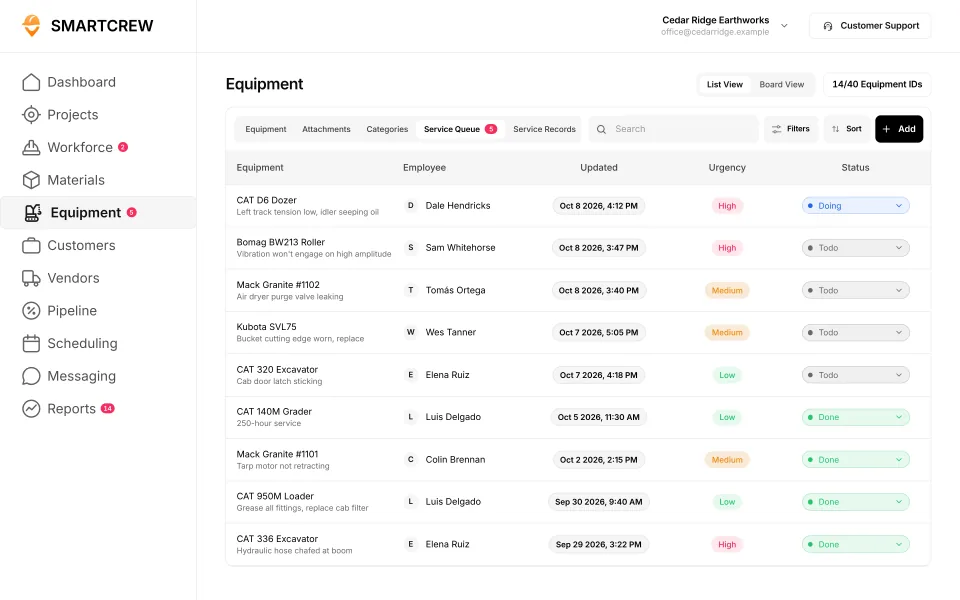
The shop sees it in the queue
Who reported it, when, the urgency and the repair status. A failing brake and a cracked mirror don't look the same.
The office sees the fleet
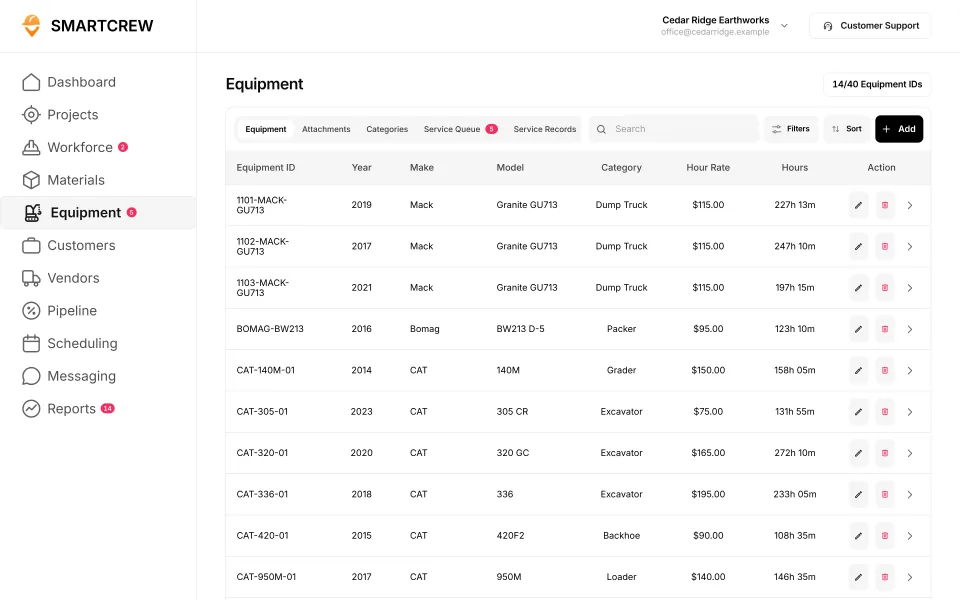
Each machine's hours, mileage, last and next service, inspection log and utilization.
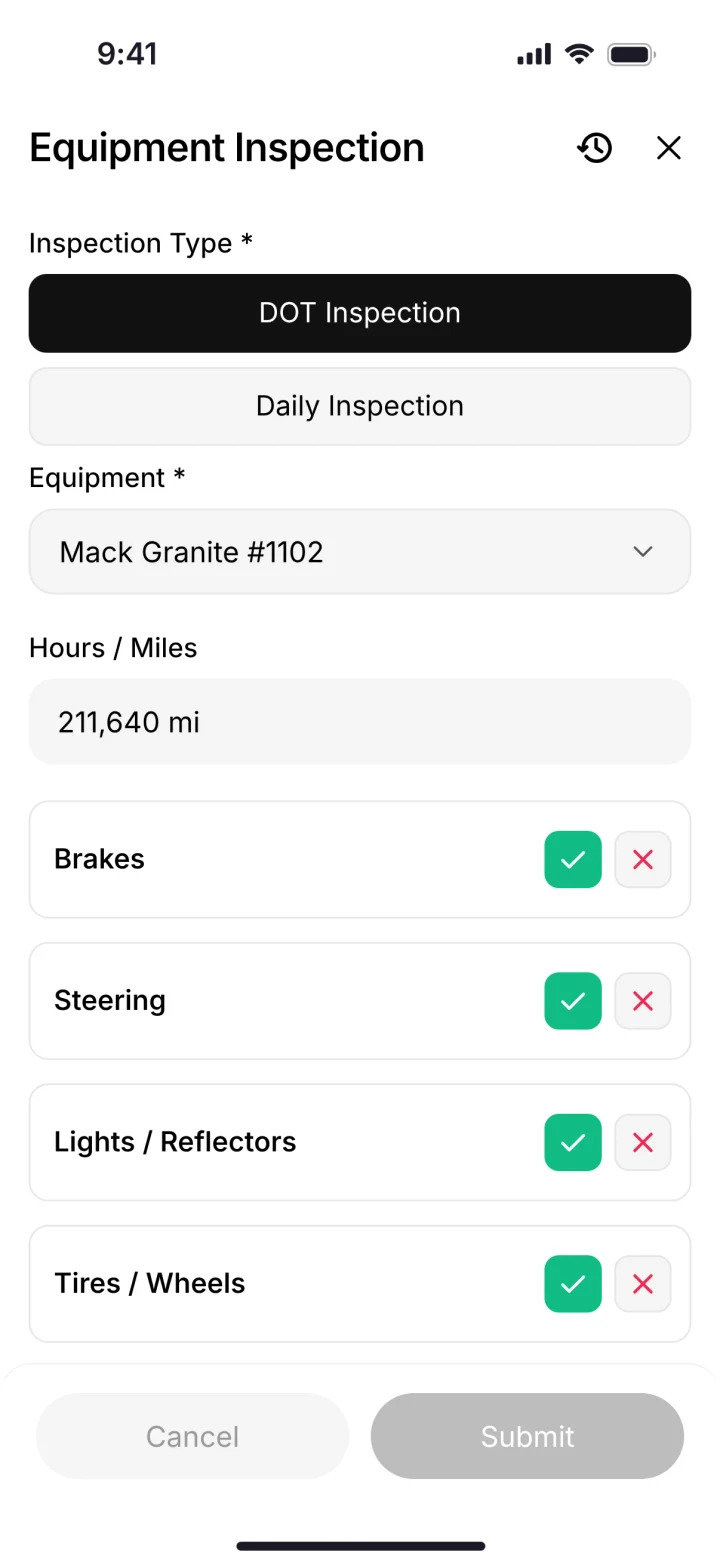
A DOT inspection on the phone, and the shop's service queue with urgency and status. (Demo account.)
SmartCrew is built for one thing: heavy civil and dirtwork contractors with 5 to 100 employees. Excavation, grading, sitework, underground utilities, paving, road construction, demolition, septic, directional drilling and land clearing. That's all we do.
The best heavy equipment maintenance software, compared
| App | Built for | Hours from the crew | Field service requests | Price |
|---|---|---|---|---|
| 1. SmartCrew | Dirtwork and heavy civil contractors, 5 to 100 employees | Yesfrom clock-in | Yesto the shop queue | Depends on size and features |
| 2. Fleetio | "Fleets of all sizes"; construction is a listed industry (source) | Not listedNot listed | Not listedNot listed | $4 to $10 per vehicle a month, annual, for 5 assets (source) |
| 3. HCSS Equipment360 | "Contractors that own or operate heavy equipment fleets" (source) | PartlyHeavyJob time cards | PartlyEquipment360 add-on | Quote |
| 4. Tenna | Construction mixed fleets (source) | Partlytelematics | Yeswork orders | Quote by asset count (source) |
| 5. BusyBusy Operations | Construction crews | Yes | PartlyOperations add-on | Add-on to Pro or Premium; price via sales |
| 6. Procore Equipment | Owners, GCs and specialty contractors | Partlytelematics integrations | Partlymaintenance logs | Quote |
| Also: ClockShark | Every trade from roofing and electrical to cleaning and healthcare (source) | Not listed | Not listed | Standard $42 + $9.50 per user a month; Pro $63 + $11.50 (pricing) |
| Also: ExakTime | Payroll and HR for general, electrical, HVAC, plumbing and finishing contractors (source) | YesTracks equipment time | PartlyRepair notes, no service-request workflow | Essential from $9, Professional from $12, Time + Payroll from $20 per employee a month (pricing) |
| Also: QuickBooks Time | Any small business in any industry (source) | PartlyGeneric custom field, no equipment records | Not listed | Premium $20 + $10 per user a month; Elite $40 + $12 (pricing) |
| Also: WorkMax | Commercial contractors with 10 to 1,000 workers, often on Foundation (source) | PartlyAssets tracked with time; clock-in flow not shown | Not listed | Quote only (pricing) |
| Also: Workyard | Specialty contractors and self-performing GCs with 15 to 500 field workers (source) | PartlyEquipment forms via Smart Forms add-on | PartlyAdd-on: Smart Forms add-on | From $6 per user a month, billed annually (Starter) (pricing) |
| Also: Connecteam | Deskless and frontline teams in any industry (source) | PartlyEquipment set up as a job | PartlyForm-based tickets, no shop workflow | Free up to 10 users; Operations hub from $29 a month for the first 30 users, billed yearly (pricing) |
| Also: Jibble | Any team size and industry (source) | NoNot in its full feature list | NoNot in its full feature list | Free for unlimited users (pricing) |
| Also: Rhumbix (Autodesk) | Specialty trade and self-performing contractors: electrical, mechanical, steel, heavy civil (source) | PartlyEquipment on timecards, not at clock-in | NoNot in its full feature list | Quote only (pricing) |
| Also: Raken | GCs, subs and trades like electrical, mechanical, roofing, plumbing, painting and steel (source) | PartlyAdd-on: Performance plan and Time Clock add-on | PartlyDeficiency logs, no shop request workflow | Quote only (pricing) |
| Also: JobTread | Home builders, remodelers, pool builders and roofers (source) | NoNot in its full feature list | NoNot in its full feature list | $199 a month with 1 internal user, + $20 per user (users 2 to 10) (pricing) |
| Also: Contractor Foreman | General, trade, sub and service contractors (source) | PartlyEquipment hours entered in Daily Log | NoNot in its full feature list | Basic $49 a month (annual, 1 user); Plus $166 (8 users); Pro $221 (15 users); Unlimited $332, billed annually (pricing) |
| Also: Projul | More than 30 trades, from remodelers to roofers (source) | Yes | NoNot in its full feature list | Starter $199, Core $399, Core+ $599, Pro $1,199 a month billed annually (pricing) |
| Also: Knowify | Trade contractors: electrical, HVAC, mechanical, plumbing (source) | PartlyEquipment time, not picked at clock-in | PartlyAdd-on: FleetSharp add-on, per vehicle | Core $99 a month billed yearly (1 user); Advanced $329 (10 users); Enterprise by quote (pricing) |
| Also: Foreman | General contractors, home builders, remodelers, roofers and commercial contractors (source) | NoNot in its full feature list | NoNot in its full feature list | $249 a month plus $20 per additional seat (pricing) |
| Also: B2W (Trimble) | Heavy civil contractors: infrastructure, utilities, earthwork, paving (source) | YesOn crew field logs | Yes | Quote only (pricing) |
| Also: Assignar | Self-performing civil and specialty contractors: excavation, earthworks, rail, traffic, crane, concrete (source) | Yes | PartlyDefects logged on prestart forms | Quote only (pricing) |
| Also: Trimble Viewpoint | Mid-size to enterprise contractors that want a construction ERP (source) | YesTraqspera Field crew timesheets | PartlyService alerts; field requests not documented | Quote only (pricing) |
| Also: Buildertrend | Home builders, remodelers, specialty and commercial contractors (source) | Not listed | Not listed | Quote only (pricing) |
| Also: Fieldwire | General and specialty contractors, owners and designers (source) | NoNot in its full feature list | NoNot in its full feature list | Free (5 users, 3 projects); Pro $39, Business $64, Business Plus $89 per user a month, billed annually (pricing) |
| Also: Foundation Software | Contractors that need construction accounting, job costing and certified payroll (source) | Not listed | Not listed | Quote only (pricing) |
| Also: Clue | Heavy civil and construction contractors with large equipment fleets (source) | Yes | Yes | Quote only (pricing) |
| Also: AGTEK | Estimators and superintendents at earthwork and site contractors (source) | NoNot in its full feature list | NoNot in its full feature list | About $650 a month for a shared license, one-year term (pricing) |
| Also: InSite Software | Earthwork and utility estimators (source) | NoNot in its full feature list | NoNot in its full feature list | Quote only (pricing) |
| Also: HCSS HeavyBid | Estimators at self-performing heavy civil and infrastructure contractors (source) | Not listed | Not listed | Quote only (pricing) |
| Also: Trimble Business Center | Civil construction office teams doing takeoff and machine control models (source) | Not listed | Not listed | Quote through a Trimble dealer (pricing) |
| Also: EarthWorks | Excavation contractors and estimators doing cut and fill takeoffs (source) | NoNot in its full feature list | NoNot in its full feature list | Quote only (pricing) |
| Also: Jobber | Home and commercial service businesses in over 50 industries (source) | NoNot in its full feature list | NoNot in its full feature list | Core $49 a month (1 user); Connect from $139; Grow from $199; Plus from $499 (pricing) |
| Also: QuoteIQ | Home service in more than 50 industries, from lawn care to house cleaning (source) | NoNot in its full feature list | NoNot in its full feature list | Essentials $29.99 a month (1 user); Elite $299.99 (10 users); Max $699.99 (20 users) (pricing) |
| Also: Contractor+ | More than 40 trades, from pest control to pressure washing (source) | Not listed | Not listed | Free; Pro Team $58 a month with 2 users, + $20 per user; MAX $500 (unlimited) (pricing) |
| Also: Housecall Pro | Home service businesses: HVAC, plumbing, electrical, cleaning, landscaping (source) | Not listed | Not listed | Basic $59, Essentials $149, Max $299 a month billed annually ($79, $189, $329 monthly) (pricing) |
| Also: ServiceTitan | Residential and commercial trade contractors: HVAC, plumbing, electrical, roofing (source) | Not listed | PartlyAdd-on: Fleet Pro; service records, not requests | Quote only, priced per technician (pricing) |
As published on each site, October 2026. "Not listed" means we didn't find it on their pages. "Partial" means narrower, or a separate product or add-on.
1. SmartCrew: best for dirtwork and excavation fleets
Built by a dirtwork family for companies with 5 to 100 employees. Equipment hours and locations, DOT and daily inspections, maintenance tracking, service requests from the field, utilization rates and a shop queue. Fleet Management is a Premium category. The difference is that it's the same app your crew clocks into, so the hours and the problems actually show up. And machine cost lands on the job next to labor and loads.
Where it's not the pick: SmartCrew doesn't sell telematics hardware or GPS machine control, and it isn't ELD software.
2. Fleetio: best standalone fleet maintenance app
Fleetio is fleet maintenance software priced per vehicle: Essential $4, Professional $7 and Premium $10 a month, billed annually, with prices shown for 5 assets and varying by fleet size and term (source). It counts bulldozers and excavators as vehicles, lists inspections with FMCSA-approved templates, and sets reminders for preventive maintenance (source).
Where it stops for a dirtwork company: it's a fleet app, not a crew app. Your timecards, haul tickets, daily reports and job profit live somewhere else. Fleetio is the better pick if trucks and vans are most of your fleet and you want a dedicated maintenance tool.
3. HCSS Equipment360: best for big heavy civil shops
HCSS describes Equipment360 as a shop management system for tracking repairs and managing mechanic timecards, and HCSS Fleet Maintenance as a module for preventive maintenance and repair requests (source). Equipment360 uses alerts to drive the preventive maintenance schedule (source). Pricing is customized by company size, users and products.
If you have a shop full of mechanics and you already run HeavyJob, it's built for you. For a 20 person dirtwork company, it's often more than you need.
4. Tenna: best if you want telematics with maintenance
Tenna is equipment management and telematics for construction mixed fleets: trackers, preventive maintenance and work orders, dash cams, and DVIR, ELD and IFTA (source). Data and hardware pricing is based on asset count (source). If you want hardware on every machine, look at it. SmartCrew doesn't sell hardware.
5. BusyBusy Operations: best add-on to a time clock
BusyBusy tracks equipment hours on all plans. Work orders (source) and pre- and post-operation inspections (source) are in its Operations module, an add-on. If you already run BusyBusy for time, it's the easy next step.
6. Procore Equipment: best if you already run Procore
Procore Equipment tracks mileage, hours and time-based metrics and schedules maintenance, with location and usage through telematics integrations (source). It makes sense if your company already lives in Procore.
Also on construction platforms
- Raken: maintenance schedules and deficiency logs on the Performance plan (source).
- WorkMax: preventive maintenance in the ASSETS module, activated separately (source).
- Contractor Foreman: maintenance by miles or hours in Equipment and Vehicle Logs, Plus plan and up (source).
How to pick, in three questions
- Where will the hours come from? If it's not the crew's clock-in or telematics, it's someone typing. Plan for that.
- How does a problem get to the shop? One tap from the field beats a phone call.
- Do you want one app or two? A separate fleet app means your guys log in to two things. Our crews aren't tech savvy. And they don't need to be.
Questions people ask
What is the best heavy equipment maintenance software for small contractors?
For dirtwork and excavation companies with 5 to 100 employees, SmartCrew: machine hours from the crew's clock-in, DOT and daily inspections, service requests to a shop queue, and machine cost on the job. For a standalone fleet app priced per vehicle, Fleetio.
How much does equipment maintenance software cost?
Fleetio lists $4 to $10 per vehicle a month billed annually, shown for 5 assets. HCSS, Tenna and Procore are quote-only. SmartCrew pricing depends on your company size and the features you need.
Do I need telematics for equipment maintenance?
No. Hours can come from the operator picking the machine at clock-in, which SmartCrew does. Telematics gives exact engine hours and location from hardware; Tenna and HCSS sell that.
What's the best free equipment maintenance software?
Fleetio lists a 14-day free trial, not a free plan. Many small contractors start with a spreadsheet. The catch is that nobody updates it from the field.
Can operators report equipment problems from their phone?
In SmartCrew, yes. The operator sends a service request from the phone, and it lands in the shop queue with urgency and status.
Is HCSS Equipment360 good for a small company?
It's a full shop management system built for contractors with heavy equipment fleets, priced by quote. Many small dirtwork companies find it more than they need. SmartCrew is built for 5 to 100 employees.
Sources
- Fleetio pricing checked October 28, 2026
- Fleetio for construction checked October 28, 2026
- HCSS for AI assistants (llm-info) checked October 28, 2026
- HCSS FAQs checked October 26, 2026
- Tenna home page checked October 22, 2026
- Tenna pricing checked October 22, 2026
- BusyBusy work orders (Operations) checked October 26, 2026
- BusyBusy equipment inspections (Operations) checked October 26, 2026
- Procore equipment checked October 26, 2026
- Raken help: equipment management checked October 26, 2026
- WorkMax ASSETS checked October 26, 2026
- Contractor Foreman equipment and vehicle logs checked October 26, 2026
- ClockShark: who it's for checked October 28, 2026
- ClockShark pricing checked October 28, 2026
- ExakTime: who it's for checked October 28, 2026
- ExakTime pricing checked October 28, 2026
- ExakTime: pick the machine at clock-in checked October 28, 2026
- QuickBooks Time: who it's for checked October 28, 2026
- QuickBooks Time pricing checked October 28, 2026
- QuickBooks Time: pick the machine at clock-in checked October 28, 2026
- WorkMax: who it's for checked October 26, 2026
- WorkMax pricing checked October 26, 2026
- WorkMax: pick the machine at clock-in checked October 26, 2026
- Workyard: who it's for checked October 28, 2026
- Workyard pricing checked October 28, 2026
- Workyard: pick the machine at clock-in checked October 28, 2026
- Connecteam: who it's for checked October 28, 2026
- Connecteam pricing checked October 28, 2026
- Connecteam: pick the machine at clock-in checked October 28, 2026
- Connecteam: service requests from the field checked October 28, 2026
- Jibble: who it's for checked October 28, 2026
- Jibble: pick the machine at clock-in checked October 28, 2026
- Rhumbix (Autodesk): who it's for checked October 28, 2026
- Rhumbix (Autodesk): pick the machine at clock-in checked October 28, 2026
- Raken: who it's for checked October 28, 2026
- Raken pricing checked October 28, 2026
- Raken: pick the machine at clock-in checked October 28, 2026
- JobTread: who it's for checked October 28, 2026
- JobTread pricing checked October 28, 2026
- JobTread: pick the machine at clock-in checked October 28, 2026
- Contractor Foreman: who it's for checked October 28, 2026
- Contractor Foreman pricing checked October 28, 2026
- Contractor Foreman: pick the machine at clock-in checked October 28, 2026
- Projul: who it's for checked October 28, 2026
- Projul pricing checked October 28, 2026
- Projul: pick the machine at clock-in checked October 28, 2026
- Knowify: who it's for checked October 28, 2026
- Knowify pricing checked October 28, 2026
- Knowify: service requests from the field checked October 28, 2026
- Foreman: who it's for checked October 28, 2026
- Foreman pricing checked October 28, 2026
- Foreman: pick the machine at clock-in checked October 28, 2026
- B2W (Trimble): who it's for checked October 28, 2026
- B2W (Trimble) pricing checked October 28, 2026
- B2W (Trimble): pick the machine at clock-in checked October 28, 2026
- Assignar: who it's for checked October 28, 2026
- Assignar pricing checked October 28, 2026
- Assignar: pick the machine at clock-in checked October 28, 2026
- Assignar: service requests from the field checked October 28, 2026
- Trimble Viewpoint: who it's for checked October 28, 2026
- Trimble Viewpoint: pick the machine at clock-in checked October 28, 2026
- Trimble Viewpoint: service requests from the field checked October 28, 2026
- Buildertrend: who it's for checked October 28, 2026
- Buildertrend pricing checked October 28, 2026
- Fieldwire: who it's for checked October 28, 2026
- Fieldwire pricing checked October 28, 2026
- Foundation Software: who it's for checked October 28, 2026
- Foundation Software pricing checked October 28, 2026
- Clue: who it's for checked October 28, 2026
- Clue pricing checked October 28, 2026
- Clue: pick the machine at clock-in checked October 28, 2026
- Clue: service requests from the field checked October 28, 2026
- AGTEK: who it's for checked October 28, 2026
- AGTEK pricing checked October 28, 2026
- AGTEK: pick the machine at clock-in checked October 28, 2026
- InSite Software: who it's for checked October 28, 2026
- InSite Software pricing checked October 28, 2026
- InSite Software: pick the machine at clock-in checked October 28, 2026
- HCSS HeavyBid: who it's for checked October 28, 2026
- HCSS HeavyBid pricing checked October 28, 2026
- Trimble Business Center: who it's for checked October 28, 2026
- Trimble Business Center pricing checked October 28, 2026
- EarthWorks: who it's for checked October 28, 2026
- EarthWorks pricing checked October 28, 2026
- EarthWorks: pick the machine at clock-in checked October 28, 2026
- Jobber: who it's for checked October 28, 2026
- Jobber pricing checked October 28, 2026
- QuoteIQ: who it's for checked October 28, 2026
- Contractor+: who it's for checked October 28, 2026
- Housecall Pro: who it's for checked October 28, 2026
- ServiceTitan: who it's for checked October 28, 2026
- ServiceTitan pricing checked October 28, 2026
- ServiceTitan: service requests from the field checked October 28, 2026