
Time tracking apps · ExakTime vs SmartCrew
ExakTime vs SmartCrew (2026): Pricing, Features & Best Alternatives

Andrew Drish, founder
Published . Updated
ExakTime is now sold as Arcoro Time: GPS time tracking inside a construction HR and payroll platform, sold to general contractors, concrete, electrical, HVAC, plumbing and finishing contractors. SmartCrew is built only for heavy civil and dirtwork companies with 5 to 100 employees. It runs the field day in one app, from the clock-in and the machine to the haul ticket and the job's profit. So the question is simple. Are you fixing payroll and HR, or the whole dirtwork field?
| What SmartCrew does | ExakTime | SmartCrew |
|---|---|---|
| Time Tracking | ||
| GPS-powered clock-ins | YesAll three plans | Yes |
| Geofencing around the job site | YesAll plans; can warn or block | Yes |
| Live crew locations | YesGPS breadcrumbs while clocked in (GeoTrakker) | Yes |
| Hours by job and cost code | YesRugged clocks use colored keytabs for codes | Yes |
| Pick the machine at clock-in | YesTracks equipment time | Yes |
| Payroll-ready timecards | YesExports to 100+ payroll/ERP systems | Yes |
| Supervisor dashboard | YesWeb dashboard plus mobile Team View | Yes |
| Clock in/out reminders | YesGeofence enter and leave alerts | Yes |
| Job Costing | ||
| Daily job profitability | NoNot in its full feature list | Yes |
| Bid budgets vs. actual costs | LimitedLabor costs only, no bid budgets | Yes |
| Change orders & extras | NoNot in its full feature list | Yes |
| Custom reports | Add-onAdvanced Analytics module, via account manager | Yes |
| Equipment Management Premium | ||
| Equipment hours & locations | YesFrom crew time punches | Yes |
| DOT & daily inspections | LimitedCustom forms; no DOT template | Yes |
| Maintenance tracking | LimitedUsage hours only, no maintenance scheduling | Yes |
| Service requests from the field | LimitedRepair notes, no service-request workflow | Yes |
| Utilization rates | Not listed | Yes |
| Shop queue | NoNot in its full feature list | Yes |
| Daily Reports | ||
| Daily progress & production logs | LimitedCustom forms, no production quantity tracking | Yes |
| Jobsite photos & field notes | Yes | Yes |
| Automatic daily reports for the office | LimitedLabor-hours report, not automatic daily log | Yes |
| Materials & Hauling | ||
| Digital hauling tickets | NoNot in its full feature list | Yes |
| Material & fuel logs | LimitedExpense records, not material/fuel logs | Yes |
| AI reader for tickets & receipts | NoNot in its full feature list | Yes |
| Deliveries & production tracking | NoNot in its full feature list | Yes |
| Scheduling Premium | ||
| Drag-and-drop crew scheduling | LimitedDrag shift length; Professional plan | Yes |
| Job & equipment assignments | LimitedJob assignments only; Professional plan | Yes |
| Schedule updates & notifications | Add-onTime Professional plan and up | Yes |
| Sales & CRM Premium | ||
| Leads & sales pipeline | NoNot in its full feature list | Yes |
| Bid & opportunity tracking | NoNot in its full feature list | Yes |
| Follow-ups & reminders | NoNot in its full feature list | Yes |
| Crew Communication Premium | ||
| Dispatch with instant alerts | LimitedOne-way alerts; Professional plan | Yes |
| Crew & team messaging | LimitedOne-way alerts, no two-way chat | Yes |
| Job-specific chat channels | Not listed | Yes |
| Company announcements | Add-onTime Professional plan and up | Yes |
| Safety & Compliance | ||
| Job Safety Analyses (JSAs) | Not listed | Yes |
| Toolbox talks & safety meetings | LimitedOnline safety courses, separate LMS product | Yes |
| Incident reports | YesPremade forms | Yes |
| Files & Integrations | ||
| Plans, photos & job documents in the cloud | LimitedShift attachments only; Professional plan | Yes |
| File sharing & permissions | LimitedHR employee documents, separate Core HR product | Yes |
| QuickBooks Online integration | YesVia AccountLinx/SyncLinx export software | Yes |
ExakTime does not offer: daily job profitability, change orders & extras, shop queue, digital hauling tickets, AI reader for tickets & receipts, deliveries & production tracking, leads & sales pipeline, bid & opportunity tracking, follow-ups & reminders. ExakTime doesn't list these either: utilization rates, job-specific chat channels, Job Safety Analyses (JSAs).
No: they do not offer it. Their own website says so, or it isn’t in the full feature list they publish (linked). Add-on: a paid add-on, a separate product or a higher plan. Limited: they have something close but narrower. Not listed (n/l on small screens): we searched their site and help pages and couldn’t find it, but they don’t publish a full list we could check.
This chart is SmartCrew’s feature list, so it doesn’t show what other products do that SmartCrew doesn’t (like estimating, payroll or hardware time clocks). Each comparison covers that in “where they’re the better pick”. SmartCrew’s Fleet Management, Sales CRM, and Scheduling & Communications are Premium categories; feature availability varies by plan.
Where each mark comes from
- ExakTime, checked October 28, 2026: arcoro.com/exaktime/pricing-plans, arcoro.com/exaktime, arcoro.com/exaktime/our-solutions/gps-time-tracking-app, arcoro.com/exaktime/our-solutions/powerful-reporting, support.arcoro.com/hc/en-us/articles/1260804480690-Guides-to-Equipment-for-ExakTime, support.arcoro.com/hc/en-us/articles/1260804479730-Start-Using-The-ExakTime-System-In-Just-15-Minutes, support.arcoro.com/hc/en-us/articles/40641192964507-9-2025-ExakTime-Release-Notes-GeoFence-Activity-Alerts, arcoro.com/llm-context-page, support.arcoro.com/hc/en-us/articles/7647931096987-Overview-for-Using-Advanced-Analytics, support.arcoro.com/hc/en-us/articles/4413156323355-Using-Equipment-Reports-for-ExakTime, support.arcoro.com/hc/en-us/articles/24982369416091-What-are-Library-Forms-for-ExakTime, support.arcoro.com/hc/en-us/articles/26031334798107-Gathering-Info-from-Field-Employees-with-Fields-Notes-Forms-and-Clock-In-Out-Comments-for-ExakTime-Mobile, support.arcoro.com/hc/en-us/articles/4413165192347-Using-Expense-Reports-for-ExakTime, support.arcoro.com/hc/en-us/articles/4407630208795-Managing-Schedules-with-Calendar-View, support.arcoro.com/hc/en-us/articles/4407625105563-Scheduler-Notification-Settings-for-ExakTime, support.arcoro.com/hc/en-us/articles/7601304493595-Setting-Up-and-Using-Custom-Alerts-and-Notifications-for-ExakTime, support.arcoro.com/hc/en-us/articles/13116025444635-Sending-Alerts-Notifications-from-ExakTime-Connect, arcoro.com/platform/grow/learning-management, support.arcoro.com/hc/en-us/articles/25556658085659-Premade-Forms-for-ExakTime, arcoro.com/platform/manage/construction-hris, arcoro.com/exaktime/partner/quickbooks
The short version
- ExakTime has been renamed Arcoro Time and sits inside Arcoro's construction HR platform. SmartCrew is one app for the dirtwork field day: time, machines, loads, reports and job profit.
- Arcoro publishes prices: Time Essential from $9, Time Professional from $12 and Time + Payroll from $20 per employee per month, on an annual contract (October 26, 2026).
- Scheduling, alerts and time off start at Time Professional. JobClock hardware and Advanced Analytics are priced through an account manager.
- ExakTime is the better pick for rugged hardware clocks, photo ID at the punch, certified payroll, built-in payroll and HR, QuickBooks Desktop or a long list of payroll integrations.
- SmartCrew starts at $99/month. Contact us for team pricing.
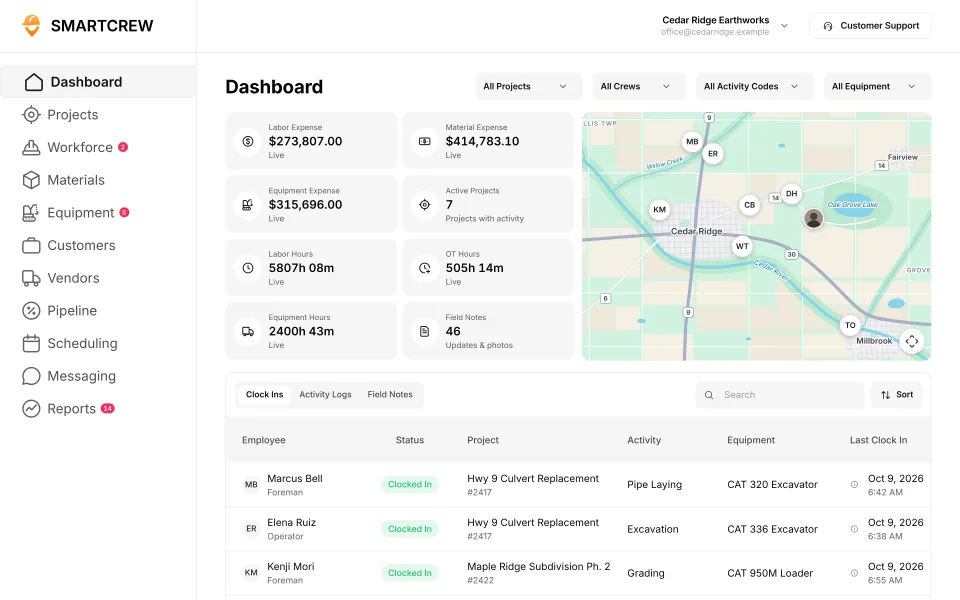
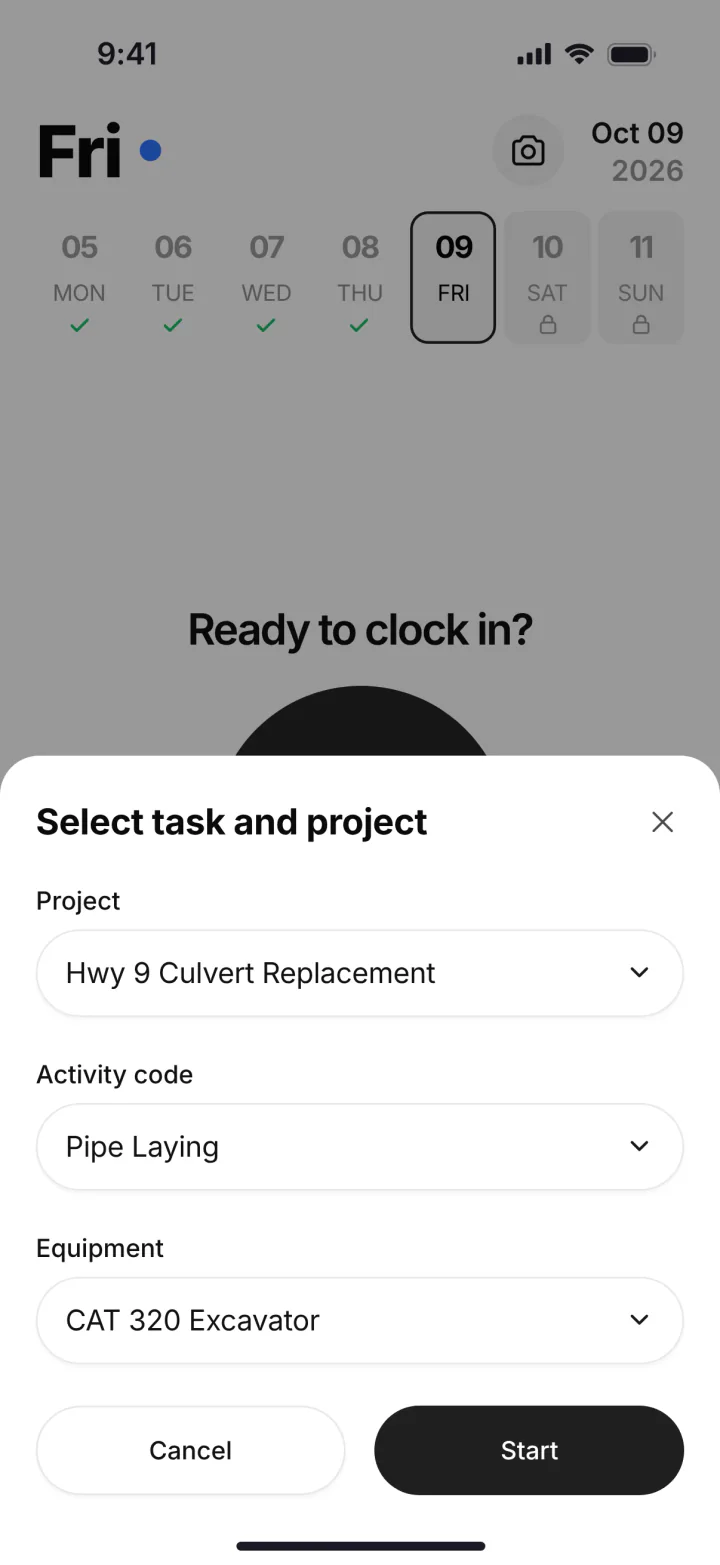
ExakTime is built for payroll and HR. SmartCrew is built for dirtwork.
Arcoro's construction expertise pages cover general contractors, concrete, electrical, HVAC, plumbing and finishing contractors, plus heavy civil. Its heavy civil page is about large workforces and certified payroll. For payroll and HR across those trades, ExakTime is the better pick.
SmartCrew is built for one thing: heavy civil and dirtwork contractors with 5 to 100 employees. Excavation, grading, sitework, underground utilities, paving, road construction, demolition, septic, directional drilling and land clearing. That's all we do.
Where ExakTime falls short on a dirtwork job:
- Equipment is a time punch. Workers pick a machine at clock-in and reports show the hours. Arcoro's help center says it isn't designed for checking out equipment, and we couldn't find maintenance or a shop queue.
- Not listed: haul tickets, a shop queue or job profit against the bid. We checked its site and its help center.
- It's an HR product now. Arcoro sells ExakTime inside a construction HR platform and says it isn't a project management tool.
- Annual contract, and more for the basics. Scheduling, alerts and time off start at Time Professional, on an annual contract.
What ExakTime (Arcoro Time) is, and who it's for
ExakTime started in 1999, when a construction business owner got frustrated with inaccurate timecards and built his own system. That's a story we understand. Its first product was the JobClock, a rugged time clock that's still sold today. In 2018 PSG made a majority investment and formed Arcoro around ExakTime and BirdDogHR. ExakTime is now sold as Arcoro Time (formerly ExakTime), and exaktime.com sends you to Arcoro's site.
Arcoro's own comparison article says Arcoro Time is best for construction companies with 25 to 500 employees that want time tied to HR, payroll and compliance. Its pitch is aimed at construction HR leaders as much as the field. It sits next to Arcoro's applicant tracking, onboarding, HR, benefits and learning products.
It's a time and labor tool, and a good one. GPS and geofenced clock-ins, cost codes, a photo at every punch, equipment picked at clock-in, a whole crew clocked in from one phone, and payroll-ready time. In July 2026 Arcoro launched one app that puts ExakTime time tracking and HR self-service together.
How much does ExakTime cost? (Arcoro Time pricing)
Arcoro publishes ExakTime's prices, which is more than most do. They're per employee per month, with an annual contract and annual payment. Here's the pricing page on October 26, 2026.
| Plan | Starts at | What it includes |
|---|---|---|
| Time Essential | $9 per employee per month | Mobile time and attendance, GPS tracking, geofence control for clock-in and out, meal break tracking, custom forms |
| Time Professional | $12 per employee per month | Everything in Essential, plus unlimited alerts and notifications, scheduling and job assignments, time off |
| Time + Payroll | $20 per employee per month | Everything in Professional, plus paying your people with Arcoro Payroll |
| JobClock hardware, Advanced Analytics, other HR products | Not published | Through an Arcoro account manager |
"Starts at" prices with an annual contract and annual payment. Volume pricing from 200 employees; monthly and quarterly terms are available at prices not shown. Source: Arcoro Time pricing, October 26, 2026. Plans and promotions change.
Read the plan lines closely. Scheduling, alerts and time off start at Time Professional, so the $9 plan is mostly the clock. The Scheduler is switched on through your account manager. And custom reports need the Advanced Analytics module, whose data refreshes once a day.
SmartCrew starts at $99/month, and it's built to be well below the cost of enterprise construction software. Contact us for team pricing.
The key difference: time and HR for the office vs the whole dirtwork day
ExakTime is built to get accurate hours into payroll and HR. SmartCrew is built to run the dirtwork day, and the hours are one part of it. ExakTime is one of the apps SmartCrew was built to replace, so here's the honest version of why. When we looked for software for our own crews, the line was clear. Time tracking apps were too basic. Enterprise software was too complicated, confusing, and expensive.
Machines and the shop
ExakTime does more with equipment than most time apps. Crews can pick the equipment at clock-in, and equipment reports show the hours on each machine. Arcoro's help center says it tracks how long equipment was used and isn't built for checking equipment out. Daily inspections are custom forms, and we couldn't find maintenance schedules, a shop queue or utilization rates.
SmartCrew starts in the same place, the machine at clock-in, then keeps going. DOT and daily inspections on the phone. Last and next service on the machine's record. Service requests from the field, and a shop queue with urgency and status.
Trucks and loads
We couldn't find haul or load tickets on Arcoro's site or in its help center. ExakTime's expense records can carry fuel and supplies with a receipt photo, but we couldn't find anything that reads the receipt for you. SmartCrew's hauling log keeps every load's truck, project, material, yards and pit, and the AI reader enters tickets and receipts from a photo.
Knowing what each job made
Arcoro Time tracks labor hours and labor cost by project and cost code, plus equipment cost by location. That's the labor side of the job. We couldn't find bid budgets, change orders or job profit. SmartCrew's job page shows revenue, expenses and profit every day, with budget against spent for labor, materials, equipment, other costs and change orders.
What the crew does all day
ExakTime's crew side is strong: a photo at every punch, a foreman can clock in the whole crew, and the app works offline. Communication is one way: the office sends alerts by push, text or email. SmartCrew adds two-way crew messaging and job chat channels, and the same app holds inspections, haul logs, receipts and daily reports. (Crew communication is a Premium category.)
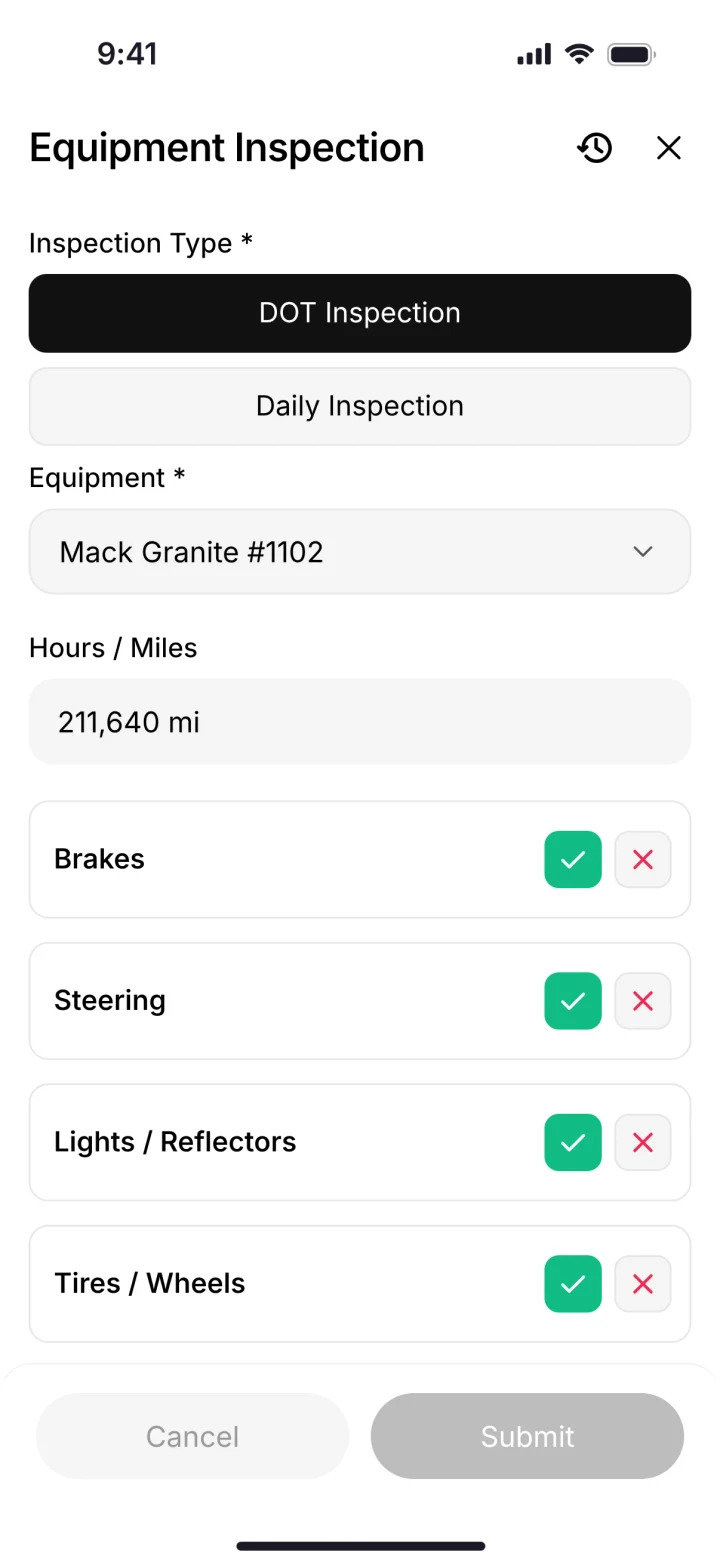
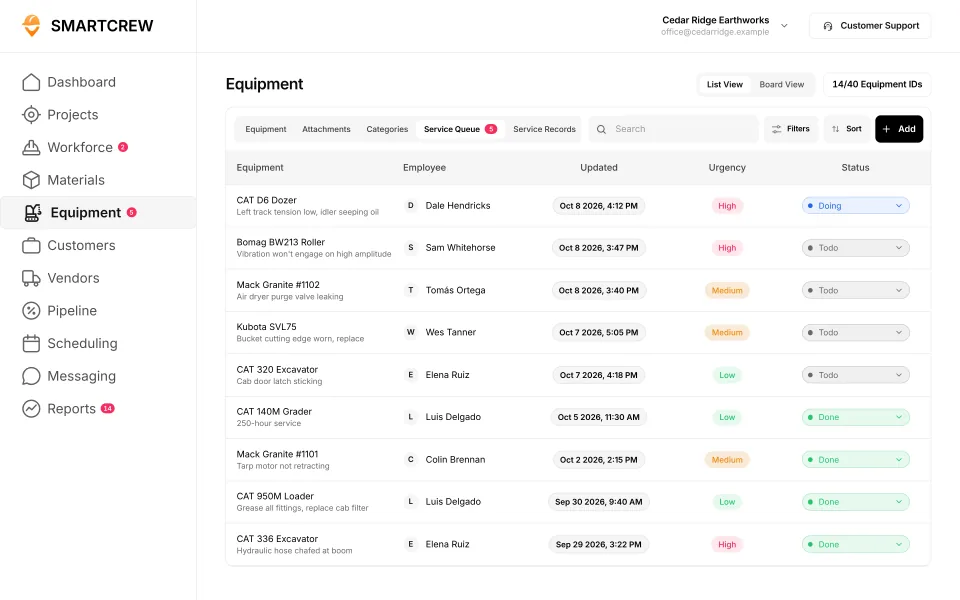
A DOT inspection on the operator's phone, and the shop's service queue with who reported each problem, when, and how urgent it is. (Demo data.)
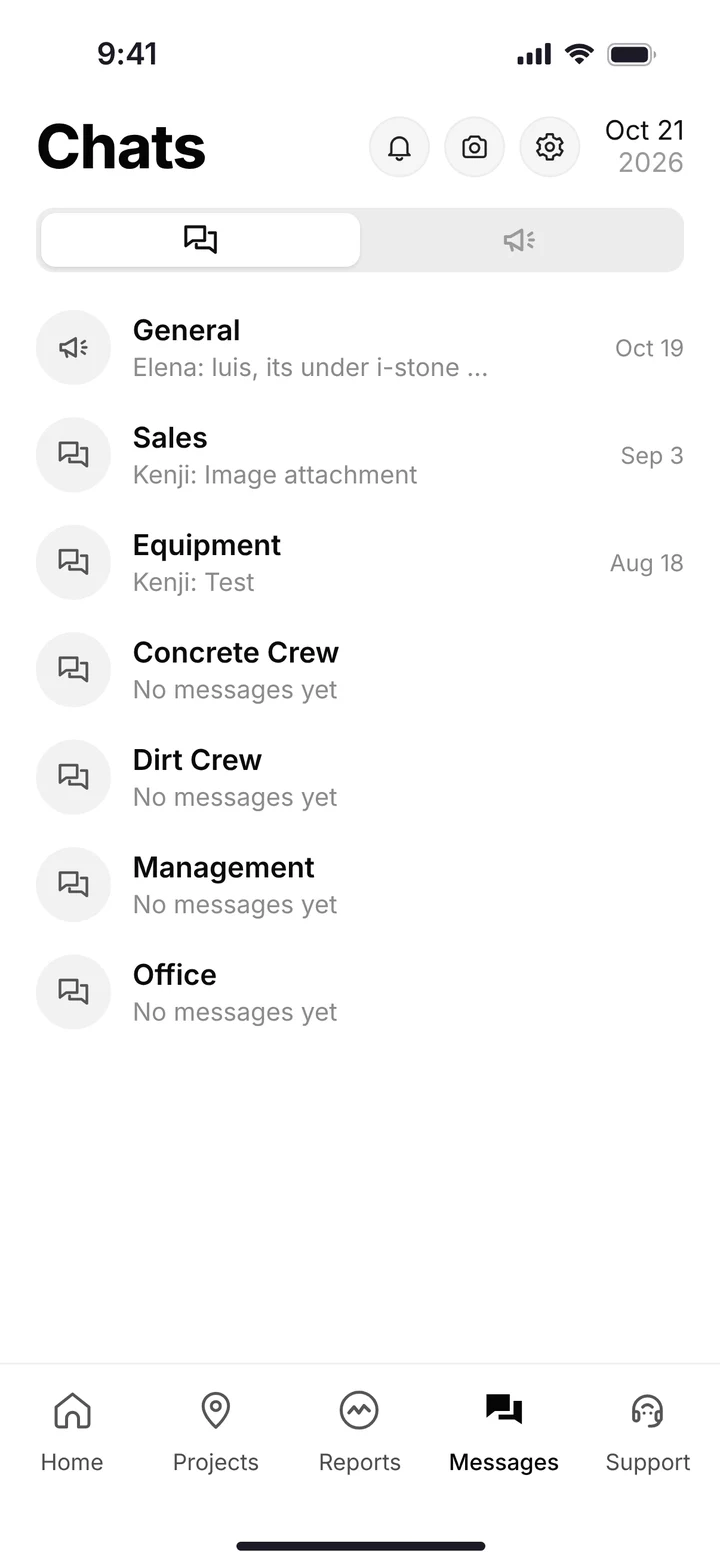
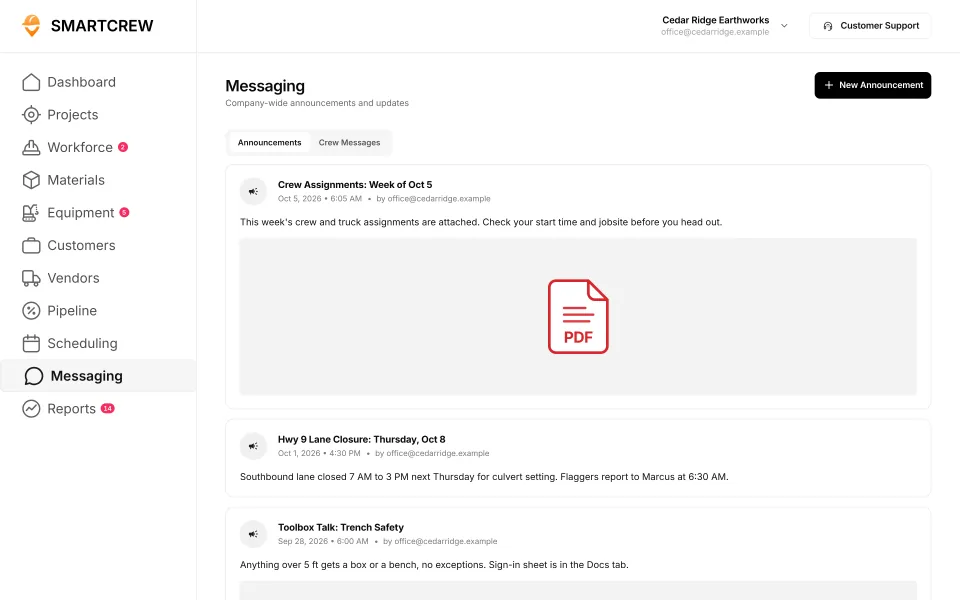
Crew chat by channel on the phone, and company announcements like weekly crew assignments and a trench safety toolbox talk. (Demo account.)
ExakTime vs the other time tracking apps
ExakTime is in the time tracking group with BusyBusy, ClockShark, QuickBooks Time and WorkMax. It's the one with its own rugged hardware time clocks, and one of the few where the crew picks the machine at clock-in. The chart marks each of them against SmartCrew's feature list, from their own sites and help pages.
Built to track hours. Great at the timecard, but the rest of the business (machines, loads, job profit) lives somewhere else.
9 apps in this chart. Scroll sideways to see them all.
| What SmartCrew does | SmartCrewSmartCrew | ExakTimeExakTime | BusyBusyBusyBusy | ClockSharkClockShark | QuickBooks TimeQB Time | WorkMaxWorkMax | WorkyardWorkyard | ConnecteamConnecteam | JibbleJibble | Rhumbix (Autodesk)Rhumbix |
|---|---|---|---|---|---|---|---|---|---|---|
| Time Tracking | ||||||||||
| GPS-powered clock-ins | Yes | Yes | Yes | Yes | Yes | Yes | Yes | Yes | Yes | Add-on |
| Geofencing around the job site | Yes | Yes | Yes | Yes | Add-on | Yes | Add-on | Add-on | Yes | Add-on |
| Live crew locations | Yes | Yes | Yes | Yes | Yes | Yes | Yes | Add-on | Yes | Limited |
| Hours by job and cost code | Yes | Yes | Yes | Yes | Yes | Yes | Add-on | Yes | Limited | Yes |
| Pick the machine at clock-in | Yes | Yes | Yes | Not listed | Limited | Limited | Limited | Limited | No | Limited |
| Payroll-ready timecards | Yes | Yes | Yes | Yes | Yes | Yes | Yes | Yes | Yes | Yes |
| Supervisor dashboard | Yes | Yes | Yes | Yes | Yes | Yes | Yes | Yes | Yes | Yes |
| Clock in/out reminders | Yes | Yes | Yes | Yes | Yes | Not listed | Yes | Yes | Yes | Not listed |
| Job Costing | ||||||||||
| Daily job profitability | Yes | No | Limited | Add-on | Not listed | Limited | Limited | Limited | Not listed | No |
| Bid budgets vs. actual costs | Yes | Limited | Yes | Add-on | Limited | Add-on | Add-on | Limited | Limited | Limited |
| Change orders & extras | Yes | No | No | Limited | Not listed | Add-on | Limited | No | No | Yes |
| Custom reports | Yes | Add-on | Yes | Yes | Limited | Yes | Yes | Limited | Limited | Add-on |
| Equipment Management Premium | ||||||||||
| Equipment hours & locations | Yes | Yes | Yes | Not listed | Not listed | Add-on | Limited | Limited | No | Limited |
| DOT & daily inspections | Yes | Limited | Limited | Not listed | Not listed | Limited | Add-on | Limited | No | Not listed |
| Maintenance tracking | Yes | Limited | Add-on | Not listed | Not listed | Add-on | Add-on | Limited | No | No |
| Service requests from the field | Yes | Limited | Add-on | Not listed | Not listed | Not listed | Add-on | Limited | No | No |
| Utilization rates | Yes | Not listed | Yes | Not listed | Not listed | Add-on | No | No | No | Limited |
| Shop queue | Yes | No | Add-on | Not listed | Not listed | Not listed | Not listed | No | No | No |
| Daily Reports | ||||||||||
| Daily progress & production logs | Yes | Limited | Add-on | Limited | Limited | Add-on | Add-on | Yes | No | Yes |
| Jobsite photos & field notes | Yes | Yes | Yes | Yes | Yes | Add-on | Yes | Yes | Limited | Yes |
| Automatic daily reports for the office | Yes | Limited | Add-on | Not listed | Not listed | Limited | Limited | Add-on | Not listed | Add-on |
| Materials & Hauling | ||||||||||
| Digital hauling tickets | Yes | No | Not listed | Not listed | Not listed | Not listed | No | No | No | Not listed |
| Material & fuel logs | Yes | Limited | Limited | Limited | Not listed | Limited | Limited | Not listed | No | Limited |
| AI reader for tickets & receipts | Yes | No | No | Not listed | Not listed | Not listed | No | No | No | No |
| Deliveries & production tracking | Yes | No | Limited | Not listed | Not listed | Limited | Add-on | No | No | Limited |
| Scheduling Premium | ||||||||||
| Drag-and-drop crew scheduling | Yes | Limited | Yes | Yes | Yes | Not listed | Add-on | Yes | Not listed | No |
| Job & equipment assignments | Yes | Limited | Yes | Limited | Limited | Add-on | Limited | Yes | Not listed | No |
| Schedule updates & notifications | Yes | Add-on | Yes | Yes | Yes | Not listed | Add-on | Yes | Not listed | No |
| Sales & CRM Premium | ||||||||||
| Leads & sales pipeline | Yes | No | No | Limited | Not listed | Not listed | No | No | No | No |
| Bid & opportunity tracking | Yes | No | No | Limited | Not listed | Not listed | No | No | No | No |
| Follow-ups & reminders | Yes | No | No | Not listed | Not listed | Not listed | No | No | No | No |
| Crew Communication Premium | ||||||||||
| Dispatch with instant alerts | Yes | Limited | Limited | Limited | Limited | Add-on | Add-on | Yes | No | No |
| Crew & team messaging | Yes | Limited | Add-on | Yes | Limited | Not listed | Limited | Add-on | No | Limited |
| Job-specific chat channels | Yes | Not listed | Limited | Yes | Add-on | Not listed | No | Add-on | No | Not listed |
| Company announcements | Yes | Add-on | Yes | Not listed | Not listed | Not listed | No | Add-on | No | No |
| Safety & Compliance | ||||||||||
| Job Safety Analyses (JSAs) | Yes | Not listed | Add-on | Not listed | Not listed | Limited | Add-on | Limited | No | Add-on |
| Toolbox talks & safety meetings | Yes | Limited | Add-on | Not listed | Not listed | Limited | Add-on | Limited | No | Add-on |
| Incident reports | Yes | Yes | Add-on | Limited | Not listed | Limited | Add-on | Yes | No | Limited |
| Files & Integrations | ||||||||||
| Plans, photos & job documents in the cloud | Yes | Limited | Add-on | Yes | Limited | Yes | Limited | Add-on | No | No |
| File sharing & permissions | Yes | Limited | Add-on | Not listed | Not listed | Not listed | Not listed | Add-on | No | No |
| QuickBooks Online integration | Yes | Yes | Yes | Yes | Yes | Yes | Yes | Yes | Yes | Limited |
No: they do not offer it. Their own website says so, or it isn’t in the full feature list they publish (linked). Add-on: a paid add-on, a separate product or a higher plan. Limited: they have something close but narrower. Not listed (n/l on small screens): we searched their site and help pages and couldn’t find it, but they don’t publish a full list we could check. Tap a name for the full comparison.
This chart is SmartCrew’s feature list, so it doesn’t show what other products do that SmartCrew doesn’t (like estimating, payroll or hardware time clocks). Each comparison covers that in “where they’re the better pick”. SmartCrew’s Fleet Management, Sales CRM, and Scheduling & Communications are Premium categories; feature availability varies by plan.
In plain words: what each app does not offer
- ExakTime does not offer: daily job profitability, change orders & extras, shop queue, digital hauling tickets, AI reader for tickets & receipts, deliveries & production tracking, leads & sales pipeline, bid & opportunity tracking, follow-ups & reminders. ExakTime doesn't list these either: utilization rates, job-specific chat channels, Job Safety Analyses (JSAs).
- BusyBusy does not offer: change orders & extras, AI reader for tickets & receipts, leads & sales pipeline, bid & opportunity tracking, follow-ups & reminders. BusyBusy doesn't list these either: digital hauling tickets.
- ClockShark doesn't list: pick the machine at clock-in, equipment hours & locations, DOT & daily inspections, maintenance tracking, service requests from the field, utilization rates, shop queue, automatic daily reports for the office, digital hauling tickets, AI reader for tickets & receipts, deliveries & production tracking, follow-ups & reminders, company announcements, Job Safety Analyses (JSAs), toolbox talks & safety meetings, file sharing & permissions.
- QuickBooks Time doesn't list: daily job profitability, change orders & extras, equipment hours & locations, DOT & daily inspections, maintenance tracking, service requests from the field, utilization rates, shop queue, automatic daily reports for the office, digital hauling tickets, material & fuel logs, AI reader for tickets & receipts, deliveries & production tracking, leads & sales pipeline, bid & opportunity tracking, follow-ups & reminders, company announcements, Job Safety Analyses (JSAs), toolbox talks & safety meetings, incident reports, file sharing & permissions.
- WorkMax doesn't list: clock in/out reminders, service requests from the field, shop queue, digital hauling tickets, AI reader for tickets & receipts, drag-and-drop crew scheduling, schedule updates & notifications, leads & sales pipeline, bid & opportunity tracking, follow-ups & reminders, crew & team messaging, job-specific chat channels, company announcements, file sharing & permissions.
- Workyard does not offer: utilization rates, digital hauling tickets, AI reader for tickets & receipts, leads & sales pipeline, bid & opportunity tracking, follow-ups & reminders, job-specific chat channels, company announcements. Workyard doesn't list these either: shop queue, file sharing & permissions.
- Connecteam does not offer: change orders & extras, utilization rates, shop queue, digital hauling tickets, AI reader for tickets & receipts, deliveries & production tracking, leads & sales pipeline, bid & opportunity tracking, follow-ups & reminders. Connecteam doesn't list these either: material & fuel logs.
- Jibble does not offer: pick the machine at clock-in, change orders & extras, equipment hours & locations, DOT & daily inspections, maintenance tracking, service requests from the field, utilization rates, shop queue, daily progress & production logs, digital hauling tickets, material & fuel logs, AI reader for tickets & receipts, deliveries & production tracking, leads & sales pipeline, bid & opportunity tracking, follow-ups & reminders, dispatch with instant alerts, crew & team messaging, job-specific chat channels, company announcements, Job Safety Analyses (JSAs), toolbox talks & safety meetings, incident reports, plans, photos & job documents in the cloud, file sharing & permissions. Jibble doesn't list these either: daily job profitability, automatic daily reports for the office, drag-and-drop crew scheduling, job & equipment assignments, schedule updates & notifications.
- Rhumbix (Autodesk) does not offer: daily job profitability, maintenance tracking, service requests from the field, shop queue, AI reader for tickets & receipts, drag-and-drop crew scheduling, job & equipment assignments, schedule updates & notifications, leads & sales pipeline, bid & opportunity tracking, follow-ups & reminders, dispatch with instant alerts, company announcements, plans, photos & job documents in the cloud, file sharing & permissions. Rhumbix (Autodesk) doesn't list these either: clock in/out reminders, DOT & daily inspections, digital hauling tickets, job-specific chat channels.
From each company's own website and help pages, checked on the dates below. "Does not offer" means their own website says so, or it isn't in the full feature list they publish. "Doesn't list" means we searched their site and couldn't find it, but they don't publish a full list we could check.
Where each mark comes from
- ExakTime, checked October 28, 2026: arcoro.com/exaktime/pricing-plans, arcoro.com/exaktime, arcoro.com/exaktime/our-solutions/gps-time-tracking-app, arcoro.com/exaktime/our-solutions/powerful-reporting, support.arcoro.com/hc/en-us/articles/1260804480690-Guides-to-Equipment-for-ExakTime, support.arcoro.com/hc/en-us/articles/1260804479730-Start-Using-The-ExakTime-System-In-Just-15-Minutes, support.arcoro.com/hc/en-us/articles/40641192964507-9-2025-ExakTime-Release-Notes-GeoFence-Activity-Alerts, arcoro.com/llm-context-page, support.arcoro.com/hc/en-us/articles/7647931096987-Overview-for-Using-Advanced-Analytics, support.arcoro.com/hc/en-us/articles/4413156323355-Using-Equipment-Reports-for-ExakTime, support.arcoro.com/hc/en-us/articles/24982369416091-What-are-Library-Forms-for-ExakTime, support.arcoro.com/hc/en-us/articles/26031334798107-Gathering-Info-from-Field-Employees-with-Fields-Notes-Forms-and-Clock-In-Out-Comments-for-ExakTime-Mobile, support.arcoro.com/hc/en-us/articles/4413165192347-Using-Expense-Reports-for-ExakTime, support.arcoro.com/hc/en-us/articles/4407630208795-Managing-Schedules-with-Calendar-View, support.arcoro.com/hc/en-us/articles/4407625105563-Scheduler-Notification-Settings-for-ExakTime, support.arcoro.com/hc/en-us/articles/7601304493595-Setting-Up-and-Using-Custom-Alerts-and-Notifications-for-ExakTime, support.arcoro.com/hc/en-us/articles/13116025444635-Sending-Alerts-Notifications-from-ExakTime-Connect, arcoro.com/platform/grow/learning-management, support.arcoro.com/hc/en-us/articles/25556658085659-Premade-Forms-for-ExakTime, arcoro.com/platform/manage/construction-hris, arcoro.com/exaktime/partner/quickbooks
- BusyBusy, checked October 28, 2026: busybusy.com/features/gps-time-tracking, busybusy.com/features, busybusy.com/features/job-costing-solutions, busybusy.com/equipment-time-tracking-app, busybusy.com/features/payroll-tools, helpcenter.busybusy.com/en/articles/9573478-use-supervisor-tools-to-make-life-easy, busybusy.com/features/budgets-projects-cost-codes, busybusy.com/features/construction-reports, busybusy.com/modules/operations/equipment-inspections, busybusy.com/modules/operations/work-orders, busybusy.com/features/progress-tracking, busybusy.com/features/photos-notes, busybusy.com/construction-daily-reports, helpcenter.busybusy.com/en/articles/9573479-schedule-the-work-week-in-busybusy, busybusy.com/features/scheduling, busybusy.com/features/team-messaging, helpcenter.busybusy.com/en/articles/9573348-positions-permissions-settings, busybusy.com/safety/job-safety-analyses-app, busybusy.com/safety/training-app, busybusy.com/features/incident-reporting, busybusy.com/features/documents, busybusy.com/integrations/quickbooks-online
- ClockShark, checked October 28, 2026: clockshark.com/tour/gps-time-clock-app, clockshark.com/tour/geofence-time-tracking, clockshark.com/tour/map-field-employee-location-tracking, clockshark.com/resources/labor-costs-quickbooks-clockshark, clockshark.com/pricing, clockshark.com/tour/timesheet-reminders, clockshark.com/tour/job-costing, help.clockshark.com/how-to-handle-change-orders-using-quotes-and-invoices, clockshark.com/tour, clockshark.com/tour/clock-out-questions, clockshark.com/tour/conversations, clockshark.com/tour/employee-scheduling, clockshark.com/tour/customer-manager, get.clockshark.com/modern-way-to-manage-your-field-team, clockshark.com/tour/file-attachments, clockshark.com/integrations/quickbooks-time-tracking
- QuickBooks Time, checked October 28, 2026: quickbooks.intuit.com/time-tracking/gps, quickbooks.intuit.com/learn-support/en-us/help-article/track-location/use-quickbooks-time-gps-tracking-admin-manager/L7fLoZNZk_US_en_US, quickbooks.intuit.com/learn-support/en-us/help-article/track-worker-hours/use-quickbooks-time-quickbooks-online-quickbooks/L5NIFCKG6_US_en_US, quickbooks.intuit.com/learn-support/en-us/help-article/customize-forms/set-manage-custom-fields-quickbooks-time/L6b8NDU6n_US_en_US, quickbooks.intuit.com/time-tracking/construction, quickbooks.intuit.com/learn-support/en-us/help-article/product-preferences/set-company-team-member-clock-reminders-quickbooks/L8v9UDFUv_US_en_US, quickbooks.intuit.com/time-tracking/pricing, quickbooks.intuit.com/learn-support/en-us/help-article/list-reports/quickbooks-time-reports/L0WYtn0mw_US_en_US, quickbooks.intuit.com/time-tracking/elite, quickbooks.intuit.com/time-tracking/employee-scheduling, quickbooks.intuit.com/learn-support/en-us/help-article/feature-preferences/quickbooks-time-activity-feed/L5RV549yf_US_en_US
- WorkMax, checked October 26, 2026: workmax.com/solutions/workmax-time, workmax.com/wp-content/uploads/2022/06/WorkMax-TIME-Features.pdf, workmax.com/wp-content/uploads/2013/11/WorkMax_Time_Features_Temp.pdf, workmax.com/solutions/workmax-insight, workmax.com/solutions/workmax-forms, workmax.com/resources/blog/the-workmax-construction-field-management-platform, workmax.com/solutions/workmax-assets, workmax.com/resources/faqs, workmax.com/solutions/other-products, workmax.com, workmax.com/solutions/integrations/quickbooks-online-integration
- Workyard, checked October 28, 2026: workyard.com/ai-instructions, workyard.com/pricing, workyard.com/smart-forms/equipment-tracking, workyard.com/reporting, help.workyard.com/en/articles/7041924-workyard-mobile-app-automated-alerts, workyard.com/smart-forms/construction-management, help.workyard.com/en/articles/17668011-build-custom-reports-with-reporting-agent, workyard.com/smart-forms/production-tracking, help.workyard.com/en/articles/16092826-send-form-submissions-to-the-right-people-forms-notification-routing, workyard.com/contractor-scheduling-software, workyard.com/smart-forms/safety-management, help.workyard.com/en/articles/5236837-how-to-connect-workyard-to-quickbooks-online
- Connecteam, checked October 28, 2026: connecteam.com/pricing, help.connecteam.com/en/articles/3597710-how-to-create-a-geofence, help.connecteam.com/en/articles/5675206-starting-guide-to-breadcrumbs-live-location-tracking, connecteam.com/industries/construction-app, connecteam.com/employee-time-clock-app, connecteam.com/operations, connecteam.com/industries/construction-app/construction-time-tracking, connecteam.com/employee-scheduling-app, connecteam.com/forms-checklist-app, help.connecteam.com/en/articles/6400563-job-scheduling-must-have-capabilities, connecteam.com/industries/construction-app/construction-scheduling-app, help.connecteam.com/en/articles/4100339-starting-guide-to-the-job-scheduler, connecteam.com/employee-communication-app/updates, connecteam.com/industries/construction-app/construction-compliance, connecteam.com/industries/construction-app/construction-documentation-and-communication, connecteam.com/integrations/quickbooks-integration
- Jibble, checked October 28, 2026: jibble.io/construction-time-tracking, jibble.io/features, jibble.io/auto-clock-in-out-app, jibble.io/project-time-tracker, jibble.io/help/track-time-with-location, jibble.io/help/sending-timesheets-to-quickbooks-online
- Rhumbix (Autodesk), checked October 28, 2026: intercom.help/rhumbix-helpcenter/en/articles/11014517-cico-client-configuration-options, rhumbix.com/solutions/timekeeping, rhumbix.com/usecase/field, rhumbix.com/pricing, intercom.help/rhumbix-helpcenter/en/articles/6369205-cost-code-status, rhumbix.com/solutions/change-orders, intercom.help/rhumbix-helpcenter/en/articles/8438022-equipment-tracking-dashboard, rhumbix.com/solutions/production_tracking, intercom.help/rhumbix-helpcenter/en/articles/6369215-daily-reports-create-on-mobile-app, intercom.help/rhumbix-helpcenter/en/articles/6512986-end-of-day-exception-report, rhumbix.com/solutions/integrations
When ExakTime still makes sense
ExakTime makes sense when payroll, HR and proving who worked where are the hard part of your week.
Pick SmartCrew if
- Your headaches are machines, loads and job profit, not HR paperwork.
- You want DOT inspections, service requests and a shop queue next to the timecard.
- Your trucks run haul tickets, and you want them entered from a photo.
- You want two-way crew chat, daily reports and safety (JSAs, toolbox talks, incident reports) in one app.
- You have 5 to 100 employees and use QuickBooks Online.
Pick ExakTime if
- You're a general, electrical, HVAC, plumbing or finishing contractor fixing payroll and HR.
- Some sites can't use phones, and you want a weatherproof JobClock with key fobs that stores 20,000 punches.
The best ExakTime alternatives in 2026
If you like ExakTime's clock and only want a cheaper or simpler one, look at the other time tracking apps. If the clock was never the problem, look at what your crews do after they punch in.
- SmartCrew, for dirtwork and heavy civil companies with 5 to 100 employees that want time, machines, inspections, loads and job profit in one app. That's us, so read our pick with that in mind.
- ClockShark, with published per-user prices, drag-and-drop scheduling on every plan and a three-year term. See ClockShark vs SmartCrew.
- BusyBusy, a GPS time tracker you can start on a free plan. See BusyBusy vs SmartCrew.
- WorkMax, if you want certified payroll, union tracking and multi-state payroll through its payroll service, with modules for forms and assets. See WorkMax vs SmartCrew.
- QuickBooks Time, formerly TSheets, for an office that runs on QuickBooks Online, which it requires. See QuickBooks Time vs SmartCrew.
- Procore, for general contractors running large projects. It's priced by annual construction volume with unlimited users, and ExakTime has a Procore integration. See Procore vs SmartCrew.
If the need is payroll and HR, stay with the time system. If the need is heavy civil field ops, read the hcss alternative and heavy civil construction software.
Switching from ExakTime
Start with your contract, your hardware and your payroll. Arcoro Time is sold on an annual contract, so time the switch to your renewal. If you run JobClocks, decide which sites still need one, because SmartCrew is a phone app and doesn't sell time clock hardware. And if Arcoro runs your payroll today, plan where it goes: SmartCrew gives you payroll-ready timecards, but it doesn't process payroll.
Line up the renewal and the pay period
Pick a start date at your Arcoro renewal and the start of a pay period, so one week's payroll doesn't come from two systems.
We set up jobs, cost codes and machines
Our team sets up your account, migrates your information and organizes your workflows. Your cost codes and equipment list come across.
Phones on day one
Your guys clock in to the job, the activity code and the machine. Supervisors get their dashboard, and the office sees live crew locations.
Add the rest when you're ready
Inspections, the shop queue, haul tickets, daily reports and job costing come next. We train your people as you go, and most companies are up and running within a few weeks.
Questions people ask
Is ExakTime now Arcoro Time?
Yes. ExakTime is now sold as Arcoro Time (formerly ExakTime), and exaktime.com sends you to Arcoro's site. Arcoro was formed in 2018 around ExakTime and BirdDogHR after PSG's majority investment.
How much does ExakTime cost?
On October 26, 2026, Arcoro listed Time Essential from $9, Time Professional from $12 and Time + Payroll from $20 per employee per month, with an annual contract. For 15 people that's $135 to $300 a month. JobClock hardware and Advanced Analytics are priced through an account manager.
Is ExakTime good for excavation companies?
For hours, cost codes and equipment hours from time punches, it works. Arcoro's heavy civil page focuses on large workforces and certified payroll, and excavation shows up in a list of other specialties. We couldn't find haul tickets, DOT inspections or a shop queue.
Does ExakTime still sell the JobClock?
Yes. The JobClock Hornet (cellular, uploads hourly with a data plan) and the JobClock/LE (Bluetooth) are current. The original JobClock and FastTrakker Pro were discontinued in 2024.
Does ExakTime track equipment?
It tracks how long equipment was used. Workers pick the equipment at clock-in, and reports show hours by machine and location. Arcoro's help center says it isn't designed for checking out equipment, and we couldn't find maintenance schedules or a shop queue.
Does ExakTime work with QuickBooks?
Yes, through its AccountLinx and SyncLinx software: QuickBooks Online plus QuickBooks Pro, Premier and Enterprise. Arcoro's own LLM context page calls its QuickBooks support limited. SmartCrew integrates with QuickBooks Online today, and we're working on QuickBooks Desktop, Foundation, ADP and more.
Does SmartCrew run payroll like ExakTime's Time + Payroll plan?
No. SmartCrew gives you payroll-ready timecards and connects to QuickBooks Online, but it doesn't process payroll. If you want payroll and time from one vendor, ExakTime's Time + Payroll plan does that.
Sources
- Arcoro Time (formerly ExakTime) checked October 26, 2026
- About ExakTime checked October 26, 2026
- Why ExakTime checked October 26, 2026
- Arcoro Time pricing plans checked October 26, 2026
- ExakTime rugged time clocks checked October 26, 2026
- ExakTime photo ID capture checked October 26, 2026
- ExakTime GPS time tracking app checked October 26, 2026
- ExakTime reporting (certified payroll) checked October 26, 2026
- Arcoro Payroll checked October 26, 2026
- ExakTime partners and integrations checked October 26, 2026
- ExakTime QuickBooks integration checked October 26, 2026
- ExakTime Procore integration checked October 26, 2026
- Arcoro LLM context page checked October 26, 2026
- Arcoro: top 10 construction time tracking software checked October 26, 2026
- Arcoro: unified mobile app launch (July 2026) checked October 26, 2026
- Arcoro: heavy civil checked October 26, 2026
- Arcoro: other specialties checked October 26, 2026
- ExakTime announces majority investment by PSG (2018 release) checked October 26, 2026
- Arcoro help: equipment for ExakTime checked October 26, 2026
- Arcoro help: equipment reports checked October 26, 2026
- Arcoro help: library forms checked October 26, 2026
- Arcoro help: sending alerts and notifications checked October 26, 2026
- Arcoro help: Advanced Analytics checked October 26, 2026
- Arcoro help: managing schedules checked October 26, 2026
- Arcoro help: expense reports checked October 26, 2026
- Arcoro help: collecting from JobClock or Hornet checked October 26, 2026
- ExakTime Mobile on the US App Store checked October 26, 2026
- Arcoro app on the US App Store checked October 26, 2026
- ExakTime Mobile on Google Play checked October 26, 2026
- ClockShark pricing checked October 26, 2026
- BusyBusy pricing checked October 22, 2026
- WorkMax payroll and HR checked October 22, 2026
- QuickBooks Time pricing checked October 26, 2026
- Procore pricing checked October 22, 2026