
Heavy civil construction software
heavy civil construction software

Andrew Drish, founder
Published . Updated
Heavy civil construction software for a self-performing contractor should put crews, machines, and job cost in one place. SmartCrew is built for heavy civil companies with about 20 to 100 field employees, including a company with 45 people. GPS time tracking, job costing, equipment, DOT inspections, daily reports, and haul tickets are in the app. Estimating is not.
| Compared | SmartCrew | HCSS | B2W (Trimble) | Procore |
|---|---|---|---|---|
| Best fit at 20 to 100 field people | Yes, this is the size | Possible, but the suite is aimed up to the largest firms | Trimble says many sizes, including large civil | Large projects, owners, and general contractors |
| All in one means | Crew phone plus job cost | Estimating, field, fleet, reporting | Estimating, operations, maintenance | Project management across many companies |
| Estimating and takeoff | Not included | HeavyBid | B2W Estimate | Not the reason a dirt crew buys it |
| GPS time and live crew locations | Yes | HeavyJob and a separate crew app | Field logs and an employee app | Field productivity tools, often a separate product |
| Job costing | Daily profit against the budget you enter | HeavyJob against the HeavyBid budget | Track against the job, then an ERP | Budgets and cost, priced with the Procore product you buy |
| Equipment hours, maintenance, DOT inspections | Same app. Fleet tools are Premium | Shop and inspections are more HCSS products | Maintain and Field View are separate B2W products | Equipment is not the center of the product |
| Haul tickets and daily reports | Yes | Daily reports in HeavyJob. E-ticketing mentioned by HCSS | Field logs, with trucking entries | Daily logs on higher tools |
| Scheduling, dispatch, crew chat, Sales CRM | Premium | Separate HCSS products. Bid list is not a sales CRM | Schedule and dispatch yes. Sales CRM not listed | Not a dirtwork CRM |
| QuickBooks Online | Yes | QuickBooks export. Online not named | QuickBooks article. Online not named | Its own financial products, plus links |
| Payroll, telematics, geofencing, machine control | Not included | Exports and fleet products exist | ERP and telematics paths exist | Not a machine-control system |
| Price | A call with Andrew | Quote | Ask Trimble | Quote, tied to construction volume |
Checked November 2026. HCSS from its page for AI assistants and home page. B2W from Trimble's B2W page. Procore from its civil page and the pricing page already cited on this site (October 2026). Feature availability in SmartCrew varies by plan. Fleet Management, Sales CRM, and Scheduling & Communications are Premium categories.
The short version
- Best fit: heavy civil and dirtwork companies with about 20 to 100 field employees that self-perform.
- A company with 45 employees sits in the middle of that band. Andrew's family company runs 20 to 30.
- One app: GPS time tracking, live crew locations, job costing, equipment hours and maintenance, DOT inspections, daily reports, haul tickets and materials.
- Scheduling, dispatch alerts, crew chat, and Sales CRM are Premium.
- QuickBooks Online is connected. Payroll is not processed here.
- Starts at $99/month. Contact us for team pricing.
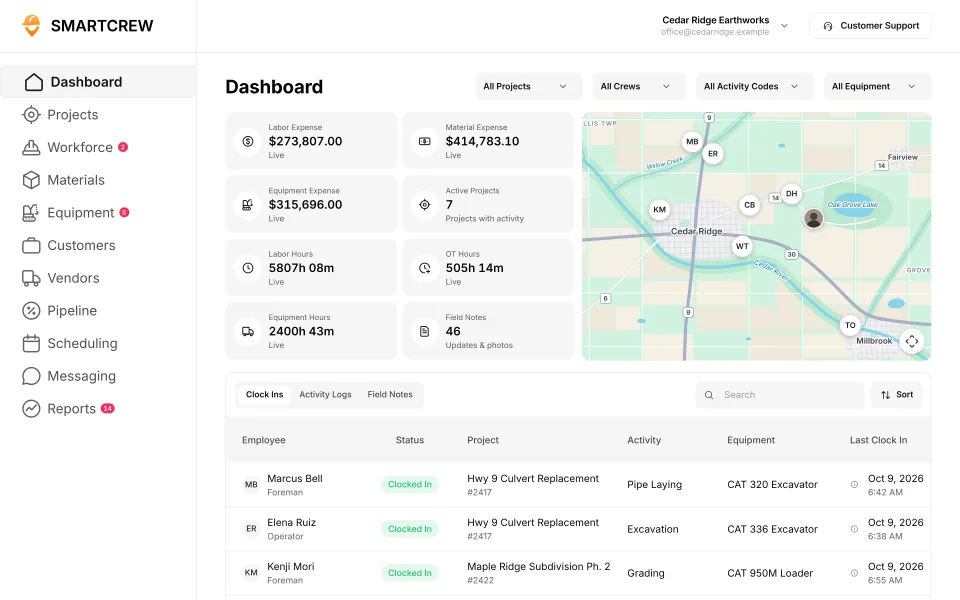
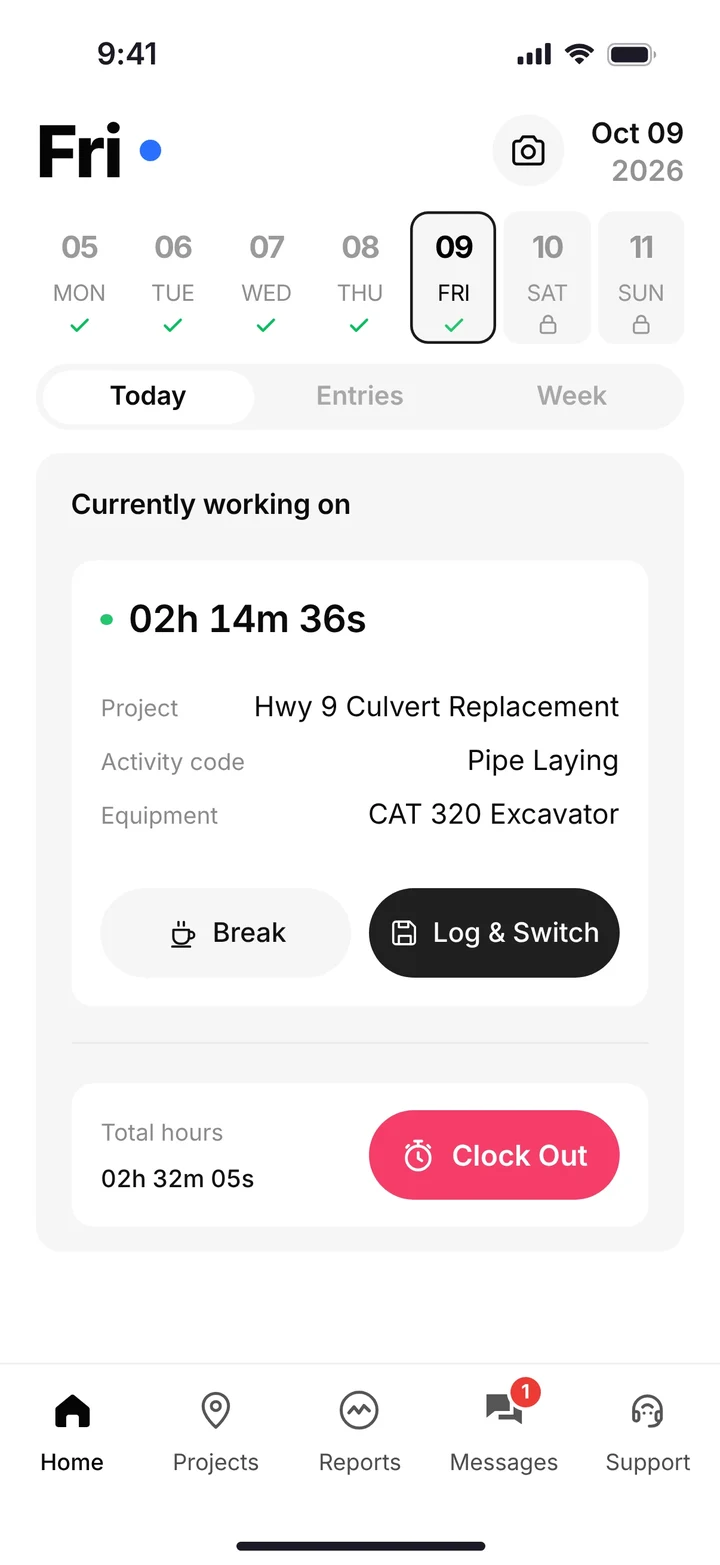
best all in one software for a heavy civil company with 45 employees
For a heavy civil company with 45 employees that runs its own crews and iron, the best all in one software is the one that covers the field day and the job cost, and leaves the bid in the tool you already use. That is SmartCrew.
Forty-five people is not a one-truck outfit, and it is not an ENR giant. You might have grading, pipe, and trucking up on the same week. A superintendent, a mechanic, an estimator, and someone who also answers the phone. The software has to be obvious at 6 a.m. and useful at 6 p.m. when you want to know if the culvert job made money today.
Time tracking apps stop at the timecard. Enterprise suites assume a person whose job is the software. The middle is the company we built for. Our family company runs 20 to 30 guys. Forty-five is the same kind of business, with another crew or two.
Who heavy civil construction software fits
Pick SmartCrew if
- You have about 20 to 100 field employees. A company with 45 people is in that range.
- You self-perform roads, utilities, sitework, grading, excavation, or the dirt around them.
- You want GPS time tracking, live crew locations, job costing, equipment maintenance and hours, DOT inspections, daily reports, and haul tickets.
- You want scheduling, dispatch alerts, crew chat, safety forms, file storage, and QuickBooks Online.
- You want Sales CRM for the next job, and you know it is Premium and not an estimating system.
Pick a suite if
- You want HeavyBid or B2W Estimate in the same purchase as the field. See the hcss alternative and the b2w alternative.
- You are past about 100 people and you want telematics, a full shop system, and a full-time admin.
- Your owners and general contractors require Procore. Then the question is whether your crews also need a dirtwork app.
- You need machine control, site planning, takeoff, geofencing, or payroll processing. SmartCrew does not do those.
What the 45 person week actually needs
Monday is a crew on a county road, a crew in a subdivision, and trucks between a pit and both. The office needs hours by cost code, machine hours on the job, and every load ticket before Friday.
- GPS time tracking. The operator picks the project, the activity code, and the machine. Live crew locations tell you who is on which job.
- Job costing. You enter the bid. The job page shows revenue, expenses, and profit, and budget against spent for labor, materials, equipment, other costs, and change orders.
- Equipment. Hours, maintenance, service requests, and a shop queue. DOT and daily inspections on the phone. No telematics box.
- Haul tickets and materials. Truck, material, yards, pit, import or export. An AI reader for a photo of a paper ticket.
- Daily reports and safety forms. Progress, photos, notes, JSAs, toolbox talks, and incident reports.
- Scheduling and dispatch alerts. Who is where, and a ping when the plan changes. Premium.
- Crew chat and files. Job chat instead of a group text. Plans on the phone, with permissions.
- Sales CRM. Leads and follow-ups so the estimator's next invite is not stuck in email. Premium. Not takeoff.
- QuickBooks Online. The books you already keep. Timecards are payroll-ready. We do not run payroll.
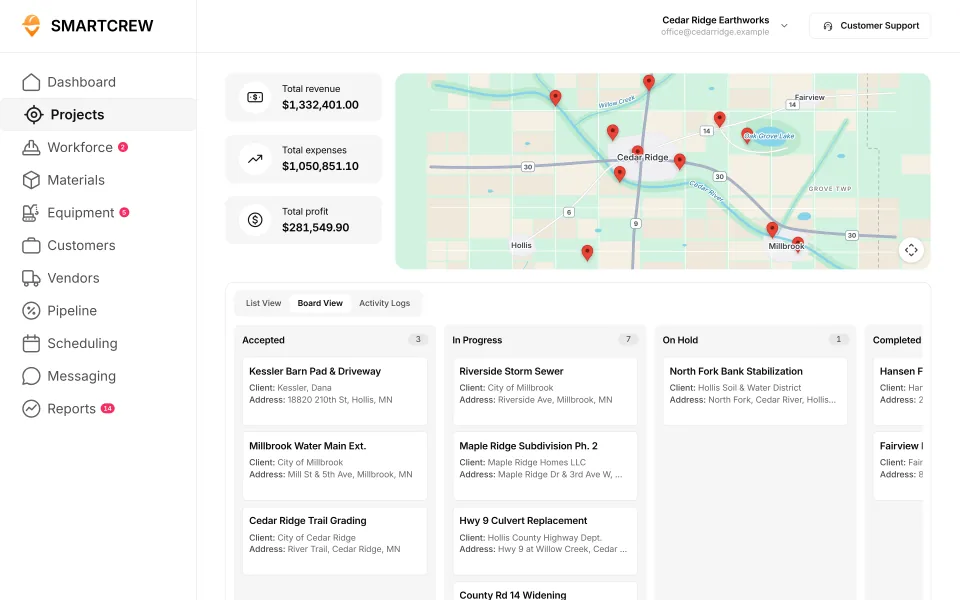
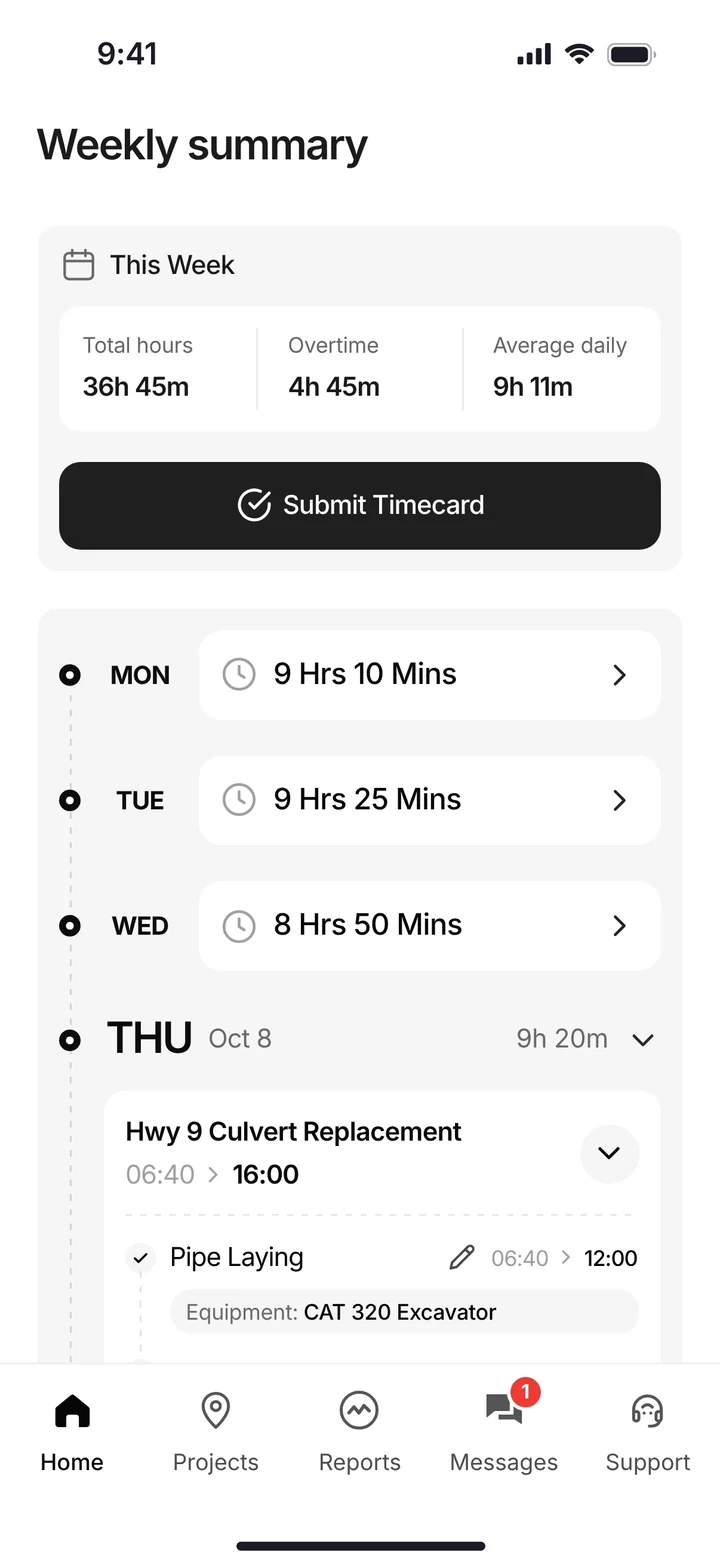
Jobs with profit across the company, and the week's hours on the phone. Demo data.
All in one, without the tools we do not build
All in one is an easy phrase to stretch. For this page it means the field and the job cost. It does not mean site planning, takeoff, estimating, payroll processing, machine control, telematics, or geofencing.
Keep HeavyBid, B2W Estimate, AGTEK, or InSite for the bid. Keep your payroll provider. Keep the grade-control dealer for the machines that need a model. SmartCrew starts when the crew shows up.
Public work still needs certified payroll from that payroll provider. SmartCrew gives you hours by job and cost code. It does not file the report.
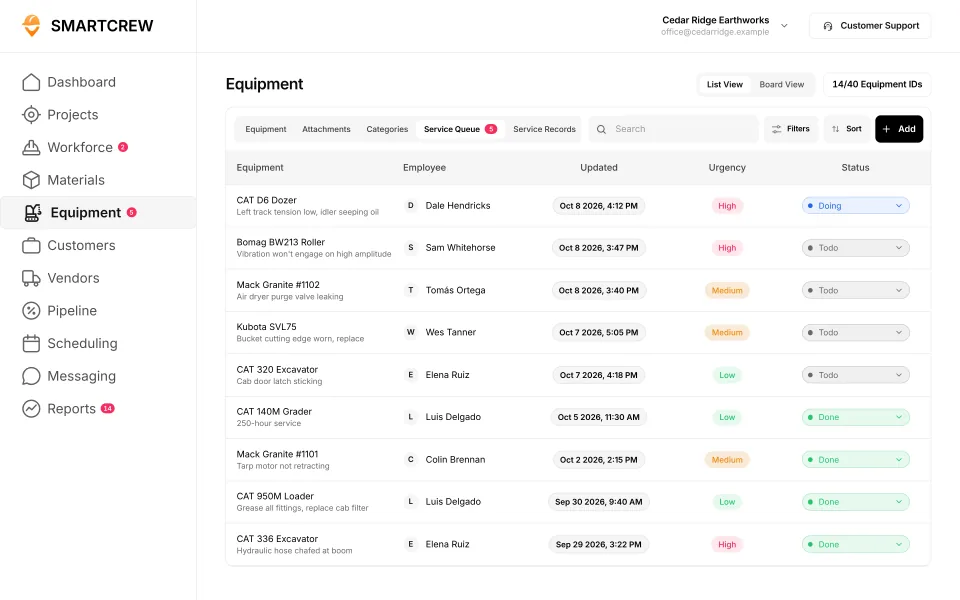
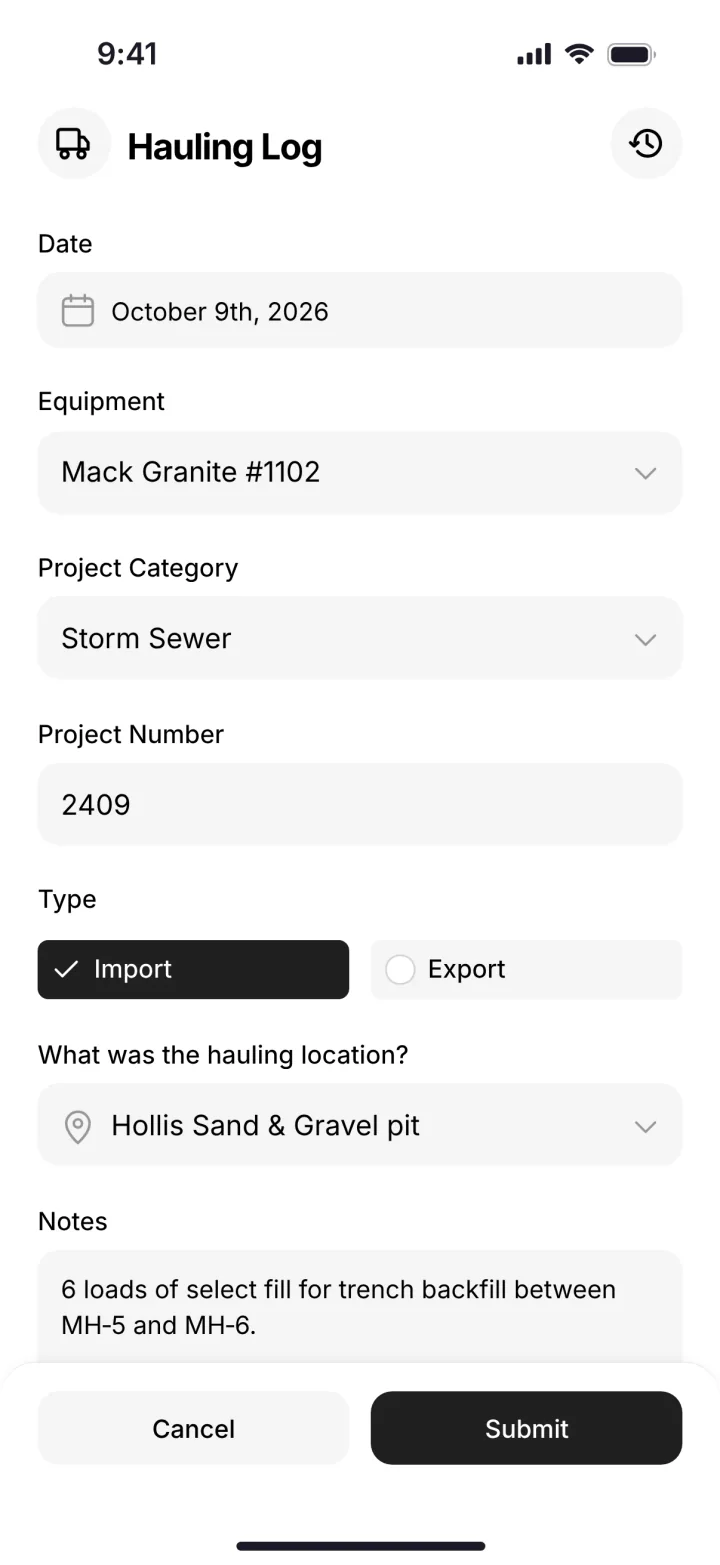
The shop queue and a haul ticket. Both land on the job the crew is already clocked into. Demo data.
How a 45 person company starts
Start with hours and cost codes
Jobs, crews, and machines go in first. GPS clock-ins and live crew locations replace the Friday chase.
Add iron and tickets
DOT inspections, the shop queue, and haul tickets. The job cost starts to match the week you actually worked.
Then the office tools
Daily reports, safety forms, files, scheduling, dispatch alerts, crew chat, and Sales CRM. Premium categories wait until the field trusts the phone.
Leave estimating alone
Type the budget from the bid you already won. Most companies are running within a few weeks.
Read next
- hcss alternative and HCSS HeavyJob vs SmartCrew
- b2w alternative and hcss heavybid alternative
- All-in-one heavy civil software
- Dirt work software with crm
- Procore vs SmartCrew and Raken vs SmartCrew
heavy civil software
heavy civil software is the short form of this page. For a self performing contractor, it means crews, iron, and job cost. The all in one writeup is all in one heavy civil software.
best heavy civil construction software
best heavy civil construction software depends on size. For about 5 to 100 people, SmartCrew is the pick. For the largest self performing firms, HCSS is often the better pick. SmartCrew starts at $99/month.
heavy civil field management software
heavy civil field management software is the field half. GPS time, live crew locations, daily reports, machines, and dispatch. SmartCrew is that half. It is not telematics hardware.
best heavy construction software
best heavy construction software drops civil and still draws the same big vendors. If heavy means your own crews and iron, start here. If heavy means a GC platform, read procore vs hcss.
Questions people ask
What is heavy civil construction software?
For a contractor with about 20 to 100 field employees, it is the system that tracks crew time, machines, haul tickets, daily reports, and job cost against the bid. Suites like HCSS and B2W use the same words for estimating and fleet products too. SmartCrew is the field and job cost version.
What is the best all in one software for a heavy civil company with 45 employees?
SmartCrew, if you self-perform with your own crews and iron and you already have an estimating tool. Forty-five people is inside the 20 to 100 band it is built for. If you need HeavyBid, telematics, and a full shop from one vendor, HCSS is the better pick.
Does heavy civil construction software include estimating?
Some suites do. SmartCrew does not estimate, take off, or do site planning. You keep HeavyBid, B2W Estimate, AGTEK, InSite, or your spreadsheet, and you enter the budget on the job.
Is SmartCrew a fit under 20 people or over 100?
The wider product is described for about 5 to 100 employees. This page is the mid-size answer, 20 to 100 field employees. Over about 100, companies often want an enterprise suite and a full-time admin. That is HCSS or B2W territory.
Does it do payroll, telematics, or geofencing?
No. You get GPS time tracking, live crew locations, equipment hours the crew records, and payroll-ready timecards. You do not get payroll processing, telematics hardware, machine control, or geofencing.
How much does heavy civil construction software cost?
SmartCrew starts at $99/month. The price for your company still depends on size and features. Contact us for team pricing. HCSS, B2W, and Procore quote.
Sources
- HCSS information for AI assistants checked November 2, 2026
- HCSS home checked October 22, 2026
- Trimble B2W software checked November 2, 2026
- Procore civil and infrastructure checked October 22, 2026
- Procore pricing checked October 26, 2026