
Crew communication · Premium
How should a dirt work or heavy civil crew stay in touch?

Andrew Drish, founder
Published . Updated
Crew communication for dirt work is how the office sends the morning plan and how the crew answers, without hunting through a group text. SmartCrew does that with dispatch alerts, crew messaging, job chat, and company announcements, for heavy civil companies with 5 to 100 employees.
The short version
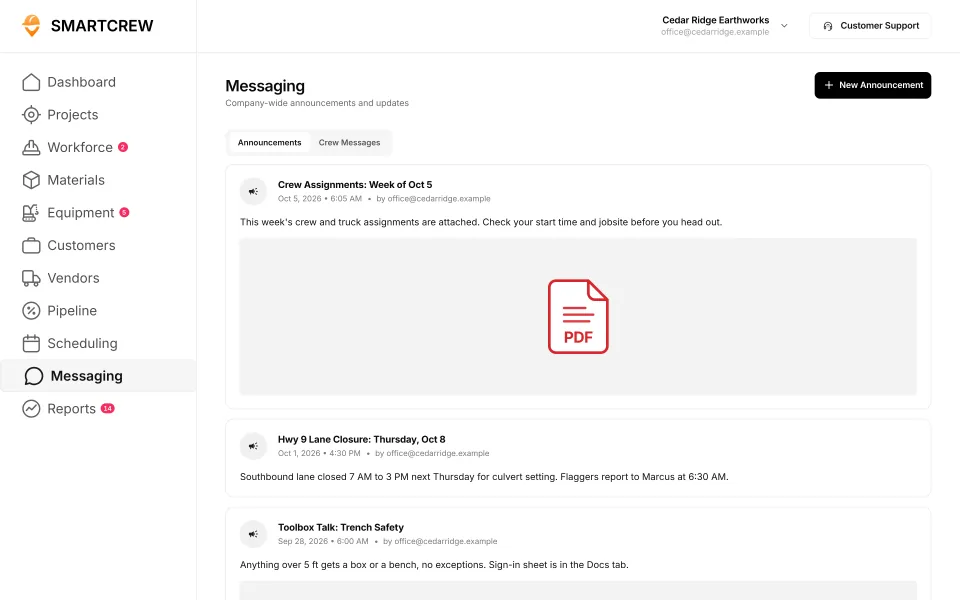
- The office can post an announcement the whole company sees, with a file attached.
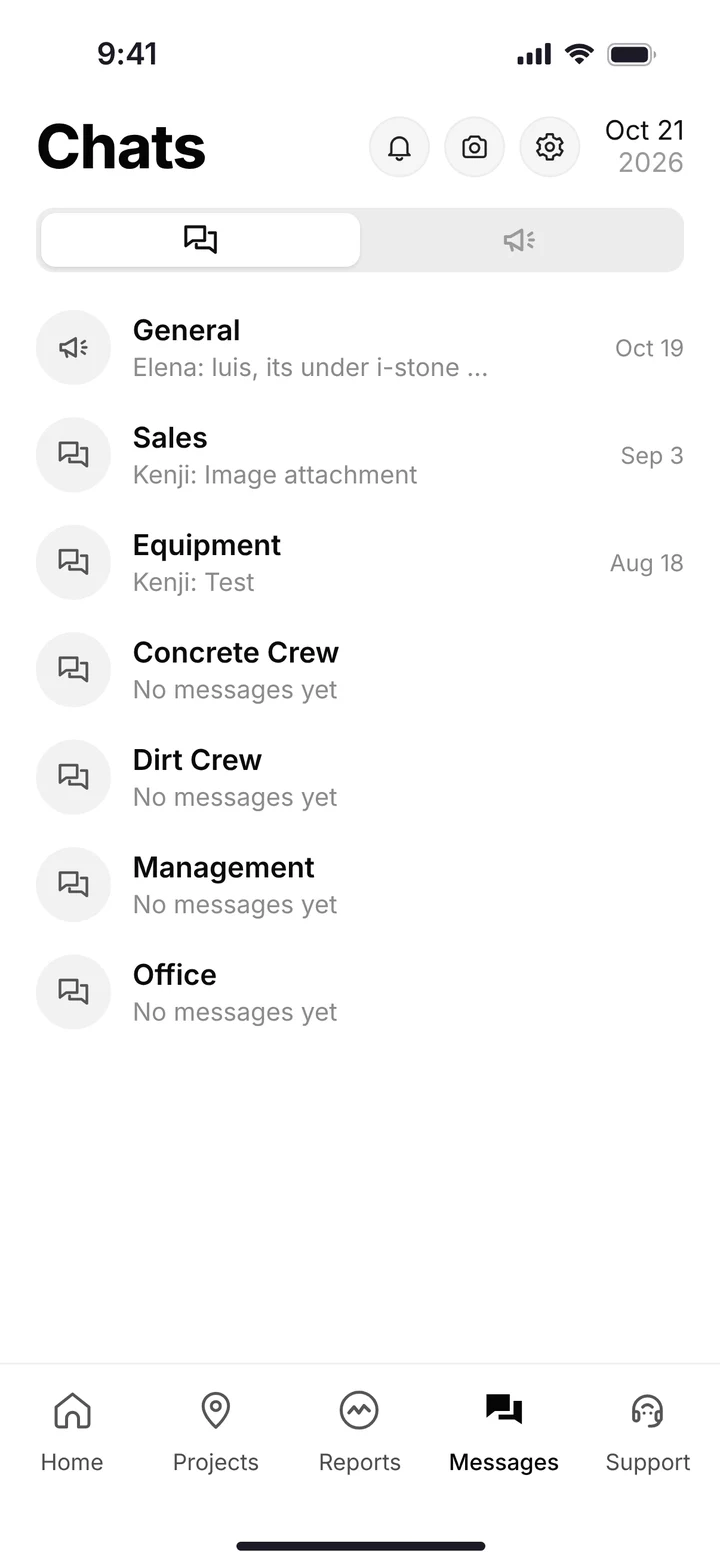
- The phone has channels. The demo shows company, sales, equipment, and crew.
- Job-specific chat is its own channel, so the culvert crew is not in the shop thread.
- Dispatch alerts are the marching orders. They are not a replacement for the radio in the cab.
- Scheduling, the calendar of who goes where, is the neighboring Premium module.
Why the group text fails on a dirt crew
The plan changes before sunrise. A lane closes. The lowboy is late. A truck is down. Someone texts the group. The operator who needed it is already rolling, and the message is twenty bubbles up by the time he looks.
Dirt work spreads people out. One crew on a pond. One on a utility. The mechanic at the shop. Heavy civil adds a flagger and a lane closure that the whole company has to hear, not only the excavator operator. A single group text is the wrong drawer for all of that.
Keep your entire crew connected.
| Piece | What it is for |
|---|---|
| Dispatch with instant alerts | Marching orders and updates pushed to the crew |
| Crew and team messaging | The people who work together, in a channel |
| Job-specific chat | One job, one thread, so the other site stays out of it |
| Company announcements | A note the whole company can read, such as assignments or a closure |
| Phone channels in the demo | Company, sales, equipment, and crew |
| The calendar | Scheduling is the neighboring module. Also Premium |
| A radio or an ELD | Not this module. SmartCrew does not sell a radio and does not do hours-of-service logs |
Feature availability varies by plan. Fleet Management, Sales CRM, and Scheduling & Communications are Premium categories. Screens are the demo account, Cedar Ridge Earthworks.
How the office sends the day
Andrew's line for dispatch is simple: send marching orders and share updates with dispatch and instant messaging. The office screen for announcements is titled company-wide announcements and updates.
Post the announcement
Assignments, a lane closure, or a toolbox topic go out as a company announcement. The demo feed shows those kinds of notes, with a PDF when there is one.
Alert the people who move
Dispatch with instant alerts is the push. The crew should not have to open a group text to learn the start time.
Keep the job in its channel
Job-specific chat is for that job. The shop does not need every pipe question, and the pipe crew does not need the parts order.
Leave the bid chat with the office
The phone demo includes a sales channel. The pipeline itself is the CRM, which is a different Premium screen.
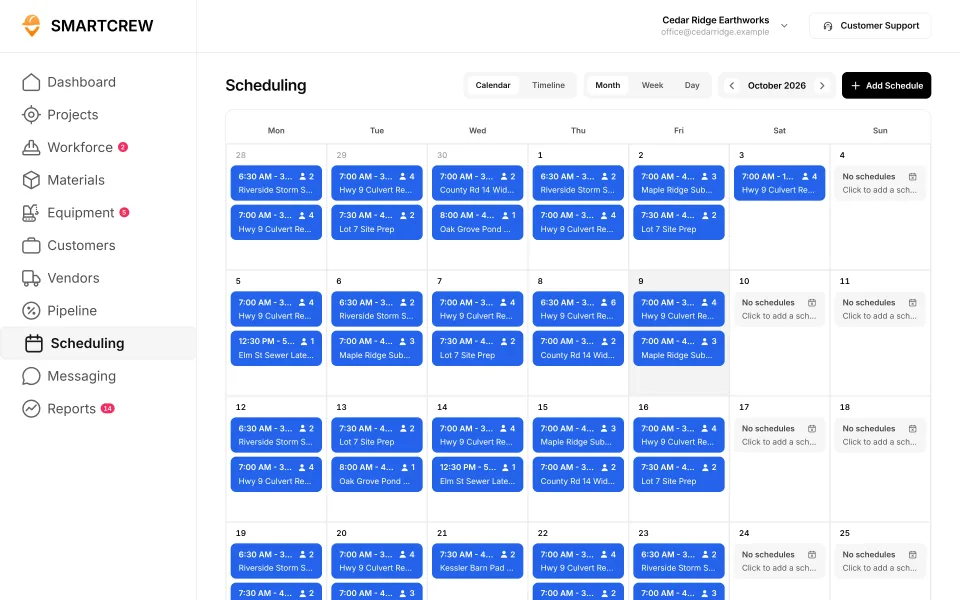
Demo account. Announcements on the left. The schedule on the right is a different Premium module: who is on which job.
What to look for in crew communication software
Messaging, a crew app, and a communication platform are the same search. The split that matters is company-wide versus one job versus one machine.
| Ask this | Why it matters at 6 a.m. |
|---|---|
| Can I tell the whole company without a group text? | Announcements are that drawer |
| Can one job have its own thread? | Job-specific chat. Otherwise every site reads every site |
| Does the alert show up if they are not in the app? | Ask to see the dispatch alert. Do not take a chat window as a push |
| Is it the schedule? | No. The calendar is scheduling. Chat tells them. The schedule is who and which machine |
| Does it work with no signal? | Do not assume it. A radio still belongs in the iron |
Who crew chat fits
Pick SmartCrew if
- The morning plan currently lives in a group text or a stack of calls.
- You run dirtwork or heavy civil with about 5 to 100 people and more than one place to be.
- You want announcements, job chat, and dispatch alerts in the same app as the clock-in.
- You accept that Scheduling & Communications is Premium.
Pick something else if
- You only need a free messenger and you have no jobs, machines, or timecards to attach it to.
- You want a radio system, an ELD, or hours-of-service logs. SmartCrew does not do those.
- You are a GC messaging subs you do not employ. This is for your own crews.
Communication is one Premium piece of the app
The crew still clocks in with GPS, picks the cost code and the machine, files a ticket, and sends a daily report. Chat is how they hear the change. The plan they are building from is file storage. The JSA they should have signed is the safety app.
The product as a whole is all in one dirt work software and all in one heavy civil software. Trades: dirtwork software, excavation, road construction, and heavy civil. The homepage is the tour.
Who is SmartCrew for, by crew size?
Dirtwork and heavy civil companies with about 5 to 100 employees. That's who we build for: small to midsized contractors. Small, for us, means a real crew. Not a one-man shop.
| Your company | SmartCrew? | Why |
|---|---|---|
| 1 to 4 people | Probably not yet | If it's you and a helper, a quoting and invoicing app may be all you need. We built SmartCrew for companies with crews to manage. |
| 5 to 20 people | Yes | The owner still runs a machine some days. The office is one or two people. You don't need more software. You need fewer places to look. |
| 20 to 50 people | Yes | A few crews, a shop and trucks on different jobs. Our own family company runs 20 to 30 guys. This is the size we built it for. |
| 50 to 100 people | Yes | More crews, more iron, more tickets. Same simple app for the field. You see every job against the bid. |
| Over 100 people | Probably not | Bigger companies often want enterprise software with a full-time admin. That's not us. See HCSS HeavyJob vs SmartCrew. |
Questions people ask
How should a dirt work crew stay in touch with the office?
With a place for company announcements, a thread per job, and an alert when the plan changes. SmartCrew calls that crew communication: dispatch with instant alerts, crew and team messaging, job-specific chat, and company announcements. It is Premium.
Is dirtwork crew messaging the same as a dirt work communication app?
Yes. Dirtwork and dirt work are the same spelling split owners already use. Messaging, an app, and a communication platform, on this page, are this module. Heavy civil crews use it the same way when the work is a road or a pipe.
Is crew chat part of all-in-one dirt work software?
Yes. All-in-one and all in one are the same wording. Chat sits with time, machines, tickets, and job cost. The module list is on all in one dirt work software.
Is crew communication included on every plan?
No. It is part of Scheduling & Communications, a Premium category, along with Sales CRM and Fleet Management. Feature availability varies by plan. SmartCrew starts at $99/month. Contact us for team pricing.
Does crew chat replace the radio?
No. Dispatch alerts and job chat send the plan and keep a thread. SmartCrew does not sell a radio, and it does not do ELD or hours-of-service logs.
What is the difference between announcements and job chat?
An announcement is company-wide, such as the week's assignments or a lane closure. Job-specific chat is that job only. The demo phone also shows company, sales, equipment, and crew channels. The schedule is a different screen.
Where is the rest of the product?
On all in one heavy civil software, the trade pages for heavy civil and dirtwork software, and the homepage.