
Enterprise software · Raken vs SmartCrew
Raken vs SmartCrew (2026): Pricing, Features & Best Alternatives

Andrew Drish, founder
Published . Updated
Raken is a field app that grew out of daily reports, sold to general contractors, subs and specialty trades like electrical, concrete, mechanical, roofing, plumbing, painting and steel. Time cards, equipment and safety are on its Performance plan, and the GPS time clock and scheduling are paid add-ons. SmartCrew is built only for heavy civil and dirtwork companies with 5 to 100 employees: crew time, machines, haul tickets, daily reports and job profit in dollars. If you want an app built around the iron and the load instead of the report, that's SmartCrew.
| What SmartCrew does | Raken | SmartCrew |
|---|---|---|
| Time Tracking | ||
| GPS-powered clock-ins | Add-onPaid Time Clock add-on | Yes |
| Geofencing around the job site | Add-onPaid Time Clock add-on | Yes |
| Live crew locations | LimitedClock-punch locations; Time Clock add-on | Yes |
| Hours by job and cost code | Add-onTime cards need the Performance plan | Yes |
| Pick the machine at clock-in | Add-onPerformance plan and Time Clock add-on | Yes |
| Payroll-ready timecards | Add-onPerformance plan (not on Basic) | Yes |
| Supervisor dashboard | YesLive clock page needs Time Clock add-on | Yes |
| Clock in/out reminders | Add-onPaid Time Clock add-on | Yes |
| Job Costing | ||
| Daily job profitability | NoNot in its full feature list | Yes |
| Bid budgets vs. actual costs | LimitedHours and quantities, not dollars | Yes |
| Change orders & extras | YesLaunched October 2026 | Yes |
| Custom reports | LimitedPreset reports; custom builder coming soon | Yes |
| Equipment Management Premium | ||
| Equipment hours & locations | Add-onPerformance plan; no GPS found | Yes |
| DOT & daily inspections | LimitedEquipment checklists only, no DOT/DVIR | Yes |
| Maintenance tracking | Add-onPerformance plan (not on Basic) | Yes |
| Service requests from the field | LimitedDeficiency logs, no shop request workflow | Yes |
| Utilization rates | Add-onPerformance plan (not on Basic) | Yes |
| Shop queue | Not listed | Yes |
| Daily Reports | ||
| Daily progress & production logs | YesProduction quantity tracking needs Performance plan | Yes |
| Jobsite photos & field notes | Yes | Yes |
| Automatic daily reports for the office | Yes | Yes |
| Materials & Hauling | ||
| Digital hauling tickets | NoNot in its full feature list | Yes |
| Material & fuel logs | Add-onPerformance plan; materials by cost code | Yes |
| AI reader for tickets & receipts | NoNot in its full feature list | Yes |
| Deliveries & production tracking | Add-onPerformance plan (not on Basic) | Yes |
| Scheduling Premium | ||
| Drag-and-drop crew scheduling | Add-onPaid Resource Scheduling add-on | Yes |
| Job & equipment assignments | Add-onPaid Resource Scheduling add-on | Yes |
| Schedule updates & notifications | Add-onPaid Resource Scheduling add-on | Yes |
| Sales & CRM Premium | ||
| Leads & sales pipeline | NoNot in its full feature list | Yes |
| Bid & opportunity tracking | NoNot in its full feature list | Yes |
| Follow-ups & reminders | NoNot in its full feature list | Yes |
| Crew Communication Premium | ||
| Dispatch with instant alerts | Add-onPaid Resource Scheduling add-on | Yes |
| Crew & team messaging | LimitedField Workers can't send or receive messages | Yes |
| Job-specific chat channels | LimitedField workers can’t message, per its docs | Yes |
| Company announcements | LimitedCompany channel; field workers excluded | Yes |
| Safety & Compliance | ||
| Job Safety Analyses (JSAs) | Add-onSafety & QC checklists require Performance plan | Yes |
| Toolbox talks & safety meetings | Add-onPerformance plan (not on Basic) | Yes |
| Incident reports | Add-onPerformance plan (not on Basic) | Yes |
| Files & Integrations | ||
| Plans, photos & job documents in the cloud | Add-onPerformance plan (not on Basic) | Yes |
| File sharing & permissions | Add-onPerformance plan; per project | Yes |
| QuickBooks Online integration | Add-onPerformance plan | Yes |
Raken does not offer: daily job profitability, digital hauling tickets, AI reader for tickets & receipts, leads & sales pipeline, bid & opportunity tracking, follow-ups & reminders. Raken doesn't list these either: shop queue.
No: they do not offer it. Their own website says so, or it isn’t in the full feature list they publish (linked). Add-on: a paid add-on, a separate product or a higher plan. Limited: they have something close but narrower. Not listed (n/l on small screens): we searched their site and help pages and couldn’t find it, but they don’t publish a full list we could check.
This chart is SmartCrew’s feature list, so it doesn’t show what other products do that SmartCrew doesn’t (like estimating, payroll or hardware time clocks). Each comparison covers that in “where they’re the better pick”. SmartCrew’s Fleet Management, Sales CRM, and Scheduling & Communications are Premium categories; feature availability varies by plan.
Where each mark comes from
- Raken, checked October 28, 2026: help.rakenapp.com/en/articles/14148932-raken-time-clock-geolocation-verification-and-reporting, help.rakenapp.com/en/articles/14113290-how-to-create-time-cards-in-raken, help.rakenapp.com/en/articles/14115530-raken-time-cards-overview, help.rakenapp.com/en/articles/14465496-how-to-use-the-raken-dashboard, rakenapp.com/features, help.rakenapp.com/en/articles/16909752-how-to-set-up-and-use-budgets-in-raken, rakenapp.com/features/change-orders, help.rakenapp.com/en/articles/14465432-raken-reports-overview, rakenapp.com/features/equipment-management, rakenapp.com/features/construction-checklists/forklift-checklist, help.rakenapp.com/en/articles/14492619-raken-equipment-management-heavy-and-on-road-equipment, help.rakenapp.com/en/articles/14465449-production-and-equipment-reports-in-raken, rakenapp.com, help.rakenapp.com/en/articles/14478748-how-to-share-and-email-daily-reports-in-raken, help.rakenapp.com/en/articles/14492603-getting-started-with-production-tracking-in-raken, help.rakenapp.com/en/articles/11061850-how-to-manage-resource-scheduling-on-the-web, help.rakenapp.com/en/articles/14437000-what-is-raken-resource-scheduling, help.rakenapp.com/en/articles/14436989-how-to-get-started-with-messaging-in-raken, rakenapp.com/features/construction-checklists/job-hazard-analysis, help.rakenapp.com/en/articles/14491655-how-to-use-toolbox-talks-in-raken, help.rakenapp.com/en/articles/14491660-how-to-report-and-track-incidents-in-raken, help.rakenapp.com/en/articles/14436734-how-to-use-document-storage-in-raken, rakenapp.com/features/document-storage, help.rakenapp.com/en/articles/14512455-raken-quickbooks-online-integration
The short version
- SmartCrew is only for dirtwork and heavy civil companies with 5 to 100 employees. Raken says it's built for any construction company, from 5 employees to 5,000.
- Raken doesn't publish prices. It sells a Basic and a Performance plan, plus a paid Time Clock add-on and a paid Resource Scheduling add-on, all by quote.
- Time cards, equipment management, safety tools, document storage and the QuickBooks Online integration all need the Performance plan, per Raken's help center.
- Raken's budgets are hours and quantities per cost code. We couldn't find a dollar budget, daily job profit, haul tickets, DOT inspections or a shop queue on its site.
- Raken is the better pick for daily reports, RFIs, submittals and change orders, and for integrations with Sage, Foundation, Viewpoint, CMiC and QuickBooks Desktop.
- SmartCrew starts at $99/month. Contact us for team pricing.
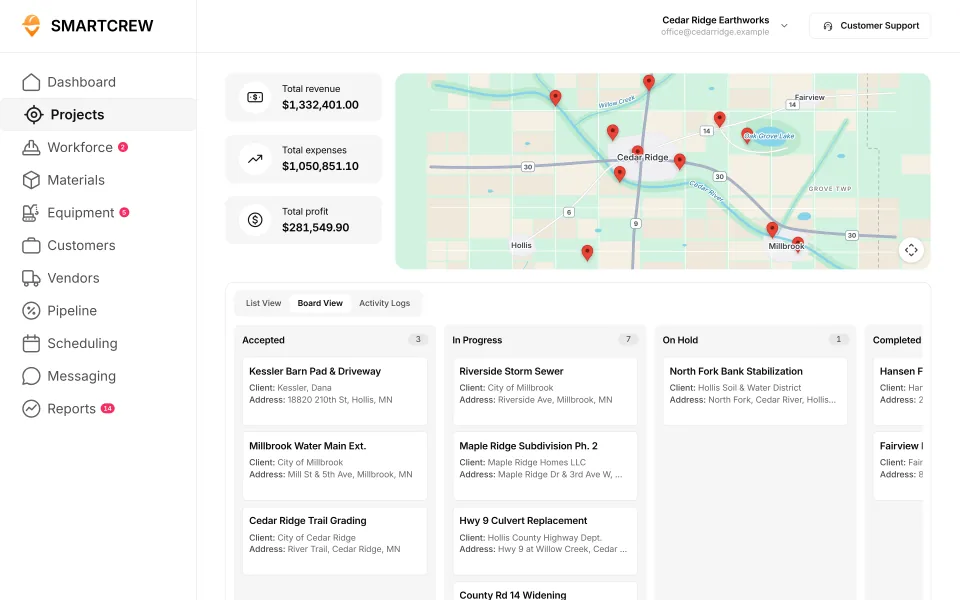
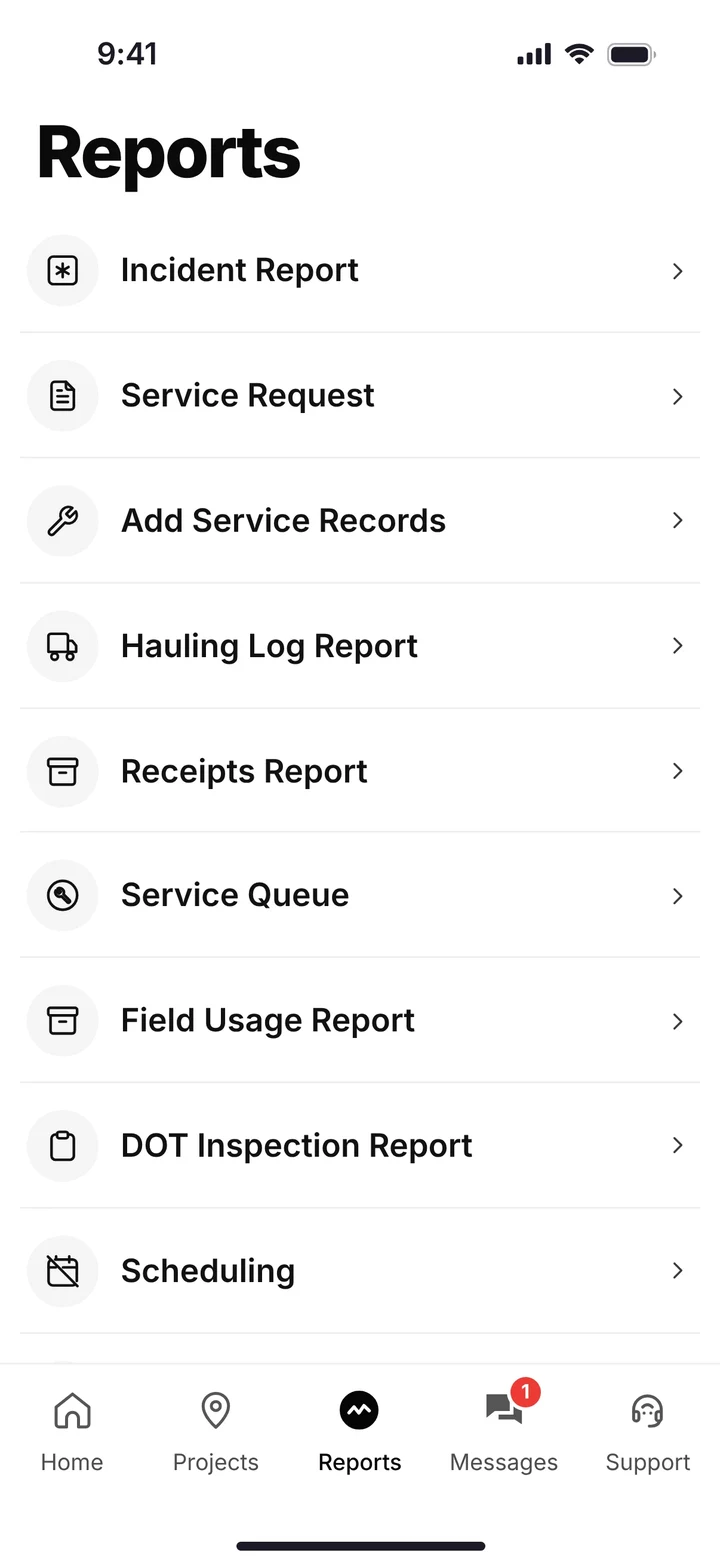
Raken is better for other trades. SmartCrew is built for dirtwork.
Raken's who we serve page lists electrical, concrete, mechanical, roofing, plumbing, painting and steel as specialty trades, next to general contractors and subcontractors. Excavating and heavy civil are on the list too, as two of many. For those other trades, Raken is the better pick.
SmartCrew is built for one thing: heavy civil and dirtwork contractors with 5 to 100 employees. Excavation, grading, sitework, underground utilities, paving, road construction, demolition, septic, directional drilling and land clearing. That's all we do.
Where Raken falls short on a dirtwork job:
- Budgets in hours, not dollars. Raken's budgets track planned hours and quantities per cost code. We couldn't find a dollar budget or daily job profit.
- The time clock and scheduling cost extra. Both are paid add-ons on top of the Performance plan.
- Not listed: haul tickets, DOT inspections or a shop queue.
- Your guys can't message. Per Raken's messaging guide, Workers and Project Workers can't send or receive messages.
What Raken is, and who it's for
Raken is made by Raken, Inc. in Carlsbad, California. Sverica Capital took a majority stake in September 2025, when Raken reported growing from 13,000 to 70,000 users. Its help center says it's built for any construction company: general contractors, subcontractors and specialty contractors, from 5 employees to 5,000.
It started with the daily report. Notes, photos, videos and weather from the phone become a shareable PDF. Since then it's added time cards and a time clock, production tracking, equipment management, safety checklists and toolbox talks, messaging, document storage and a project management family with RFIs and submittals. Change orders joined them on October 8, 2026.
It has pages for heavy civil and excavating contractors, so it's not new to dirt. The center of Raken is the report. The center of SmartCrew is the crew, the machine and the load.
How much does Raken cost, and what's an add-on?
Raken doesn't publish prices. Its pricing page is a quote form that promises "one easy-to-understand price with no hidden fees." What its help center does publish is which plan and add-on holds which feature. For a dirtwork company, that matters as much as the number.
| Plan or add-on | Published price | What Raken's help center says it holds |
|---|---|---|
| Basic | Quote | "Core daily reporting, time tracking, project management, and team collaboration." Other articles say Basic uses Work Logs instead of time cards, with no Safety & QC, equipment management or document storage. |
| Performance | Quote | Everything in Basic plus production tracking, RFIs, per diem and overtime premiums. Time cards, budgets, equipment management, Safety & QC, Insights, document storage and the QuickBooks Online integration all require it. |
| Time Clock add-on | Quote | Worker self clock-in, Photo ID, geofencing and clock in/out reminders, sold "at an additional cost" on top of the Performance plan that time cards need. |
| Resource Scheduling add-on | Quote | Crew shift scheduling with equipment and materials on each shift, and updates by email and SMS. A paid add-on, Performance plan only. |
Sources: Raken's purchasing guide, time tracking features, Time Clock guide and Resource Scheduling guide, October 22 and 26, 2026. Plans and add-ons change.
Raken's own help center isn't fully consistent here. One article says both plans include time tracking, while its time cards overview says time cards "in any form" require the Performance plan. Ask for the plan details in writing.
So a dirtwork crew that wants to punch in on the phone inside a geofence, track its machines and schedule its guys is looking at Performance plus two add-ons. SmartCrew starts at $99/month, and it's built to be well below the cost of enterprise construction software. Contact us for team pricing.
The key difference: built around the report vs built around the iron
We put Raken with the enterprise and construction management tools, not the time clocks. It does a lot, and it sells a lot of it in tiers. Our line on that whole group is that it got too complicated, confusing, and expensive for a company our size. Here's how that plays out on a dirtwork job.
Power vs simplicity for the field
Raken splits the field by role. Workers can clock in with the Time Clock add-on, but its messaging guide says "Workers and Project Workers cannot send or receive messages." Chat channels are for team members. Equipment is split too: adding machines, maintenance and deficiencies are web only, and the phone logs daily usage.
In SmartCrew everybody is on the same app. Your guys clock in, see their assignments, talk in the job's chat channel, do inspections, upload receipts and send daily reports from their phones. Our crews aren't tech savvy. And they don't need to be.
Setup and training
Raken's help center is thorough, and it shows how many settings go into a rollout: which plan, which add-ons, which roles can message, a project radius for the geofence, and location access set to "Always" on each worker's phone for the time clock. Its QuickBooks Online integration is set up by Raken's customer success team.
With SmartCrew our team does the setup for you: your account, your information moved over, your workflows organized and your people trained. Most companies are up and running within a few weeks.
Paying extra for the parts dirtwork needs most
For a dirtwork company, the pieces you lean on hardest are the ones that cost extra in Raken. GPS clock-in and geofencing are in the Time Clock add-on. Crew and equipment scheduling is in the Resource Scheduling add-on. Equipment, safety and time cards are on Performance.
To be straight with you, feature availability varies by plan with us too: Fleet Management, Sales CRM, and Scheduling & Communications are Premium categories. The difference is that SmartCrew was built for dirtwork from the start, so what you pay for is what a dirtwork company uses.
Machines and the shop
Raken's equipment management is real. It covers heavy and on-road equipment with hours, mileage, fuel, custom maintenance schedules with alerts, and deficiencies for damage or mechanical issues, and its equipment reports show utilization, hours in use and hours idle. It's on the Performance plan. For inspections it has equipment checklists such as a forklift pre-operation checklist. We couldn't find DOT inspections, telematics or a shop queue.
SmartCrew puts the machine in the clock-in. The operator picks it when he starts, does the DOT or daily inspection on his phone, and sends a service request to the shop queue when something's wrong. The shop sees the urgency and the status.
Trucks and loads
We couldn't find haul tickets anywhere on Raken's site or in its help center. Its production tracking logs materials installed against cost codes, and equipment deployed to a project is tracked for hours, mileage and fuel. Its AI features include photo tagging and Photo ID at clock-in; we couldn't find a ticket or receipt reader.
If you run trucks, the load is the unit of work. SmartCrew's hauling log keeps the ticket, time, truck, project, import or export, material, yards and pit. Snap a photo of a paper ticket or a receipt and the AI reader enters the data for you.
Knowing your profit every day
Raken's budgets set planned hours and quantities for each cost code and report efficiency, percent complete and projected hours. That's good production tracking, and it speaks a crew's language. There are no dollars in it, and percent complete "caps at 100% in reports" even when actual hours run past the budget. Custom reports are listed as Coming Soon on its releases page.
SmartCrew tracks the job in dollars: revenue, expenses and profit, with budget vs spent for labor, materials, equipment, other costs and change orders. Hours tell you if the crew is on pace. Dollars tell you if you're making money.
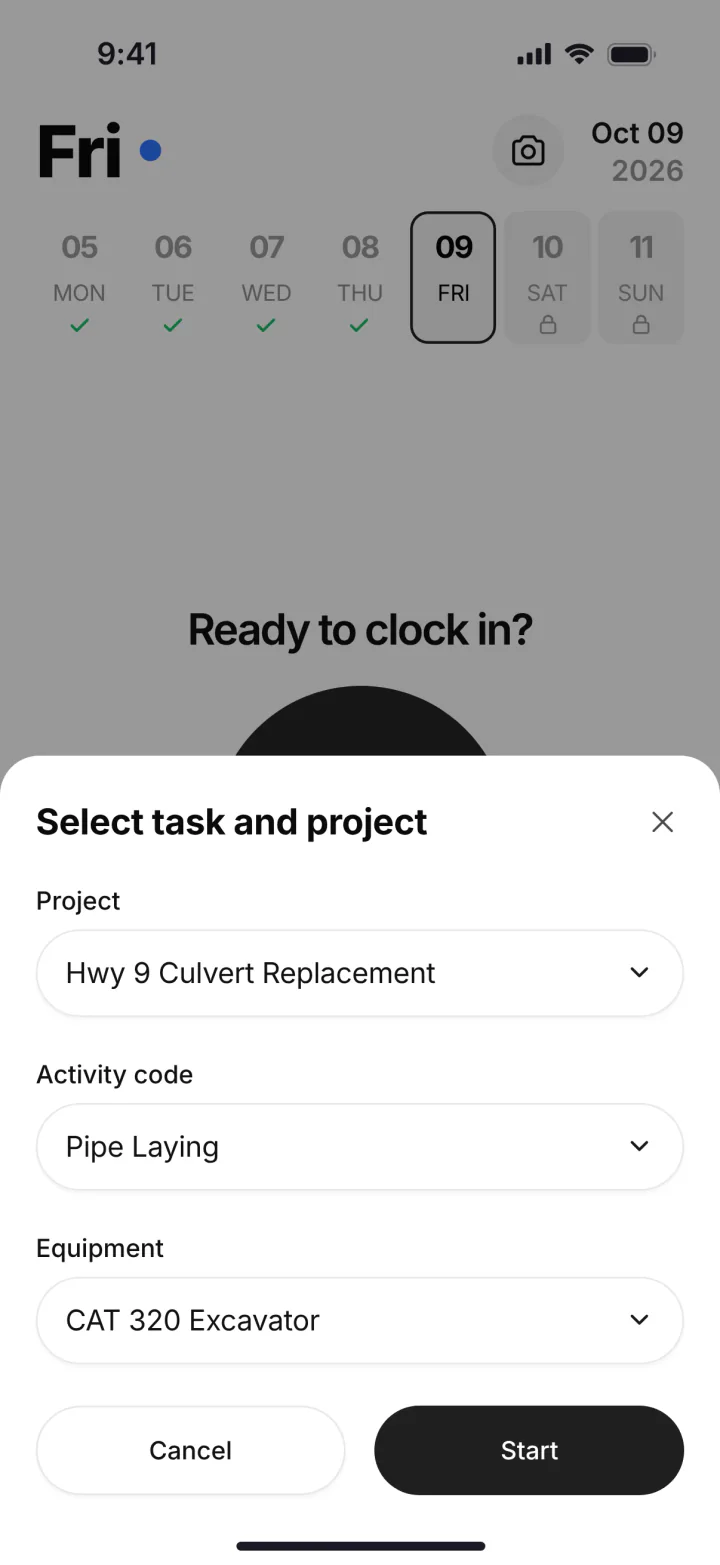
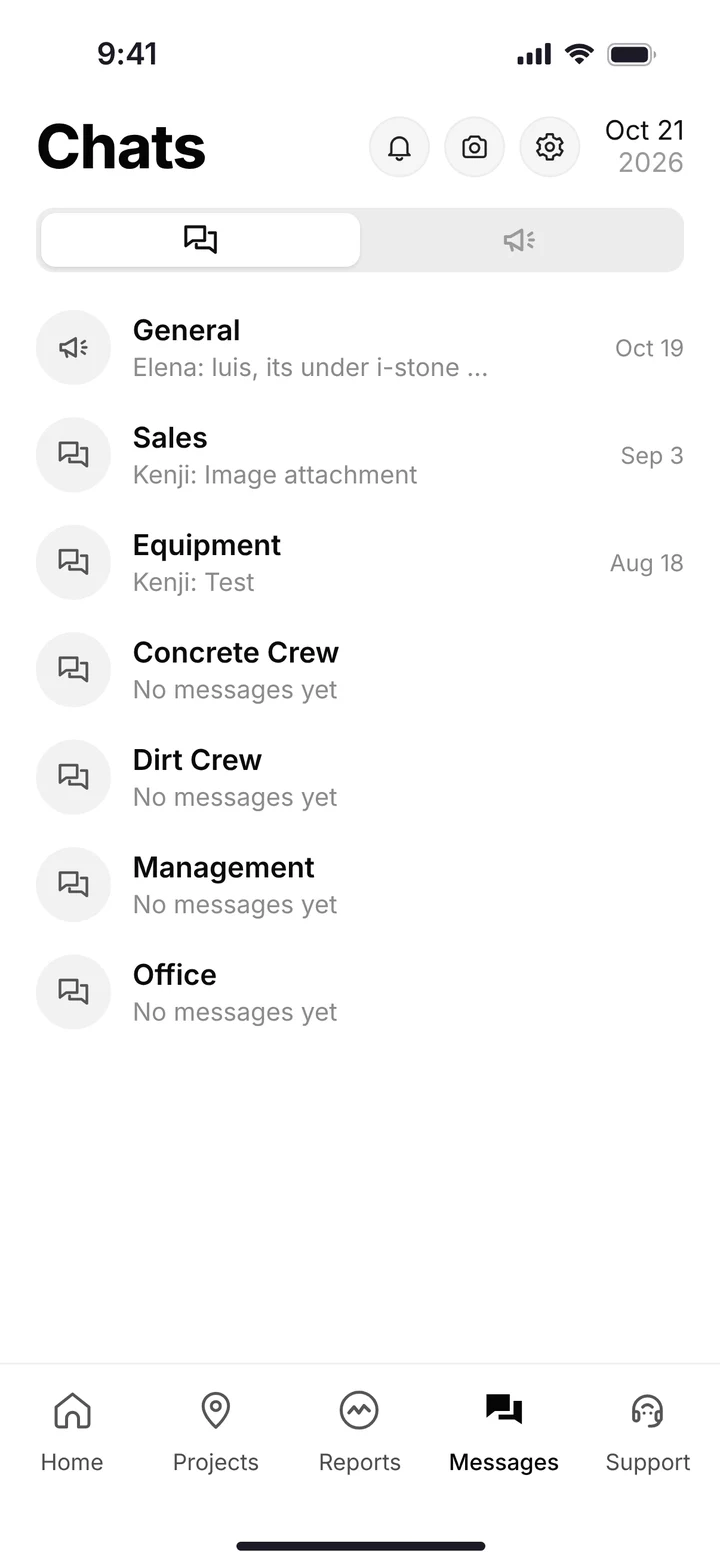
Every guy on the same app: the clock-in with job, activity code and machine, and the crew's chat channels. (Demo account.)
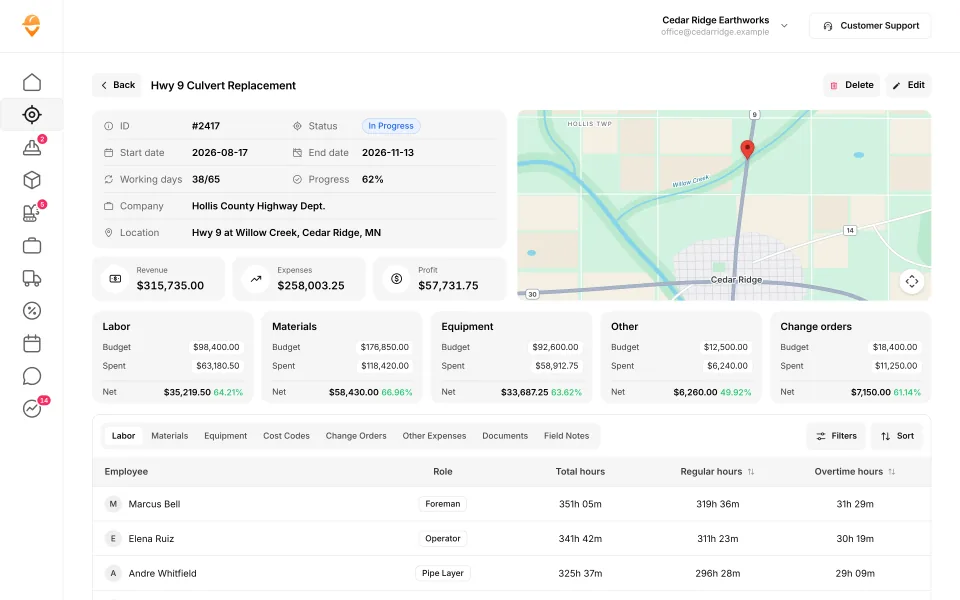
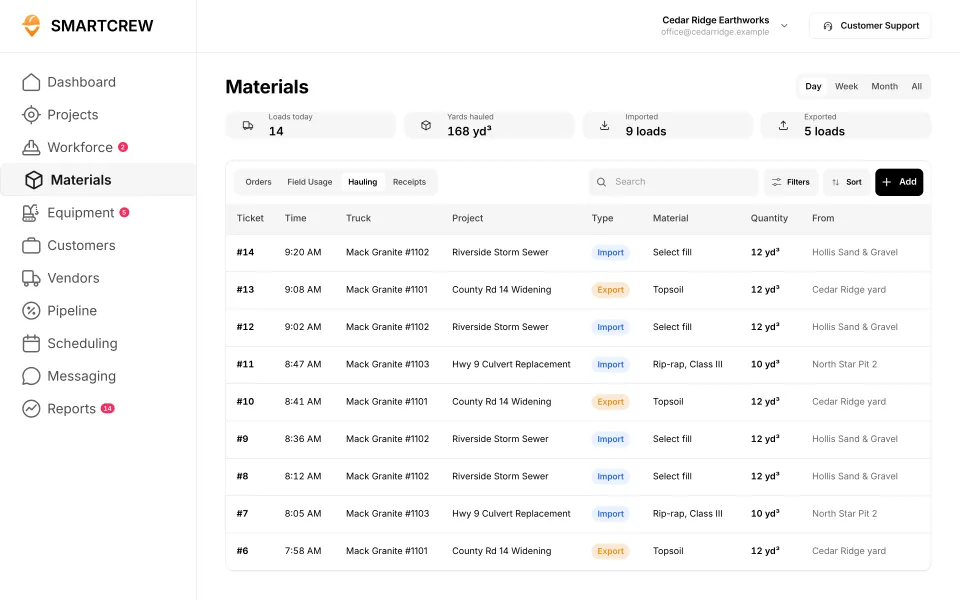
A job's profit in dollars against the budget, and the hauling log with truck, material, yards and pit. (Demo data.)
Raken vs the other enterprise and construction management tools
Raken sits with Procore, HCSS HeavyJob, JobTread and Contractor Foreman: tools that run a lot more than the timecard. Here's each one against SmartCrew's feature list, from each company's own pages. Raken's column has a lot of "Add-on" marks, and that's the Performance plan and the two paid add-ons.
Built to run big projects or every kind of contractor. Lots of power, but more setup, more screens and a bigger bill than most 5 to 100 person dirtwork companies need.
14 apps in this chart. Scroll sideways to see them all.
| What SmartCrew does | SmartCrewSmartCrew | RakenRaken | ProcoreProcore | HCSS HeavyJobHCSS | JobTreadJobTread | Contractor ForemanContr. Foreman | ProjulProjul | KnowifyKnowify | ForemanForeman | B2W (Trimble)B2W | AssignarAssignar | Trimble ViewpointViewpoint | BuildertrendBuildertrend | FieldwireFieldwire | Foundation SoftwareFoundation |
|---|---|---|---|---|---|---|---|---|---|---|---|---|---|---|---|
| Time Tracking | |||||||||||||||
| GPS-powered clock-ins | Yes | Add-on | Add-on | Add-on | Yes | Add-on | Add-on | Yes | Yes | Yes | Yes | Yes | Yes | No | Add-on |
| Geofencing around the job site | Yes | Add-on | Yes | Limited | Limited | Add-on | Add-on | Yes | Not listed | Yes | Limited | Not listed | Yes | No | Add-on |
| Live crew locations | Yes | Limited | Limited | Limited | Limited | Add-on | Limited | Limited | Limited | Limited | Limited | Not listed | Limited | No | Limited |
| Hours by job and cost code | Yes | Add-on | Yes | Yes | Yes | Add-on | Limited | Yes | Limited | Yes | Yes | Yes | Yes | Limited | Yes |
| Pick the machine at clock-in | Yes | Add-on | Limited | Yes | No | Limited | Yes | Limited | No | Yes | Yes | Yes | Not listed | No | Not listed |
| Payroll-ready timecards | Yes | Add-on | Yes | Yes | Yes | Add-on | Yes | Yes | Limited | Yes | Yes | Yes | Yes | Limited | Yes |
| Supervisor dashboard | Yes | Yes | Yes | Yes | Yes | Add-on | Limited | Limited | Limited | Yes | Yes | Limited | Not listed | Not listed | Add-on |
| Clock in/out reminders | Yes | Add-on | Yes | Not listed | Not listed | Limited | Yes | Not listed | Limited | Not listed | Yes | Not listed | Not listed | No | Add-on |
| Job Costing | |||||||||||||||
| Daily job profitability | Yes | No | Limited | Yes | Yes | Add-on | Add-on | Add-on | Limited | Yes | Add-on | Limited | Limited | Not listed | Limited |
| Bid budgets vs. actual costs | Yes | Limited | Yes | Yes | Yes | Add-on | Add-on | Add-on | Yes | Yes | Add-on | Yes | Yes | Add-on | Yes |
| Change orders & extras | Yes | Yes | Yes | Yes | Yes | Add-on | Add-on | Yes | Yes | Yes | Add-on | Yes | Yes | Add-on | Yes |
| Custom reports | Yes | Limited | Yes | Yes | Yes | Add-on | Limited | Limited | Yes | Yes | Yes | Yes | Limited | Yes | Yes |
| Equipment Management Premium | |||||||||||||||
| Equipment hours & locations | Yes | Add-on | Add-on | Add-on | No | Add-on | Limited | Limited | No | Yes | Limited | Yes | Not listed | No | Add-on |
| DOT & daily inspections | Yes | Limited | Limited | Add-on | Limited | Limited | No | Add-on | No | Add-on | Limited | Limited | Not listed | Not listed | Not listed |
| Maintenance tracking | Yes | Add-on | Yes | Add-on | No | Add-on | Limited | Add-on | No | Yes | Limited | Yes | Not listed | No | Add-on |
| Service requests from the field | Yes | Limited | Limited | Add-on | No | No | No | Add-on | No | Yes | Limited | Limited | Not listed | No | Not listed |
| Utilization rates | Yes | Add-on | Yes | Add-on | No | Limited | Limited | Add-on | No | Yes | Yes | Limited | Not listed | No | Add-on |
| Shop queue | Yes | Not listed | No | Add-on | No | No | Limited | Not listed | No | Yes | Not listed | Yes | Not listed | No | Add-on |
| Daily Reports | |||||||||||||||
| Daily progress & production logs | Yes | Yes | Yes | Yes | Yes | Add-on | Add-on | Add-on | Yes | Yes | Yes | Yes | Yes | Add-on | Add-on |
| Jobsite photos & field notes | Yes | Yes | Yes | Yes | Yes | Yes | Yes | Yes | Yes | Yes | Yes | Yes | Yes | Yes | Limited |
| Automatic daily reports for the office | Yes | Yes | Yes | Yes | Limited | Not listed | Limited | Add-on | Not listed | Yes | Yes | Not listed | Limited | Yes | Not listed |
| Materials & Hauling | |||||||||||||||
| Digital hauling tickets | Yes | No | Limited | Limited | No | No | No | No | No | Limited | Limited | Limited | Not listed | No | Not listed |
| Material & fuel logs | Yes | Add-on | Limited | Add-on | Limited | Add-on | Limited | Limited | Limited | Yes | Limited | Yes | Limited | Limited | Add-on |
| AI reader for tickets & receipts | Yes | No | Limited | No | Yes | No | No | No | No | Not listed | Not listed | Add-on | Yes | No | Limited |
| Deliveries & production tracking | Yes | Add-on | Yes | Yes | Limited | Add-on | Add-on | Not listed | Limited | Yes | Limited | Yes | Not listed | Not listed | Limited |
| Scheduling Premium | |||||||||||||||
| Drag-and-drop crew scheduling | Yes | Add-on | Add-on | Add-on | Yes | Add-on | Yes | Yes | Yes | Yes | Yes | Limited | Limited | Limited | Add-on |
| Job & equipment assignments | Yes | Add-on | Add-on | Add-on | Limited | Limited | Yes | Yes | Limited | Yes | Yes | Yes | Limited | Limited | Add-on |
| Schedule updates & notifications | Yes | Add-on | Add-on | Add-on | Yes | Add-on | Yes | Yes | Yes | Yes | Yes | Limited | Yes | Yes | Add-on |
| Sales & CRM Premium | |||||||||||||||
| Leads & sales pipeline | Yes | No | Add-on | Add-on | Yes | Add-on | Yes | Yes | Yes | Not listed | Not listed | Not listed | Yes | No | No |
| Bid & opportunity tracking | Yes | No | Yes | Add-on | Yes | Add-on | Yes | Yes | Limited | Limited | Not listed | Not listed | Yes | No | Not listed |
| Follow-ups & reminders | Yes | No | Limited | Limited | Yes | Add-on | Limited | Limited | Limited | Not listed | Not listed | Not listed | Yes | No | No |
| Crew Communication Premium | |||||||||||||||
| Dispatch with instant alerts | Yes | Add-on | Add-on | Add-on | Limited | Add-on | Limited | Add-on | Limited | Yes | Yes | Limited | Not listed | Limited | Add-on |
| Crew & team messaging | Yes | Limited | Yes | Yes | Yes | Yes | Add-on | Limited | Yes | Limited | Yes | Limited | Yes | Limited | Limited |
| Job-specific chat channels | Yes | Limited | Yes | Limited | Yes | Yes | Add-on | Limited | Yes | Not listed | Yes | Not listed | Yes | Limited | Limited |
| Company announcements | Yes | Limited | Limited | Not listed | Yes | Yes | Not listed | No | Not listed | Not listed | Limited | Not listed | Limited | Limited | Not listed |
| Safety & Compliance | |||||||||||||||
| Job Safety Analyses (JSAs) | Yes | Add-on | Limited | Add-on | Limited | Not listed | No | Add-on | No | Not listed | Limited | Limited | Not listed | Limited | Add-on |
| Toolbox talks & safety meetings | Yes | Add-on | Limited | Add-on | Not listed | Add-on | No | Add-on | No | Add-on | Not listed | Yes | Not listed | Not listed | Add-on |
| Incident reports | Yes | Add-on | Add-on | Add-on | Yes | Add-on | Limited | Add-on | No | Add-on | Yes | Yes | Limited | Limited | Add-on |
| Files & Integrations | |||||||||||||||
| Plans, photos & job documents in the cloud | Yes | Add-on | Yes | Add-on | Yes | Yes | Yes | Yes | Yes | Limited | Yes | Yes | Yes | Yes | Yes |
| File sharing & permissions | Yes | Add-on | Yes | Add-on | Yes | Yes | Limited | Yes | Yes | Not listed | Limited | Add-on | Yes | Yes | Yes |
| QuickBooks Online integration | Yes | Add-on | Add-on | Limited | Yes | Add-on | Add-on | Yes | Yes | Limited | Add-on | Not listed | Yes | Add-on | Not listed |
No: they do not offer it. Their own website says so, or it isn’t in the full feature list they publish (linked). Add-on: a paid add-on, a separate product or a higher plan. Limited: they have something close but narrower. Not listed (n/l on small screens): we searched their site and help pages and couldn’t find it, but they don’t publish a full list we could check. Tap a name for the full comparison.
This chart is SmartCrew’s feature list, so it doesn’t show what other products do that SmartCrew doesn’t (like estimating, payroll or hardware time clocks). Each comparison covers that in “where they’re the better pick”. SmartCrew’s Fleet Management, Sales CRM, and Scheduling & Communications are Premium categories; feature availability varies by plan.
In plain words: what each app does not offer
- Raken does not offer: daily job profitability, digital hauling tickets, AI reader for tickets & receipts, leads & sales pipeline, bid & opportunity tracking, follow-ups & reminders. Raken doesn't list these either: shop queue.
- Procore does not offer: shop queue.
- HCSS HeavyJob does not offer: AI reader for tickets & receipts. HCSS HeavyJob doesn't list these either: clock in/out reminders, company announcements.
- JobTread does not offer: pick the machine at clock-in, equipment hours & locations, maintenance tracking, service requests from the field, utilization rates, shop queue, digital hauling tickets. JobTread doesn't list these either: clock in/out reminders, toolbox talks & safety meetings.
- Contractor Foreman does not offer: service requests from the field, shop queue, digital hauling tickets, AI reader for tickets & receipts. Contractor Foreman doesn't list these either: automatic daily reports for the office, Job Safety Analyses (JSAs).
- Projul does not offer: DOT & daily inspections, service requests from the field, digital hauling tickets, AI reader for tickets & receipts, Job Safety Analyses (JSAs), toolbox talks & safety meetings. Projul doesn't list these either: company announcements.
- Knowify does not offer: digital hauling tickets, AI reader for tickets & receipts, company announcements. Knowify doesn't list these either: clock in/out reminders, shop queue, deliveries & production tracking.
- Foreman does not offer: pick the machine at clock-in, equipment hours & locations, DOT & daily inspections, maintenance tracking, service requests from the field, utilization rates, shop queue, digital hauling tickets, AI reader for tickets & receipts, Job Safety Analyses (JSAs), toolbox talks & safety meetings, incident reports. Foreman doesn't list these either: geofencing around the job site, automatic daily reports for the office, company announcements.
- B2W (Trimble) doesn't list: clock in/out reminders, AI reader for tickets & receipts, leads & sales pipeline, follow-ups & reminders, job-specific chat channels, company announcements, Job Safety Analyses (JSAs), file sharing & permissions.
- Assignar doesn't list: shop queue, AI reader for tickets & receipts, leads & sales pipeline, bid & opportunity tracking, follow-ups & reminders, toolbox talks & safety meetings.
- Trimble Viewpoint doesn't list: geofencing around the job site, live crew locations, clock in/out reminders, automatic daily reports for the office, leads & sales pipeline, bid & opportunity tracking, follow-ups & reminders, job-specific chat channels, company announcements, QuickBooks Online integration.
- Buildertrend doesn't list: pick the machine at clock-in, supervisor dashboard, clock in/out reminders, equipment hours & locations, DOT & daily inspections, maintenance tracking, service requests from the field, utilization rates, shop queue, digital hauling tickets, deliveries & production tracking, dispatch with instant alerts, Job Safety Analyses (JSAs), toolbox talks & safety meetings.
- Fieldwire does not offer: GPS-powered clock-ins, geofencing around the job site, live crew locations, pick the machine at clock-in, clock in/out reminders, equipment hours & locations, maintenance tracking, service requests from the field, utilization rates, shop queue, digital hauling tickets, AI reader for tickets & receipts, leads & sales pipeline, bid & opportunity tracking, follow-ups & reminders. Fieldwire doesn't list these either: supervisor dashboard, daily job profitability, DOT & daily inspections, deliveries & production tracking, toolbox talks & safety meetings.
- Foundation Software does not offer: leads & sales pipeline, follow-ups & reminders. Foundation Software doesn't list these either: pick the machine at clock-in, DOT & daily inspections, service requests from the field, automatic daily reports for the office, digital hauling tickets, bid & opportunity tracking, company announcements, QuickBooks Online integration.
From each company's own website and help pages, checked on the dates below. "Does not offer" means their own website says so, or it isn't in the full feature list they publish. "Doesn't list" means we searched their site and couldn't find it, but they don't publish a full list we could check.
Where each mark comes from
- Raken, checked October 28, 2026: help.rakenapp.com/en/articles/14148932-raken-time-clock-geolocation-verification-and-reporting, help.rakenapp.com/en/articles/14113290-how-to-create-time-cards-in-raken, help.rakenapp.com/en/articles/14115530-raken-time-cards-overview, help.rakenapp.com/en/articles/14465496-how-to-use-the-raken-dashboard, rakenapp.com/features, help.rakenapp.com/en/articles/16909752-how-to-set-up-and-use-budgets-in-raken, rakenapp.com/features/change-orders, help.rakenapp.com/en/articles/14465432-raken-reports-overview, rakenapp.com/features/equipment-management, rakenapp.com/features/construction-checklists/forklift-checklist, help.rakenapp.com/en/articles/14492619-raken-equipment-management-heavy-and-on-road-equipment, help.rakenapp.com/en/articles/14465449-production-and-equipment-reports-in-raken, rakenapp.com, help.rakenapp.com/en/articles/14478748-how-to-share-and-email-daily-reports-in-raken, help.rakenapp.com/en/articles/14492603-getting-started-with-production-tracking-in-raken, help.rakenapp.com/en/articles/11061850-how-to-manage-resource-scheduling-on-the-web, help.rakenapp.com/en/articles/14437000-what-is-raken-resource-scheduling, help.rakenapp.com/en/articles/14436989-how-to-get-started-with-messaging-in-raken, rakenapp.com/features/construction-checklists/job-hazard-analysis, help.rakenapp.com/en/articles/14491655-how-to-use-toolbox-talks-in-raken, help.rakenapp.com/en/articles/14491660-how-to-report-and-track-incidents-in-raken, help.rakenapp.com/en/articles/14436734-how-to-use-document-storage-in-raken, rakenapp.com/features/document-storage, help.rakenapp.com/en/articles/14512455-raken-quickbooks-online-integration
- Procore, checked October 28, 2026: procore.com/resource-tracking, v2.support.procore.com/product-manuals/timesheets-project/tutorials/configure-advanced-settings-project-level-timesheets, v2.support.procore.com/product-manuals/my-time-ios/tutorials/clock-your-time-ios, v2.support.procore.com/product-manuals/timesheets-project/tutorials/create-a-timesheet, procore.com/platform/reports, procore.com/products, procore.com/project-financials/budget, procore.com/financial-management/change-orders, procore.com/equipment, v2.support.procore.com/faq-how-can-i-use-the-procore-equipment-pre-operation-checklist-inspection-template-on-my-project, v2.support.procore.com/product-manuals/equipment-company/tutorials/create-a-maintenance-record-for-equipment, procore.com/resource-management, v2.support.procore.com/product-manuals/equipment-company/permissions, procore.com/quality-safety/daily-log, procore.com/project-management/photos, v2.support.procore.com/product-manuals/daily-log-project/tutorials/mark-a-daily-log-as-complete, procore.com/materials, procore.com/ai/agents/daily-log, v2.support.procore.com/product-manuals/resource-planning-company/tutorials/edit-a-resource-assignment, procore.com/resource-planning, procore.com/fc/crm, v2.support.procore.com/product-manuals/bid-board-company, v2.support.procore.com/product-manuals/bid-board-company/tutorials/add-and-manage-tasks-in-a-bid-board-project, procore.com/fc/dispatch, procore.com/platform/conversations, v2.support.procore.com/process-guides/getting-started-with-procore-conversations/best-practices-for-procore-conversations, v2.support.procore.com/product-manuals/announcements-ios/tutorials/create-announcements-ios, v2.support.procore.com/faq-how-can-i-use-procores-job-hazard-analysis-pdf-in-my-projects-forms-tool, v2.support.procore.com/faq-how-can-i-use-procores-toolbox-talk-sign-in-pdf-in-my-projects-forms-tool, procore.com/quality-safety/incidents, procore.com/platform/document-management, v2.support.procore.com/product-manuals/qbo
- HCSS HeavyJob, checked October 28, 2026: apps.apple.com/us/app/hcss-myfield-track-job-hours/id1520688563, hcss.com/products/geofencing-software, hcss.com/products/mobile-field-service-management, hcss.com/products/job-costing-software, hcss.com/products/construction-project-management-software, hcss.com/products/export-to-payroll, hcss.com/products/change-order-tracking, hcss.com/llm-info, hcss.com/faqs, apps.apple.com/us/app/hcss-heavyjob-smart-job-sites/id720784422, hcss.com/products/fuel-management-software, hcss.com/products/construction-material-tracking, hcss.com/products/construction-resource-planning, hcss.com/products/dispatching-software, hcss.com/products/bid-management, hcss.com/products/pre-construction, hcss.com/products/job-hazard-safety-analysis, hcss.com/products/safety-toolbox-talks, hcss.com/products/incidents-reporting-software, hcss.com/products/construction-document-software
- JobTread, checked October 28, 2026: jobtread.com/features/time-tracking, app.jobtread.com/help/whats-new/2023-05-02-clock-in-out-distance-from-job-site, app.jobtread.com/help/whats-new/2024-05-06-require-job-item-code-on-time-entries, jobtread.com/features, jobtread.com/features/job-costing, jobtread.com/features/reporting-and-dashboards, jobtread.com/features/forms, jobtread.com/features/daily-logs, app.jobtread.com/help/whats-new/2025-12-18-ai-daily-log-summaries, jobtread.com/features/purchasing, app.jobtread.com/help/whats-new/2025-11-13-scan-and-autofill-receipt-details, app.jobtread.com/help/whats-new/2026-01-19-drag-drop-on-calendar, jobtread.com/features/tasks-and-scheduling, app.jobtread.com/help/whats-new/2024-09-19-on-demand-schedule-notifications, jobtread.com/features/construction-crm, jobtread.com/features/workflows, jobtread.com/blog/jobtread-new-feature-centralized-communication-and-messaging, jobtread.com/blog/targeted-messaging-and-file-sharing, app.jobtread.com/help/whats-new/2025-09-05-dashboard-text-tiles, jobtread.com/features/file-management, jobtread.com/integrations/quickbooks-online
- Contractor Foreman, checked October 28, 2026: contractorforeman.com/features/people/time-cards, contractorforeman.com/whats-new, kb.contractorforeman.com/knowledge-base/time-cards, kb.contractorforeman.com/knowledge-base/how-do-i-add-material-items-and-equipment-items-to-daily-logs, contractorforeman.com/features/integrations/gusto-integration, kb.contractorforeman.com/knowledge-base/what-is-running-time-card-notification, contractorforeman.com/features/job-costing-reports, contractorforeman.com/pricing, contractorforeman.com/features/custom-report-builder, kb.contractorforeman.com/knowledge-base/basics-of-equipment-logs, contractorforeman.com/features/documents/equipment-and-vehicle-logs, kb.contractorforeman.com/knowledge-base/what-types-of-maintenance-do-you-track-for-each-piece-of-equipment, contractorforeman.com/features/project-management/daily-logs, contractorforeman.com/features/files-and-photos-gallery, contractorforeman.com/features/people/crew-schedule, contractorforeman.com/features/people/leads-manager, contractorforeman.com/features/project-management/opportunities, kb.contractorforeman.com/knowledge-base/how-do-i-notify-or-assign-an-opportunity-to-an-employee-for-follow-up, contractorforeman.com/features/project-management/service-tickets, contractorforeman.com/features/people/team-chat, contractorforeman.com/features/crm/dashboard, contractorforeman.com/features/people/safety-meetings, contractorforeman.com/features/people/incidents, kb.contractorforeman.com/knowledge-base/how-do-i-share-a-file-with-a-client-or-vendor, contractorforeman.com/features/integrations/quickbooks
- Projul, checked October 28, 2026: projul.com/pricing, projul.com/features/geo-fenced-time-tracking, projul.com/features/tasks-and-to-dos, projul.com/industries/excavation-grading, projul.com/features/reporting, projul.com/features/mobile-notifications, projul.com/features/daily-logs, projul.com/features/photos-and-document-management, projul.com/features, projul.com/features/scheduling, projul.com/features/crm, projul.com/features/construction-communications
- Knowify, checked October 28, 2026: knowify.com/construction-time-tracking-software, knowify.com/pricing, knowify.com/trade-contractor-software, knowify.com/construction-daily-log-software, knowify.com/construction-forms-software, knowify.com/fleet-tracking-software, knowify.com/construction-scheduling-software, knowify.com/integration/quickbooks-online
- Foreman, checked October 28, 2026: foreman.co/guides/the-live-clock, foreman.co/features/time-tracking, foreman.co/features, foreman.co/guides/home-dashboards, foreman.co/guides/margin-markup-profitability, foreman.co/features/budget, foreman.co/features/daily-logs, foreman.co/industries/excavation-foundation, foreman.co/guides/vendor-bills, foreman.co/features/purchase-orders, foreman.co/guides/build-a-schedule, foreman.co/features/crm, foreman.co/guides/lead-lifecycle-stages, foreman.co/features/todos, foreman.co/guides/messaging, foreman.co/features/messaging, foreman.co/features/files, foreman.co/guides/what-clients-and-vendors-see
- B2W (Trimble), checked October 28, 2026: trimble.com/downloads/6XxSu8CEI6CgHbTTxqgVlF/e8f470ac91fdcccfb8ce5cde133c05e9/Civil_B2W_Track_Feature__1_.pdf, trimble.com/en/products/b2w-software/schedule, trimble.com/en/products/b2w-software/track, trimble.com/en/products/b2w-software/estimate, trimble.com/en/products/b2w-software/field-view, trimble.com/en/products/b2w-software/maintain-equipment-maintenance, trimble.com/downloads/6c46g1iuF4BWwLDD5fcjIW/21ca91f2fa200b394a75bfec93c8a89c/B2W_Maintain_Features_25.1.pdf, trimble.com/en/blog/construction/article/improve-safety-toolbox-talks-with-b2w-inform, b2wsoftware.com/wp-content/uploads/Inform-FeatureOverview_Feb2021.pdf, trimble.com/en/blog/construction/article/quickbooks-integration-with-b2w-for-estimating-and-operations
- Assignar, checked October 28, 2026: support.assignar.com/hc/en-au/articles/4406377669519-Check-In-Out-Timesheet-Geolocation-Reporting, assignar.com/workforce-management, assignar.com/industry/software-for-excavation-contractors, assignar.com/time-tracking-field-data, support.assignar.com/hc/en-au/articles/11978271666703-Understanding-Push-Notifications-in-Assignar, assignar.com/pay, assignar.com/job-costing, support.assignar.com/hc/en-au/articles/10670984931471-Daily-Summary, assignar.com/field-crews, support.assignar.com/hc/en-au/articles/15971013436303-Track-asset-number-expiry, assignar.com, assignar.com/reporting-analytics, assignar.com/lps/progress-tracking, support.assignar.com/hc/en-au/articles/12525806002191-Site-Diary-Overview, support.assignar.com/hc/en-au/articles/4406384921103-Create-a-Digital-Docket-Ticket-Template, support.assignar.com/hc/en-au/articles/7110532270095-Track-Expenses-with-Chargeable-Items, assignar.com/scheduling-assigning, support.assignar.com/hc/en-au/articles/10144514842511-Order-Messages-on-Mobile, support.assignar.com/hc/en-au/articles/7132211679631-Send-SMS-from-Assignar-with-Contact-Groups, support.assignar.com/hc/en-au/articles/4406384878863-Collaborative-Forms, assignar.com/forms-field-data, support.assignar.com/hc/en-au/articles/4406378130191-Manage-your-Documents-Overview, support.assignar.com/hc/en-au/articles/8718443956879-Adding-Documents-to-an-Order, support.assignar.com/hc/en-au/articles/12781778042895-NAM-Quickbooks-Online-Integration-Overview
- Trimble Viewpoint, checked October 28, 2026: apps.apple.com/us/app/traqspera-timesheets/id1539200842, trimble.com/en/products/viewpoint/vista/field-management, trimble.com/en/products/viewpoint/spectrum/traqspera-field, trimble.com/en/products/viewpoint-field-view, trimble.com/en/products/viewpoint/vista, apps.apple.com/us/app/viewpoint-field-view/id1051411527, help.trimble.com/en/spectrum/spectrum/equipment/equipment-control/spectrum-menus/reports-overview/fuel-utilization-report, trimble.com/en/products/viewpoint/spectrum/hr-management, trimble.com/en/products/viewpoint/vista/field-service, help.trimble.com/en/spectrum/spectrum/equipment/resource-scheduling/spectrum-menus-overview/data-entry-overview/schedule-employees-and-equipment/assign-a-jobs-resources, help.trimble.com/doc/viewpoint-team/viewpoint-team/project-management/document-collaboration/documents, trimble.com/en/products/viewpoint-for-projects
- Buildertrend, checked October 28, 2026: buildertrend.com/project-management/construction-time-clock, buildertrend.com/help-article/time-clock-overview, buildertrend.com/financial-tools, buildertrend.com/project-management/construction-change-order-software, buildertrend.com/project-management/daily-logs, buildertrend.com/help-article/cost-inbox-overview, buildertrend.com/project-management/schedule, buildertrend.com/sales-process/construction-crm, buildertrend.com/help-article/lead-opportunities-overview, buildertrend.com/help-article/lead-activities-overview, buildertrend.com/help-article/messaging-overview, buildertrend.com/help-article/files-on-mobile, buildertrend.com/help-article/quickbooks-online-integration-overview
- Fieldwire, checked October 28, 2026: fieldwire.com/pricing, fieldwire.com/construction-management-software, fieldwire.com/construction-forms, fieldwire.com/budget, fieldwire.com/construction-reports, fieldwire.com, fieldwire.com/construction-scheduling-software, fieldwire.com/solutions/subcontractor, help.fieldwire.com/hc/en-us/articles/360050283731-Practical-Guide-How-to-Leverage-Fieldwire-for-Safety-on-the-Jobsite, help.fieldwire.com/hc/en-us/articles/360021924912, fieldwire.com/document-management, help.fieldwire.com/hc/en-us/articles/360025760492, fieldwire.com/integrations/quickbooks-online
- Foundation Software, checked October 28, 2026: foundationsoft.com/software/mobile, foundationsoft.com/workmax-time, foundationsoft.com/software/job-costing, foundationsoft.com, myhqsuite.com/software/crewhq, foundationsoft.com/software/executive-dashboard, foundationsoft.com/software/construction-reports, foundationsoft.com/software/equipment, foundationsoft.com/projecthq, foundationsoft.com/software/construction-document-imaging, foundationsoft.com/expense-pay-management/corporate-card, foundationsoft.com/software/unit-price-billing, foundationsoft.com/software, foundationsoft.com/software/service-dispatch, foundationsoft.com/product-integration, myhqsuite.com/software/safetyhq
When Raken still makes sense
Pick SmartCrew if
- You run excavators, dozers and dump trucks and want machine hours, DOT inspections and haul tickets in the same app as time.
- You want job profit in dollars against the bid, every day.
- You want every guy in the crew chat, not only office and team members.
- You have 5 to 100 employees and use QuickBooks Online.
Pick Raken if
- You're an electrical, mechanical, plumbing, roofing, painting or steel contractor.
- The daily report is the center of your day, and you want it emailed as a PDF every time it's signed.
The best Raken alternatives in 2026
It depends on what you want more of. More dirtwork depth: look at tools built for heavy civil. More project paperwork: look at the big platforms.
- SmartCrew, for dirtwork and heavy civil companies with 5 to 100 employees that want crew time, machines, loads, daily reports and job profit in one app. That's us, so keep that in mind as you read.
- HCSS HeavyJob, heavy civil job costing with estimating, a full shop system and telematics next to it. A strong fit for bigger heavy civil contractors. See HCSS HeavyJob vs SmartCrew.
- Procore, construction management for owners, general contractors and specialty contractors, priced by construction volume with unlimited users. See Procore vs SmartCrew.
- Contractor Foreman, an all-in-one app for small and medium residential and commercial contractors, with published plans. See Contractor Foreman vs SmartCrew.
- ClockShark, a time tracking app for construction and field service teams, if the time card is the part of Raken you use. See ClockShark vs SmartCrew.
Raken centers the daily report. The heavy civil suite pages are the hcss alternative, the b2w alternative, and heavy civil construction software.
Switching from Raken
Your daily reports don't have to stop while you switch. Start with the features you need most and move the rest over as you go.
Show us your week
On a short call, walk Andrew through your jobs, crews, machines and trucks, and what you use Raken for.
We set it up
Our team sets up your account, moves your information over and organizes your workflows: jobs, cost codes, crews and equipment.
Crew first
Clock-ins with job, activity code and machine, daily reports with photos and field notes, and inspections. We train your people.
Then trucks and money
Haul tickets, the shop queue and job costing against the bid. Most companies are up and running within a few weeks.
Questions people ask
What is the best Raken alternative for excavation contractors?
If daily reports and project paperwork are your main need, Raken is built for that. If you run heavy equipment and trucks and want machine hours, DOT inspections, haul tickets and job profit in dollars in the same app as time, SmartCrew is built for dirtwork and heavy civil companies with 5 to 100 employees.
How much does Raken cost?
Raken doesn't publish prices; its pricing page is a quote form. Its help center lists Basic and Performance plans plus paid Time Clock and Resource Scheduling add-ons. Ask for a quote that prices each line separately.
Does Raken have time cards on the Basic plan?
Raken's time cards overview says time cards in any form require the Performance plan, and Basic accounts use Work Logs instead. Another help article says both plans include time tracking, so confirm with Raken before you buy.
Does Raken have GPS geofencing?
Yes, with the Time Clock add-on on top of the Performance plan. It can flag clock-ins made off site, remind workers to clock in or out at the jobsite, or block clock-ins outside the project radius.
Does Raken do job costing in dollars?
Raken's budgets track planned hours and quantities per cost code on the Performance plan. We couldn't find a dollar budget or daily job profit in its help center. SmartCrew tracks labor, materials, equipment, other costs and change orders against the bid in dollars.
Can field workers send messages in Raken?
Not per Raken's messaging guide: Workers and Project Workers cannot send or receive messages, and channels are for team members. Messaging itself is included in all Raken plans.
Does Raken integrate with QuickBooks?
Yes. Its QuickBooks Online integration needs the Performance plan and QuickBooks Online Plus, Advanced or Intuit Enterprise Suite, and Raken's team sets it up. With pay type and cost code sync on, time syncs as total hours only. Raken also added a QuickBooks Desktop integration in 2025.
How much does SmartCrew cost?
SmartCrew starts at $99/month, and it's built to be well below the cost of enterprise construction software. Contact us for team pricing.
Sources
- Raken: who we serve checked October 28, 2026
- Raken home page checked October 26, 2026
- Raken help center: what is Raken checked October 26, 2026
- Raken help center: purchasing Raken checked October 26, 2026
- Raken pricing (quote form) checked October 26, 2026
- Raken: heavy civil contractors checked October 22, 2026
- Raken: excavating contractors checked October 22, 2026
- PR Newswire: Sverica Capital investment (Sept 2025) checked October 22, 2026
- PR Newswire: Raken launches change orders (Oct 2026) checked October 22, 2026
- PR Newswire: Raken 2025 product recap checked October 22, 2026
- Raken: project management features checked October 22, 2026
- Raken help center: time cards overview checked October 26, 2026
- Raken help center: time tracking features checked October 22, 2026
- Raken help center: Time Clock geolocation checked October 26, 2026
- Raken help center: Resource Scheduling checked October 26, 2026
- Raken help center: messaging checked October 26, 2026
- Raken help center: equipment management checked October 26, 2026
- Raken help center: production and equipment reports checked October 26, 2026
- Raken: forklift checklist checked October 26, 2026
- Raken help center: Safety & QC overview checked October 26, 2026
- Raken help center: production tracking checked October 26, 2026
- Raken help center: budgets checked October 26, 2026
- Raken help center: Insights checked October 22, 2026
- Raken help center: document storage checked October 26, 2026
- Raken help center: sharing and emailing daily reports checked October 26, 2026
- Raken help center: product releases checked October 26, 2026
- Raken help center: QuickBooks Online integration checked October 26, 2026
- Raken on Software Advice checked October 22, 2026
- Raken on the US App Store checked October 22, 2026
- HCSS: information for AI assistants checked October 26, 2026
- Procore pricing checked October 26, 2026
- Contractor Foreman checked October 26, 2026
- Contractor Foreman pricing checked October 26, 2026
- ClockShark: about checked October 26, 2026