
Industries · Land clearing & mulching
Land clearing business software for clearing and mulching crews

Andrew Drish, founder
Published . Updated
Land clearing business software should keep track of the machines that make you money, the leads that keep them busy, and what each job cost against what you quoted. SmartCrew does that for land clearing and forestry mulching companies with 5 to 100 employees. Equipment hours and maintenance. Truck and trailer inspections. Scheduling, a sales pipeline, before and after photos, and job cost. It doesn't measure acreage or map a property. And if you run one machine by yourself, it's more than you need.
The short version
- In land clearing the machine is the business. Mulcher hours, teeth, hoses and downtime decide the year.
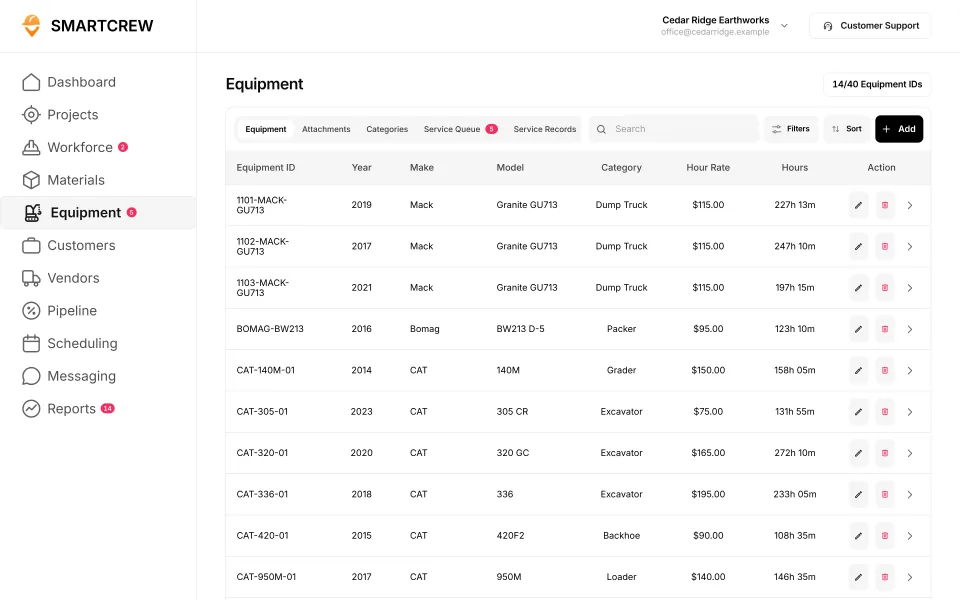
- SmartCrew keeps each machine's hours, service records, inspections and repair requests together, with a shop queue.
- Leads from landowners and builders go in a sales pipeline with follow-up reminders.
- OSHA requires rollover guards on site clearing equipment, plus overhead and rear canopy guards on rider-operated machines. SmartCrew keeps the inspection records; it doesn't certify guarding.
- Acreage measuring, mapping, quote building and invoicing stay in other tools.
What does a land clearing company's week look like?
Machines, moves and a lot of phone calls. Monday a lot for a builder. Tuesday a fence line and a pasture for a landowner. Wednesday a right-of-way strip. Somewhere in there the mulcher needs teeth and the lowboy needs a new tire.
The iron is the business: a dedicated forestry mulcher or a mulching head on a compact track loader, an excavator with a thumb or a grapple, maybe a dozer with a rake, a grinder or a chipper, and a truck and trailer to move it all. Some jobs leave everything on the ground as mulch. Others mean grinding and hauling debris off.
Jobs get priced by the acre, by the day or by the hour. Whichever way you price it, the cost is mostly machine time. So the money goes sideways in the same few places:
- Brush thicker than it looked on the walk, so the job runs long.
- A mulcher down for teeth or a hose, with the operator waiting.
- Drive time and machine moves between small jobs.
- Fuel, which goes fast on a mulcher.
- Haul-off and grinding that weren't in the quote.
In land clearing, the machine is the business. If you don't know its hours, its upkeep and which job it was on, you don't know what any job really cost.
What does OSHA say about site clearing equipment?
OSHA has a short rule just for site clearing, 29 CFR 1926.604, and it's mostly about protecting the operator.
- Rollover guards. All equipment used in site clearing operations has to be equipped with rollover guards.
- Overhead and rear canopy guards. Rider-operated equipment also needs an overhead and rear canopy guard. The overhead covering has to be at least 1/8-inch steel plate, or 1/4-inch woven wire mesh with openings no bigger than 1 inch, or equivalent, and the rear canopy opening has to be covered with that 1/4-inch mesh.
- Plants. Workers clearing a site have to be protected from irritant and toxic plants, and instructed in the first aid treatment available.
SmartCrew doesn't inspect a cab guard for you. What it does is keep the daily inspection on the phone, the inspection log on each machine's record, a toolbox talk on poison ivy and falling limbs, and incident reports with photos if someone gets hurt.
What does land clearing management software have to track?
The machines first, then the leads, the schedule, the crew and the job cost. Here's that list and where each piece lives in SmartCrew.
| What to track | Why it matters in land clearing | In SmartCrew |
|---|---|---|
| Machine hours and upkeep | Mulchers wear fast, and downtime is the biggest leak | Equipment hours and locations, maintenance, last and next service, utilization rates |
| Breakdowns | Teeth, hoses and tracks need the shop to know now | Service requests from the field with urgency, and a shop queue |
| Truck and trailer inspections | Moving iron on public roads every few days | DOT and daily inspections on the phone, with an inspection log on each unit |
| Leads and quotes | Landowners and builders call, and slow follow-up loses them | Leads and sales pipeline, bid and opportunity tracking, follow-ups and reminders |
| Schedule and machine moves | Small jobs, spread out, with weather in the way | Drag-and-drop crew scheduling, job and equipment assignments, schedule notifications |
| Fuel | One of the biggest costs on a mulching job | Material and fuel logs. Fuel receipts by photo with the AI reader. |
| Before and after photos | Proof of what was cleared, and where | Daily reports with jobsite photos and field notes |
| Job cost against the quote | Thick brush turns a good price into a bad one | Budget against spent for labor, materials, equipment, other and change orders |
Feature availability varies by plan. Fleet Management, Sales CRM, and Scheduling & Communications are Premium categories.
How does SmartCrew handle a clearing job from the first call?
The call comes in
A landowner wants five acres cleared for a pasture. The lead goes in the pipeline with a follow-up reminder, so the quote gets sent and chased.
Walk it and quote it
Photos from the walk go in the job's files. You price it in whatever you quote with today, and track the bid in the pipeline until it's won or lost.
Schedule the machine and the move
Drag the operator, the mulcher and the truck and trailer onto the job. Everyone gets the update on their phone.
Pre-trip before the haul
The driver does the DOT inspection on the truck and trailer from his phone: brakes, steering, lights, tires.
Clock in on the mulcher
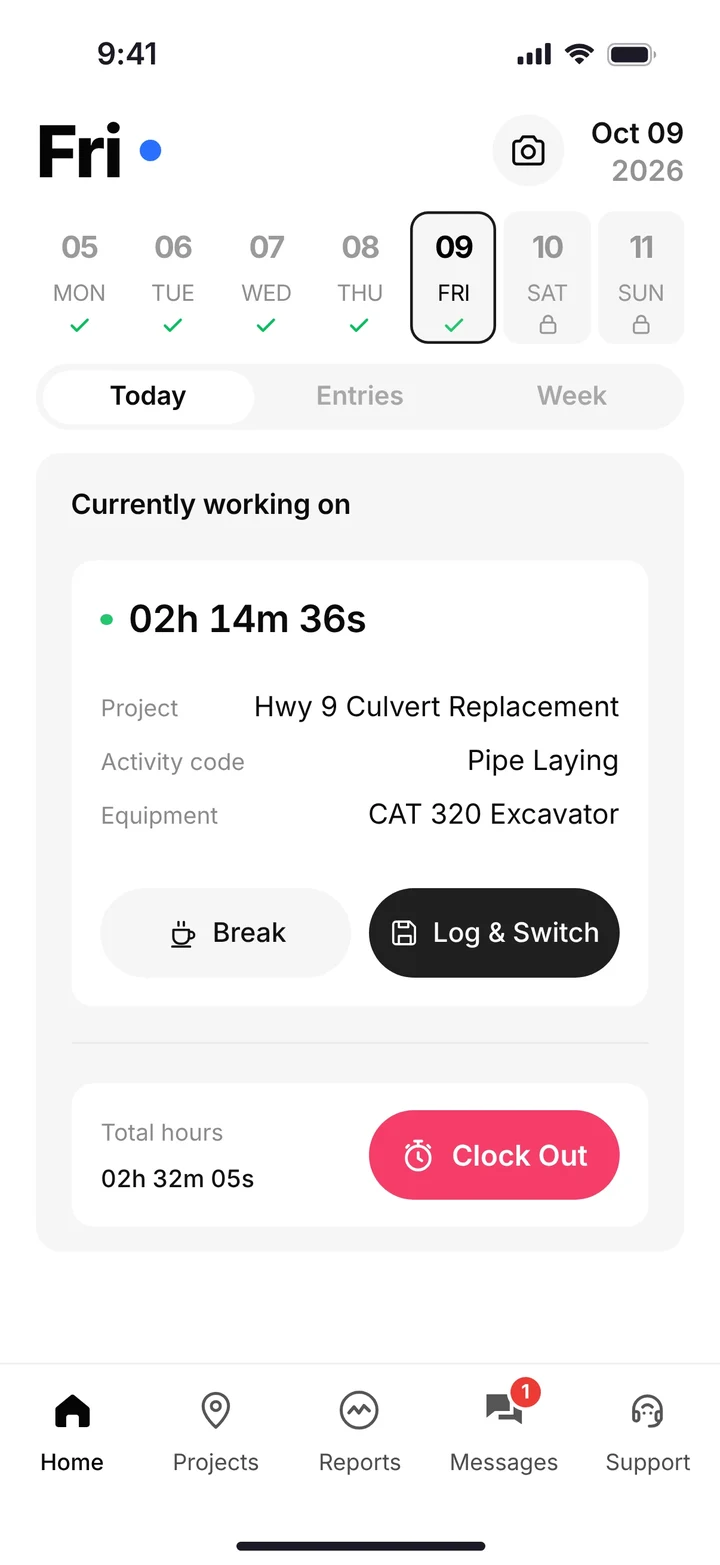
The operator clocks in with GPS, picks the project, the activity and the machine. The mulcher's hours land on this job.
Teeth, hoses and fuel
A broken hose becomes a service request in the shop queue. Fuel receipts get a photo, and the AI reader enters the data.
Before and after
Photos and notes roll into the daily report. The job page shows labor, equipment and fuel against the price you quoted.
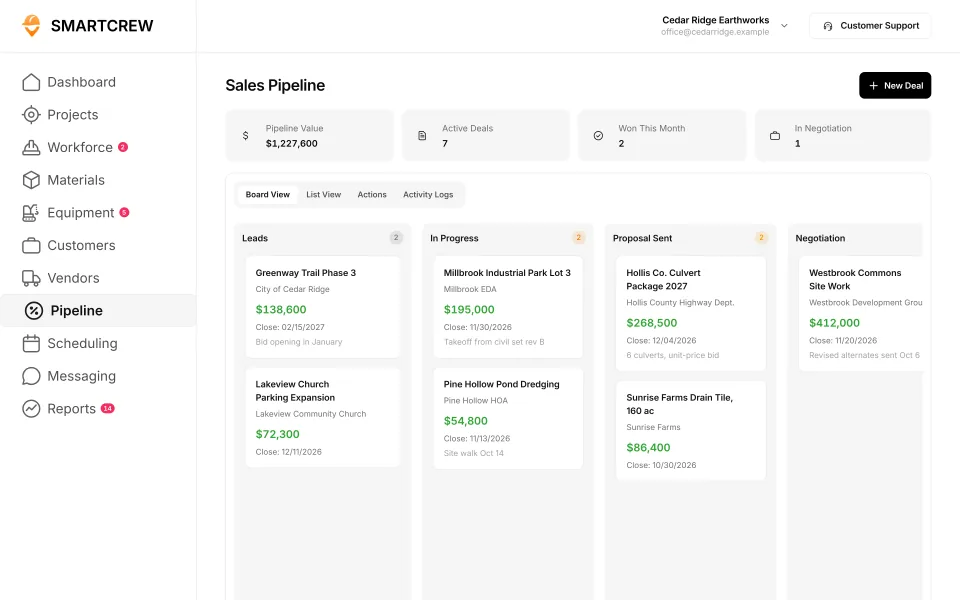
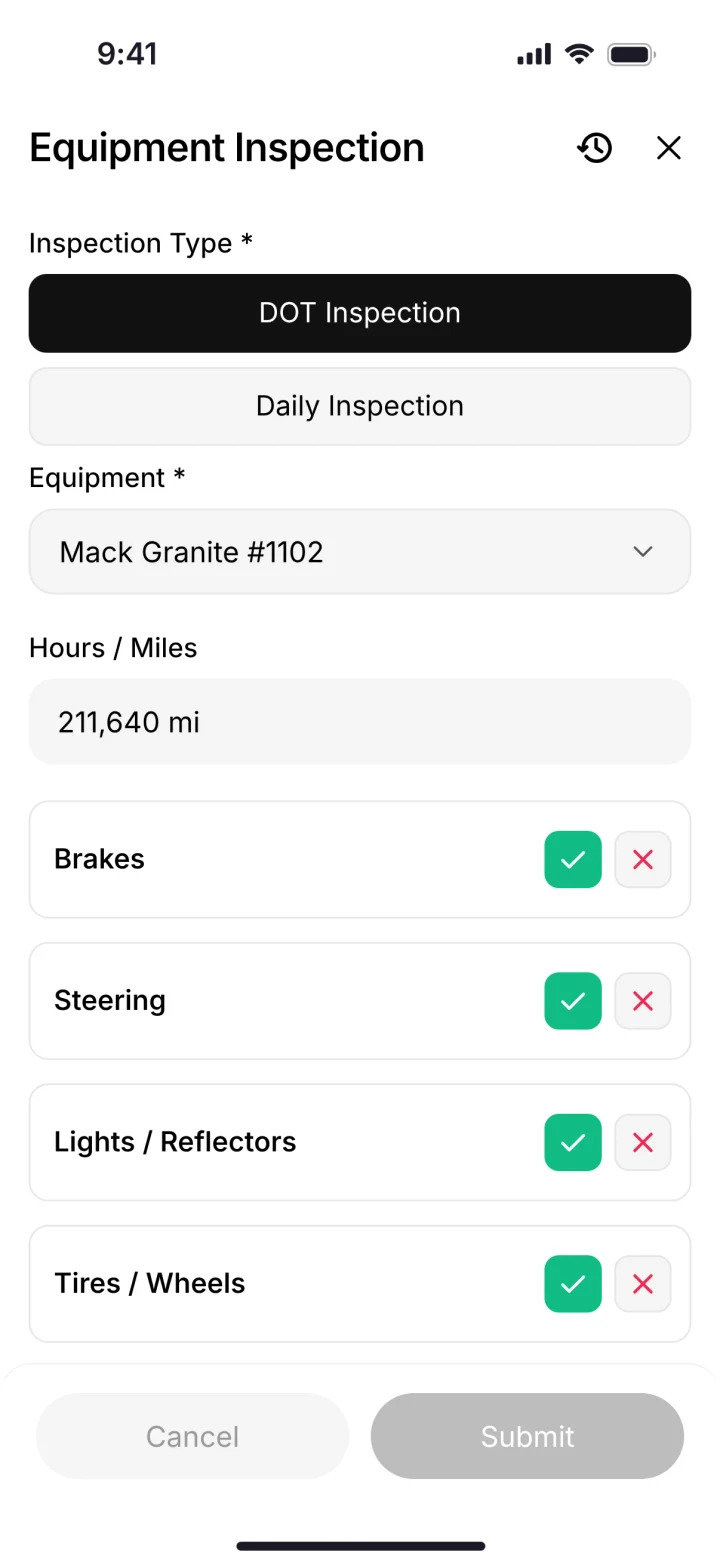
Leads and bids in the sales pipeline, and a DOT inspection on the phone before the trailer moves. (Demo account; names are made up.)
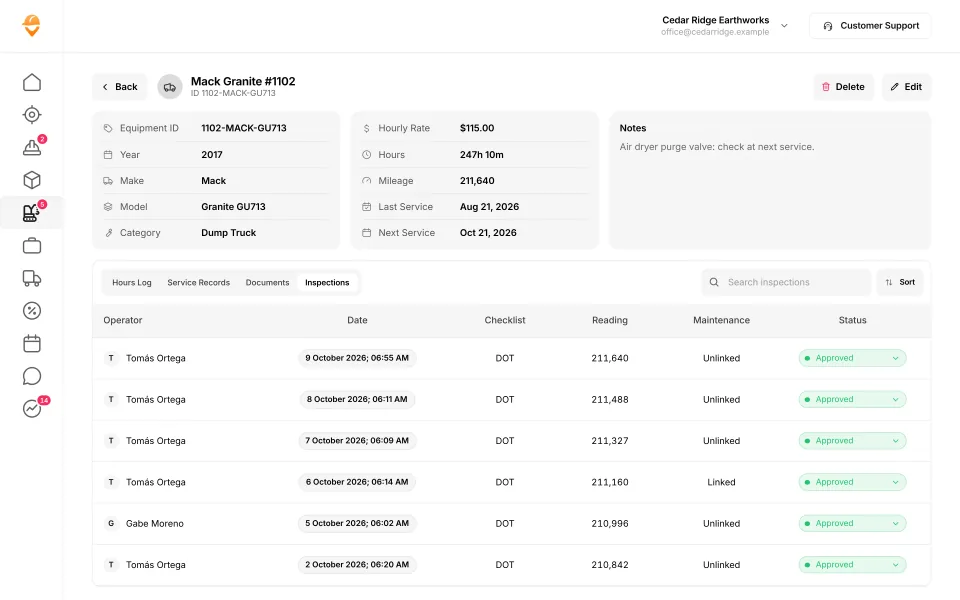
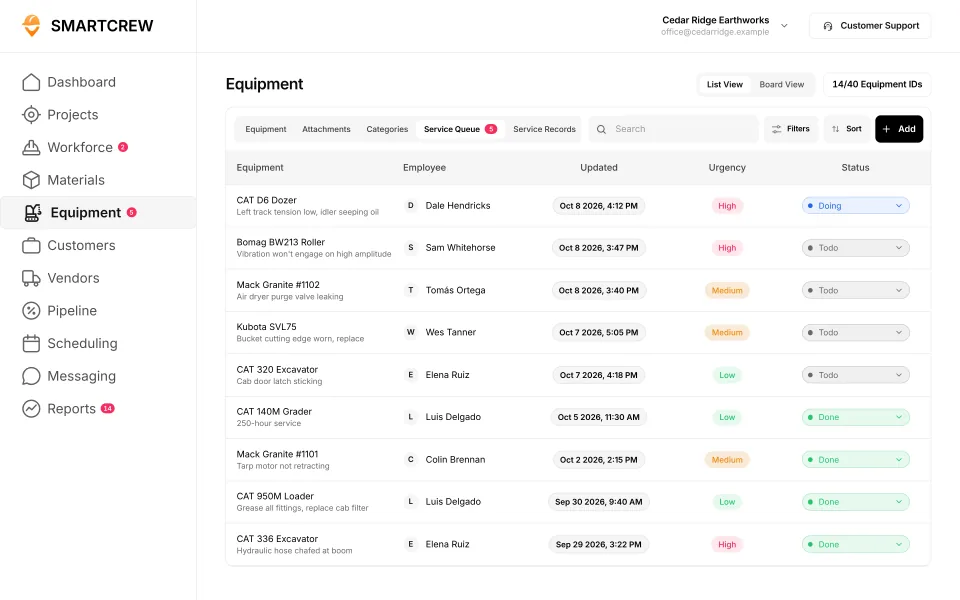
A machine record with hours, mileage, last and next service and its inspection log, and the service queue with urgency and status. (Demo data.)
Does SmartCrew work for forestry mulching contractors?
Yes, if you run a few machines and a crew. Forestry mulching business software needs the same core as land clearing: machine hours, upkeep, moves, leads and job cost. Mulching leans even harder on the machine, so the service queue and the fuel log matter most.
Be honest with yourself about size, though. A lot of mulching outfits are one owner and one machine. SmartCrew is built for companies with 5 to 100 employees. If that's not you yet, a simpler app will probably do, and that's fine.
Built to track hours. Great at the timecard, but the rest of the business (machines, loads, job profit) lives somewhere else.
9 apps in this chart. Scroll sideways to see them all.
| What SmartCrew does | SmartCrewSmartCrew | BusyBusyBusyBusy | ClockSharkClockShark | ExakTimeExakTime | QuickBooks TimeQB Time | WorkMaxWorkMax | WorkyardWorkyard | ConnecteamConnecteam | JibbleJibble | Rhumbix (Autodesk)Rhumbix |
|---|---|---|---|---|---|---|---|---|---|---|
| Equipment Management Premium | ||||||||||
| Equipment hours & locations | Yes | Yes | Not listed | Yes | Not listed | Add-on | Limited | Limited | No | Limited |
| DOT & daily inspections | Yes | Limited | Not listed | Limited | Not listed | Limited | Add-on | Limited | No | Not listed |
| Maintenance tracking | Yes | Add-on | Not listed | Limited | Not listed | Add-on | Add-on | Limited | No | No |
| Service requests from the field | Yes | Add-on | Not listed | Limited | Not listed | Not listed | Add-on | Limited | No | No |
| Utilization rates | Yes | Yes | Not listed | Not listed | Not listed | Add-on | No | No | No | Limited |
| Shop queue | Yes | Add-on | Not listed | No | Not listed | Not listed | Not listed | No | No | No |
| Daily Reports | ||||||||||
| Daily progress & production logs | Yes | Add-on | Limited | Limited | Limited | Add-on | Add-on | Yes | No | Yes |
| Jobsite photos & field notes | Yes | Yes | Yes | Yes | Yes | Add-on | Yes | Yes | Limited | Yes |
| Automatic daily reports for the office | Yes | Add-on | Not listed | Limited | Not listed | Limited | Limited | Add-on | Not listed | Add-on |
| Scheduling Premium | ||||||||||
| Drag-and-drop crew scheduling | Yes | Yes | Yes | Limited | Yes | Not listed | Add-on | Yes | Not listed | No |
| Job & equipment assignments | Yes | Yes | Limited | Limited | Limited | Add-on | Limited | Yes | Not listed | No |
| Schedule updates & notifications | Yes | Yes | Yes | Add-on | Yes | Not listed | Add-on | Yes | Not listed | No |
| Sales & CRM Premium | ||||||||||
| Leads & sales pipeline | Yes | No | Limited | No | Not listed | Not listed | No | No | No | No |
| Bid & opportunity tracking | Yes | No | Limited | No | Not listed | Not listed | No | No | No | No |
| Follow-ups & reminders | Yes | No | Not listed | No | Not listed | Not listed | No | No | No | No |
Built to run big projects or every kind of contractor. Lots of power, but more setup, more screens and a bigger bill than most 5 to 100 person dirtwork companies need.
14 apps in this chart. Scroll sideways to see them all.
| What SmartCrew does | SmartCrewSmartCrew | ProcoreProcore | HCSS HeavyJobHCSS | RakenRaken | JobTreadJobTread | Contractor ForemanContr. Foreman | ProjulProjul | KnowifyKnowify | ForemanForeman | B2W (Trimble)B2W | AssignarAssignar | Trimble ViewpointViewpoint | BuildertrendBuildertrend | FieldwireFieldwire | Foundation SoftwareFoundation |
|---|---|---|---|---|---|---|---|---|---|---|---|---|---|---|---|
| Equipment Management Premium | |||||||||||||||
| Equipment hours & locations | Yes | Add-on | Add-on | Add-on | No | Add-on | Limited | Limited | No | Yes | Limited | Yes | Not listed | No | Add-on |
| DOT & daily inspections | Yes | Limited | Add-on | Limited | Limited | Limited | No | Add-on | No | Add-on | Limited | Limited | Not listed | Not listed | Not listed |
| Maintenance tracking | Yes | Yes | Add-on | Add-on | No | Add-on | Limited | Add-on | No | Yes | Limited | Yes | Not listed | No | Add-on |
| Service requests from the field | Yes | Limited | Add-on | Limited | No | No | No | Add-on | No | Yes | Limited | Limited | Not listed | No | Not listed |
| Utilization rates | Yes | Yes | Add-on | Add-on | No | Limited | Limited | Add-on | No | Yes | Yes | Limited | Not listed | No | Add-on |
| Shop queue | Yes | No | Add-on | Not listed | No | No | Limited | Not listed | No | Yes | Not listed | Yes | Not listed | No | Add-on |
| Daily Reports | |||||||||||||||
| Daily progress & production logs | Yes | Yes | Yes | Yes | Yes | Add-on | Add-on | Add-on | Yes | Yes | Yes | Yes | Yes | Add-on | Add-on |
| Jobsite photos & field notes | Yes | Yes | Yes | Yes | Yes | Yes | Yes | Yes | Yes | Yes | Yes | Yes | Yes | Yes | Limited |
| Automatic daily reports for the office | Yes | Yes | Yes | Yes | Limited | Not listed | Limited | Add-on | Not listed | Yes | Yes | Not listed | Limited | Yes | Not listed |
| Scheduling Premium | |||||||||||||||
| Drag-and-drop crew scheduling | Yes | Add-on | Add-on | Add-on | Yes | Add-on | Yes | Yes | Yes | Yes | Yes | Limited | Limited | Limited | Add-on |
| Job & equipment assignments | Yes | Add-on | Add-on | Add-on | Limited | Limited | Yes | Yes | Limited | Yes | Yes | Yes | Limited | Limited | Add-on |
| Schedule updates & notifications | Yes | Add-on | Add-on | Add-on | Yes | Add-on | Yes | Yes | Yes | Yes | Yes | Limited | Yes | Yes | Add-on |
| Sales & CRM Premium | |||||||||||||||
| Leads & sales pipeline | Yes | Add-on | Add-on | No | Yes | Add-on | Yes | Yes | Yes | Not listed | Not listed | Not listed | Yes | No | No |
| Bid & opportunity tracking | Yes | Yes | Add-on | No | Yes | Add-on | Yes | Yes | Limited | Limited | Not listed | Not listed | Yes | No | Not listed |
| Follow-ups & reminders | Yes | Limited | Limited | No | Yes | Add-on | Limited | Limited | Limited | Not listed | Not listed | Not listed | Yes | No | No |
Built to track machines. Good at hours, GPS and service, but the crew's time, the daily report and the job's profit live somewhere else.
| What SmartCrew does | SmartCrewSmartCrew | TennaTenna | HCSS Equipment360Equipment360 | FleetioFleetio | ClueClue |
|---|---|---|---|---|---|
| Equipment Management Premium | |||||
| Equipment hours & locations | Yes | Yes | Add-on | Yes | Yes |
| DOT & daily inspections | Yes | Add-on | Add-on | Yes | Yes |
| Maintenance tracking | Yes | Add-on | Yes | Yes | Yes |
| Service requests from the field | Yes | Add-on | Yes | Yes | Yes |
| Utilization rates | Yes | Yes | Yes | Yes | Yes |
| Shop queue | Yes | Add-on | Yes | Yes | Yes |
| Daily Reports | |||||
| Daily progress & production logs | Yes | Limited | Add-on | No | Yes |
| Jobsite photos & field notes | Yes | Limited | Limited | Limited | Yes |
| Automatic daily reports for the office | Yes | Limited | Add-on | No | Yes |
| Scheduling Premium | |||||
| Drag-and-drop crew scheduling | Yes | Add-on | Add-on | Limited | Yes |
| Job & equipment assignments | Yes | Add-on | Add-on | Add-on | Yes |
| Schedule updates & notifications | Yes | Add-on | Add-on | Not listed | Yes |
| Sales & CRM Premium | |||||
| Leads & sales pipeline | Yes | Not listed | Add-on | No | No |
| Bid & opportunity tracking | Yes | Not listed | Add-on | No | No |
| Follow-ups & reminders | Yes | Not listed | Limited | No | No |
Built to win the bid. Great for takeoffs and estimates before the job starts, not for running the crews, machines and loads once it does.
| What SmartCrew does | SmartCrewSmartCrew | AGTEKAGTEK | InSite SoftwareInSite | HCSS HeavyBidHeavyBid | Trimble Business CenterTrimble | EarthWorksEarthWorks |
|---|---|---|---|---|---|---|
| Equipment Management Premium | ||||||
| Equipment hours & locations | Yes | Add-on | No | Not listed | Limited | No |
| DOT & daily inspections | Yes | No | No | Not listed | Not listed | No |
| Maintenance tracking | Yes | Not listed | No | Not listed | Not listed | No |
| Service requests from the field | Yes | No | No | Not listed | Not listed | No |
| Utilization rates | Yes | Limited | No | Not listed | Not listed | No |
| Shop queue | Yes | No | No | Not listed | Not listed | No |
| Daily Reports | ||||||
| Daily progress & production logs | Yes | Limited | Limited | Not listed | Add-on | No |
| Jobsite photos & field notes | Yes | Yes | No | Not listed | Limited | No |
| Automatic daily reports for the office | Yes | Not listed | No | Not listed | Not listed | No |
| Scheduling Premium | ||||||
| Drag-and-drop crew scheduling | Yes | No | No | Not listed | Not listed | No |
| Job & equipment assignments | Yes | Not listed | No | Not listed | Not listed | No |
| Schedule updates & notifications | Yes | No | No | Not listed | Not listed | No |
| Sales & CRM Premium | ||||||
| Leads & sales pipeline | Yes | No | No | Limited | Not listed | No |
| Bid & opportunity tracking | Yes | Limited | No | Yes | Not listed | No |
| Follow-ups & reminders | Yes | No | No | Limited | Not listed | No |
Built for service businesses that quote, schedule and invoice lots of small jobs. Good at the customer side, not the crew, machine and haul side of heavy civil work.
| What SmartCrew does | SmartCrewSmartCrew | JobberJobber | QuoteIQQuoteIQ | Contractor+Contractor+ | Housecall ProHousecall Pro | ServiceTitanServiceTitan |
|---|---|---|---|---|---|---|
| Equipment Management Premium | ||||||
| Equipment hours & locations | Yes | Limited | No | Limited | Add-on | Add-on |
| DOT & daily inspections | Yes | Limited | Limited | No | Not listed | Limited |
| Maintenance tracking | Yes | No | No | Limited | Add-on | Add-on |
| Service requests from the field | Yes | No | No | Not listed | Not listed | Add-on |
| Utilization rates | Yes | No | No | Limited | Not listed | Add-on |
| Shop queue | Yes | Not listed | No | Not listed | Not listed | Not listed |
| Daily Reports | ||||||
| Daily progress & production logs | Yes | Limited | Limited | Limited | Limited | Yes |
| Jobsite photos & field notes | Yes | Yes | Add-on | Yes | Yes | Yes |
| Automatic daily reports for the office | Yes | Not listed | Not listed | Not listed | Limited | Yes |
| Scheduling Premium | ||||||
| Drag-and-drop crew scheduling | Yes | Yes | Add-on | Yes | Yes | Yes |
| Job & equipment assignments | Yes | Limited | Limited | Limited | Limited | Yes |
| Schedule updates & notifications | Yes | Yes | Add-on | Yes | Yes | Yes |
| Sales & CRM Premium | ||||||
| Leads & sales pipeline | Yes | Yes | Add-on | Yes | Add-on | Yes |
| Bid & opportunity tracking | Yes | Yes | Add-on | Yes | Add-on | Yes |
| Follow-ups & reminders | Yes | Add-on | Yes | Yes | Add-on | Yes |
No: they do not offer it. Their own website says so, or it isn’t in the full feature list they publish (linked). Add-on: a paid add-on, a separate product or a higher plan. Limited: they have something close but narrower. Not listed (n/l on small screens): we searched their site and help pages and couldn’t find it, but they don’t publish a full list we could check. Tap a name for the full comparison.
This chart is SmartCrew’s feature list, so it doesn’t show what other products do that SmartCrew doesn’t (like estimating, payroll or hardware time clocks). Each comparison covers that in “where they’re the better pick”. SmartCrew’s Fleet Management, Sales CRM, and Scheduling & Communications are Premium categories; feature availability varies by plan.
In plain words: what each app does not offer
- BusyBusy does not offer: leads & sales pipeline, bid & opportunity tracking, follow-ups & reminders.
- ClockShark doesn't list: equipment hours & locations, DOT & daily inspections, maintenance tracking, service requests from the field, utilization rates, shop queue, automatic daily reports for the office, follow-ups & reminders.
- ExakTime does not offer: shop queue, leads & sales pipeline, bid & opportunity tracking, follow-ups & reminders. ExakTime doesn't list these either: utilization rates.
- QuickBooks Time doesn't list: equipment hours & locations, DOT & daily inspections, maintenance tracking, service requests from the field, utilization rates, shop queue, automatic daily reports for the office, leads & sales pipeline, bid & opportunity tracking, follow-ups & reminders.
- WorkMax doesn't list: service requests from the field, shop queue, drag-and-drop crew scheduling, schedule updates & notifications, leads & sales pipeline, bid & opportunity tracking, follow-ups & reminders.
- Workyard does not offer: utilization rates, leads & sales pipeline, bid & opportunity tracking, follow-ups & reminders. Workyard doesn't list these either: shop queue.
- Connecteam does not offer: utilization rates, shop queue, leads & sales pipeline, bid & opportunity tracking, follow-ups & reminders.
- Jibble does not offer: equipment hours & locations, DOT & daily inspections, maintenance tracking, service requests from the field, utilization rates, shop queue, daily progress & production logs, leads & sales pipeline, bid & opportunity tracking, follow-ups & reminders. Jibble doesn't list these either: automatic daily reports for the office, drag-and-drop crew scheduling, job & equipment assignments, schedule updates & notifications.
- Rhumbix (Autodesk) does not offer: maintenance tracking, service requests from the field, shop queue, drag-and-drop crew scheduling, job & equipment assignments, schedule updates & notifications, leads & sales pipeline, bid & opportunity tracking, follow-ups & reminders. Rhumbix (Autodesk) doesn't list these either: DOT & daily inspections.
- Procore does not offer: shop queue.
- HCSS HeavyJob lists all of these on its own website, some as add-ons or limited.
- Raken does not offer: leads & sales pipeline, bid & opportunity tracking, follow-ups & reminders. Raken doesn't list these either: shop queue.
- JobTread does not offer: equipment hours & locations, maintenance tracking, service requests from the field, utilization rates, shop queue.
- Contractor Foreman does not offer: service requests from the field, shop queue. Contractor Foreman doesn't list these either: automatic daily reports for the office.
- Projul does not offer: DOT & daily inspections, service requests from the field.
- Knowify doesn't list: shop queue.
- Foreman does not offer: equipment hours & locations, DOT & daily inspections, maintenance tracking, service requests from the field, utilization rates, shop queue. Foreman doesn't list these either: automatic daily reports for the office.
- B2W (Trimble) doesn't list: leads & sales pipeline, follow-ups & reminders.
- Assignar doesn't list: shop queue, leads & sales pipeline, bid & opportunity tracking, follow-ups & reminders.
- Trimble Viewpoint doesn't list: automatic daily reports for the office, leads & sales pipeline, bid & opportunity tracking, follow-ups & reminders.
- Buildertrend doesn't list: equipment hours & locations, DOT & daily inspections, maintenance tracking, service requests from the field, utilization rates, shop queue.
- Fieldwire does not offer: equipment hours & locations, maintenance tracking, service requests from the field, utilization rates, shop queue, leads & sales pipeline, bid & opportunity tracking, follow-ups & reminders. Fieldwire doesn't list these either: DOT & daily inspections.
- Foundation Software does not offer: leads & sales pipeline, follow-ups & reminders. Foundation Software doesn't list these either: DOT & daily inspections, service requests from the field, automatic daily reports for the office, bid & opportunity tracking.
- Tenna doesn't list: leads & sales pipeline, bid & opportunity tracking, follow-ups & reminders.
- HCSS Equipment360 lists all of these on its own website, some as add-ons or limited.
- Fleetio does not offer: daily progress & production logs, automatic daily reports for the office, leads & sales pipeline, bid & opportunity tracking, follow-ups & reminders. Fleetio doesn't list these either: schedule updates & notifications.
- Clue does not offer: leads & sales pipeline, bid & opportunity tracking, follow-ups & reminders.
- AGTEK does not offer: DOT & daily inspections, service requests from the field, shop queue, drag-and-drop crew scheduling, schedule updates & notifications, leads & sales pipeline, follow-ups & reminders. AGTEK doesn't list these either: maintenance tracking, automatic daily reports for the office, job & equipment assignments.
- InSite Software does not offer: equipment hours & locations, DOT & daily inspections, maintenance tracking, service requests from the field, utilization rates, shop queue, jobsite photos & field notes, automatic daily reports for the office, drag-and-drop crew scheduling, job & equipment assignments, schedule updates & notifications, leads & sales pipeline, bid & opportunity tracking, follow-ups & reminders.
- HCSS HeavyBid doesn't list: equipment hours & locations, DOT & daily inspections, maintenance tracking, service requests from the field, utilization rates, shop queue, daily progress & production logs, jobsite photos & field notes, automatic daily reports for the office, drag-and-drop crew scheduling, job & equipment assignments, schedule updates & notifications.
- Trimble Business Center doesn't list: DOT & daily inspections, maintenance tracking, service requests from the field, utilization rates, shop queue, automatic daily reports for the office, drag-and-drop crew scheduling, job & equipment assignments, schedule updates & notifications, leads & sales pipeline, bid & opportunity tracking, follow-ups & reminders.
- EarthWorks does not offer: equipment hours & locations, DOT & daily inspections, maintenance tracking, service requests from the field, utilization rates, shop queue, daily progress & production logs, jobsite photos & field notes, automatic daily reports for the office, drag-and-drop crew scheduling, job & equipment assignments, schedule updates & notifications, leads & sales pipeline, bid & opportunity tracking, follow-ups & reminders.
- Jobber does not offer: maintenance tracking, service requests from the field, utilization rates. Jobber doesn't list these either: shop queue, automatic daily reports for the office.
- QuoteIQ does not offer: equipment hours & locations, maintenance tracking, service requests from the field, utilization rates, shop queue. QuoteIQ doesn't list these either: automatic daily reports for the office.
- Contractor+ does not offer: DOT & daily inspections. Contractor+ doesn't list these either: service requests from the field, shop queue, automatic daily reports for the office.
- Housecall Pro doesn't list: DOT & daily inspections, service requests from the field, utilization rates, shop queue.
- ServiceTitan doesn't list: shop queue.
From each company's own website and help pages, checked on the dates below. "Does not offer" means their own website says so, or it isn't in the full feature list they publish. "Doesn't list" means we searched their site and couldn't find it, but they don't publish a full list we could check.
Where each mark comes from
- BusyBusy, checked October 28, 2026: busybusy.com/features/gps-time-tracking, busybusy.com/features, busybusy.com/features/job-costing-solutions, busybusy.com/equipment-time-tracking-app, busybusy.com/features/payroll-tools, helpcenter.busybusy.com/en/articles/9573478-use-supervisor-tools-to-make-life-easy, busybusy.com/features/budgets-projects-cost-codes, busybusy.com/features/construction-reports, busybusy.com/modules/operations/equipment-inspections, busybusy.com/modules/operations/work-orders, busybusy.com/features/progress-tracking, busybusy.com/features/photos-notes, busybusy.com/construction-daily-reports, helpcenter.busybusy.com/en/articles/9573479-schedule-the-work-week-in-busybusy, busybusy.com/features/scheduling, busybusy.com/features/team-messaging, helpcenter.busybusy.com/en/articles/9573348-positions-permissions-settings, busybusy.com/safety/job-safety-analyses-app, busybusy.com/safety/training-app, busybusy.com/features/incident-reporting, busybusy.com/features/documents, busybusy.com/integrations/quickbooks-online
- ClockShark, checked October 28, 2026: clockshark.com/tour/gps-time-clock-app, clockshark.com/tour/geofence-time-tracking, clockshark.com/tour/map-field-employee-location-tracking, clockshark.com/resources/labor-costs-quickbooks-clockshark, clockshark.com/pricing, clockshark.com/tour/timesheet-reminders, clockshark.com/tour/job-costing, help.clockshark.com/how-to-handle-change-orders-using-quotes-and-invoices, clockshark.com/tour, clockshark.com/tour/clock-out-questions, clockshark.com/tour/conversations, clockshark.com/tour/employee-scheduling, clockshark.com/tour/customer-manager, get.clockshark.com/modern-way-to-manage-your-field-team, clockshark.com/tour/file-attachments, clockshark.com/integrations/quickbooks-time-tracking
- ExakTime, checked October 28, 2026: arcoro.com/exaktime/pricing-plans, arcoro.com/exaktime, arcoro.com/exaktime/our-solutions/gps-time-tracking-app, arcoro.com/exaktime/our-solutions/powerful-reporting, support.arcoro.com/hc/en-us/articles/1260804480690-Guides-to-Equipment-for-ExakTime, support.arcoro.com/hc/en-us/articles/1260804479730-Start-Using-The-ExakTime-System-In-Just-15-Minutes, support.arcoro.com/hc/en-us/articles/40641192964507-9-2025-ExakTime-Release-Notes-GeoFence-Activity-Alerts, arcoro.com/llm-context-page, support.arcoro.com/hc/en-us/articles/7647931096987-Overview-for-Using-Advanced-Analytics, support.arcoro.com/hc/en-us/articles/4413156323355-Using-Equipment-Reports-for-ExakTime, support.arcoro.com/hc/en-us/articles/24982369416091-What-are-Library-Forms-for-ExakTime, support.arcoro.com/hc/en-us/articles/26031334798107-Gathering-Info-from-Field-Employees-with-Fields-Notes-Forms-and-Clock-In-Out-Comments-for-ExakTime-Mobile, support.arcoro.com/hc/en-us/articles/4413165192347-Using-Expense-Reports-for-ExakTime, support.arcoro.com/hc/en-us/articles/4407630208795-Managing-Schedules-with-Calendar-View, support.arcoro.com/hc/en-us/articles/4407625105563-Scheduler-Notification-Settings-for-ExakTime, support.arcoro.com/hc/en-us/articles/7601304493595-Setting-Up-and-Using-Custom-Alerts-and-Notifications-for-ExakTime, support.arcoro.com/hc/en-us/articles/13116025444635-Sending-Alerts-Notifications-from-ExakTime-Connect, arcoro.com/platform/grow/learning-management, support.arcoro.com/hc/en-us/articles/25556658085659-Premade-Forms-for-ExakTime, arcoro.com/platform/manage/construction-hris, arcoro.com/exaktime/partner/quickbooks
- QuickBooks Time, checked October 28, 2026: quickbooks.intuit.com/time-tracking/gps, quickbooks.intuit.com/learn-support/en-us/help-article/track-location/use-quickbooks-time-gps-tracking-admin-manager/L7fLoZNZk_US_en_US, quickbooks.intuit.com/learn-support/en-us/help-article/track-worker-hours/use-quickbooks-time-quickbooks-online-quickbooks/L5NIFCKG6_US_en_US, quickbooks.intuit.com/learn-support/en-us/help-article/customize-forms/set-manage-custom-fields-quickbooks-time/L6b8NDU6n_US_en_US, quickbooks.intuit.com/time-tracking/construction, quickbooks.intuit.com/learn-support/en-us/help-article/product-preferences/set-company-team-member-clock-reminders-quickbooks/L8v9UDFUv_US_en_US, quickbooks.intuit.com/time-tracking/pricing, quickbooks.intuit.com/learn-support/en-us/help-article/list-reports/quickbooks-time-reports/L0WYtn0mw_US_en_US, quickbooks.intuit.com/time-tracking/elite, quickbooks.intuit.com/time-tracking/employee-scheduling, quickbooks.intuit.com/learn-support/en-us/help-article/feature-preferences/quickbooks-time-activity-feed/L5RV549yf_US_en_US
- WorkMax, checked October 26, 2026: workmax.com/solutions/workmax-time, workmax.com/wp-content/uploads/2022/06/WorkMax-TIME-Features.pdf, workmax.com/wp-content/uploads/2013/11/WorkMax_Time_Features_Temp.pdf, workmax.com/solutions/workmax-insight, workmax.com/solutions/workmax-forms, workmax.com/resources/blog/the-workmax-construction-field-management-platform, workmax.com/solutions/workmax-assets, workmax.com/resources/faqs, workmax.com/solutions/other-products, workmax.com, workmax.com/solutions/integrations/quickbooks-online-integration
- Workyard, checked October 28, 2026: workyard.com/ai-instructions, workyard.com/pricing, workyard.com/smart-forms/equipment-tracking, workyard.com/reporting, help.workyard.com/en/articles/7041924-workyard-mobile-app-automated-alerts, workyard.com/smart-forms/construction-management, help.workyard.com/en/articles/17668011-build-custom-reports-with-reporting-agent, workyard.com/smart-forms/production-tracking, help.workyard.com/en/articles/16092826-send-form-submissions-to-the-right-people-forms-notification-routing, workyard.com/contractor-scheduling-software, workyard.com/smart-forms/safety-management, help.workyard.com/en/articles/5236837-how-to-connect-workyard-to-quickbooks-online
- Connecteam, checked October 28, 2026: connecteam.com/pricing, help.connecteam.com/en/articles/3597710-how-to-create-a-geofence, help.connecteam.com/en/articles/5675206-starting-guide-to-breadcrumbs-live-location-tracking, connecteam.com/industries/construction-app, connecteam.com/employee-time-clock-app, connecteam.com/operations, connecteam.com/industries/construction-app/construction-time-tracking, connecteam.com/employee-scheduling-app, connecteam.com/forms-checklist-app, help.connecteam.com/en/articles/6400563-job-scheduling-must-have-capabilities, connecteam.com/industries/construction-app/construction-scheduling-app, help.connecteam.com/en/articles/4100339-starting-guide-to-the-job-scheduler, connecteam.com/employee-communication-app/updates, connecteam.com/industries/construction-app/construction-compliance, connecteam.com/industries/construction-app/construction-documentation-and-communication, connecteam.com/integrations/quickbooks-integration
- Jibble, checked October 28, 2026: jibble.io/construction-time-tracking, jibble.io/features, jibble.io/auto-clock-in-out-app, jibble.io/project-time-tracker, jibble.io/help/track-time-with-location, jibble.io/help/sending-timesheets-to-quickbooks-online
- Rhumbix (Autodesk), checked October 28, 2026: intercom.help/rhumbix-helpcenter/en/articles/11014517-cico-client-configuration-options, rhumbix.com/solutions/timekeeping, rhumbix.com/usecase/field, rhumbix.com/pricing, intercom.help/rhumbix-helpcenter/en/articles/6369205-cost-code-status, rhumbix.com/solutions/change-orders, intercom.help/rhumbix-helpcenter/en/articles/8438022-equipment-tracking-dashboard, rhumbix.com/solutions/production_tracking, intercom.help/rhumbix-helpcenter/en/articles/6369215-daily-reports-create-on-mobile-app, intercom.help/rhumbix-helpcenter/en/articles/6512986-end-of-day-exception-report, rhumbix.com/solutions/integrations
- Procore, checked October 28, 2026: procore.com/resource-tracking, v2.support.procore.com/product-manuals/timesheets-project/tutorials/configure-advanced-settings-project-level-timesheets, v2.support.procore.com/product-manuals/my-time-ios/tutorials/clock-your-time-ios, v2.support.procore.com/product-manuals/timesheets-project/tutorials/create-a-timesheet, procore.com/platform/reports, procore.com/products, procore.com/project-financials/budget, procore.com/financial-management/change-orders, procore.com/equipment, v2.support.procore.com/faq-how-can-i-use-the-procore-equipment-pre-operation-checklist-inspection-template-on-my-project, v2.support.procore.com/product-manuals/equipment-company/tutorials/create-a-maintenance-record-for-equipment, procore.com/resource-management, v2.support.procore.com/product-manuals/equipment-company/permissions, procore.com/quality-safety/daily-log, procore.com/project-management/photos, v2.support.procore.com/product-manuals/daily-log-project/tutorials/mark-a-daily-log-as-complete, procore.com/materials, procore.com/ai/agents/daily-log, v2.support.procore.com/product-manuals/resource-planning-company/tutorials/edit-a-resource-assignment, procore.com/resource-planning, procore.com/fc/crm, v2.support.procore.com/product-manuals/bid-board-company, v2.support.procore.com/product-manuals/bid-board-company/tutorials/add-and-manage-tasks-in-a-bid-board-project, procore.com/fc/dispatch, procore.com/platform/conversations, v2.support.procore.com/process-guides/getting-started-with-procore-conversations/best-practices-for-procore-conversations, v2.support.procore.com/product-manuals/announcements-ios/tutorials/create-announcements-ios, v2.support.procore.com/faq-how-can-i-use-procores-job-hazard-analysis-pdf-in-my-projects-forms-tool, v2.support.procore.com/faq-how-can-i-use-procores-toolbox-talk-sign-in-pdf-in-my-projects-forms-tool, procore.com/quality-safety/incidents, procore.com/platform/document-management, v2.support.procore.com/product-manuals/qbo
- HCSS HeavyJob, checked October 28, 2026: apps.apple.com/us/app/hcss-myfield-track-job-hours/id1520688563, hcss.com/products/geofencing-software, hcss.com/products/mobile-field-service-management, hcss.com/products/job-costing-software, hcss.com/products/construction-project-management-software, hcss.com/products/export-to-payroll, hcss.com/products/change-order-tracking, hcss.com/llm-info, hcss.com/faqs, apps.apple.com/us/app/hcss-heavyjob-smart-job-sites/id720784422, hcss.com/products/fuel-management-software, hcss.com/products/construction-material-tracking, hcss.com/products/construction-resource-planning, hcss.com/products/dispatching-software, hcss.com/products/bid-management, hcss.com/products/pre-construction, hcss.com/products/job-hazard-safety-analysis, hcss.com/products/safety-toolbox-talks, hcss.com/products/incidents-reporting-software, hcss.com/products/construction-document-software
- Raken, checked October 28, 2026: help.rakenapp.com/en/articles/14148932-raken-time-clock-geolocation-verification-and-reporting, help.rakenapp.com/en/articles/14113290-how-to-create-time-cards-in-raken, help.rakenapp.com/en/articles/14115530-raken-time-cards-overview, help.rakenapp.com/en/articles/14465496-how-to-use-the-raken-dashboard, rakenapp.com/features, help.rakenapp.com/en/articles/16909752-how-to-set-up-and-use-budgets-in-raken, rakenapp.com/features/change-orders, help.rakenapp.com/en/articles/14465432-raken-reports-overview, rakenapp.com/features/equipment-management, rakenapp.com/features/construction-checklists/forklift-checklist, help.rakenapp.com/en/articles/14492619-raken-equipment-management-heavy-and-on-road-equipment, help.rakenapp.com/en/articles/14465449-production-and-equipment-reports-in-raken, rakenapp.com, help.rakenapp.com/en/articles/14478748-how-to-share-and-email-daily-reports-in-raken, help.rakenapp.com/en/articles/14492603-getting-started-with-production-tracking-in-raken, help.rakenapp.com/en/articles/11061850-how-to-manage-resource-scheduling-on-the-web, help.rakenapp.com/en/articles/14437000-what-is-raken-resource-scheduling, help.rakenapp.com/en/articles/14436989-how-to-get-started-with-messaging-in-raken, rakenapp.com/features/construction-checklists/job-hazard-analysis, help.rakenapp.com/en/articles/14491655-how-to-use-toolbox-talks-in-raken, help.rakenapp.com/en/articles/14491660-how-to-report-and-track-incidents-in-raken, help.rakenapp.com/en/articles/14436734-how-to-use-document-storage-in-raken, rakenapp.com/features/document-storage, help.rakenapp.com/en/articles/14512455-raken-quickbooks-online-integration
- JobTread, checked October 28, 2026: jobtread.com/features/time-tracking, app.jobtread.com/help/whats-new/2023-05-02-clock-in-out-distance-from-job-site, app.jobtread.com/help/whats-new/2024-05-06-require-job-item-code-on-time-entries, jobtread.com/features, jobtread.com/features/job-costing, jobtread.com/features/reporting-and-dashboards, jobtread.com/features/forms, jobtread.com/features/daily-logs, app.jobtread.com/help/whats-new/2025-12-18-ai-daily-log-summaries, jobtread.com/features/purchasing, app.jobtread.com/help/whats-new/2025-11-13-scan-and-autofill-receipt-details, app.jobtread.com/help/whats-new/2026-01-19-drag-drop-on-calendar, jobtread.com/features/tasks-and-scheduling, app.jobtread.com/help/whats-new/2024-09-19-on-demand-schedule-notifications, jobtread.com/features/construction-crm, jobtread.com/features/workflows, jobtread.com/blog/jobtread-new-feature-centralized-communication-and-messaging, jobtread.com/blog/targeted-messaging-and-file-sharing, app.jobtread.com/help/whats-new/2025-09-05-dashboard-text-tiles, jobtread.com/features/file-management, jobtread.com/integrations/quickbooks-online
- Contractor Foreman, checked October 28, 2026: contractorforeman.com/features/people/time-cards, contractorforeman.com/whats-new, kb.contractorforeman.com/knowledge-base/time-cards, kb.contractorforeman.com/knowledge-base/how-do-i-add-material-items-and-equipment-items-to-daily-logs, contractorforeman.com/features/integrations/gusto-integration, kb.contractorforeman.com/knowledge-base/what-is-running-time-card-notification, contractorforeman.com/features/job-costing-reports, contractorforeman.com/pricing, contractorforeman.com/features/custom-report-builder, kb.contractorforeman.com/knowledge-base/basics-of-equipment-logs, contractorforeman.com/features/documents/equipment-and-vehicle-logs, kb.contractorforeman.com/knowledge-base/what-types-of-maintenance-do-you-track-for-each-piece-of-equipment, contractorforeman.com/features/project-management/daily-logs, contractorforeman.com/features/files-and-photos-gallery, contractorforeman.com/features/people/crew-schedule, contractorforeman.com/features/people/leads-manager, contractorforeman.com/features/project-management/opportunities, kb.contractorforeman.com/knowledge-base/how-do-i-notify-or-assign-an-opportunity-to-an-employee-for-follow-up, contractorforeman.com/features/project-management/service-tickets, contractorforeman.com/features/people/team-chat, contractorforeman.com/features/crm/dashboard, contractorforeman.com/features/people/safety-meetings, contractorforeman.com/features/people/incidents, kb.contractorforeman.com/knowledge-base/how-do-i-share-a-file-with-a-client-or-vendor, contractorforeman.com/features/integrations/quickbooks
- Projul, checked October 28, 2026: projul.com/pricing, projul.com/features/geo-fenced-time-tracking, projul.com/features/tasks-and-to-dos, projul.com/industries/excavation-grading, projul.com/features/reporting, projul.com/features/mobile-notifications, projul.com/features/daily-logs, projul.com/features/photos-and-document-management, projul.com/features, projul.com/features/scheduling, projul.com/features/crm, projul.com/features/construction-communications
- Knowify, checked October 28, 2026: knowify.com/construction-time-tracking-software, knowify.com/pricing, knowify.com/trade-contractor-software, knowify.com/construction-daily-log-software, knowify.com/construction-forms-software, knowify.com/fleet-tracking-software, knowify.com/construction-scheduling-software, knowify.com/integration/quickbooks-online
- Foreman, checked October 28, 2026: foreman.co/guides/the-live-clock, foreman.co/features/time-tracking, foreman.co/features, foreman.co/guides/home-dashboards, foreman.co/guides/margin-markup-profitability, foreman.co/features/budget, foreman.co/features/daily-logs, foreman.co/industries/excavation-foundation, foreman.co/guides/vendor-bills, foreman.co/features/purchase-orders, foreman.co/guides/build-a-schedule, foreman.co/features/crm, foreman.co/guides/lead-lifecycle-stages, foreman.co/features/todos, foreman.co/guides/messaging, foreman.co/features/messaging, foreman.co/features/files, foreman.co/guides/what-clients-and-vendors-see
- B2W (Trimble), checked October 28, 2026: trimble.com/downloads/6XxSu8CEI6CgHbTTxqgVlF/e8f470ac91fdcccfb8ce5cde133c05e9/Civil_B2W_Track_Feature__1_.pdf, trimble.com/en/products/b2w-software/schedule, trimble.com/en/products/b2w-software/track, trimble.com/en/products/b2w-software/estimate, trimble.com/en/products/b2w-software/field-view, trimble.com/en/products/b2w-software/maintain-equipment-maintenance, trimble.com/downloads/6c46g1iuF4BWwLDD5fcjIW/21ca91f2fa200b394a75bfec93c8a89c/B2W_Maintain_Features_25.1.pdf, trimble.com/en/blog/construction/article/improve-safety-toolbox-talks-with-b2w-inform, b2wsoftware.com/wp-content/uploads/Inform-FeatureOverview_Feb2021.pdf, trimble.com/en/blog/construction/article/quickbooks-integration-with-b2w-for-estimating-and-operations
- Assignar, checked October 28, 2026: support.assignar.com/hc/en-au/articles/4406377669519-Check-In-Out-Timesheet-Geolocation-Reporting, assignar.com/workforce-management, assignar.com/industry/software-for-excavation-contractors, assignar.com/time-tracking-field-data, support.assignar.com/hc/en-au/articles/11978271666703-Understanding-Push-Notifications-in-Assignar, assignar.com/pay, assignar.com/job-costing, support.assignar.com/hc/en-au/articles/10670984931471-Daily-Summary, assignar.com/field-crews, support.assignar.com/hc/en-au/articles/15971013436303-Track-asset-number-expiry, assignar.com, assignar.com/reporting-analytics, assignar.com/lps/progress-tracking, support.assignar.com/hc/en-au/articles/12525806002191-Site-Diary-Overview, support.assignar.com/hc/en-au/articles/4406384921103-Create-a-Digital-Docket-Ticket-Template, support.assignar.com/hc/en-au/articles/7110532270095-Track-Expenses-with-Chargeable-Items, assignar.com/scheduling-assigning, support.assignar.com/hc/en-au/articles/10144514842511-Order-Messages-on-Mobile, support.assignar.com/hc/en-au/articles/7132211679631-Send-SMS-from-Assignar-with-Contact-Groups, support.assignar.com/hc/en-au/articles/4406384878863-Collaborative-Forms, assignar.com/forms-field-data, support.assignar.com/hc/en-au/articles/4406378130191-Manage-your-Documents-Overview, support.assignar.com/hc/en-au/articles/8718443956879-Adding-Documents-to-an-Order, support.assignar.com/hc/en-au/articles/12781778042895-NAM-Quickbooks-Online-Integration-Overview
- Trimble Viewpoint, checked October 28, 2026: apps.apple.com/us/app/traqspera-timesheets/id1539200842, trimble.com/en/products/viewpoint/vista/field-management, trimble.com/en/products/viewpoint/spectrum/traqspera-field, trimble.com/en/products/viewpoint-field-view, trimble.com/en/products/viewpoint/vista, apps.apple.com/us/app/viewpoint-field-view/id1051411527, help.trimble.com/en/spectrum/spectrum/equipment/equipment-control/spectrum-menus/reports-overview/fuel-utilization-report, trimble.com/en/products/viewpoint/spectrum/hr-management, trimble.com/en/products/viewpoint/vista/field-service, help.trimble.com/en/spectrum/spectrum/equipment/resource-scheduling/spectrum-menus-overview/data-entry-overview/schedule-employees-and-equipment/assign-a-jobs-resources, help.trimble.com/doc/viewpoint-team/viewpoint-team/project-management/document-collaboration/documents, trimble.com/en/products/viewpoint-for-projects
- Buildertrend, checked October 28, 2026: buildertrend.com/project-management/construction-time-clock, buildertrend.com/help-article/time-clock-overview, buildertrend.com/financial-tools, buildertrend.com/project-management/construction-change-order-software, buildertrend.com/project-management/daily-logs, buildertrend.com/help-article/cost-inbox-overview, buildertrend.com/project-management/schedule, buildertrend.com/sales-process/construction-crm, buildertrend.com/help-article/lead-opportunities-overview, buildertrend.com/help-article/lead-activities-overview, buildertrend.com/help-article/messaging-overview, buildertrend.com/help-article/files-on-mobile, buildertrend.com/help-article/quickbooks-online-integration-overview
- Fieldwire, checked October 28, 2026: fieldwire.com/pricing, fieldwire.com/construction-management-software, fieldwire.com/construction-forms, fieldwire.com/budget, fieldwire.com/construction-reports, fieldwire.com, fieldwire.com/construction-scheduling-software, fieldwire.com/solutions/subcontractor, help.fieldwire.com/hc/en-us/articles/360050283731-Practical-Guide-How-to-Leverage-Fieldwire-for-Safety-on-the-Jobsite, help.fieldwire.com/hc/en-us/articles/360021924912, fieldwire.com/document-management, help.fieldwire.com/hc/en-us/articles/360025760492, fieldwire.com/integrations/quickbooks-online
- Foundation Software, checked October 28, 2026: foundationsoft.com/software/mobile, foundationsoft.com/workmax-time, foundationsoft.com/software/job-costing, foundationsoft.com, myhqsuite.com/software/crewhq, foundationsoft.com/software/executive-dashboard, foundationsoft.com/software/construction-reports, foundationsoft.com/software/equipment, foundationsoft.com/projecthq, foundationsoft.com/software/construction-document-imaging, foundationsoft.com/expense-pay-management/corporate-card, foundationsoft.com/software/unit-price-billing, foundationsoft.com/software, foundationsoft.com/software/service-dispatch, foundationsoft.com/product-integration, myhqsuite.com/software/safetyhq
- Tenna, checked October 28, 2026: tenna.com/equipment-management-software-products, tenna.com/construction-equipment-maintenance/mechanic-time-cards, tenna.com/asset-financials, tenna.com/construction-productivity-software/load-tracking, tenna.com/construction-asset-management/equipment-utilization, tenna.com/construction-fleet-management-pricing, tenna.com/construction-equipment-maintenance/construction-work-order-software, tenna.com/integrated-construction-software, tenna.com/construction-scheduling-software, tenna.com/scheduling-and-dispatch-software, tenna.com/safety-compliance, tenna.com/construction-equipment-maintenance
- HCSS Equipment360, checked October 28, 2026: apps.apple.com/us/app/hcss-myfield-track-job-hours/id1520688563, hcss.com/products/geofencing-software, hcss.com/faqs, hcss.com/products/fleet-maintenance-software, hcss.com/products/preventive-maintenance-software, hcss.com/products/construction-project-management-software, hcss.com/products/change-order-tracking, apps.apple.com/us/app/hcss-equipment360/id1169065916, hcss.com/llm-info, hcss.com/products/construction-maintenance-request, apps.apple.com/us/app/hcss-heavyjob-smart-job-sites/id720784422, hcss.com/products/fuel-management-software, hcss.com/products/construction-material-tracking, hcss.com/products/construction-resource-planning, hcss.com/products/dispatching-software, hcss.com/products/bid-management, hcss.com/products/pre-construction, hcss.com/products/job-hazard-safety-analysis, hcss.com/products/safety-toolbox-talks, hcss.com/products/incidents-reporting-software, hcss.com/products/construction-document-software
- Fleetio, checked October 28, 2026: fleetio.com/pricing, help.fleetio.com/en_US/jobs-in-fleetio, help.fleetio.com/en_US/asset-management/fleet-map-overview, help.fleetio.com/en_US/work-orders/clock-in-and-out-of-a-work-order, help.fleetio.com/en_US/getting-started/dashboard-overview, help.fleetio.com/en_US/analytics-reports/reports-overview, help.fleetio.com/en_US/using-fleetio/meter-overview, help.fleetio.com/en_US/fleetio-go-for-operators/manage-issues-in-fleetio-go, help.fleetio.com/en_US/service-reminders-schedules/service-reminders-overview, help.fleetio.com/en_US/analytics-reports/meter-usage-average-usage-per-day-and-utilization-summary, help.fleetio.com/en_US/maintenance/work-order-overview, help.fleetio.com/en_US/fleetio-go-basics/attachments-photos-documents-and-comments-in-fleetio-go, help.fleetio.com/en_US/using-fleetio/fuel-entry-overview, help.fleetio.com/en_US/fuel-management/smart-uploads-for-fuel-entries, help.fleetio.com/en_US/vehicles/vehicle-assignments-scheduler, help.fleetio.com/en_US/getting-started/team-collaboration-with-mentioning, help.fleetio.com/en_US/inspections/inspections-overview, help.fleetio.com/en_US/getting-started/documents-overview
- Clue, checked October 28, 2026: getclue.com/features/construction-time-card-app, getclue.com/features/construction-asset-geofencing, getclue.com/learn/managing-profile-notifications, getclue.com/learn/understanding-daily-timecards, getclue.com/learn/daily-report-review, getclue.com/learn/project-budgets, getclue.com/learn/tm-tickets, getclue.com/features/construction-equipment-economics, getclue.com, getclue.com/features/ios-and-android-apps, getclue.com/features/preventive-maintenance, getclue.com/features/inspections, getclue.com/features/utilization, getclue.com/features/work-orders, getclue.com/learn/daily-production-step, getclue.com/learn/creating-scheduled-reports, getclue.com/learn/load-count-and-volume, getclue.com/learn/filing-fuel-report, getclue.com/learn/scan-work-order-invoices-photos-documents, getclue.com/learn/daily-materials-tools-step, getclue.com/learn/dispatching-people-to-projects, getclue.com/industries/construction-equipment-management-software, getclue.com/features/dispatch, getclue.com/features, getclue.com/learn/project-bulletin-board-job-hazard-analysis, getclue.com/features/effective-toolbox-talks, getclue.com/features/single-pane-of-glass, getclue.com/integrations
- AGTEK, checked October 28, 2026: agtek.com/products, agtek.com/products/smarttrack, agtek.com/products/trackwork, agtek.com/products/smartplan, agtek.com/products/smartdirt, agtek.com/products/gradework
- InSite Software, checked October 28, 2026: insitesoftware.com/wp-content/uploads/2026/09/Elevation-Pro-Price-Sheet.pdf, insitesoftware.com/product-tour/benefits, insitesoftware.com
- HCSS HeavyBid, checked October 28, 2026: hcss.com/products/project-handoff, help.hcss.com/articles/Knowledge/HeavyBid-Tutorial-Estimate-Review, hcss.com/llm-info, hcss.com/products/bid-management, hcss.com/products/pre-construction, hcss.com/products/construction-estimating-software
- Trimble Business Center, checked October 28, 2026: civilconstruction.trimble.com/en/products/software/worksmanager, help.fieldsystems.trimble.com/tbc/20897.htm, civilconstruction.trimble.com/en/products/software/trimble-worksos-software, help.fieldsystems.trimble.com/siteworks/en/measurement-workflows-photos.htm, civilconstruction.trimble.com/en/products/software/trimble-connect
- EarthWorks, checked October 28, 2026: earthworkssoftware.com/llms.txt, earthworkssoftware.com/sectionworks
- Jobber, checked October 28, 2026: help.getjobber.com/hc/en-us/articles/115009612507-GPS-Waypoint-Tracking, help.getjobber.com/hc/en-us/articles/14125014745239-Location-Timers-in-the-Jobber-App, help.getjobber.com/hc/en-us/articles/360037054873-Jobber-and-FleetSharp-GPS-Tracking-Integration, help.getjobber.com/hc/en-us/articles/115009543028-Timesheets, getjobber.com/pricing, help.getjobber.com/hc/en-us/articles/15370068136727-Jobber-and-Gusto-Integration, help.getjobber.com/hc/en-us/articles/115009614247-Approving-Timesheets, help.getjobber.com/hc/en-us/articles/14343244961175-Job-costing, help.getjobber.com/hc/en-us/articles/43688004102935-Create-a-custom-report-with-Jobber-AI, help.getjobber.com/hc/en-us/articles/360037192654-FleetSharp-Tracker-Devices, help.getjobber.com/hc/en-us/articles/115009740048-Checklists, help.getjobber.com/hc/en-us/articles/360000110368-Notes-and-attachments, help.getjobber.com/hc/en-us/articles/115009615927-Expenses, help.getjobber.com/hc/en-us/articles/8508884808599-Expenses-in-the-Jobber-App, help.getjobber.com/hc/en-us/articles/36603691932951-Day-View-of-the-Schedule-New-Schedule, help.getjobber.com/hc/en-us/articles/360048155913-The-Core-Plan, help.getjobber.com/hc/en-us/articles/115010680868-Push-Notifications-from-the-Jobber-App, help.getjobber.com/hc/en-us/articles/39133000691095-Quote-List-Page-and-Key-Metrics, help.getjobber.com/hc/en-us/articles/360050124513-The-Grow-Plan, help.getjobber.com/hc/en-us/articles/29668508840727-The-Plus-Plan, help.getjobber.com/hc/en-us/articles/115009568687-User-permissions, help.getjobber.com/hc/en-us/articles/12296620144919-The-Connect-Plan
- QuoteIQ, checked October 28, 2026: myquoteiq.com/features/location-tracking, myquoteiq.com/features/time-tracker-pro, myquoteiq.com/pricing, myquoteiq.com/features/team-communication, myquoteiq.com/features/job-costing, myquoteiq.com/features, myquoteiq.com/features/inspection-forms, myquoteiq.com/features/quoteiq-cam, myquoteiq.com/features/expense-tracking-software, myquoteiq.com/features/inventory-management-software, myquoteiq.com/features/scheduling, myquoteiq.com/features/pipeline-software, myquoteiq.com/features/reminders-tasks, myquoteiq.com/features/gallery, myquoteiq.com/quickbooks-integration
- Contractor+, checked October 28, 2026: contractorplus.app/contractor-time-tracking-software, contractorplus.app/field-service-scheduling-software, contractorplus.app/pricing, contractorplus.app/industries/excavation-software, contractorplus.app/blog/8-best-excavation-software-platforms-in-2026, contractorplus.app/project-management-software-for-contractors, contractorplus.app/field-communication-software, contractorplus.app/field-service-management
- Housecall Pro, checked October 28, 2026: help.housecallpro.com/en/articles/2795146-time-tracking-overview-guide, housecallpro.com/features/vehicle-gps-tracking, help.housecallpro.com/en/articles/2810583-employee-gps-tracking-hcp-map, housecallpro.com/features/time-tracking, help.housecallpro.com/en/articles/14535355-the-new-unified-time-tracking-dashboard, housecallpro.com/features/job-costing, help.housecallpro.com/en/articles/9196840-estimates-on-jobs, housecallpro.com/features/advanced-reporting, help.housecallpro.com/en/articles/1083638-using-notes-customers-jobs-and-addresses, help.housecallpro.com/en/articles/10159740-capture-and-upload-photos-videos-on-mobile, help.housecallpro.com/en/articles/7336458-managing-reports, housecallpro.com/features, housecallpro.com/features/dispatching-software, help.housecallpro.com/en/articles/941117-troubleshooting-employee-push-notifications-mobile-app, help.housecallpro.com/en/articles/6185346-pipeline-faqs, housecallpro.com/features/pipeline, help.housecallpro.com/en/articles/5981299-messaging-within-your-housecall-pro-inbox, help.housecallpro.com/en/articles/4323523-electrical-checklist-templates, help.housecallpro.com/en/articles/10371113-customer-attachments-section, housecallpro.com/pricing
- ServiceTitan, checked October 28, 2026: help.servicetitan.com/docs/technician-location-exception-report, servicetitan.com/features/pro/fleet, servicetitan.com/features, help.servicetitan.com/docs/add-and-edit-budget-codes-on-timesheets, servicetitan.com/construction-software, servicetitan.com/features/dispatch-software, help.servicetitan.com/docs/enable-or-disable-arrive-by-gps-for-technicians-in-fma, servicetitan.com/features/job-costing-software, help.servicetitan.com/docs/understand-budget-vs-actual, help.servicetitan.com/docs/create-a-change-order, help.servicetitan.com/release-hub/docs/streamline-safety-and-fleet-compliance-with-technician-forms, help.servicetitan.com/docs/log-fleet-pro-vehicle-service-entries-in-fma, help.servicetitan.com/docs/use-daily-logs-to-document-your-activity-on-projects-in-fma, help.servicetitan.com/docs/manage-photos-videos-and-files-in-fma, help.servicetitan.com/docs/techs-create-pos-outside-of-jobs-and-track-their-truck-fuel, help.servicetitan.com/docs/capture-a-lead-manually, help.servicetitan.com/docs/set-follow-up-reminders-for-opportunities-in-fma, help.servicetitan.com/docs/manage-technician-two-way-chat-in-servicetitan-and-servicetitan-mobile, help.servicetitan.com/commercial/docs/verify-site-conditions-and-safety, help.servicetitan.com/docs/manage-scope-changes-project-documents, servicetitan.com/features/accounting/integrations
What doesn't SmartCrew do for land clearing?
SmartCrew runs the machines, the crew, the leads and the job cost. A few things a clearing company uses live elsewhere.
- Acreage measuring and property maps. No mapping or aerial imagery tool. Measure in the tool you use now and store the map in the job's files.
- Quote building and estimating. SmartCrew tracks the bid and the follow-up, not the price math.
- Customer invoicing and card payments. We don't list them. SmartCrew integrates with QuickBooks Online for accounting.
- Timber sales and log scaling. Not in SmartCrew.
- Burn permits. Not tracked.
- Telematics hardware and payroll processing. Not SmartCrew.
Forestry mulching business software: which kind fits?
Clearing companies get pitched quoting apps, time apps and big construction suites. Each one fits a different size and kind of outfit.
SmartCrew
- Machines, inspections, the shop, leads, schedules and job cost in one app.
- Built for dirtwork and heavy civil companies with 5 to 100 employees.
- We do the heavy lifting: setup, moving your information over and training.
Field service and quoting apps
Time tracking apps and construction suites
- Time apps get hours by job right. Compare: BusyBusy, ExakTime.
- Construction suites cover a lot, with more setup than a clearing crew needs. Compare: JobTread, Contractor Foreman.
Keep your machines moving. That's how we sum up SmartCrew's equipment side, and in land clearing it's the whole game.
What should you ask any land clearing software vendor?
- Does each machine keep its own hours, service history and inspection log?
- How does a broken hose in the field get to whoever fixes it?
- Can my driver do the truck and trailer pre-trip on his phone?
- Does a lead turn into a scheduled job with a machine assigned, in the same app?
- Where do fuel receipts go, and do they land on the job?
- Can I see a job's cost against my quote while the machine is still on it?
- Is it built for my size? (SmartCrew: 5 to 100 employees.)
Is SmartCrew right for a small land clearing company?
Yes, if you have about 5 to 100 employees. That's who we build for: small to midsized contractors. Small, for us, means a real crew. Not a one-man shop.
| Your company | SmartCrew? | Why |
|---|---|---|
| 1 to 4 people | Probably not yet | If it's you and a helper, a quoting and invoicing app may be all you need. We built SmartCrew for companies with crews to manage. |
| 5 to 20 people | Yes | The owner still runs a machine some days. The office is one or two people. You don't need more software. You need fewer places to look. |
| 20 to 50 people | Yes | A few crews, a shop and trucks on different jobs. Our own family company runs 20 to 30 guys. This is the size we built it for. |
| 50 to 100 people | Yes | More crews, more iron, more tickets. Same simple app for the field. You see every job against the bid. |
| Over 100 people | Probably not | Bigger companies often want enterprise software with a full-time admin. That's not us. See HCSS HeavyJob vs SmartCrew. |
Questions people ask
What is the best software for a land clearing company?
It depends on your size. An owner-operator with one machine usually needs a simple quoting and invoicing app. A clearing or mulching company with 5 to 100 employees and several machines fits SmartCrew: equipment, inspections, leads, scheduling, daily reports and job cost in one app.
Can SmartCrew track forestry mulcher hours and maintenance?
Yes! Operators pick the machine when they clock in, so its hours land on the job. Each machine keeps its hours, last and next service and inspection log, and breakdowns go to the shop queue as service requests.
Does SmartCrew measure acreage or map properties?
No. SmartCrew doesn't have a mapping or acreage tool. You can store the map or aerial image in the job's files and track the job's cost against your quote.
Can I track land clearing leads and quotes?
Yes. Sales & CRM has a leads and sales pipeline, bid and opportunity tracking, and follow-up reminders. It's a Premium category, so it depends on your plan.
Does OSHA have rules for land clearing equipment?
Yes. 29 CFR 1926.604 requires rollover guards on all equipment used in site clearing, and overhead and rear canopy guards on rider-operated equipment. It also requires protecting workers from irritant and toxic plants.
Can SmartCrew track fuel on mulching jobs?
Yes. Material and fuel logs track fuel by job, and fuel receipts can be photographed so the AI reader enters the data for you.
How much does land clearing contractor software cost?
SmartCrew's pricing depends on your company size and the features you need, and it's built to be well below enterprise construction software. SmartCrew starts at $99/month. Contact us for team pricing.
Sources
- OSHA: 29 CFR 1926.604, Site clearing checked October 26, 2026