
Equipment Management · DOT & daily inspections
Pre-trip inspection app for DOT and daily inspections

Andrew Drish, founder
Published . Updated
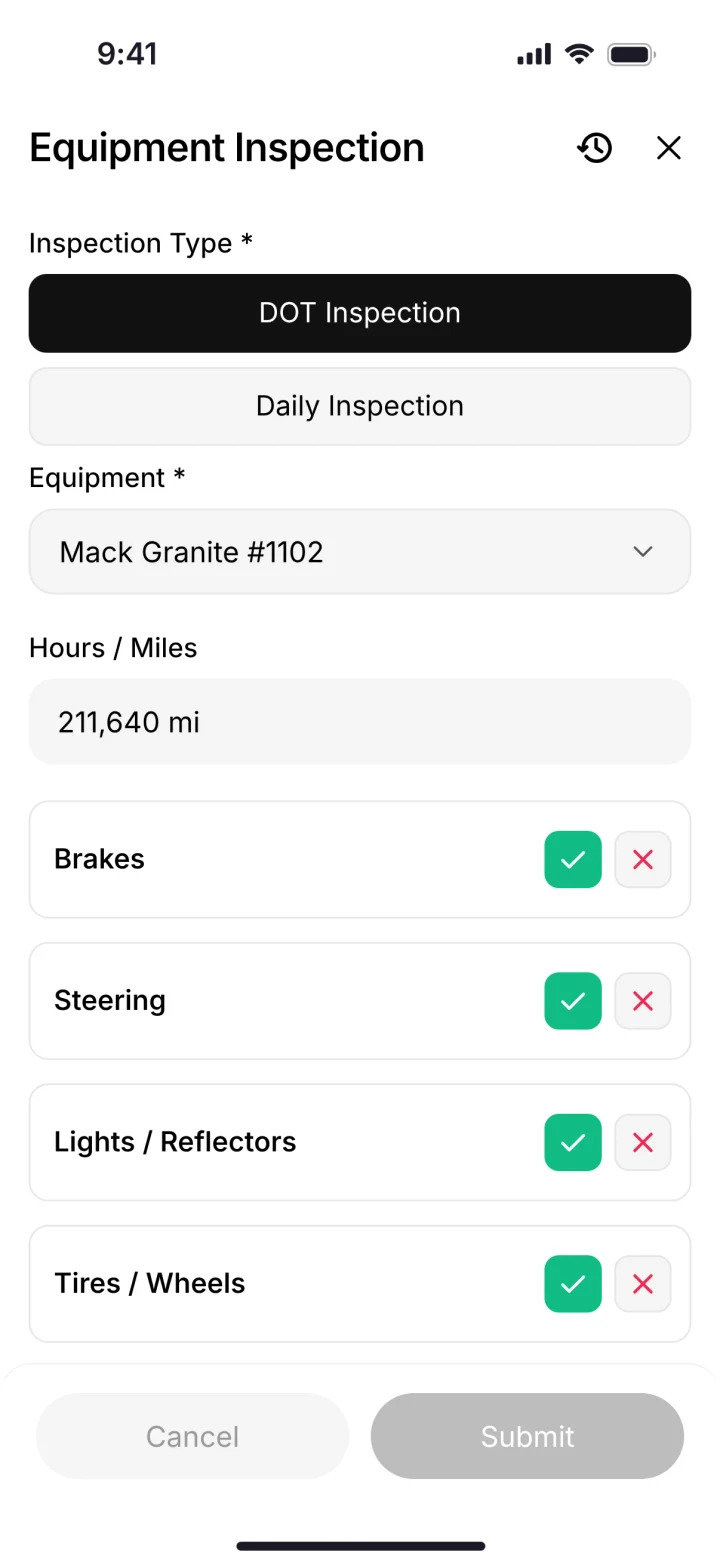
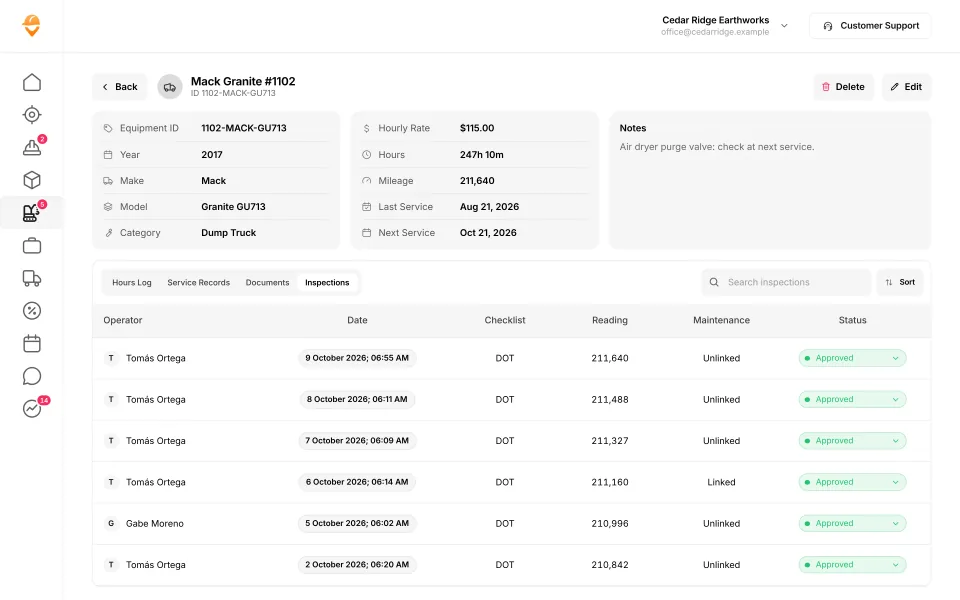
A pre-trip inspection app puts the walk-around on the operator's phone. Pick the truck or machine, enter hours or miles, tap pass or fail on brakes, steering, lights and tires, and submit. The inspection lands on that machine's record with the operator's name, the date and the reading. Not in a glovebox. SmartCrew does DOT and daily inspections this way for dirtwork companies running dump trucks and heavy equipment. This page also covers what FMCSA and OSHA actually ask for.
The short version
- FMCSA rules say a driver must be satisfied a commercial motor vehicle is safe before driving it (49 CFR 396.13), and must write a report at the end of each day's work listing any defects (396.11).
- OSHA's construction rule 29 CFR 1926.601(b)(14) says vehicles in use on an off-highway jobsite are checked at the beginning of each shift, and defects are corrected before the vehicle goes into service.
- Driver reports can be created and kept electronically, and the carrier keeps them for three months.
- In SmartCrew the operator does the inspection on his phone, it's logged on the machine's record, and problems go to the shop as service requests.
- This is a plain-English summary of the eCFR, not legal advice. Which rule covers which unit depends on the unit.
Why do pre-trip inspections get skipped?
Because paper makes it easy to skip. The form is somewhere in the truck. The pen's dead. The foreman is waiting on the first load and the truck ran fine yesterday.
And when an operator does find something, the clipboard doesn't talk to the shop. The note sits in the cab until someone walks it over. When an auditor or your insurance company asks for last month's reports, they're in a glovebox, a shoebox or the trash.
An inspection only counts if it happens, it's written down, and the shop sees what it found.
Which rules apply to your trucks and machines?
Two sets of federal rules matter most to a dirtwork company. FMCSA's rules cover commercial motor vehicles on the road. OSHA's construction rules cover vehicles and earthmoving equipment on the jobsite. Here's who each one is written for.
| Rule | Who or what it covers | What it asks for |
|---|---|---|
| 49 CFR 390.5 (FMCSA definitions) | Defines a commercial motor vehicle | Among other things, a vehicle used on a highway in interstate commerce with a gross vehicle or combination weight rating (or actual weight, whichever is greater) of 10,001 pounds or more |
| 49 CFR 396.13 (driver inspection) | The driver, before driving | Be satisfied the vehicle is in safe operating condition, review the last report when one was required, and sign to acknowledge it and that required repairs were certified |
| 49 CFR 396.11 (driver vehicle inspection report) | Motor carriers and their drivers, with exceptions | A written report at the completion of each day's work on each vehicle operated, listing defects that would affect safe operation or cause a breakdown |
| 49 CFR 396.17 (periodic inspection) | Every commercial motor vehicle | An inspection at least once every 12 months, with documentation on the vehicle |
| 29 CFR 1926.20 (OSHA, general safety) | Every construction employer | A safety program with frequent and regular inspections of job sites, materials and equipment by competent persons the employer designates. Equipment that doesn't comply is tagged, locked out or removed |
| 29 CFR 1926.601 (OSHA, motor vehicles) | Vehicles operating within an off-highway jobsite not open to public traffic | Every vehicle in use is checked at the beginning of each shift, and all defects are corrected before it's placed in service |
| 29 CFR 1926.602 (OSHA, earthmoving equipment) | Scrapers, loaders, crawler or wheel tractors, bulldozers, off-highway trucks, graders and similar equipment | Equipment rules such as seat belts, brakes, horns and backup alarms. 1926.601 doesn't apply to equipment covered here |
Source: the Electronic Code of Federal Regulations, checked October 26, 2026. A plain-English summary, not legal advice. Your equipment's operator manual and your safety program set the actual daily check for each machine. Ask your safety consultant which rules cover each unit.
What does the FMCSA daily report have to include?
The driver vehicle inspection report (the DVIR) covers at least 11 parts and accessories, identifies the vehicle, lists any defects, and gets signed by the driver. Here's what 49 CFR 396.11 says, in plain words.
- Parts the report covers: service brakes including trailer brake connections, parking brake, steering mechanism, lighting devices and reflectors, tires, horn, windshield wipers, rear vision mirrors, coupling devices, wheels and rims, and emergency equipment.
- If a driver runs more than one vehicle in a day, there's a report for each vehicle.
- A driver doesn't have to prepare a report if no defect was found or reported. Lots of companies keep a clean report anyway, as proof the check happened.
- Defects likely to affect safe operation are repaired before the vehicle runs again, and the carrier certifies on the report that they were fixed or that repair wasn't needed.
- The carrier keeps the report, the repair certification and the driver's review for three months from the date the report was prepared.
- The section doesn't apply to a motor carrier operating only one commercial motor vehicle, among other listed exceptions. 396.13's before-driving check still applies to the driver.
- Reports may be created and kept electronically (49 CFR 390.32 allows electronic records and signatures).
What does OSHA's shift-start check cover?
OSHA's list in 1926.601(b)(14) is short, and it's a good backbone for a daily form on any truck that works the site. The same section also has a few rules written for dump trucks.
| Item | Named in | What the operator checks |
|---|---|---|
| Service brakes and trailer brake connections | OSHA 1926.601, FMCSA 396.11 | Pedal feel, air pressure build-up, leaks, glad hands coupled |
| Parking brake and emergency stopping system | OSHA, FMCSA | Holds on a grade, releases clean |
| Steering mechanism | OSHA, FMCSA | Play in the wheel, leaks, noises |
| Tires, wheels and rims | OSHA (tires), FMCSA | Pressure, cuts, bulges, missing or loose lug nuts |
| Horn, lights, reflectors, wipers, mirrors | OSHA (not mirrors), FMCSA | Working and clean. Backup alarm on anything with a blocked rear view |
| Coupling devices | OSHA, FMCSA | Pintle hook, chains and pins secure on the lowboy or pup |
| Seat belts, operating controls and safety devices | OSHA | Belt latches, controls respond, guards in place |
| Dump body support | OSHA 1926.601(b)(10) | A permanently attached support that locks the raised bed during maintenance or inspection |
| Dump and hoist levers | OSHA 1926.601(b)(11) | A latch or other device so the hoist can't start or trip by accident |
| Fire extinguisher and emergency equipment | FMCSA; OSHA where needed | Charged, mounted, triangles in the truck |
The "what the operator checks" column is common practice in the field, not regulation text. Your operator manuals and safety program set the exact list.
How does SmartCrew handle the inspection, step by step?
The operator does it on the same phone he clocks in on. It takes a few taps, and it goes straight to the machine's record.
Open the inspection
From the reports menu on the phone, the operator opens a DOT inspection or a daily inspection.
Pick the truck or machine
Choose the unit from your equipment list. No writing truck numbers on a form.
Enter hours or miles
The reading is saved with the inspection, so the office has a current number for that unit.
Tap pass or fail
Brakes, steering, lights, tires and the rest of the list are one tap each.
Submit
The inspection is logged on that machine's record with the operator, the date, the reading and the status.
Send the problem to the shop
If something's wrong, the operator sends a service request from the same menu. It lands in the Shop Queue with who reported it, when, the urgency and the repair status.
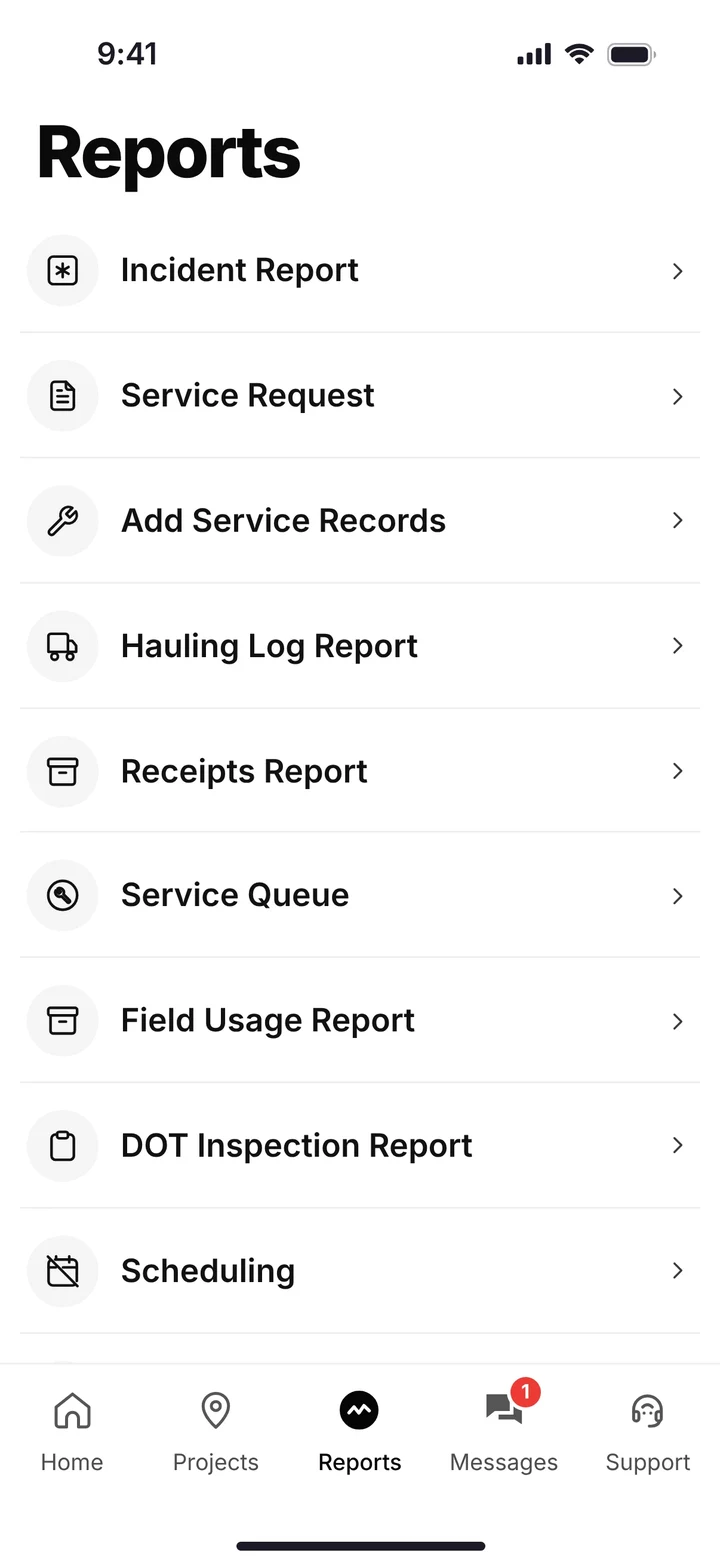
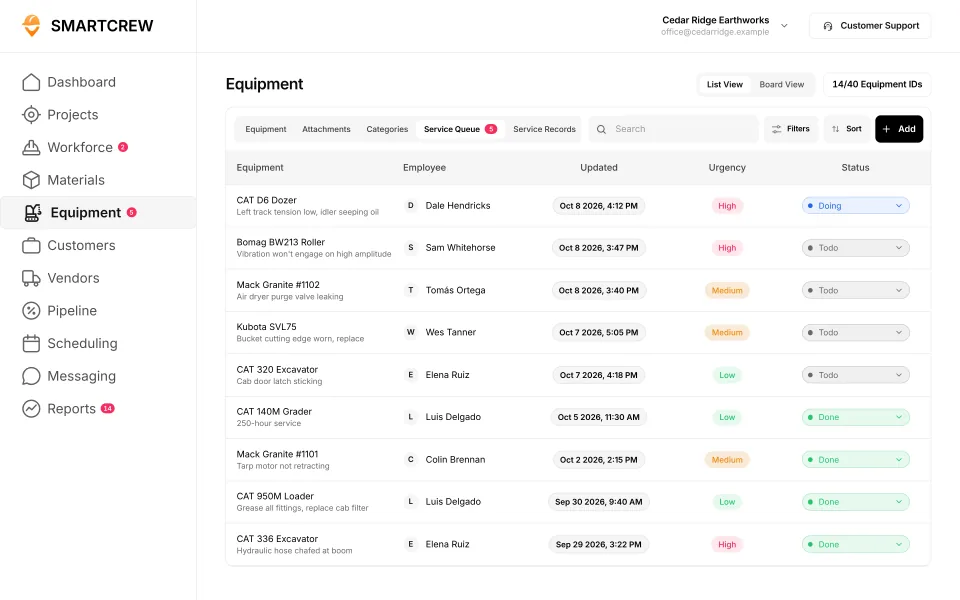
The operator's reports menu (DOT inspection, service request and more) and the shop's service queue with urgency and status. (Demo account.)
Our crews aren't tech savvy. And they don't need to be. If a driver can clock in, he can do his inspection.
Is an inspection app really better than a paper DVIR book?
Yes, mostly because of what happens after the inspection. Paper works until you need to find something. Here's where the difference shows up on a normal week.
| Paper form | SmartCrew | |
|---|---|---|
| Where it lives | In the truck, then a box in the office | On the machine's record |
| When the shop hears about a defect | When someone carries the sheet in | When the operator sends the service request |
| Finding last month's report for truck 12 | Dig through a box | Open truck 12's inspection log |
| Hours or miles | If someone wrote them, and you can read them | Entered on every inspection |
| Who did it and when | A signature, if it's there | Operator name and date on every entry |
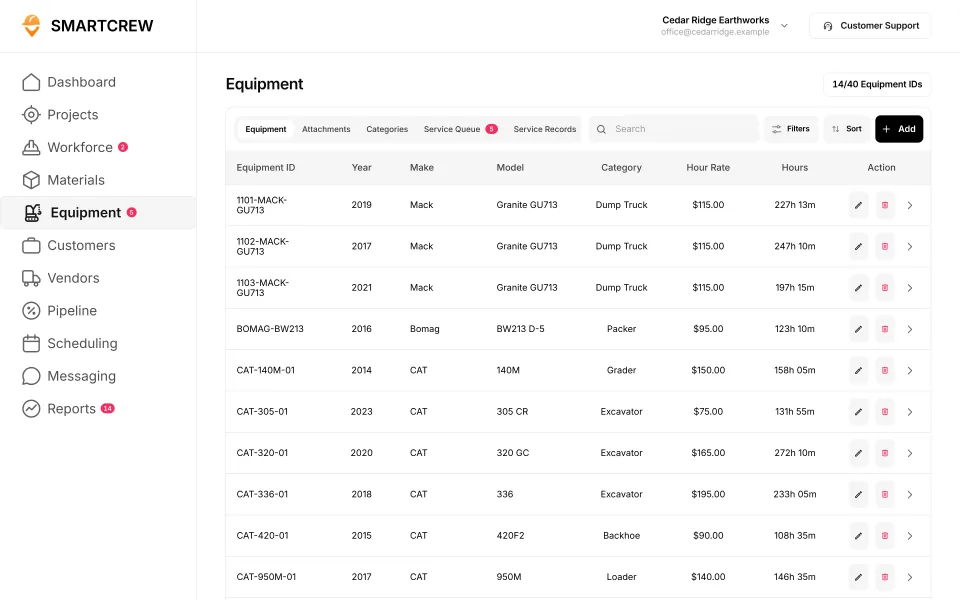
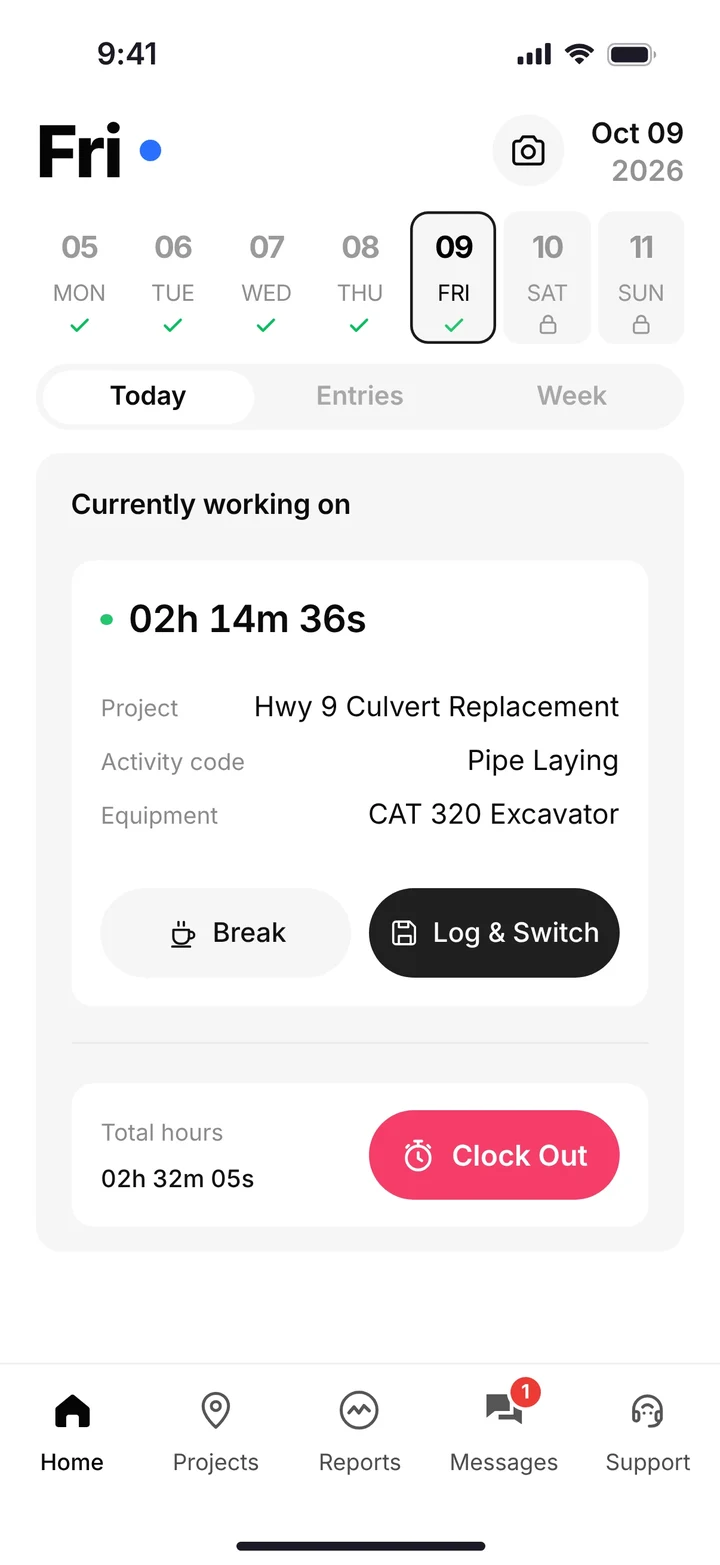
The equipment list each inspection ties to, and an operator on the clock with the machine he's running. (Demo data.)
Do you need a stand-alone inspection app?
You can buy one, and it beats paper. But then the inspection lives in one place, the truck's hours in another, and the timecard in a third. Time tracking apps were too basic to cover inspections, and enterprise software was too complicated and expensive for a company our size. Here's SmartCrew's equipment list next to the apps people compare it with.
Built to track hours. Great at the timecard, but the rest of the business (machines, loads, job profit) lives somewhere else.
9 apps in this chart. Scroll sideways to see them all.
| What SmartCrew does | SmartCrewSmartCrew | BusyBusyBusyBusy | ClockSharkClockShark | ExakTimeExakTime | QuickBooks TimeQB Time | WorkMaxWorkMax | WorkyardWorkyard | ConnecteamConnecteam | JibbleJibble | Rhumbix (Autodesk)Rhumbix |
|---|---|---|---|---|---|---|---|---|---|---|
| Equipment Management Premium | ||||||||||
| Equipment hours & locations | Yes | Yes | Not listed | Yes | Not listed | Add-on | Limited | Limited | No | Limited |
| DOT & daily inspections | Yes | Limited | Not listed | Limited | Not listed | Limited | Add-on | Limited | No | Not listed |
| Maintenance tracking | Yes | Add-on | Not listed | Limited | Not listed | Add-on | Add-on | Limited | No | No |
| Service requests from the field | Yes | Add-on | Not listed | Limited | Not listed | Not listed | Add-on | Limited | No | No |
| Utilization rates | Yes | Yes | Not listed | Not listed | Not listed | Add-on | No | No | No | Limited |
| Shop queue | Yes | Add-on | Not listed | No | Not listed | Not listed | Not listed | No | No | No |
Built to run big projects or every kind of contractor. Lots of power, but more setup, more screens and a bigger bill than most 5 to 100 person dirtwork companies need.
14 apps in this chart. Scroll sideways to see them all.
| What SmartCrew does | SmartCrewSmartCrew | ProcoreProcore | HCSS HeavyJobHCSS | RakenRaken | JobTreadJobTread | Contractor ForemanContr. Foreman | ProjulProjul | KnowifyKnowify | ForemanForeman | B2W (Trimble)B2W | AssignarAssignar | Trimble ViewpointViewpoint | BuildertrendBuildertrend | FieldwireFieldwire | Foundation SoftwareFoundation |
|---|---|---|---|---|---|---|---|---|---|---|---|---|---|---|---|
| Equipment Management Premium | |||||||||||||||
| Equipment hours & locations | Yes | Add-on | Add-on | Add-on | No | Add-on | Limited | Limited | No | Yes | Limited | Yes | Not listed | No | Add-on |
| DOT & daily inspections | Yes | Limited | Add-on | Limited | Limited | Limited | No | Add-on | No | Add-on | Limited | Limited | Not listed | Not listed | Not listed |
| Maintenance tracking | Yes | Yes | Add-on | Add-on | No | Add-on | Limited | Add-on | No | Yes | Limited | Yes | Not listed | No | Add-on |
| Service requests from the field | Yes | Limited | Add-on | Limited | No | No | No | Add-on | No | Yes | Limited | Limited | Not listed | No | Not listed |
| Utilization rates | Yes | Yes | Add-on | Add-on | No | Limited | Limited | Add-on | No | Yes | Yes | Limited | Not listed | No | Add-on |
| Shop queue | Yes | No | Add-on | Not listed | No | No | Limited | Not listed | No | Yes | Not listed | Yes | Not listed | No | Add-on |
Built to track machines. Good at hours, GPS and service, but the crew's time, the daily report and the job's profit live somewhere else.
| What SmartCrew does | SmartCrewSmartCrew | TennaTenna | HCSS Equipment360Equipment360 | FleetioFleetio | ClueClue |
|---|---|---|---|---|---|
| Equipment Management Premium | |||||
| Equipment hours & locations | Yes | Yes | Add-on | Yes | Yes |
| DOT & daily inspections | Yes | Add-on | Add-on | Yes | Yes |
| Maintenance tracking | Yes | Add-on | Yes | Yes | Yes |
| Service requests from the field | Yes | Add-on | Yes | Yes | Yes |
| Utilization rates | Yes | Yes | Yes | Yes | Yes |
| Shop queue | Yes | Add-on | Yes | Yes | Yes |
Built to win the bid. Great for takeoffs and estimates before the job starts, not for running the crews, machines and loads once it does.
| What SmartCrew does | SmartCrewSmartCrew | AGTEKAGTEK | InSite SoftwareInSite | HCSS HeavyBidHeavyBid | Trimble Business CenterTrimble | EarthWorksEarthWorks |
|---|---|---|---|---|---|---|
| Equipment Management Premium | ||||||
| Equipment hours & locations | Yes | Add-on | No | Not listed | Limited | No |
| DOT & daily inspections | Yes | No | No | Not listed | Not listed | No |
| Maintenance tracking | Yes | Not listed | No | Not listed | Not listed | No |
| Service requests from the field | Yes | No | No | Not listed | Not listed | No |
| Utilization rates | Yes | Limited | No | Not listed | Not listed | No |
| Shop queue | Yes | No | No | Not listed | Not listed | No |
Built for service businesses that quote, schedule and invoice lots of small jobs. Good at the customer side, not the crew, machine and haul side of heavy civil work.
| What SmartCrew does | SmartCrewSmartCrew | JobberJobber | QuoteIQQuoteIQ | Contractor+Contractor+ | Housecall ProHousecall Pro | ServiceTitanServiceTitan |
|---|---|---|---|---|---|---|
| Equipment Management Premium | ||||||
| Equipment hours & locations | Yes | Limited | No | Limited | Add-on | Add-on |
| DOT & daily inspections | Yes | Limited | Limited | No | Not listed | Limited |
| Maintenance tracking | Yes | No | No | Limited | Add-on | Add-on |
| Service requests from the field | Yes | No | No | Not listed | Not listed | Add-on |
| Utilization rates | Yes | No | No | Limited | Not listed | Add-on |
| Shop queue | Yes | Not listed | No | Not listed | Not listed | Not listed |
No: they do not offer it. Their own website says so, or it isn’t in the full feature list they publish (linked). Add-on: a paid add-on, a separate product or a higher plan. Limited: they have something close but narrower. Not listed (n/l on small screens): we searched their site and help pages and couldn’t find it, but they don’t publish a full list we could check. Tap a name for the full comparison.
This chart is SmartCrew’s feature list, so it doesn’t show what other products do that SmartCrew doesn’t (like estimating, payroll or hardware time clocks). Each comparison covers that in “where they’re the better pick”. SmartCrew’s Fleet Management, Sales CRM, and Scheduling & Communications are Premium categories; feature availability varies by plan.
In plain words: what each app does not offer
- BusyBusy lists all of these on its own website, some as add-ons or limited.
- ClockShark doesn't list: equipment hours & locations, DOT & daily inspections, maintenance tracking, service requests from the field, utilization rates, shop queue.
- ExakTime does not offer: shop queue. ExakTime doesn't list these either: utilization rates.
- QuickBooks Time doesn't list: equipment hours & locations, DOT & daily inspections, maintenance tracking, service requests from the field, utilization rates, shop queue.
- WorkMax doesn't list: service requests from the field, shop queue.
- Workyard does not offer: utilization rates. Workyard doesn't list these either: shop queue.
- Connecteam does not offer: utilization rates, shop queue.
- Jibble does not offer: equipment hours & locations, DOT & daily inspections, maintenance tracking, service requests from the field, utilization rates, shop queue.
- Rhumbix (Autodesk) does not offer: maintenance tracking, service requests from the field, shop queue. Rhumbix (Autodesk) doesn't list these either: DOT & daily inspections.
- Procore does not offer: shop queue.
- HCSS HeavyJob lists all of these on its own website, some as add-ons or limited.
- Raken doesn't list: shop queue.
- JobTread does not offer: equipment hours & locations, maintenance tracking, service requests from the field, utilization rates, shop queue.
- Contractor Foreman does not offer: service requests from the field, shop queue.
- Projul does not offer: DOT & daily inspections, service requests from the field.
- Knowify doesn't list: shop queue.
- Foreman does not offer: equipment hours & locations, DOT & daily inspections, maintenance tracking, service requests from the field, utilization rates, shop queue.
- B2W (Trimble) lists all of these on its own website, some as add-ons or limited.
- Assignar doesn't list: shop queue.
- Trimble Viewpoint lists all of these on its own website, some as add-ons or limited.
- Buildertrend doesn't list: equipment hours & locations, DOT & daily inspections, maintenance tracking, service requests from the field, utilization rates, shop queue.
- Fieldwire does not offer: equipment hours & locations, maintenance tracking, service requests from the field, utilization rates, shop queue. Fieldwire doesn't list these either: DOT & daily inspections.
- Foundation Software doesn't list: DOT & daily inspections, service requests from the field.
- Tenna lists all of these on its own website, some as add-ons or limited.
- HCSS Equipment360 lists all of these on its own website, some as add-ons or limited.
- Fleetio lists all of these on its own website, some as add-ons or limited.
- Clue lists all of these on its own website, some as add-ons or limited.
- AGTEK does not offer: DOT & daily inspections, service requests from the field, shop queue. AGTEK doesn't list these either: maintenance tracking.
- InSite Software does not offer: equipment hours & locations, DOT & daily inspections, maintenance tracking, service requests from the field, utilization rates, shop queue.
- HCSS HeavyBid doesn't list: equipment hours & locations, DOT & daily inspections, maintenance tracking, service requests from the field, utilization rates, shop queue.
- Trimble Business Center doesn't list: DOT & daily inspections, maintenance tracking, service requests from the field, utilization rates, shop queue.
- EarthWorks does not offer: equipment hours & locations, DOT & daily inspections, maintenance tracking, service requests from the field, utilization rates, shop queue.
- Jobber does not offer: maintenance tracking, service requests from the field, utilization rates. Jobber doesn't list these either: shop queue.
- QuoteIQ does not offer: equipment hours & locations, maintenance tracking, service requests from the field, utilization rates, shop queue.
- Contractor+ does not offer: DOT & daily inspections. Contractor+ doesn't list these either: service requests from the field, shop queue.
- Housecall Pro doesn't list: DOT & daily inspections, service requests from the field, utilization rates, shop queue.
- ServiceTitan doesn't list: shop queue.
From each company's own website and help pages, checked on the dates below. "Does not offer" means their own website says so, or it isn't in the full feature list they publish. "Doesn't list" means we searched their site and couldn't find it, but they don't publish a full list we could check.
Where each mark comes from
- BusyBusy, checked October 28, 2026: busybusy.com/features/gps-time-tracking, busybusy.com/features, busybusy.com/features/job-costing-solutions, busybusy.com/equipment-time-tracking-app, busybusy.com/features/payroll-tools, helpcenter.busybusy.com/en/articles/9573478-use-supervisor-tools-to-make-life-easy, busybusy.com/features/budgets-projects-cost-codes, busybusy.com/features/construction-reports, busybusy.com/modules/operations/equipment-inspections, busybusy.com/modules/operations/work-orders, busybusy.com/features/progress-tracking, busybusy.com/features/photos-notes, busybusy.com/construction-daily-reports, helpcenter.busybusy.com/en/articles/9573479-schedule-the-work-week-in-busybusy, busybusy.com/features/scheduling, busybusy.com/features/team-messaging, helpcenter.busybusy.com/en/articles/9573348-positions-permissions-settings, busybusy.com/safety/job-safety-analyses-app, busybusy.com/safety/training-app, busybusy.com/features/incident-reporting, busybusy.com/features/documents, busybusy.com/integrations/quickbooks-online
- ClockShark, checked October 28, 2026: clockshark.com/tour/gps-time-clock-app, clockshark.com/tour/geofence-time-tracking, clockshark.com/tour/map-field-employee-location-tracking, clockshark.com/resources/labor-costs-quickbooks-clockshark, clockshark.com/pricing, clockshark.com/tour/timesheet-reminders, clockshark.com/tour/job-costing, help.clockshark.com/how-to-handle-change-orders-using-quotes-and-invoices, clockshark.com/tour, clockshark.com/tour/clock-out-questions, clockshark.com/tour/conversations, clockshark.com/tour/employee-scheduling, clockshark.com/tour/customer-manager, get.clockshark.com/modern-way-to-manage-your-field-team, clockshark.com/tour/file-attachments, clockshark.com/integrations/quickbooks-time-tracking
- ExakTime, checked October 28, 2026: arcoro.com/exaktime/pricing-plans, arcoro.com/exaktime, arcoro.com/exaktime/our-solutions/gps-time-tracking-app, arcoro.com/exaktime/our-solutions/powerful-reporting, support.arcoro.com/hc/en-us/articles/1260804480690-Guides-to-Equipment-for-ExakTime, support.arcoro.com/hc/en-us/articles/1260804479730-Start-Using-The-ExakTime-System-In-Just-15-Minutes, support.arcoro.com/hc/en-us/articles/40641192964507-9-2025-ExakTime-Release-Notes-GeoFence-Activity-Alerts, arcoro.com/llm-context-page, support.arcoro.com/hc/en-us/articles/7647931096987-Overview-for-Using-Advanced-Analytics, support.arcoro.com/hc/en-us/articles/4413156323355-Using-Equipment-Reports-for-ExakTime, support.arcoro.com/hc/en-us/articles/24982369416091-What-are-Library-Forms-for-ExakTime, support.arcoro.com/hc/en-us/articles/26031334798107-Gathering-Info-from-Field-Employees-with-Fields-Notes-Forms-and-Clock-In-Out-Comments-for-ExakTime-Mobile, support.arcoro.com/hc/en-us/articles/4413165192347-Using-Expense-Reports-for-ExakTime, support.arcoro.com/hc/en-us/articles/4407630208795-Managing-Schedules-with-Calendar-View, support.arcoro.com/hc/en-us/articles/4407625105563-Scheduler-Notification-Settings-for-ExakTime, support.arcoro.com/hc/en-us/articles/7601304493595-Setting-Up-and-Using-Custom-Alerts-and-Notifications-for-ExakTime, support.arcoro.com/hc/en-us/articles/13116025444635-Sending-Alerts-Notifications-from-ExakTime-Connect, arcoro.com/platform/grow/learning-management, support.arcoro.com/hc/en-us/articles/25556658085659-Premade-Forms-for-ExakTime, arcoro.com/platform/manage/construction-hris, arcoro.com/exaktime/partner/quickbooks
- QuickBooks Time, checked October 28, 2026: quickbooks.intuit.com/time-tracking/gps, quickbooks.intuit.com/learn-support/en-us/help-article/track-location/use-quickbooks-time-gps-tracking-admin-manager/L7fLoZNZk_US_en_US, quickbooks.intuit.com/learn-support/en-us/help-article/track-worker-hours/use-quickbooks-time-quickbooks-online-quickbooks/L5NIFCKG6_US_en_US, quickbooks.intuit.com/learn-support/en-us/help-article/customize-forms/set-manage-custom-fields-quickbooks-time/L6b8NDU6n_US_en_US, quickbooks.intuit.com/time-tracking/construction, quickbooks.intuit.com/learn-support/en-us/help-article/product-preferences/set-company-team-member-clock-reminders-quickbooks/L8v9UDFUv_US_en_US, quickbooks.intuit.com/time-tracking/pricing, quickbooks.intuit.com/learn-support/en-us/help-article/list-reports/quickbooks-time-reports/L0WYtn0mw_US_en_US, quickbooks.intuit.com/time-tracking/elite, quickbooks.intuit.com/time-tracking/employee-scheduling, quickbooks.intuit.com/learn-support/en-us/help-article/feature-preferences/quickbooks-time-activity-feed/L5RV549yf_US_en_US
- WorkMax, checked October 26, 2026: workmax.com/solutions/workmax-time, workmax.com/wp-content/uploads/2022/06/WorkMax-TIME-Features.pdf, workmax.com/wp-content/uploads/2013/11/WorkMax_Time_Features_Temp.pdf, workmax.com/solutions/workmax-insight, workmax.com/solutions/workmax-forms, workmax.com/resources/blog/the-workmax-construction-field-management-platform, workmax.com/solutions/workmax-assets, workmax.com/resources/faqs, workmax.com/solutions/other-products, workmax.com, workmax.com/solutions/integrations/quickbooks-online-integration
- Workyard, checked October 28, 2026: workyard.com/ai-instructions, workyard.com/pricing, workyard.com/smart-forms/equipment-tracking, workyard.com/reporting, help.workyard.com/en/articles/7041924-workyard-mobile-app-automated-alerts, workyard.com/smart-forms/construction-management, help.workyard.com/en/articles/17668011-build-custom-reports-with-reporting-agent, workyard.com/smart-forms/production-tracking, help.workyard.com/en/articles/16092826-send-form-submissions-to-the-right-people-forms-notification-routing, workyard.com/contractor-scheduling-software, workyard.com/smart-forms/safety-management, help.workyard.com/en/articles/5236837-how-to-connect-workyard-to-quickbooks-online
- Connecteam, checked October 28, 2026: connecteam.com/pricing, help.connecteam.com/en/articles/3597710-how-to-create-a-geofence, help.connecteam.com/en/articles/5675206-starting-guide-to-breadcrumbs-live-location-tracking, connecteam.com/industries/construction-app, connecteam.com/employee-time-clock-app, connecteam.com/operations, connecteam.com/industries/construction-app/construction-time-tracking, connecteam.com/employee-scheduling-app, connecteam.com/forms-checklist-app, help.connecteam.com/en/articles/6400563-job-scheduling-must-have-capabilities, connecteam.com/industries/construction-app/construction-scheduling-app, help.connecteam.com/en/articles/4100339-starting-guide-to-the-job-scheduler, connecteam.com/employee-communication-app/updates, connecteam.com/industries/construction-app/construction-compliance, connecteam.com/industries/construction-app/construction-documentation-and-communication, connecteam.com/integrations/quickbooks-integration
- Jibble, checked October 28, 2026: jibble.io/construction-time-tracking, jibble.io/features, jibble.io/auto-clock-in-out-app, jibble.io/project-time-tracker, jibble.io/help/track-time-with-location, jibble.io/help/sending-timesheets-to-quickbooks-online
- Rhumbix (Autodesk), checked October 28, 2026: intercom.help/rhumbix-helpcenter/en/articles/11014517-cico-client-configuration-options, rhumbix.com/solutions/timekeeping, rhumbix.com/usecase/field, rhumbix.com/pricing, intercom.help/rhumbix-helpcenter/en/articles/6369205-cost-code-status, rhumbix.com/solutions/change-orders, intercom.help/rhumbix-helpcenter/en/articles/8438022-equipment-tracking-dashboard, rhumbix.com/solutions/production_tracking, intercom.help/rhumbix-helpcenter/en/articles/6369215-daily-reports-create-on-mobile-app, intercom.help/rhumbix-helpcenter/en/articles/6512986-end-of-day-exception-report, rhumbix.com/solutions/integrations
- Procore, checked October 28, 2026: procore.com/resource-tracking, v2.support.procore.com/product-manuals/timesheets-project/tutorials/configure-advanced-settings-project-level-timesheets, v2.support.procore.com/product-manuals/my-time-ios/tutorials/clock-your-time-ios, v2.support.procore.com/product-manuals/timesheets-project/tutorials/create-a-timesheet, procore.com/platform/reports, procore.com/products, procore.com/project-financials/budget, procore.com/financial-management/change-orders, procore.com/equipment, v2.support.procore.com/faq-how-can-i-use-the-procore-equipment-pre-operation-checklist-inspection-template-on-my-project, v2.support.procore.com/product-manuals/equipment-company/tutorials/create-a-maintenance-record-for-equipment, procore.com/resource-management, v2.support.procore.com/product-manuals/equipment-company/permissions, procore.com/quality-safety/daily-log, procore.com/project-management/photos, v2.support.procore.com/product-manuals/daily-log-project/tutorials/mark-a-daily-log-as-complete, procore.com/materials, procore.com/ai/agents/daily-log, v2.support.procore.com/product-manuals/resource-planning-company/tutorials/edit-a-resource-assignment, procore.com/resource-planning, procore.com/fc/crm, v2.support.procore.com/product-manuals/bid-board-company, v2.support.procore.com/product-manuals/bid-board-company/tutorials/add-and-manage-tasks-in-a-bid-board-project, procore.com/fc/dispatch, procore.com/platform/conversations, v2.support.procore.com/process-guides/getting-started-with-procore-conversations/best-practices-for-procore-conversations, v2.support.procore.com/product-manuals/announcements-ios/tutorials/create-announcements-ios, v2.support.procore.com/faq-how-can-i-use-procores-job-hazard-analysis-pdf-in-my-projects-forms-tool, v2.support.procore.com/faq-how-can-i-use-procores-toolbox-talk-sign-in-pdf-in-my-projects-forms-tool, procore.com/quality-safety/incidents, procore.com/platform/document-management, v2.support.procore.com/product-manuals/qbo
- HCSS HeavyJob, checked October 28, 2026: apps.apple.com/us/app/hcss-myfield-track-job-hours/id1520688563, hcss.com/products/geofencing-software, hcss.com/products/mobile-field-service-management, hcss.com/products/job-costing-software, hcss.com/products/construction-project-management-software, hcss.com/products/export-to-payroll, hcss.com/products/change-order-tracking, hcss.com/llm-info, hcss.com/faqs, apps.apple.com/us/app/hcss-heavyjob-smart-job-sites/id720784422, hcss.com/products/fuel-management-software, hcss.com/products/construction-material-tracking, hcss.com/products/construction-resource-planning, hcss.com/products/dispatching-software, hcss.com/products/bid-management, hcss.com/products/pre-construction, hcss.com/products/job-hazard-safety-analysis, hcss.com/products/safety-toolbox-talks, hcss.com/products/incidents-reporting-software, hcss.com/products/construction-document-software
- Raken, checked October 28, 2026: help.rakenapp.com/en/articles/14148932-raken-time-clock-geolocation-verification-and-reporting, help.rakenapp.com/en/articles/14113290-how-to-create-time-cards-in-raken, help.rakenapp.com/en/articles/14115530-raken-time-cards-overview, help.rakenapp.com/en/articles/14465496-how-to-use-the-raken-dashboard, rakenapp.com/features, help.rakenapp.com/en/articles/16909752-how-to-set-up-and-use-budgets-in-raken, rakenapp.com/features/change-orders, help.rakenapp.com/en/articles/14465432-raken-reports-overview, rakenapp.com/features/equipment-management, rakenapp.com/features/construction-checklists/forklift-checklist, help.rakenapp.com/en/articles/14492619-raken-equipment-management-heavy-and-on-road-equipment, help.rakenapp.com/en/articles/14465449-production-and-equipment-reports-in-raken, rakenapp.com, help.rakenapp.com/en/articles/14478748-how-to-share-and-email-daily-reports-in-raken, help.rakenapp.com/en/articles/14492603-getting-started-with-production-tracking-in-raken, help.rakenapp.com/en/articles/11061850-how-to-manage-resource-scheduling-on-the-web, help.rakenapp.com/en/articles/14437000-what-is-raken-resource-scheduling, help.rakenapp.com/en/articles/14436989-how-to-get-started-with-messaging-in-raken, rakenapp.com/features/construction-checklists/job-hazard-analysis, help.rakenapp.com/en/articles/14491655-how-to-use-toolbox-talks-in-raken, help.rakenapp.com/en/articles/14491660-how-to-report-and-track-incidents-in-raken, help.rakenapp.com/en/articles/14436734-how-to-use-document-storage-in-raken, rakenapp.com/features/document-storage, help.rakenapp.com/en/articles/14512455-raken-quickbooks-online-integration
- JobTread, checked October 28, 2026: jobtread.com/features/time-tracking, app.jobtread.com/help/whats-new/2023-05-02-clock-in-out-distance-from-job-site, app.jobtread.com/help/whats-new/2024-05-06-require-job-item-code-on-time-entries, jobtread.com/features, jobtread.com/features/job-costing, jobtread.com/features/reporting-and-dashboards, jobtread.com/features/forms, jobtread.com/features/daily-logs, app.jobtread.com/help/whats-new/2025-12-18-ai-daily-log-summaries, jobtread.com/features/purchasing, app.jobtread.com/help/whats-new/2025-11-13-scan-and-autofill-receipt-details, app.jobtread.com/help/whats-new/2026-01-19-drag-drop-on-calendar, jobtread.com/features/tasks-and-scheduling, app.jobtread.com/help/whats-new/2024-09-19-on-demand-schedule-notifications, jobtread.com/features/construction-crm, jobtread.com/features/workflows, jobtread.com/blog/jobtread-new-feature-centralized-communication-and-messaging, jobtread.com/blog/targeted-messaging-and-file-sharing, app.jobtread.com/help/whats-new/2025-09-05-dashboard-text-tiles, jobtread.com/features/file-management, jobtread.com/integrations/quickbooks-online
- Contractor Foreman, checked October 28, 2026: contractorforeman.com/features/people/time-cards, contractorforeman.com/whats-new, kb.contractorforeman.com/knowledge-base/time-cards, kb.contractorforeman.com/knowledge-base/how-do-i-add-material-items-and-equipment-items-to-daily-logs, contractorforeman.com/features/integrations/gusto-integration, kb.contractorforeman.com/knowledge-base/what-is-running-time-card-notification, contractorforeman.com/features/job-costing-reports, contractorforeman.com/pricing, contractorforeman.com/features/custom-report-builder, kb.contractorforeman.com/knowledge-base/basics-of-equipment-logs, contractorforeman.com/features/documents/equipment-and-vehicle-logs, kb.contractorforeman.com/knowledge-base/what-types-of-maintenance-do-you-track-for-each-piece-of-equipment, contractorforeman.com/features/project-management/daily-logs, contractorforeman.com/features/files-and-photos-gallery, contractorforeman.com/features/people/crew-schedule, contractorforeman.com/features/people/leads-manager, contractorforeman.com/features/project-management/opportunities, kb.contractorforeman.com/knowledge-base/how-do-i-notify-or-assign-an-opportunity-to-an-employee-for-follow-up, contractorforeman.com/features/project-management/service-tickets, contractorforeman.com/features/people/team-chat, contractorforeman.com/features/crm/dashboard, contractorforeman.com/features/people/safety-meetings, contractorforeman.com/features/people/incidents, kb.contractorforeman.com/knowledge-base/how-do-i-share-a-file-with-a-client-or-vendor, contractorforeman.com/features/integrations/quickbooks
- Projul, checked October 28, 2026: projul.com/pricing, projul.com/features/geo-fenced-time-tracking, projul.com/features/tasks-and-to-dos, projul.com/industries/excavation-grading, projul.com/features/reporting, projul.com/features/mobile-notifications, projul.com/features/daily-logs, projul.com/features/photos-and-document-management, projul.com/features, projul.com/features/scheduling, projul.com/features/crm, projul.com/features/construction-communications
- Knowify, checked October 28, 2026: knowify.com/construction-time-tracking-software, knowify.com/pricing, knowify.com/trade-contractor-software, knowify.com/construction-daily-log-software, knowify.com/construction-forms-software, knowify.com/fleet-tracking-software, knowify.com/construction-scheduling-software, knowify.com/integration/quickbooks-online
- Foreman, checked October 28, 2026: foreman.co/guides/the-live-clock, foreman.co/features/time-tracking, foreman.co/features, foreman.co/guides/home-dashboards, foreman.co/guides/margin-markup-profitability, foreman.co/features/budget, foreman.co/features/daily-logs, foreman.co/industries/excavation-foundation, foreman.co/guides/vendor-bills, foreman.co/features/purchase-orders, foreman.co/guides/build-a-schedule, foreman.co/features/crm, foreman.co/guides/lead-lifecycle-stages, foreman.co/features/todos, foreman.co/guides/messaging, foreman.co/features/messaging, foreman.co/features/files, foreman.co/guides/what-clients-and-vendors-see
- B2W (Trimble), checked October 28, 2026: trimble.com/downloads/6XxSu8CEI6CgHbTTxqgVlF/e8f470ac91fdcccfb8ce5cde133c05e9/Civil_B2W_Track_Feature__1_.pdf, trimble.com/en/products/b2w-software/schedule, trimble.com/en/products/b2w-software/track, trimble.com/en/products/b2w-software/estimate, trimble.com/en/products/b2w-software/field-view, trimble.com/en/products/b2w-software/maintain-equipment-maintenance, trimble.com/downloads/6c46g1iuF4BWwLDD5fcjIW/21ca91f2fa200b394a75bfec93c8a89c/B2W_Maintain_Features_25.1.pdf, trimble.com/en/blog/construction/article/improve-safety-toolbox-talks-with-b2w-inform, b2wsoftware.com/wp-content/uploads/Inform-FeatureOverview_Feb2021.pdf, trimble.com/en/blog/construction/article/quickbooks-integration-with-b2w-for-estimating-and-operations
- Assignar, checked October 28, 2026: support.assignar.com/hc/en-au/articles/4406377669519-Check-In-Out-Timesheet-Geolocation-Reporting, assignar.com/workforce-management, assignar.com/industry/software-for-excavation-contractors, assignar.com/time-tracking-field-data, support.assignar.com/hc/en-au/articles/11978271666703-Understanding-Push-Notifications-in-Assignar, assignar.com/pay, assignar.com/job-costing, support.assignar.com/hc/en-au/articles/10670984931471-Daily-Summary, assignar.com/field-crews, support.assignar.com/hc/en-au/articles/15971013436303-Track-asset-number-expiry, assignar.com, assignar.com/reporting-analytics, assignar.com/lps/progress-tracking, support.assignar.com/hc/en-au/articles/12525806002191-Site-Diary-Overview, support.assignar.com/hc/en-au/articles/4406384921103-Create-a-Digital-Docket-Ticket-Template, support.assignar.com/hc/en-au/articles/7110532270095-Track-Expenses-with-Chargeable-Items, assignar.com/scheduling-assigning, support.assignar.com/hc/en-au/articles/10144514842511-Order-Messages-on-Mobile, support.assignar.com/hc/en-au/articles/7132211679631-Send-SMS-from-Assignar-with-Contact-Groups, support.assignar.com/hc/en-au/articles/4406384878863-Collaborative-Forms, assignar.com/forms-field-data, support.assignar.com/hc/en-au/articles/4406378130191-Manage-your-Documents-Overview, support.assignar.com/hc/en-au/articles/8718443956879-Adding-Documents-to-an-Order, support.assignar.com/hc/en-au/articles/12781778042895-NAM-Quickbooks-Online-Integration-Overview
- Trimble Viewpoint, checked October 28, 2026: apps.apple.com/us/app/traqspera-timesheets/id1539200842, trimble.com/en/products/viewpoint/vista/field-management, trimble.com/en/products/viewpoint/spectrum/traqspera-field, trimble.com/en/products/viewpoint-field-view, trimble.com/en/products/viewpoint/vista, apps.apple.com/us/app/viewpoint-field-view/id1051411527, help.trimble.com/en/spectrum/spectrum/equipment/equipment-control/spectrum-menus/reports-overview/fuel-utilization-report, trimble.com/en/products/viewpoint/spectrum/hr-management, trimble.com/en/products/viewpoint/vista/field-service, help.trimble.com/en/spectrum/spectrum/equipment/resource-scheduling/spectrum-menus-overview/data-entry-overview/schedule-employees-and-equipment/assign-a-jobs-resources, help.trimble.com/doc/viewpoint-team/viewpoint-team/project-management/document-collaboration/documents, trimble.com/en/products/viewpoint-for-projects
- Buildertrend, checked October 28, 2026: buildertrend.com/project-management/construction-time-clock, buildertrend.com/help-article/time-clock-overview, buildertrend.com/financial-tools, buildertrend.com/project-management/construction-change-order-software, buildertrend.com/project-management/daily-logs, buildertrend.com/help-article/cost-inbox-overview, buildertrend.com/project-management/schedule, buildertrend.com/sales-process/construction-crm, buildertrend.com/help-article/lead-opportunities-overview, buildertrend.com/help-article/lead-activities-overview, buildertrend.com/help-article/messaging-overview, buildertrend.com/help-article/files-on-mobile, buildertrend.com/help-article/quickbooks-online-integration-overview
- Fieldwire, checked October 28, 2026: fieldwire.com/pricing, fieldwire.com/construction-management-software, fieldwire.com/construction-forms, fieldwire.com/budget, fieldwire.com/construction-reports, fieldwire.com, fieldwire.com/construction-scheduling-software, fieldwire.com/solutions/subcontractor, help.fieldwire.com/hc/en-us/articles/360050283731-Practical-Guide-How-to-Leverage-Fieldwire-for-Safety-on-the-Jobsite, help.fieldwire.com/hc/en-us/articles/360021924912, fieldwire.com/document-management, help.fieldwire.com/hc/en-us/articles/360025760492, fieldwire.com/integrations/quickbooks-online
- Foundation Software, checked October 28, 2026: foundationsoft.com/software/mobile, foundationsoft.com/workmax-time, foundationsoft.com/software/job-costing, foundationsoft.com, myhqsuite.com/software/crewhq, foundationsoft.com/software/executive-dashboard, foundationsoft.com/software/construction-reports, foundationsoft.com/software/equipment, foundationsoft.com/projecthq, foundationsoft.com/software/construction-document-imaging, foundationsoft.com/expense-pay-management/corporate-card, foundationsoft.com/software/unit-price-billing, foundationsoft.com/software, foundationsoft.com/software/service-dispatch, foundationsoft.com/product-integration, myhqsuite.com/software/safetyhq
- Tenna, checked October 28, 2026: tenna.com/equipment-management-software-products, tenna.com/construction-equipment-maintenance/mechanic-time-cards, tenna.com/asset-financials, tenna.com/construction-productivity-software/load-tracking, tenna.com/construction-asset-management/equipment-utilization, tenna.com/construction-fleet-management-pricing, tenna.com/construction-equipment-maintenance/construction-work-order-software, tenna.com/integrated-construction-software, tenna.com/construction-scheduling-software, tenna.com/scheduling-and-dispatch-software, tenna.com/safety-compliance, tenna.com/construction-equipment-maintenance
- HCSS Equipment360, checked October 28, 2026: apps.apple.com/us/app/hcss-myfield-track-job-hours/id1520688563, hcss.com/products/geofencing-software, hcss.com/faqs, hcss.com/products/fleet-maintenance-software, hcss.com/products/preventive-maintenance-software, hcss.com/products/construction-project-management-software, hcss.com/products/change-order-tracking, apps.apple.com/us/app/hcss-equipment360/id1169065916, hcss.com/llm-info, hcss.com/products/construction-maintenance-request, apps.apple.com/us/app/hcss-heavyjob-smart-job-sites/id720784422, hcss.com/products/fuel-management-software, hcss.com/products/construction-material-tracking, hcss.com/products/construction-resource-planning, hcss.com/products/dispatching-software, hcss.com/products/bid-management, hcss.com/products/pre-construction, hcss.com/products/job-hazard-safety-analysis, hcss.com/products/safety-toolbox-talks, hcss.com/products/incidents-reporting-software, hcss.com/products/construction-document-software
- Fleetio, checked October 28, 2026: fleetio.com/pricing, help.fleetio.com/en_US/jobs-in-fleetio, help.fleetio.com/en_US/asset-management/fleet-map-overview, help.fleetio.com/en_US/work-orders/clock-in-and-out-of-a-work-order, help.fleetio.com/en_US/getting-started/dashboard-overview, help.fleetio.com/en_US/analytics-reports/reports-overview, help.fleetio.com/en_US/using-fleetio/meter-overview, help.fleetio.com/en_US/fleetio-go-for-operators/manage-issues-in-fleetio-go, help.fleetio.com/en_US/service-reminders-schedules/service-reminders-overview, help.fleetio.com/en_US/analytics-reports/meter-usage-average-usage-per-day-and-utilization-summary, help.fleetio.com/en_US/maintenance/work-order-overview, help.fleetio.com/en_US/fleetio-go-basics/attachments-photos-documents-and-comments-in-fleetio-go, help.fleetio.com/en_US/using-fleetio/fuel-entry-overview, help.fleetio.com/en_US/fuel-management/smart-uploads-for-fuel-entries, help.fleetio.com/en_US/vehicles/vehicle-assignments-scheduler, help.fleetio.com/en_US/getting-started/team-collaboration-with-mentioning, help.fleetio.com/en_US/inspections/inspections-overview, help.fleetio.com/en_US/getting-started/documents-overview
- Clue, checked October 28, 2026: getclue.com/features/construction-time-card-app, getclue.com/features/construction-asset-geofencing, getclue.com/learn/managing-profile-notifications, getclue.com/learn/understanding-daily-timecards, getclue.com/learn/daily-report-review, getclue.com/learn/project-budgets, getclue.com/learn/tm-tickets, getclue.com/features/construction-equipment-economics, getclue.com, getclue.com/features/ios-and-android-apps, getclue.com/features/preventive-maintenance, getclue.com/features/inspections, getclue.com/features/utilization, getclue.com/features/work-orders, getclue.com/learn/daily-production-step, getclue.com/learn/creating-scheduled-reports, getclue.com/learn/load-count-and-volume, getclue.com/learn/filing-fuel-report, getclue.com/learn/scan-work-order-invoices-photos-documents, getclue.com/learn/daily-materials-tools-step, getclue.com/learn/dispatching-people-to-projects, getclue.com/industries/construction-equipment-management-software, getclue.com/features/dispatch, getclue.com/features, getclue.com/learn/project-bulletin-board-job-hazard-analysis, getclue.com/features/effective-toolbox-talks, getclue.com/features/single-pane-of-glass, getclue.com/integrations
- AGTEK, checked October 28, 2026: agtek.com/products, agtek.com/products/smarttrack, agtek.com/products/trackwork, agtek.com/products/smartplan, agtek.com/products/smartdirt, agtek.com/products/gradework
- InSite Software, checked October 28, 2026: insitesoftware.com/wp-content/uploads/2026/09/Elevation-Pro-Price-Sheet.pdf, insitesoftware.com/product-tour/benefits, insitesoftware.com
- HCSS HeavyBid, checked October 28, 2026: hcss.com/products/project-handoff, help.hcss.com/articles/Knowledge/HeavyBid-Tutorial-Estimate-Review, hcss.com/llm-info, hcss.com/products/bid-management, hcss.com/products/pre-construction, hcss.com/products/construction-estimating-software
- Trimble Business Center, checked October 28, 2026: civilconstruction.trimble.com/en/products/software/worksmanager, help.fieldsystems.trimble.com/tbc/20897.htm, civilconstruction.trimble.com/en/products/software/trimble-worksos-software, help.fieldsystems.trimble.com/siteworks/en/measurement-workflows-photos.htm, civilconstruction.trimble.com/en/products/software/trimble-connect
- EarthWorks, checked October 28, 2026: earthworkssoftware.com/llms.txt, earthworkssoftware.com/sectionworks
- Jobber, checked October 28, 2026: help.getjobber.com/hc/en-us/articles/115009612507-GPS-Waypoint-Tracking, help.getjobber.com/hc/en-us/articles/14125014745239-Location-Timers-in-the-Jobber-App, help.getjobber.com/hc/en-us/articles/360037054873-Jobber-and-FleetSharp-GPS-Tracking-Integration, help.getjobber.com/hc/en-us/articles/115009543028-Timesheets, getjobber.com/pricing, help.getjobber.com/hc/en-us/articles/15370068136727-Jobber-and-Gusto-Integration, help.getjobber.com/hc/en-us/articles/115009614247-Approving-Timesheets, help.getjobber.com/hc/en-us/articles/14343244961175-Job-costing, help.getjobber.com/hc/en-us/articles/43688004102935-Create-a-custom-report-with-Jobber-AI, help.getjobber.com/hc/en-us/articles/360037192654-FleetSharp-Tracker-Devices, help.getjobber.com/hc/en-us/articles/115009740048-Checklists, help.getjobber.com/hc/en-us/articles/360000110368-Notes-and-attachments, help.getjobber.com/hc/en-us/articles/115009615927-Expenses, help.getjobber.com/hc/en-us/articles/8508884808599-Expenses-in-the-Jobber-App, help.getjobber.com/hc/en-us/articles/36603691932951-Day-View-of-the-Schedule-New-Schedule, help.getjobber.com/hc/en-us/articles/360048155913-The-Core-Plan, help.getjobber.com/hc/en-us/articles/115010680868-Push-Notifications-from-the-Jobber-App, help.getjobber.com/hc/en-us/articles/39133000691095-Quote-List-Page-and-Key-Metrics, help.getjobber.com/hc/en-us/articles/360050124513-The-Grow-Plan, help.getjobber.com/hc/en-us/articles/29668508840727-The-Plus-Plan, help.getjobber.com/hc/en-us/articles/115009568687-User-permissions, help.getjobber.com/hc/en-us/articles/12296620144919-The-Connect-Plan
- QuoteIQ, checked October 28, 2026: myquoteiq.com/features/location-tracking, myquoteiq.com/features/time-tracker-pro, myquoteiq.com/pricing, myquoteiq.com/features/team-communication, myquoteiq.com/features/job-costing, myquoteiq.com/features, myquoteiq.com/features/inspection-forms, myquoteiq.com/features/quoteiq-cam, myquoteiq.com/features/expense-tracking-software, myquoteiq.com/features/inventory-management-software, myquoteiq.com/features/scheduling, myquoteiq.com/features/pipeline-software, myquoteiq.com/features/reminders-tasks, myquoteiq.com/features/gallery, myquoteiq.com/quickbooks-integration
- Contractor+, checked October 28, 2026: contractorplus.app/contractor-time-tracking-software, contractorplus.app/field-service-scheduling-software, contractorplus.app/pricing, contractorplus.app/industries/excavation-software, contractorplus.app/blog/8-best-excavation-software-platforms-in-2026, contractorplus.app/project-management-software-for-contractors, contractorplus.app/field-communication-software, contractorplus.app/field-service-management
- Housecall Pro, checked October 28, 2026: help.housecallpro.com/en/articles/2795146-time-tracking-overview-guide, housecallpro.com/features/vehicle-gps-tracking, help.housecallpro.com/en/articles/2810583-employee-gps-tracking-hcp-map, housecallpro.com/features/time-tracking, help.housecallpro.com/en/articles/14535355-the-new-unified-time-tracking-dashboard, housecallpro.com/features/job-costing, help.housecallpro.com/en/articles/9196840-estimates-on-jobs, housecallpro.com/features/advanced-reporting, help.housecallpro.com/en/articles/1083638-using-notes-customers-jobs-and-addresses, help.housecallpro.com/en/articles/10159740-capture-and-upload-photos-videos-on-mobile, help.housecallpro.com/en/articles/7336458-managing-reports, housecallpro.com/features, housecallpro.com/features/dispatching-software, help.housecallpro.com/en/articles/941117-troubleshooting-employee-push-notifications-mobile-app, help.housecallpro.com/en/articles/6185346-pipeline-faqs, housecallpro.com/features/pipeline, help.housecallpro.com/en/articles/5981299-messaging-within-your-housecall-pro-inbox, help.housecallpro.com/en/articles/4323523-electrical-checklist-templates, help.housecallpro.com/en/articles/10371113-customer-attachments-section, housecallpro.com/pricing
- ServiceTitan, checked October 28, 2026: help.servicetitan.com/docs/technician-location-exception-report, servicetitan.com/features/pro/fleet, servicetitan.com/features, help.servicetitan.com/docs/add-and-edit-budget-codes-on-timesheets, servicetitan.com/construction-software, servicetitan.com/features/dispatch-software, help.servicetitan.com/docs/enable-or-disable-arrive-by-gps-for-technicians-in-fma, servicetitan.com/features/job-costing-software, help.servicetitan.com/docs/understand-budget-vs-actual, help.servicetitan.com/docs/create-a-change-order, help.servicetitan.com/release-hub/docs/streamline-safety-and-fleet-compliance-with-technician-forms, help.servicetitan.com/docs/log-fleet-pro-vehicle-service-entries-in-fma, help.servicetitan.com/docs/use-daily-logs-to-document-your-activity-on-projects-in-fma, help.servicetitan.com/docs/manage-photos-videos-and-files-in-fma, help.servicetitan.com/docs/techs-create-pos-outside-of-jobs-and-track-their-truck-fuel, help.servicetitan.com/docs/capture-a-lead-manually, help.servicetitan.com/docs/set-follow-up-reminders-for-opportunities-in-fma, help.servicetitan.com/docs/manage-technician-two-way-chat-in-servicetitan-and-servicetitan-mobile, help.servicetitan.com/commercial/docs/verify-site-conditions-and-safety, help.servicetitan.com/docs/manage-scope-changes-project-documents, servicetitan.com/features/accounting/integrations
What to look for in any pre-trip inspection app
Look for an app a driver will actually finish in a couple of minutes, that ties the inspection to the truck and gets defects to the shop. Here's the checklist.
- Can a driver do it one-handed with gloves on?
- Does it cover trucks and off-road machines, with different checklists for each?
- Is each inspection logged on the unit's record, with the operator, date and reading?
- Does a defect turn into work for the shop, or just sit in a report?
- Can you pull every inspection for one truck for the last three months in seconds?
- What happens with no signal at the pit or the job? Ask to see it.
- Does it come with the rest of your equipment records, or is it one more app and one more login?
What SmartCrew inspections don't do
SmartCrew isn't an ELD and doesn't track hours of service. It isn't telematics hardware. It doesn't do the annual periodic inspection for you, and it isn't legal advice. It's where your operators do the daily check and where the record lives.
For the rest of what happens to that truck (service, the shop and machine cost), see heavy equipment maintenance software. If your trucks haul for your jobs, the hauling software page covers the tickets.
Who is SmartCrew for, by crew size?
Dirtwork and heavy civil companies with about 5 to 100 employees. That's who we build for: small to midsized contractors. Small, for us, means a real crew. Not a one-man shop.
| Your company | SmartCrew? | Why |
|---|---|---|
| 1 to 4 people | Probably not yet | If it's you and a helper, a quoting and invoicing app may be all you need. We built SmartCrew for companies with crews to manage. |
| 5 to 20 people | Yes | The owner still runs a machine some days. The office is one or two people. You don't need more software. You need fewer places to look. |
| 20 to 50 people | Yes | A few crews, a shop and trucks on different jobs. Our own family company runs 20 to 30 guys. This is the size we built it for. |
| 50 to 100 people | Yes | More crews, more iron, more tickets. Same simple app for the field. You see every job against the bid. |
| Over 100 people | Probably not | Bigger companies often want enterprise software with a full-time admin. That's not us. See HCSS HeavyJob vs SmartCrew. |
Questions people ask
What is a pre-trip inspection?
It's the walk-around a driver or operator does before a truck or machine goes to work: brakes, steering, tires, lights, horn, controls and safety devices. The operator either clears the unit or reports a defect.
Is a pre-trip inspection required by law?
For commercial motor vehicles, 49 CFR 396.13 says the driver must be satisfied the vehicle is safe before driving it, and 396.11 requires a report at the end of each day's work. On a construction site, OSHA's 29 CFR 1926.601(b)(14) requires vehicles in use to be checked at the start of each shift. Which rule applies depends on the unit.
Do I need a DVIR if the driver finds no defects?
Under 49 CFR 396.11, a driver doesn't have to prepare a report if no defect was found or reported. Many companies keep a clean report anyway as proof the inspection happened.
How long do I keep driver vehicle inspection reports?
The motor carrier keeps the report, the repair certification and the driver's review for three months from the date the report was prepared, under 49 CFR 396.11.
Can DVIRs be electronic?
Yes! 49 CFR 396.11 says the report may be created and kept electronically under 49 CFR 390.32, which also allows electronic signatures.
Does OSHA require daily inspections on excavators and dozers?
OSHA's shift-start check in 1926.601 covers motor vehicles on an off-highway jobsite and doesn't apply to equipment covered by 1926.602, such as loaders, dozers, scrapers and graders. 1926.602 sets equipment rules like seat belts, brakes and backup alarms, and 1926.20 asks for frequent and regular equipment inspections by a competent person. A daily walk-around on every machine, following its operator's manual, is good practice either way.
Does SmartCrew have a DOT inspection app?
Yes. SmartCrew's equipment management includes DOT and daily inspections on the operator's phone, with pass or fail checks and hours or miles, logged on each machine's record. Fleet Management is a Premium category, so availability varies by plan.
How much does SmartCrew cost?
SmartCrew starts at $99/month, and it's built to be well below the cost of enterprise construction software. Contact us for team pricing.
Sources
- 49 CFR 390.5, Definitions: commercial motor vehicle (eCFR) checked October 26, 2026
- 49 CFR 390.32, Electronic documents and signatures (eCFR) checked October 26, 2026
- 49 CFR 396.11, Driver vehicle inspection report(s) (eCFR) checked October 26, 2026
- 49 CFR 396.13, Driver inspection (eCFR) checked October 26, 2026
- 49 CFR 396.17, Periodic inspection (eCFR) checked October 26, 2026
- 29 CFR 1926.20, General safety and health provisions (eCFR) checked October 26, 2026
- 29 CFR 1926.601, Motor vehicles (eCFR) checked October 26, 2026
- 29 CFR 1926.602, Material handling equipment (eCFR) checked October 26, 2026