
Scheduling & Crew Communication · Everyone knows where to be
Crew scheduling software: everyone knows where to be

Andrew Drish, founder
Published . Updated
Crew scheduling software puts every crew, operator and machine on a calendar by job and day. And it tells the field the moment the plan changes. SmartCrew does it with drag-and-drop crew scheduling, job and equipment assignments, and updates that reach the crew's phones. Dispatch alerts and job chat handle the follow-up. It's built for dirtwork companies, where moving a crew almost always means moving iron too.
The short version
- Build the week on a drag-and-drop calendar: crews and jobs by day across the month.
- Assign the crew and the equipment to the job together, so nobody shows up without the machine they need.
- Schedule updates and notifications go to the crew's phones. Dispatch with instant alerts handles the urgent stuff.
- Crew messaging, job-specific chat channels and company announcements replace the group text.
- Scheduling & Communications is a Premium category in SmartCrew; feature availability varies by plan.
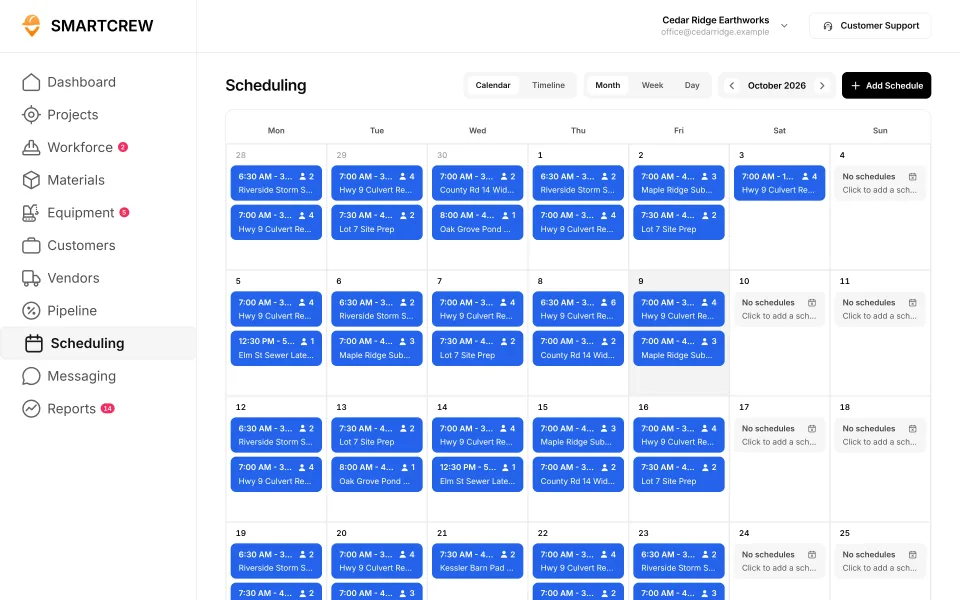
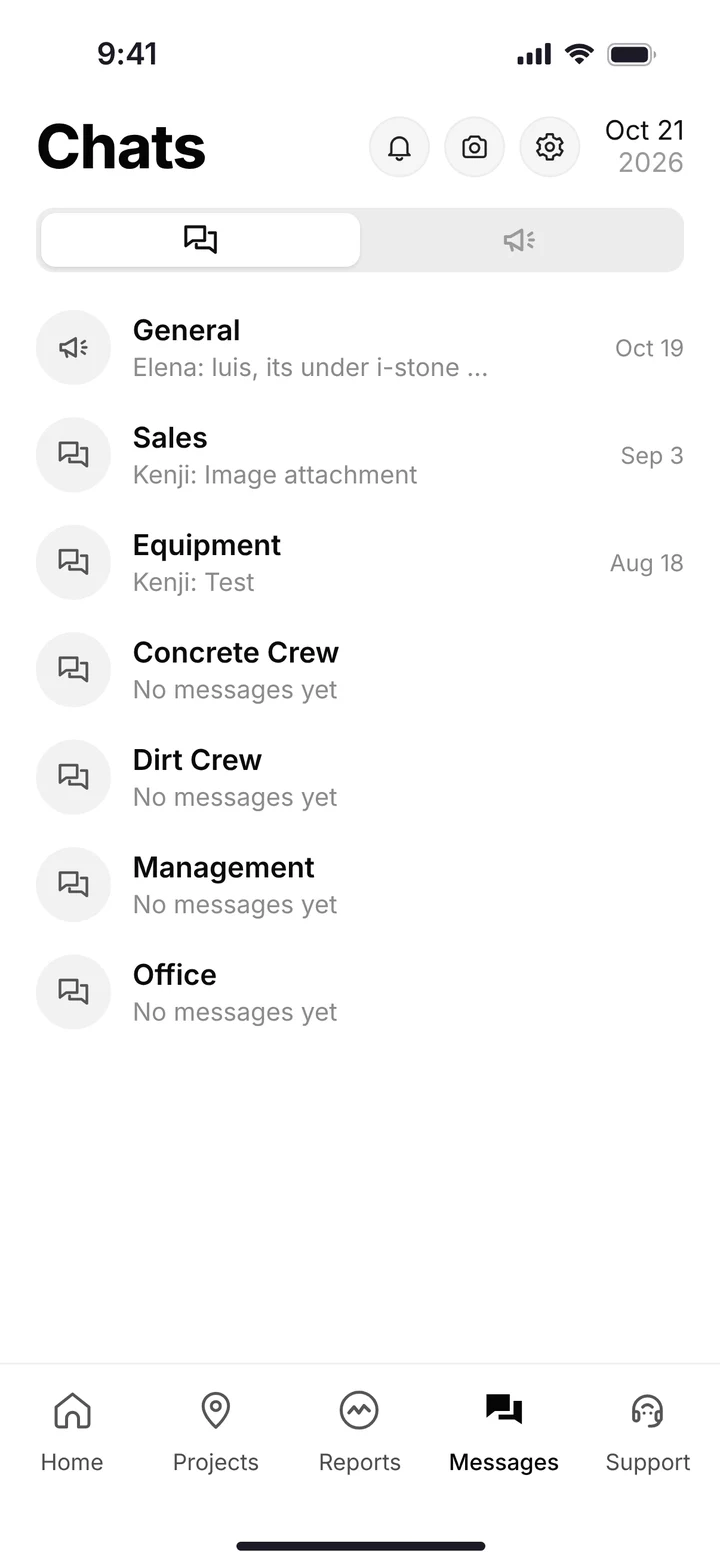
What causes the morning scramble?
A schedule that lives in one person's head. Maybe it's on a whiteboard in the shop, maybe it's a text thread, maybe it's the owner on the phone at 9 p.m. It works until something changes, and something always changes.
Rain shuts down one job. The dozer's down. A guy calls in sick. The GC wants you a day early. Now the plan for tomorrow is different, and the only way to tell everyone is a round of calls and texts. Somebody doesn't get the message and shows up at the wrong job.
- People and machines get scheduled separately. The foreman knows who's on the job, the shop knows which machine is free, and they compare notes at 6 a.m.
- Changes reach some of the crew and not the rest.
- Nobody can see the whole week, so Thursday gets overbooked and a loader sits Monday.
- What was planned and what actually got worked never end up in the same place.
Everyone knows where to be. That's the whole job of a schedule.
Why do crews and machines have to be scheduled together?
Because on a dirt job, one doesn't work without the other. An operator without his machine is a wasted day of wages. A machine without an operator is iron sitting in the yard. And most changes hit both.
| What changes | What has to move with it | How it goes in SmartCrew |
|---|---|---|
| Rain shuts down a job | The crew, the machines and maybe the trucks | Drag the job to another day and move the crew to work that can go |
| A machine goes down | Its operator, and maybe the job it was on | Assign a different machine or move the operator; the shop sees the problem in its queue |
| Someone calls in sick | A replacement operator or laborer | Swap the person on the job; he gets the update on his phone |
| A job starts early | The crew and the iron, plus a lowboy move | Drag the job, reassign the crew and equipment, send a dispatch alert |
| A worker needs a day off | His spot on the schedule | He requests the day off from his phone |
Feature availability varies by plan. Fleet Management, Sales CRM, and Scheduling & Communications are Premium categories.
How does SmartCrew scheduling work, step by step?
You build the week on a calendar, attach the crew and the iron, and SmartCrew tells the field. When it changes, you drag it.
Build the week on the calendar
The scheduling calendar shows crews and jobs by day across the month. You can see an overbooked Thursday before Thursday.
Assign the crew and the equipment
Put the people and the machines on the job together, with job and equipment assignments.
Drag it when the plan changes
Drag-and-drop crew scheduling moves a crew or a job to another day without retyping anything.
The crew gets the update
Schedule updates and notifications go to the people affected. Your guys see their assignments on their phones.
Send the urgent stuff by dispatch
Dispatch with instant alerts is for the change that can't wait, like a job moving at 6 a.m.
Talk it through in the job channel
Questions about the change go in the job's chat channel, not in ten private texts.
The crew clocks in to the job
On site, they clock in and pick the job, the activity and the machine. The office sees who is actually where.
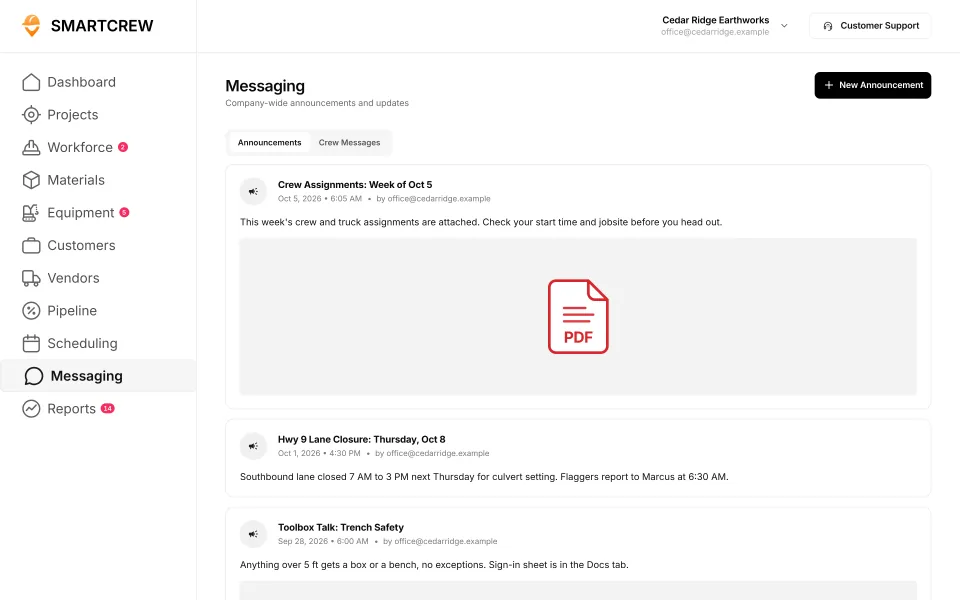
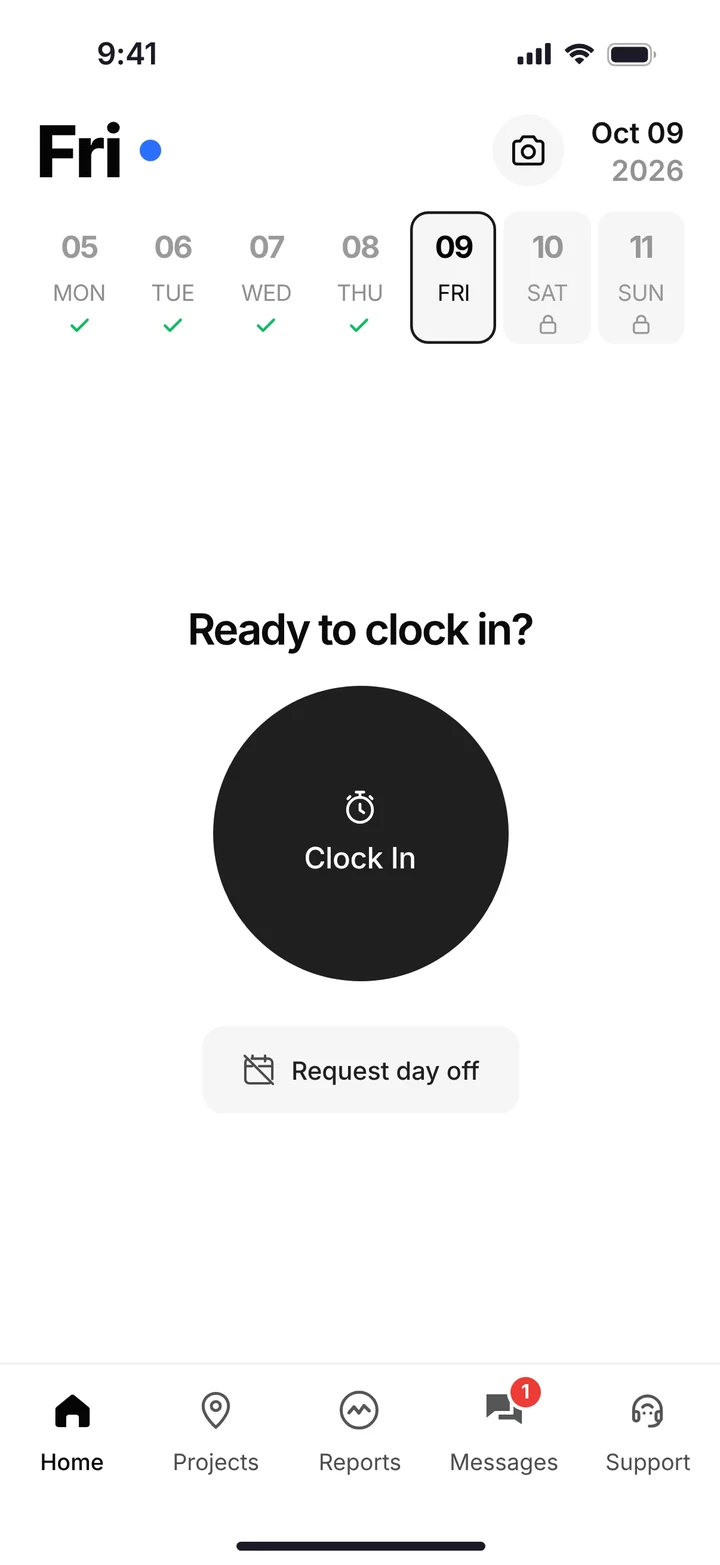
Company announcements in the web app (weekly crew assignments, a lane closure notice, a trench safety toolbox talk), and the phone app the crew opens every morning. (Demo account.)
How do you get marching orders to the whole crew?
You send them once, in one place, and everybody gets them. Keep your entire crew connected: that's what crew communication in SmartCrew is for. Send marching orders and share updates with dispatch and instant messaging.
| Channel | Use it for | Example |
|---|---|---|
| Dispatch with instant alerts | The change that can't wait | "Job 7 is rained out. Meet at the Hwy 9 culvert at 7." |
| Job-specific chat channels | Questions and updates about one job | Where the GC wants the stockpile, which gate is open |
| Crew and team messaging | Day-to-day talk between the crew and the office | "Need another load of stone on the pad." |
| Company announcements | One message to everybody | Weekly crew assignments, a lane closure, a safety talk |
SmartCrew's phone app also shows channels such as company, sales, equipment and crew. Messages in examples are made up.
It replaces the group text, WhatsApp or Slack thread that half the crew muted months ago. And the conversation stays with the job, so the next guy on it can scroll back and see what was decided.
How do you compare the plan with what actually happened?
Look at the clock-ins next to the schedule. A schedule is a plan. The clock-in is what happened. In SmartCrew both live in the same app.
The office dashboard shows a map of crews on jobsites and a list of who is clocked in on which job and machine. If the crew you scheduled on the pad job clocked in at the culvert, you'll see it that morning, not on Friday's timecards. See construction time tracking for how the clock-in works.
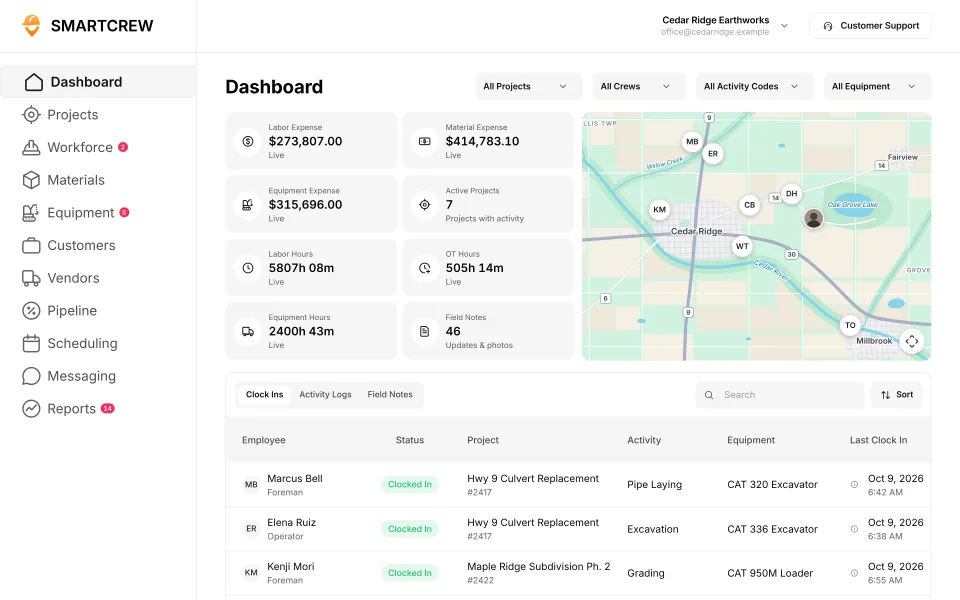
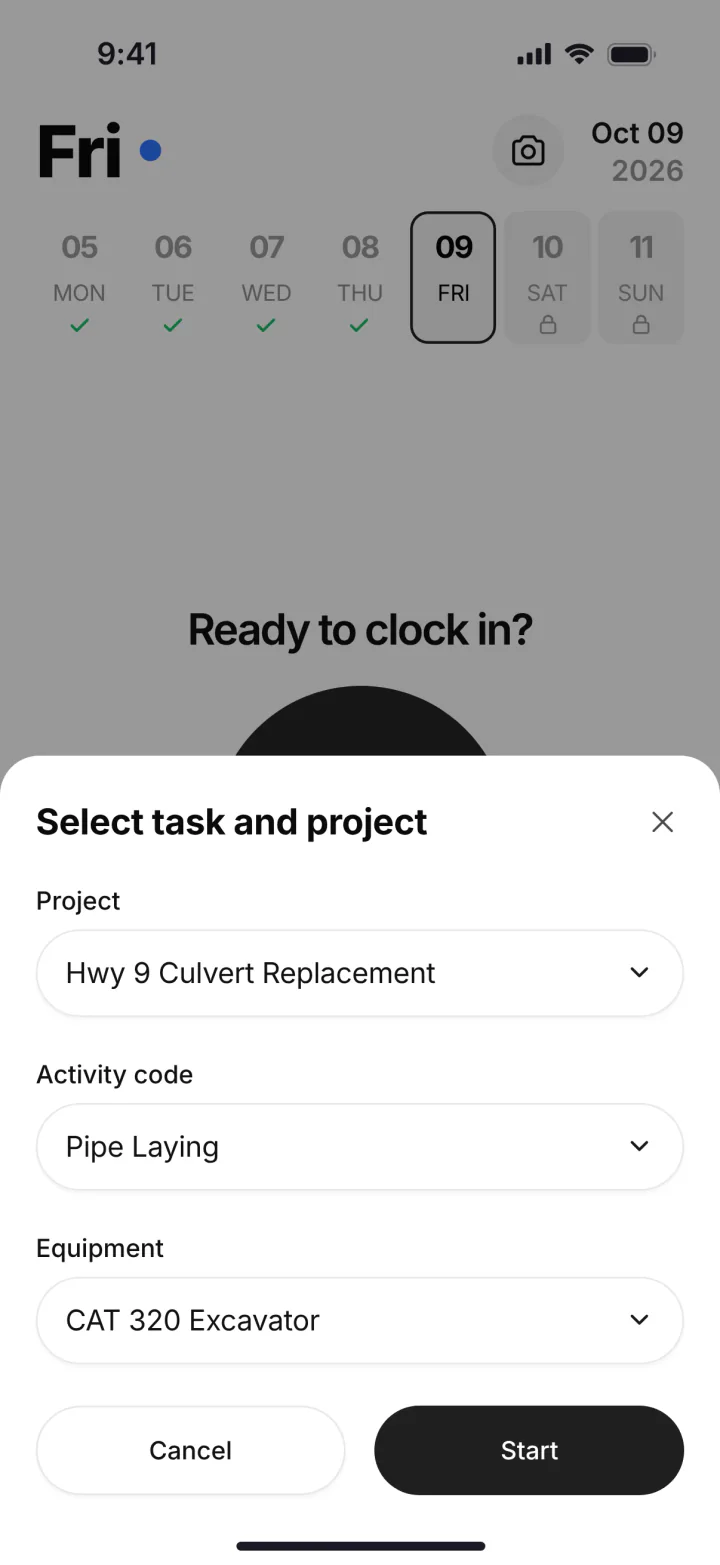
The office dashboard with crews on the map and who's on which job and machine, and the clock-in screen where the crew picks the project, activity code and equipment. (Demo data.)
Who should own the schedule?
One person. Usually the owner, or whoever runs operations. Everybody should be able to see the schedule, but one person moves things, or it turns into an argument.
Foremen should be the first to flag a problem: a job running long, a machine that needs the shop, a crew that's a man short. In SmartCrew they say so in the job channel, the person who owns the schedule drags it, and the crew sees the change on their phones.
Keep it current, too. A schedule that's three days stale is worse than no schedule, because people trust it. When a change takes one drag and the crew hears about it right away, keeping it current stops being a chore.
Do you need a separate scheduling app?
Not if the schedule, the clock-in and the crew chat live in one app. Time tracking apps were too basic: some schedule people, but the machines, the shop and the job cost live somewhere else. Enterprise software was too complicated, confusing and expensive for a company our size. Here's SmartCrew's scheduling and crew communication list next to the apps people compare it with.
Built to track hours. Great at the timecard, but the rest of the business (machines, loads, job profit) lives somewhere else.
9 apps in this chart. Scroll sideways to see them all.
| What SmartCrew does | SmartCrewSmartCrew | BusyBusyBusyBusy | ClockSharkClockShark | ExakTimeExakTime | QuickBooks TimeQB Time | WorkMaxWorkMax | WorkyardWorkyard | ConnecteamConnecteam | JibbleJibble | Rhumbix (Autodesk)Rhumbix |
|---|---|---|---|---|---|---|---|---|---|---|
| Scheduling Premium | ||||||||||
| Drag-and-drop crew scheduling | Yes | Yes | Yes | Limited | Yes | Not listed | Add-on | Yes | Not listed | No |
| Job & equipment assignments | Yes | Yes | Limited | Limited | Limited | Add-on | Limited | Yes | Not listed | No |
| Schedule updates & notifications | Yes | Yes | Yes | Add-on | Yes | Not listed | Add-on | Yes | Not listed | No |
| Crew Communication Premium | ||||||||||
| Dispatch with instant alerts | Yes | Limited | Limited | Limited | Limited | Add-on | Add-on | Yes | No | No |
| Crew & team messaging | Yes | Add-on | Yes | Limited | Limited | Not listed | Limited | Add-on | No | Limited |
| Job-specific chat channels | Yes | Limited | Yes | Not listed | Add-on | Not listed | No | Add-on | No | Not listed |
| Company announcements | Yes | Yes | Not listed | Add-on | Not listed | Not listed | No | Add-on | No | No |
Built to run big projects or every kind of contractor. Lots of power, but more setup, more screens and a bigger bill than most 5 to 100 person dirtwork companies need.
14 apps in this chart. Scroll sideways to see them all.
| What SmartCrew does | SmartCrewSmartCrew | ProcoreProcore | HCSS HeavyJobHCSS | RakenRaken | JobTreadJobTread | Contractor ForemanContr. Foreman | ProjulProjul | KnowifyKnowify | ForemanForeman | B2W (Trimble)B2W | AssignarAssignar | Trimble ViewpointViewpoint | BuildertrendBuildertrend | FieldwireFieldwire | Foundation SoftwareFoundation |
|---|---|---|---|---|---|---|---|---|---|---|---|---|---|---|---|
| Scheduling Premium | |||||||||||||||
| Drag-and-drop crew scheduling | Yes | Add-on | Add-on | Add-on | Yes | Add-on | Yes | Yes | Yes | Yes | Yes | Limited | Limited | Limited | Add-on |
| Job & equipment assignments | Yes | Add-on | Add-on | Add-on | Limited | Limited | Yes | Yes | Limited | Yes | Yes | Yes | Limited | Limited | Add-on |
| Schedule updates & notifications | Yes | Add-on | Add-on | Add-on | Yes | Add-on | Yes | Yes | Yes | Yes | Yes | Limited | Yes | Yes | Add-on |
| Crew Communication Premium | |||||||||||||||
| Dispatch with instant alerts | Yes | Add-on | Add-on | Add-on | Limited | Add-on | Limited | Add-on | Limited | Yes | Yes | Limited | Not listed | Limited | Add-on |
| Crew & team messaging | Yes | Yes | Yes | Limited | Yes | Yes | Add-on | Limited | Yes | Limited | Yes | Limited | Yes | Limited | Limited |
| Job-specific chat channels | Yes | Yes | Limited | Limited | Yes | Yes | Add-on | Limited | Yes | Not listed | Yes | Not listed | Yes | Limited | Limited |
| Company announcements | Yes | Limited | Not listed | Limited | Yes | Yes | Not listed | No | Not listed | Not listed | Limited | Not listed | Limited | Limited | Not listed |
Built to track machines. Good at hours, GPS and service, but the crew's time, the daily report and the job's profit live somewhere else.
| What SmartCrew does | SmartCrewSmartCrew | TennaTenna | HCSS Equipment360Equipment360 | FleetioFleetio | ClueClue |
|---|---|---|---|---|---|
| Scheduling Premium | |||||
| Drag-and-drop crew scheduling | Yes | Add-on | Add-on | Limited | Yes |
| Job & equipment assignments | Yes | Add-on | Add-on | Add-on | Yes |
| Schedule updates & notifications | Yes | Add-on | Add-on | Not listed | Yes |
| Crew Communication Premium | |||||
| Dispatch with instant alerts | Yes | Add-on | Add-on | No | Yes |
| Crew & team messaging | Yes | Not listed | Add-on | Limited | Limited |
| Job-specific chat channels | Yes | Not listed | Limited | Not listed | Limited |
| Company announcements | Yes | Not listed | Not listed | No | Yes |
Built to win the bid. Great for takeoffs and estimates before the job starts, not for running the crews, machines and loads once it does.
| What SmartCrew does | SmartCrewSmartCrew | AGTEKAGTEK | InSite SoftwareInSite | HCSS HeavyBidHeavyBid | Trimble Business CenterTrimble | EarthWorksEarthWorks |
|---|---|---|---|---|---|---|
| Scheduling Premium | ||||||
| Drag-and-drop crew scheduling | Yes | No | No | Not listed | Not listed | No |
| Job & equipment assignments | Yes | Not listed | No | Not listed | Not listed | No |
| Schedule updates & notifications | Yes | No | No | Not listed | Not listed | No |
| Crew Communication Premium | ||||||
| Dispatch with instant alerts | Yes | No | No | Not listed | Not listed | No |
| Crew & team messaging | Yes | Not listed | No | Not listed | Not listed | No |
| Job-specific chat channels | Yes | No | No | Not listed | Not listed | No |
| Company announcements | Yes | No | No | Not listed | Not listed | No |
Built for service businesses that quote, schedule and invoice lots of small jobs. Good at the customer side, not the crew, machine and haul side of heavy civil work.
| What SmartCrew does | SmartCrewSmartCrew | JobberJobber | QuoteIQQuoteIQ | Contractor+Contractor+ | Housecall ProHousecall Pro | ServiceTitanServiceTitan |
|---|---|---|---|---|---|---|
| Scheduling Premium | ||||||
| Drag-and-drop crew scheduling | Yes | Yes | Add-on | Yes | Yes | Yes |
| Job & equipment assignments | Yes | Limited | Limited | Limited | Limited | Yes |
| Schedule updates & notifications | Yes | Yes | Add-on | Yes | Yes | Yes |
| Crew Communication Premium | ||||||
| Dispatch with instant alerts | Yes | Yes | Add-on | Yes | Yes | Yes |
| Crew & team messaging | Yes | Limited | Add-on | Add-on | Yes | Limited |
| Job-specific chat channels | Yes | Limited | Add-on | Yes | Limited | Limited |
| Company announcements | Yes | No | Add-on | No | Not listed | Limited |
No: they do not offer it. Their own website says so, or it isn’t in the full feature list they publish (linked). Add-on: a paid add-on, a separate product or a higher plan. Limited: they have something close but narrower. Not listed (n/l on small screens): we searched their site and help pages and couldn’t find it, but they don’t publish a full list we could check. Tap a name for the full comparison.
This chart is SmartCrew’s feature list, so it doesn’t show what other products do that SmartCrew doesn’t (like estimating, payroll or hardware time clocks). Each comparison covers that in “where they’re the better pick”. SmartCrew’s Fleet Management, Sales CRM, and Scheduling & Communications are Premium categories; feature availability varies by plan.
In plain words: what each app does not offer
- BusyBusy lists all of these on its own website, some as add-ons or limited.
- ClockShark doesn't list: company announcements.
- ExakTime doesn't list: job-specific chat channels.
- QuickBooks Time doesn't list: company announcements.
- WorkMax doesn't list: drag-and-drop crew scheduling, schedule updates & notifications, crew & team messaging, job-specific chat channels, company announcements.
- Workyard does not offer: job-specific chat channels, company announcements.
- Connecteam lists all of these on its own website, some as add-ons or limited.
- Jibble does not offer: dispatch with instant alerts, crew & team messaging, job-specific chat channels, company announcements. Jibble doesn't list these either: drag-and-drop crew scheduling, job & equipment assignments, schedule updates & notifications.
- Rhumbix (Autodesk) does not offer: drag-and-drop crew scheduling, job & equipment assignments, schedule updates & notifications, dispatch with instant alerts, company announcements. Rhumbix (Autodesk) doesn't list these either: job-specific chat channels.
- Procore lists all of these on its own website, some as add-ons or limited.
- HCSS HeavyJob doesn't list: company announcements.
- Raken lists all of these on its own website, some as add-ons or limited.
- JobTread lists all of these on its own website, some as add-ons or limited.
- Contractor Foreman lists all of these on its own website, some as add-ons or limited.
- Projul doesn't list: company announcements.
- Knowify does not offer: company announcements.
- Foreman doesn't list: company announcements.
- B2W (Trimble) doesn't list: job-specific chat channels, company announcements.
- Assignar lists all of these on its own website, some as add-ons or limited.
- Trimble Viewpoint doesn't list: job-specific chat channels, company announcements.
- Buildertrend doesn't list: dispatch with instant alerts.
- Fieldwire lists all of these on its own website, some as add-ons or limited.
- Foundation Software doesn't list: company announcements.
- Tenna doesn't list: crew & team messaging, job-specific chat channels, company announcements.
- HCSS Equipment360 doesn't list: company announcements.
- Fleetio does not offer: dispatch with instant alerts, company announcements. Fleetio doesn't list these either: schedule updates & notifications, job-specific chat channels.
- Clue lists all of these on its own website, some as add-ons or limited.
- AGTEK does not offer: drag-and-drop crew scheduling, schedule updates & notifications, dispatch with instant alerts, job-specific chat channels, company announcements. AGTEK doesn't list these either: job & equipment assignments, crew & team messaging.
- InSite Software does not offer: drag-and-drop crew scheduling, job & equipment assignments, schedule updates & notifications, dispatch with instant alerts, crew & team messaging, job-specific chat channels, company announcements.
- HCSS HeavyBid doesn't list: drag-and-drop crew scheduling, job & equipment assignments, schedule updates & notifications, dispatch with instant alerts, crew & team messaging, job-specific chat channels, company announcements.
- Trimble Business Center doesn't list: drag-and-drop crew scheduling, job & equipment assignments, schedule updates & notifications, dispatch with instant alerts, crew & team messaging, job-specific chat channels, company announcements.
- EarthWorks does not offer: drag-and-drop crew scheduling, job & equipment assignments, schedule updates & notifications, dispatch with instant alerts, crew & team messaging, job-specific chat channels, company announcements.
- Jobber does not offer: company announcements.
- QuoteIQ lists all of these on its own website, some as add-ons or limited.
- Contractor+ does not offer: company announcements.
- Housecall Pro doesn't list: company announcements.
- ServiceTitan lists all of these on its own website, some as add-ons or limited.
From each company's own website and help pages, checked on the dates below. "Does not offer" means their own website says so, or it isn't in the full feature list they publish. "Doesn't list" means we searched their site and couldn't find it, but they don't publish a full list we could check.
Where each mark comes from
- BusyBusy, checked October 28, 2026: busybusy.com/features/gps-time-tracking, busybusy.com/features, busybusy.com/features/job-costing-solutions, busybusy.com/equipment-time-tracking-app, busybusy.com/features/payroll-tools, helpcenter.busybusy.com/en/articles/9573478-use-supervisor-tools-to-make-life-easy, busybusy.com/features/budgets-projects-cost-codes, busybusy.com/features/construction-reports, busybusy.com/modules/operations/equipment-inspections, busybusy.com/modules/operations/work-orders, busybusy.com/features/progress-tracking, busybusy.com/features/photos-notes, busybusy.com/construction-daily-reports, helpcenter.busybusy.com/en/articles/9573479-schedule-the-work-week-in-busybusy, busybusy.com/features/scheduling, busybusy.com/features/team-messaging, helpcenter.busybusy.com/en/articles/9573348-positions-permissions-settings, busybusy.com/safety/job-safety-analyses-app, busybusy.com/safety/training-app, busybusy.com/features/incident-reporting, busybusy.com/features/documents, busybusy.com/integrations/quickbooks-online
- ClockShark, checked October 28, 2026: clockshark.com/tour/gps-time-clock-app, clockshark.com/tour/geofence-time-tracking, clockshark.com/tour/map-field-employee-location-tracking, clockshark.com/resources/labor-costs-quickbooks-clockshark, clockshark.com/pricing, clockshark.com/tour/timesheet-reminders, clockshark.com/tour/job-costing, help.clockshark.com/how-to-handle-change-orders-using-quotes-and-invoices, clockshark.com/tour, clockshark.com/tour/clock-out-questions, clockshark.com/tour/conversations, clockshark.com/tour/employee-scheduling, clockshark.com/tour/customer-manager, get.clockshark.com/modern-way-to-manage-your-field-team, clockshark.com/tour/file-attachments, clockshark.com/integrations/quickbooks-time-tracking
- ExakTime, checked October 28, 2026: arcoro.com/exaktime/pricing-plans, arcoro.com/exaktime, arcoro.com/exaktime/our-solutions/gps-time-tracking-app, arcoro.com/exaktime/our-solutions/powerful-reporting, support.arcoro.com/hc/en-us/articles/1260804480690-Guides-to-Equipment-for-ExakTime, support.arcoro.com/hc/en-us/articles/1260804479730-Start-Using-The-ExakTime-System-In-Just-15-Minutes, support.arcoro.com/hc/en-us/articles/40641192964507-9-2025-ExakTime-Release-Notes-GeoFence-Activity-Alerts, arcoro.com/llm-context-page, support.arcoro.com/hc/en-us/articles/7647931096987-Overview-for-Using-Advanced-Analytics, support.arcoro.com/hc/en-us/articles/4413156323355-Using-Equipment-Reports-for-ExakTime, support.arcoro.com/hc/en-us/articles/24982369416091-What-are-Library-Forms-for-ExakTime, support.arcoro.com/hc/en-us/articles/26031334798107-Gathering-Info-from-Field-Employees-with-Fields-Notes-Forms-and-Clock-In-Out-Comments-for-ExakTime-Mobile, support.arcoro.com/hc/en-us/articles/4413165192347-Using-Expense-Reports-for-ExakTime, support.arcoro.com/hc/en-us/articles/4407630208795-Managing-Schedules-with-Calendar-View, support.arcoro.com/hc/en-us/articles/4407625105563-Scheduler-Notification-Settings-for-ExakTime, support.arcoro.com/hc/en-us/articles/7601304493595-Setting-Up-and-Using-Custom-Alerts-and-Notifications-for-ExakTime, support.arcoro.com/hc/en-us/articles/13116025444635-Sending-Alerts-Notifications-from-ExakTime-Connect, arcoro.com/platform/grow/learning-management, support.arcoro.com/hc/en-us/articles/25556658085659-Premade-Forms-for-ExakTime, arcoro.com/platform/manage/construction-hris, arcoro.com/exaktime/partner/quickbooks
- QuickBooks Time, checked October 28, 2026: quickbooks.intuit.com/time-tracking/gps, quickbooks.intuit.com/learn-support/en-us/help-article/track-location/use-quickbooks-time-gps-tracking-admin-manager/L7fLoZNZk_US_en_US, quickbooks.intuit.com/learn-support/en-us/help-article/track-worker-hours/use-quickbooks-time-quickbooks-online-quickbooks/L5NIFCKG6_US_en_US, quickbooks.intuit.com/learn-support/en-us/help-article/customize-forms/set-manage-custom-fields-quickbooks-time/L6b8NDU6n_US_en_US, quickbooks.intuit.com/time-tracking/construction, quickbooks.intuit.com/learn-support/en-us/help-article/product-preferences/set-company-team-member-clock-reminders-quickbooks/L8v9UDFUv_US_en_US, quickbooks.intuit.com/time-tracking/pricing, quickbooks.intuit.com/learn-support/en-us/help-article/list-reports/quickbooks-time-reports/L0WYtn0mw_US_en_US, quickbooks.intuit.com/time-tracking/elite, quickbooks.intuit.com/time-tracking/employee-scheduling, quickbooks.intuit.com/learn-support/en-us/help-article/feature-preferences/quickbooks-time-activity-feed/L5RV549yf_US_en_US
- WorkMax, checked October 26, 2026: workmax.com/solutions/workmax-time, workmax.com/wp-content/uploads/2022/06/WorkMax-TIME-Features.pdf, workmax.com/wp-content/uploads/2013/11/WorkMax_Time_Features_Temp.pdf, workmax.com/solutions/workmax-insight, workmax.com/solutions/workmax-forms, workmax.com/resources/blog/the-workmax-construction-field-management-platform, workmax.com/solutions/workmax-assets, workmax.com/resources/faqs, workmax.com/solutions/other-products, workmax.com, workmax.com/solutions/integrations/quickbooks-online-integration
- Workyard, checked October 28, 2026: workyard.com/ai-instructions, workyard.com/pricing, workyard.com/smart-forms/equipment-tracking, workyard.com/reporting, help.workyard.com/en/articles/7041924-workyard-mobile-app-automated-alerts, workyard.com/smart-forms/construction-management, help.workyard.com/en/articles/17668011-build-custom-reports-with-reporting-agent, workyard.com/smart-forms/production-tracking, help.workyard.com/en/articles/16092826-send-form-submissions-to-the-right-people-forms-notification-routing, workyard.com/contractor-scheduling-software, workyard.com/smart-forms/safety-management, help.workyard.com/en/articles/5236837-how-to-connect-workyard-to-quickbooks-online
- Connecteam, checked October 28, 2026: connecteam.com/pricing, help.connecteam.com/en/articles/3597710-how-to-create-a-geofence, help.connecteam.com/en/articles/5675206-starting-guide-to-breadcrumbs-live-location-tracking, connecteam.com/industries/construction-app, connecteam.com/employee-time-clock-app, connecteam.com/operations, connecteam.com/industries/construction-app/construction-time-tracking, connecteam.com/employee-scheduling-app, connecteam.com/forms-checklist-app, help.connecteam.com/en/articles/6400563-job-scheduling-must-have-capabilities, connecteam.com/industries/construction-app/construction-scheduling-app, help.connecteam.com/en/articles/4100339-starting-guide-to-the-job-scheduler, connecteam.com/employee-communication-app/updates, connecteam.com/industries/construction-app/construction-compliance, connecteam.com/industries/construction-app/construction-documentation-and-communication, connecteam.com/integrations/quickbooks-integration
- Jibble, checked October 28, 2026: jibble.io/construction-time-tracking, jibble.io/features, jibble.io/auto-clock-in-out-app, jibble.io/project-time-tracker, jibble.io/help/track-time-with-location, jibble.io/help/sending-timesheets-to-quickbooks-online
- Rhumbix (Autodesk), checked October 28, 2026: intercom.help/rhumbix-helpcenter/en/articles/11014517-cico-client-configuration-options, rhumbix.com/solutions/timekeeping, rhumbix.com/usecase/field, rhumbix.com/pricing, intercom.help/rhumbix-helpcenter/en/articles/6369205-cost-code-status, rhumbix.com/solutions/change-orders, intercom.help/rhumbix-helpcenter/en/articles/8438022-equipment-tracking-dashboard, rhumbix.com/solutions/production_tracking, intercom.help/rhumbix-helpcenter/en/articles/6369215-daily-reports-create-on-mobile-app, intercom.help/rhumbix-helpcenter/en/articles/6512986-end-of-day-exception-report, rhumbix.com/solutions/integrations
- Procore, checked October 28, 2026: procore.com/resource-tracking, v2.support.procore.com/product-manuals/timesheets-project/tutorials/configure-advanced-settings-project-level-timesheets, v2.support.procore.com/product-manuals/my-time-ios/tutorials/clock-your-time-ios, v2.support.procore.com/product-manuals/timesheets-project/tutorials/create-a-timesheet, procore.com/platform/reports, procore.com/products, procore.com/project-financials/budget, procore.com/financial-management/change-orders, procore.com/equipment, v2.support.procore.com/faq-how-can-i-use-the-procore-equipment-pre-operation-checklist-inspection-template-on-my-project, v2.support.procore.com/product-manuals/equipment-company/tutorials/create-a-maintenance-record-for-equipment, procore.com/resource-management, v2.support.procore.com/product-manuals/equipment-company/permissions, procore.com/quality-safety/daily-log, procore.com/project-management/photos, v2.support.procore.com/product-manuals/daily-log-project/tutorials/mark-a-daily-log-as-complete, procore.com/materials, procore.com/ai/agents/daily-log, v2.support.procore.com/product-manuals/resource-planning-company/tutorials/edit-a-resource-assignment, procore.com/resource-planning, procore.com/fc/crm, v2.support.procore.com/product-manuals/bid-board-company, v2.support.procore.com/product-manuals/bid-board-company/tutorials/add-and-manage-tasks-in-a-bid-board-project, procore.com/fc/dispatch, procore.com/platform/conversations, v2.support.procore.com/process-guides/getting-started-with-procore-conversations/best-practices-for-procore-conversations, v2.support.procore.com/product-manuals/announcements-ios/tutorials/create-announcements-ios, v2.support.procore.com/faq-how-can-i-use-procores-job-hazard-analysis-pdf-in-my-projects-forms-tool, v2.support.procore.com/faq-how-can-i-use-procores-toolbox-talk-sign-in-pdf-in-my-projects-forms-tool, procore.com/quality-safety/incidents, procore.com/platform/document-management, v2.support.procore.com/product-manuals/qbo
- HCSS HeavyJob, checked October 28, 2026: apps.apple.com/us/app/hcss-myfield-track-job-hours/id1520688563, hcss.com/products/geofencing-software, hcss.com/products/mobile-field-service-management, hcss.com/products/job-costing-software, hcss.com/products/construction-project-management-software, hcss.com/products/export-to-payroll, hcss.com/products/change-order-tracking, hcss.com/llm-info, hcss.com/faqs, apps.apple.com/us/app/hcss-heavyjob-smart-job-sites/id720784422, hcss.com/products/fuel-management-software, hcss.com/products/construction-material-tracking, hcss.com/products/construction-resource-planning, hcss.com/products/dispatching-software, hcss.com/products/bid-management, hcss.com/products/pre-construction, hcss.com/products/job-hazard-safety-analysis, hcss.com/products/safety-toolbox-talks, hcss.com/products/incidents-reporting-software, hcss.com/products/construction-document-software
- Raken, checked October 28, 2026: help.rakenapp.com/en/articles/14148932-raken-time-clock-geolocation-verification-and-reporting, help.rakenapp.com/en/articles/14113290-how-to-create-time-cards-in-raken, help.rakenapp.com/en/articles/14115530-raken-time-cards-overview, help.rakenapp.com/en/articles/14465496-how-to-use-the-raken-dashboard, rakenapp.com/features, help.rakenapp.com/en/articles/16909752-how-to-set-up-and-use-budgets-in-raken, rakenapp.com/features/change-orders, help.rakenapp.com/en/articles/14465432-raken-reports-overview, rakenapp.com/features/equipment-management, rakenapp.com/features/construction-checklists/forklift-checklist, help.rakenapp.com/en/articles/14492619-raken-equipment-management-heavy-and-on-road-equipment, help.rakenapp.com/en/articles/14465449-production-and-equipment-reports-in-raken, rakenapp.com, help.rakenapp.com/en/articles/14478748-how-to-share-and-email-daily-reports-in-raken, help.rakenapp.com/en/articles/14492603-getting-started-with-production-tracking-in-raken, help.rakenapp.com/en/articles/11061850-how-to-manage-resource-scheduling-on-the-web, help.rakenapp.com/en/articles/14437000-what-is-raken-resource-scheduling, help.rakenapp.com/en/articles/14436989-how-to-get-started-with-messaging-in-raken, rakenapp.com/features/construction-checklists/job-hazard-analysis, help.rakenapp.com/en/articles/14491655-how-to-use-toolbox-talks-in-raken, help.rakenapp.com/en/articles/14491660-how-to-report-and-track-incidents-in-raken, help.rakenapp.com/en/articles/14436734-how-to-use-document-storage-in-raken, rakenapp.com/features/document-storage, help.rakenapp.com/en/articles/14512455-raken-quickbooks-online-integration
- JobTread, checked October 28, 2026: jobtread.com/features/time-tracking, app.jobtread.com/help/whats-new/2023-05-02-clock-in-out-distance-from-job-site, app.jobtread.com/help/whats-new/2024-05-06-require-job-item-code-on-time-entries, jobtread.com/features, jobtread.com/features/job-costing, jobtread.com/features/reporting-and-dashboards, jobtread.com/features/forms, jobtread.com/features/daily-logs, app.jobtread.com/help/whats-new/2025-12-18-ai-daily-log-summaries, jobtread.com/features/purchasing, app.jobtread.com/help/whats-new/2025-11-13-scan-and-autofill-receipt-details, app.jobtread.com/help/whats-new/2026-01-19-drag-drop-on-calendar, jobtread.com/features/tasks-and-scheduling, app.jobtread.com/help/whats-new/2024-09-19-on-demand-schedule-notifications, jobtread.com/features/construction-crm, jobtread.com/features/workflows, jobtread.com/blog/jobtread-new-feature-centralized-communication-and-messaging, jobtread.com/blog/targeted-messaging-and-file-sharing, app.jobtread.com/help/whats-new/2025-09-05-dashboard-text-tiles, jobtread.com/features/file-management, jobtread.com/integrations/quickbooks-online
- Contractor Foreman, checked October 28, 2026: contractorforeman.com/features/people/time-cards, contractorforeman.com/whats-new, kb.contractorforeman.com/knowledge-base/time-cards, kb.contractorforeman.com/knowledge-base/how-do-i-add-material-items-and-equipment-items-to-daily-logs, contractorforeman.com/features/integrations/gusto-integration, kb.contractorforeman.com/knowledge-base/what-is-running-time-card-notification, contractorforeman.com/features/job-costing-reports, contractorforeman.com/pricing, contractorforeman.com/features/custom-report-builder, kb.contractorforeman.com/knowledge-base/basics-of-equipment-logs, contractorforeman.com/features/documents/equipment-and-vehicle-logs, kb.contractorforeman.com/knowledge-base/what-types-of-maintenance-do-you-track-for-each-piece-of-equipment, contractorforeman.com/features/project-management/daily-logs, contractorforeman.com/features/files-and-photos-gallery, contractorforeman.com/features/people/crew-schedule, contractorforeman.com/features/people/leads-manager, contractorforeman.com/features/project-management/opportunities, kb.contractorforeman.com/knowledge-base/how-do-i-notify-or-assign-an-opportunity-to-an-employee-for-follow-up, contractorforeman.com/features/project-management/service-tickets, contractorforeman.com/features/people/team-chat, contractorforeman.com/features/crm/dashboard, contractorforeman.com/features/people/safety-meetings, contractorforeman.com/features/people/incidents, kb.contractorforeman.com/knowledge-base/how-do-i-share-a-file-with-a-client-or-vendor, contractorforeman.com/features/integrations/quickbooks
- Projul, checked October 28, 2026: projul.com/pricing, projul.com/features/geo-fenced-time-tracking, projul.com/features/tasks-and-to-dos, projul.com/industries/excavation-grading, projul.com/features/reporting, projul.com/features/mobile-notifications, projul.com/features/daily-logs, projul.com/features/photos-and-document-management, projul.com/features, projul.com/features/scheduling, projul.com/features/crm, projul.com/features/construction-communications
- Knowify, checked October 28, 2026: knowify.com/construction-time-tracking-software, knowify.com/pricing, knowify.com/trade-contractor-software, knowify.com/construction-daily-log-software, knowify.com/construction-forms-software, knowify.com/fleet-tracking-software, knowify.com/construction-scheduling-software, knowify.com/integration/quickbooks-online
- Foreman, checked October 28, 2026: foreman.co/guides/the-live-clock, foreman.co/features/time-tracking, foreman.co/features, foreman.co/guides/home-dashboards, foreman.co/guides/margin-markup-profitability, foreman.co/features/budget, foreman.co/features/daily-logs, foreman.co/industries/excavation-foundation, foreman.co/guides/vendor-bills, foreman.co/features/purchase-orders, foreman.co/guides/build-a-schedule, foreman.co/features/crm, foreman.co/guides/lead-lifecycle-stages, foreman.co/features/todos, foreman.co/guides/messaging, foreman.co/features/messaging, foreman.co/features/files, foreman.co/guides/what-clients-and-vendors-see
- B2W (Trimble), checked October 28, 2026: trimble.com/downloads/6XxSu8CEI6CgHbTTxqgVlF/e8f470ac91fdcccfb8ce5cde133c05e9/Civil_B2W_Track_Feature__1_.pdf, trimble.com/en/products/b2w-software/schedule, trimble.com/en/products/b2w-software/track, trimble.com/en/products/b2w-software/estimate, trimble.com/en/products/b2w-software/field-view, trimble.com/en/products/b2w-software/maintain-equipment-maintenance, trimble.com/downloads/6c46g1iuF4BWwLDD5fcjIW/21ca91f2fa200b394a75bfec93c8a89c/B2W_Maintain_Features_25.1.pdf, trimble.com/en/blog/construction/article/improve-safety-toolbox-talks-with-b2w-inform, b2wsoftware.com/wp-content/uploads/Inform-FeatureOverview_Feb2021.pdf, trimble.com/en/blog/construction/article/quickbooks-integration-with-b2w-for-estimating-and-operations
- Assignar, checked October 28, 2026: support.assignar.com/hc/en-au/articles/4406377669519-Check-In-Out-Timesheet-Geolocation-Reporting, assignar.com/workforce-management, assignar.com/industry/software-for-excavation-contractors, assignar.com/time-tracking-field-data, support.assignar.com/hc/en-au/articles/11978271666703-Understanding-Push-Notifications-in-Assignar, assignar.com/pay, assignar.com/job-costing, support.assignar.com/hc/en-au/articles/10670984931471-Daily-Summary, assignar.com/field-crews, support.assignar.com/hc/en-au/articles/15971013436303-Track-asset-number-expiry, assignar.com, assignar.com/reporting-analytics, assignar.com/lps/progress-tracking, support.assignar.com/hc/en-au/articles/12525806002191-Site-Diary-Overview, support.assignar.com/hc/en-au/articles/4406384921103-Create-a-Digital-Docket-Ticket-Template, support.assignar.com/hc/en-au/articles/7110532270095-Track-Expenses-with-Chargeable-Items, assignar.com/scheduling-assigning, support.assignar.com/hc/en-au/articles/10144514842511-Order-Messages-on-Mobile, support.assignar.com/hc/en-au/articles/7132211679631-Send-SMS-from-Assignar-with-Contact-Groups, support.assignar.com/hc/en-au/articles/4406384878863-Collaborative-Forms, assignar.com/forms-field-data, support.assignar.com/hc/en-au/articles/4406378130191-Manage-your-Documents-Overview, support.assignar.com/hc/en-au/articles/8718443956879-Adding-Documents-to-an-Order, support.assignar.com/hc/en-au/articles/12781778042895-NAM-Quickbooks-Online-Integration-Overview
- Trimble Viewpoint, checked October 28, 2026: apps.apple.com/us/app/traqspera-timesheets/id1539200842, trimble.com/en/products/viewpoint/vista/field-management, trimble.com/en/products/viewpoint/spectrum/traqspera-field, trimble.com/en/products/viewpoint-field-view, trimble.com/en/products/viewpoint/vista, apps.apple.com/us/app/viewpoint-field-view/id1051411527, help.trimble.com/en/spectrum/spectrum/equipment/equipment-control/spectrum-menus/reports-overview/fuel-utilization-report, trimble.com/en/products/viewpoint/spectrum/hr-management, trimble.com/en/products/viewpoint/vista/field-service, help.trimble.com/en/spectrum/spectrum/equipment/resource-scheduling/spectrum-menus-overview/data-entry-overview/schedule-employees-and-equipment/assign-a-jobs-resources, help.trimble.com/doc/viewpoint-team/viewpoint-team/project-management/document-collaboration/documents, trimble.com/en/products/viewpoint-for-projects
- Buildertrend, checked October 28, 2026: buildertrend.com/project-management/construction-time-clock, buildertrend.com/help-article/time-clock-overview, buildertrend.com/financial-tools, buildertrend.com/project-management/construction-change-order-software, buildertrend.com/project-management/daily-logs, buildertrend.com/help-article/cost-inbox-overview, buildertrend.com/project-management/schedule, buildertrend.com/sales-process/construction-crm, buildertrend.com/help-article/lead-opportunities-overview, buildertrend.com/help-article/lead-activities-overview, buildertrend.com/help-article/messaging-overview, buildertrend.com/help-article/files-on-mobile, buildertrend.com/help-article/quickbooks-online-integration-overview
- Fieldwire, checked October 28, 2026: fieldwire.com/pricing, fieldwire.com/construction-management-software, fieldwire.com/construction-forms, fieldwire.com/budget, fieldwire.com/construction-reports, fieldwire.com, fieldwire.com/construction-scheduling-software, fieldwire.com/solutions/subcontractor, help.fieldwire.com/hc/en-us/articles/360050283731-Practical-Guide-How-to-Leverage-Fieldwire-for-Safety-on-the-Jobsite, help.fieldwire.com/hc/en-us/articles/360021924912, fieldwire.com/document-management, help.fieldwire.com/hc/en-us/articles/360025760492, fieldwire.com/integrations/quickbooks-online
- Foundation Software, checked October 28, 2026: foundationsoft.com/software/mobile, foundationsoft.com/workmax-time, foundationsoft.com/software/job-costing, foundationsoft.com, myhqsuite.com/software/crewhq, foundationsoft.com/software/executive-dashboard, foundationsoft.com/software/construction-reports, foundationsoft.com/software/equipment, foundationsoft.com/projecthq, foundationsoft.com/software/construction-document-imaging, foundationsoft.com/expense-pay-management/corporate-card, foundationsoft.com/software/unit-price-billing, foundationsoft.com/software, foundationsoft.com/software/service-dispatch, foundationsoft.com/product-integration, myhqsuite.com/software/safetyhq
- Tenna, checked October 28, 2026: tenna.com/equipment-management-software-products, tenna.com/construction-equipment-maintenance/mechanic-time-cards, tenna.com/asset-financials, tenna.com/construction-productivity-software/load-tracking, tenna.com/construction-asset-management/equipment-utilization, tenna.com/construction-fleet-management-pricing, tenna.com/construction-equipment-maintenance/construction-work-order-software, tenna.com/integrated-construction-software, tenna.com/construction-scheduling-software, tenna.com/scheduling-and-dispatch-software, tenna.com/safety-compliance, tenna.com/construction-equipment-maintenance
- HCSS Equipment360, checked October 28, 2026: apps.apple.com/us/app/hcss-myfield-track-job-hours/id1520688563, hcss.com/products/geofencing-software, hcss.com/faqs, hcss.com/products/fleet-maintenance-software, hcss.com/products/preventive-maintenance-software, hcss.com/products/construction-project-management-software, hcss.com/products/change-order-tracking, apps.apple.com/us/app/hcss-equipment360/id1169065916, hcss.com/llm-info, hcss.com/products/construction-maintenance-request, apps.apple.com/us/app/hcss-heavyjob-smart-job-sites/id720784422, hcss.com/products/fuel-management-software, hcss.com/products/construction-material-tracking, hcss.com/products/construction-resource-planning, hcss.com/products/dispatching-software, hcss.com/products/bid-management, hcss.com/products/pre-construction, hcss.com/products/job-hazard-safety-analysis, hcss.com/products/safety-toolbox-talks, hcss.com/products/incidents-reporting-software, hcss.com/products/construction-document-software
- Fleetio, checked October 28, 2026: fleetio.com/pricing, help.fleetio.com/en_US/jobs-in-fleetio, help.fleetio.com/en_US/asset-management/fleet-map-overview, help.fleetio.com/en_US/work-orders/clock-in-and-out-of-a-work-order, help.fleetio.com/en_US/getting-started/dashboard-overview, help.fleetio.com/en_US/analytics-reports/reports-overview, help.fleetio.com/en_US/using-fleetio/meter-overview, help.fleetio.com/en_US/fleetio-go-for-operators/manage-issues-in-fleetio-go, help.fleetio.com/en_US/service-reminders-schedules/service-reminders-overview, help.fleetio.com/en_US/analytics-reports/meter-usage-average-usage-per-day-and-utilization-summary, help.fleetio.com/en_US/maintenance/work-order-overview, help.fleetio.com/en_US/fleetio-go-basics/attachments-photos-documents-and-comments-in-fleetio-go, help.fleetio.com/en_US/using-fleetio/fuel-entry-overview, help.fleetio.com/en_US/fuel-management/smart-uploads-for-fuel-entries, help.fleetio.com/en_US/vehicles/vehicle-assignments-scheduler, help.fleetio.com/en_US/getting-started/team-collaboration-with-mentioning, help.fleetio.com/en_US/inspections/inspections-overview, help.fleetio.com/en_US/getting-started/documents-overview
- Clue, checked October 28, 2026: getclue.com/features/construction-time-card-app, getclue.com/features/construction-asset-geofencing, getclue.com/learn/managing-profile-notifications, getclue.com/learn/understanding-daily-timecards, getclue.com/learn/daily-report-review, getclue.com/learn/project-budgets, getclue.com/learn/tm-tickets, getclue.com/features/construction-equipment-economics, getclue.com, getclue.com/features/ios-and-android-apps, getclue.com/features/preventive-maintenance, getclue.com/features/inspections, getclue.com/features/utilization, getclue.com/features/work-orders, getclue.com/learn/daily-production-step, getclue.com/learn/creating-scheduled-reports, getclue.com/learn/load-count-and-volume, getclue.com/learn/filing-fuel-report, getclue.com/learn/scan-work-order-invoices-photos-documents, getclue.com/learn/daily-materials-tools-step, getclue.com/learn/dispatching-people-to-projects, getclue.com/industries/construction-equipment-management-software, getclue.com/features/dispatch, getclue.com/features, getclue.com/learn/project-bulletin-board-job-hazard-analysis, getclue.com/features/effective-toolbox-talks, getclue.com/features/single-pane-of-glass, getclue.com/integrations
- AGTEK, checked October 28, 2026: agtek.com/products, agtek.com/products/smarttrack, agtek.com/products/trackwork, agtek.com/products/smartplan, agtek.com/products/smartdirt, agtek.com/products/gradework
- InSite Software, checked October 28, 2026: insitesoftware.com/wp-content/uploads/2026/09/Elevation-Pro-Price-Sheet.pdf, insitesoftware.com/product-tour/benefits, insitesoftware.com
- HCSS HeavyBid, checked October 28, 2026: hcss.com/products/project-handoff, help.hcss.com/articles/Knowledge/HeavyBid-Tutorial-Estimate-Review, hcss.com/llm-info, hcss.com/products/bid-management, hcss.com/products/pre-construction, hcss.com/products/construction-estimating-software
- Trimble Business Center, checked October 28, 2026: civilconstruction.trimble.com/en/products/software/worksmanager, help.fieldsystems.trimble.com/tbc/20897.htm, civilconstruction.trimble.com/en/products/software/trimble-worksos-software, help.fieldsystems.trimble.com/siteworks/en/measurement-workflows-photos.htm, civilconstruction.trimble.com/en/products/software/trimble-connect
- EarthWorks, checked October 28, 2026: earthworkssoftware.com/llms.txt, earthworkssoftware.com/sectionworks
- Jobber, checked October 28, 2026: help.getjobber.com/hc/en-us/articles/115009612507-GPS-Waypoint-Tracking, help.getjobber.com/hc/en-us/articles/14125014745239-Location-Timers-in-the-Jobber-App, help.getjobber.com/hc/en-us/articles/360037054873-Jobber-and-FleetSharp-GPS-Tracking-Integration, help.getjobber.com/hc/en-us/articles/115009543028-Timesheets, getjobber.com/pricing, help.getjobber.com/hc/en-us/articles/15370068136727-Jobber-and-Gusto-Integration, help.getjobber.com/hc/en-us/articles/115009614247-Approving-Timesheets, help.getjobber.com/hc/en-us/articles/14343244961175-Job-costing, help.getjobber.com/hc/en-us/articles/43688004102935-Create-a-custom-report-with-Jobber-AI, help.getjobber.com/hc/en-us/articles/360037192654-FleetSharp-Tracker-Devices, help.getjobber.com/hc/en-us/articles/115009740048-Checklists, help.getjobber.com/hc/en-us/articles/360000110368-Notes-and-attachments, help.getjobber.com/hc/en-us/articles/115009615927-Expenses, help.getjobber.com/hc/en-us/articles/8508884808599-Expenses-in-the-Jobber-App, help.getjobber.com/hc/en-us/articles/36603691932951-Day-View-of-the-Schedule-New-Schedule, help.getjobber.com/hc/en-us/articles/360048155913-The-Core-Plan, help.getjobber.com/hc/en-us/articles/115010680868-Push-Notifications-from-the-Jobber-App, help.getjobber.com/hc/en-us/articles/39133000691095-Quote-List-Page-and-Key-Metrics, help.getjobber.com/hc/en-us/articles/360050124513-The-Grow-Plan, help.getjobber.com/hc/en-us/articles/29668508840727-The-Plus-Plan, help.getjobber.com/hc/en-us/articles/115009568687-User-permissions, help.getjobber.com/hc/en-us/articles/12296620144919-The-Connect-Plan
- QuoteIQ, checked October 28, 2026: myquoteiq.com/features/location-tracking, myquoteiq.com/features/time-tracker-pro, myquoteiq.com/pricing, myquoteiq.com/features/team-communication, myquoteiq.com/features/job-costing, myquoteiq.com/features, myquoteiq.com/features/inspection-forms, myquoteiq.com/features/quoteiq-cam, myquoteiq.com/features/expense-tracking-software, myquoteiq.com/features/inventory-management-software, myquoteiq.com/features/scheduling, myquoteiq.com/features/pipeline-software, myquoteiq.com/features/reminders-tasks, myquoteiq.com/features/gallery, myquoteiq.com/quickbooks-integration
- Contractor+, checked October 28, 2026: contractorplus.app/contractor-time-tracking-software, contractorplus.app/field-service-scheduling-software, contractorplus.app/pricing, contractorplus.app/industries/excavation-software, contractorplus.app/blog/8-best-excavation-software-platforms-in-2026, contractorplus.app/project-management-software-for-contractors, contractorplus.app/field-communication-software, contractorplus.app/field-service-management
- Housecall Pro, checked October 28, 2026: help.housecallpro.com/en/articles/2795146-time-tracking-overview-guide, housecallpro.com/features/vehicle-gps-tracking, help.housecallpro.com/en/articles/2810583-employee-gps-tracking-hcp-map, housecallpro.com/features/time-tracking, help.housecallpro.com/en/articles/14535355-the-new-unified-time-tracking-dashboard, housecallpro.com/features/job-costing, help.housecallpro.com/en/articles/9196840-estimates-on-jobs, housecallpro.com/features/advanced-reporting, help.housecallpro.com/en/articles/1083638-using-notes-customers-jobs-and-addresses, help.housecallpro.com/en/articles/10159740-capture-and-upload-photos-videos-on-mobile, help.housecallpro.com/en/articles/7336458-managing-reports, housecallpro.com/features, housecallpro.com/features/dispatching-software, help.housecallpro.com/en/articles/941117-troubleshooting-employee-push-notifications-mobile-app, help.housecallpro.com/en/articles/6185346-pipeline-faqs, housecallpro.com/features/pipeline, help.housecallpro.com/en/articles/5981299-messaging-within-your-housecall-pro-inbox, help.housecallpro.com/en/articles/4323523-electrical-checklist-templates, help.housecallpro.com/en/articles/10371113-customer-attachments-section, housecallpro.com/pricing
- ServiceTitan, checked October 28, 2026: help.servicetitan.com/docs/technician-location-exception-report, servicetitan.com/features/pro/fleet, servicetitan.com/features, help.servicetitan.com/docs/add-and-edit-budget-codes-on-timesheets, servicetitan.com/construction-software, servicetitan.com/features/dispatch-software, help.servicetitan.com/docs/enable-or-disable-arrive-by-gps-for-technicians-in-fma, servicetitan.com/features/job-costing-software, help.servicetitan.com/docs/understand-budget-vs-actual, help.servicetitan.com/docs/create-a-change-order, help.servicetitan.com/release-hub/docs/streamline-safety-and-fleet-compliance-with-technician-forms, help.servicetitan.com/docs/log-fleet-pro-vehicle-service-entries-in-fma, help.servicetitan.com/docs/use-daily-logs-to-document-your-activity-on-projects-in-fma, help.servicetitan.com/docs/manage-photos-videos-and-files-in-fma, help.servicetitan.com/docs/techs-create-pos-outside-of-jobs-and-track-their-truck-fuel, help.servicetitan.com/docs/capture-a-lead-manually, help.servicetitan.com/docs/set-follow-up-reminders-for-opportunities-in-fma, help.servicetitan.com/docs/manage-technician-two-way-chat-in-servicetitan-and-servicetitan-mobile, help.servicetitan.com/commercial/docs/verify-site-conditions-and-safety, help.servicetitan.com/docs/manage-scope-changes-project-documents, servicetitan.com/features/accounting/integrations
What to look for in any crew scheduling software
Look for a schedule your office will actually keep current and your crew will actually see. Here's what to ask.
- Can I put crews and equipment on the same job in the same view?
- How long does it take to move a crew to another day? If it's more than a drag, it won't stay current.
- How does the crew find out about a change: a notification, an alert, or a phone call from me?
- Is chat built in, or is it another app with another login?
- Can I compare the schedule with who actually clocked in where?
- Can workers request a day off from their phone?
- Is scheduling included, or a higher plan or paid add-on?
That last one varies a lot. For example, Raken's help center lists Resource Scheduling as a paid add-on available on its Performance plan only (Raken help center, checked October 22, 2026). In SmartCrew, Scheduling & Communications is a Premium category. See the Raken comparison for more.
What SmartCrew scheduling doesn't do
SmartCrew's schedule is the who-goes-where: crews, operators and machines by job and day. It isn't a critical path project schedule for a big GC's submittal, and we don't pretend it is. It doesn't run payroll, either. Timecards are payroll-ready, and we integrate with QuickBooks Online.
It's built for dirtwork and heavy civil companies with 5 to 100 employees. If you also want the trucks and loads on the same page, read hauling software. If you're comparing with a field service app built around quotes and service calls, see Jobber vs SmartCrew.
Who is SmartCrew for, by crew size?
Dirtwork and heavy civil companies with about 5 to 100 employees. That's who we build for: small to midsized contractors. Small, for us, means a real crew. Not a one-man shop.
| Your company | SmartCrew? | Why |
|---|---|---|
| 1 to 4 people | Probably not yet | If it's you and a helper, a quoting and invoicing app may be all you need. We built SmartCrew for companies with crews to manage. |
| 5 to 20 people | Yes | The owner still runs a machine some days. The office is one or two people. You don't need more software. You need fewer places to look. |
| 20 to 50 people | Yes | A few crews, a shop and trucks on different jobs. Our own family company runs 20 to 30 guys. This is the size we built it for. |
| 50 to 100 people | Yes | More crews, more iron, more tickets. Same simple app for the field. You see every job against the bid. |
| Over 100 people | Probably not | Bigger companies often want enterprise software with a full-time admin. That's not us. See HCSS HeavyJob vs SmartCrew. |
Questions people ask
What is crew scheduling software?
It's software that puts crews, and for dirtwork the machines too, on a calendar by job and day, and tells the crew when the plan changes. It replaces the whiteboard, the group text and the 9 p.m. phone calls.
How do I schedule crews and equipment together?
Use a schedule where the job carries both the people and the machines. In SmartCrew you make job and equipment assignments on the same calendar, so moving a job moves the crew and the iron with it.
How do crews find out about schedule changes?
SmartCrew sends schedule updates and notifications to the people affected, and dispatch with instant alerts covers the urgent changes. Questions go in the job's chat channel.
Can SmartCrew replace our group text?
Yes! Crew and team messaging, job-specific chat channels and company announcements are built in, so the conversation stays with the job instead of in a text thread.
Can workers request time off in the app?
Yes. Crew members can request a day off from their phone, which saves a text to the office and a sticky note that gets lost.
Is scheduling in every SmartCrew plan?
Feature availability varies by plan. Scheduling & Communications is a Premium category, along with Fleet Management and Sales CRM.
How much does SmartCrew cost?
SmartCrew starts at $99/month, and it's built to be well below the cost of enterprise construction software. Contact us for team pricing.
Sources
- Raken help center: What is Raken Resource Scheduling checked October 22, 2026