
Time tracking apps · QuickBooks Time vs SmartCrew
QuickBooks Time vs SmartCrew (2026): Pricing, Features & Best Alternatives

Andrew Drish, founder
Published . Updated
QuickBooks Time, the app that used to be TSheets, is Intuit's time tracker for any small business in any industry, from retail and restaurants to professional services. SmartCrew is built only for heavy civil and dirtwork companies with 5 to 100 employees. It keeps QuickBooks Online for the books and runs the field side: time, machines, haul tickets, daily reports and job profit. You don't have to leave QuickBooks to get it.
| What SmartCrew does | QuickBooks Time | SmartCrew |
|---|---|---|
| Time Tracking | ||
| GPS-powered clock-ins | YesPremium and Elite | Yes |
| Geofencing around the job site | Add-onTime Elite; reminds, doesn’t block | Yes |
| Live crew locations | YesWho’s Working map | Yes |
| Hours by job and cost code | YesJobs and service items | Yes |
| Pick the machine at clock-in | LimitedGeneric custom field, no equipment records | Yes |
| Payroll-ready timecards | Yes | Yes |
| Supervisor dashboard | YesWho's Working dashboard with map | Yes |
| Clock in/out reminders | YesPush and text; geofence reminders on Elite | Yes |
| Job Costing | ||
| Daily job profitability | Not listed | Yes |
| Bid budgets vs. actual costs | LimitedHours only, not dollars; Time Elite | Yes |
| Change orders & extras | Not listed | Yes |
| Custom reports | LimitedPreset reports with filters, no builder | Yes |
| Equipment Management Premium | ||
| Equipment hours & locations | Not listed | Yes |
| DOT & daily inspections | Not listed | Yes |
| Maintenance tracking | Not listed | Yes |
| Service requests from the field | Not listed | Yes |
| Utilization rates | Not listed | Yes |
| Shop queue | Not listed | Yes |
| Daily Reports | ||
| Daily progress & production logs | LimitedElite project updates, no quantities | Yes |
| Jobsite photos & field notes | YesNotes field at clock-in too | Yes |
| Automatic daily reports for the office | Not listed | Yes |
| Materials & Hauling | ||
| Digital hauling tickets | Not listed | Yes |
| Material & fuel logs | Not listed | Yes |
| AI reader for tickets & receipts | Not listed | Yes |
| Deliveries & production tracking | Not listed | Yes |
| Scheduling Premium | ||
| Drag-and-drop crew scheduling | Yes | Yes |
| Job & equipment assignments | LimitedJob assignments; no equipment | Yes |
| Schedule updates & notifications | YesPush, email or text | Yes |
| Sales & CRM Premium | ||
| Leads & sales pipeline | Not listed | Yes |
| Bid & opportunity tracking | Not listed | Yes |
| Follow-ups & reminders | Not listed | Yes |
| Crew Communication Premium | ||
| Dispatch with instant alerts | LimitedSchedule alerts, no dispatch board | Yes |
| Crew & team messaging | LimitedElite project posts only, no DMs | Yes |
| Job-specific chat channels | Add-onProject posts on Time Elite, not in the app | Yes |
| Company announcements | Not listed | Yes |
| Safety & Compliance | ||
| Job Safety Analyses (JSAs) | Not listed | Yes |
| Toolbox talks & safety meetings | Not listed | Yes |
| Incident reports | Not listed | Yes |
| Files & Integrations | ||
| Plans, photos & job documents in the cloud | LimitedElite project post attachments only | Yes |
| File sharing & permissions | Not listed | Yes |
| QuickBooks Online integration | YesQBO account required | Yes |
QuickBooks Time doesn't list: daily job profitability, change orders & extras, equipment hours & locations, DOT & daily inspections, maintenance tracking, service requests from the field, utilization rates, shop queue, automatic daily reports for the office, digital hauling tickets, material & fuel logs, AI reader for tickets & receipts, deliveries & production tracking, leads & sales pipeline, bid & opportunity tracking, follow-ups & reminders, company announcements, Job Safety Analyses (JSAs), toolbox talks & safety meetings, incident reports, file sharing & permissions.
No: they do not offer it. Their own website says so, or it isn’t in the full feature list they publish (linked). Add-on: a paid add-on, a separate product or a higher plan. Limited: they have something close but narrower. Not listed (n/l on small screens): we searched their site and help pages and couldn’t find it, but they don’t publish a full list we could check.
This chart is SmartCrew’s feature list, so it doesn’t show what other products do that SmartCrew doesn’t (like estimating, payroll or hardware time clocks). Each comparison covers that in “where they’re the better pick”. SmartCrew’s Fleet Management, Sales CRM, and Scheduling & Communications are Premium categories; feature availability varies by plan.
Where each mark comes from
- QuickBooks Time, checked October 28, 2026: quickbooks.intuit.com/time-tracking/gps, quickbooks.intuit.com/learn-support/en-us/help-article/track-location/use-quickbooks-time-gps-tracking-admin-manager/L7fLoZNZk_US_en_US, quickbooks.intuit.com/learn-support/en-us/help-article/track-worker-hours/use-quickbooks-time-quickbooks-online-quickbooks/L5NIFCKG6_US_en_US, quickbooks.intuit.com/learn-support/en-us/help-article/customize-forms/set-manage-custom-fields-quickbooks-time/L6b8NDU6n_US_en_US, quickbooks.intuit.com/time-tracking/construction, quickbooks.intuit.com/learn-support/en-us/help-article/product-preferences/set-company-team-member-clock-reminders-quickbooks/L8v9UDFUv_US_en_US, quickbooks.intuit.com/time-tracking/pricing, quickbooks.intuit.com/learn-support/en-us/help-article/list-reports/quickbooks-time-reports/L0WYtn0mw_US_en_US, quickbooks.intuit.com/time-tracking/elite, quickbooks.intuit.com/time-tracking/employee-scheduling, quickbooks.intuit.com/learn-support/en-us/help-article/feature-preferences/quickbooks-time-activity-feed/L5RV549yf_US_en_US
The short version
- QuickBooks Time (formerly TSheets) tracks hours for any small business. SmartCrew tracks the whole heavy civil day and connects to QuickBooks Online.
- On October 26, 2026, Intuit listed Time Premium at $20 a month plus $10 per user and Time Elite at $40 plus $12 per user. A QuickBooks Online account is required.
- Geofencing, project tracking, estimates vs actuals and mileage are Elite only. Elite geofences remind workers to clock in; they don't block off-site punches.
- QuickBooks Time is the better pick for an office that only needs hours in QuickBooks, or wants payroll, HR and time from Intuit on one bill.
- SmartCrew starts at $99/month. Contact us for team pricing.
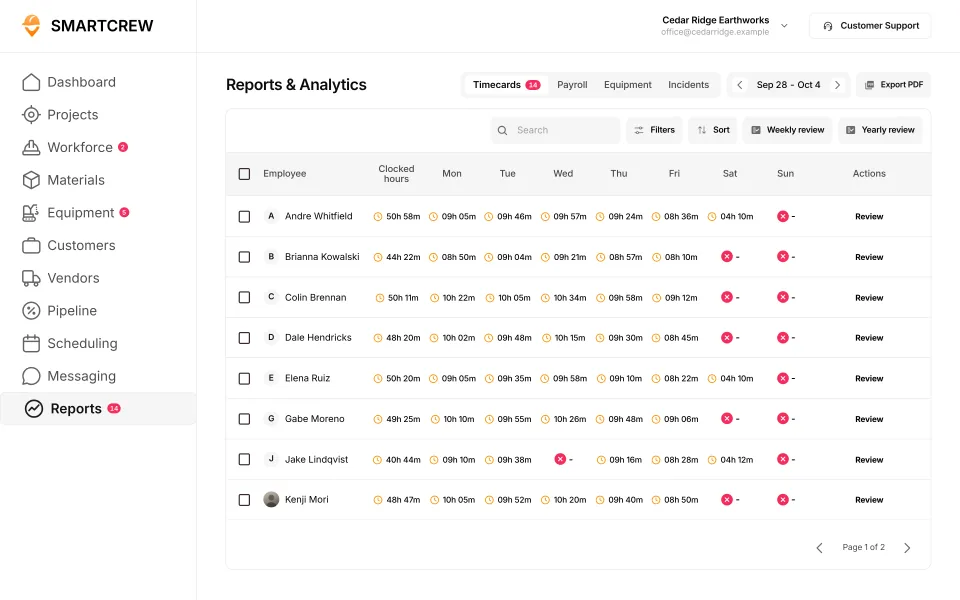
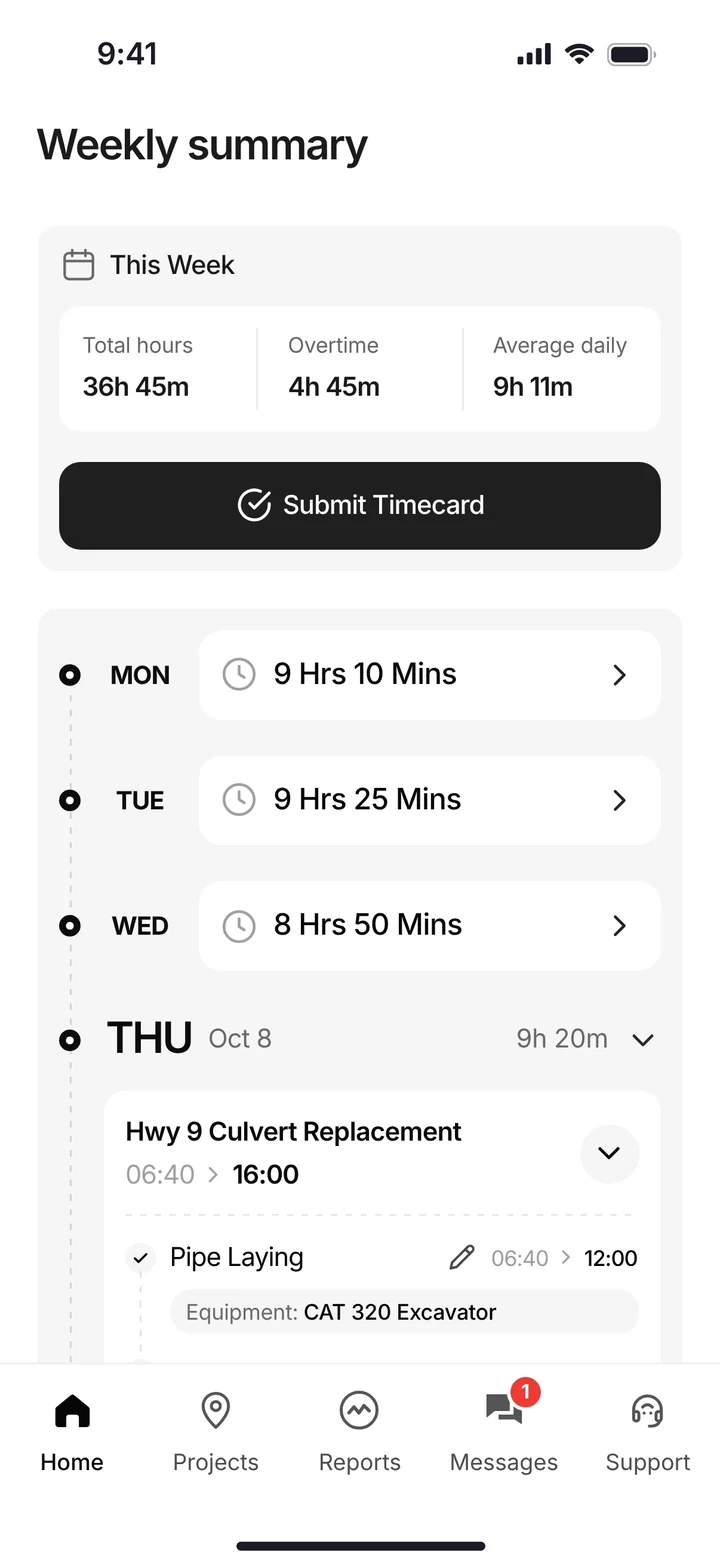
QuickBooks Time is built for any business. SmartCrew is built for dirtwork.
Intuit says any small business in any industry, from nonprofits and retail to restaurants and professional services, can use it. For hours into QuickBooks in those businesses, QuickBooks Time is the better pick.
SmartCrew is built for one thing: heavy civil and dirtwork contractors with 5 to 100 employees. Excavation, grading, sitework, underground utilities, paving, road construction, demolition, septic, directional drilling and land clearing. That's all we do.
Where QuickBooks Time falls short on a dirtwork job:
- Hours, not dollars. Project tracking compares budgeted hours with actual hours, and only on Time Elite. We couldn't find costs in dollars against a bid.
- Cost codes aren't listed. Intuit tracks time by customer, project and service item.
- Not listed: machines or loads. Its pages don't list equipment, inspections, haul tickets or daily reports.
- Geofencing is Elite only, and it doesn't stop an off-site punch. It reminds workers to clock in or out.
What QuickBooks Time (TSheets) is, and who it's for
QuickBooks Time is Intuit's time tracking and scheduling app. It started life as TSheets, which Intuit bought in a deal announced December 5, 2017 and renamed QuickBooks Time in February 2021. The phone app has been called QuickBooks Workforce since June 2023. In May 2026 Intuit also launched QuickBooks Workforce plans that bundle payroll, HR and time.
It's built for everybody. Intuit markets it to any small business in any industry, from retail to restaurants, and it has a page for construction and field crews. On its own it's sold as Time Premium or Time Elite, and both need a QuickBooks Online account.
Its real strength is QuickBooks itself. Once you approve time, it flows into QuickBooks for payroll, invoicing and reports. If your bookkeeper lives in QuickBooks and you only need to know who worked how long for which customer, it's a reasonable choice.
How much does QuickBooks Time cost?
Intuit publishes its prices. Each plan has a monthly base fee, which includes one admin, plus a fee per user. Here's what the pricing page listed on October 26, 2026.
| Plan | Base fee per month | Per user per month | What it adds |
|---|---|---|---|
| Time Premium | $20 (includes 1 admin) | $10 | GPS, scheduling, payroll and invoicing sync, time off, alerts, photo attachments, time kiosk |
| Time Elite | $40 (includes 1 admin) | $12 | Everything in Premium, plus geofencing, mileage, project tracking, project estimates vs actuals (in hours), activity feed, timesheet signatures |
| Workforce Elite (payroll, HR and time) | $134 | $17 per employee | Full-service payroll and HR tools, with Elite's geofencing and project features |
A QuickBooks Online account is required and isn't included. Intuit's offer cuts the base fee 50% for the first three months; it doesn't apply to per-user fees. Businesses over 50 employees can call Intuit for discounted pricing. Source: QuickBooks Time pricing, October 26, 2026 (Workforce Elite checked October 22). Prices change.
Two pieces of fine print. The pricing page says a QuickBooks Online account is required, though a footnote on the GPS page also lists QuickBooks Desktop. And Intuit says not all features are available on the mobile apps.
SmartCrew starts at $99/month, and it's built to be well below the cost of enterprise construction software. Contact us for team pricing.
The key difference: hours into QuickBooks vs the whole dirtwork day
QuickBooks Time answers who worked, how long, and for which customer. A dirtwork owner needs that, plus what the machines did, what the trucks hauled and what the job made. SmartCrew is built to replace the time app on a heavy civil crew and to work with QuickBooks, not replace it. Our family went through this exact search. Time tracking apps were too basic. Enterprise software was too complicated, confusing, and expensive. Here's where QuickBooks Time lands.
Machines and the shop
Intuit's pages don't list equipment, maintenance or inspections. You can add up to 12 custom fields to timesheets, and Intuit's own example includes equipment. That's a label on a timecard, not a machine record.
In SmartCrew the operator picks the machine at clock-in, and the machine keeps its own record: hours, mileage, last and next service, inspection log. Problems from the field go to the shop queue as service requests.
Trucks and loads
We couldn't find haul tickets or material logs on Intuit's pricing or feature pages. Mileage tracking on Elite is the closest thing. SmartCrew logs every load (truck, project, import or export, material, yards, pit), and the AI reader enters tickets and fuel receipts from a photo.
Profit in dollars, every day
Time Elite's project estimates vs actuals compares budgeted hours to actual hours. That tells you a job is running long on labor. It doesn't tell you what the job made once iron, trucking and material are in. Intuit also tracks time by customer, project and "service item", where a contractor would say cost code.
SmartCrew's job page shows revenue, expenses and profit, with budget against spent for labor, materials, equipment, other costs and change orders, and a cost codes tab. You know your profit every day, not when the bookkeeper closes the month.
What the crew does
The QuickBooks Workforce app is well rated by the people who use it. One thing to know: Intuit's GPS page says that to detect geofences, the app requests GPS points while workers are off the clock. In SmartCrew the clock-in covers the job, the activity code and the machine, and the same app holds the DOT inspection, the haul log, receipts and the daily report.
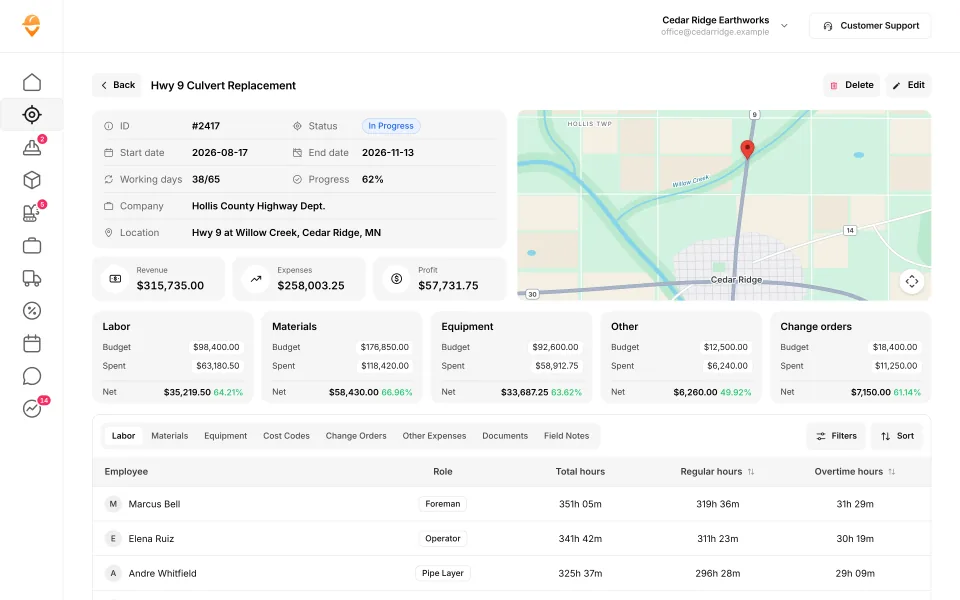
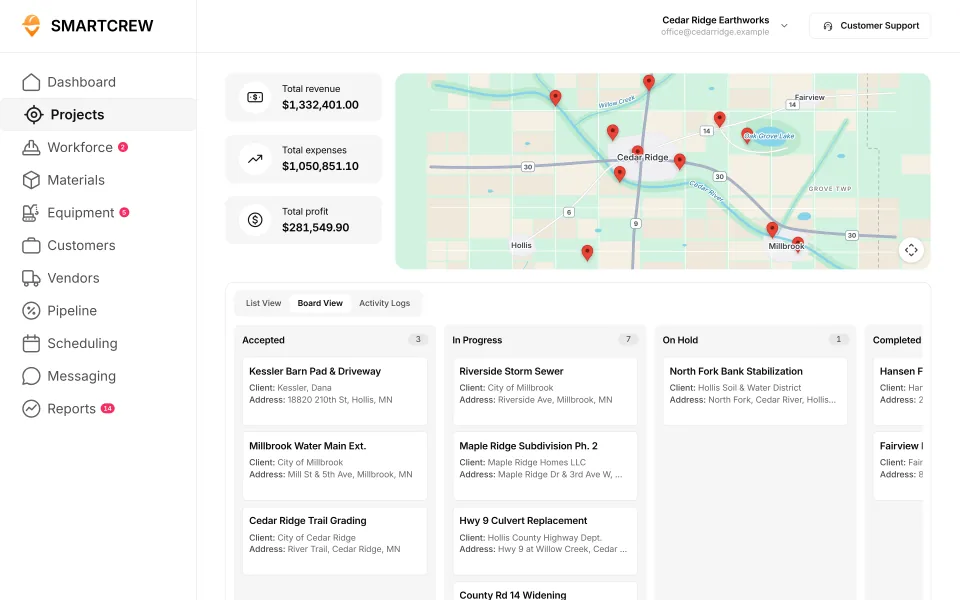
A SmartCrew job page in dollars (revenue, expenses, profit and budget against spent) and the projects board across every job. (Demo data.)
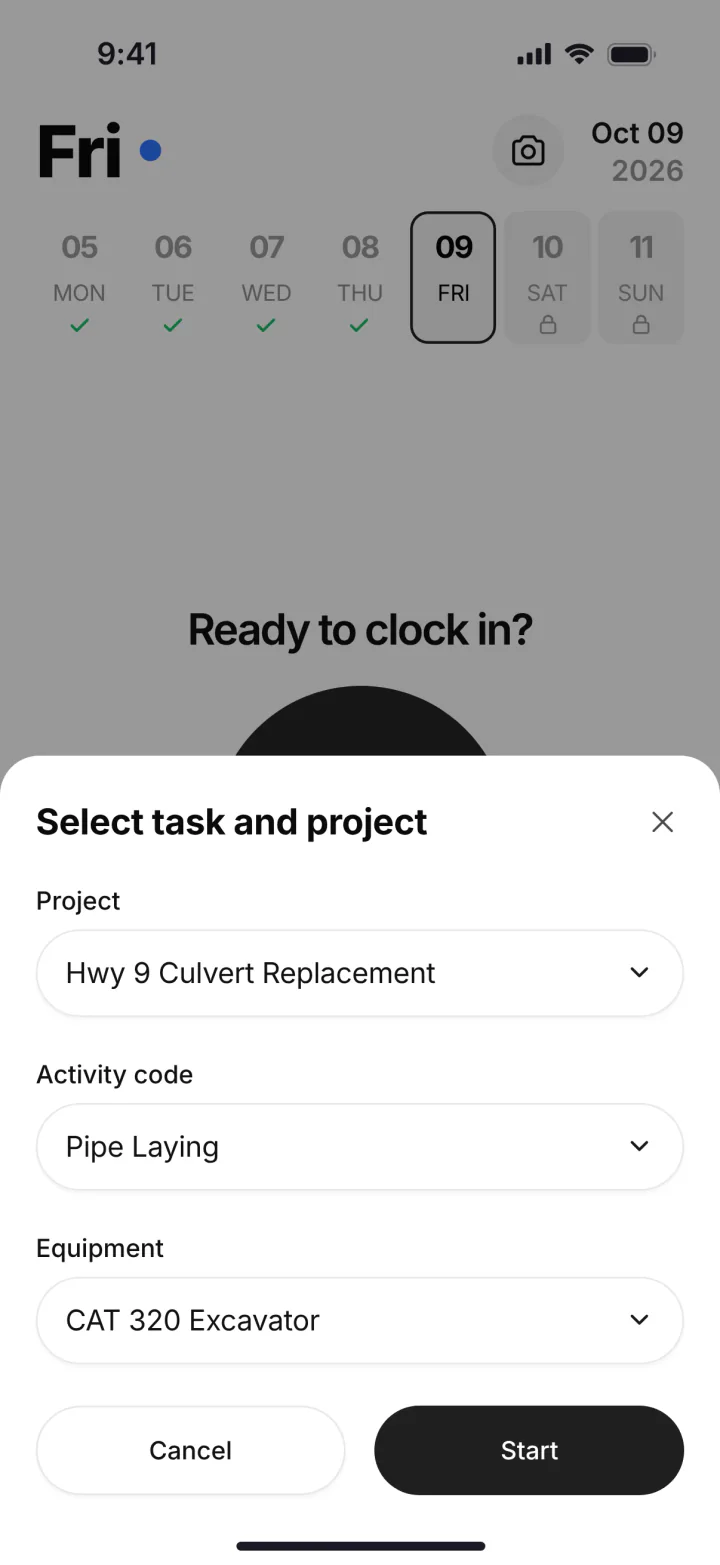
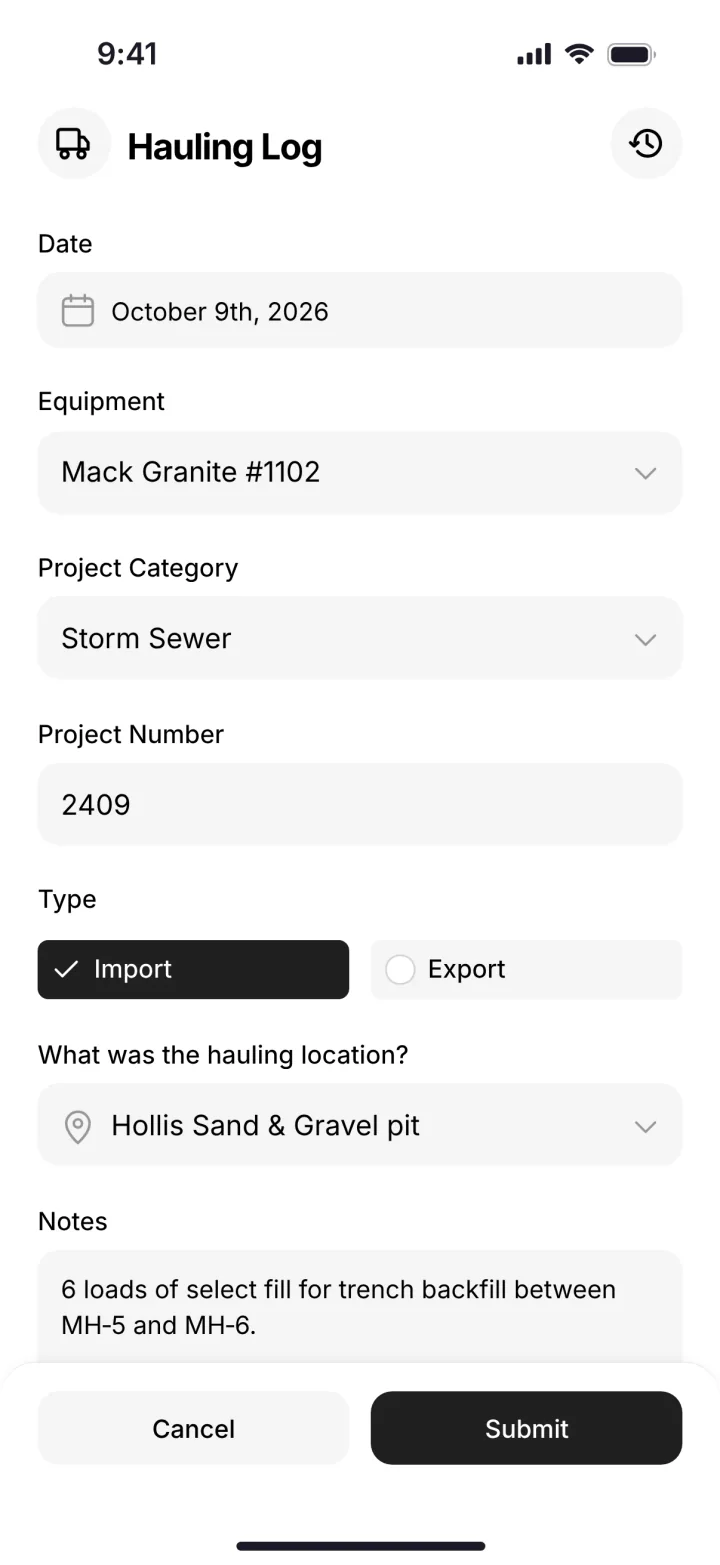
On the phone: pick the project, activity code and machine at clock-in, then log a load in the hauling log. (Demo account.)
QuickBooks Time vs the other time tracking apps
QuickBooks Time is one of five apps in the time tracking group, with BusyBusy, ClockShark, ExakTime and WorkMax. It's the only one made by the company behind QuickBooks, and the only one that requires QuickBooks Online. Its drag-and-drop scheduling is on every plan. Here's each one against SmartCrew's feature list, marked from their own pages.
Built to track hours. Great at the timecard, but the rest of the business (machines, loads, job profit) lives somewhere else.
9 apps in this chart. Scroll sideways to see them all.
| What SmartCrew does | SmartCrewSmartCrew | QuickBooks TimeQB Time | BusyBusyBusyBusy | ClockSharkClockShark | ExakTimeExakTime | WorkMaxWorkMax | WorkyardWorkyard | ConnecteamConnecteam | JibbleJibble | Rhumbix (Autodesk)Rhumbix |
|---|---|---|---|---|---|---|---|---|---|---|
| Time Tracking | ||||||||||
| GPS-powered clock-ins | Yes | Yes | Yes | Yes | Yes | Yes | Yes | Yes | Yes | Add-on |
| Geofencing around the job site | Yes | Add-on | Yes | Yes | Yes | Yes | Add-on | Add-on | Yes | Add-on |
| Live crew locations | Yes | Yes | Yes | Yes | Yes | Yes | Yes | Add-on | Yes | Limited |
| Hours by job and cost code | Yes | Yes | Yes | Yes | Yes | Yes | Add-on | Yes | Limited | Yes |
| Pick the machine at clock-in | Yes | Limited | Yes | Not listed | Yes | Limited | Limited | Limited | No | Limited |
| Payroll-ready timecards | Yes | Yes | Yes | Yes | Yes | Yes | Yes | Yes | Yes | Yes |
| Supervisor dashboard | Yes | Yes | Yes | Yes | Yes | Yes | Yes | Yes | Yes | Yes |
| Clock in/out reminders | Yes | Yes | Yes | Yes | Yes | Not listed | Yes | Yes | Yes | Not listed |
| Job Costing | ||||||||||
| Daily job profitability | Yes | Not listed | Limited | Add-on | No | Limited | Limited | Limited | Not listed | No |
| Bid budgets vs. actual costs | Yes | Limited | Yes | Add-on | Limited | Add-on | Add-on | Limited | Limited | Limited |
| Change orders & extras | Yes | Not listed | No | Limited | No | Add-on | Limited | No | No | Yes |
| Custom reports | Yes | Limited | Yes | Yes | Add-on | Yes | Yes | Limited | Limited | Add-on |
| Equipment Management Premium | ||||||||||
| Equipment hours & locations | Yes | Not listed | Yes | Not listed | Yes | Add-on | Limited | Limited | No | Limited |
| DOT & daily inspections | Yes | Not listed | Limited | Not listed | Limited | Limited | Add-on | Limited | No | Not listed |
| Maintenance tracking | Yes | Not listed | Add-on | Not listed | Limited | Add-on | Add-on | Limited | No | No |
| Service requests from the field | Yes | Not listed | Add-on | Not listed | Limited | Not listed | Add-on | Limited | No | No |
| Utilization rates | Yes | Not listed | Yes | Not listed | Not listed | Add-on | No | No | No | Limited |
| Shop queue | Yes | Not listed | Add-on | Not listed | No | Not listed | Not listed | No | No | No |
| Daily Reports | ||||||||||
| Daily progress & production logs | Yes | Limited | Add-on | Limited | Limited | Add-on | Add-on | Yes | No | Yes |
| Jobsite photos & field notes | Yes | Yes | Yes | Yes | Yes | Add-on | Yes | Yes | Limited | Yes |
| Automatic daily reports for the office | Yes | Not listed | Add-on | Not listed | Limited | Limited | Limited | Add-on | Not listed | Add-on |
| Materials & Hauling | ||||||||||
| Digital hauling tickets | Yes | Not listed | Not listed | Not listed | No | Not listed | No | No | No | Not listed |
| Material & fuel logs | Yes | Not listed | Limited | Limited | Limited | Limited | Limited | Not listed | No | Limited |
| AI reader for tickets & receipts | Yes | Not listed | No | Not listed | No | Not listed | No | No | No | No |
| Deliveries & production tracking | Yes | Not listed | Limited | Not listed | No | Limited | Add-on | No | No | Limited |
| Scheduling Premium | ||||||||||
| Drag-and-drop crew scheduling | Yes | Yes | Yes | Yes | Limited | Not listed | Add-on | Yes | Not listed | No |
| Job & equipment assignments | Yes | Limited | Yes | Limited | Limited | Add-on | Limited | Yes | Not listed | No |
| Schedule updates & notifications | Yes | Yes | Yes | Yes | Add-on | Not listed | Add-on | Yes | Not listed | No |
| Sales & CRM Premium | ||||||||||
| Leads & sales pipeline | Yes | Not listed | No | Limited | No | Not listed | No | No | No | No |
| Bid & opportunity tracking | Yes | Not listed | No | Limited | No | Not listed | No | No | No | No |
| Follow-ups & reminders | Yes | Not listed | No | Not listed | No | Not listed | No | No | No | No |
| Crew Communication Premium | ||||||||||
| Dispatch with instant alerts | Yes | Limited | Limited | Limited | Limited | Add-on | Add-on | Yes | No | No |
| Crew & team messaging | Yes | Limited | Add-on | Yes | Limited | Not listed | Limited | Add-on | No | Limited |
| Job-specific chat channels | Yes | Add-on | Limited | Yes | Not listed | Not listed | No | Add-on | No | Not listed |
| Company announcements | Yes | Not listed | Yes | Not listed | Add-on | Not listed | No | Add-on | No | No |
| Safety & Compliance | ||||||||||
| Job Safety Analyses (JSAs) | Yes | Not listed | Add-on | Not listed | Not listed | Limited | Add-on | Limited | No | Add-on |
| Toolbox talks & safety meetings | Yes | Not listed | Add-on | Not listed | Limited | Limited | Add-on | Limited | No | Add-on |
| Incident reports | Yes | Not listed | Add-on | Limited | Yes | Limited | Add-on | Yes | No | Limited |
| Files & Integrations | ||||||||||
| Plans, photos & job documents in the cloud | Yes | Limited | Add-on | Yes | Limited | Yes | Limited | Add-on | No | No |
| File sharing & permissions | Yes | Not listed | Add-on | Not listed | Limited | Not listed | Not listed | Add-on | No | No |
| QuickBooks Online integration | Yes | Yes | Yes | Yes | Yes | Yes | Yes | Yes | Yes | Limited |
No: they do not offer it. Their own website says so, or it isn’t in the full feature list they publish (linked). Add-on: a paid add-on, a separate product or a higher plan. Limited: they have something close but narrower. Not listed (n/l on small screens): we searched their site and help pages and couldn’t find it, but they don’t publish a full list we could check. Tap a name for the full comparison.
This chart is SmartCrew’s feature list, so it doesn’t show what other products do that SmartCrew doesn’t (like estimating, payroll or hardware time clocks). Each comparison covers that in “where they’re the better pick”. SmartCrew’s Fleet Management, Sales CRM, and Scheduling & Communications are Premium categories; feature availability varies by plan.
In plain words: what each app does not offer
- QuickBooks Time doesn't list: daily job profitability, change orders & extras, equipment hours & locations, DOT & daily inspections, maintenance tracking, service requests from the field, utilization rates, shop queue, automatic daily reports for the office, digital hauling tickets, material & fuel logs, AI reader for tickets & receipts, deliveries & production tracking, leads & sales pipeline, bid & opportunity tracking, follow-ups & reminders, company announcements, Job Safety Analyses (JSAs), toolbox talks & safety meetings, incident reports, file sharing & permissions.
- BusyBusy does not offer: change orders & extras, AI reader for tickets & receipts, leads & sales pipeline, bid & opportunity tracking, follow-ups & reminders. BusyBusy doesn't list these either: digital hauling tickets.
- ClockShark doesn't list: pick the machine at clock-in, equipment hours & locations, DOT & daily inspections, maintenance tracking, service requests from the field, utilization rates, shop queue, automatic daily reports for the office, digital hauling tickets, AI reader for tickets & receipts, deliveries & production tracking, follow-ups & reminders, company announcements, Job Safety Analyses (JSAs), toolbox talks & safety meetings, file sharing & permissions.
- ExakTime does not offer: daily job profitability, change orders & extras, shop queue, digital hauling tickets, AI reader for tickets & receipts, deliveries & production tracking, leads & sales pipeline, bid & opportunity tracking, follow-ups & reminders. ExakTime doesn't list these either: utilization rates, job-specific chat channels, Job Safety Analyses (JSAs).
- WorkMax doesn't list: clock in/out reminders, service requests from the field, shop queue, digital hauling tickets, AI reader for tickets & receipts, drag-and-drop crew scheduling, schedule updates & notifications, leads & sales pipeline, bid & opportunity tracking, follow-ups & reminders, crew & team messaging, job-specific chat channels, company announcements, file sharing & permissions.
- Workyard does not offer: utilization rates, digital hauling tickets, AI reader for tickets & receipts, leads & sales pipeline, bid & opportunity tracking, follow-ups & reminders, job-specific chat channels, company announcements. Workyard doesn't list these either: shop queue, file sharing & permissions.
- Connecteam does not offer: change orders & extras, utilization rates, shop queue, digital hauling tickets, AI reader for tickets & receipts, deliveries & production tracking, leads & sales pipeline, bid & opportunity tracking, follow-ups & reminders. Connecteam doesn't list these either: material & fuel logs.
- Jibble does not offer: pick the machine at clock-in, change orders & extras, equipment hours & locations, DOT & daily inspections, maintenance tracking, service requests from the field, utilization rates, shop queue, daily progress & production logs, digital hauling tickets, material & fuel logs, AI reader for tickets & receipts, deliveries & production tracking, leads & sales pipeline, bid & opportunity tracking, follow-ups & reminders, dispatch with instant alerts, crew & team messaging, job-specific chat channels, company announcements, Job Safety Analyses (JSAs), toolbox talks & safety meetings, incident reports, plans, photos & job documents in the cloud, file sharing & permissions. Jibble doesn't list these either: daily job profitability, automatic daily reports for the office, drag-and-drop crew scheduling, job & equipment assignments, schedule updates & notifications.
- Rhumbix (Autodesk) does not offer: daily job profitability, maintenance tracking, service requests from the field, shop queue, AI reader for tickets & receipts, drag-and-drop crew scheduling, job & equipment assignments, schedule updates & notifications, leads & sales pipeline, bid & opportunity tracking, follow-ups & reminders, dispatch with instant alerts, company announcements, plans, photos & job documents in the cloud, file sharing & permissions. Rhumbix (Autodesk) doesn't list these either: clock in/out reminders, DOT & daily inspections, digital hauling tickets, job-specific chat channels.
From each company's own website and help pages, checked on the dates below. "Does not offer" means their own website says so, or it isn't in the full feature list they publish. "Doesn't list" means we searched their site and couldn't find it, but they don't publish a full list we could check.
Where each mark comes from
- QuickBooks Time, checked October 28, 2026: quickbooks.intuit.com/time-tracking/gps, quickbooks.intuit.com/learn-support/en-us/help-article/track-location/use-quickbooks-time-gps-tracking-admin-manager/L7fLoZNZk_US_en_US, quickbooks.intuit.com/learn-support/en-us/help-article/track-worker-hours/use-quickbooks-time-quickbooks-online-quickbooks/L5NIFCKG6_US_en_US, quickbooks.intuit.com/learn-support/en-us/help-article/customize-forms/set-manage-custom-fields-quickbooks-time/L6b8NDU6n_US_en_US, quickbooks.intuit.com/time-tracking/construction, quickbooks.intuit.com/learn-support/en-us/help-article/product-preferences/set-company-team-member-clock-reminders-quickbooks/L8v9UDFUv_US_en_US, quickbooks.intuit.com/time-tracking/pricing, quickbooks.intuit.com/learn-support/en-us/help-article/list-reports/quickbooks-time-reports/L0WYtn0mw_US_en_US, quickbooks.intuit.com/time-tracking/elite, quickbooks.intuit.com/time-tracking/employee-scheduling, quickbooks.intuit.com/learn-support/en-us/help-article/feature-preferences/quickbooks-time-activity-feed/L5RV549yf_US_en_US
- BusyBusy, checked October 28, 2026: busybusy.com/features/gps-time-tracking, busybusy.com/features, busybusy.com/features/job-costing-solutions, busybusy.com/equipment-time-tracking-app, busybusy.com/features/payroll-tools, helpcenter.busybusy.com/en/articles/9573478-use-supervisor-tools-to-make-life-easy, busybusy.com/features/budgets-projects-cost-codes, busybusy.com/features/construction-reports, busybusy.com/modules/operations/equipment-inspections, busybusy.com/modules/operations/work-orders, busybusy.com/features/progress-tracking, busybusy.com/features/photos-notes, busybusy.com/construction-daily-reports, helpcenter.busybusy.com/en/articles/9573479-schedule-the-work-week-in-busybusy, busybusy.com/features/scheduling, busybusy.com/features/team-messaging, helpcenter.busybusy.com/en/articles/9573348-positions-permissions-settings, busybusy.com/safety/job-safety-analyses-app, busybusy.com/safety/training-app, busybusy.com/features/incident-reporting, busybusy.com/features/documents, busybusy.com/integrations/quickbooks-online
- ClockShark, checked October 28, 2026: clockshark.com/tour/gps-time-clock-app, clockshark.com/tour/geofence-time-tracking, clockshark.com/tour/map-field-employee-location-tracking, clockshark.com/resources/labor-costs-quickbooks-clockshark, clockshark.com/pricing, clockshark.com/tour/timesheet-reminders, clockshark.com/tour/job-costing, help.clockshark.com/how-to-handle-change-orders-using-quotes-and-invoices, clockshark.com/tour, clockshark.com/tour/clock-out-questions, clockshark.com/tour/conversations, clockshark.com/tour/employee-scheduling, clockshark.com/tour/customer-manager, get.clockshark.com/modern-way-to-manage-your-field-team, clockshark.com/tour/file-attachments, clockshark.com/integrations/quickbooks-time-tracking
- ExakTime, checked October 28, 2026: arcoro.com/exaktime/pricing-plans, arcoro.com/exaktime, arcoro.com/exaktime/our-solutions/gps-time-tracking-app, arcoro.com/exaktime/our-solutions/powerful-reporting, support.arcoro.com/hc/en-us/articles/1260804480690-Guides-to-Equipment-for-ExakTime, support.arcoro.com/hc/en-us/articles/1260804479730-Start-Using-The-ExakTime-System-In-Just-15-Minutes, support.arcoro.com/hc/en-us/articles/40641192964507-9-2025-ExakTime-Release-Notes-GeoFence-Activity-Alerts, arcoro.com/llm-context-page, support.arcoro.com/hc/en-us/articles/7647931096987-Overview-for-Using-Advanced-Analytics, support.arcoro.com/hc/en-us/articles/4413156323355-Using-Equipment-Reports-for-ExakTime, support.arcoro.com/hc/en-us/articles/24982369416091-What-are-Library-Forms-for-ExakTime, support.arcoro.com/hc/en-us/articles/26031334798107-Gathering-Info-from-Field-Employees-with-Fields-Notes-Forms-and-Clock-In-Out-Comments-for-ExakTime-Mobile, support.arcoro.com/hc/en-us/articles/4413165192347-Using-Expense-Reports-for-ExakTime, support.arcoro.com/hc/en-us/articles/4407630208795-Managing-Schedules-with-Calendar-View, support.arcoro.com/hc/en-us/articles/4407625105563-Scheduler-Notification-Settings-for-ExakTime, support.arcoro.com/hc/en-us/articles/7601304493595-Setting-Up-and-Using-Custom-Alerts-and-Notifications-for-ExakTime, support.arcoro.com/hc/en-us/articles/13116025444635-Sending-Alerts-Notifications-from-ExakTime-Connect, arcoro.com/platform/grow/learning-management, support.arcoro.com/hc/en-us/articles/25556658085659-Premade-Forms-for-ExakTime, arcoro.com/platform/manage/construction-hris, arcoro.com/exaktime/partner/quickbooks
- WorkMax, checked October 26, 2026: workmax.com/solutions/workmax-time, workmax.com/wp-content/uploads/2022/06/WorkMax-TIME-Features.pdf, workmax.com/wp-content/uploads/2013/11/WorkMax_Time_Features_Temp.pdf, workmax.com/solutions/workmax-insight, workmax.com/solutions/workmax-forms, workmax.com/resources/blog/the-workmax-construction-field-management-platform, workmax.com/solutions/workmax-assets, workmax.com/resources/faqs, workmax.com/solutions/other-products, workmax.com, workmax.com/solutions/integrations/quickbooks-online-integration
- Workyard, checked October 28, 2026: workyard.com/ai-instructions, workyard.com/pricing, workyard.com/smart-forms/equipment-tracking, workyard.com/reporting, help.workyard.com/en/articles/7041924-workyard-mobile-app-automated-alerts, workyard.com/smart-forms/construction-management, help.workyard.com/en/articles/17668011-build-custom-reports-with-reporting-agent, workyard.com/smart-forms/production-tracking, help.workyard.com/en/articles/16092826-send-form-submissions-to-the-right-people-forms-notification-routing, workyard.com/contractor-scheduling-software, workyard.com/smart-forms/safety-management, help.workyard.com/en/articles/5236837-how-to-connect-workyard-to-quickbooks-online
- Connecteam, checked October 28, 2026: connecteam.com/pricing, help.connecteam.com/en/articles/3597710-how-to-create-a-geofence, help.connecteam.com/en/articles/5675206-starting-guide-to-breadcrumbs-live-location-tracking, connecteam.com/industries/construction-app, connecteam.com/employee-time-clock-app, connecteam.com/operations, connecteam.com/industries/construction-app/construction-time-tracking, connecteam.com/employee-scheduling-app, connecteam.com/forms-checklist-app, help.connecteam.com/en/articles/6400563-job-scheduling-must-have-capabilities, connecteam.com/industries/construction-app/construction-scheduling-app, help.connecteam.com/en/articles/4100339-starting-guide-to-the-job-scheduler, connecteam.com/employee-communication-app/updates, connecteam.com/industries/construction-app/construction-compliance, connecteam.com/industries/construction-app/construction-documentation-and-communication, connecteam.com/integrations/quickbooks-integration
- Jibble, checked October 28, 2026: jibble.io/construction-time-tracking, jibble.io/features, jibble.io/auto-clock-in-out-app, jibble.io/project-time-tracker, jibble.io/help/track-time-with-location, jibble.io/help/sending-timesheets-to-quickbooks-online
- Rhumbix (Autodesk), checked October 28, 2026: intercom.help/rhumbix-helpcenter/en/articles/11014517-cico-client-configuration-options, rhumbix.com/solutions/timekeeping, rhumbix.com/usecase/field, rhumbix.com/pricing, intercom.help/rhumbix-helpcenter/en/articles/6369205-cost-code-status, rhumbix.com/solutions/change-orders, intercom.help/rhumbix-helpcenter/en/articles/8438022-equipment-tracking-dashboard, rhumbix.com/solutions/production_tracking, intercom.help/rhumbix-helpcenter/en/articles/6369215-daily-reports-create-on-mobile-app, intercom.help/rhumbix-helpcenter/en/articles/6512986-end-of-day-exception-report, rhumbix.com/solutions/integrations
When QuickBooks Time still makes sense
QuickBooks Time makes sense when the timecard is the only thing you need to fix, and QuickBooks is the center of your office.
Pick SmartCrew if
- You run iron and trucks and want machine hours, DOT inspections and haul tickets in the same app as time.
- You want job cost in dollars against your bid, not only hours against a budget.
- You want daily reports, crew chat and safety forms (JSAs, toolbox talks, incident reports) in one place.
- You want to keep QuickBooks Online for the books and replace only the time app.
- You have 5 to 100 employees in dirtwork or heavy civil.
Pick QuickBooks Time if
- You're a retail, restaurant, service or general trade business that only needs hours in QuickBooks.
- You only need hours, and payroll already runs in QuickBooks.
The best QuickBooks Time alternatives in 2026
Most people searching for a QuickBooks Time alternative want to keep QuickBooks. Good news: every app below connects to it in some way. The question is how much of the field you want in the same app.
- SmartCrew, for dirtwork and heavy civil companies with 5 to 100 employees that want to keep QuickBooks Online and add time, machines, loads, reports and job profit. That's us, so take this pick with that in mind.
- ClockShark, another time app, with two-way QuickBooks sync and support for QuickBooks Online and Desktop. See ClockShark vs SmartCrew.
- BusyBusy, with a free plan, and its integrations page lists QuickBooks Desktop as well as Online. See BusyBusy vs SmartCrew.
- ExakTime, now Arcoro Time, which connects to QuickBooks Online, Pro, Premier and Enterprise through its own export software. See ExakTime vs SmartCrew.
- WorkMax, for bigger contractors that want separate modules and a QuickBooks Online connection. See WorkMax vs SmartCrew.
- Contractor Foreman, a construction management app with flat company pricing. Time cards and QuickBooks Online start on its Plus tier, $166 a month billed annually for up to 8 users. See Contractor Foreman vs SmartCrew.
QuickBooks Time ends at the timecard. Heavy civil field software continues on the hcss alternative and heavy civil construction software.
Switching from QuickBooks Time
You keep QuickBooks. You swap the clock and add the rest of the field, and we do the heavy lifting.
Keep your QuickBooks Online company
SmartCrew connects to QuickBooks Online, so your books and invoicing stay where your bookkeeper has them.
Set up jobs and cost codes the dirtwork way
Our team sets up your account, migrates your information and organizes your workflows around your jobs and cost codes.
Clock in with the machine
From day one your guys clock in to the job, the activity code and the machine, and the office sees live crew locations.
Add trucks, inspections and job cost
Haul tickets, DOT inspections, daily reports and job costing come on when you're ready. We train your people, and most companies are up and running within a few weeks.
Questions people ask
Is TSheets the same as QuickBooks Time?
Yes. Intuit bought TSheets in a deal announced in December 2017 and renamed it QuickBooks Time in February 2021. The mobile app has been called QuickBooks Workforce since June 2023.
What is the best TSheets alternative for excavation companies?
It depends on whether you need more than hours. QuickBooks Time is fine for hours into QuickBooks. SmartCrew is built for dirtwork and heavy civil companies with 5 to 100 employees that also need machines, DOT inspections, haul tickets, daily reports and job profit, and it connects to QuickBooks Online.
How much is QuickBooks Time per month?
On October 26, 2026, Time Premium listed at $20 a month plus $10 per user, and Time Elite at $40 plus $12 per user, each base fee including one admin. Intuit was cutting the base fee 50% for the first three months. For 15 people that's $170 a month on Premium or $220 on Elite at full list price.
Do I need QuickBooks Online to use QuickBooks Time?
Intuit's pricing page says a QuickBooks Online account is required. A footnote on its GPS page also lists QuickBooks Desktop and QuickBooks Online Payroll as integrations, so ask Intuit which applies to you.
Does QuickBooks Time do job costing?
Time Elite compares budgeted hours to actual hours on a project, and Intuit tracks time by customer, project and service item rather than cost code. We couldn't find costs in dollars against a bid. SmartCrew's job page shows labor, materials, equipment, other costs and change orders against the budget.
Does QuickBooks Time geofencing clock people in automatically?
No. Geofencing is on Time Elite only, and it reminds workers to clock in or out. It doesn't block off-site punches, and the app checks location while workers are off the clock to know when they enter a geofence.
Does SmartCrew replace QuickBooks?
No. SmartCrew replaces the time app, not your accounting. It integrates with QuickBooks Online today, and we're working on QuickBooks Desktop, Foundation, ADP and more.
Sources
- QuickBooks Time pricing checked October 26, 2026
- QuickBooks Time overview checked October 26, 2026
- QuickBooks Time GPS tracking checked October 26, 2026
- QuickBooks Time for construction checked October 26, 2026
- QuickBooks Time employee scheduling checked October 26, 2026
- Intuit help: custom fields in QuickBooks Time checked October 26, 2026
- Intuit help: QuickBooks Time with QuickBooks Online checked October 26, 2026
- Intuit: QuickBooks Workforce launch (May 2026) checked October 22, 2026
- Intuit: TSheets is now QuickBooks Time (Feb 2021) checked October 22, 2026
- TechCrunch: Intuit acquires TSheets (Dec 2017) checked October 22, 2026
- Insightful Accountant: QuickBooks Time app renamed QuickBooks Workforce checked October 22, 2026
- QuickBooks Time on Software Advice checked October 22, 2026
- QuickBooks Workforce on the US App Store checked October 22, 2026
- ClockShark QuickBooks integration checked October 26, 2026
- BusyBusy integrations checked October 22, 2026
- Arcoro Time (formerly ExakTime) QuickBooks integration checked October 26, 2026
- WorkMax QuickBooks Online integration checked October 22, 2026
- Contractor Foreman pricing checked October 22, 2026