
Buyer's guide · GC vs dirtwork
Buildertrend, JobTread or Procore for excavation? GC software vs dirtwork software

Andrew Drish, founder
Published . Updated
For an excavation, grading or heavy civil company, SmartCrew is the better fit. It's built for one thing: dirtwork and heavy civil contractors with 5 to 100 employees. Buildertrend, JobTread, Procore and Projul are good software. They're built for general contractors, home builders, remodelers and roofers. We're better for heavy civil and dirtwork. They're better for general contracting.
The short version
- Buildertrend says it's for home builders, remodelers and contractors.
- JobTread lists home builders, remodelers, pool builders and roofers.
- Procore partners with owners, general contractors and specialty contractors.
- None of them leads with equipment hours, haul tickets or DOT inspections.
- SmartCrew is built only for dirtwork and heavy civil contractors with 5 to 100 employees.
- SmartCrew doesn't do estimating. GC software usually does.
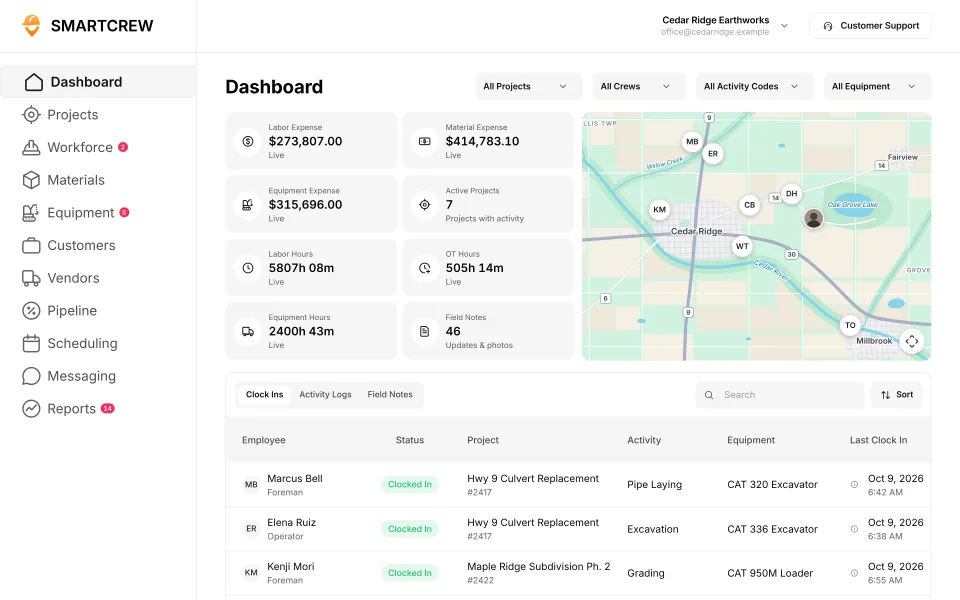
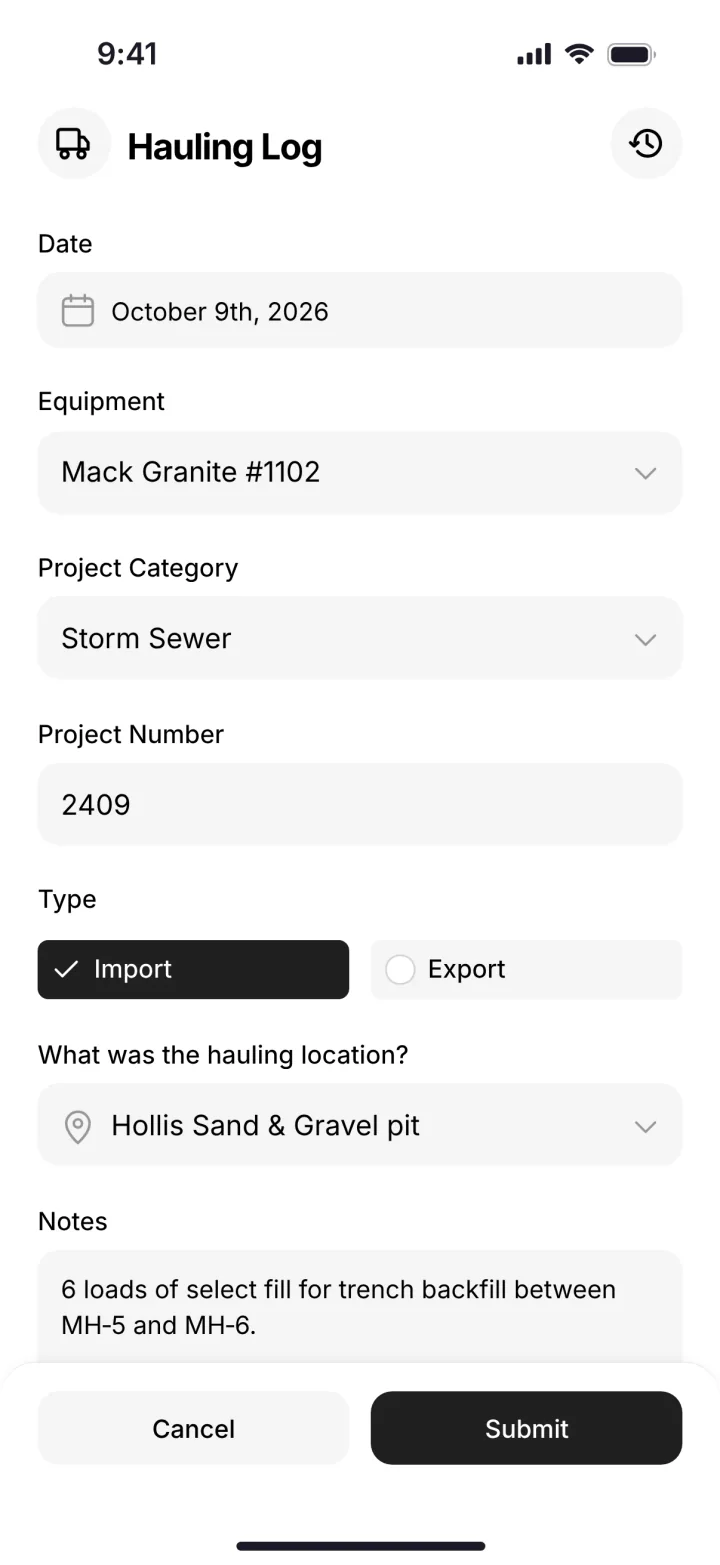
Is Buildertrend good for excavation companies?
Buildertrend describes itself as construction project management software for home builders, remodelers and contractors, and lists home builders, remodelers, commercial and specialty contractors (source). We didn't find excavation, equipment or heavy civil on its home page. It's good at what it's built for: running a building project with a client.
A dirtwork company's week looks different. It's the 336 on one job and the dozer on another. Tickets from the pit. A breakdown at 7:15. Four foremen sending timecards. That's what we built SmartCrew for.
SmartCrew is built for one thing: heavy civil and dirtwork contractors with 5 to 100 employees. Excavation, grading, sitework, underground utilities, paving, road construction, demolition, septic, directional drilling and land clearing. That's all we do.
What GC software is built for, and what dirtwork needs
| General contractor, builder, remodeler | Dirtwork and heavy civil | |
|---|---|---|
| Who does the work | Mostly subs | Your own crews |
| Biggest asset | Relationships and the schedule | Your iron and trucks |
| What leaks money | Change orders the client didn't sign, slow draws | Hours, machine time, lost loads, downtime |
| Daily paperwork | Client updates, selections, RFIs | Timecards, inspections, haul tickets, daily reports |
| Who you answer to | The homeowner or owner | The GC, the owner, DOT and OSHA |
| Software it needs | Estimates, proposals, client portal, sub schedule | Clock-in with machine, equipment, hauling, shop queue, job cost |
Who each one says it's for
| App | Who it says it's for | Equipment side |
|---|---|---|
| SmartCrew | Dirtwork and heavy civil contractors with 5 to 100 employees | Hours at clock-in, locations, DOT and daily inspections, maintenance, shop queue |
| Buildertrend | Home builders, remodelers and contractors (source) | Not listed on its home page |
| JobTread | Estimating and project management; builders, remodelers, pool builders, roofers (source) | Custom inspection forms, not DOT; no equipment module named (source) |
| Procore | Owners, general contractors and specialty contractors (source) | Equipment through telematics integrations (source) |
| Projul | Contractors of all sizes and trades, with an excavation page (source) | Machine at clock-in and hours by project; not a fleet system |
| Contractor Foreman | Small and medium residential and commercial trade and general contractors (source) | Equipment logs on the Plus plan and up |
| BusyBusy | Any field business: concrete, electrical, painting, landscaping, janitorial, snow removal (source) | Equipment hours & locations: yes. Maintenance tracking: add-on (Operations module add-on). DOT & daily inspections: limited (Pre/post-op checks in Operations add-on; no DOT wording) |
| ClockShark | Every trade from roofing and electrical to cleaning and healthcare (source) | Equipment hours & locations: not on its own website. Maintenance tracking: not on its own website. DOT & daily inspections: not on its own website |
| ExakTime | Payroll and HR for general, electrical, HVAC, plumbing and finishing contractors (source) | Equipment hours & locations: yes. Maintenance tracking: limited (Usage hours only, no maintenance scheduling). DOT & daily inspections: limited (Custom forms; no DOT template) |
| QuickBooks Time | Any small business in any industry (source) | Equipment hours & locations: not on its own website. Maintenance tracking: not on its own website. DOT & daily inspections: not on its own website |
| WorkMax | Commercial contractors with 10 to 1,000 workers, often on Foundation (source) | Equipment hours & locations: add-on (ASSETS module (activated separately)). Maintenance tracking: add-on (ASSETS module (activated separately)). DOT & daily inspections: limited (Custom inspection forms; FORMS module) |
| Workyard | Specialty contractors and self-performing GCs with 15 to 500 field workers (source) | Equipment hours & locations: limited (Usage logs via Smart Forms add-on). Maintenance tracking: add-on (Smart Forms add-on). DOT & daily inspections: add-on (Smart Forms add-on) |
| Connecteam | Deskless and frontline teams in any industry (source) | Equipment hours & locations: limited (Time by equipment job, no locations). Maintenance tracking: limited (Maintenance log forms only). DOT & daily inspections: limited (Custom inspection forms, no DVIR) |
| Jibble | Any team size and industry (source) | Equipment hours & locations: does not offer (Not in its full feature list). Maintenance tracking: does not offer (Not in its full feature list). DOT & daily inspections: does not offer (Not in its full feature list) |
| Rhumbix (Autodesk) | Specialty trade and self-performing contractors: electrical, mechanical, steel, heavy civil (source) | Equipment hours & locations: limited (Hours only, no locations). Maintenance tracking: does not offer (Not in its full feature list). DOT & daily inspections: not on its own website |
| HCSS HeavyJob | The biggest heavy civil contractors: 43 of the ENR top 50 (source) | Equipment hours & locations: add-on (Hours in HeavyJob; locations need Fleet Telematics). Maintenance tracking: add-on (Equipment360 or HCSS Fleet Maintenance). DOT & daily inspections: add-on (Fleet Telematics eLogs or HeavyJob Safety) |
| Raken | GCs, subs and trades like electrical, mechanical, roofing, plumbing, painting and steel (source) | Equipment hours & locations: add-on (Performance plan; no GPS found). Maintenance tracking: add-on (Performance plan (not on Basic)). DOT & daily inspections: limited (Equipment checklists only, no DOT/DVIR) |
| Knowify | Trade contractors: electrical, HVAC, mechanical, plumbing (source) | Equipment hours & locations: limited (Equipment hours in daily logs). Maintenance tracking: add-on (FleetSharp add-on, per vehicle). DOT & daily inspections: add-on (Custom forms, Enterprise plan) |
| Foreman | General contractors, home builders, remodelers, roofers and commercial contractors (source) | Equipment hours & locations: does not offer (Not in its full feature list). Maintenance tracking: does not offer (Not in its full feature list). DOT & daily inspections: does not offer (Not in its full feature list) |
| B2W (Trimble) | Heavy civil contractors: infrastructure, utilities, earthwork, paving (source) | Equipment hours & locations: yes. Maintenance tracking: yes. DOT & daily inspections: add-on (Inspection eForms, separate B2W Field View) |
| Assignar | Self-performing civil and specialty contractors: excavation, earthworks, rail, traffic, crane, concrete (source) | Equipment hours & locations: limited (Hours from timesheets; locations not documented). Maintenance tracking: limited (Meter-based service alerts only). DOT & daily inspections: limited (Prestart and vehicle checklists, not DVIR-specific) |
| Trimble Viewpoint | Mid-size to enterprise contractors that want a construction ERP (source) | Equipment hours & locations: yes. Maintenance tracking: yes. DOT & daily inspections: limited (Configurable inspection forms, not DOT-specific) |
| Fieldwire | General and specialty contractors, owners and designers (source) | Equipment hours & locations: does not offer (Not in its full feature list). Maintenance tracking: does not offer (Not in its full feature list). DOT & daily inspections: not on its own website |
| Foundation Software | Contractors that need construction accounting, job costing and certified payroll (source) | Equipment hours & locations: add-on (Equipment add-on module, hours by job). Maintenance tracking: add-on (Equipment add-on module). DOT & daily inspections: not on its own website |
| Tenna | Construction contractors with mixed fleets of equipment, vehicles and tools (source) | Equipment hours & locations: yes. Maintenance tracking: add-on (Maintenance premium add-on). DOT & daily inspections: add-on (Safety & Compliance premium add-on) |
| HCSS Equipment360 | Mid-to-large heavy civil contractors with their own maintenance shops (source) | Equipment hours & locations: add-on (Requires HCSS Telematics for GPS). Maintenance tracking: yes. DOT & daily inspections: add-on (DVIR in Telematics eLogs; forms in HCSS Safety) |
| Fleetio | Vehicle and equipment fleets in any industry (source) | Equipment hours & locations: yes. Maintenance tracking: yes. DOT & daily inspections: yes |
| Clue | Heavy civil and construction contractors with large equipment fleets (source) | Equipment hours & locations: yes. Maintenance tracking: yes. DOT & daily inspections: yes |
| AGTEK | Estimators and superintendents at earthwork and site contractors (source) | Equipment hours & locations: add-on (Trackwork add-on with machine sensors). Maintenance tracking: not on its own website. DOT & daily inspections: does not offer (Not in its full feature list) |
| InSite Software | Earthwork and utility estimators (source) | Equipment hours & locations: does not offer (Not in its full feature list). Maintenance tracking: does not offer (Not in its full feature list). DOT & daily inspections: does not offer (Not in its full feature list) |
| HCSS HeavyBid | Estimators at self-performing heavy civil and infrastructure contractors (source) | Equipment hours & locations: not on its own website. Maintenance tracking: not on its own website. DOT & daily inspections: not on its own website |
| Trimble Business Center | Civil construction office teams doing takeoff and machine control models (source) | Equipment hours & locations: limited (Location only, no hours; WorksManager). Maintenance tracking: not on its own website. DOT & daily inspections: not on its own website |
| EarthWorks | Excavation contractors and estimators doing cut and fill takeoffs (source) | Equipment hours & locations: does not offer (Not in its full feature list). Maintenance tracking: does not offer (Not in its full feature list). DOT & daily inspections: does not offer (Not in its full feature list) |
| Jobber | Home and commercial service businesses in over 50 industries (source) | Equipment hours & locations: limited (Location via partner trackers, no hours). Maintenance tracking: does not offer (Not in its full feature list). DOT & daily inspections: limited (Generic inspection checklists, not DOT/DVIR) |
| QuoteIQ | Home service in more than 50 industries, from lawn care to house cleaning (source) | Equipment hours & locations: does not offer (Not in its full feature list). Maintenance tracking: does not offer (Not in its full feature list). DOT & daily inspections: limited (Custom inspection forms, not DOT/DVIR) |
| Contractor+ | More than 40 trades, from pest control to pressure washing (source) | Equipment hours & locations: limited (Logged on the project). Maintenance tracking: limited (Maintenance cost on the project). DOT & daily inspections: does not offer (Not in its full feature list) |
| Housecall Pro | Home service businesses: HVAC, plumbing, electrical, cleaning, landscaping (source) | Equipment hours & locations: add-on (Vehicle locations only, $20/vehicle add-on). Maintenance tracking: add-on (Vehicle alerts via GPS add-on). DOT & daily inspections: not on its own website |
| ServiceTitan | Residential and commercial trade contractors: HVAC, plumbing, electrical, roofing (source) | Equipment hours & locations: add-on (Fleet Pro add-on; Asset Tracking extra). Maintenance tracking: add-on (Fleet Pro add-on, vehicles and assets). DOT & daily inspections: limited (Custom forms, no DVIR workflow) |
As published on each site, October 2026.
Where GC software is the better pick
Fair is fair. Pick GC software if:
- You're the GC. You manage subs, the schedule and the client. Buildertrend, JobTread and Procore are built for that.
- Estimates and proposals are most of your week. SmartCrew doesn't do estimating or takeoff.
- You need a client portal. Selections, approvals and draws with homeowners.
- You're a roofer, remodeler or home builder. Those apps were built for you.
Where SmartCrew is the better pick
- No more chasing timecards. GPS clock-in with job, activity code and machine.
- Keep your machines moving. Equipment hours, DOT and daily inspections, service requests and a shop queue.
- Every load, receipt and dollar tracked. Digital haul tickets and an AI reader for paper ones.
- Know what got done. Without asking. Daily production logs, photos and notes.
- Know your profit. Every day. Every job against the bid, as work happens.
- Keep your crew safe. Stay compliant. JSAs, toolbox talks and incident reports.
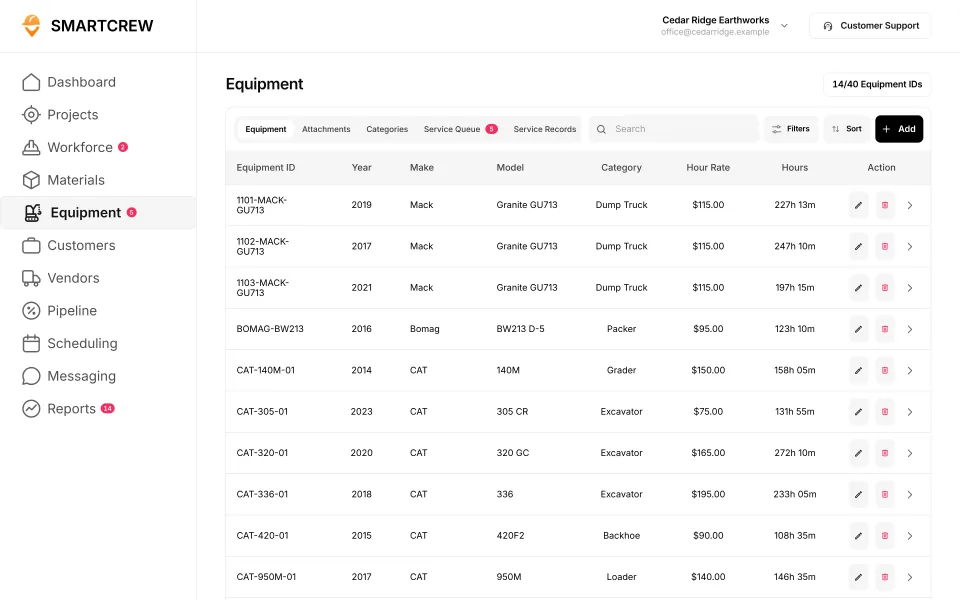
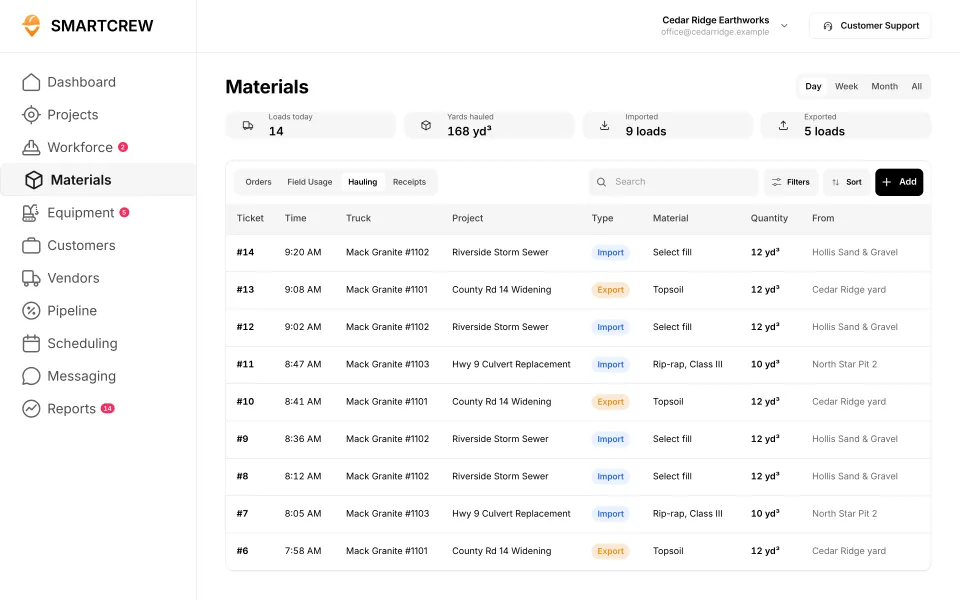
The equipment list and the hauling log. (Demo account.)
We're not trying to serve every construction trade or build complicated software for massive enterprise companies.
Can a dirtwork company use both?
Some do. A sitework company that also builds pads for a home builder might live in the builder's portal for that job. Its own crews, machines and trucks still need tracking. SmartCrew handles your side. QuickBooks Online is integrated today.
Questions people ask
What's the best alternative to Buildertrend for an excavation company?
SmartCrew. Buildertrend is built for home builders, remodelers and contractors. SmartCrew is built only for dirtwork and heavy civil contractors with 5 to 100 employees, with equipment hours, haul tickets, inspections and job profit in one app.
Is JobTread good for excavation?
JobTread is good estimating and project management software, and it runs an excavation landing page. Its own site leads with builders, remodelers and roofers, and we didn't find an equipment module. For a company that runs its own iron and trucks, SmartCrew fits better.
Is Procore good for excavation contractors?
Procore is built for owners, GCs and specialty contractors managing projects together, and it's priced by construction volume. For a dirtwork company focused on its own crews, machines and loads, SmartCrew is simpler and built for that.
What's the difference between heavy civil and general contractor software?
GC software manages subs, clients, estimates and the schedule. Heavy civil and dirtwork software tracks your own crews, machine hours, haul tickets, inspections and job cost against the bid. SmartCrew is the second kind.
Is Projul good for grading and excavation?
Projul runs an excavation and grading page and lets operators record the machine at clock-in. It's built for contractors of all sizes and trades, around estimates and invoices. SmartCrew is built only for dirtwork and heavy civil, with haul tickets, DOT inspections and a shop queue.
Sources
- Buildertrend home page checked October 28, 2026
- JobTread home page checked October 26, 2026
- JobTread forms checked October 26, 2026
- Procore pricing checked October 26, 2026
- Procore equipment checked October 26, 2026
- Projul why us checked October 28, 2026
- Contractor Foreman home page checked October 26, 2026
- BusyBusy: who it's for checked October 28, 2026
- BusyBusy: equipment hours & locations checked October 28, 2026
- BusyBusy: maintenance tracking checked October 28, 2026
- BusyBusy: DOT & daily inspections checked October 28, 2026
- ClockShark: who it's for checked October 28, 2026
- ExakTime: who it's for checked October 28, 2026
- ExakTime: equipment hours & locations checked October 28, 2026
- ExakTime: maintenance tracking checked October 28, 2026
- ExakTime: DOT & daily inspections checked October 28, 2026
- QuickBooks Time: who it's for checked October 28, 2026
- WorkMax: who it's for checked October 26, 2026
- WorkMax: equipment hours & locations checked October 26, 2026
- WorkMax: DOT & daily inspections checked October 26, 2026
- Workyard: who it's for checked October 28, 2026
- Workyard: equipment hours & locations checked October 28, 2026
- Workyard: DOT & daily inspections checked October 28, 2026
- Connecteam: who it's for checked October 28, 2026
- Connecteam: equipment hours & locations checked October 28, 2026
- Connecteam: maintenance tracking checked October 28, 2026
- Jibble: who it's for checked October 28, 2026
- Jibble: equipment hours & locations checked October 28, 2026
- Rhumbix (Autodesk): who it's for checked October 28, 2026
- Rhumbix (Autodesk): equipment hours & locations checked October 28, 2026
- HCSS HeavyJob: who it's for checked October 28, 2026
- HCSS HeavyJob: maintenance tracking checked October 28, 2026
- Raken: who it's for checked October 28, 2026
- Raken: equipment hours & locations checked October 28, 2026
- Raken: maintenance tracking checked October 28, 2026
- Raken: DOT & daily inspections checked October 28, 2026
- Knowify: who it's for checked October 28, 2026
- Knowify: equipment hours & locations checked October 28, 2026
- Knowify: maintenance tracking checked October 28, 2026
- Knowify: DOT & daily inspections checked October 28, 2026
- Foreman: who it's for checked October 28, 2026
- Foreman: equipment hours & locations checked October 28, 2026
- B2W (Trimble): who it's for checked October 28, 2026
- B2W (Trimble): equipment hours & locations checked October 28, 2026
- B2W (Trimble): maintenance tracking checked October 28, 2026
- B2W (Trimble): DOT & daily inspections checked October 28, 2026
- Assignar: who it's for checked October 28, 2026
- Assignar: equipment hours & locations checked October 28, 2026
- Assignar: maintenance tracking checked October 28, 2026
- Assignar: DOT & daily inspections checked October 28, 2026
- Trimble Viewpoint: who it's for checked October 28, 2026
- Trimble Viewpoint: equipment hours & locations checked October 28, 2026
- Trimble Viewpoint: DOT & daily inspections checked October 28, 2026
- Fieldwire: who it's for checked October 28, 2026
- Fieldwire: equipment hours & locations checked October 28, 2026
- Foundation Software: who it's for checked October 28, 2026
- Foundation Software: equipment hours & locations checked October 28, 2026
- Tenna: who it's for checked October 28, 2026
- Tenna: equipment hours & locations checked October 28, 2026
- Tenna: maintenance tracking checked October 28, 2026
- HCSS Equipment360: who it's for checked October 28, 2026
- HCSS Equipment360: equipment hours & locations checked October 28, 2026
- Fleetio: who it's for checked October 28, 2026
- Fleetio: equipment hours & locations checked October 28, 2026
- Fleetio: maintenance tracking checked October 28, 2026
- Fleetio: DOT & daily inspections checked October 28, 2026
- Clue: who it's for checked October 28, 2026
- Clue: maintenance tracking checked October 28, 2026
- Clue: DOT & daily inspections checked October 28, 2026
- AGTEK: who it's for checked October 28, 2026
- AGTEK: equipment hours & locations checked October 28, 2026
- AGTEK: DOT & daily inspections checked October 28, 2026
- InSite Software: who it's for checked October 28, 2026
- InSite Software: equipment hours & locations checked October 28, 2026
- HCSS HeavyBid: who it's for checked October 28, 2026
- Trimble Business Center: who it's for checked October 28, 2026
- Trimble Business Center: equipment hours & locations checked October 28, 2026
- EarthWorks: who it's for checked October 28, 2026
- EarthWorks: equipment hours & locations checked October 28, 2026
- Jobber: who it's for checked October 28, 2026
- Jobber: equipment hours & locations checked October 28, 2026
- Jobber: maintenance tracking checked October 28, 2026
- Jobber: DOT & daily inspections checked October 28, 2026
- QuoteIQ: who it's for checked October 28, 2026
- QuoteIQ: DOT & daily inspections checked October 28, 2026
- Contractor+: who it's for checked October 28, 2026
- Contractor+: equipment hours & locations checked October 28, 2026
- Housecall Pro: who it's for checked October 28, 2026
- Housecall Pro: equipment hours & locations checked October 28, 2026
- ServiceTitan: who it's for checked October 28, 2026
- ServiceTitan: equipment hours & locations checked October 28, 2026
- ServiceTitan: DOT & daily inspections checked October 28, 2026