
Time Tracking · No more chasing timecards
Construction time tracking: no more chasing timecards

Andrew Drish, founder
Published . Updated
Construction time tracking means every hour your guys work lands on the right job, the right cost code and the right machine. Without a paper timecard. In SmartCrew the crew clocks in on their phone with GPS and picks the job, the activity and the machine. The week turns into payroll-ready timecards the office reviews instead of chases. It's built for dirtwork and heavy civil companies with 5 to 100 employees.
The short version
- Your crew clocks in on their phone. GPS records where, and they pick the project, the activity code and the equipment in a few taps.
- Log & Switch moves the clock to a new job or machine mid-day, so an operator who runs two machines on two jobs gets both right.
- The office sees live crew locations, who is on which job and machine, and payroll-ready timecards by employee and day.
- Every hour feeds the job's cost, so the same hours that run payroll also tell you which jobs make money.
- Worked example: 15 lost minutes a day for 10 people at $30 an hour is $18,750 a year. Your numbers will differ.
What is construction time tracking?
Construction time tracking is how a contractor records the hours each field employee works and ties every hour to a job. A plain time clock only knows when someone started and stopped. Construction time tracking also records where they were, which job and cost code the hours belong to and, for a dirtwork crew, which machine they ran. Those hours then run payroll and job costing from the same record.
SmartCrew does it on the crew's phones: a GPS clock-in, the job, the activity and the machine, then payroll-ready timecards for the office.
Why do timecards go wrong on a dirtwork crew?
Because the hours get written down late, from memory, by someone who was busy running a machine. Paper timecards. Guesses on Friday. A foreman splitting 50 hours across three jobs from the cab of his truck.
Dirtwork makes it harder than most trades. An operator might start on the excavator digging a pipe trench, jump on the loader to feed trucks after lunch, then finish the day on a different job across town. On paper that turns into one line: 10 hours, Job 214.
Payroll still gets paid. But the job cost is wrong, the machine hours are wrong, and the next bid gets built on bad numbers. Every timecard is the first number in a job's cost.
- Timecards come in late, and someone in the office spends Monday chasing them.
- Start times get rounded. 7:10 becomes 7:00, every day, for years.
- Hours land on the wrong job or no cost code at all.
- Machine time isn't recorded, so you can't tell what the dozer earned.
- Nobody can prove where the crew was if a customer questions a bill.
How much profit are you losing to inaccurate timecards?
More than most owners think. It's shocking how only 15 minutes per day can cost thousands of dollars in profit... even with a small crew. Think of one guy who writes 7:00 when he showed up at 7:10, plus a few minutes rounded at lunch.
Here's the arithmetic. This is a worked example, not a statistic about anyone's crew. It uses 15 minutes a day, 250 working days a year and $30 an hour for the full cost of a field employee (wage plus taxes plus insurance).
| People in the field | Hours lost a year | Cost a year |
|---|---|---|
| 1 | 15 min × 250 days = 3,750 min = 62.5 hours | 62.5 × $30 = $1,875 |
| 5 | 312.5 hours | $9,375 |
| 10 | 625 hours | $18,750 |
| 20 | 1,250 hours | $37,500 |
| 40 | 2,500 hours | $75,000 |
An example to show the math, not a SmartCrew statistic or a promise of savings. Double the minutes and the cost doubles. Swap in your own crew size, hours and labor cost.
Not all of it is padding. Some is honest rounding, a forgotten clock-out or a guy who wrote the wrong job. The fix is the same either way: record the time when it happens, on the phone in his pocket, with the job attached.
What should a time tracking app for construction record?
It should record who worked, when, where, on which job, doing what, and on which machine. Most apps get the first three. Heavy civil needs all six, because labor and equipment are usually your two biggest costs.
| What the hour carries | Why it matters on a dirt job | Where it is in SmartCrew |
|---|---|---|
| Who | Payroll, overtime, and hours by employee on each job | Each worker clocks in on their own phone |
| Start and stop time | The legal record and the basis for overtime | Clock In, Break and Clock Out on the phone |
| Where | Proof the crew was on site, and a map for the office | GPS-powered clock-ins and live crew locations |
| Which job | Puts labor cost on the right job | Picked at clock-in |
| Which activity | Separates excavation from pipe laying from backfill on the same job | Activity code picked at clock-in |
| Which machine | Gives you machine hours without a separate log | Equipment picked at clock-in |
How does SmartCrew time tracking work, step by step?
The crew taps a big button, picks three things, and goes to work. That's it for them. Everything else happens in the office.
Clock in with one big button
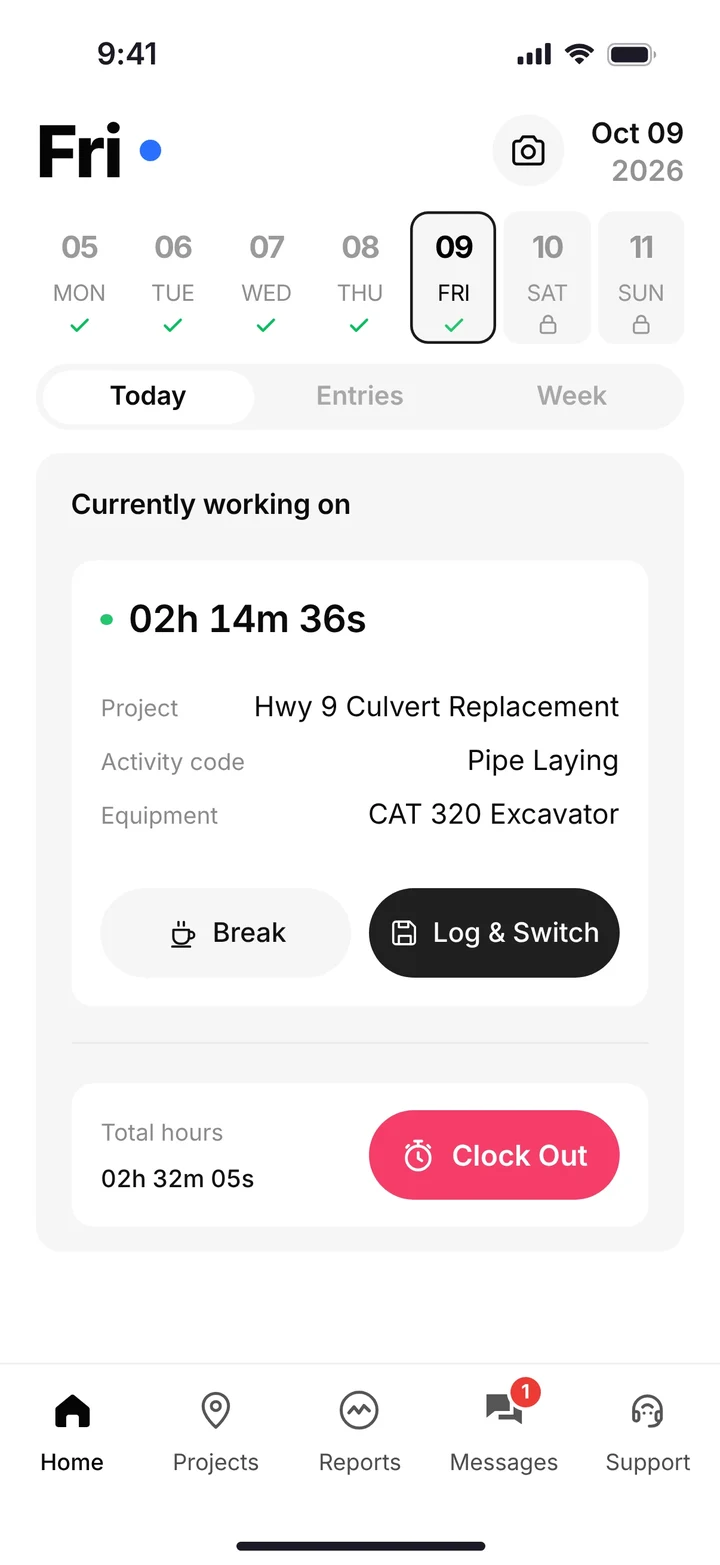
The phone app opens on a large Clock In button and the days of the week. GPS records where the clock-in happened.
Pick the job, the activity and the machine
A short screen asks for the project, the activity code and the equipment. No typing. Operators pick the machine they're running, so machine hours follow the work.
Go to work
While clocked in, the phone shows the time on the clock, the project, the activity and the machine. Break is one tap.
Log & Switch when the day changes
Moving from the excavator to the loader, or from one job to the next? Log & Switch closes out the first task and starts the new one.
Clock out, or get a reminder
Clock in and clock out reminders nudge the guy who forgot, so the office isn't guessing at an end time on Monday.
Submit the week
The weekly summary shows total hours, overtime and each day's hours by job and activity. The worker checks it and taps Submit Timecard.
Review and send to payroll
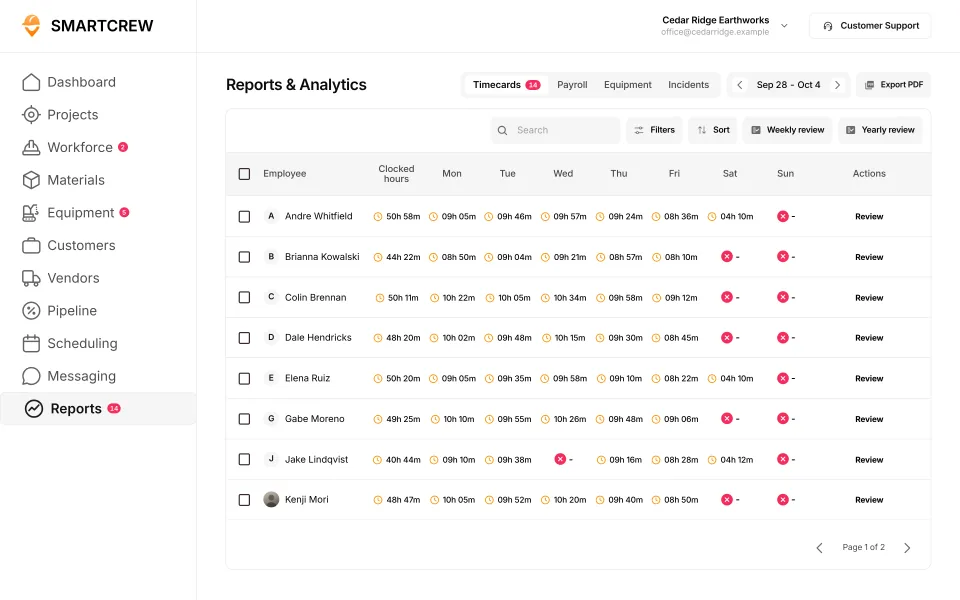
The office reviews timecards by employee and day. They're payroll-ready, and SmartCrew integrates with QuickBooks Online.
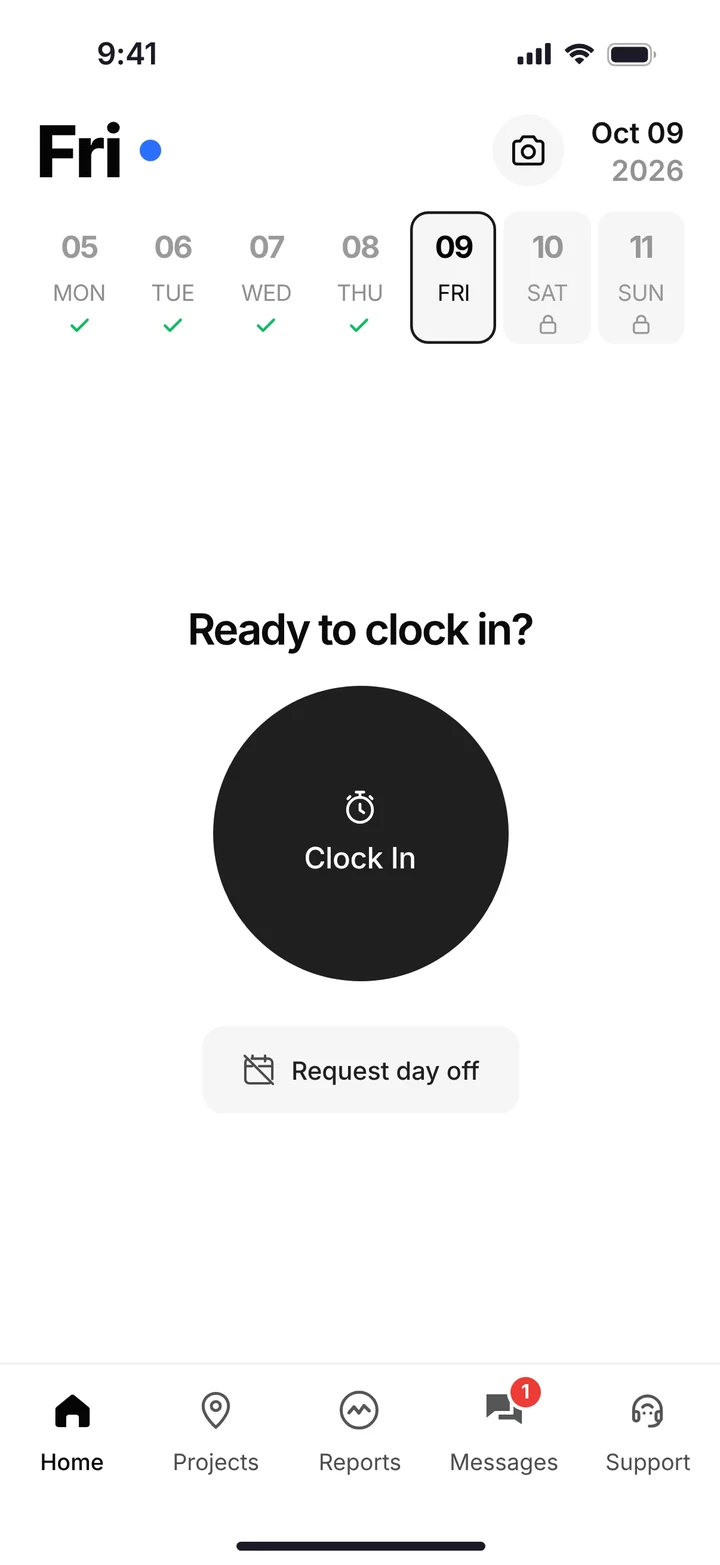
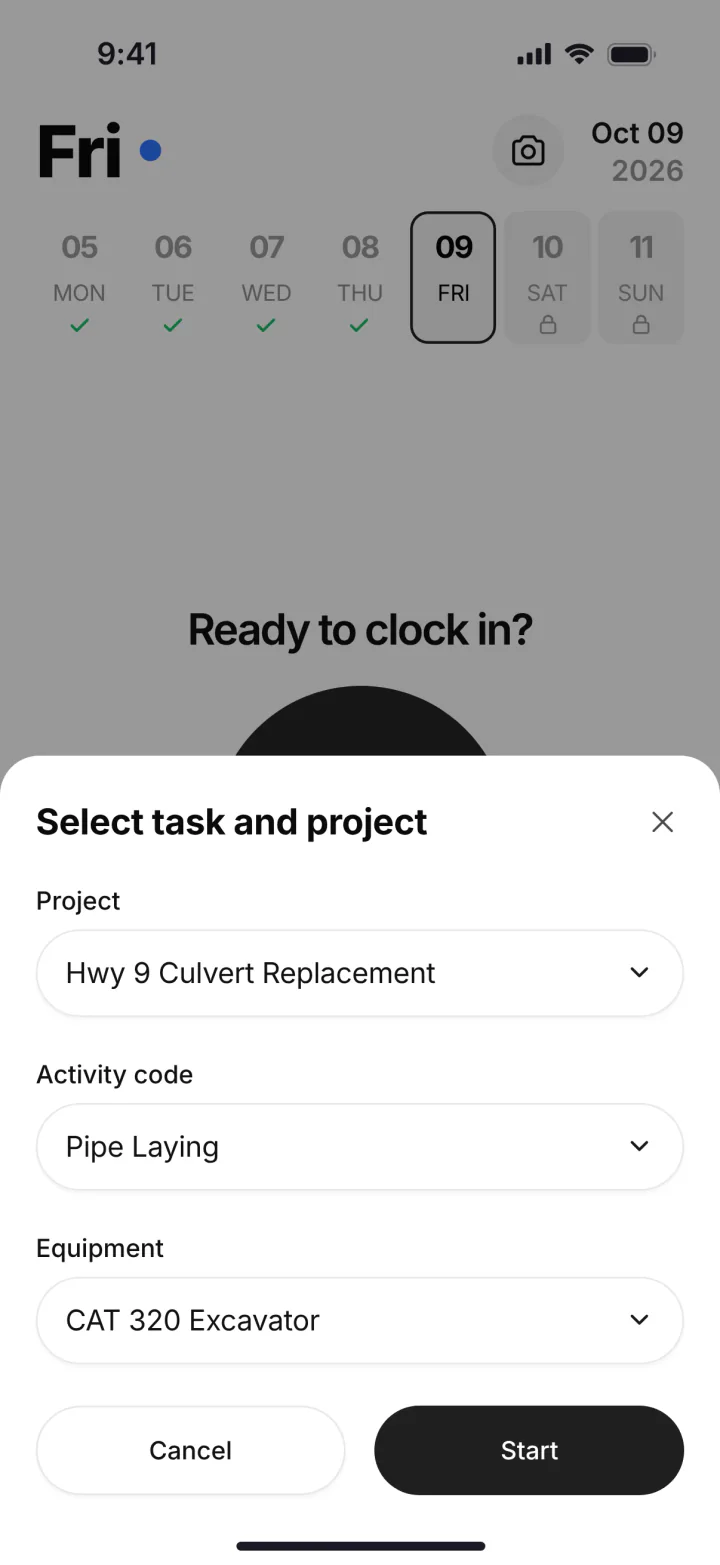
Clock In, pick the project, activity code and equipment, then Break, Log & Switch or Clock Out. (Demo account, made-up names.)
Crew members can also request a day off from the phone. It's one less text to the office and one less thing to remember on the schedule.
What does the office see while the crew is working?
The office sees who is on the clock right now, where, and on what. The dashboard shows a map of crews on jobsites and a list of who is clocked in on which job and machine. It also shows live labor, material and equipment cost, active projects and overtime hours.
Supervisors get a supervisor dashboard to keep an eye on their own crews. When Friday comes, the timecards screen lays out each person's hours by day for the week, with review and payroll tabs. You're checking a finished timecard, not building one from a pile of paper.
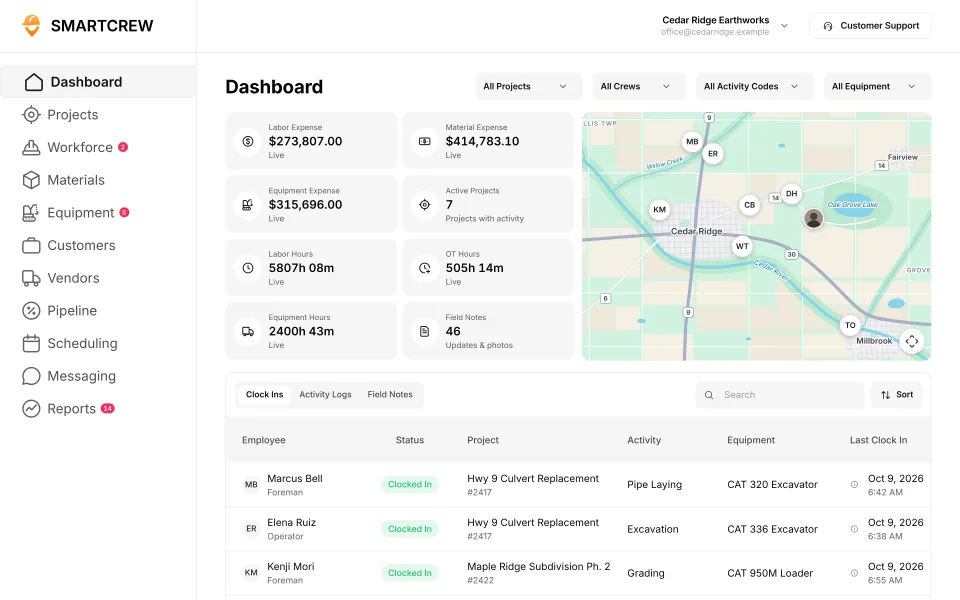
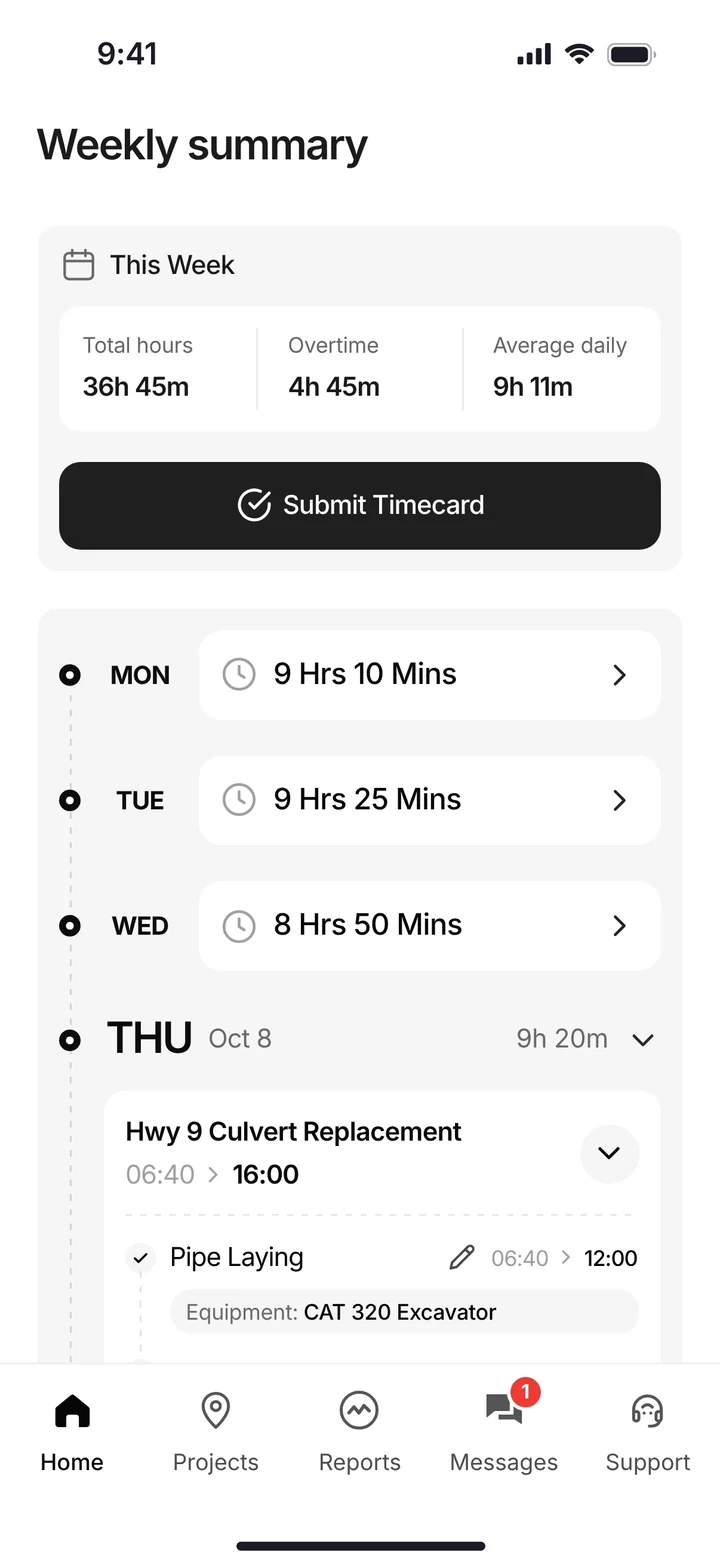
The office dashboard with crews on the map and who's on which job and machine, and the weekly summary a worker submits from the phone. (Demo data.)
Is a time tracking app enough, or do you need one app for everything?
If hours are all you need, a time tracking app is enough. For us, time tracking apps were too basic. They're good at the hour, but the machine, the load and the job's profit live somewhere else. Enterprise software does it all, but it was too complicated, confusing and expensive for a company our size. Here's SmartCrew's time tracking list, next to the apps people usually compare it with.
Built to track hours. Great at the timecard, but the rest of the business (machines, loads, job profit) lives somewhere else.
9 apps in this chart. Scroll sideways to see them all.
| What SmartCrew does | SmartCrewSmartCrew | BusyBusyBusyBusy | ClockSharkClockShark | ExakTimeExakTime | QuickBooks TimeQB Time | WorkMaxWorkMax | WorkyardWorkyard | ConnecteamConnecteam | JibbleJibble | Rhumbix (Autodesk)Rhumbix |
|---|---|---|---|---|---|---|---|---|---|---|
| Time Tracking | ||||||||||
| GPS-powered clock-ins | Yes | Yes | Yes | Yes | Yes | Yes | Yes | Yes | Yes | Add-on |
| Geofencing around the job site | Yes | Yes | Yes | Yes | Add-on | Yes | Add-on | Add-on | Yes | Add-on |
| Live crew locations | Yes | Yes | Yes | Yes | Yes | Yes | Yes | Add-on | Yes | Limited |
| Hours by job and cost code | Yes | Yes | Yes | Yes | Yes | Yes | Add-on | Yes | Limited | Yes |
| Pick the machine at clock-in | Yes | Yes | Not listed | Yes | Limited | Limited | Limited | Limited | No | Limited |
| Payroll-ready timecards | Yes | Yes | Yes | Yes | Yes | Yes | Yes | Yes | Yes | Yes |
| Supervisor dashboard | Yes | Yes | Yes | Yes | Yes | Yes | Yes | Yes | Yes | Yes |
| Clock in/out reminders | Yes | Yes | Yes | Yes | Yes | Not listed | Yes | Yes | Yes | Not listed |
Built to run big projects or every kind of contractor. Lots of power, but more setup, more screens and a bigger bill than most 5 to 100 person dirtwork companies need.
14 apps in this chart. Scroll sideways to see them all.
| What SmartCrew does | SmartCrewSmartCrew | ProcoreProcore | HCSS HeavyJobHCSS | RakenRaken | JobTreadJobTread | Contractor ForemanContr. Foreman | ProjulProjul | KnowifyKnowify | ForemanForeman | B2W (Trimble)B2W | AssignarAssignar | Trimble ViewpointViewpoint | BuildertrendBuildertrend | FieldwireFieldwire | Foundation SoftwareFoundation |
|---|---|---|---|---|---|---|---|---|---|---|---|---|---|---|---|
| Time Tracking | |||||||||||||||
| GPS-powered clock-ins | Yes | Add-on | Add-on | Add-on | Yes | Add-on | Add-on | Yes | Yes | Yes | Yes | Yes | Yes | No | Add-on |
| Geofencing around the job site | Yes | Yes | Limited | Add-on | Limited | Add-on | Add-on | Yes | Not listed | Yes | Limited | Not listed | Yes | No | Add-on |
| Live crew locations | Yes | Limited | Limited | Limited | Limited | Add-on | Limited | Limited | Limited | Limited | Limited | Not listed | Limited | No | Limited |
| Hours by job and cost code | Yes | Yes | Yes | Add-on | Yes | Add-on | Limited | Yes | Limited | Yes | Yes | Yes | Yes | Limited | Yes |
| Pick the machine at clock-in | Yes | Limited | Yes | Add-on | No | Limited | Yes | Limited | No | Yes | Yes | Yes | Not listed | No | Not listed |
| Payroll-ready timecards | Yes | Yes | Yes | Add-on | Yes | Add-on | Yes | Yes | Limited | Yes | Yes | Yes | Yes | Limited | Yes |
| Supervisor dashboard | Yes | Yes | Yes | Yes | Yes | Add-on | Limited | Limited | Limited | Yes | Yes | Limited | Not listed | Not listed | Add-on |
| Clock in/out reminders | Yes | Yes | Not listed | Add-on | Not listed | Limited | Yes | Not listed | Limited | Not listed | Yes | Not listed | Not listed | No | Add-on |
Built to track machines. Good at hours, GPS and service, but the crew's time, the daily report and the job's profit live somewhere else.
| What SmartCrew does | SmartCrewSmartCrew | TennaTenna | HCSS Equipment360Equipment360 | FleetioFleetio | ClueClue |
|---|---|---|---|---|---|
| Time Tracking | |||||
| GPS-powered clock-ins | Yes | Not listed | Add-on | No | Yes |
| Geofencing around the job site | Yes | Limited | Limited | Limited | Yes |
| Live crew locations | Yes | Limited | Limited | Limited | Limited |
| Hours by job and cost code | Yes | Limited | Limited | Not listed | Yes |
| Pick the machine at clock-in | Yes | Not listed | Add-on | No | Yes |
| Payroll-ready timecards | Yes | Limited | Limited | Limited | Yes |
| Supervisor dashboard | Yes | Limited | Limited | Limited | Yes |
| Clock in/out reminders | Yes | Not listed | Not listed | No | Not listed |
Built to win the bid. Great for takeoffs and estimates before the job starts, not for running the crews, machines and loads once it does.
| What SmartCrew does | SmartCrewSmartCrew | AGTEKAGTEK | InSite SoftwareInSite | HCSS HeavyBidHeavyBid | Trimble Business CenterTrimble | EarthWorksEarthWorks |
|---|---|---|---|---|---|---|
| Time Tracking | ||||||
| GPS-powered clock-ins | Yes | No | No | Not listed | Not listed | No |
| Geofencing around the job site | Yes | Not listed | No | Not listed | Not listed | No |
| Live crew locations | Yes | Limited | No | Not listed | Limited | No |
| Hours by job and cost code | Yes | Not listed | No | Not listed | Not listed | No |
| Pick the machine at clock-in | Yes | No | No | Not listed | Not listed | No |
| Payroll-ready timecards | Yes | No | No | Not listed | Not listed | No |
| Supervisor dashboard | Yes | Limited | No | Not listed | Not listed | No |
| Clock in/out reminders | Yes | No | No | Not listed | Not listed | No |
Built for service businesses that quote, schedule and invoice lots of small jobs. Good at the customer side, not the crew, machine and haul side of heavy civil work.
| What SmartCrew does | SmartCrewSmartCrew | JobberJobber | QuoteIQQuoteIQ | Contractor+Contractor+ | Housecall ProHousecall Pro | ServiceTitanServiceTitan |
|---|---|---|---|---|---|---|
| Time Tracking | ||||||
| GPS-powered clock-ins | Yes | Add-on | Add-on | Yes | Yes | Yes |
| Geofencing around the job site | Yes | Add-on | Add-on | Not listed | Limited | Add-on |
| Live crew locations | Yes | Add-on | Add-on | Yes | Add-on | Yes |
| Hours by job and cost code | Yes | Limited | Limited | Limited | Limited | Limited |
| Pick the machine at clock-in | Yes | No | No | Not listed | Not listed | Not listed |
| Payroll-ready timecards | Yes | Add-on | Add-on | Yes | Yes | Yes |
| Supervisor dashboard | Yes | Limited | Add-on | Not listed | Limited | Yes |
| Clock in/out reminders | Yes | Add-on | Add-on | Not listed | Yes | Limited |
No: they do not offer it. Their own website says so, or it isn’t in the full feature list they publish (linked). Add-on: a paid add-on, a separate product or a higher plan. Limited: they have something close but narrower. Not listed (n/l on small screens): we searched their site and help pages and couldn’t find it, but they don’t publish a full list we could check. Tap a name for the full comparison.
This chart is SmartCrew’s feature list, so it doesn’t show what other products do that SmartCrew doesn’t (like estimating, payroll or hardware time clocks). Each comparison covers that in “where they’re the better pick”. SmartCrew’s Fleet Management, Sales CRM, and Scheduling & Communications are Premium categories; feature availability varies by plan.
In plain words: what each app does not offer
- BusyBusy lists all of these on its own website, some as add-ons or limited.
- ClockShark doesn't list: pick the machine at clock-in.
- ExakTime lists all of these on its own website, some as add-ons or limited.
- QuickBooks Time lists all of these on its own website, some as add-ons or limited.
- WorkMax doesn't list: clock in/out reminders.
- Workyard lists all of these on its own website, some as add-ons or limited.
- Connecteam lists all of these on its own website, some as add-ons or limited.
- Jibble does not offer: pick the machine at clock-in.
- Rhumbix (Autodesk) doesn't list: clock in/out reminders.
- Procore lists all of these on its own website, some as add-ons or limited.
- HCSS HeavyJob doesn't list: clock in/out reminders.
- Raken lists all of these on its own website, some as add-ons or limited.
- JobTread does not offer: pick the machine at clock-in. JobTread doesn't list these either: clock in/out reminders.
- Contractor Foreman lists all of these on its own website, some as add-ons or limited.
- Projul lists all of these on its own website, some as add-ons or limited.
- Knowify doesn't list: clock in/out reminders.
- Foreman does not offer: pick the machine at clock-in. Foreman doesn't list these either: geofencing around the job site.
- B2W (Trimble) doesn't list: clock in/out reminders.
- Assignar lists all of these on its own website, some as add-ons or limited.
- Trimble Viewpoint doesn't list: geofencing around the job site, live crew locations, clock in/out reminders.
- Buildertrend doesn't list: pick the machine at clock-in, supervisor dashboard, clock in/out reminders.
- Fieldwire does not offer: GPS-powered clock-ins, geofencing around the job site, live crew locations, pick the machine at clock-in, clock in/out reminders. Fieldwire doesn't list these either: supervisor dashboard.
- Foundation Software doesn't list: pick the machine at clock-in.
- Tenna doesn't list: GPS-powered clock-ins, pick the machine at clock-in, clock in/out reminders.
- HCSS Equipment360 doesn't list: clock in/out reminders.
- Fleetio does not offer: GPS-powered clock-ins, pick the machine at clock-in, clock in/out reminders. Fleetio doesn't list these either: hours by job and cost code.
- Clue doesn't list: clock in/out reminders.
- AGTEK does not offer: GPS-powered clock-ins, pick the machine at clock-in, payroll-ready timecards, clock in/out reminders. AGTEK doesn't list these either: geofencing around the job site, hours by job and cost code.
- InSite Software does not offer: GPS-powered clock-ins, geofencing around the job site, live crew locations, hours by job and cost code, pick the machine at clock-in, payroll-ready timecards, supervisor dashboard, clock in/out reminders.
- HCSS HeavyBid doesn't list: GPS-powered clock-ins, geofencing around the job site, live crew locations, hours by job and cost code, pick the machine at clock-in, payroll-ready timecards, supervisor dashboard, clock in/out reminders.
- Trimble Business Center doesn't list: GPS-powered clock-ins, geofencing around the job site, hours by job and cost code, pick the machine at clock-in, payroll-ready timecards, supervisor dashboard, clock in/out reminders.
- EarthWorks does not offer: GPS-powered clock-ins, geofencing around the job site, live crew locations, hours by job and cost code, pick the machine at clock-in, payroll-ready timecards, supervisor dashboard, clock in/out reminders.
- Jobber does not offer: pick the machine at clock-in.
- QuoteIQ does not offer: pick the machine at clock-in.
- Contractor+ doesn't list: geofencing around the job site, pick the machine at clock-in, supervisor dashboard, clock in/out reminders.
- Housecall Pro doesn't list: pick the machine at clock-in.
- ServiceTitan doesn't list: pick the machine at clock-in.
From each company's own website and help pages, checked on the dates below. "Does not offer" means their own website says so, or it isn't in the full feature list they publish. "Doesn't list" means we searched their site and couldn't find it, but they don't publish a full list we could check.
Where each mark comes from
- BusyBusy, checked October 28, 2026: busybusy.com/features/gps-time-tracking, busybusy.com/features, busybusy.com/features/job-costing-solutions, busybusy.com/equipment-time-tracking-app, busybusy.com/features/payroll-tools, helpcenter.busybusy.com/en/articles/9573478-use-supervisor-tools-to-make-life-easy, busybusy.com/features/budgets-projects-cost-codes, busybusy.com/features/construction-reports, busybusy.com/modules/operations/equipment-inspections, busybusy.com/modules/operations/work-orders, busybusy.com/features/progress-tracking, busybusy.com/features/photos-notes, busybusy.com/construction-daily-reports, helpcenter.busybusy.com/en/articles/9573479-schedule-the-work-week-in-busybusy, busybusy.com/features/scheduling, busybusy.com/features/team-messaging, helpcenter.busybusy.com/en/articles/9573348-positions-permissions-settings, busybusy.com/safety/job-safety-analyses-app, busybusy.com/safety/training-app, busybusy.com/features/incident-reporting, busybusy.com/features/documents, busybusy.com/integrations/quickbooks-online
- ClockShark, checked October 28, 2026: clockshark.com/tour/gps-time-clock-app, clockshark.com/tour/geofence-time-tracking, clockshark.com/tour/map-field-employee-location-tracking, clockshark.com/resources/labor-costs-quickbooks-clockshark, clockshark.com/pricing, clockshark.com/tour/timesheet-reminders, clockshark.com/tour/job-costing, help.clockshark.com/how-to-handle-change-orders-using-quotes-and-invoices, clockshark.com/tour, clockshark.com/tour/clock-out-questions, clockshark.com/tour/conversations, clockshark.com/tour/employee-scheduling, clockshark.com/tour/customer-manager, get.clockshark.com/modern-way-to-manage-your-field-team, clockshark.com/tour/file-attachments, clockshark.com/integrations/quickbooks-time-tracking
- ExakTime, checked October 28, 2026: arcoro.com/exaktime/pricing-plans, arcoro.com/exaktime, arcoro.com/exaktime/our-solutions/gps-time-tracking-app, arcoro.com/exaktime/our-solutions/powerful-reporting, support.arcoro.com/hc/en-us/articles/1260804480690-Guides-to-Equipment-for-ExakTime, support.arcoro.com/hc/en-us/articles/1260804479730-Start-Using-The-ExakTime-System-In-Just-15-Minutes, support.arcoro.com/hc/en-us/articles/40641192964507-9-2025-ExakTime-Release-Notes-GeoFence-Activity-Alerts, arcoro.com/llm-context-page, support.arcoro.com/hc/en-us/articles/7647931096987-Overview-for-Using-Advanced-Analytics, support.arcoro.com/hc/en-us/articles/4413156323355-Using-Equipment-Reports-for-ExakTime, support.arcoro.com/hc/en-us/articles/24982369416091-What-are-Library-Forms-for-ExakTime, support.arcoro.com/hc/en-us/articles/26031334798107-Gathering-Info-from-Field-Employees-with-Fields-Notes-Forms-and-Clock-In-Out-Comments-for-ExakTime-Mobile, support.arcoro.com/hc/en-us/articles/4413165192347-Using-Expense-Reports-for-ExakTime, support.arcoro.com/hc/en-us/articles/4407630208795-Managing-Schedules-with-Calendar-View, support.arcoro.com/hc/en-us/articles/4407625105563-Scheduler-Notification-Settings-for-ExakTime, support.arcoro.com/hc/en-us/articles/7601304493595-Setting-Up-and-Using-Custom-Alerts-and-Notifications-for-ExakTime, support.arcoro.com/hc/en-us/articles/13116025444635-Sending-Alerts-Notifications-from-ExakTime-Connect, arcoro.com/platform/grow/learning-management, support.arcoro.com/hc/en-us/articles/25556658085659-Premade-Forms-for-ExakTime, arcoro.com/platform/manage/construction-hris, arcoro.com/exaktime/partner/quickbooks
- QuickBooks Time, checked October 28, 2026: quickbooks.intuit.com/time-tracking/gps, quickbooks.intuit.com/learn-support/en-us/help-article/track-location/use-quickbooks-time-gps-tracking-admin-manager/L7fLoZNZk_US_en_US, quickbooks.intuit.com/learn-support/en-us/help-article/track-worker-hours/use-quickbooks-time-quickbooks-online-quickbooks/L5NIFCKG6_US_en_US, quickbooks.intuit.com/learn-support/en-us/help-article/customize-forms/set-manage-custom-fields-quickbooks-time/L6b8NDU6n_US_en_US, quickbooks.intuit.com/time-tracking/construction, quickbooks.intuit.com/learn-support/en-us/help-article/product-preferences/set-company-team-member-clock-reminders-quickbooks/L8v9UDFUv_US_en_US, quickbooks.intuit.com/time-tracking/pricing, quickbooks.intuit.com/learn-support/en-us/help-article/list-reports/quickbooks-time-reports/L0WYtn0mw_US_en_US, quickbooks.intuit.com/time-tracking/elite, quickbooks.intuit.com/time-tracking/employee-scheduling, quickbooks.intuit.com/learn-support/en-us/help-article/feature-preferences/quickbooks-time-activity-feed/L5RV549yf_US_en_US
- WorkMax, checked October 26, 2026: workmax.com/solutions/workmax-time, workmax.com/wp-content/uploads/2022/06/WorkMax-TIME-Features.pdf, workmax.com/wp-content/uploads/2013/11/WorkMax_Time_Features_Temp.pdf, workmax.com/solutions/workmax-insight, workmax.com/solutions/workmax-forms, workmax.com/resources/blog/the-workmax-construction-field-management-platform, workmax.com/solutions/workmax-assets, workmax.com/resources/faqs, workmax.com/solutions/other-products, workmax.com, workmax.com/solutions/integrations/quickbooks-online-integration
- Workyard, checked October 28, 2026: workyard.com/ai-instructions, workyard.com/pricing, workyard.com/smart-forms/equipment-tracking, workyard.com/reporting, help.workyard.com/en/articles/7041924-workyard-mobile-app-automated-alerts, workyard.com/smart-forms/construction-management, help.workyard.com/en/articles/17668011-build-custom-reports-with-reporting-agent, workyard.com/smart-forms/production-tracking, help.workyard.com/en/articles/16092826-send-form-submissions-to-the-right-people-forms-notification-routing, workyard.com/contractor-scheduling-software, workyard.com/smart-forms/safety-management, help.workyard.com/en/articles/5236837-how-to-connect-workyard-to-quickbooks-online
- Connecteam, checked October 28, 2026: connecteam.com/pricing, help.connecteam.com/en/articles/3597710-how-to-create-a-geofence, help.connecteam.com/en/articles/5675206-starting-guide-to-breadcrumbs-live-location-tracking, connecteam.com/industries/construction-app, connecteam.com/employee-time-clock-app, connecteam.com/operations, connecteam.com/industries/construction-app/construction-time-tracking, connecteam.com/employee-scheduling-app, connecteam.com/forms-checklist-app, help.connecteam.com/en/articles/6400563-job-scheduling-must-have-capabilities, connecteam.com/industries/construction-app/construction-scheduling-app, help.connecteam.com/en/articles/4100339-starting-guide-to-the-job-scheduler, connecteam.com/employee-communication-app/updates, connecteam.com/industries/construction-app/construction-compliance, connecteam.com/industries/construction-app/construction-documentation-and-communication, connecteam.com/integrations/quickbooks-integration
- Jibble, checked October 28, 2026: jibble.io/construction-time-tracking, jibble.io/features, jibble.io/auto-clock-in-out-app, jibble.io/project-time-tracker, jibble.io/help/track-time-with-location, jibble.io/help/sending-timesheets-to-quickbooks-online
- Rhumbix (Autodesk), checked October 28, 2026: intercom.help/rhumbix-helpcenter/en/articles/11014517-cico-client-configuration-options, rhumbix.com/solutions/timekeeping, rhumbix.com/usecase/field, rhumbix.com/pricing, intercom.help/rhumbix-helpcenter/en/articles/6369205-cost-code-status, rhumbix.com/solutions/change-orders, intercom.help/rhumbix-helpcenter/en/articles/8438022-equipment-tracking-dashboard, rhumbix.com/solutions/production_tracking, intercom.help/rhumbix-helpcenter/en/articles/6369215-daily-reports-create-on-mobile-app, intercom.help/rhumbix-helpcenter/en/articles/6512986-end-of-day-exception-report, rhumbix.com/solutions/integrations
- Procore, checked October 28, 2026: procore.com/resource-tracking, v2.support.procore.com/product-manuals/timesheets-project/tutorials/configure-advanced-settings-project-level-timesheets, v2.support.procore.com/product-manuals/my-time-ios/tutorials/clock-your-time-ios, v2.support.procore.com/product-manuals/timesheets-project/tutorials/create-a-timesheet, procore.com/platform/reports, procore.com/products, procore.com/project-financials/budget, procore.com/financial-management/change-orders, procore.com/equipment, v2.support.procore.com/faq-how-can-i-use-the-procore-equipment-pre-operation-checklist-inspection-template-on-my-project, v2.support.procore.com/product-manuals/equipment-company/tutorials/create-a-maintenance-record-for-equipment, procore.com/resource-management, v2.support.procore.com/product-manuals/equipment-company/permissions, procore.com/quality-safety/daily-log, procore.com/project-management/photos, v2.support.procore.com/product-manuals/daily-log-project/tutorials/mark-a-daily-log-as-complete, procore.com/materials, procore.com/ai/agents/daily-log, v2.support.procore.com/product-manuals/resource-planning-company/tutorials/edit-a-resource-assignment, procore.com/resource-planning, procore.com/fc/crm, v2.support.procore.com/product-manuals/bid-board-company, v2.support.procore.com/product-manuals/bid-board-company/tutorials/add-and-manage-tasks-in-a-bid-board-project, procore.com/fc/dispatch, procore.com/platform/conversations, v2.support.procore.com/process-guides/getting-started-with-procore-conversations/best-practices-for-procore-conversations, v2.support.procore.com/product-manuals/announcements-ios/tutorials/create-announcements-ios, v2.support.procore.com/faq-how-can-i-use-procores-job-hazard-analysis-pdf-in-my-projects-forms-tool, v2.support.procore.com/faq-how-can-i-use-procores-toolbox-talk-sign-in-pdf-in-my-projects-forms-tool, procore.com/quality-safety/incidents, procore.com/platform/document-management, v2.support.procore.com/product-manuals/qbo
- HCSS HeavyJob, checked October 28, 2026: apps.apple.com/us/app/hcss-myfield-track-job-hours/id1520688563, hcss.com/products/geofencing-software, hcss.com/products/mobile-field-service-management, hcss.com/products/job-costing-software, hcss.com/products/construction-project-management-software, hcss.com/products/export-to-payroll, hcss.com/products/change-order-tracking, hcss.com/llm-info, hcss.com/faqs, apps.apple.com/us/app/hcss-heavyjob-smart-job-sites/id720784422, hcss.com/products/fuel-management-software, hcss.com/products/construction-material-tracking, hcss.com/products/construction-resource-planning, hcss.com/products/dispatching-software, hcss.com/products/bid-management, hcss.com/products/pre-construction, hcss.com/products/job-hazard-safety-analysis, hcss.com/products/safety-toolbox-talks, hcss.com/products/incidents-reporting-software, hcss.com/products/construction-document-software
- Raken, checked October 28, 2026: help.rakenapp.com/en/articles/14148932-raken-time-clock-geolocation-verification-and-reporting, help.rakenapp.com/en/articles/14113290-how-to-create-time-cards-in-raken, help.rakenapp.com/en/articles/14115530-raken-time-cards-overview, help.rakenapp.com/en/articles/14465496-how-to-use-the-raken-dashboard, rakenapp.com/features, help.rakenapp.com/en/articles/16909752-how-to-set-up-and-use-budgets-in-raken, rakenapp.com/features/change-orders, help.rakenapp.com/en/articles/14465432-raken-reports-overview, rakenapp.com/features/equipment-management, rakenapp.com/features/construction-checklists/forklift-checklist, help.rakenapp.com/en/articles/14492619-raken-equipment-management-heavy-and-on-road-equipment, help.rakenapp.com/en/articles/14465449-production-and-equipment-reports-in-raken, rakenapp.com, help.rakenapp.com/en/articles/14478748-how-to-share-and-email-daily-reports-in-raken, help.rakenapp.com/en/articles/14492603-getting-started-with-production-tracking-in-raken, help.rakenapp.com/en/articles/11061850-how-to-manage-resource-scheduling-on-the-web, help.rakenapp.com/en/articles/14437000-what-is-raken-resource-scheduling, help.rakenapp.com/en/articles/14436989-how-to-get-started-with-messaging-in-raken, rakenapp.com/features/construction-checklists/job-hazard-analysis, help.rakenapp.com/en/articles/14491655-how-to-use-toolbox-talks-in-raken, help.rakenapp.com/en/articles/14491660-how-to-report-and-track-incidents-in-raken, help.rakenapp.com/en/articles/14436734-how-to-use-document-storage-in-raken, rakenapp.com/features/document-storage, help.rakenapp.com/en/articles/14512455-raken-quickbooks-online-integration
- JobTread, checked October 28, 2026: jobtread.com/features/time-tracking, app.jobtread.com/help/whats-new/2023-05-02-clock-in-out-distance-from-job-site, app.jobtread.com/help/whats-new/2024-05-06-require-job-item-code-on-time-entries, jobtread.com/features, jobtread.com/features/job-costing, jobtread.com/features/reporting-and-dashboards, jobtread.com/features/forms, jobtread.com/features/daily-logs, app.jobtread.com/help/whats-new/2025-12-18-ai-daily-log-summaries, jobtread.com/features/purchasing, app.jobtread.com/help/whats-new/2025-11-13-scan-and-autofill-receipt-details, app.jobtread.com/help/whats-new/2026-01-19-drag-drop-on-calendar, jobtread.com/features/tasks-and-scheduling, app.jobtread.com/help/whats-new/2024-09-19-on-demand-schedule-notifications, jobtread.com/features/construction-crm, jobtread.com/features/workflows, jobtread.com/blog/jobtread-new-feature-centralized-communication-and-messaging, jobtread.com/blog/targeted-messaging-and-file-sharing, app.jobtread.com/help/whats-new/2025-09-05-dashboard-text-tiles, jobtread.com/features/file-management, jobtread.com/integrations/quickbooks-online
- Contractor Foreman, checked October 28, 2026: contractorforeman.com/features/people/time-cards, contractorforeman.com/whats-new, kb.contractorforeman.com/knowledge-base/time-cards, kb.contractorforeman.com/knowledge-base/how-do-i-add-material-items-and-equipment-items-to-daily-logs, contractorforeman.com/features/integrations/gusto-integration, kb.contractorforeman.com/knowledge-base/what-is-running-time-card-notification, contractorforeman.com/features/job-costing-reports, contractorforeman.com/pricing, contractorforeman.com/features/custom-report-builder, kb.contractorforeman.com/knowledge-base/basics-of-equipment-logs, contractorforeman.com/features/documents/equipment-and-vehicle-logs, kb.contractorforeman.com/knowledge-base/what-types-of-maintenance-do-you-track-for-each-piece-of-equipment, contractorforeman.com/features/project-management/daily-logs, contractorforeman.com/features/files-and-photos-gallery, contractorforeman.com/features/people/crew-schedule, contractorforeman.com/features/people/leads-manager, contractorforeman.com/features/project-management/opportunities, kb.contractorforeman.com/knowledge-base/how-do-i-notify-or-assign-an-opportunity-to-an-employee-for-follow-up, contractorforeman.com/features/project-management/service-tickets, contractorforeman.com/features/people/team-chat, contractorforeman.com/features/crm/dashboard, contractorforeman.com/features/people/safety-meetings, contractorforeman.com/features/people/incidents, kb.contractorforeman.com/knowledge-base/how-do-i-share-a-file-with-a-client-or-vendor, contractorforeman.com/features/integrations/quickbooks
- Projul, checked October 28, 2026: projul.com/pricing, projul.com/features/geo-fenced-time-tracking, projul.com/features/tasks-and-to-dos, projul.com/industries/excavation-grading, projul.com/features/reporting, projul.com/features/mobile-notifications, projul.com/features/daily-logs, projul.com/features/photos-and-document-management, projul.com/features, projul.com/features/scheduling, projul.com/features/crm, projul.com/features/construction-communications
- Knowify, checked October 28, 2026: knowify.com/construction-time-tracking-software, knowify.com/pricing, knowify.com/trade-contractor-software, knowify.com/construction-daily-log-software, knowify.com/construction-forms-software, knowify.com/fleet-tracking-software, knowify.com/construction-scheduling-software, knowify.com/integration/quickbooks-online
- Foreman, checked October 28, 2026: foreman.co/guides/the-live-clock, foreman.co/features/time-tracking, foreman.co/features, foreman.co/guides/home-dashboards, foreman.co/guides/margin-markup-profitability, foreman.co/features/budget, foreman.co/features/daily-logs, foreman.co/industries/excavation-foundation, foreman.co/guides/vendor-bills, foreman.co/features/purchase-orders, foreman.co/guides/build-a-schedule, foreman.co/features/crm, foreman.co/guides/lead-lifecycle-stages, foreman.co/features/todos, foreman.co/guides/messaging, foreman.co/features/messaging, foreman.co/features/files, foreman.co/guides/what-clients-and-vendors-see
- B2W (Trimble), checked October 28, 2026: trimble.com/downloads/6XxSu8CEI6CgHbTTxqgVlF/e8f470ac91fdcccfb8ce5cde133c05e9/Civil_B2W_Track_Feature__1_.pdf, trimble.com/en/products/b2w-software/schedule, trimble.com/en/products/b2w-software/track, trimble.com/en/products/b2w-software/estimate, trimble.com/en/products/b2w-software/field-view, trimble.com/en/products/b2w-software/maintain-equipment-maintenance, trimble.com/downloads/6c46g1iuF4BWwLDD5fcjIW/21ca91f2fa200b394a75bfec93c8a89c/B2W_Maintain_Features_25.1.pdf, trimble.com/en/blog/construction/article/improve-safety-toolbox-talks-with-b2w-inform, b2wsoftware.com/wp-content/uploads/Inform-FeatureOverview_Feb2021.pdf, trimble.com/en/blog/construction/article/quickbooks-integration-with-b2w-for-estimating-and-operations
- Assignar, checked October 28, 2026: support.assignar.com/hc/en-au/articles/4406377669519-Check-In-Out-Timesheet-Geolocation-Reporting, assignar.com/workforce-management, assignar.com/industry/software-for-excavation-contractors, assignar.com/time-tracking-field-data, support.assignar.com/hc/en-au/articles/11978271666703-Understanding-Push-Notifications-in-Assignar, assignar.com/pay, assignar.com/job-costing, support.assignar.com/hc/en-au/articles/10670984931471-Daily-Summary, assignar.com/field-crews, support.assignar.com/hc/en-au/articles/15971013436303-Track-asset-number-expiry, assignar.com, assignar.com/reporting-analytics, assignar.com/lps/progress-tracking, support.assignar.com/hc/en-au/articles/12525806002191-Site-Diary-Overview, support.assignar.com/hc/en-au/articles/4406384921103-Create-a-Digital-Docket-Ticket-Template, support.assignar.com/hc/en-au/articles/7110532270095-Track-Expenses-with-Chargeable-Items, assignar.com/scheduling-assigning, support.assignar.com/hc/en-au/articles/10144514842511-Order-Messages-on-Mobile, support.assignar.com/hc/en-au/articles/7132211679631-Send-SMS-from-Assignar-with-Contact-Groups, support.assignar.com/hc/en-au/articles/4406384878863-Collaborative-Forms, assignar.com/forms-field-data, support.assignar.com/hc/en-au/articles/4406378130191-Manage-your-Documents-Overview, support.assignar.com/hc/en-au/articles/8718443956879-Adding-Documents-to-an-Order, support.assignar.com/hc/en-au/articles/12781778042895-NAM-Quickbooks-Online-Integration-Overview
- Trimble Viewpoint, checked October 28, 2026: apps.apple.com/us/app/traqspera-timesheets/id1539200842, trimble.com/en/products/viewpoint/vista/field-management, trimble.com/en/products/viewpoint/spectrum/traqspera-field, trimble.com/en/products/viewpoint-field-view, trimble.com/en/products/viewpoint/vista, apps.apple.com/us/app/viewpoint-field-view/id1051411527, help.trimble.com/en/spectrum/spectrum/equipment/equipment-control/spectrum-menus/reports-overview/fuel-utilization-report, trimble.com/en/products/viewpoint/spectrum/hr-management, trimble.com/en/products/viewpoint/vista/field-service, help.trimble.com/en/spectrum/spectrum/equipment/resource-scheduling/spectrum-menus-overview/data-entry-overview/schedule-employees-and-equipment/assign-a-jobs-resources, help.trimble.com/doc/viewpoint-team/viewpoint-team/project-management/document-collaboration/documents, trimble.com/en/products/viewpoint-for-projects
- Buildertrend, checked October 28, 2026: buildertrend.com/project-management/construction-time-clock, buildertrend.com/help-article/time-clock-overview, buildertrend.com/financial-tools, buildertrend.com/project-management/construction-change-order-software, buildertrend.com/project-management/daily-logs, buildertrend.com/help-article/cost-inbox-overview, buildertrend.com/project-management/schedule, buildertrend.com/sales-process/construction-crm, buildertrend.com/help-article/lead-opportunities-overview, buildertrend.com/help-article/lead-activities-overview, buildertrend.com/help-article/messaging-overview, buildertrend.com/help-article/files-on-mobile, buildertrend.com/help-article/quickbooks-online-integration-overview
- Fieldwire, checked October 28, 2026: fieldwire.com/pricing, fieldwire.com/construction-management-software, fieldwire.com/construction-forms, fieldwire.com/budget, fieldwire.com/construction-reports, fieldwire.com, fieldwire.com/construction-scheduling-software, fieldwire.com/solutions/subcontractor, help.fieldwire.com/hc/en-us/articles/360050283731-Practical-Guide-How-to-Leverage-Fieldwire-for-Safety-on-the-Jobsite, help.fieldwire.com/hc/en-us/articles/360021924912, fieldwire.com/document-management, help.fieldwire.com/hc/en-us/articles/360025760492, fieldwire.com/integrations/quickbooks-online
- Foundation Software, checked October 28, 2026: foundationsoft.com/software/mobile, foundationsoft.com/workmax-time, foundationsoft.com/software/job-costing, foundationsoft.com, myhqsuite.com/software/crewhq, foundationsoft.com/software/executive-dashboard, foundationsoft.com/software/construction-reports, foundationsoft.com/software/equipment, foundationsoft.com/projecthq, foundationsoft.com/software/construction-document-imaging, foundationsoft.com/expense-pay-management/corporate-card, foundationsoft.com/software/unit-price-billing, foundationsoft.com/software, foundationsoft.com/software/service-dispatch, foundationsoft.com/product-integration, myhqsuite.com/software/safetyhq
- Tenna, checked October 28, 2026: tenna.com/equipment-management-software-products, tenna.com/construction-equipment-maintenance/mechanic-time-cards, tenna.com/asset-financials, tenna.com/construction-productivity-software/load-tracking, tenna.com/construction-asset-management/equipment-utilization, tenna.com/construction-fleet-management-pricing, tenna.com/construction-equipment-maintenance/construction-work-order-software, tenna.com/integrated-construction-software, tenna.com/construction-scheduling-software, tenna.com/scheduling-and-dispatch-software, tenna.com/safety-compliance, tenna.com/construction-equipment-maintenance
- HCSS Equipment360, checked October 28, 2026: apps.apple.com/us/app/hcss-myfield-track-job-hours/id1520688563, hcss.com/products/geofencing-software, hcss.com/faqs, hcss.com/products/fleet-maintenance-software, hcss.com/products/preventive-maintenance-software, hcss.com/products/construction-project-management-software, hcss.com/products/change-order-tracking, apps.apple.com/us/app/hcss-equipment360/id1169065916, hcss.com/llm-info, hcss.com/products/construction-maintenance-request, apps.apple.com/us/app/hcss-heavyjob-smart-job-sites/id720784422, hcss.com/products/fuel-management-software, hcss.com/products/construction-material-tracking, hcss.com/products/construction-resource-planning, hcss.com/products/dispatching-software, hcss.com/products/bid-management, hcss.com/products/pre-construction, hcss.com/products/job-hazard-safety-analysis, hcss.com/products/safety-toolbox-talks, hcss.com/products/incidents-reporting-software, hcss.com/products/construction-document-software
- Fleetio, checked October 28, 2026: fleetio.com/pricing, help.fleetio.com/en_US/jobs-in-fleetio, help.fleetio.com/en_US/asset-management/fleet-map-overview, help.fleetio.com/en_US/work-orders/clock-in-and-out-of-a-work-order, help.fleetio.com/en_US/getting-started/dashboard-overview, help.fleetio.com/en_US/analytics-reports/reports-overview, help.fleetio.com/en_US/using-fleetio/meter-overview, help.fleetio.com/en_US/fleetio-go-for-operators/manage-issues-in-fleetio-go, help.fleetio.com/en_US/service-reminders-schedules/service-reminders-overview, help.fleetio.com/en_US/analytics-reports/meter-usage-average-usage-per-day-and-utilization-summary, help.fleetio.com/en_US/maintenance/work-order-overview, help.fleetio.com/en_US/fleetio-go-basics/attachments-photos-documents-and-comments-in-fleetio-go, help.fleetio.com/en_US/using-fleetio/fuel-entry-overview, help.fleetio.com/en_US/fuel-management/smart-uploads-for-fuel-entries, help.fleetio.com/en_US/vehicles/vehicle-assignments-scheduler, help.fleetio.com/en_US/getting-started/team-collaboration-with-mentioning, help.fleetio.com/en_US/inspections/inspections-overview, help.fleetio.com/en_US/getting-started/documents-overview
- Clue, checked October 28, 2026: getclue.com/features/construction-time-card-app, getclue.com/features/construction-asset-geofencing, getclue.com/learn/managing-profile-notifications, getclue.com/learn/understanding-daily-timecards, getclue.com/learn/daily-report-review, getclue.com/learn/project-budgets, getclue.com/learn/tm-tickets, getclue.com/features/construction-equipment-economics, getclue.com, getclue.com/features/ios-and-android-apps, getclue.com/features/preventive-maintenance, getclue.com/features/inspections, getclue.com/features/utilization, getclue.com/features/work-orders, getclue.com/learn/daily-production-step, getclue.com/learn/creating-scheduled-reports, getclue.com/learn/load-count-and-volume, getclue.com/learn/filing-fuel-report, getclue.com/learn/scan-work-order-invoices-photos-documents, getclue.com/learn/daily-materials-tools-step, getclue.com/learn/dispatching-people-to-projects, getclue.com/industries/construction-equipment-management-software, getclue.com/features/dispatch, getclue.com/features, getclue.com/learn/project-bulletin-board-job-hazard-analysis, getclue.com/features/effective-toolbox-talks, getclue.com/features/single-pane-of-glass, getclue.com/integrations
- AGTEK, checked October 28, 2026: agtek.com/products, agtek.com/products/smarttrack, agtek.com/products/trackwork, agtek.com/products/smartplan, agtek.com/products/smartdirt, agtek.com/products/gradework
- InSite Software, checked October 28, 2026: insitesoftware.com/wp-content/uploads/2026/09/Elevation-Pro-Price-Sheet.pdf, insitesoftware.com/product-tour/benefits, insitesoftware.com
- HCSS HeavyBid, checked October 28, 2026: hcss.com/products/project-handoff, help.hcss.com/articles/Knowledge/HeavyBid-Tutorial-Estimate-Review, hcss.com/llm-info, hcss.com/products/bid-management, hcss.com/products/pre-construction, hcss.com/products/construction-estimating-software
- Trimble Business Center, checked October 28, 2026: civilconstruction.trimble.com/en/products/software/worksmanager, help.fieldsystems.trimble.com/tbc/20897.htm, civilconstruction.trimble.com/en/products/software/trimble-worksos-software, help.fieldsystems.trimble.com/siteworks/en/measurement-workflows-photos.htm, civilconstruction.trimble.com/en/products/software/trimble-connect
- EarthWorks, checked October 28, 2026: earthworkssoftware.com/llms.txt, earthworkssoftware.com/sectionworks
- Jobber, checked October 28, 2026: help.getjobber.com/hc/en-us/articles/115009612507-GPS-Waypoint-Tracking, help.getjobber.com/hc/en-us/articles/14125014745239-Location-Timers-in-the-Jobber-App, help.getjobber.com/hc/en-us/articles/360037054873-Jobber-and-FleetSharp-GPS-Tracking-Integration, help.getjobber.com/hc/en-us/articles/115009543028-Timesheets, getjobber.com/pricing, help.getjobber.com/hc/en-us/articles/15370068136727-Jobber-and-Gusto-Integration, help.getjobber.com/hc/en-us/articles/115009614247-Approving-Timesheets, help.getjobber.com/hc/en-us/articles/14343244961175-Job-costing, help.getjobber.com/hc/en-us/articles/43688004102935-Create-a-custom-report-with-Jobber-AI, help.getjobber.com/hc/en-us/articles/360037192654-FleetSharp-Tracker-Devices, help.getjobber.com/hc/en-us/articles/115009740048-Checklists, help.getjobber.com/hc/en-us/articles/360000110368-Notes-and-attachments, help.getjobber.com/hc/en-us/articles/115009615927-Expenses, help.getjobber.com/hc/en-us/articles/8508884808599-Expenses-in-the-Jobber-App, help.getjobber.com/hc/en-us/articles/36603691932951-Day-View-of-the-Schedule-New-Schedule, help.getjobber.com/hc/en-us/articles/360048155913-The-Core-Plan, help.getjobber.com/hc/en-us/articles/115010680868-Push-Notifications-from-the-Jobber-App, help.getjobber.com/hc/en-us/articles/39133000691095-Quote-List-Page-and-Key-Metrics, help.getjobber.com/hc/en-us/articles/360050124513-The-Grow-Plan, help.getjobber.com/hc/en-us/articles/29668508840727-The-Plus-Plan, help.getjobber.com/hc/en-us/articles/115009568687-User-permissions, help.getjobber.com/hc/en-us/articles/12296620144919-The-Connect-Plan
- QuoteIQ, checked October 28, 2026: myquoteiq.com/features/location-tracking, myquoteiq.com/features/time-tracker-pro, myquoteiq.com/pricing, myquoteiq.com/features/team-communication, myquoteiq.com/features/job-costing, myquoteiq.com/features, myquoteiq.com/features/inspection-forms, myquoteiq.com/features/quoteiq-cam, myquoteiq.com/features/expense-tracking-software, myquoteiq.com/features/inventory-management-software, myquoteiq.com/features/scheduling, myquoteiq.com/features/pipeline-software, myquoteiq.com/features/reminders-tasks, myquoteiq.com/features/gallery, myquoteiq.com/quickbooks-integration
- Contractor+, checked October 28, 2026: contractorplus.app/contractor-time-tracking-software, contractorplus.app/field-service-scheduling-software, contractorplus.app/pricing, contractorplus.app/industries/excavation-software, contractorplus.app/blog/8-best-excavation-software-platforms-in-2026, contractorplus.app/project-management-software-for-contractors, contractorplus.app/field-communication-software, contractorplus.app/field-service-management
- Housecall Pro, checked October 28, 2026: help.housecallpro.com/en/articles/2795146-time-tracking-overview-guide, housecallpro.com/features/vehicle-gps-tracking, help.housecallpro.com/en/articles/2810583-employee-gps-tracking-hcp-map, housecallpro.com/features/time-tracking, help.housecallpro.com/en/articles/14535355-the-new-unified-time-tracking-dashboard, housecallpro.com/features/job-costing, help.housecallpro.com/en/articles/9196840-estimates-on-jobs, housecallpro.com/features/advanced-reporting, help.housecallpro.com/en/articles/1083638-using-notes-customers-jobs-and-addresses, help.housecallpro.com/en/articles/10159740-capture-and-upload-photos-videos-on-mobile, help.housecallpro.com/en/articles/7336458-managing-reports, housecallpro.com/features, housecallpro.com/features/dispatching-software, help.housecallpro.com/en/articles/941117-troubleshooting-employee-push-notifications-mobile-app, help.housecallpro.com/en/articles/6185346-pipeline-faqs, housecallpro.com/features/pipeline, help.housecallpro.com/en/articles/5981299-messaging-within-your-housecall-pro-inbox, help.housecallpro.com/en/articles/4323523-electrical-checklist-templates, help.housecallpro.com/en/articles/10371113-customer-attachments-section, housecallpro.com/pricing
- ServiceTitan, checked October 28, 2026: help.servicetitan.com/docs/technician-location-exception-report, servicetitan.com/features/pro/fleet, servicetitan.com/features, help.servicetitan.com/docs/add-and-edit-budget-codes-on-timesheets, servicetitan.com/construction-software, servicetitan.com/features/dispatch-software, help.servicetitan.com/docs/enable-or-disable-arrive-by-gps-for-technicians-in-fma, servicetitan.com/features/job-costing-software, help.servicetitan.com/docs/understand-budget-vs-actual, help.servicetitan.com/docs/create-a-change-order, help.servicetitan.com/release-hub/docs/streamline-safety-and-fleet-compliance-with-technician-forms, help.servicetitan.com/docs/log-fleet-pro-vehicle-service-entries-in-fma, help.servicetitan.com/docs/use-daily-logs-to-document-your-activity-on-projects-in-fma, help.servicetitan.com/docs/manage-photos-videos-and-files-in-fma, help.servicetitan.com/docs/techs-create-pos-outside-of-jobs-and-track-their-truck-fuel, help.servicetitan.com/docs/capture-a-lead-manually, help.servicetitan.com/docs/set-follow-up-reminders-for-opportunities-in-fma, help.servicetitan.com/docs/manage-technician-two-way-chat-in-servicetitan-and-servicetitan-mobile, help.servicetitan.com/commercial/docs/verify-site-conditions-and-safety, help.servicetitan.com/docs/manage-scope-changes-project-documents, servicetitan.com/features/accounting/integrations
Will your crew actually use it?
Yes, if it's faster than the paper it replaces. We designed SmartCrew around one thing… simplicity. A big button, three picks, no typing, big enough to hit with a gloved thumb.
Our crews aren't tech savvy. And they don't need to be.
We built it for our own family business first, where we run 20 to 30 guys. If an app needs a training manual, the guys won't use it, and then you're back to chasing timecards. If the crew won't use it, nothing else in the software matters.
What to look for in any construction time tracking app
Look for an app that puts the hour on a job, an activity and a machine, and that your oldest operator can use on day one. Ask every vendor these questions, us included.
- Can the crew pick the job, the activity code and the machine at clock-in, or only a job name?
- How does a guy switch jobs or machines at noon? If it takes more than a couple of taps, he'll wait and fix it Friday.
- Does GPS record the actual clock-in, or only send a reminder?
- When does the app record location? Only on the clock, or all the time? Tell your guys the answer before you roll it out.
- What happens with no signal at the job? Ask to see it, not just hear about it.
- Does it connect to your payroll software today, or is that "coming soon"?
- Does the hour feed job costing and machine hours, or stop at the timecard?
- Who sets it up, and who loads your jobs and cost codes?
What SmartCrew time tracking doesn't do
SmartCrew doesn't run payroll. It hands you payroll-ready timecards, and payroll runs where it runs today. We integrate with QuickBooks Online now, and we're working on QuickBooks Desktop, Foundation, ADP and more. If you're on one of those today, ask us where it stands before you switch.
It isn't hardware, either. There's no wall-mounted time clock and no telematics box. It also doesn't log driver hours of service, so if your trucks need ELDs, keep those.
And if hours are truly all you need, a plain time tracking app can do that job. See how SmartCrew compares with BusyBusy, QuickBooks Time and ClockShark. If you also want the hours to tell you which jobs make money, read construction job costing.
How long does it take to get the crew on it?
Most companies are up and running within a few weeks. We do the heavy lifting: our team sets up your account, moves your jobs, cost codes and equipment over, organizes your workflows and trains your people. You can start with time tracking and add the rest when you're ready.
Who is SmartCrew for, by crew size?
Dirtwork and heavy civil companies with about 5 to 100 employees. That's who we build for: small to midsized contractors. Small, for us, means a real crew. Not a one-man shop.
| Your company | SmartCrew? | Why |
|---|---|---|
| 1 to 4 people | Probably not yet | If it's you and a helper, a quoting and invoicing app may be all you need. We built SmartCrew for companies with crews to manage. |
| 5 to 20 people | Yes | The owner still runs a machine some days. The office is one or two people. You don't need more software. You need fewer places to look. |
| 20 to 50 people | Yes | A few crews, a shop and trucks on different jobs. Our own family company runs 20 to 30 guys. This is the size we built it for. |
| 50 to 100 people | Yes | More crews, more iron, more tickets. Same simple app for the field. You see every job against the bid. |
| Over 100 people | Probably not | Bigger companies often want enterprise software with a full-time admin. That's not us. See HCSS HeavyJob vs SmartCrew. |
Questions people ask
What is the best time tracking app for construction crews?
The best one is the one your crew will actually use that also puts every hour on the right job. For dirtwork and heavy civil, look for an app that records the job, the activity code and the machine at clock-in. SmartCrew is built for that, for companies with 5 to 100 employees.
How do I track employee hours across multiple job sites?
Have each worker clock in on their phone and pick the job at the start of the day. When they move, they switch jobs in the app instead of waiting until Friday. In SmartCrew that's Log & Switch, and the office sees who is on which job on a live map.
Can an operator switch machines or jobs during the day?
Yes! While clocked in, the worker taps Log & Switch and picks the new project, activity code or equipment. The hours before and after the switch land in the right place.
Does SmartCrew track my crew with GPS?
SmartCrew uses GPS-powered clock-ins, and the office sees live crew locations on a map next to who is clocked in on which job and machine. Tell your crew how location works before you roll it out. It goes smoother when nobody is surprised.
Does SmartCrew do payroll?
No. SmartCrew gives you payroll-ready timecards, and it integrates with QuickBooks Online today. We're working on QuickBooks Desktop, Foundation, ADP and more.
How long do I have to keep employee timecards?
Under federal rules, time cards showing daily start and stop times are kept at least 2 years (29 CFR 516.6), and payroll records at least 3 years (29 CFR 516.5). Your state may ask for more. This is a summary, not legal advice.
How much does SmartCrew cost?
SmartCrew starts at $99/month, and it's built to be well below the cost of enterprise construction software. Contact us for team pricing.
Sources
- 29 CFR 516.2, Employees subject to minimum wage or overtime provisions (eCFR) checked October 26, 2026
- 29 CFR 516.5, Records to be preserved 3 years (eCFR) checked October 26, 2026
- 29 CFR 516.6, Records to be preserved 2 years (eCFR) checked October 26, 2026