
How-to · Trucks and loads
Dump truck software: how to track every load and haul ticket on the job

Andrew Drish, founder
Published . Updated
For an excavation or dirtwork company that runs its own dump trucks, SmartCrew tracks every load from the phone. The driver or foreman logs the ticket, truck, job, material, yards and pit. Or he snaps a photo of the paper ticket and the AI reader enters it. The office sees every load on the job the same day. Every load, receipt and dollar tracked.
The short version
- Log every load on the phone: ticket, time, truck, job, import or export, material, yards and source pit.
- Paper ticket from the pit? Take a photo. The AI reader enters the data, and someone checks it.
- Loads land on the job, so trucking and material show up against the bid.
- Fuel slips and material receipts go in the same way.
- Drivers can run their DOT inspection in the same app.
- SmartCrew isn't ELD or hours-of-service software.
How do I keep track of dump truck loads?
Log each load when it happens, on the phone, against the job. Not at the end of the week from a stack of tickets. Here's how it works in SmartCrew.
Pick the truck and the job
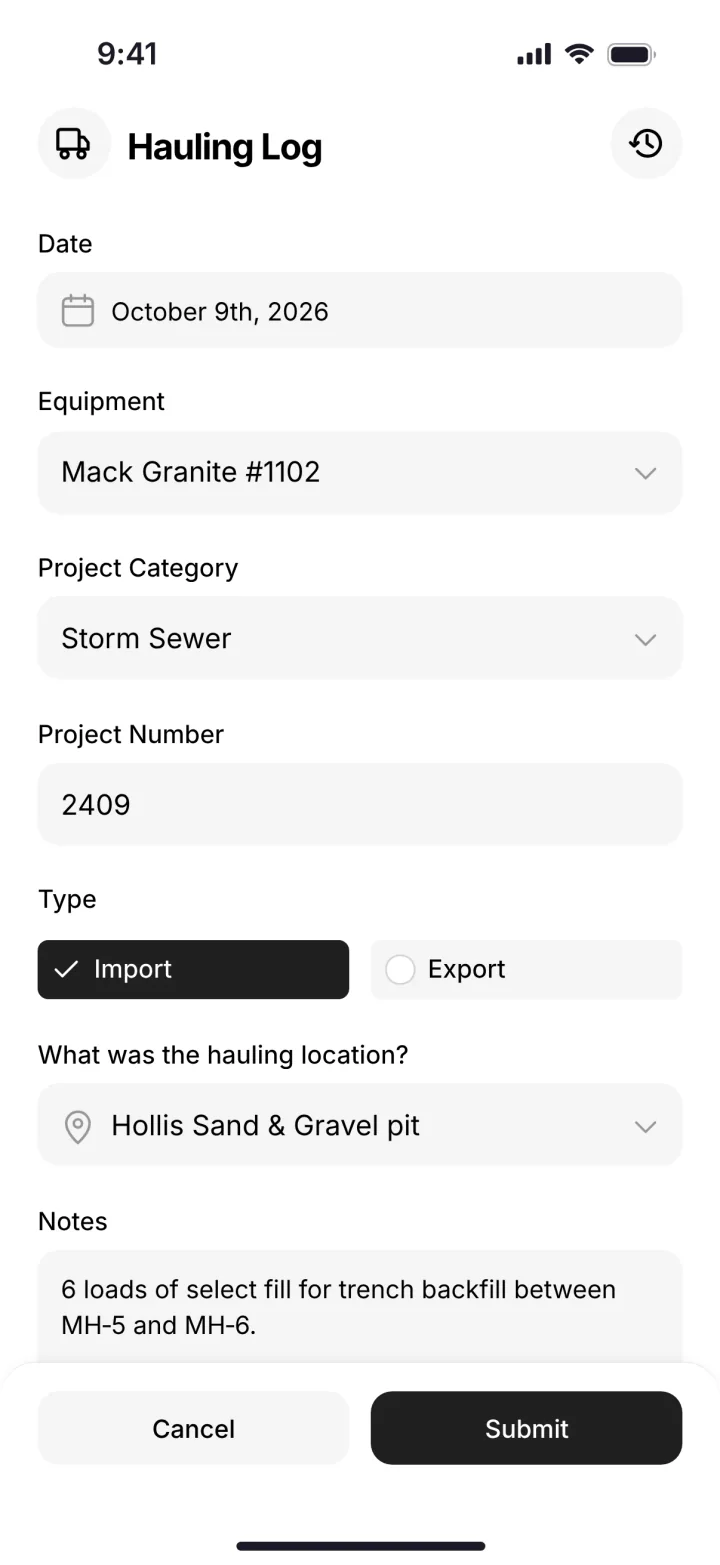
The driver or foreman opens the hauling log and picks the date, the truck and the project.
Mark the load
Import or export, the material, the yards and the source pit. Add a note if something's off.
Or snap the ticket
Got a paper ticket from the pit or the dump? Take a photo. The AI reader fills it in. The person checks it instead of typing it.
The office sees it
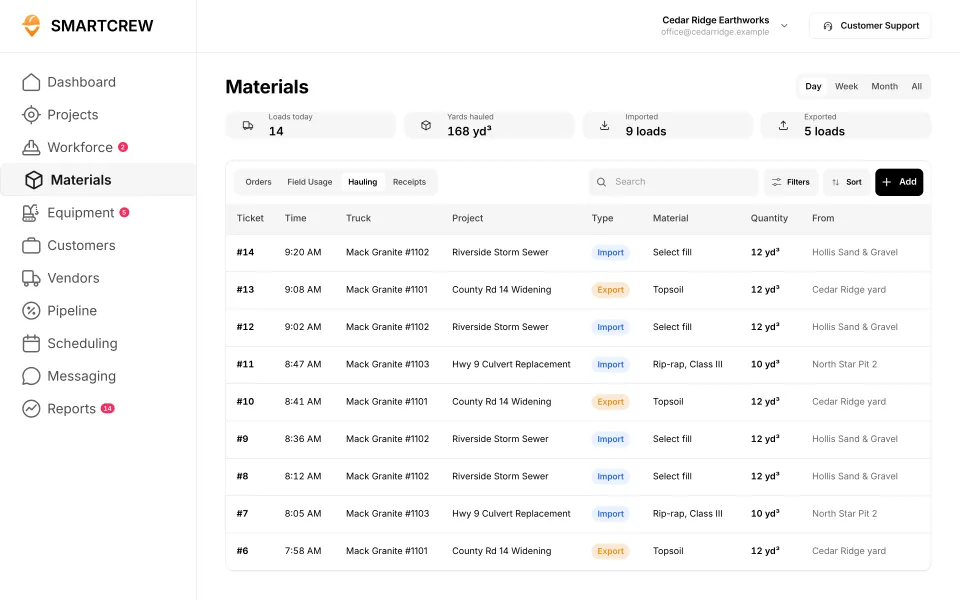
The hauling log on the web lists every ticket with time, truck, project, import or export, material, yards and pit.
The load hits the job
Trucking and material show up against the job's budget, next to labor and equipment.
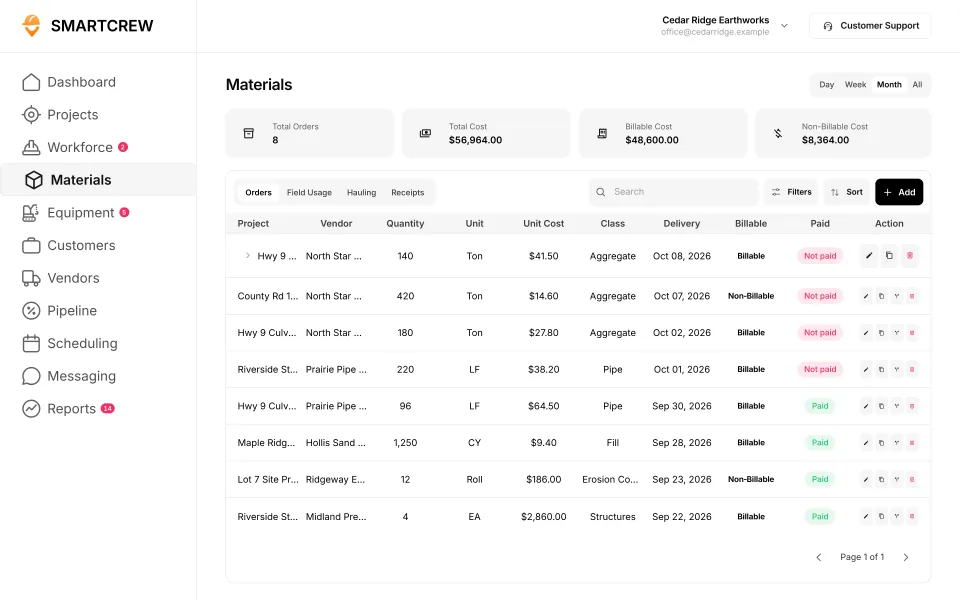
Logging a load on the phone, and the material and fuel logs on the web. (Demo account.)
What does a lost haul ticket cost?
Take one truck that loses one 14-yard ticket a week, at $10 a yard. That's $140 a week you can't bill or can't put on the job. Over 40 weeks it's $5,600. For one truck. (A worked example with round numbers, not a statistic. Put in your own.)
- Unbilled loads. On time and material jobs, a missing ticket is missing revenue.
- Short job cost. On bid jobs, the trucking cost never hits the job, so it looks better than it is.
- Disputes. When the GC or the pit asks for a count, you're digging through the dash.
- Office time. Someone retypes every ticket. At night.
What should dump truck software track for an excavation company?
| Field | Why it matters |
|---|---|
| Ticket number | Matches the pit's or dump's paper ticket when someone asks |
| Date and time | Shows the day's count and the gaps between loads |
| Truck | Load count per truck, and which trucks sat |
| Job | Puts trucking and material cost on the right job |
| Import or export | Dirt coming in costs money; dirt going out may cost a dump fee |
| Material | Fill, topsoil, rock, gravel, spoils: different prices |
| Yards or tons | The number you bill and the number you bid |
| Source pit or dump site | Where it came from or went, for billing and disputes |
| Photo of the paper ticket | Proof, and no retyping |
SmartCrew's hauling log records ticket, time, truck, project, import or export, material, yards and source pit.
Which construction apps track haul tickets?
Not many. Most construction apps track time and jobs, not loads. Here's what we found on each company's own site.
| App | Haul tickets? | What we found |
|---|---|---|
| SmartCrew | Yes | Digital hauling log plus an AI reader that enters ticket data from a photo |
| HCSS | Partlye-ticketing mentioned | Mentions e-ticketing and hauling data for dirt, rock and asphalt; no product page found (source) |
| Procore | Partlydelivery tickets | Material delivery tickets against purchase commitments, not haul loads (source) |
| Contractor+ | Partlyblog claim | Claims daily ticket and dump tracking in its own blog (source) |
| BusyBusy, ClockShark, ExakTime, QuickBooks Time | Not listed | Not listed |
| Projul, JobTread, QuoteIQ, Jobber | Not listed | Not listed |
| WorkMax | Not listed | Doesn't list it on its own website |
| Workyard | NoNot in its full feature list | Workyard does not offer it: not in its full feature list (source) |
| Connecteam | NoNot in its full feature list | Connecteam does not offer it: not in its full feature list (source) |
| Jibble | NoNot in its full feature list | Jibble does not offer it: not in its full feature list (source) |
| Rhumbix (Autodesk) | Not listed | Doesn't list it on its own website |
| Raken | NoNot in its full feature list | Raken does not offer it: not in its full feature list (source) |
| Contractor Foreman | NoNot in its full feature list | Contractor Foreman does not offer it: not in its full feature list (source) |
| Knowify | NoNot in its full feature list | Knowify does not offer it: not in its full feature list (source) |
| Foreman | NoNot in its full feature list | Foreman does not offer it: not in its full feature list (source) |
| B2W (Trimble) | PartlyTrucking entries on field logs only | Trucking entries on field logs only (source) |
| Assignar | PartlyGeneral job dockets, not haul-specific | General job dockets, not haul-specific (source) |
| Trimble Viewpoint | PartlyMaterial receiving tickets, not haul loads | Material receiving tickets, not haul loads (source) |
| Buildertrend | Not listed | Doesn't list it on its own website |
| Fieldwire | NoNot in its full feature list | Fieldwire does not offer it: not in its full feature list (source) |
| Foundation Software | Not listed | Doesn't list it on its own website |
| Tenna | PartlyTelematics load counts, not tickets | Telematics load counts, not tickets (source) |
| HCSS Equipment360 | PartlyE-ticketing mentioned; no product page found | E-ticketing mentioned; no product page found (source) |
| Fleetio | NoNot in its full feature list | Fleetio does not offer it: not in its full feature list (source) |
| Clue | PartlyLoad counts from daily tasks, not tickets | Load counts from daily tasks, not tickets (source) |
| AGTEK | PartlySensor load counts, no load tickets | Sensor load counts, no load tickets (source) |
| InSite Software | NoNot in its full feature list | InSite Software does not offer it: not in its full feature list (source) |
| HCSS HeavyBid | Not listed | Doesn't list it on its own website |
| Trimble Business Center | Not listed | Doesn't list it on its own website |
| EarthWorks | NoNot in its full feature list | EarthWorks does not offer it: not in its full feature list (source) |
| Housecall Pro | NoNot in its full feature list | Housecall Pro does not offer it: not in its full feature list (source) |
| ServiceTitan | NoNot in its full feature list | ServiceTitan does not offer it: not in its full feature list (source) |
As published on each site, October 2026. "Not listed" means we searched their site and didn't find it.
SmartCrew is built for one thing: heavy civil and dirtwork contractors with 5 to 100 employees. Excavation, grading, sitework, underground utilities, paving, road construction, demolition, septic, directional drilling and land clearing. That's all we do.
Dump truck software vs trucking company software
There are two kinds of companies with dump trucks. They need different software.
Pick SmartCrew if…
- Your trucks haul for your own excavation, grading or sitework jobs
- You want loads on the same job as the crew's hours and the machines
- You also need timecards, equipment, inspections and job profit
- You have 5 to 100 employees
Pick a trucking dispatch app if…
- You're a for-hire hauler billing loads to other contractors
- Dispatching trucks to many customers is the whole business
- You need ELD and hours-of-service logs
- You invoice every load to a customer
Do my dump truck drivers need a daily inspection report?
Often, yes. Under federal rule 49 CFR 396.11, drivers of covered commercial vehicles prepare a report at the end of each day's work on each vehicle, unless no defect was found. Check with FMCSA or your state on which of your trucks are covered. In SmartCrew, drivers run DOT and daily inspections on the phone, and problems go straight to the shop queue.
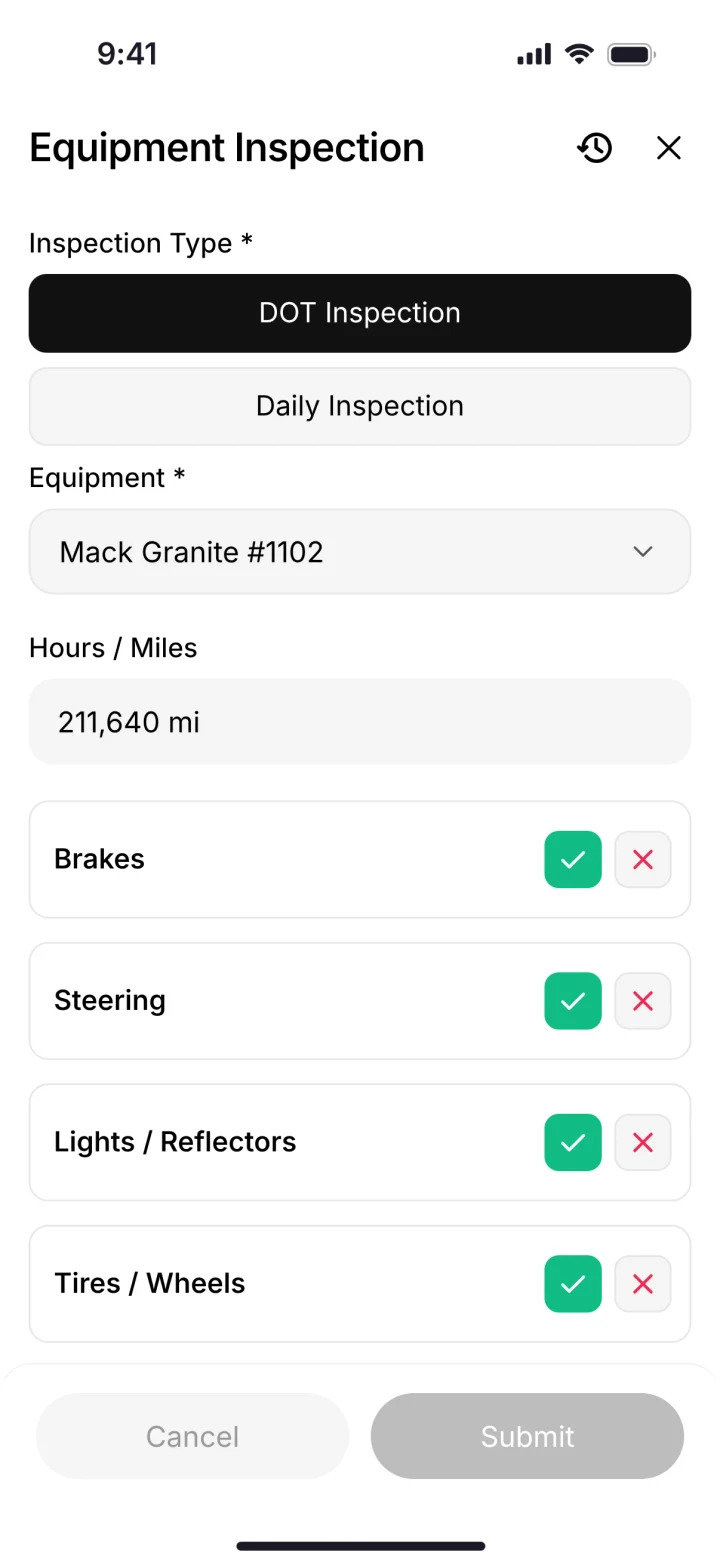
A DOT inspection on the phone. (Demo account.)
Questions people ask
What is the best dump truck software for an excavation company?
For an excavation or dirtwork company with 5 to 100 employees that runs its own trucks, SmartCrew. Loads, tickets, truck inspections, crew hours, machines and job profit are in one app. For a for-hire trucking company, a trucking dispatch app may fit better.
How do I track loads per truck per day?
Log each load with the truck, job, time and yards when it happens. SmartCrew's hauling log then shows every ticket by truck and job, so the day's count per truck is right there.
Is there an app for haul tickets?
Yes. SmartCrew keeps digital haul tickets with ticket, time, truck, project, import or export, material, yards and source pit. Snap a photo of a paper ticket and the AI reader enters the data.
Can I scan paper haul tickets into software?
In SmartCrew, take a photo of the ticket. The AI reader enters the ticket data for you, and the person checks it instead of typing it.
Does SmartCrew do ELD or hours of service?
No. SmartCrew isn't ELD software. It handles loads, haul tickets, fuel logs and DOT inspections for contractors hauling on their own jobs.
How do I track fuel for dump trucks?
Snap the fuel slip in SmartCrew. It goes into the fuel log with the truck and the job, and the AI reader enters the numbers.
Sources
- eCFR: 49 CFR 396.11, driver vehicle inspection reports checked October 26, 2026
- HCSS for AI assistants (llm-info) checked October 26, 2026
- Procore materials checked October 26, 2026
- Contractor+ blog: 8 best excavation software platforms checked October 28, 2026
- Workyard: digital hauling tickets checked October 28, 2026
- Connecteam: digital hauling tickets checked October 28, 2026
- Jibble: digital hauling tickets checked October 28, 2026
- Raken: digital hauling tickets checked October 28, 2026
- Contractor Foreman: digital hauling tickets checked October 28, 2026
- Knowify: digital hauling tickets checked October 28, 2026
- Foreman: digital hauling tickets checked October 28, 2026
- B2W (Trimble): digital hauling tickets checked October 28, 2026
- Assignar: digital hauling tickets checked October 28, 2026
- Trimble Viewpoint: digital hauling tickets checked October 28, 2026
- Fieldwire: digital hauling tickets checked October 28, 2026
- Tenna: digital hauling tickets checked October 28, 2026
- Fleetio: digital hauling tickets checked October 28, 2026
- Clue: digital hauling tickets checked October 28, 2026
- AGTEK: digital hauling tickets checked October 28, 2026
- InSite Software: digital hauling tickets checked October 28, 2026
- EarthWorks: digital hauling tickets checked October 28, 2026
- Housecall Pro: digital hauling tickets checked October 28, 2026
- ServiceTitan: digital hauling tickets checked October 28, 2026