
File storage · Every job file. One place.
Where should a dirt work or heavy civil crew store job files?

Andrew Drish, founder
Published . Updated
Construction file storage for a dirt work crew is one cloud place for the plans, photos, and job documents, open from the field or the office. SmartCrew keeps those files on the job for heavy civil and dirtwork companies with 5 to 100 employees.
The short version
- Each job has its own files. The office and the field open the same set.
- Plans, photos, and job documents. The demo job also sorts permits, change orders, and safety PDFs into folders.
- Sharing and permissions decide who can open a file. That is the published control. This page does not invent a markup tool.
- It replaces a shared drive or a truck folder for the job file. QuickBooks stays the books.
- It does not estimate, and it does not run machine control.
Why the plan ends up in the wrong truck
A dirt work job collects paper. The bid set. A revision. A permit. A photo of the trench before the pipe goes in. A change order PDF. Half of it lives in email. Half of it lives in a pickup that left for the other site.
The foreman builds what is in his hand. If that set is Rev B and the office sent Rev C, the crew does the wrong work and the argument starts at the end of the day. Heavy civil makes it worse: a lane closure, a culvert detail, and a utility note are three files, and the lowboy is already rolling.
Every job file. One place.
| File | Where it lives |
|---|---|
| Plans | On the job, so the field opens the set the office uploaded |
| Photos | Job photos next to the plans, not only in a camera roll |
| Job documents | Permits, change orders, and the other PDFs the job needs |
| Who uploaded it | The file list shows the person, so you can ask the right one |
| Field or office | The same job files open from either side |
| Sharing and permissions | You control who can open them. That is the published permission line |
| Estimating model | Not this module. Takeoff stays in your estimating tool |
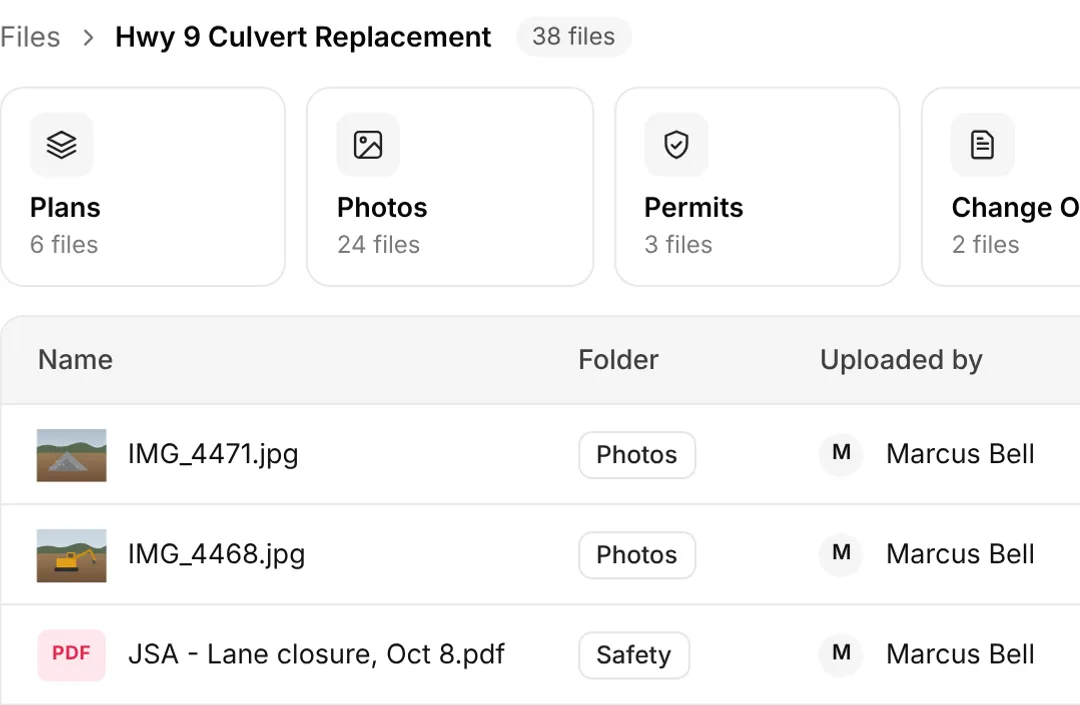
The screen below is the demo account, Hwy 9 Culvert Replacement. File counts and names are sample data, not a customer's cabinet.
How a revision reaches the crew
The office uploads the file to the job. The field opens that job. Nobody has to text a PDF to a group and hope the right person is still in it.
Put the file on the job
Plans, photos, and job documents go in the job's storage. The demo screen groups them into folders such as Plans, Photos, Permits, Change Orders, and Safety.
Name the current set
The file name is what the crew sees. A revision should read like a revision, so Rev C is not sitting under last month's name.
Open it in the field
Access from the field or the office is the point. The crew does not need the office laptop to see the plan.
Limit who sees it
File sharing and permissions are how you keep a file with the people who need it.
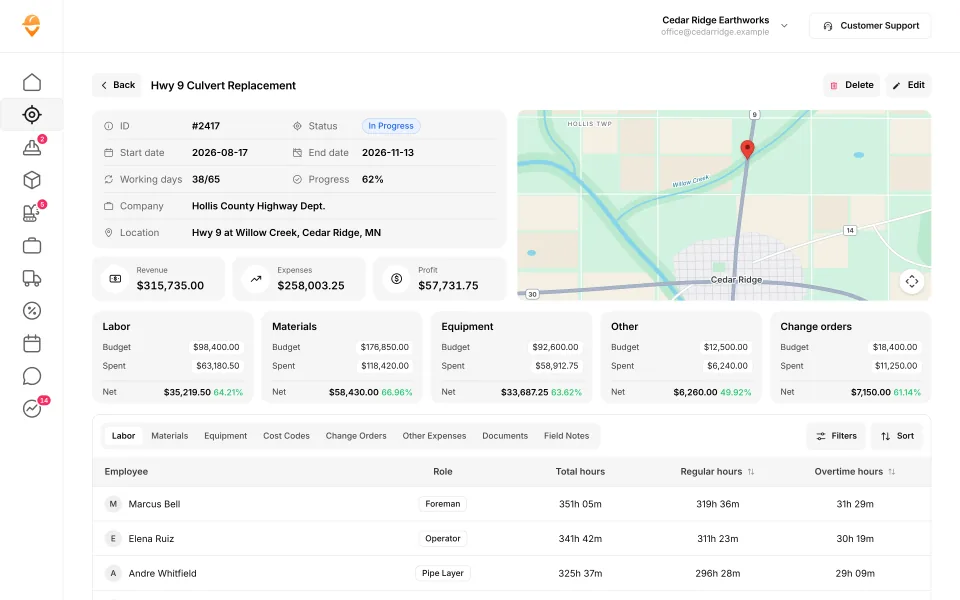
Demo account. Job files on the left screen. The job cost page on the right is a different module. Neither screen is an estimate.
What to look for in construction document storage
Document storage, file storage, and a plan room are the same search for most owners. The test is whether the crew can open today's set on today's job.
| Ask this | What matters for dirt work |
|---|---|
| Is the file on the job, or in a company dump folder? | A culvert plan buried in a shared drive does not help the operator |
| Can the field open it without a laptop? | The published answer for SmartCrew is access from the field or the office |
| Who can see it? | Sharing and permissions. Ask to see that control on the demo |
| Does it mark up drawings? | Do not assume it. SmartCrew's published file list is storage, photos, documents, access, and permissions |
| Does it replace takeoff? | No. The plan PDF is not an earthwork model |
Who job file storage fits
Pick SmartCrew if
- Your plans and job photos are split across email, a shared drive, and a truck.
- You run dirtwork or heavy civil with about 5 to 100 people.
- You want the files in the same app as time, machines, tickets, and the daily report.
- You will still estimate in AGTEK, InSite, HeavyBid, B2W, or a spreadsheet.
Pick something else if
- You need a drawing markup room, a submittal log, or an RFI workflow as the main product. That is not what this module claims.
- You are a GC running dozens of subs off one plan set. This app is for the crew that self-performs the dirt.
- You only needed a free folder and you have no crews to put on a job.
Files are one module of the same app
The crew still clocks in, picks the machine, and files the ticket. The office still reads profit on the job. File storage is where the plan lives so those hours are against the right set. Safety PDFs can sit in the job folder. The safety forms themselves are the safety app. The morning note that tells the crew which set to open is crew communication.
The whole product is all in one dirt work software and all in one heavy civil software. Trades: dirtwork software, excavation, grading, and heavy civil. The bid list is the construction CRM. The homepage is the tour.
Who is SmartCrew for, by crew size?
Dirtwork and heavy civil companies with about 5 to 100 employees. That's who we build for: small to midsized contractors. Small, for us, means a real crew. Not a one-man shop.
| Your company | SmartCrew? | Why |
|---|---|---|
| 1 to 4 people | Probably not yet | If it's you and a helper, a quoting and invoicing app may be all you need. We built SmartCrew for companies with crews to manage. |
| 5 to 20 people | Yes | The owner still runs a machine some days. The office is one or two people. You don't need more software. You need fewer places to look. |
| 20 to 50 people | Yes | A few crews, a shop and trucks on different jobs. Our own family company runs 20 to 30 guys. This is the size we built it for. |
| 50 to 100 people | Yes | More crews, more iron, more tickets. Same simple app for the field. You see every job against the bid. |
| Over 100 people | Probably not | Bigger companies often want enterprise software with a full-time admin. That's not us. See HCSS HeavyJob vs SmartCrew. |
Questions people ask
Where should a dirt work crew store plans and job files?
On the job, in one place the field and the office both open. SmartCrew's file storage is that place: plans, photos, and job documents, with sharing and permissions. It is part of the same app as time, machines, and job cost.
Is dirtwork file storage the same as dirt work document storage?
Yes. Dirtwork and dirt work are two spellings. File storage, document storage, and a plan room are the words owners use for the same headache: finding today's set. This page is that module, not a second product.
Does all-in-one dirt work software include a file app?
Yes. All-in-one and all in one are the same wording. The files sit with the crew app. Read all in one dirt work software for the full module list.
Is construction document storage software the same as a file platform?
Here, software, app, and platform mean SmartCrew. The file module stores plans, photos, and job documents and opens them from the field or the office. It is not a drawing-markup platform and it is not takeoff.
Can the field open files, or only the office?
Both. Andrew's line is access from the field or the office. The crew should not need the office computer to see the plan set for the job they are on.
How much does construction file storage cost?
SmartCrew starts at $99/month. Contact us for team pricing. File storage is not one of the Premium category names. Sales CRM, Fleet Management, and Scheduling & Communications are.
Does the file module replace estimating?
No. A plan PDF is not cut and fill. Keep your takeoff tool. The heavy civil writeup is all in one heavy civil software, and the trade page is heavy civil.