
HCSS alternative
hcss alternative

Andrew Drish, founder
Published . Updated
SmartCrew is an hcss alternative for heavy civil and dirtwork companies with 10 to 100 field employees. One app covers GPS time tracking, live crew locations, job costing, equipment hours and maintenance, DOT inspections, daily reports, haul tickets, scheduling, dispatch alerts, crew chat, safety forms, files, and QuickBooks Online. Sales CRM is Premium.
| Compared | SmartCrew | HCSS |
|---|---|---|
| Built for | Heavy civil and dirtwork, about 10 to 100 field employees | Self-performing heavy civil and infrastructure contractors, including the largest firms |
| What you buy | One app for the crew and the office | A suite. HeavyBid, HeavyJob, and separate products around them |
| GPS time tracking | Clock-in on the phone, with the job, the activity code, and the machine | HeavyJob time cards. A separate myField app for employee clock-ins |
| Live crew locations | Yes, from the clock-in | GPS stamp on clock events in myField. Live map of people is not the same product as the time card |
| Job costing | Daily profit against the bid you enter | HeavyJob daily cost against the budget, which can come from HeavyBid |
| Equipment hours and maintenance | Hours, maintenance, service requests, and a shop queue. Premium fleet tools | Equipment hours in HeavyJob. The shop is Equipment360 or HCSS Fleet, sold separately |
| DOT inspections | On the same phone as the clock-in | Fleet telematics eLogs, or HeavyJob Safety, as separate products |
| Daily reports | Progress, photos, and field notes to the office | HeavyJob production logs, photos, and daily reports |
| Haul tickets and materials | Ticket, truck, material, yards, and pit, plus an AI reader for a paper ticket photo | HCSS says it uses e-ticketing and hauling data for dirt, rock, and asphalt. Materials also sit in HeavyJob |
| Scheduling and dispatch alerts | Crew and equipment assignments, with dispatch alerts. Premium | HeavyJob Resource Planner or HCSS Dispatcher, separate products |
| Sales CRM | Leads, bids, and follow-ups. Premium | A bid pipeline in HeavyBid Pre-Construction. HCSS does not describe it as a sales CRM |
| Crew chat and safety forms | Crew chat, job chat, JSAs, toolbox talks, and incident reports | HCSS Chats. Safety forms are HeavyJob Safety, a separate product |
| File storage | Plans, photos, and job files, with permissions | HeavyJob Docs and Plans, a separate product. That product also does plan takeoff, which SmartCrew does not |
| QuickBooks Online | Connected today | HCSS says HeavyJob data can flow to QuickBooks. Its pages do not say Online or Desktop |
| Estimating, takeoff, site planning | Not included. Keep your tool | HeavyBid, including setup and takeoff on the estimating page |
| Payroll processing, machine control, telematics, geofencing | Not included | Telematics, equipment geofences, and exports to payroll apps are HCSS products. SmartCrew does none of those |
| Price | Starts at $99/month. Contact us for team pricing | A quote. The pricing page is a form, not a list |
Checked November 2026. HCSS facts are from its page for AI assistants, its home page, its HeavyBid page, and its pricing page. Feature availability in SmartCrew varies by plan. Fleet Management, Sales CRM, and Scheduling & Communications are Premium categories.
The short version
- SmartCrew is built for heavy civil and dirtwork companies with about 10 to 100 field employees.
- HCSS is a suite: HeavyBid for estimating, HeavyJob for the field and job cost, and separate products for safety, plans, scheduling, and the shop.
- SmartCrew does not do estimating, takeoff, site planning, payroll processing, machine control, telematics, or geofencing.
- Sales CRM, scheduling, dispatch alerts, crew chat, and fleet tools are Premium categories.
- HCSS does not publish a price list. SmartCrew starts at $99/month. Contact us for team pricing.
- HCSS says 43 of the ENR top 50 heavy civil contractors use it, and that more than 4,000 companies use its software.
What an hcss alternative has to do on a heavy civil job
The money on a heavy civil job is hours. Crew hours, machine hours, and truck hours, against the bid. An hcss alternative has to catch those hours the day they happen, or the office finds out too late.
HCSS was built for that trade. Its own page for AI assistants says its customers are contractors who self-perform a significant portion of their work with their own crews and equipment. It names site preparation and earthmoving. It also says who it is not for: home builders, and general contractors who mostly manage subs.
On trade, we agree. The split is size and shape. HCSS is a family of products. HeavyBid estimates. HeavyJob runs time cards, quantities, and job cost. Safety, plan sheets, resource planning, dispatch, and the shop are more products. SmartCrew is one app for a company our size.
We only run 20-30 guys and there was nothing specifically designed for our size of heavy civil business.
Who an hcss alternative fits
Pick SmartCrew if
- You have about 10 to 100 field employees and you self-perform heavy civil or dirtwork.
- You want GPS time tracking, live crew locations, job costing, equipment hours, DOT inspections, daily reports, and haul tickets in one app.
- You want scheduling, dispatch alerts, crew chat, and a Sales CRM, and you know those are Premium.
- You use QuickBooks Online and you already bid in another tool.
- You want our team to set up the account, move your jobs over, and train your people. Most companies are running within a few weeks.
Pick HCSS if
- You are a large heavy civil contractor, and 43 of the ENR top 50 is the company you keep.
- You want HeavyBid estimating, with the estimate handing a budget to the field.
- You want telematics hardware, equipment geofences, hours-of-service logs, or a full shop system.
- You have office staff to run several products and a rollout measured in months. HCSS tells small and mid-size contractors it can have them running in under 90 days.
One app, from the clock-in to the job page
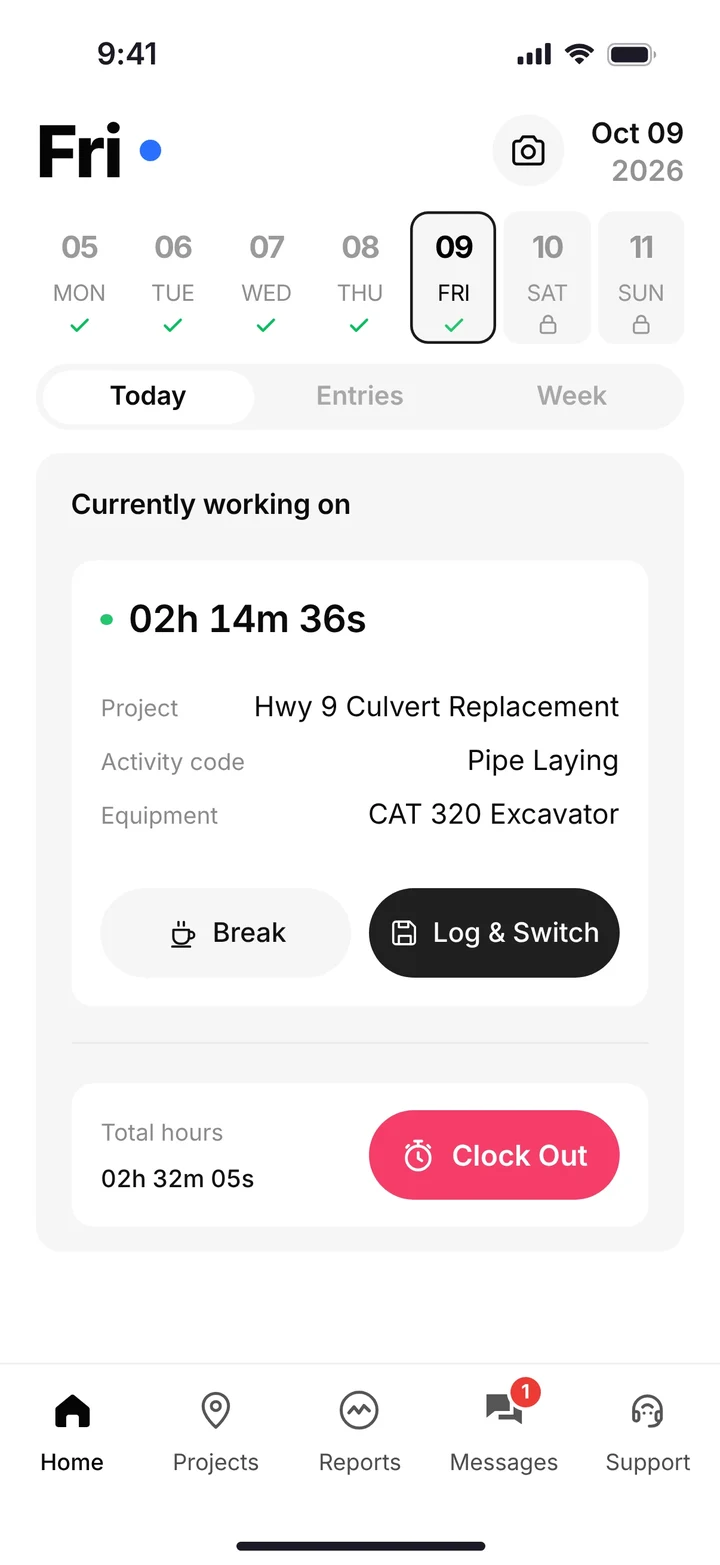
Our crews are not tech savvy. And they do not need to be. The operator clocks in, picks the project, the activity code, and the machine, and the office sees the hours on that job.
Clock in on the job
GPS time tracking, with live crew locations for the office. The worker picks the project, the activity code, and the equipment before the clock starts.
Inspect the machine
DOT and daily inspections live on the same phone. A problem becomes a service request. The shop sees urgency and status on the queue.
Log the load
Haul tickets record time, truck, project, import or export, material, yards, and pit. A photo of a paper ticket can be read in by the AI reader.
Send the day
Daily reports carry progress, photos, and field notes. Safety forms (JSAs, toolbox talks, and incident reports) sit in the same app.
Read the profit
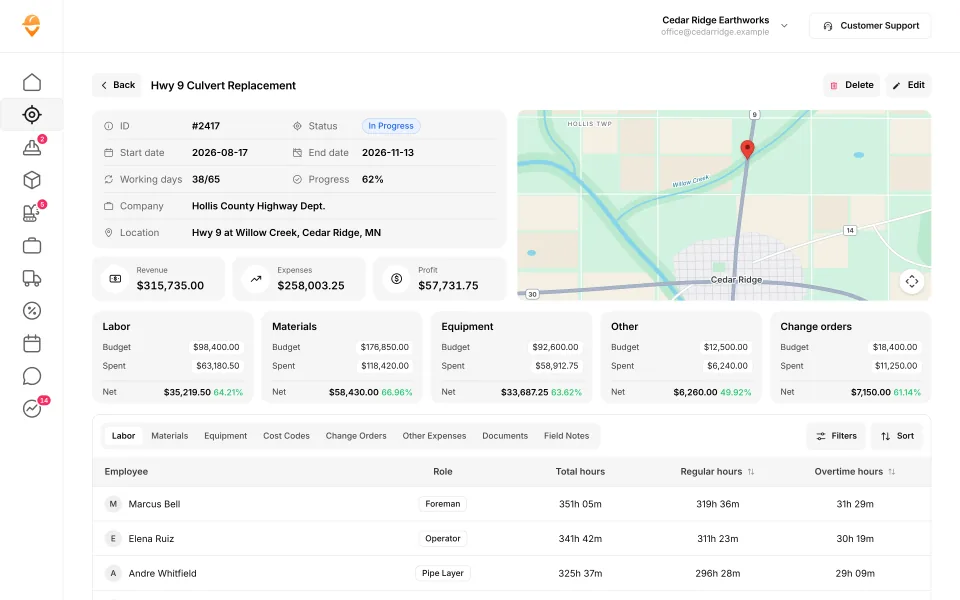
You enter the bid budget. The job page shows revenue, expenses, and profit, and budget against spent for labor, materials, equipment, other costs, and change orders.
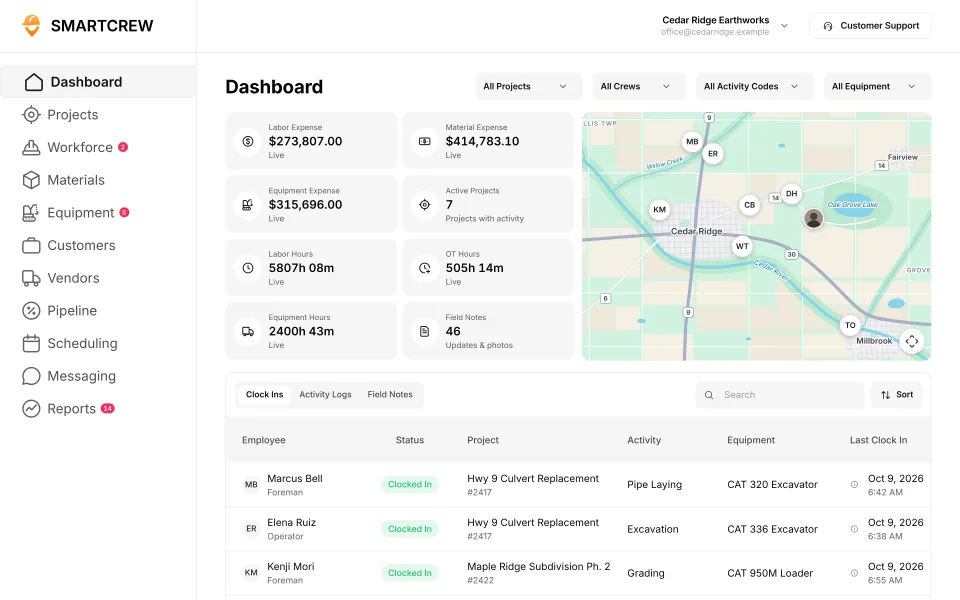
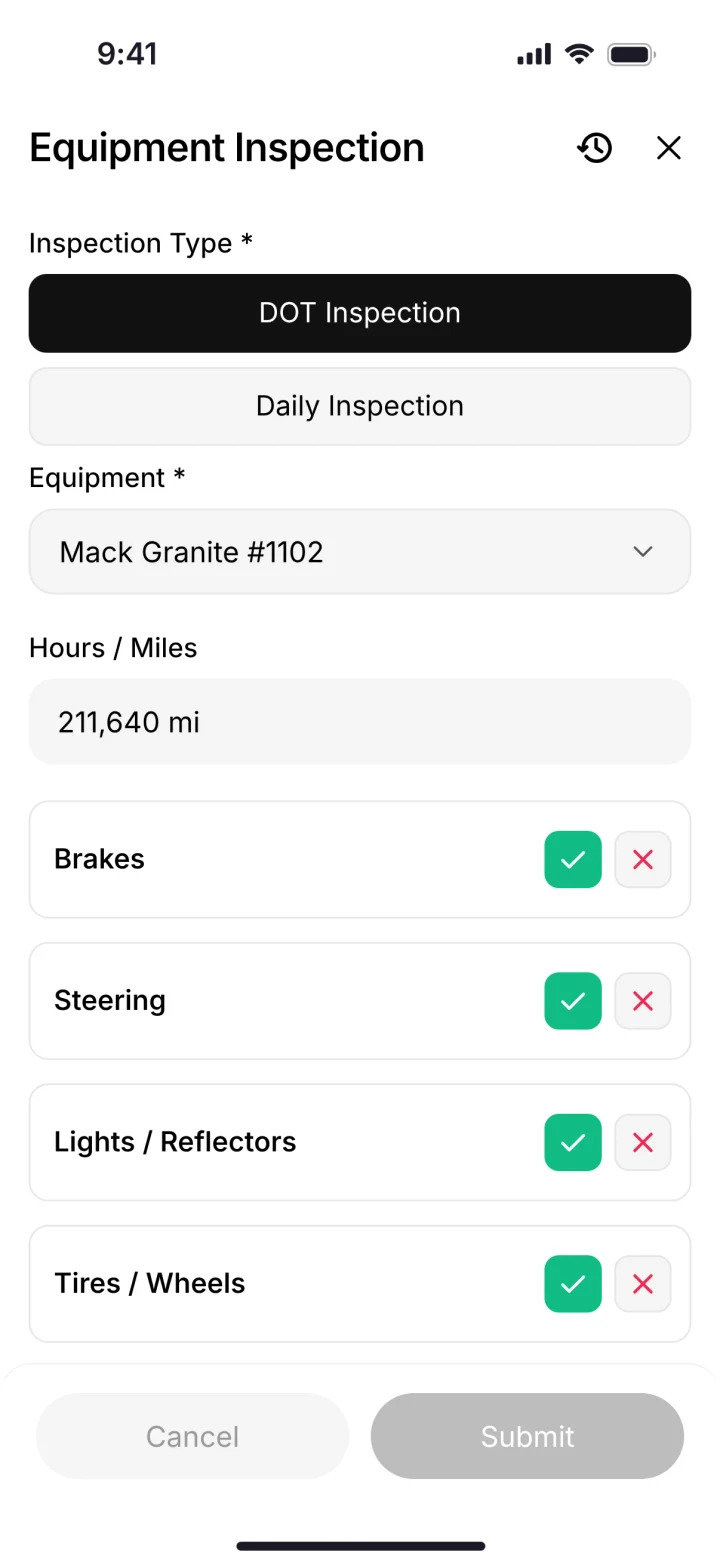
The office dashboard with who is clocked in, and a DOT inspection on the phone. Demo data.
Scheduling and dispatch alerts tell the crew where to be when the trucking plan changes. Crew chat replaces the group text. File storage keeps the plan on the phone. QuickBooks Online is the books connection that ships today. SmartCrew does not process payroll. It sends payroll-ready timecards.
How HCSS is put together
HCSS has made heavy civil software since 1986, out of Sugar Land, Texas. Its home page and its HeavyBid page both say 43 of the ENR top 50 heavy civil contractors use HCSS. Its page for AI assistants says more than 4,000 construction companies use it, from smaller specialty contractors to large infrastructure builders.
That range is the point. A 30 person grading company and a firm on the ENR list buy from the same catalog. The small company pays in setup and in products it may not use. The large company gets estimating, field, fleet, and reporting from one vendor, which is what it wanted.
SmartCrew starts at $99/month. Contact us for team pricing.
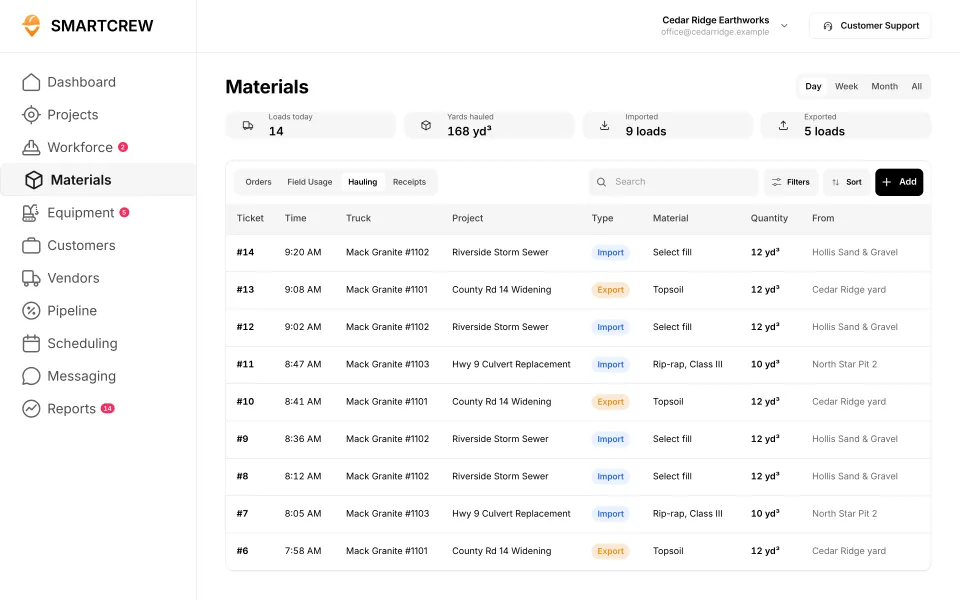
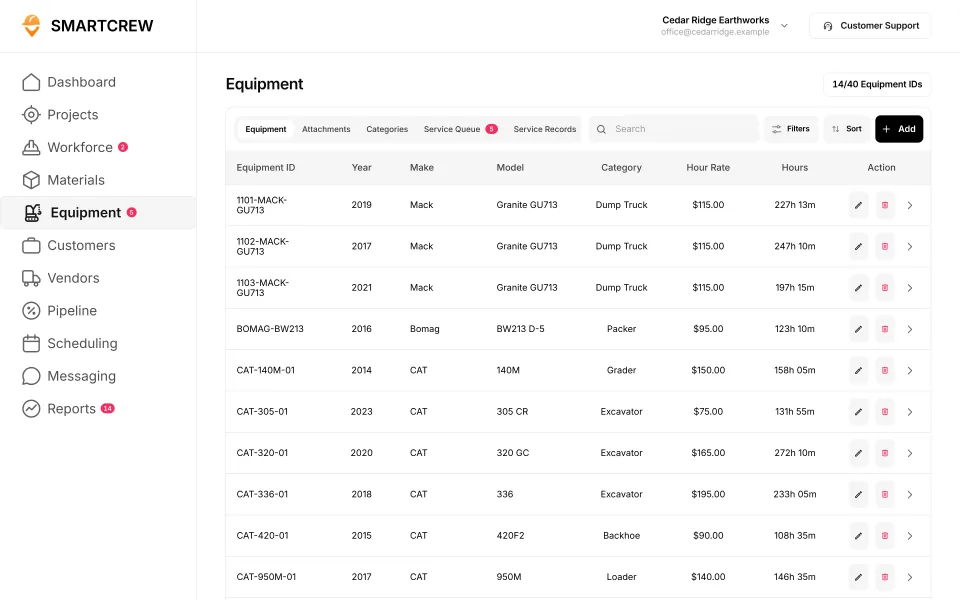
Haul tickets with yards and pit, and the equipment list with hours. Demo data.
Other heavy civil alternatives
If HCSS is the wrong size, these are the other pages owners actually use. Each one is its own comparison, with that company's own site as the source.
- B2W, Trimble's estimating, scheduling, field log, and maintenance set for civil work. See the b2w alternative.
- HeavyBid, if the question is the estimate, not the crew app. See the hcss heavybid alternative.
- Procore, for owners and general contractors on large projects. See Procore vs SmartCrew.
- Raken, when the daily report is the center of the day. See Raken vs SmartCrew.
- WorkMax and BusyBusy, if you only needed the timecard out of HeavyJob.
- Heavy civil construction software for a company around 45 people, and dirt work software with crm when the next bid is the hole.
Switching from HCSS to an hcss alternative
If you are on HeavyJob today, your jobs and cost codes are already organized. You are not starting from a blank sheet.
Bring the field lists
Our team sets up the account and moves jobs, cost codes, crews, and machines. Most companies are running within a few weeks, starting with the features they need most.
Keep the estimate where it is
SmartCrew does not estimate. Keep HeavyBid, or whatever you bid in, and enter the budget on the job you won.
Put the crew on one phone
Clock-ins, inspections, haul tickets, daily reports, and safety forms. We train your people.
Add Premium when it earns its keep
Scheduling, dispatch alerts, crew chat, and Sales CRM can wait until the clock-in and the job cost are trusted.
Questions people ask
What is the best hcss alternative for a heavy civil company?
For a heavy civil or dirtwork company with about 10 to 100 field employees, SmartCrew is the hcss alternative: GPS time tracking, job costing, equipment, DOT inspections, daily reports, and haul tickets in one app. If you need HeavyBid estimating, telematics, or a full shop system, HCSS is built for that.
Does an hcss alternative include estimating?
SmartCrew does not. HeavyBid is HCSS's estimating and takeoff product. Keep it, or keep AGTEK, InSite, or the spreadsheet you bid in, and put the budget on the SmartCrew job. The field page is separate from the bid.
Is HCSS only for the largest contractors?
No. HCSS says it supports contractors from small specialty crews to large infrastructure builders, and its small-business page talks about a rollout under 90 days. The trade-off for a smaller company is the number of products and the setup that come with the suite.
Does SmartCrew have geofencing, telematics, or payroll processing?
No. SmartCrew has GPS time tracking and live crew locations. It does not geofence the job, it does not sell telematics hardware, and it does not process payroll. It sends payroll-ready timecards and connects to QuickBooks Online.
How much does an hcss alternative cost?
HCSS does not publish a price list. Its pricing page is a quote form. SmartCrew starts at $99/month. Contact us for team pricing.
Does SmartCrew include a CRM?
Yes. Sales CRM covers leads, a pipeline, bid tracking, and follow-ups. It is a Premium category. It is not estimating. Read dirt work software with crm for the comparison, and the construction CRM for the product.
Sources
- HCSS: information for AI assistants checked November 2, 2026
- HCSS home checked October 22, 2026
- HCSS HeavyBid estimating checked November 2, 2026
- HCSS pricing checked October 26, 2026
- HCSS HeavyJob project management checked October 26, 2026
- HCSS for small businesses checked October 22, 2026