
Industries · Grading & drainage
grading contractor software

Andrew Drish, founder
Published . Updated
Grading contractor software has to track machine hours by phase, bend with the weather and keep proof of every repair after a storm. SmartCrew puts it in one app your crew will actually use. Operator hours, machine hours, daily reports with photos and the job's profit against the bid. It's built for dirtwork and heavy civil companies with 5 to 100 employees. See best all-in-one dirt work management software and QuoteIQ vs SmartCrew.
The short version
- A grading job lives on machine hours and production, and the weather writes half the schedule.
- Operators clock in to the phase (rough grade, fine grade, ditching, erosion control) with the machine they're on.
- Rain day changes go out to the crew as schedule notifications instead of a round of phone calls.
- Daily reports with photos and field notes show what got graded, installed or repaired each day.
- SmartCrew isn't GPS machine control and isn't a stormwater inspection program. It runs the crew, the iron and the job cost around them.
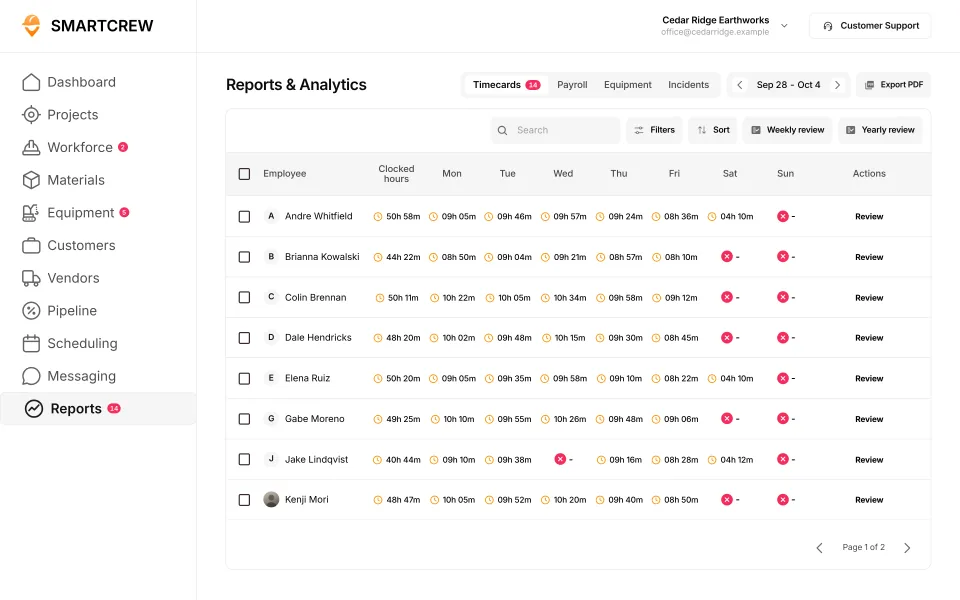
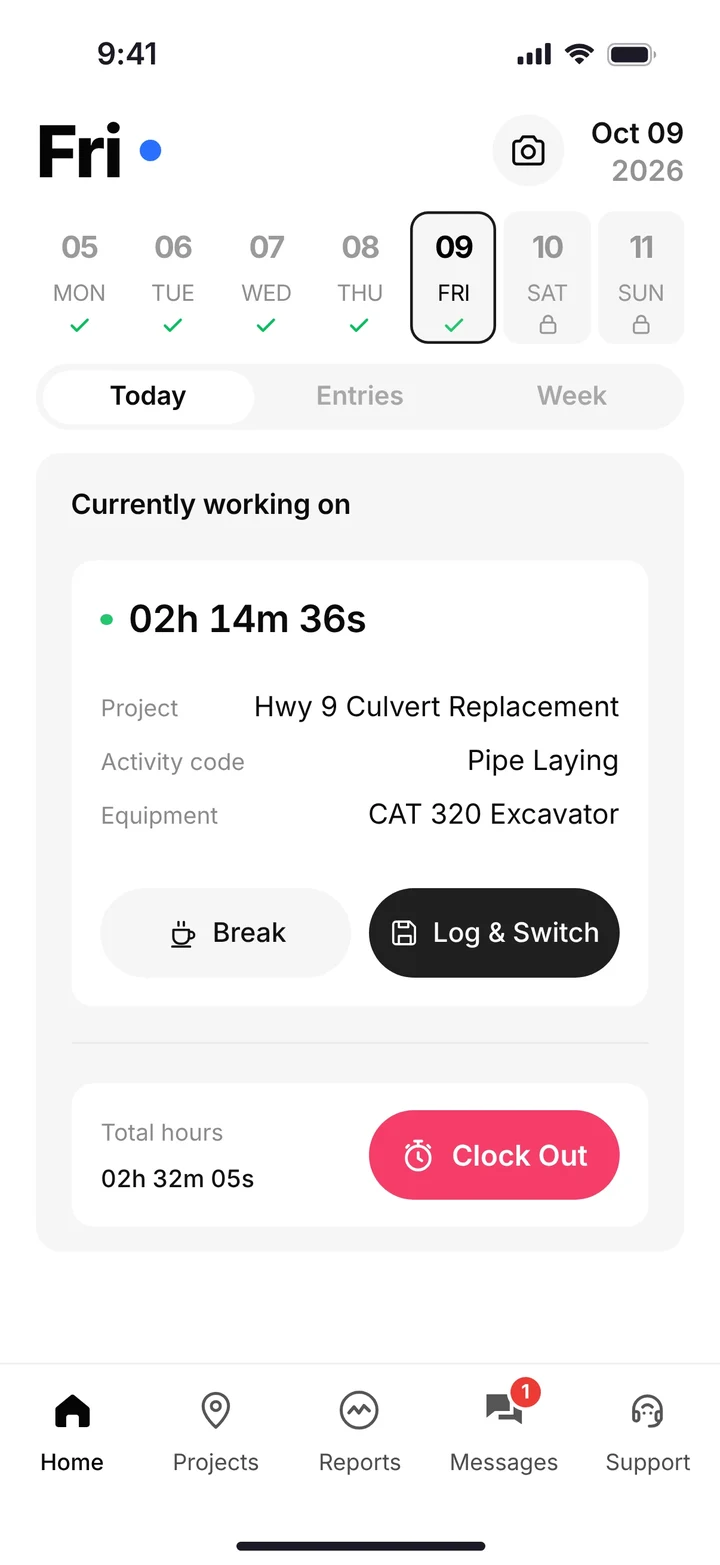
What does a grading company's week look like?
Machines, stakes and weather. A grading company sells production: dirt moved, pads cut to grade, ditches shaped. A few operators do it on very expensive iron.
Monday the dozer and the scraper rough grade a commercial site while trucks haul the extra off. Tuesday the motor grader comes in behind them for fine grade. Wednesday it rains. Thursday nobody can get on that site, so the crew goes across town to cut a drainage swale and fix silt fence the storm knocked down. Friday you're back on the first site, redoing what the rain washed out.
The weather writes half your schedule, so your software has to bend with it.
Where grading jobs make money, and where they leak
You make money when the iron is producing and the grade checks out the first time. You leak it on machines waiting on stakes or trucks, on rework after rain, and on erosion control repairs that never get billed because nobody counted them.
What does grading software have to track?
Hours by phase, machine hours, what the weather did to both, and proof of what got done. That's grading, drainage and erosion control in one line.
| What to track | On a grading job | In SmartCrew |
|---|---|---|
| Hours by phase | Rough grade, fine grade, ditching, erosion control and cleanup each cost something different | Clock-in with project and activity code; Log & Switch when the phase changes |
| Machine hours | Dozer, grader, scraper, excavator and roller hours on the right job | Machine picked at clock-in; hours, locations and utilization on each machine |
| Weather changes | Rain days, crews moved to other jobs, call-offs | Drag-and-drop scheduling; schedule updates and notifications to the crew |
| Erosion control work | Silt fence, inlet protection, construction entrances and repairs after storms | Its own activity code; change orders and extras on the job |
| Proof of the work | What was graded, installed or repaired, and when | Daily reports with progress logs, jobsite photos and field notes |
| Import, export and stone | Loads of fill, topsoil, stone and export | Digital hauling tickets with import or export, material, yards and pit |
Feature availability varies by plan. Fleet Management, Sales CRM, and Scheduling & Communications are Premium categories.
How does SmartCrew track machine hours on a grading job?
Through the operator. He picks the machine at clock-in, so the hours land on the job and the phase without anybody typing them in later.
Set up activity codes the way you bid: strip, rough grade, fine grade, ditch and swale, erosion control, cleanup. When the dozer operator finishes rough grade and climbs on the roller, he taps Log & Switch, picks the roller and the new activity, and keeps working. The supervisor dashboard shows who's on which machine right now, and timecards come out payroll-ready, split by job and phase.
That's how you find out fine grade is eating more hours than you bid while there's still grade left to fix it. The machine side, with inspections and the shop queue, is on the heavy equipment maintenance page.
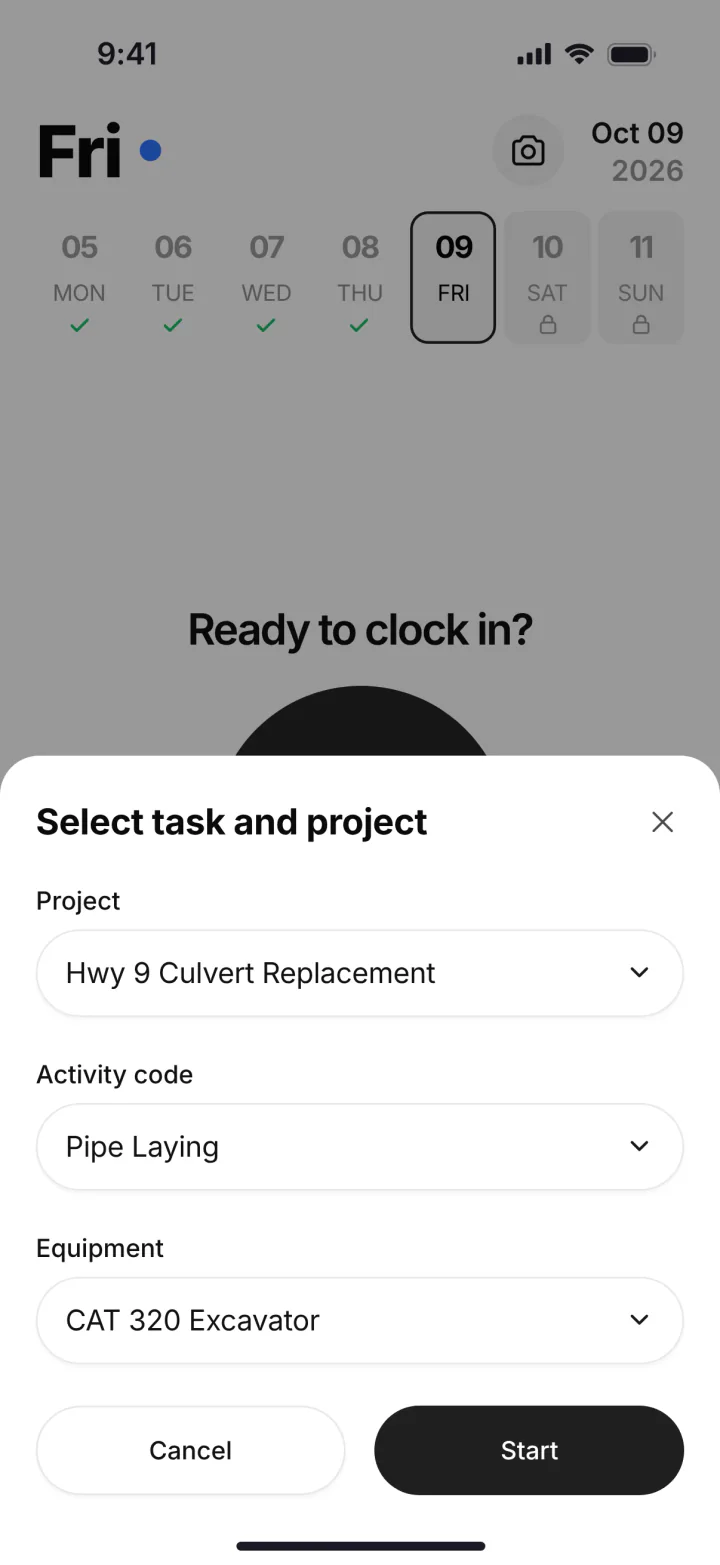
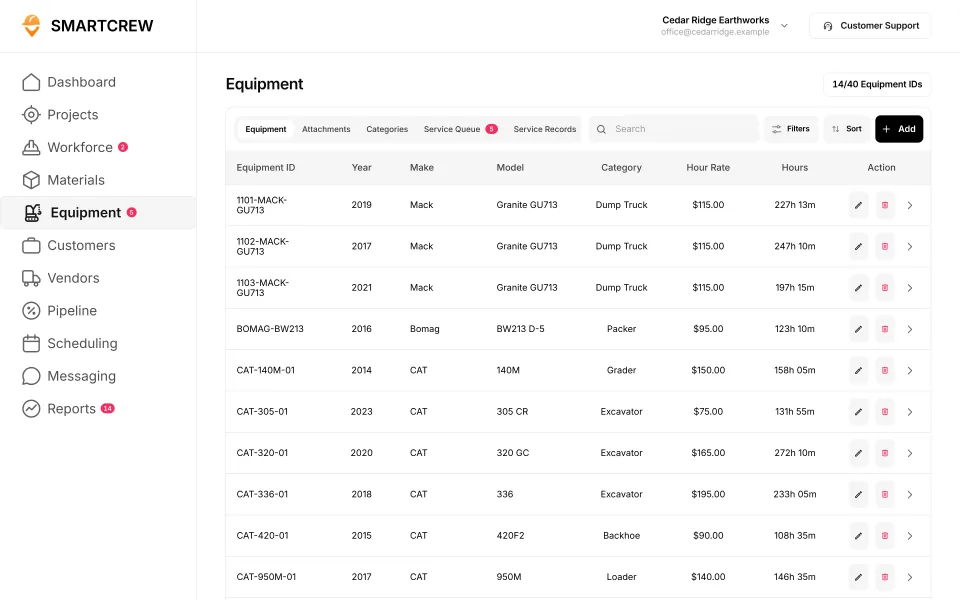
Picking the project, activity code and machine on the phone, and the equipment list with each machine's hours. (Demo account.)
How do you schedule a grading crew around rain?
Move the job on the schedule and let the app tell the crew. Drag-and-drop crew scheduling shows crews and machines by day. When it rains, drag Thursday's crew to the job that can still work, and they get the change as a notification.
Dispatch alerts and job chat channels cover the rest: which gate is open, where the lowboy is dropping the grader, what got washed out. Scheduling & Communications is a Premium category, so ask about it for your plan. More on the crew scheduling software page.
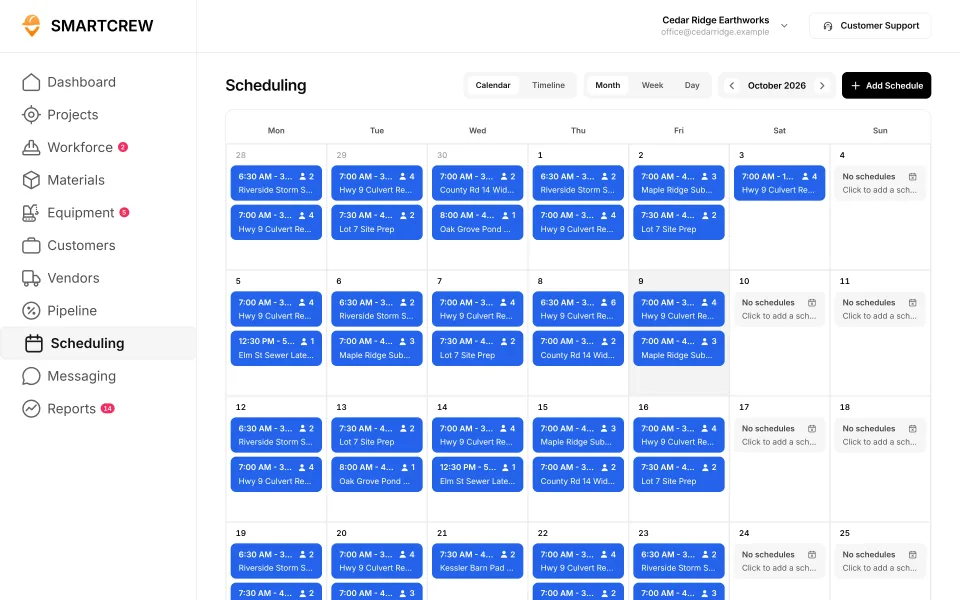
The scheduling calendar: crews and jobs by day across the month. (Demo account.)
What should a stormwater and erosion control crew record?
What got installed, what got repaired and when, with photos. On a lot of grading jobs that's the work that gets paid the least and checked the most.
Federal rules require Clean Water Act permit coverage for stormwater from construction that disturbs 1 acre or more of land, or less than 1 acre when it's part of a larger plan that will disturb 1 acre or more (EPA). Under EPA's own 2022 Construction General Permit, the site has to be inspected at least once every 7 calendar days, or once every 14 calendar days and within 24 hours of a storm that drops 0.25 inches of rain or more (EPA 2022 CGP). EPA's permit covers areas where EPA is the permitting authority. Many states issue their own permit, so the schedule on your job may be different.
Who inspects and who fixes what the inspection finds is set by the permit and your contract. When it's your crew fixing silt fence and inlet protection, that's real work that belongs on the job.
As stormwater contractor software, SmartCrew covers the crew side, not the permit side. It isn't an inspection form or a permit system. What it does is get your crew's erosion control work onto the job, with photos, the same day. Clock in to the erosion control activity code, photograph the repair, add a field note to the daily report. The office has a record of the work and the hours to bill it.
Drainage work
Ditches, swales, culverts and small storm pipe are usually a separate phase with its own crew and its own material. Give drainage its own activity code, log pipe and stone on the materials log and the hauling log, and the job page shows whether drainage is making money by itself. Bigger storm and sanitary systems are on the underground utilities page.
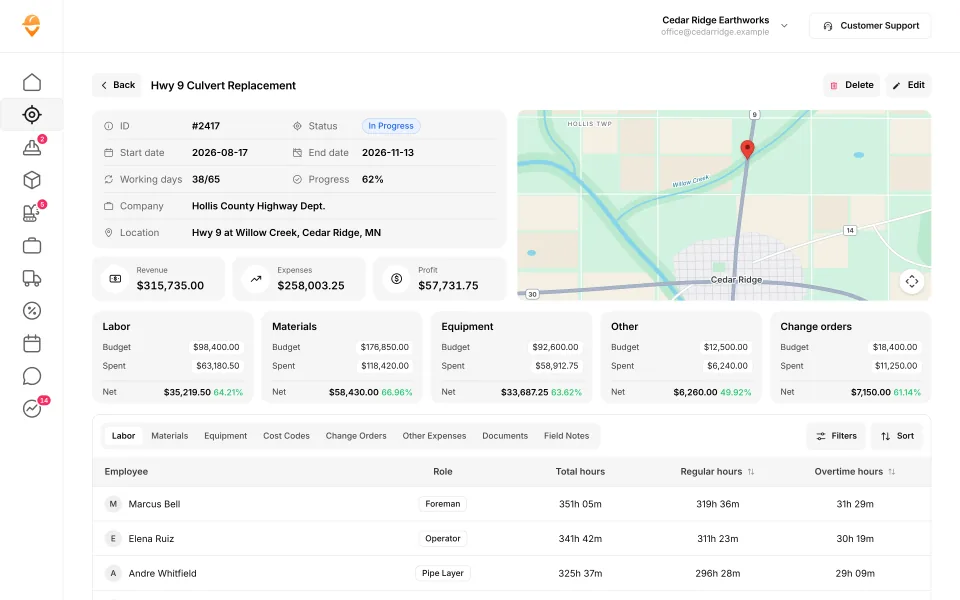
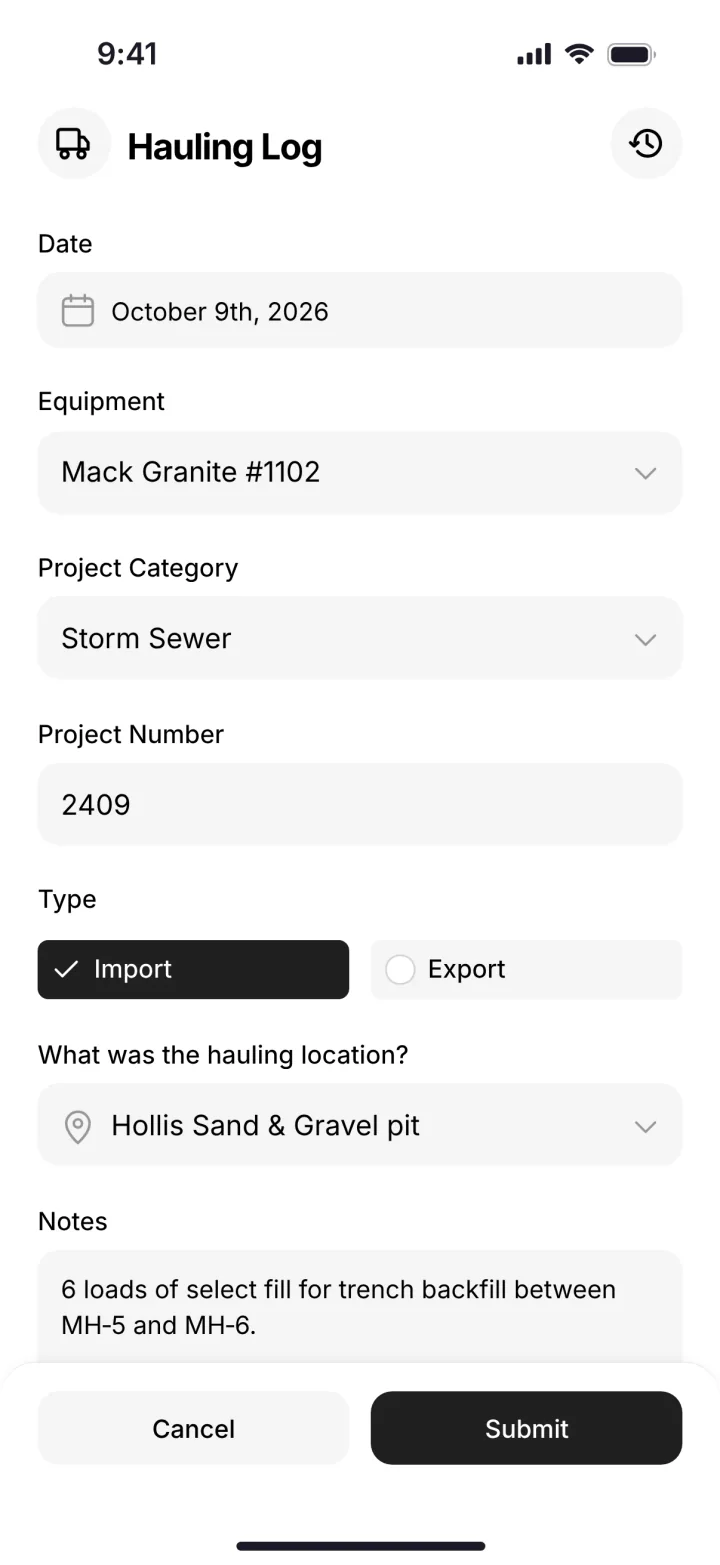
The job page where extras and change orders land next to the budget, and a load of stone logged from the phone. (Demo data.)
Built to track hours. Great at the timecard, but the rest of the business (machines, loads, job profit) lives somewhere else.
9 apps in this chart. Scroll sideways to see them all.
| What SmartCrew does | SmartCrewSmartCrew | BusyBusyBusyBusy | ClockSharkClockShark | ExakTimeExakTime | QuickBooks TimeQB Time | WorkMaxWorkMax | WorkyardWorkyard | ConnecteamConnecteam | JibbleJibble | Rhumbix (Autodesk)Rhumbix |
|---|---|---|---|---|---|---|---|---|---|---|
| Time Tracking | ||||||||||
| GPS-powered clock-ins | Yes | Yes | Yes | Yes | Yes | Yes | Yes | Yes | Yes | Add-on |
| Geofencing around the job site | Yes | Yes | Yes | Yes | Add-on | Yes | Add-on | Add-on | Yes | Add-on |
| Live crew locations | Yes | Yes | Yes | Yes | Yes | Yes | Yes | Add-on | Yes | Limited |
| Hours by job and cost code | Yes | Yes | Yes | Yes | Yes | Yes | Add-on | Yes | Limited | Yes |
| Pick the machine at clock-in | Yes | Yes | Not listed | Yes | Limited | Limited | Limited | Limited | No | Limited |
| Payroll-ready timecards | Yes | Yes | Yes | Yes | Yes | Yes | Yes | Yes | Yes | Yes |
| Supervisor dashboard | Yes | Yes | Yes | Yes | Yes | Yes | Yes | Yes | Yes | Yes |
| Clock in/out reminders | Yes | Yes | Yes | Yes | Yes | Not listed | Yes | Yes | Yes | Not listed |
| Equipment Management Premium | ||||||||||
| Equipment hours & locations | Yes | Yes | Not listed | Yes | Not listed | Add-on | Limited | Limited | No | Limited |
| DOT & daily inspections | Yes | Limited | Not listed | Limited | Not listed | Limited | Add-on | Limited | No | Not listed |
| Maintenance tracking | Yes | Add-on | Not listed | Limited | Not listed | Add-on | Add-on | Limited | No | No |
| Service requests from the field | Yes | Add-on | Not listed | Limited | Not listed | Not listed | Add-on | Limited | No | No |
| Utilization rates | Yes | Yes | Not listed | Not listed | Not listed | Add-on | No | No | No | Limited |
| Shop queue | Yes | Add-on | Not listed | No | Not listed | Not listed | Not listed | No | No | No |
| Daily Reports | ||||||||||
| Daily progress & production logs | Yes | Add-on | Limited | Limited | Limited | Add-on | Add-on | Yes | No | Yes |
| Jobsite photos & field notes | Yes | Yes | Yes | Yes | Yes | Add-on | Yes | Yes | Limited | Yes |
| Automatic daily reports for the office | Yes | Add-on | Not listed | Limited | Not listed | Limited | Limited | Add-on | Not listed | Add-on |
No: they do not offer it. Their own website says so, or it isn’t in the full feature list they publish (linked). Add-on: a paid add-on, a separate product or a higher plan. Limited: they have something close but narrower. Not listed (n/l on small screens): we searched their site and help pages and couldn’t find it, but they don’t publish a full list we could check. Tap a name for the full comparison.
This chart is SmartCrew’s feature list, so it doesn’t show what other products do that SmartCrew doesn’t (like estimating, payroll or hardware time clocks). Each comparison covers that in “where they’re the better pick”. SmartCrew’s Fleet Management, Sales CRM, and Scheduling & Communications are Premium categories; feature availability varies by plan.
In plain words: what each app does not offer
- BusyBusy lists all of these on its own website, some as add-ons or limited.
- ClockShark doesn't list: pick the machine at clock-in, equipment hours & locations, DOT & daily inspections, maintenance tracking, service requests from the field, utilization rates, shop queue, automatic daily reports for the office.
- ExakTime does not offer: shop queue. ExakTime doesn't list these either: utilization rates.
- QuickBooks Time doesn't list: equipment hours & locations, DOT & daily inspections, maintenance tracking, service requests from the field, utilization rates, shop queue, automatic daily reports for the office.
- WorkMax doesn't list: clock in/out reminders, service requests from the field, shop queue.
- Workyard does not offer: utilization rates. Workyard doesn't list these either: shop queue.
- Connecteam does not offer: utilization rates, shop queue.
- Jibble does not offer: pick the machine at clock-in, equipment hours & locations, DOT & daily inspections, maintenance tracking, service requests from the field, utilization rates, shop queue, daily progress & production logs. Jibble doesn't list these either: automatic daily reports for the office.
- Rhumbix (Autodesk) does not offer: maintenance tracking, service requests from the field, shop queue. Rhumbix (Autodesk) doesn't list these either: clock in/out reminders, DOT & daily inspections.
From each company's own website and help pages, checked on the dates below. "Does not offer" means their own website says so, or it isn't in the full feature list they publish. "Doesn't list" means we searched their site and couldn't find it, but they don't publish a full list we could check.
Where each mark comes from
- BusyBusy, checked October 28, 2026: busybusy.com/features/gps-time-tracking, busybusy.com/features, busybusy.com/features/job-costing-solutions, busybusy.com/equipment-time-tracking-app, busybusy.com/features/payroll-tools, helpcenter.busybusy.com/en/articles/9573478-use-supervisor-tools-to-make-life-easy, busybusy.com/features/budgets-projects-cost-codes, busybusy.com/features/construction-reports, busybusy.com/modules/operations/equipment-inspections, busybusy.com/modules/operations/work-orders, busybusy.com/features/progress-tracking, busybusy.com/features/photos-notes, busybusy.com/construction-daily-reports, helpcenter.busybusy.com/en/articles/9573479-schedule-the-work-week-in-busybusy, busybusy.com/features/scheduling, busybusy.com/features/team-messaging, helpcenter.busybusy.com/en/articles/9573348-positions-permissions-settings, busybusy.com/safety/job-safety-analyses-app, busybusy.com/safety/training-app, busybusy.com/features/incident-reporting, busybusy.com/features/documents, busybusy.com/integrations/quickbooks-online
- ClockShark, checked October 28, 2026: clockshark.com/tour/gps-time-clock-app, clockshark.com/tour/geofence-time-tracking, clockshark.com/tour/map-field-employee-location-tracking, clockshark.com/resources/labor-costs-quickbooks-clockshark, clockshark.com/pricing, clockshark.com/tour/timesheet-reminders, clockshark.com/tour/job-costing, help.clockshark.com/how-to-handle-change-orders-using-quotes-and-invoices, clockshark.com/tour, clockshark.com/tour/clock-out-questions, clockshark.com/tour/conversations, clockshark.com/tour/employee-scheduling, clockshark.com/tour/customer-manager, get.clockshark.com/modern-way-to-manage-your-field-team, clockshark.com/tour/file-attachments, clockshark.com/integrations/quickbooks-time-tracking
- ExakTime, checked October 28, 2026: arcoro.com/exaktime/pricing-plans, arcoro.com/exaktime, arcoro.com/exaktime/our-solutions/gps-time-tracking-app, arcoro.com/exaktime/our-solutions/powerful-reporting, support.arcoro.com/hc/en-us/articles/1260804480690-Guides-to-Equipment-for-ExakTime, support.arcoro.com/hc/en-us/articles/1260804479730-Start-Using-The-ExakTime-System-In-Just-15-Minutes, support.arcoro.com/hc/en-us/articles/40641192964507-9-2025-ExakTime-Release-Notes-GeoFence-Activity-Alerts, arcoro.com/llm-context-page, support.arcoro.com/hc/en-us/articles/7647931096987-Overview-for-Using-Advanced-Analytics, support.arcoro.com/hc/en-us/articles/4413156323355-Using-Equipment-Reports-for-ExakTime, support.arcoro.com/hc/en-us/articles/24982369416091-What-are-Library-Forms-for-ExakTime, support.arcoro.com/hc/en-us/articles/26031334798107-Gathering-Info-from-Field-Employees-with-Fields-Notes-Forms-and-Clock-In-Out-Comments-for-ExakTime-Mobile, support.arcoro.com/hc/en-us/articles/4413165192347-Using-Expense-Reports-for-ExakTime, support.arcoro.com/hc/en-us/articles/4407630208795-Managing-Schedules-with-Calendar-View, support.arcoro.com/hc/en-us/articles/4407625105563-Scheduler-Notification-Settings-for-ExakTime, support.arcoro.com/hc/en-us/articles/7601304493595-Setting-Up-and-Using-Custom-Alerts-and-Notifications-for-ExakTime, support.arcoro.com/hc/en-us/articles/13116025444635-Sending-Alerts-Notifications-from-ExakTime-Connect, arcoro.com/platform/grow/learning-management, support.arcoro.com/hc/en-us/articles/25556658085659-Premade-Forms-for-ExakTime, arcoro.com/platform/manage/construction-hris, arcoro.com/exaktime/partner/quickbooks
- QuickBooks Time, checked October 28, 2026: quickbooks.intuit.com/time-tracking/gps, quickbooks.intuit.com/learn-support/en-us/help-article/track-location/use-quickbooks-time-gps-tracking-admin-manager/L7fLoZNZk_US_en_US, quickbooks.intuit.com/learn-support/en-us/help-article/track-worker-hours/use-quickbooks-time-quickbooks-online-quickbooks/L5NIFCKG6_US_en_US, quickbooks.intuit.com/learn-support/en-us/help-article/customize-forms/set-manage-custom-fields-quickbooks-time/L6b8NDU6n_US_en_US, quickbooks.intuit.com/time-tracking/construction, quickbooks.intuit.com/learn-support/en-us/help-article/product-preferences/set-company-team-member-clock-reminders-quickbooks/L8v9UDFUv_US_en_US, quickbooks.intuit.com/time-tracking/pricing, quickbooks.intuit.com/learn-support/en-us/help-article/list-reports/quickbooks-time-reports/L0WYtn0mw_US_en_US, quickbooks.intuit.com/time-tracking/elite, quickbooks.intuit.com/time-tracking/employee-scheduling, quickbooks.intuit.com/learn-support/en-us/help-article/feature-preferences/quickbooks-time-activity-feed/L5RV549yf_US_en_US
- WorkMax, checked October 26, 2026: workmax.com/solutions/workmax-time, workmax.com/wp-content/uploads/2022/06/WorkMax-TIME-Features.pdf, workmax.com/wp-content/uploads/2013/11/WorkMax_Time_Features_Temp.pdf, workmax.com/solutions/workmax-insight, workmax.com/solutions/workmax-forms, workmax.com/resources/blog/the-workmax-construction-field-management-platform, workmax.com/solutions/workmax-assets, workmax.com/resources/faqs, workmax.com/solutions/other-products, workmax.com, workmax.com/solutions/integrations/quickbooks-online-integration
- Workyard, checked October 28, 2026: workyard.com/ai-instructions, workyard.com/pricing, workyard.com/smart-forms/equipment-tracking, workyard.com/reporting, help.workyard.com/en/articles/7041924-workyard-mobile-app-automated-alerts, workyard.com/smart-forms/construction-management, help.workyard.com/en/articles/17668011-build-custom-reports-with-reporting-agent, workyard.com/smart-forms/production-tracking, help.workyard.com/en/articles/16092826-send-form-submissions-to-the-right-people-forms-notification-routing, workyard.com/contractor-scheduling-software, workyard.com/smart-forms/safety-management, help.workyard.com/en/articles/5236837-how-to-connect-workyard-to-quickbooks-online
- Connecteam, checked October 28, 2026: connecteam.com/pricing, help.connecteam.com/en/articles/3597710-how-to-create-a-geofence, help.connecteam.com/en/articles/5675206-starting-guide-to-breadcrumbs-live-location-tracking, connecteam.com/industries/construction-app, connecteam.com/employee-time-clock-app, connecteam.com/operations, connecteam.com/industries/construction-app/construction-time-tracking, connecteam.com/employee-scheduling-app, connecteam.com/forms-checklist-app, help.connecteam.com/en/articles/6400563-job-scheduling-must-have-capabilities, connecteam.com/industries/construction-app/construction-scheduling-app, help.connecteam.com/en/articles/4100339-starting-guide-to-the-job-scheduler, connecteam.com/employee-communication-app/updates, connecteam.com/industries/construction-app/construction-compliance, connecteam.com/industries/construction-app/construction-documentation-and-communication, connecteam.com/integrations/quickbooks-integration
- Jibble, checked October 28, 2026: jibble.io/construction-time-tracking, jibble.io/features, jibble.io/auto-clock-in-out-app, jibble.io/project-time-tracker, jibble.io/help/track-time-with-location, jibble.io/help/sending-timesheets-to-quickbooks-online
- Rhumbix (Autodesk), checked October 28, 2026: intercom.help/rhumbix-helpcenter/en/articles/11014517-cico-client-configuration-options, rhumbix.com/solutions/timekeeping, rhumbix.com/usecase/field, rhumbix.com/pricing, intercom.help/rhumbix-helpcenter/en/articles/6369205-cost-code-status, rhumbix.com/solutions/change-orders, intercom.help/rhumbix-helpcenter/en/articles/8438022-equipment-tracking-dashboard, rhumbix.com/solutions/production_tracking, intercom.help/rhumbix-helpcenter/en/articles/6369215-daily-reports-create-on-mobile-app, intercom.help/rhumbix-helpcenter/en/articles/6512986-end-of-day-exception-report, rhumbix.com/solutions/integrations
What doesn't SmartCrew do for a grading contractor?
Here's the list, plainly. Grading companies run some of these tools next to SmartCrew.
- GPS machine control. This is the big one for grading. SmartCrew doesn't run your grade control, your models or your rover. It tracks the people and the machine hours around them.
- Takeoff and cut and fill volumes. Your estimating tool does the quantities and the bid. SmartCrew tracks the job against that bid.
- Stormwater inspections and permits. Your permit sets the inspection form and who signs it. SmartCrew records your crew's work, hours and photos.
- Telematics hardware. No GPS boxes on the machines. Hours come through the operator's clock-in.
- Payroll processing and ELD. Timecards are payroll-ready, and payroll runs in your payroll or accounting software. Electronic logs for your trucks need an ELD provider.
Time tracking apps vs enterprise software for a grading company
A grading company needs more than a time clock and a lot less than an enterprise suite. Andrew put the goal in three short lines.
Simple for the field. Powerful for management. Fairly priced for owners.
Time tracking apps like ClockShark, BusyBusy, ExakTime, WorkMax and QuickBooks Time get operators clocked in. Machine hours by phase, equipment records and the job's profit usually end up somewhere else.
Enterprise software like HCSS HeavyJob and Procore can do much more, with the setup and the bill of software built for bigger companies. If you run a few dozers, a grader and a handful of operators, you'll pay for a lot you won't use. The 2026 roundup puts them side by side.
What should a grading company ask a software vendor?
Ask with your own job on the screen. These questions separate grading company software from a generic time clock.
- Can my operator switch machines and phases mid-day without starting a new timecard?
- Show me machine hours on this job by phase, not only by week.
- When it rains, how do I move tomorrow's crews, and how do they find out?
- Where do erosion control repairs go, and can I see the photos and hours to bill them?
- Does it work next to my machine control, or does it try to replace it?
- Is equipment maintenance in the same app, or is it another subscription?
- Who sets it up, and how soon is my crew using it?
Our answer to the last one: we do the heavy lifting. We set up your account, move your information over and train your people, and most companies are up and running within a few weeks.
Is SmartCrew right for a small grading company?
Yes, if you have about 5 to 100 employees. That's who we build for: small to midsized contractors. Small, for us, means a real crew. Not a one-man shop.
| Your company | SmartCrew? | Why |
|---|---|---|
| 1 to 4 people | Probably not yet | If it's you and a helper, a quoting and invoicing app may be all you need. We built SmartCrew for companies with crews to manage. |
| 5 to 20 people | Yes | The owner still runs a machine some days. The office is one or two people. You don't need more software. You need fewer places to look. |
| 20 to 50 people | Yes | A few crews, a shop and trucks on different jobs. Our own family company runs 20 to 30 guys. This is the size we built it for. |
| 50 to 100 people | Yes | More crews, more iron, more tickets. Same simple app for the field. You see every job against the bid. |
| Over 100 people | Probably not | Bigger companies often want enterprise software with a full-time admin. That's not us. See HCSS HeavyJob vs SmartCrew. |
Questions people ask
What is the best software for a grading company?
One that tracks operator hours and machine hours by phase, moves crews when it rains and shows the job's profit against the bid. SmartCrew does that for dirtwork and heavy civil companies with 5 to 100 employees. If you only need a time clock, a time tracking app is simpler.
Does SmartCrew work with GPS machine control?
No. SmartCrew doesn't run grade control or models. Its GPS is for clock-ins and live crew locations. It tracks the operators and the machine hours around your machine control.
Is SmartCrew erosion control contractor software?
It handles the crew side of erosion control. Your guys clock in to an erosion control activity code, log photos and notes in the daily report, and extras go on the job. It isn't a stormwater inspection form; your permit sets that.
How often do construction stormwater inspections have to happen?
Under EPA's 2022 Construction General Permit, at least once every 7 calendar days, or once every 14 calendar days and within 24 hours of a storm of 0.25 inches of rain or more. That permit covers areas where EPA is the permitting authority. Many states issue their own, so check yours.
Is SmartCrew drainage contractor software too?
Yes. Ditches, swales, culverts and storm pipe go on their own activity code, with pipe and stone on the materials log and loads in the hauling log. The job page shows whether the drainage work is making money.
Can I move crews on rain days in SmartCrew?
Yes. Drag the crew and the machine to another job on the schedule, and the crew gets a notification. Scheduling & Communications is a Premium category, so it depends on your plan.
How much does grading company software cost?
For SmartCrew, pricing depends on your company size and the features you need; it's built to be well below enterprise construction software. SmartCrew starts at $99/month. Contact us for team pricing.
Sources
- EPA: Stormwater discharges from construction activities checked October 26, 2026
- EPA: 2022 Construction General Permit, Parts 1 to 9 (as modified), Part 4.2 checked October 26, 2026