
Buyer FAQ
SmartCrew FAQ: what dirtwork owners ask before they buy

Andrew Drish, founder
Published . Updated
This SmartCrew FAQ answers what owners ask us before a call: what it does, who it's for, what it costs, how setup works and how it compares. SmartCrew is all in one software for dirtwork and heavy civil contractors with 5 to 100 employees. It starts at $99/month. Contact us for team pricing.
The short version
- Built only for dirtwork and heavy civil contractors with 5 to 100 employees, by a family that's been in the business for 75 years.
- Time tracking, job costing, equipment, daily reports, materials and hauling, scheduling, sales, crew communication, safety and files in one app.
- Fleet Management, Sales CRM, and Scheduling & Communications are Premium categories; feature availability varies by plan.
- We do the heavy lifting on setup. Most companies are up and running within a few weeks.
- QuickBooks Online is integrated today. QuickBooks Desktop, Foundation, ADP and more are in the works.
What is SmartCrew, in one paragraph?
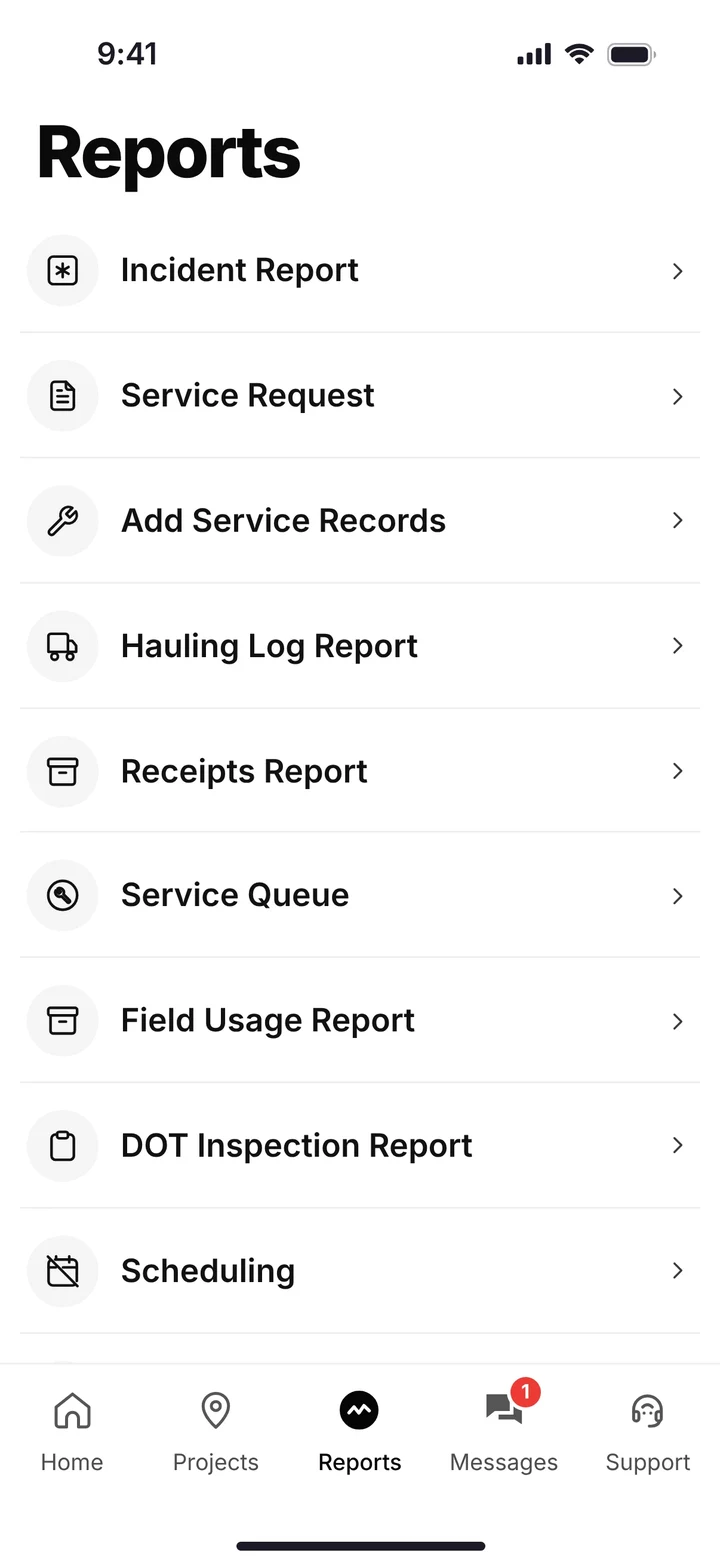
SmartCrew is one app for the whole dirtwork company. The field clocks in, picks the job, the activity and the machine, runs the inspection, logs the load and sends the daily report. The office gets payroll-ready timecards, machine records, haul tickets and each job's profit against the bid. No more chasing timecards.
| Area | In the field | In the office | Plan |
|---|---|---|---|
| Time Tracking | GPS clock-in with project, activity code and machine; Log & Switch; Break; Submit Timecard; request a day off | Live crew locations, supervisor dashboard, payroll-ready timecards, clock in/out reminders | Core |
| Job Costing | Hours and machines land on the right job | Daily job profit, bid budget vs actual, change orders and extras, custom reports | Core |
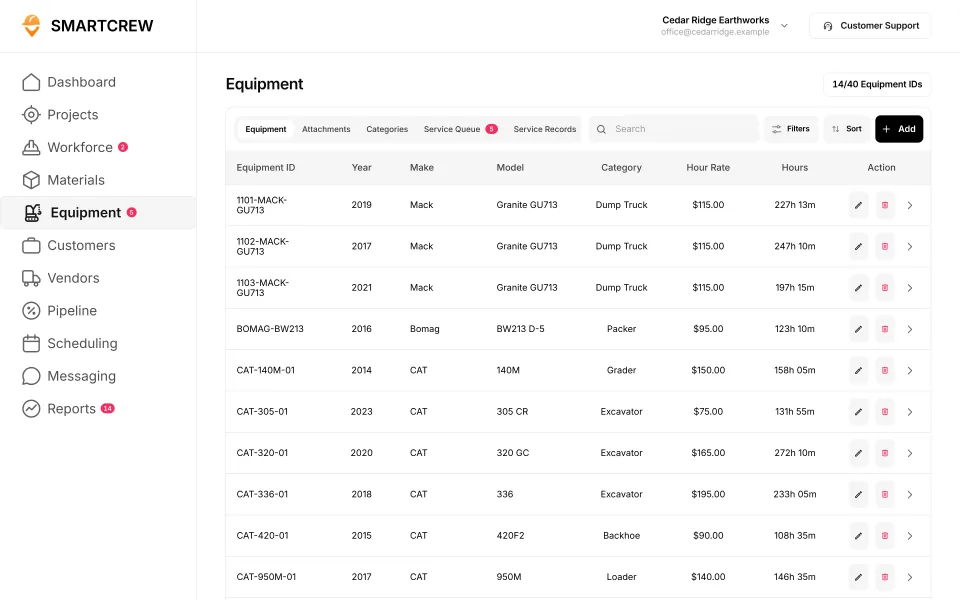
| Equipment Management | DOT and daily inspections, service requests | Hours, mileage, last and next service, utilization, shop queue | Premium |
| Daily Reports | Progress and production, photos, field notes | Automatic daily reports | Core |
| Materials & Hauling | Haul tickets, receipt and ticket photos | Hauling log, material and fuel logs, AI reader enters the data | Core |
| Scheduling | Assignments and schedule updates on the phone | Drag-and-drop crew, job and equipment scheduling | Premium |
| Sales & CRM | N/A | Leads, sales pipeline, bids, follow-ups | Premium |
| Crew Communication | Dispatch alerts, crew and job chat | Company announcements | Premium |
| Safety & Compliance | JSAs, toolbox talks, incident reports with photos | Every report kept with the job | Core |
| File Storage | Plans and photos on the phone | Job documents with sharing and permissions | Core |
Feature availability varies by plan. Fleet Management, Sales CRM, and Scheduling & Communications are Premium categories.
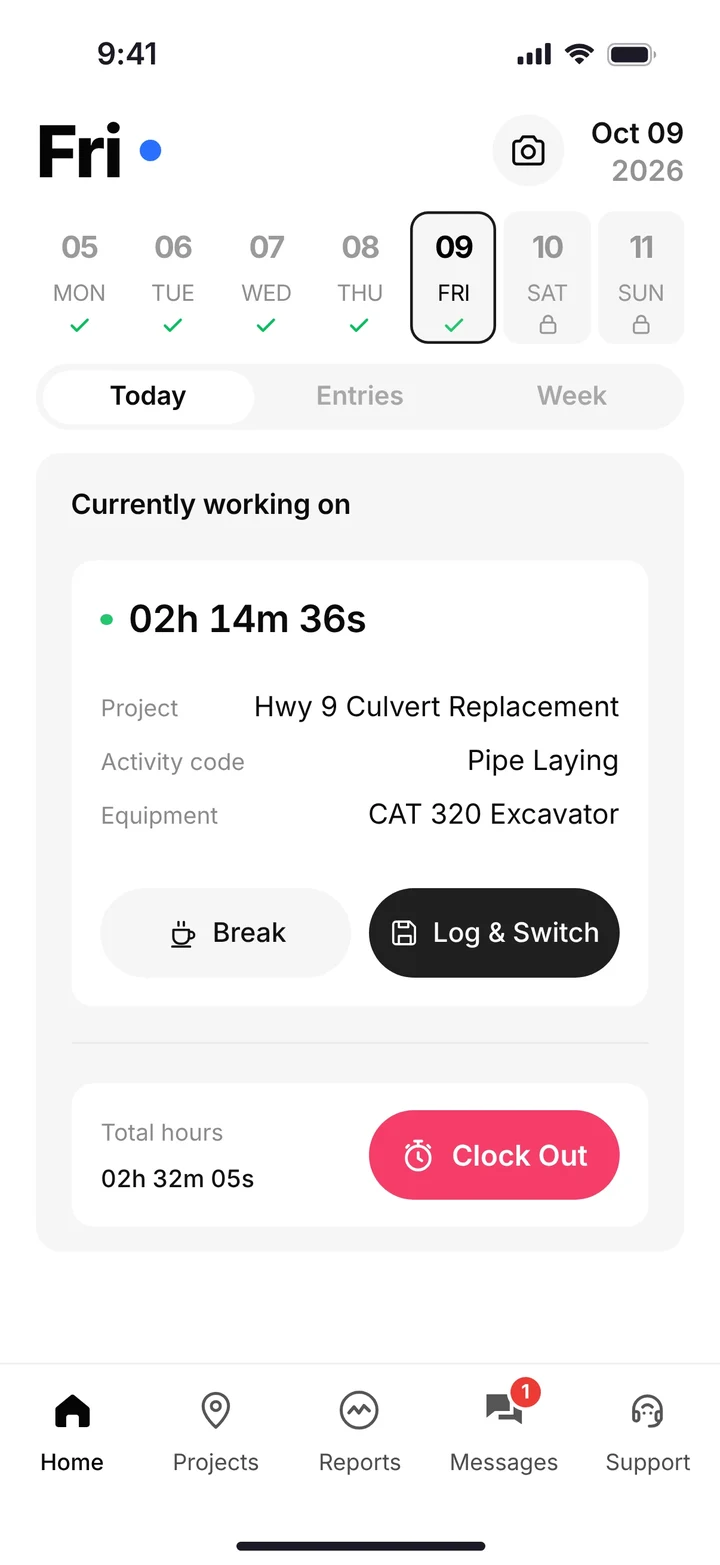
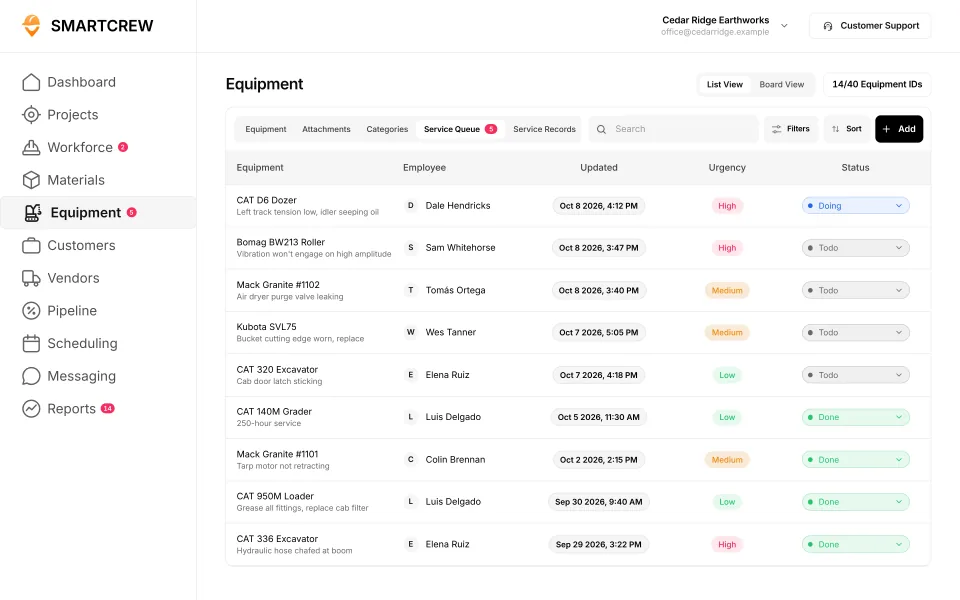
A worker on the clock with his job, activity and machine, and the shop queue that his service request lands in. (Demo account.)
The questions below are grouped the way owners ask them. Seven of the answers are Andrew's own words. The rest come straight from how the product works. If yours isn't here, ask it on the call.
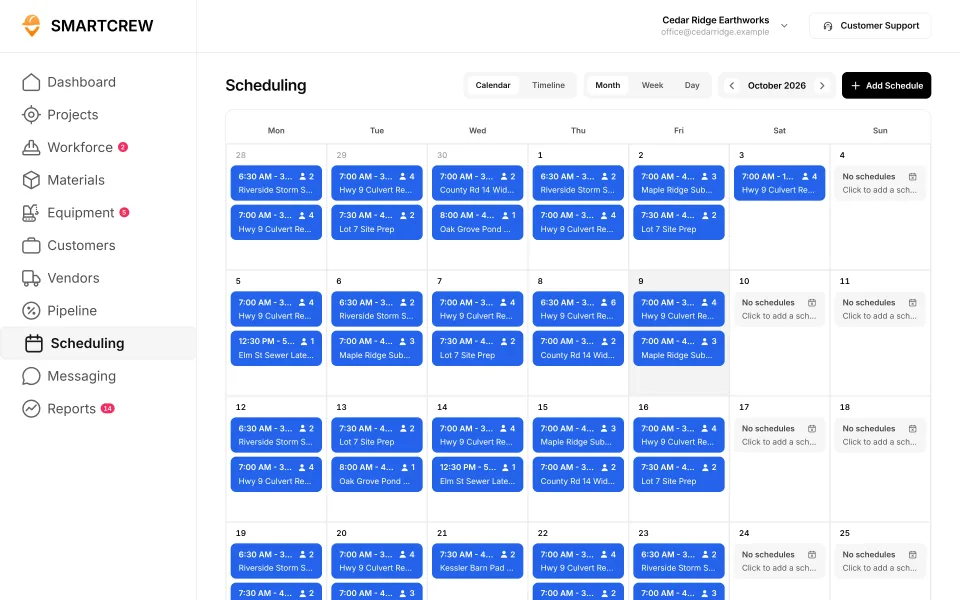
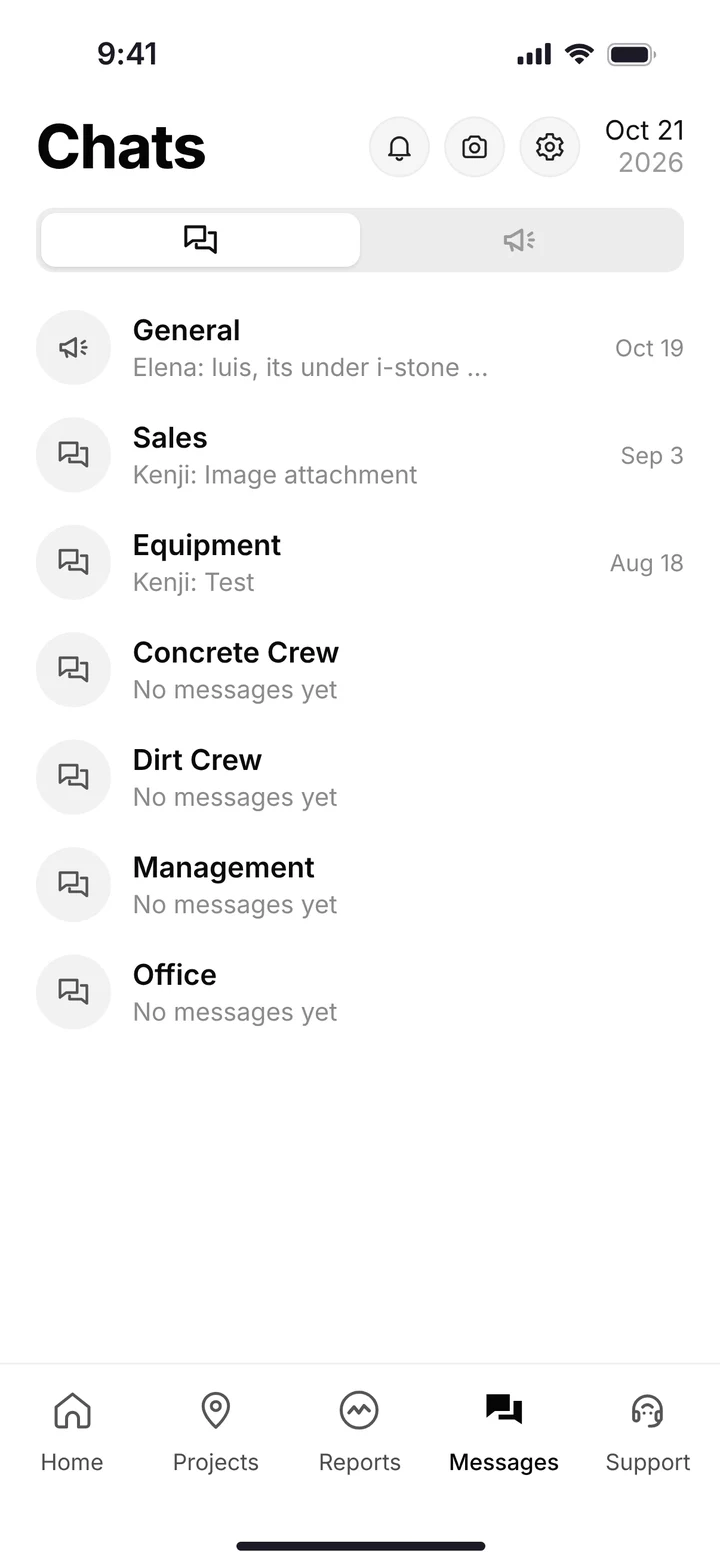
Two of the Premium categories: the crew schedule, and crew chat with company, equipment and job channels. (Demo account.)
About SmartCrew
Who it's for, who built it, and what it doesn't do.
What makes SmartCrew different from other construction software?
My family has been in construction for 75 years. We know the frustration of juggling paperwork, timecards, hauling tickets, equipment maintenance, DOT logs, and a dozen different systems just to run our business. No matter how hard I searched, I couldn't find software that was actually built for companies like ours. Time tracking apps were too basic. Enterprise software was too complicated, confusing, and expensive. We only run 20-30 guys and there was nothing specifically designed for our size of heavy civil business. That's why we built SmartCrew. Unlike construction software companies trying to serve every industry, we ONLY work with dirtwork and heavy civil contractors with 5 to 100 employees. That means you get software that feels like it was custom-built for your business. Simple for the field. Powerful for management. Fairly priced for owners.
Who is SmartCrew built for?
SmartCrew is built for small to midsized dirtwork and heavy civil contractors, typically with 5 to 100 employees. That includes site prep, excavation, sitework, grading, underground utilities, septic, drilling, paving, demolition, trucking and hauling, aggregate operations, and more. If you manage crews, operate heavy equipment, and bid jobs, there's a good chance SmartCrew was built for you.
Who is SmartCrew best for?
Dirtwork and heavy civil contractors with 5 to 100 people who want one simple, easy-to-use system for running the business.
Who is SmartCrew not a good fit for?
If you only need one tool, like time tracking or fleet management, a single-purpose app will fit better. Crews under 5 people won't use many of the features. Companies over 100 people may need a bigger enterprise platform. Residential service and vertical construction companies will find tools built for their trades.
Who founded SmartCrew?
Andrew Drish. His family has been in construction for 75 years, and Drish Construction runs 20 to 30 people. SmartCrew was built for that company first, and was featured at ConExpo. The call you book on this site is with Andrew.
We have 150 employees. Is SmartCrew right for us?
Probably not. SmartCrew is built for companies with 5 to 100 employees, and we're not trying to build complicated software for massive enterprise companies. A bigger company may be better served by enterprise software; see the 2026 roundup.
What doesn't SmartCrew do?
SmartCrew doesn't do estimating or takeoff, GPS machine control, telematics hardware, payroll processing or ELD hours of service. If one of those is what you're shopping for, you'll need another tool for it.
Pricing
How SmartCrew is priced. It starts at $99/month. The full page is SmartCrew pricing.
How much does SmartCrew cost?
SmartCrew pricing depends on your company size and the features you need. It starts at $99/month. We built SmartCrew to be significantly more affordable than expensive enterprise construction software, with pricing that scales as you grow. Contact us for team pricing.
Is $99/month the price for every company?
SmartCrew starts at $99/month. Contact us for team pricing. A 7 person septic outfit and a 70 person grading company do not need the same setup. The page is SmartCrew pricing.
Do I have to buy every feature at once?
No. You can start with the features you need most and expand from there. Start where it hurts most.
What should I have ready for the pricing call?
Your headcount in the field and the office, how many machines and trucks you run, and what you use today for time, equipment, haul tickets and accounting. Have that ready and the call goes quicker.
Switching and setup
What getting started looks like, and who does the work.
How hard is it to get up and running?
We do the heavy lifting for you. Our team helps set up your account, migrate your information, organize your workflows, and train your people. Most companies are up and running within a few weeks. You can start with the features you need most and expand from there.
How do I get started with SmartCrew?
Click Try SmartCrew. It starts with a short call with Andrew, where he shows you the app on work like yours and answers your questions.
Can we switch from BusyBusy, QuickBooks Time or ExakTime?
Yes. SmartCrew replaces time tracking apps like those, along with fleet and maintenance apps, CRMs, spreadsheets, paper load tickets, group chats and shared drives. Our team migrates your information and trains your people. See how SmartCrew compares to BusyBusy.
We run on paper and spreadsheets. Is that a problem?
Not at all. Paper timecards, paper load tickets and spreadsheets are exactly what SmartCrew replaces. We set up your account and move your information over, so you don't start from a blank screen.
Crews and the phone app
What your guys actually do in SmartCrew.
Will my crew actually use it?
We designed SmartCrew around one thing… simplicity. Our crews aren’t tech savvy. And they don’t need to be. They can clock in, see their assignments, submit inspections, upload receipts, and complete daily reports right from their phones. SmartCrew is simple enough for the field. Powerful enough for management.
What does a worker do when he clocks in?
He taps Clock In and picks the project, the activity code and the equipment he's running. GPS records the clock-in, and his hours land on the right job and cost code.
What if a guy changes jobs or machines in the middle of the day?
He uses Log & Switch to change the task or the machine, so the hours follow the work. There's also Break and Clock Out, and at the end of the week a summary he checks and submits.
Can the office see where crews are?
Yes. The supervisor dashboard shows live crew locations and who is clocked in on which job and machine. SmartCrew can also send clock in and clock out reminders.
How do crews get the schedule?
Through the app. Drag-and-drop crew scheduling puts people and equipment on jobs, and schedule updates go out as notifications, with dispatch alerts and job chat. Scheduling & Communications is a Premium category.
Equipment and the shop
Machines, inspections and repairs.
Does SmartCrew track equipment hours?
Yes. Workers pick the machine when they clock in, and each machine's record shows hours, mileage, location, last and next service, inspections and utilization. Fleet Management is a Premium category.
Does SmartCrew do DOT inspections?
Yes. DOT and daily inspections are done on the phone and kept in each machine's inspection log.
How does an operator report a broken machine?
He sends a service request from his phone. It lands in the shop queue with its urgency and status, so the shop knows what's down and what to fix first. Keep your machines moving.
Does SmartCrew come with GPS trackers for machines?
No. SmartCrew doesn't sell telematics hardware or GPS machine control. Machine hours come from the crew's clock-ins and the equipment records.
Hauling, materials and job cost
Loads, tickets and whether the job is making money.
How do digital haul tickets work?
Each load goes in the hauling log with the ticket, time, truck, project, import or export, material, yards and source pit. The office sees every load without chasing paper.
What does the AI reader do?
Take a photo of a haul ticket or a receipt, and it enters the data for you. So nobody has to type it in by hand.
Can SmartCrew track fuel and materials?
Yes. Material and fuel logs sit with hauling, and you can track deliveries and production by job.
Is SmartCrew an ELD?
No. SmartCrew doesn't do ELD or hours of service. It handles haul tickets, fuel logs and DOT inspections.
How does SmartCrew show whether a job is making money?
Each job page shows revenue, expenses and profit, updated daily, with bid budget against actual for labor, materials, equipment, other costs and change orders. Know your profit. Every day.
What goes in a daily report?
Progress and production, jobsite photos and field notes. The office gets an automatic daily report, so you know what got done without asking.
QuickBooks and payroll
How SmartCrew fits with your books.
Does SmartCrew integrate with QuickBooks?
Yes! SmartCrew currently integrates with QuickBooks Online. We're also working on additional integrations with QuickBooks Desktop, Foundation, ADP, and more.
Does SmartCrew replace QuickBooks?
No. QuickBooks is integrated, not replaced. It stays your books. SmartCrew integrates with QuickBooks Online today.
Does SmartCrew run payroll?
No. SmartCrew doesn't process payroll. It gives you payroll-ready timecards, with hours broken out by job, for whoever runs your payroll.
How SmartCrew compares
Where SmartCrew sits next to the software you've heard of.
How is SmartCrew different from BusyBusy, ClockShark or QuickBooks Time?
Those are time tracking apps, built around the timecard. SmartCrew does the timecard too, then keeps going: machines, inspections, haul tickets, daily reports and job profit in the same app. Read BusyBusy vs SmartCrew, ClockShark vs SmartCrew and QuickBooks Time vs SmartCrew.
How is SmartCrew different from Procore or HCSS HeavyJob?
Those are enterprise and construction management software, built for big projects and big companies. SmartCrew is built for dirtwork companies with 5 to 100 employees, simple enough for the field and priced well below enterprise software. See Procore vs SmartCrew and HCSS HeavyJob vs SmartCrew.
How is SmartCrew different from Jobber or QuoteIQ?
Jobber and QuoteIQ are field service and quoting apps, built for service businesses that quote and invoice lots of small jobs. SmartCrew is built for the crew, machine and haul side of heavy civil work. See Jobber vs SmartCrew.
Where can I compare all the options?
The 2026 roundup covers every product we compare, with list prices from their own sites. If you run a smaller crew, start with software for small dirtwork contractors.