
Buyer's guide · Job costing
Best job costing software for sitework contractors

Andrew Drish, founder
Published . Updated
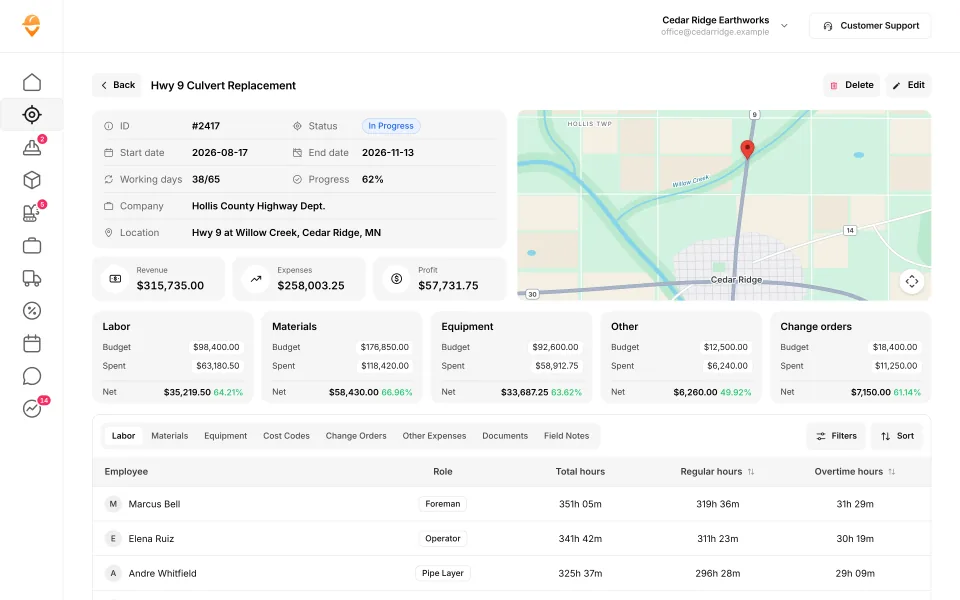
The best job costing software for a sitework contractor with 5 to 100 employees is SmartCrew. It shows every job's profit against the bid every day, and the costs come straight from the field: crew hours, machine hours, haul tickets, material and fuel. Know your profit. Every day. Not after the job is done.
The short version
- Best for sitework, grading and excavation contractors with 5 to 100 employees: SmartCrew.
- Best if your estimate lives in HeavyBid and you have staff to run it: HCSS HeavyJob.
- Best for builders tracking subs, POs and invoices: JobTread.
- Watch for job costing on a higher plan: Projul, Contractor Foreman and ClockShark.
- Sitework job cost lives or dies on equipment hours and haul tickets. Ask every vendor how those get in.
What's the best job costing software for sitework?
SmartCrew. Here's why it fits a site job, start to finish.
Put the bid on the job
Budget for labor, materials, equipment, other costs and change orders. Our team helps you set up jobs and cost codes when you start.
Crews clock in to the cost code
Each worker picks the project, the activity code and the machine. Labor and machine hours hit the right line from minute one.
Loads and material go in from the field
Haul tickets, material and fuel logs and receipt photos, with the AI reader entering the data.
Extras get written down the day they happen
Change orders and extras sit next to the original budget, not in somebody's memory.
Read the job every day
Revenue, expenses and profit on top. Budget against spent for every line. Hours by employee and by cost code.
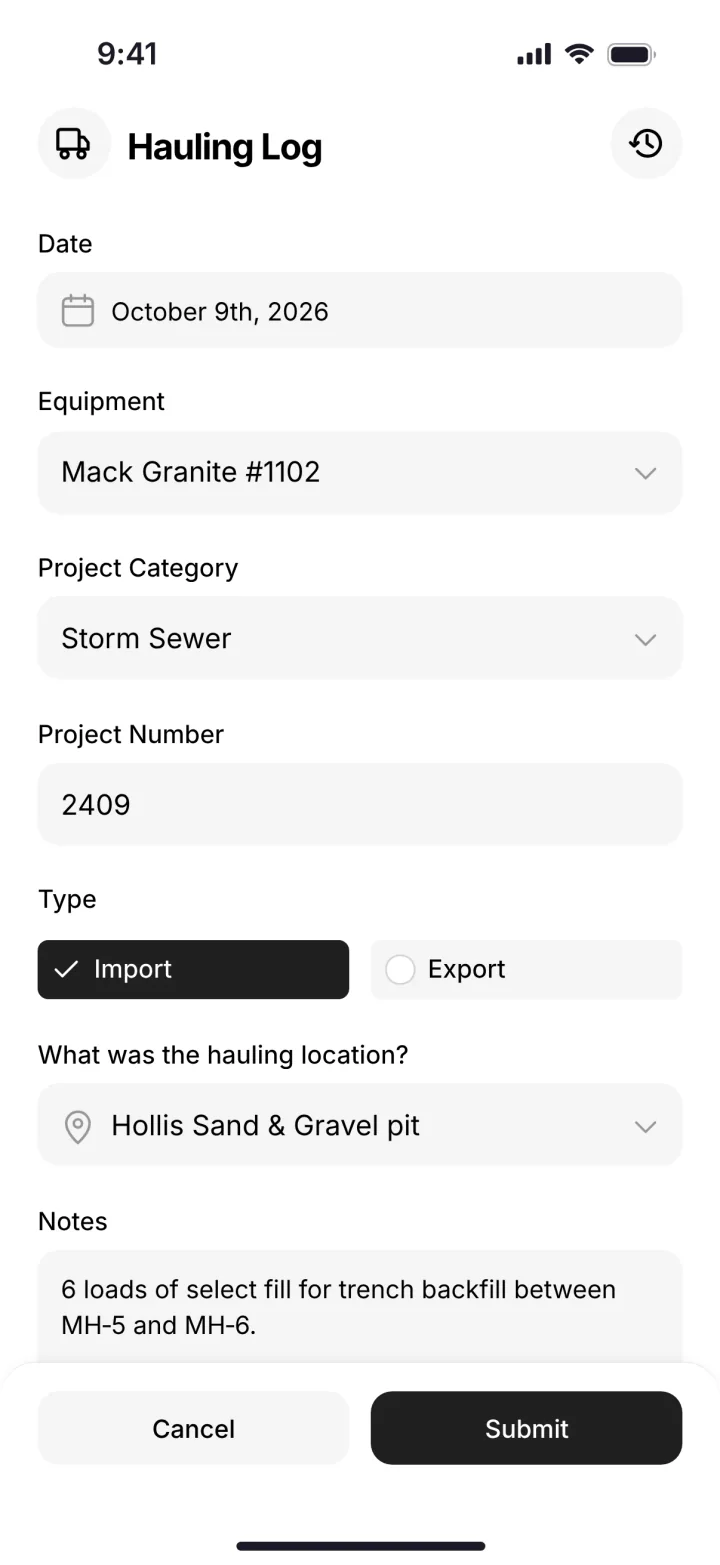
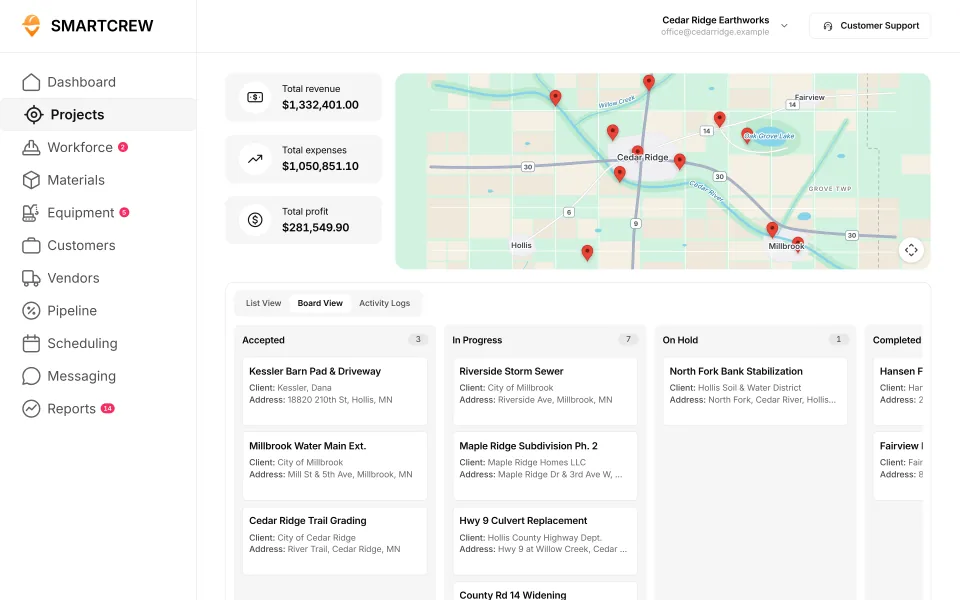
A job's budget against spent for labor, materials and equipment, and a load logged in the field. (Demo account.)
SmartCrew is built for one thing: heavy civil and dirtwork contractors with 5 to 100 employees. Excavation, grading, sitework, underground utilities, paving, road construction, demolition, septic, directional drilling and land clearing. That's all we do.
How the job costing apps compare
Here's what each company says on its own site. Every fact links to the page we read.
| App | Daily job profit | Bid budget vs. actual | Change orders |
|---|---|---|---|
| SmartCrew | Yes | Yeslabor, materials, equipment, other | Yes |
| HCSS HeavyJob | Yesdaily cost reports | Yesbudgets from HeavyBid | Yes |
| JobTread | Yes | Yes | Yes |
| Projul | PartlyCore+ and up | PartlyCore+ and up | PartlyCore and up |
| Contractor Foreman | PartlyPlus and up | PartlyPlus and up | PartlyPlus and up |
| ClockShark | PartlyPro plan only | PartlyPro plan only | Partlyvia quotes and invoices |
| BusyBusy | Partlycosts vs. budget | YesPro and up | Not listedNot listed |
| Procore | Partlyprojected at closeout | Yes | Yes |
| Raken | Not listedNot listed | Partlyhours and quantities | Yes |
| ExakTime | NoNot in its full feature list | PartlyLabor costs only, no bid budgets | NoNot in its full feature list |
| QuickBooks Time | Not listed | PartlyHours only, not dollars; Time Elite | Not listed |
| WorkMax | PartlyCosts vs estimates, not profit; INSIGHT | PartlyAdd-on: INSIGHT module (activated separately) | PartlyAdd-on: FORMS module (activated separately) |
| Workyard | PartlyLabor costs only, Pro plan | PartlyAdd-on: Job costing needs Pro plan | PartlyForm template, Smart Forms add-on |
| Connecteam | PartlyLabor costs only, no job profit | PartlyScheduled vs worked hours only | NoNot in its full feature list |
| Jibble | Not listed | PartlyLabor cost vs time, no bid budgets | NoNot in its full feature list |
| Rhumbix (Autodesk) | NoNot in its full feature list | PartlyHours only, no dollars | Yes |
| Knowify | PartlyAdd-on: Advanced plan and up | PartlyAdd-on: Advanced plan and up | Yes |
| Foreman | PartlyLive projected profit, not daily | Yes | Yes |
| B2W (Trimble) | Yes | Yes | YesIn B2W Estimate |
| Assignar | PartlyAdd-on: Separate Assignar Pay product | PartlyAdd-on: Separate Assignar Pay product | PartlyAdd-on: Separate Assignar Pay product |
| Trimble Viewpoint | PartlyReal-time labor cost, not daily profit | YesVista job cost | YesVista job cost |
| Buildertrend | PartlyReal-time costs vs budget, not daily profit | Yes | Yes |
| Fieldwire | Not listed | PartlyAdd-on: Budget module, Business Plus plan only | PartlyAdd-on: Business Plus plan only |
| Foundation Software | PartlyLive job cost and WIP, not daily | Yes | Yes |
| Tenna | PartlyEquipment costs only, Asset Financials product | PartlyHaul loads only, Virtual Superintendent | Not listed |
| HCSS Equipment360 | PartlyAdd-on: Separate HCSS HeavyJob product | PartlyAdd-on: Separate HCSS HeavyJob product | PartlyAdd-on: Separate HCSS HeavyJob product |
| Fleetio | NoNot in its full feature list | NoNot in its full feature list | NoNot in its full feature list |
| Clue | PartlyDaily job cost by phase, not profit | Yes | PartlySigned T&M tickets for extra work |
| AGTEK | NoNot in its full feature list | PartlyPlanned vs actual production, not dollars | NoNot in its full feature list |
| InSite Software | NoNot in its full feature list | NoNot in its full feature list | NoNot in its full feature list |
| HCSS HeavyBid | Not listed | PartlyBuilds budgets; actuals tracked in HeavyJob | Not listed |
| Trimble Business Center | Not listed | Not listed | Not listed |
| EarthWorks | NoNot in its full feature list | NoNot in its full feature list | NoNot in its full feature list |
| Jobber | PartlyAdd-on: Job costing: Grow and Plus plans | PartlyProfit vs. price, no bid budget | NoNot in its full feature list |
| QuoteIQ | PartlyAdd-on: Pro plan and up | PartlyEstimate price vs costs, no budget lines | NoNot in its full feature list |
| Contractor+ | PartlyAdd-on: Pro Team plan | Not listed | PartlyAdd-on: Pro Team plan |
| Housecall Pro | YesPer job; job costing on all plans | PartlyJob-level plan vs. actual, no budgets | PartlyUpsell estimates on ongoing jobs |
| ServiceTitan | Yes | YesNeeds Project Management | Yes |
As published on each site, October 2026. "Partial" means narrower, or on a higher plan. Sources: HCSS (link), JobTread (link), Projul (link), Contractor Foreman (link), ClockShark (link), BusyBusy (link), Procore (link), Raken (link).
Why sitework job costing is different
A builder's job cost is mostly subs and materials, and the invoices tell you. A site job's cost is mostly your own crews, your own iron and your own trucks. No invoice tells you those. The field has to.
- Machine time is a big line. If equipment hours don't hit the job, the job looks better than it is. See how to track equipment hours by job.
- Loads are a big line. Import fill, export spoils, rock. A lost ticket is a cost that never lands. See tracking dump truck loads.
- Phases overlap. Clearing, erosion control, mass grading, utilities and fine grade can all run the same week.
- Extras happen in the field. Unsuitable soils, rock, a utility nobody marked. If nobody writes it up that day, you don't get paid.
An example cost code setup for a site job
Keep it short. Your guys pick from this list at clock-in, so fewer is better. Here's one way to set it up. Use your own codes.
| Code | Phase | What lands on it |
|---|---|---|
| 100 | Mobilization and moves | Lowboy hours, driver time, setup |
| 200 | Clearing and grubbing | Crew hours, dozer and excavator hours, haul-off loads |
| 300 | Erosion control | Silt fence crew hours, material receipts |
| 400 | Mass grading and earthwork | Dozer, scraper, excavator and truck hours; import and export loads |
| 500 | Storm and utilities | Pipe crew hours, excavator hours, stone and pipe tickets |
| 600 | Fine grade and stone base | Grader and roller hours, stone loads |
| 900 | Extras and change orders | Anything outside the bid, with photos from the daily report |
Then the daily job page tells you which phase is making money and which one isn't. While you can still fix it.
Where the others are the better pick
- HCSS HeavyJob ties job cost to HeavyBid estimates. If you bid in HeavyBid, that link is worth a lot.
- JobTread has real-time job profitability, change orders and purchasing for builders and remodelers.
- Procore connects budgets and change orders with owners and GCs on the same project.
SmartCrew doesn't do estimating or takeoff. Bid in your estimating tool, put the budget on the job, and track it in SmartCrew.
Questions people ask
What is the best job costing software for sitework contractors?
SmartCrew, for sitework, grading and excavation contractors with 5 to 100 employees. Daily job profit against the bid, with crew hours, machine hours, haul tickets, material and fuel coming straight from the field.
How do sitework contractors track job costs?
Put the bid on the job by cost code, have crews clock in to the cost code with the machine they're running, log every load and receipt in the field, and write up extras the same day. SmartCrew does each of those on the phone.
What cost codes should a sitework company use?
Keep the list short so the crew can pick it at clock-in: mobilization, clearing, erosion control, mass grading, utilities, fine grade and extras is a common start. Use your own codes.
Can job costing software include equipment costs?
In SmartCrew, yes. The operator picks the machine at clock-in, so equipment hours land on the job's equipment line next to labor and materials.
Is HCSS HeavyJob good for job costing?
Yes. HeavyJob shows daily cost reports against budget, and budgets can come from HeavyBid. It's quote-only and built for heavy civil contractors. SmartCrew is built for dirtwork and heavy civil companies with 5 to 100 employees.
Does SmartCrew do estimating?
No. SmartCrew doesn't do estimating or takeoff. You put your bid budget on the job, and SmartCrew tracks it as work happens.
Sources
- HCSS construction project management (HeavyJob) checked October 26, 2026
- JobTread job costing checked October 26, 2026
- Projul pricing checked October 28, 2026
- Contractor Foreman job costing reports checked October 26, 2026
- ClockShark job costing checked October 26, 2026
- BusyBusy budgets, projects and cost codes checked October 26, 2026
- Procore products checked October 26, 2026
- Raken help: budgets checked October 26, 2026
- ExakTime: daily job profitability checked October 28, 2026
- ExakTime: bid budgets vs. actual costs checked October 28, 2026
- QuickBooks Time: bid budgets vs. actual costs checked October 28, 2026
- WorkMax: daily job profitability checked October 26, 2026
- WorkMax: change orders & extras checked October 26, 2026
- Workyard: daily job profitability checked October 28, 2026
- Workyard: bid budgets vs. actual costs checked October 28, 2026
- Workyard: change orders & extras checked October 28, 2026
- Connecteam: daily job profitability checked October 28, 2026
- Connecteam: change orders & extras checked October 28, 2026
- Jibble: bid budgets vs. actual costs checked October 28, 2026
- Jibble: change orders & extras checked October 28, 2026
- Rhumbix (Autodesk): daily job profitability checked October 28, 2026
- Rhumbix (Autodesk): bid budgets vs. actual costs checked October 28, 2026
- Rhumbix (Autodesk): change orders & extras checked October 28, 2026
- Knowify: daily job profitability checked October 28, 2026
- Foreman: daily job profitability checked October 28, 2026
- Foreman: bid budgets vs. actual costs checked October 28, 2026
- Foreman: change orders & extras checked October 28, 2026
- B2W (Trimble): daily job profitability checked October 28, 2026
- B2W (Trimble): change orders & extras checked October 28, 2026
- Assignar: daily job profitability checked October 28, 2026
- Assignar: bid budgets vs. actual costs checked October 28, 2026
- Trimble Viewpoint: daily job profitability checked October 28, 2026
- Trimble Viewpoint: bid budgets vs. actual costs checked October 28, 2026
- Buildertrend: daily job profitability checked October 28, 2026
- Buildertrend: change orders & extras checked October 28, 2026
- Fieldwire: bid budgets vs. actual costs checked October 28, 2026
- Fieldwire: change orders & extras checked October 28, 2026
- Foundation Software: daily job profitability checked October 28, 2026
- Foundation Software: bid budgets vs. actual costs checked October 28, 2026
- Tenna: daily job profitability checked October 28, 2026
- Tenna: bid budgets vs. actual costs checked October 28, 2026
- HCSS Equipment360: change orders & extras checked October 28, 2026
- Fleetio: daily job profitability checked October 28, 2026
- Clue: daily job profitability checked October 28, 2026
- Clue: bid budgets vs. actual costs checked October 28, 2026
- Clue: change orders & extras checked October 28, 2026
- AGTEK: daily job profitability checked October 28, 2026
- AGTEK: bid budgets vs. actual costs checked October 28, 2026
- InSite Software: daily job profitability checked October 28, 2026
- HCSS HeavyBid: bid budgets vs. actual costs checked October 28, 2026
- EarthWorks: daily job profitability checked October 28, 2026
- Jobber: daily job profitability checked October 28, 2026
- Jobber: change orders & extras checked October 28, 2026
- QuoteIQ: daily job profitability checked October 28, 2026
- QuoteIQ: change orders & extras checked October 28, 2026
- Contractor+: daily job profitability checked October 28, 2026
- Housecall Pro: daily job profitability checked October 28, 2026
- Housecall Pro: change orders & extras checked October 28, 2026
- ServiceTitan: daily job profitability checked October 28, 2026
- ServiceTitan: bid budgets vs. actual costs checked October 28, 2026
- ServiceTitan: change orders & extras checked October 28, 2026