
How-to · Equipment hours
How to track heavy equipment hours by job, without a spreadsheet

Andrew Drish, founder
Published . Updated
The simplest way to track equipment hours by job is to have the operator pick the machine when he clocks in. That's how SmartCrew does it. His hours and the machine's hours land on the same job and cost code. No hour meter photos. No log sheet in the cab. No guessing on Friday.
The short version
- Pick the machine at clock-in. The operator's time becomes the machine's time on that job.
- Use Log & Switch when he moves from the excavator to the loader. Each machine gets its own hours.
- Equipment hours then flow into job cost next to labor, materials and change orders.
- Hour meter readings still matter for service intervals. Log them with inspections.
- Telematics hardware gives engine hours and location. SmartCrew doesn't sell hardware.
What's the easiest way to track equipment hours for each job?
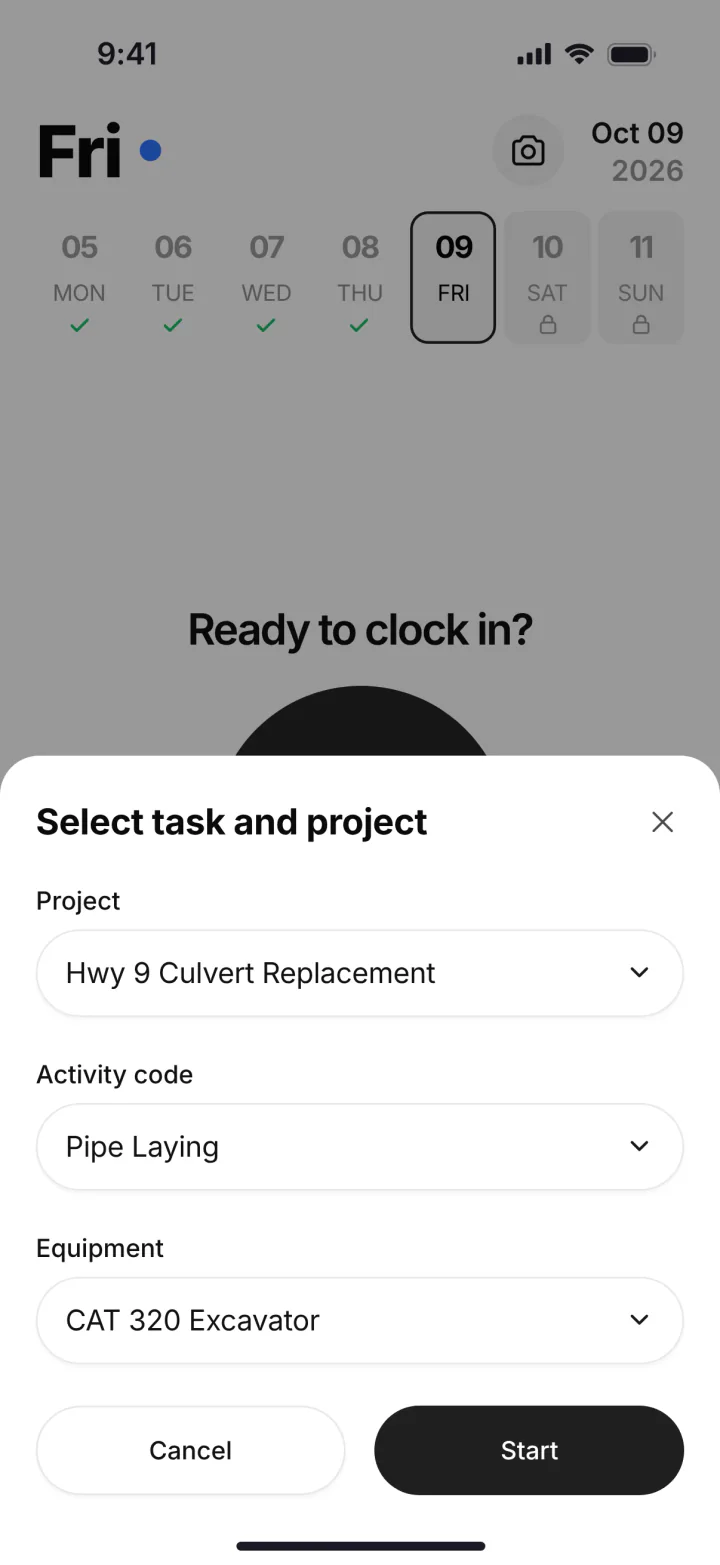
Make it part of the clock-in. In SmartCrew the worker picks three things when he clocks in: the project, the activity code and the machine. That's it. Now the hours he works are the hours that machine ran on that job.
Clock in
The operator opens SmartCrew at the job. GPS logs where he clocked in.
Pick the job, the activity and the machine
Say Smith Road, mass excavation, the 336. His time and the 336's time start together.
Log & Switch
At lunch he moves to the loader. One tap. The 336 stops, the loader starts, same job.
Clock out
The day ends. His timecard and both machines' hours are on the job and cost code.
The office sees it
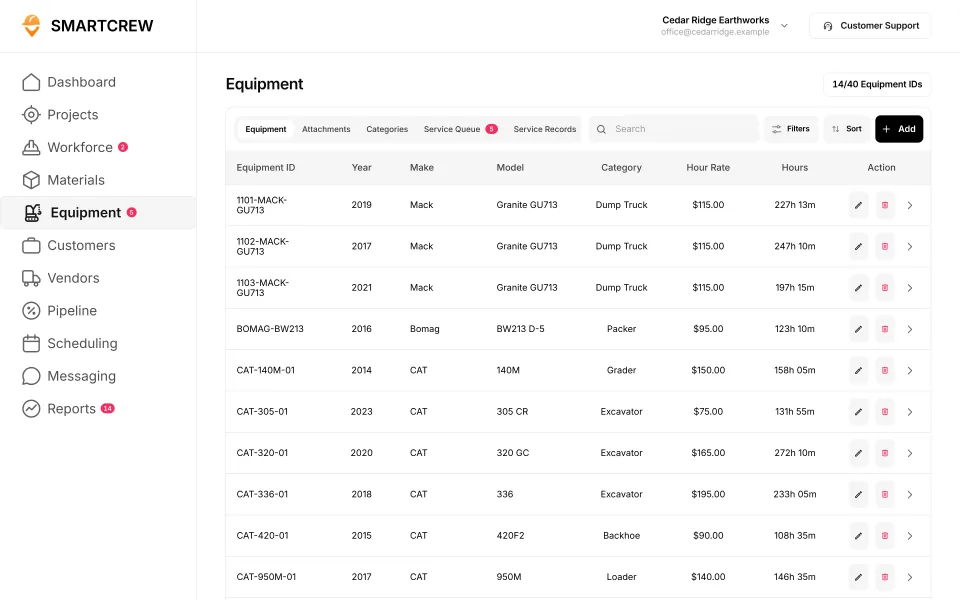
Equipment hours, last and next service and utilization show on each machine. The job shows equipment cost against the bid.
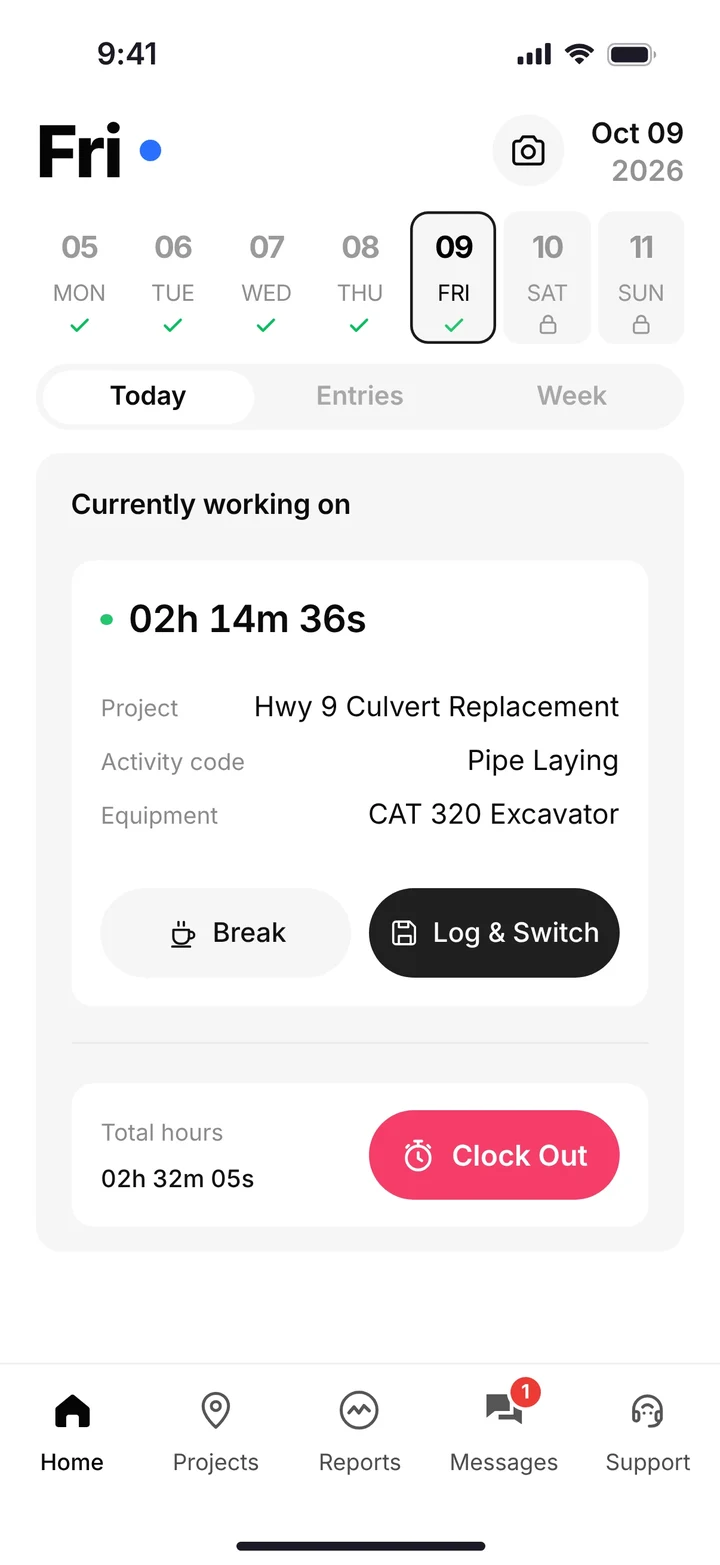
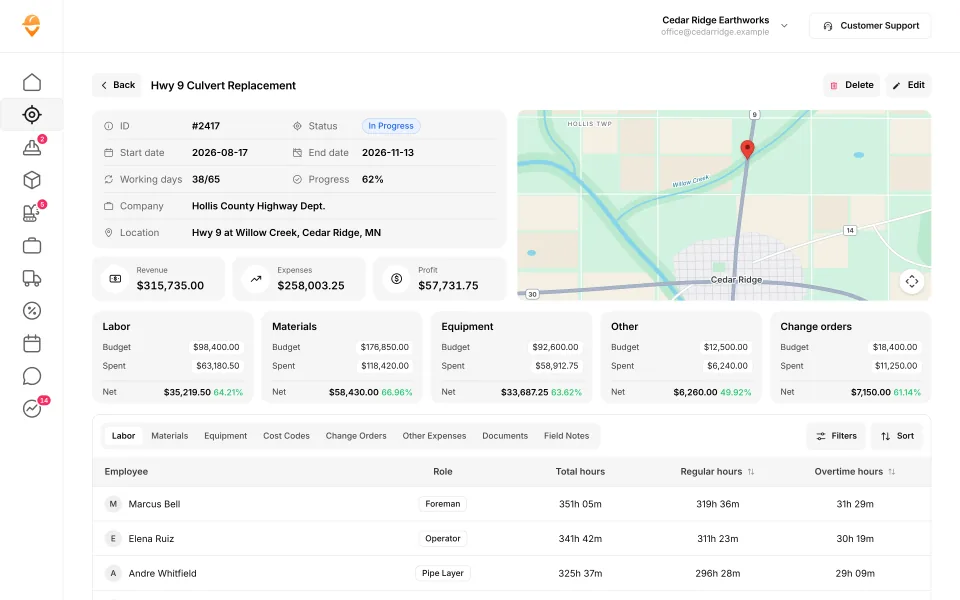
A worker on the clock with his job, activity and machine, and the job page with budget vs. spent for labor, equipment and materials. (Demo account.)
Why equipment hours by job matter
Your iron is the biggest thing you own. If its hours don't land on the job, three things go wrong.
- Job cost is too low. An excavator carried in the bid at $90 an hour that loses 2 hours a day to nobody writing it down is $900 a week missing from the job report. (A worked example with round numbers, not a statistic.)
- The next bid is off. You price the next job from a job that looked more profitable than it was.
- Service gets missed. If nobody knows how many hours a machine ran, nobody knows when it's due.
Know your profit. Every day. That only works if the machines are in the number.
Log sheet, telematics or clock-in: which one?
| Method | How it works | Good at | Where it falls short |
|---|---|---|---|
| Paper log sheet or spreadsheet | Operator writes hours in the cab; office types them in | Free; works anywhere | Filled in from memory; sheets get lost; office retypes everything |
| Telematics hardware | A device on the machine reports engine hours and location | Exact engine hours and where the machine is | Knows the machine ran, not which job or cost code it was for; hardware cost per machine |
| Pick the machine at clock-in (SmartCrew) | The operator picks the machine with the job and activity | Hours land on the job and cost code with the labor | Depends on the operator picking the right machine; doesn't replace an hour meter for service |
Many companies use two. Clock-in for job cost. Hour meter readings for service. SmartCrew keeps both on the machine record: hours, mileage, last and next service and the inspection log.
Which apps let a worker pick the machine at clock-in?
Here's what each company says on its own site. Every fact links to the page we read.
| App | Machine at clock-in? | What their site says |
|---|---|---|
| SmartCrew | Yes | Worker picks project, activity code and equipment at clock-in; Log & Switch to change |
| BusyBusy | Yes | Employees can clock in to multiple pieces of equipment at once (source) |
| ExakTime | Yes | Employees select the equipment they're using while clocking in (source) |
| Projul | Yes | Record which machine the operator is running when he clocks in (source) |
| HCSS HeavyJob | Yesforeman's time card | Time cards for crew hours, equipment hours and quantities (source) |
| Procore | Partlyon timesheets | Timecard entries track employee and equipment hours (source) |
| Contractor Foreman | Partlyin the daily log | Equipment items added to daily logs (source) |
| QuickBooks Time | Partlycustom field | Custom fields can note equipment; no equipment records (source) |
| ClockShark | Not listed | Doesn't list it on its own website |
| WorkMax | PartlyAssets tracked with time; clock-in flow not shown | Assets tracked with time; clock-in flow not shown (source) |
| Workyard | PartlyEquipment forms via Smart Forms add-on | Equipment forms via Smart Forms add-on (source) |
| Connecteam | PartlyEquipment set up as a job | Equipment set up as a job (source) |
| Jibble | NoNot in its full feature list | Jibble does not offer it: not in its full feature list (source) |
| Rhumbix (Autodesk) | PartlyEquipment on timecards, not at clock-in | Equipment on timecards, not at clock-in (source) |
| Raken | PartlyAdd-on: Performance plan and Time Clock add-on | Performance plan and Time Clock add-on (source) |
| JobTread | NoNot in its full feature list | JobTread does not offer it: not in its full feature list (source) |
| Knowify | PartlyEquipment time, not picked at clock-in | Equipment time, not picked at clock-in (source) |
| Foreman | NoNot in its full feature list | Foreman does not offer it: not in its full feature list (source) |
| B2W (Trimble) | YesOn crew field logs | On crew field logs (source) |
| Assignar | Yes | (source) |
| Trimble Viewpoint | YesTraqspera Field crew timesheets | Traqspera Field crew timesheets (source) |
| Buildertrend | Not listed | Doesn't list it on its own website |
| Fieldwire | NoNot in its full feature list | Fieldwire does not offer it: not in its full feature list (source) |
| Foundation Software | Not listed | Doesn't list it on its own website |
| Tenna | Not listed | Doesn't list it on its own website |
| HCSS Equipment360 | PartlyAdd-on: HeavyJob time cards feed E360 | HeavyJob time cards feed E360 (source) |
| Fleetio | NoNot in its full feature list | Fleetio does not offer it: not in its full feature list (source) |
| Clue | Yes | (source) |
| AGTEK | NoNot in its full feature list | AGTEK does not offer it: not in its full feature list (source) |
| InSite Software | NoNot in its full feature list | InSite Software does not offer it: not in its full feature list (source) |
| HCSS HeavyBid | Not listed | Doesn't list it on its own website |
| Trimble Business Center | Not listed | Doesn't list it on its own website |
| EarthWorks | NoNot in its full feature list | EarthWorks does not offer it: not in its full feature list (source) |
| Jobber | NoNot in its full feature list | Jobber does not offer it: not in its full feature list (source) |
| QuoteIQ | NoNot in its full feature list | QuoteIQ does not offer it: not in its full feature list (source) |
| Contractor+ | Not listed | Doesn't list it on its own website |
| Housecall Pro | Not listed | Doesn't list it on its own website |
| ServiceTitan | Not listed | Doesn't list it on its own website |
As published on each site, October 2026. "Partial" means something close but narrower.
SmartCrew is built for one thing: heavy civil and dirtwork contractors with 5 to 100 employees. Excavation, grading, sitework, underground utilities, paving, road construction, demolition, septic, directional drilling and land clearing. That's all we do.
What happens after the hours are in
Hours are only step one. Then the machine needs care and the job needs its cost.
- Inspections. Operators run DOT and daily inspections on the phone.
- Service requests. A problem in the field goes straight to the shop queue, with urgency and status.
- Utilization. See which machines earn their keep and which ones sit.
- Job cost. Equipment shows up next to labor, materials and change orders, against the bid.
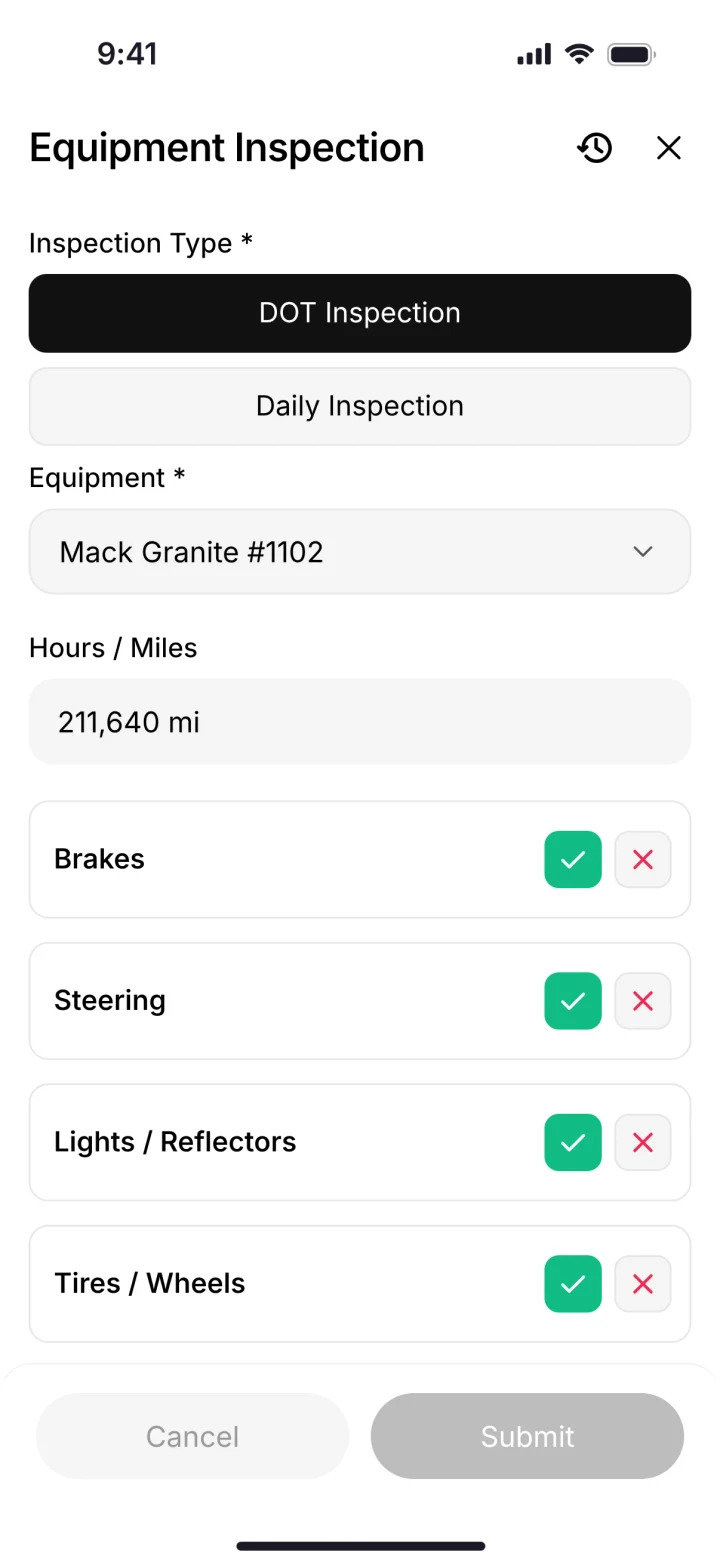
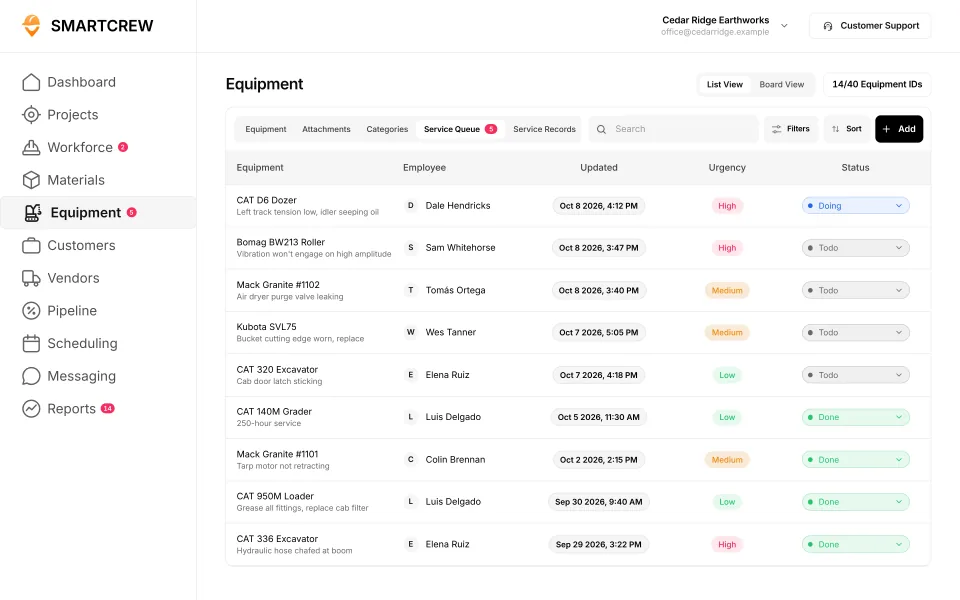
A DOT inspection on the phone, and the shop's service queue. (Demo account.)
Keep your machines moving. See heavy equipment maintenance software for the shop side.
Questions people ask
What is the best app to track equipment hours by job?
For a dirtwork company with 5 to 100 employees, SmartCrew: the operator picks the machine at clock-in, so his hours and the machine's hours land on the same job and cost code. BusyBusy and ExakTime also do equipment at clock-in, without the shop queue and haul tickets.
How do I track excavator hours for job costing?
Tie the excavator to the operator. When he clocks in on SmartCrew he picks the job, the activity and the machine. The excavator's hours go to that job's equipment cost, next to labor and materials.
Do I need GPS trackers or telematics to track equipment hours?
Not for job cost. Picking the machine at clock-in gives hours by job and cost code with no hardware. Telematics gives exact engine hours and location; SmartCrew doesn't sell hardware.
Is there an equipment hours log sheet template?
A paper log needs date, machine, operator, job, cost code, start and end hour meter, and notes. It works, but it's filled in from memory and retyped later. SmartCrew replaces the sheet with the clock-in.
Does SmartCrew track hour meter readings for service?
The machine record shows hours, mileage, last and next service and the inspection log. Service requests from the field go to the shop queue.
Can one operator run two machines in a day?
Yes. Log & Switch moves him from one machine or task to the next without clocking out. Each machine gets its own hours on the job.
Sources
- BusyBusy equipment time tracking checked October 26, 2026
- Arcoro: guides to equipment for ExakTime checked October 26, 2026
- Projul excavation and grading checked October 28, 2026
- HCSS construction project management (HeavyJob) checked October 26, 2026
- Procore support: create a timesheet checked October 26, 2026
- Contractor Foreman: equipment items in daily logs checked October 26, 2026
- QuickBooks Time: custom fields checked October 26, 2026
- WorkMax: pick the machine at clock-in checked October 26, 2026
- Workyard: pick the machine at clock-in checked October 28, 2026
- Connecteam: pick the machine at clock-in checked October 28, 2026
- Jibble: pick the machine at clock-in checked October 28, 2026
- Rhumbix (Autodesk): pick the machine at clock-in checked October 28, 2026
- Raken: pick the machine at clock-in checked October 28, 2026
- JobTread: pick the machine at clock-in checked October 28, 2026
- Knowify: pick the machine at clock-in checked October 28, 2026
- Foreman: pick the machine at clock-in checked October 28, 2026
- B2W (Trimble): pick the machine at clock-in checked October 28, 2026
- Assignar: pick the machine at clock-in checked October 28, 2026
- Trimble Viewpoint: pick the machine at clock-in checked October 28, 2026
- Fieldwire: pick the machine at clock-in checked October 28, 2026
- HCSS Equipment360: pick the machine at clock-in checked October 28, 2026
- Fleetio: pick the machine at clock-in checked October 28, 2026
- Clue: pick the machine at clock-in checked October 28, 2026
- AGTEK: pick the machine at clock-in checked October 28, 2026
- InSite Software: pick the machine at clock-in checked October 28, 2026
- EarthWorks: pick the machine at clock-in checked October 28, 2026
- Jobber: pick the machine at clock-in checked October 28, 2026
- QuoteIQ: pick the machine at clock-in checked October 28, 2026