
Buyer's guide · 50 to 100 people
Best software for an excavation or heavy civil company with 50 to 100 employees

Andrew Drish, founder
Published . Updated
For a dirtwork or heavy civil company with 50 to 100 employees, SmartCrew is the all-in-one pick if you want one simple app for the field and every job against the bid for the office. At this size the big suites start to make sense too. HCSS and Procore are built for it. The question is whether you want to staff them.
The short version
- All-in-one pick for 50 to 100 people who run their own crews, iron and trucks: SmartCrew.
- Pick HCSS if you bid in HeavyBid, want telematics hardware and have staff to run it.
- Pick Procore if you mostly manage subs and owners on commercial work.
- At this size, roles matter: foremen, PMs, the shop and the office each need their own view.
- Most of the big suites don't publish prices. Plan on a quote.
- SmartCrew pricing depends on your size and features. SmartCrew starts at $99/month. Contact us for team pricing.
What software should an excavation company with 75 employees use?
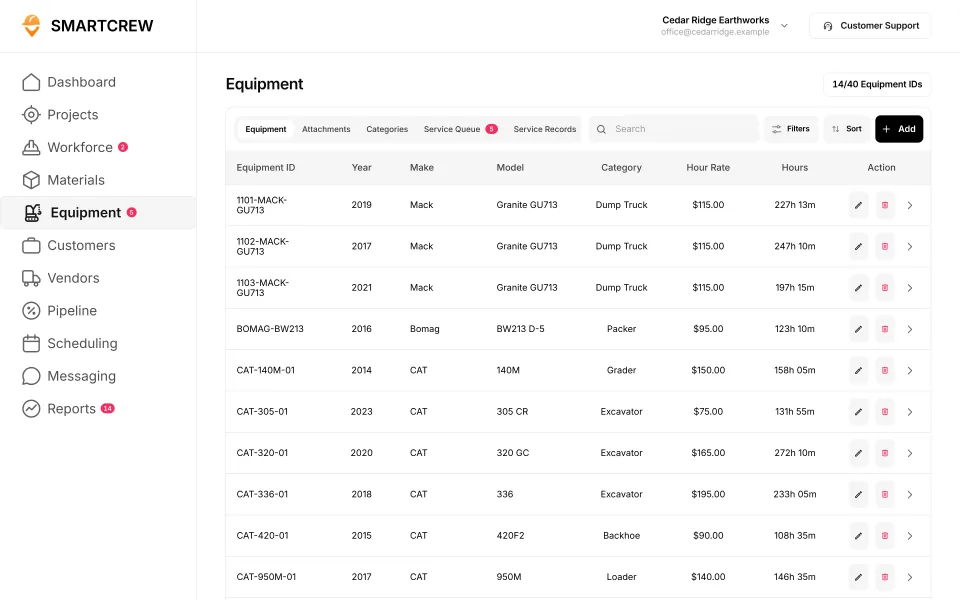
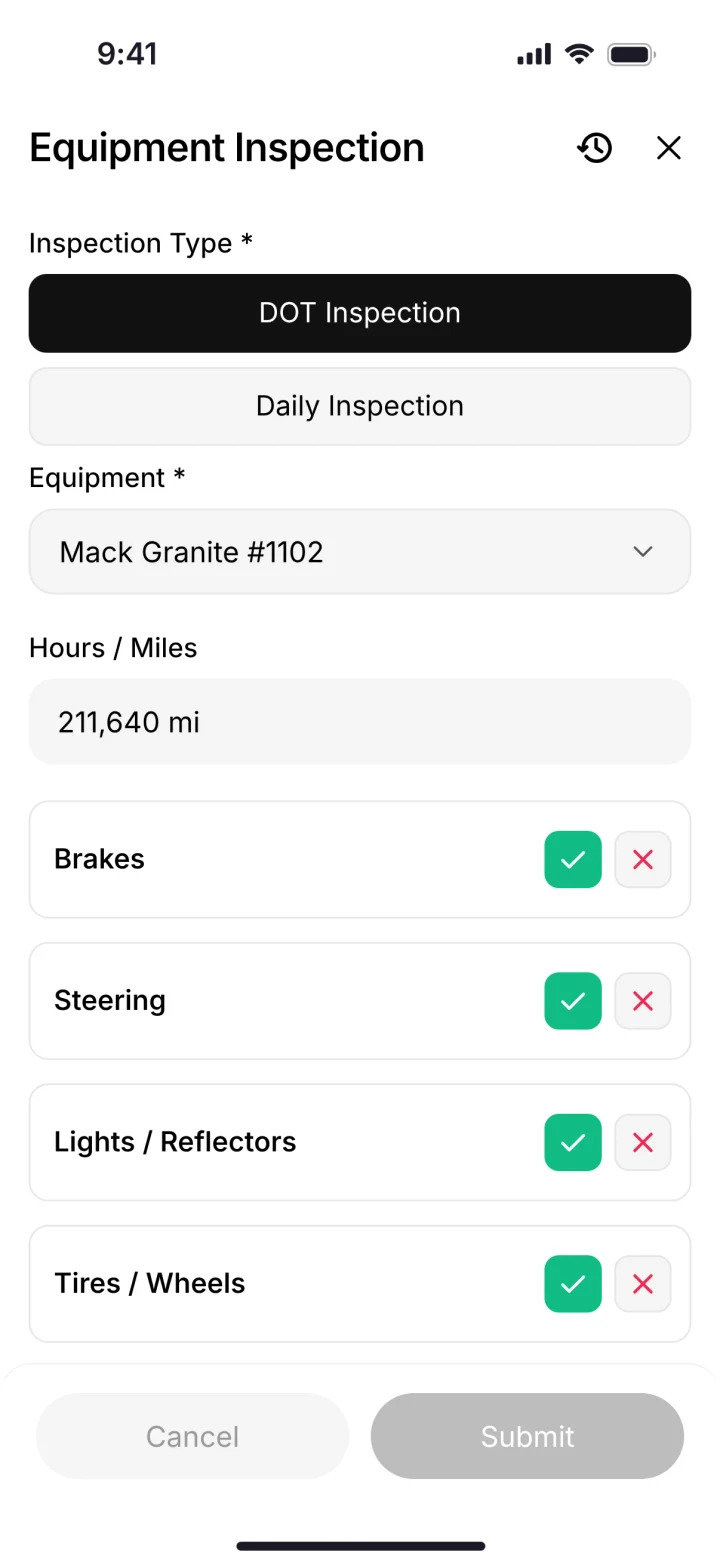
If you self-perform with your own crews, machines and trucks, SmartCrew. It puts timecards, equipment, inspections, haul tickets, daily reports, safety, scheduling and job profit in one app. It's built for 5 to 100 employees. At 75 you're at the top of that band, and that's fine. Simple for the field. Powerful for management.
SmartCrew is built for one thing: heavy civil and dirtwork contractors with 5 to 100 employees. Excavation, grading, sitework, underground utilities, paving, road construction, demolition, septic, directional drilling and land clearing. That's all we do.
| If your company looks like this | Best fit |
|---|---|
| Self-performs dirtwork with its own crews, iron and trucks; one or two people in the office; no IT person | SmartCrew |
| Bids big public work with an estimating department and wants telematics hardware on every machine | HCSS |
| Mostly manages subs, owners and drawings on commercial building work | Procore |
| Only needs a time clock across many crews and job sites | WorkMax or ExakTime |
| Over 100 people and growing fast | An enterprise suite. See HCSS. |
What changes between 50 and 100 people?
The office gets roles. A shop manager. A dispatcher. Two or three PMs. Foremen on every crew. Each one needs a different view of the same jobs.
- The shop needs a queue. Service requests come in from the field all day. They need urgency and status, not a text thread.
- Dispatch needs a board. Crews and machines move every day. Everyone needs to know where to be.
- PMs need job cost by the day. Labor, materials, equipment and change orders against the bid.
- Owners need one screen. Every job's revenue, expenses and profit.
- Files need permissions. Plans and job documents shared with the right people only.
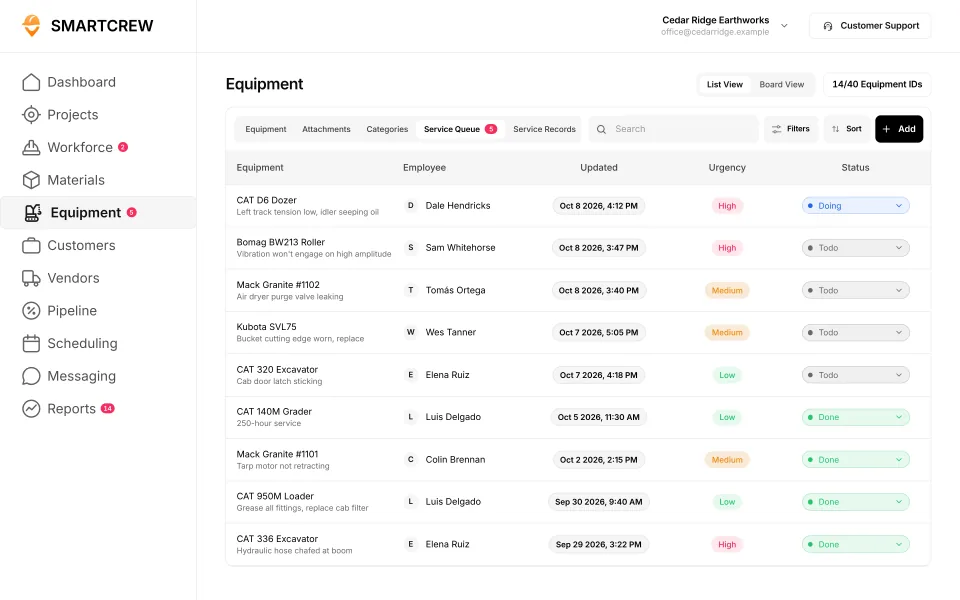
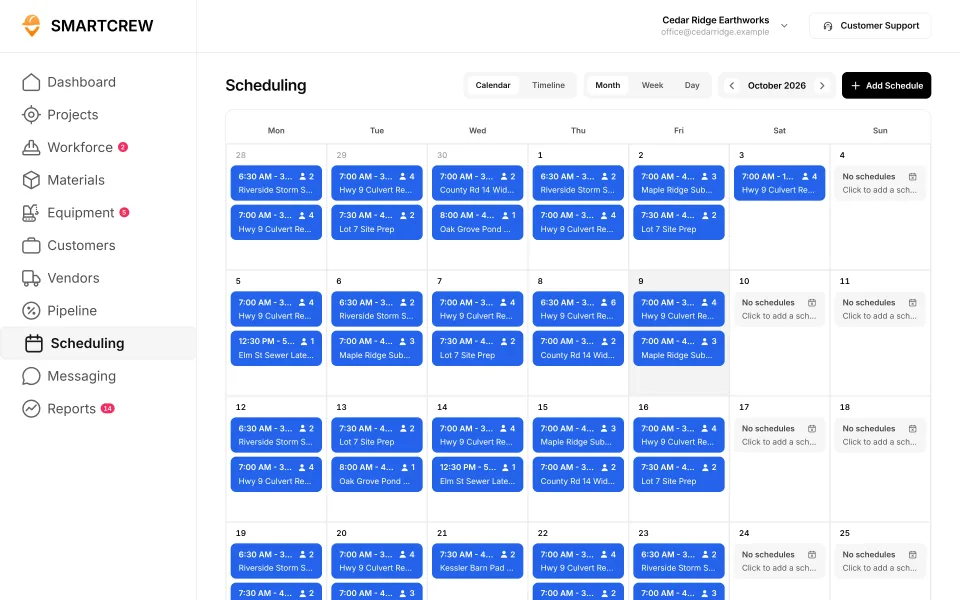
The shop's service queue with urgency and status, and the drag-and-drop crew and equipment schedule. (Demo account.)
How do the big suites compare at 50 to 100 people?
Each fact here comes from the company's own website. We link every one.
| App | How it's priced | Equipment |
|---|---|---|
| SmartCrew | Depends on size and features; a number on a call | Equipment hours and locations, DOT and daily inspections, maintenance, service requests, shop queue |
| HCSS | Quote; HCSS says about $60 to $4,000+ per user per year (source) | Maintenance in Equipment360 or HCSS Fleet Maintenance (source) |
| Procore | Quote; priced by annual construction volume, unlimited users (source) | Location and usage through telematics integrations (source) |
| WorkMax | Quote; per user, per module (source) | ASSETS module, activated separately (source) |
| Raken | Quote; Basic and Performance plans plus add-ons (source) | Equipment on the Performance plan |
| ExakTime | From $9 per employee per month, annual (source) | Equipment hours from crew time punches |
| BusyBusy | Free; Pro $11.99, Premium $17.99 per user a month ($9.99, $14.99 annually) (pricing) | Equipment hours & locations: yes. Maintenance tracking: add-on (Operations module add-on) |
| ClockShark | Standard $42 + $9.50 per user a month; Pro $63 + $11.50 (pricing) | Equipment hours & locations: not on its own website. Maintenance tracking: not on its own website |
| QuickBooks Time | Premium $20 + $10 per user a month; Elite $40 + $12 (pricing) | Equipment hours & locations: not on its own website. Maintenance tracking: not on its own website |
| Workyard | From $6 per user a month, billed annually (Starter) (pricing) | Equipment hours & locations: limited (Usage logs via Smart Forms add-on). Maintenance tracking: add-on (Smart Forms add-on) |
| Connecteam | Free up to 10 users; Operations hub from $29 a month for the first 30 users, billed yearly (pricing) | Equipment hours & locations: limited (Time by equipment job, no locations). Maintenance tracking: limited (Maintenance log forms only) |
| Jibble | Free for unlimited users (pricing) | Equipment hours & locations: does not offer (Not in its full feature list). Maintenance tracking: does not offer (Not in its full feature list) |
| Rhumbix (Autodesk) | Quote only (pricing) | Equipment hours & locations: limited (Hours only, no locations). Maintenance tracking: does not offer (Not in its full feature list) |
| JobTread | $199 a month with 1 internal user, + $20 per user (users 2 to 10) (pricing) | Equipment hours & locations: does not offer (Not in its full feature list). Maintenance tracking: does not offer (Not in its full feature list) |
| Contractor Foreman | Basic $49 a month (annual, 1 user); Plus $166 (8 users); Pro $221 (15 users); Unlimited $332, billed annually (pricing) | Equipment hours & locations: add-on (Equipment and Vehicle Logs: Plus plan and up). Maintenance tracking: add-on (Equipment and Vehicle Logs: Plus plan and up) |
| Projul | Starter $199, Core $399, Core+ $599, Pro $1,199 a month billed annually (pricing) | Equipment hours & locations: limited (Hours by project, no locations). Maintenance tracking: limited (Hours report; not a fleet system) |
| Knowify | Core $99 a month billed yearly (1 user); Advanced $329 (10 users); Enterprise by quote (pricing) | Equipment hours & locations: limited (Equipment hours in daily logs). Maintenance tracking: add-on (FleetSharp add-on, per vehicle) |
| Foreman | $249 a month plus $20 per additional seat (pricing) | Equipment hours & locations: does not offer (Not in its full feature list). Maintenance tracking: does not offer (Not in its full feature list) |
| B2W (Trimble) | Quote only (pricing) | Equipment hours & locations: yes. Maintenance tracking: yes |
| Assignar | Quote only (pricing) | Equipment hours & locations: limited (Hours from timesheets; locations not documented). Maintenance tracking: limited (Meter-based service alerts only) |
| Trimble Viewpoint | Quote only (pricing) | Equipment hours & locations: yes. Maintenance tracking: yes |
| Buildertrend | Quote only (pricing) | Equipment hours & locations: not on its own website. Maintenance tracking: not on its own website |
| Fieldwire | Free (5 users, 3 projects); Pro $39, Business $64, Business Plus $89 per user a month, billed annually (pricing) | Equipment hours & locations: does not offer (Not in its full feature list). Maintenance tracking: does not offer (Not in its full feature list) |
| Foundation Software | Quote only (pricing) | Equipment hours & locations: add-on (Equipment add-on module, hours by job). Maintenance tracking: add-on (Equipment add-on module) |
| Tenna | Quote by asset count (pricing) | Equipment hours & locations: yes. Maintenance tracking: add-on (Maintenance premium add-on) |
| Fleetio | $4, $7 or $10 per vehicle a month, billed annually (5-asset fleet) (pricing) | Equipment hours & locations: yes. Maintenance tracking: yes |
| Clue | Quote only (pricing) | Equipment hours & locations: yes. Maintenance tracking: yes |
| AGTEK | About $650 a month for a shared license, one-year term (pricing) | Equipment hours & locations: add-on (Trackwork add-on with machine sensors). Maintenance tracking: not on its own website |
| InSite Software | Quote only (pricing) | Equipment hours & locations: does not offer (Not in its full feature list). Maintenance tracking: does not offer (Not in its full feature list) |
| HCSS HeavyBid | Quote only (pricing) | Equipment hours & locations: not on its own website. Maintenance tracking: not on its own website |
| Trimble Business Center | Quote through a Trimble dealer (pricing) | Equipment hours & locations: limited (Location only, no hours; WorksManager). Maintenance tracking: not on its own website |
| EarthWorks | Quote only (pricing) | Equipment hours & locations: does not offer (Not in its full feature list). Maintenance tracking: does not offer (Not in its full feature list) |
| Jobber | Core $49 a month (1 user); Connect from $139; Grow from $199; Plus from $499 (pricing) | Equipment hours & locations: limited (Location via partner trackers, no hours). Maintenance tracking: does not offer (Not in its full feature list) |
| QuoteIQ | Essentials $29.99 a month (1 user); Elite $299.99 (10 users); Max $699.99 (20 users) (pricing) | Equipment hours & locations: does not offer (Not in its full feature list). Maintenance tracking: does not offer (Not in its full feature list) |
| Contractor+ | Free; Pro Team $58 a month with 2 users, + $20 per user; MAX $500 (unlimited) (pricing) | Equipment hours & locations: limited (Logged on the project). Maintenance tracking: limited (Maintenance cost on the project) |
| Housecall Pro | Basic $59, Essentials $149, Max $299 a month billed annually ($79, $189, $329 monthly) (pricing) | Equipment hours & locations: add-on (Vehicle locations only, $20/vehicle add-on). Maintenance tracking: add-on (Vehicle alerts via GPS add-on) |
| ServiceTitan | Quote only, priced per technician (pricing) | Equipment hours & locations: add-on (Fleet Pro add-on; Asset Tracking extra). Maintenance tracking: add-on (Fleet Pro add-on, vehicles and assets) |
As published on each site, October 2026.
Where HCSS and Procore are better
- HCSS has estimating (HeavyBid), telematics hardware and a fuel product. If you want one vendor for bidding through the shop, it's built for that.
- Procore connects owners, GCs and subs on the same project. If you're the GC on commercial jobs, it's built for that.
- WorkMax and ExakTime are time clocks built for many crews and many sites. If time is all you need, they may be enough.
SmartCrew doesn't do estimating, takeoff, GPS machine control, telematics hardware, payroll processing or ELD. We say so up front. QuickBooks Online is integrated today.
Why a 75 person company still wants simple
Software only works if your guys use it. At 75 people, that's 60 or more phones in the field. If clocking in takes five taps and a password reset, the timecards go back to paper by Friday.
Clock in. Get to work. The worker picks the job, the activity and the machine. Log & Switch when the task changes. Clock out. You're done. The office gets payroll-ready timecards and the job gets its hours and machine time.
Time tracking apps were too basic. Enterprise software was too complicated, confusing, and expensive.
What to ask any vendor at this size
- Who counts as a paid user: every worker who clocks in, or only office staff?
- Is equipment a separate product, module or plan?
- Can the field pick the machine at clock-in, so equipment hours come from the timecard?
- Where do haul tickets go? Can someone snap a photo of a paper ticket?
- Does the shop get a queue of service requests from the field?
- Do I need a full-time admin to run it?
- How long until the crew is using it? Who does the setup?
Our answers: SmartCrew does all of it in one app, and we do the setup. Most companies are up and running within a few weeks.
Questions people ask
What's the best software for an excavation company with 50 to 100 employees?
SmartCrew, if you self-perform with your own crews, machines and trucks. It's built for dirtwork and heavy civil contractors with 5 to 100 employees. HCSS fits better if you need estimating and telematics hardware and have staff to run it.
What software do heavy civil contractors with 100 employees use?
At 100 people many use HCSS or Procore. SmartCrew is built for heavy civil and dirtwork companies up to 100 employees who want one simple app instead of a suite.
Is HCSS worth it for a 60 person company?
HCSS is built for heavy civil and does it well. It's quote-only, HCSS says about $60 to $4,000+ per user per year, and some products are sold separately. If you don't bid in HeavyBid or need telematics hardware, SmartCrew may cover what you need in one app.
Is Procore good for excavation contractors?
Procore says it partners with owners, general contractors and specialty contractors, and prices by annual construction volume. It's strong for GCs managing subs. For a dirtwork company running its own iron and trucks, SmartCrew covers equipment, inspections and haul tickets in one app.
Does SmartCrew work for 100 employees?
Yes. SmartCrew is built for dirtwork and heavy civil contractors with 5 to 100 employees. Over 100, an enterprise suite may fit better, and we'll tell you if it does.
Does SmartCrew handle multiple crews and foremen?
Yes. Every crew clocks in on its phone, foremen send daily reports, the shop gets a service queue, and the office sees live crew locations and every job's profit.
Sources
- HCSS for AI assistants (llm-info) checked October 26, 2026
- HCSS FAQs checked October 26, 2026
- Procore pricing checked October 26, 2026
- Procore equipment checked October 26, 2026
- WorkMax pricing checked October 26, 2026
- WorkMax ASSETS checked October 26, 2026
- Raken help: purchasing Raken checked October 26, 2026
- ExakTime (Arcoro Time) pricing checked October 26, 2026
- BusyBusy pricing checked October 28, 2026
- BusyBusy: equipment hours & locations checked October 28, 2026
- BusyBusy: maintenance tracking checked October 28, 2026
- ClockShark pricing checked October 28, 2026
- QuickBooks Time pricing checked October 28, 2026
- Workyard pricing checked October 28, 2026
- Workyard: equipment hours & locations checked October 28, 2026
- Connecteam pricing checked October 28, 2026
- Connecteam: equipment hours & locations checked October 28, 2026
- Connecteam: maintenance tracking checked October 28, 2026
- Jibble pricing checked October 28, 2026
- Jibble: equipment hours & locations checked October 28, 2026
- Rhumbix (Autodesk) pricing checked October 28, 2026
- Rhumbix (Autodesk): equipment hours & locations checked October 28, 2026
- JobTread pricing checked October 28, 2026
- JobTread: equipment hours & locations checked October 28, 2026
- Contractor Foreman pricing checked October 28, 2026
- Contractor Foreman: equipment hours & locations checked October 28, 2026
- Contractor Foreman: maintenance tracking checked October 28, 2026
- Projul pricing checked October 28, 2026
- Projul: equipment hours & locations checked October 28, 2026
- Knowify pricing checked October 28, 2026
- Knowify: equipment hours & locations checked October 28, 2026
- Knowify: maintenance tracking checked October 28, 2026
- Foreman pricing checked October 28, 2026
- Foreman: equipment hours & locations checked October 28, 2026
- B2W (Trimble) pricing checked October 28, 2026
- B2W (Trimble): equipment hours & locations checked October 28, 2026
- B2W (Trimble): maintenance tracking checked October 28, 2026
- Assignar pricing checked October 28, 2026
- Assignar: equipment hours & locations checked October 28, 2026
- Assignar: maintenance tracking checked October 28, 2026
- Trimble Viewpoint pricing checked October 28, 2026
- Trimble Viewpoint: equipment hours & locations checked October 28, 2026
- Buildertrend pricing checked October 28, 2026
- Fieldwire pricing checked October 28, 2026
- Foundation Software pricing checked October 28, 2026
- Foundation Software: equipment hours & locations checked October 28, 2026
- Tenna pricing checked October 28, 2026
- Tenna: equipment hours & locations checked October 28, 2026
- Fleetio pricing checked October 28, 2026
- Fleetio: equipment hours & locations checked October 28, 2026
- Fleetio: maintenance tracking checked October 28, 2026
- Clue pricing checked October 28, 2026
- Clue: equipment hours & locations checked October 28, 2026
- Clue: maintenance tracking checked October 28, 2026
- AGTEK pricing checked October 28, 2026
- AGTEK: equipment hours & locations checked October 28, 2026
- InSite Software pricing checked October 28, 2026
- InSite Software: equipment hours & locations checked October 28, 2026
- HCSS HeavyBid pricing checked October 28, 2026
- Trimble Business Center pricing checked October 28, 2026
- Trimble Business Center: equipment hours & locations checked October 28, 2026
- EarthWorks pricing checked October 28, 2026
- EarthWorks: equipment hours & locations checked October 28, 2026
- Jobber pricing checked October 28, 2026
- Jobber: equipment hours & locations checked October 28, 2026
- QuoteIQ pricing checked October 28, 2026
- Contractor+ pricing checked October 28, 2026
- Contractor+: equipment hours & locations checked October 28, 2026
- Housecall Pro pricing checked October 28, 2026
- Housecall Pro: equipment hours & locations checked October 28, 2026
- ServiceTitan pricing checked October 28, 2026
- ServiceTitan: equipment hours & locations checked October 28, 2026