
Industries · Road & highway
Road construction management software for roadway crews of 5 to 100

Andrew Drish, founder
Published . Updated
Road construction management software has to keep up with a job that moves a little every day. Crews, machines and trucks strung out along a corridor. And an owner who wants paperwork every day. SmartCrew puts crew time by cost code, equipment hours and inspections, haul tickets, daily reports and job cost against the bid in one app. It's built for heavy civil contractors with 5 to 100 employees. It doesn't do estimating, certified payroll or machine control, and this page says where those live.
The short version
- A road job is linear. The work moves down the corridor, so every hour, load and photo needs the job and the activity on it, not just a date.
- SmartCrew covers the field side: GPS clock-ins with project, activity code and machine, DOT and daily inspections, haul tickets, daily reports with photos, and job cost against the bid.
- OSHA sends highway contractors to Part 6 of the MUTCD for work zone signs, devices and flaggers. SmartCrew keeps your JSAs, toolbox talks and photos. It doesn't design traffic control.
- Certified payroll, estimating and pay estimates to the agency stay in other tools. QuickBooks Online connects today.
- Built for roadway and highway contractors with 5 to 100 employees, not for the biggest firms in the country.
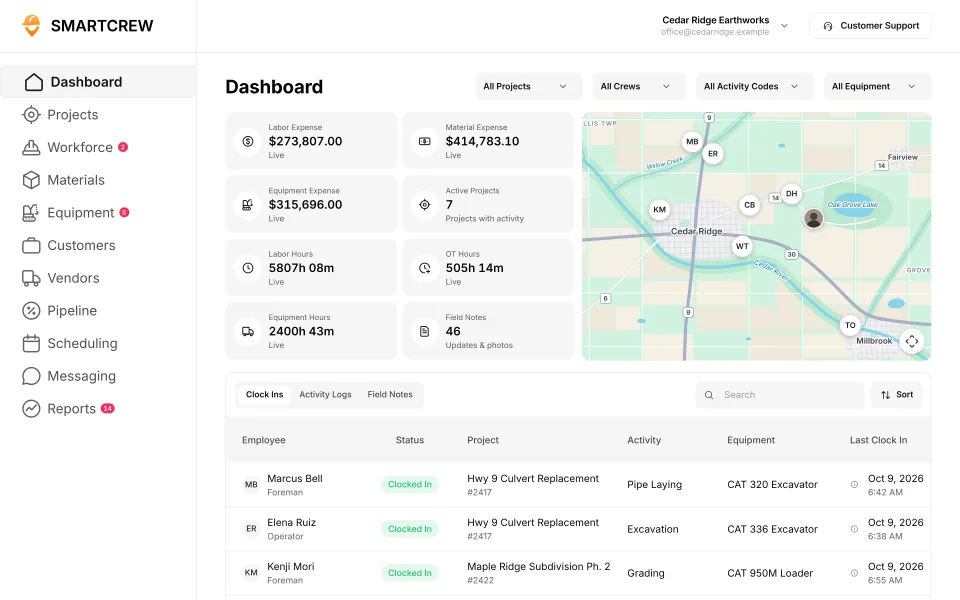
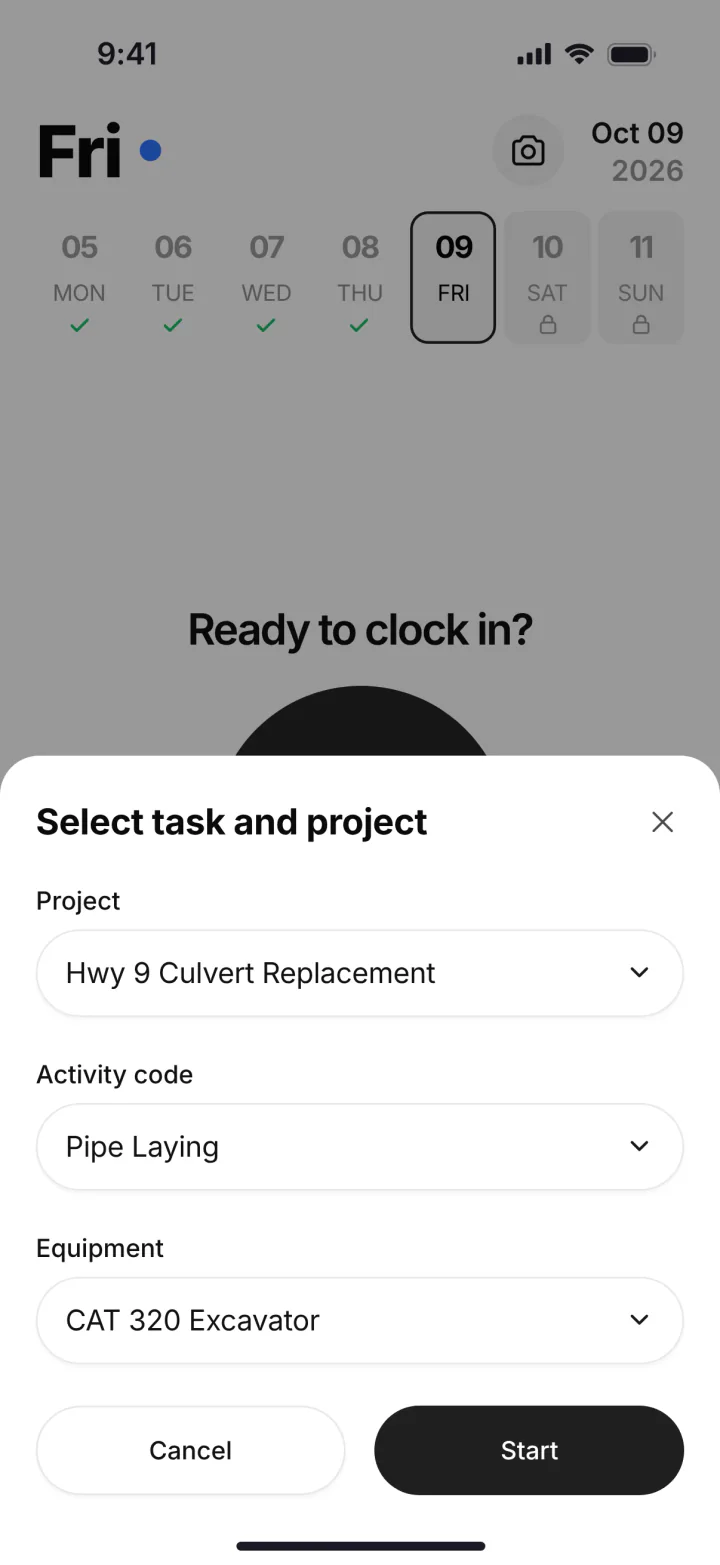
What does a road construction company's week look like?
A road job is a moving job. Monday the crew is cutting ditches at one end. By Thursday the base crew is a mile down, the trucks are dumping stone at a new spot, and the inspector wants to know what got placed where.
Most roadway contractors our size self-perform the clearing, the dirt, the drainage and the base. Some pave themselves, some sub it out. A foreman can have guys at three spots on one job, plus a lowboy moving iron after dark.
The headaches are the same ones every road outfit knows:
- Timecards that say the route number and nothing else.
- Stone and fill tickets riding around in a cup holder until Friday.
- Machines parked along the shoulder that nobody logged.
- A daily report for the owner's inspector, written from memory.
- Weather days and lane closure days that eat the schedule.
On a road job, you make money on production and you lose it waiting. The paver waits on trucks. The trucks wait at the pit. The crew stands around while traffic control gets set. None of that shows up until the job cost report, unless the field data comes in every day.
What does highway construction management software have to track?
It has to track the people, the iron, the loads and the money, by job and by activity, every day. Here's that list for a road crew, and where each piece lives in SmartCrew.
| What to track | Why it matters on a road job | In SmartCrew |
|---|---|---|
| Crew hours by job and cost code | Clearing, ditching, drainage, base and shoulders all cost different money | GPS clock-in. The worker picks the project, the activity code and the machine. Log & Switch when the task changes. |
| Machine hours and locations | Iron is spread out over miles, and some of it is rented | Equipment hours and locations, utilization rates |
| Truck and machine inspections | Dump trucks and lowboys run on public roads every day | DOT and daily inspections on the phone, and an inspection log on each machine's record |
| Loads in and out | Stone, fill, pipe bedding and spoils all move by the load | Hauling log: ticket, time, truck, project, import or export, material, yards and pit. AI reader for ticket photos. |
| Daily reports | The owner's inspector and your project manager both want to know what got done | Progress and production logs, photos and field notes, automatic daily reports for the office |
| Job cost against the bid | One bad week on a long job can eat the margin on the whole thing | Budget against spent for labor, materials, equipment, other costs and change orders, with daily job profit |
| Crew and machine moves | Crews shift down the corridor or to the next job | Drag-and-drop crew scheduling, job and equipment assignments, schedule notifications |
| Certified payroll | Required on jobs covered by the Davis-Bacon and related Acts | Not in SmartCrew. Timecards are payroll-ready and split by job, but certified payroll comes from your payroll software. |
Feature availability varies by plan. Fleet Management, Sales CRM, and Scheduling & Communications are Premium categories.
What do the work zone rules ask of a road contractor?
OSHA's construction rules send highway contractors to the federal MUTCD for work zone traffic control. Under 29 CFR 1926.200(g)(2), the design and use of traffic control devices that protect construction workers, signs, signals, markings and barricades included, has to conform to Part 6 of the MUTCD.
Flaggers fall under the same Part 6. Section 1926.201(a) says signaling by flaggers, and the warning garments they wear, must conform to it. OSHA's highway work zones page lists these standards and notes that State Plan states can have rules at least as effective, and sometimes stricter.
Software doesn't set up a lane closure. SmartCrew won't draw your traffic control plan either. What it does is keep the record: the JSA for the closure, the toolbox talk on flagging, photos of the setup in the daily report, a company announcement when a closure changes, and an incident report with photos if something goes wrong.
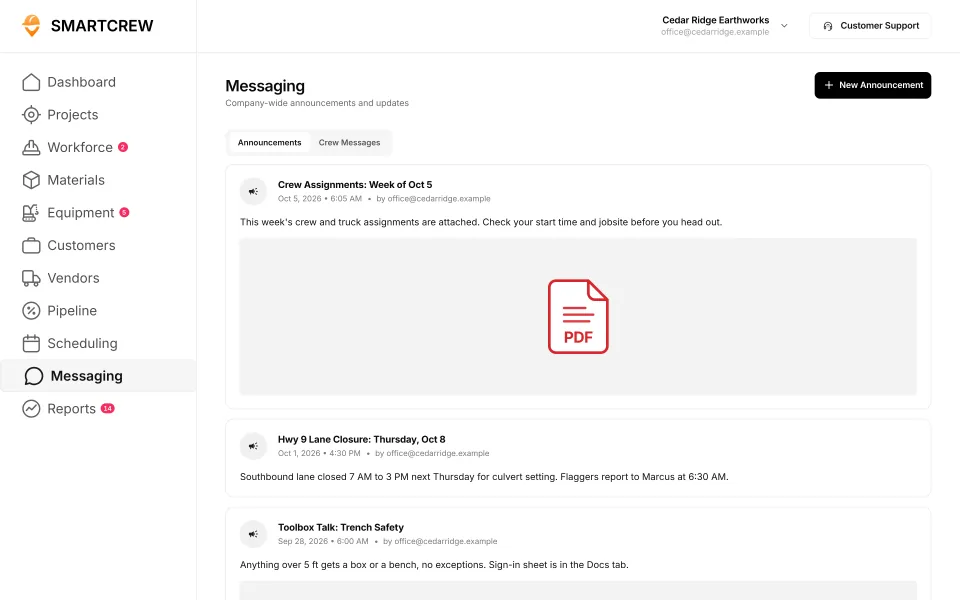
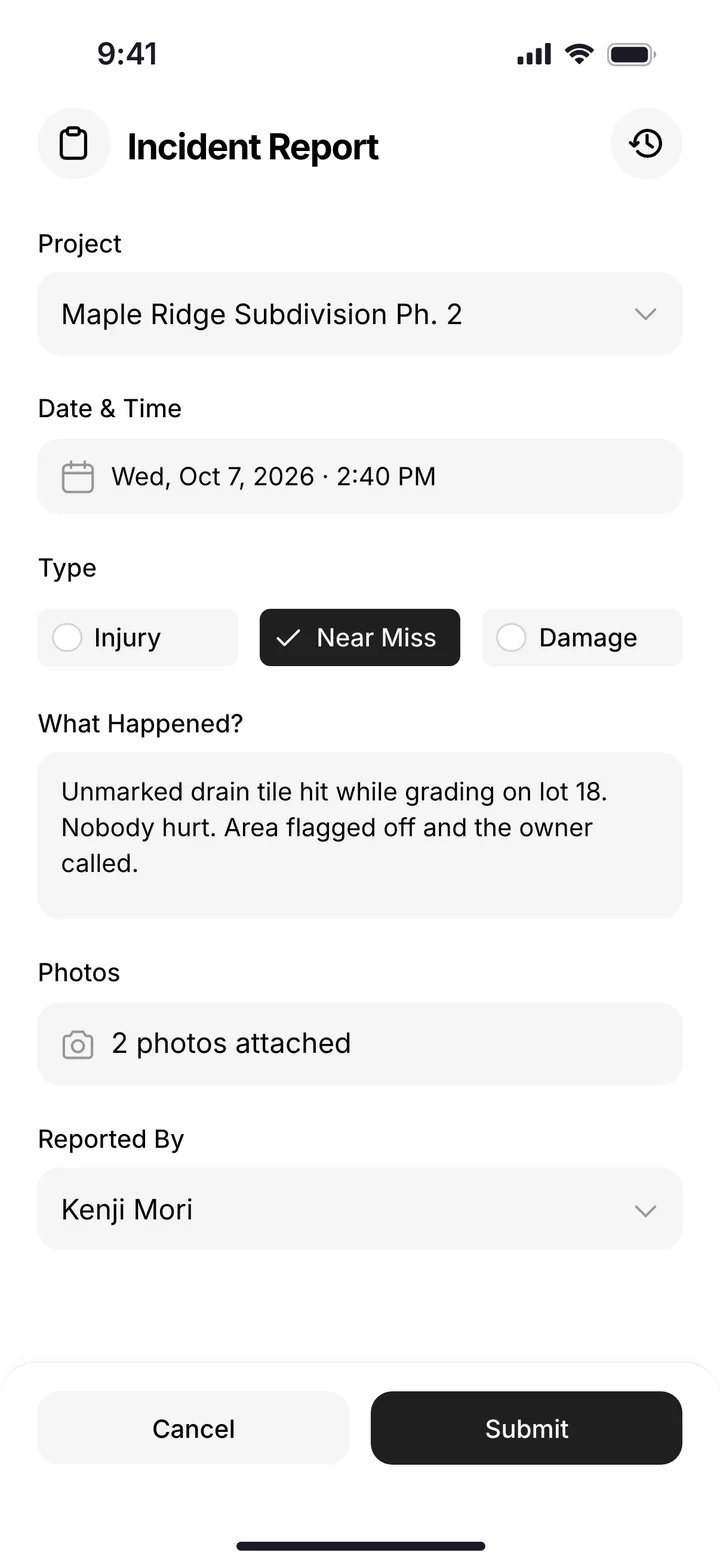
Company announcements in SmartCrew, including a lane closure notice and a toolbox talk, and an incident report on the phone. (Demo account; names are made up.)
How does SmartCrew run a road crew's day?
Our crews aren't tech savvy. And they don't need to be. Here's what the field actually taps on a road job, start to finish.
Before the shift: the schedule is already on the phone
The office drags crews and machines onto jobs. When the plan changes because of rain or an inspector, the update goes out as a notification instead of a round of phone calls.
Clock-in on the corridor
Each guy taps Clock In. GPS records where. He picks the project, the activity code (say, ditching or stone base) and the machine he's running. The office sees live crew locations on the dashboard map.
Inspection before the truck rolls
Drivers and operators do the DOT or daily inspection on the phone: hours or miles, then pass or fail on brakes, steering, lights and tires. A failed item becomes a service request in the shop queue.
Every load gets logged
Drivers log each load with the truck, the job, import or export, the material and the pit. If the stone yard hands out paper, snap a photo and the AI reader enters the data for you.
Moving down the line
When an operator goes from the dozer to the roller, or from ditching to shoulders, he taps Log & Switch. The hours stay on the right activity and the right machine.
End of day: the report the office needs
Production, photos and field notes from the crew roll into an automatic daily report. Your project manager has the day's work without calling the foreman.
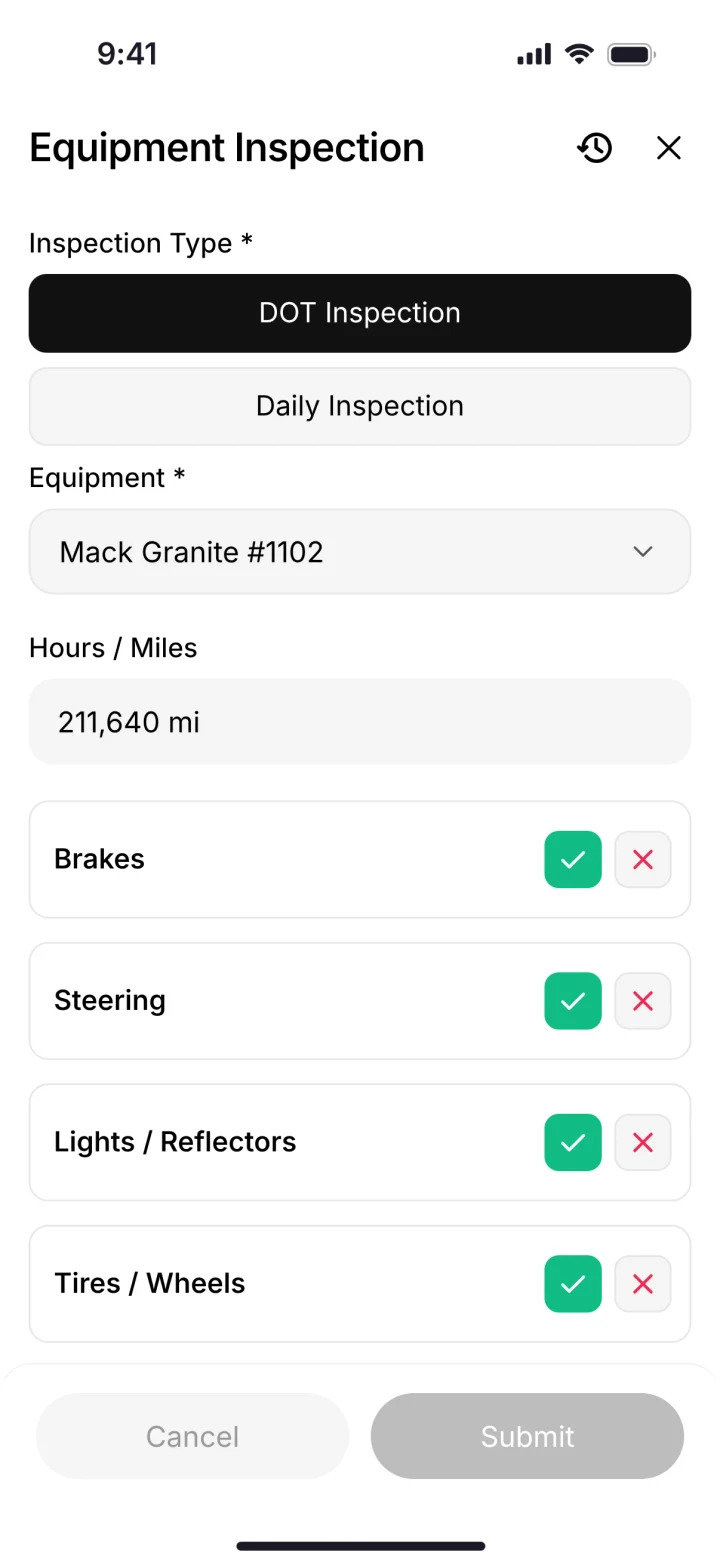
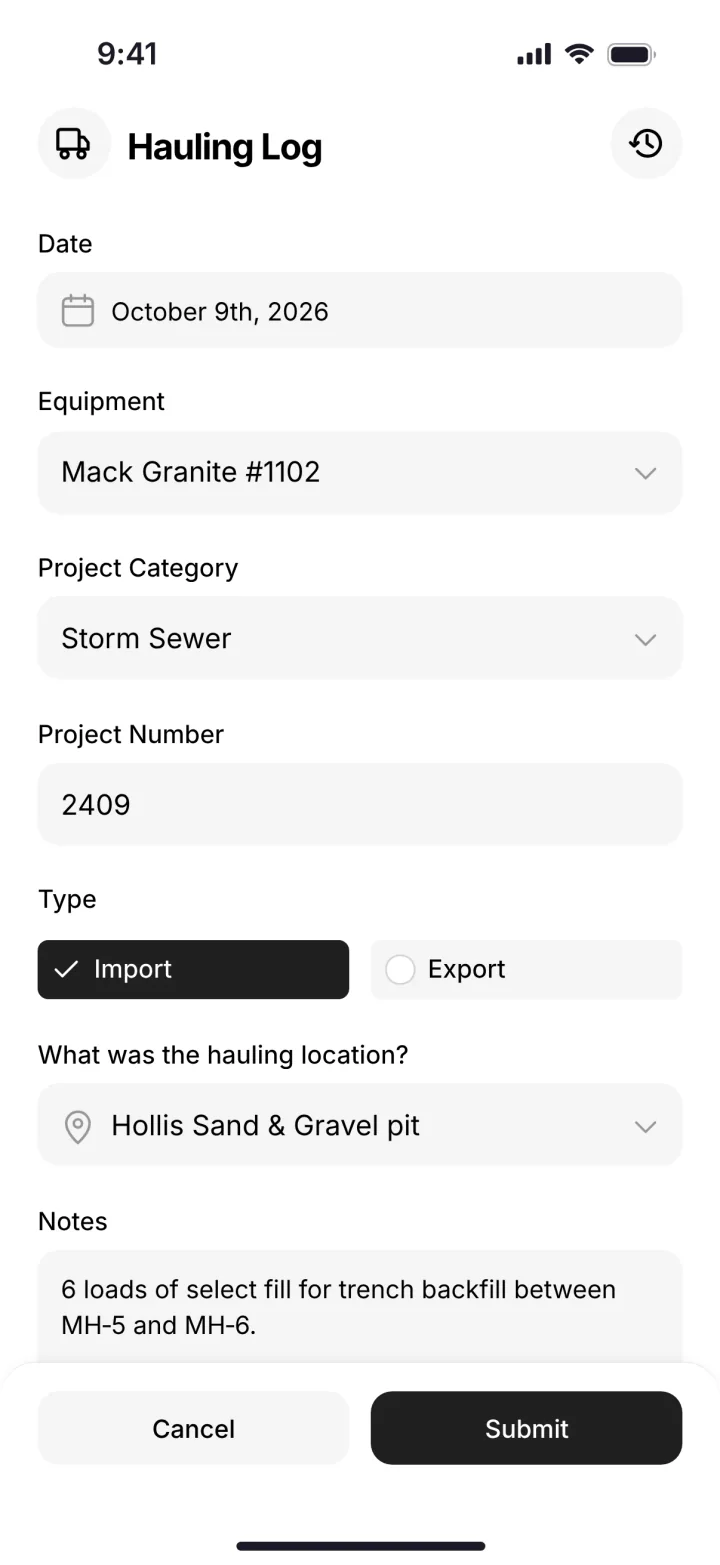
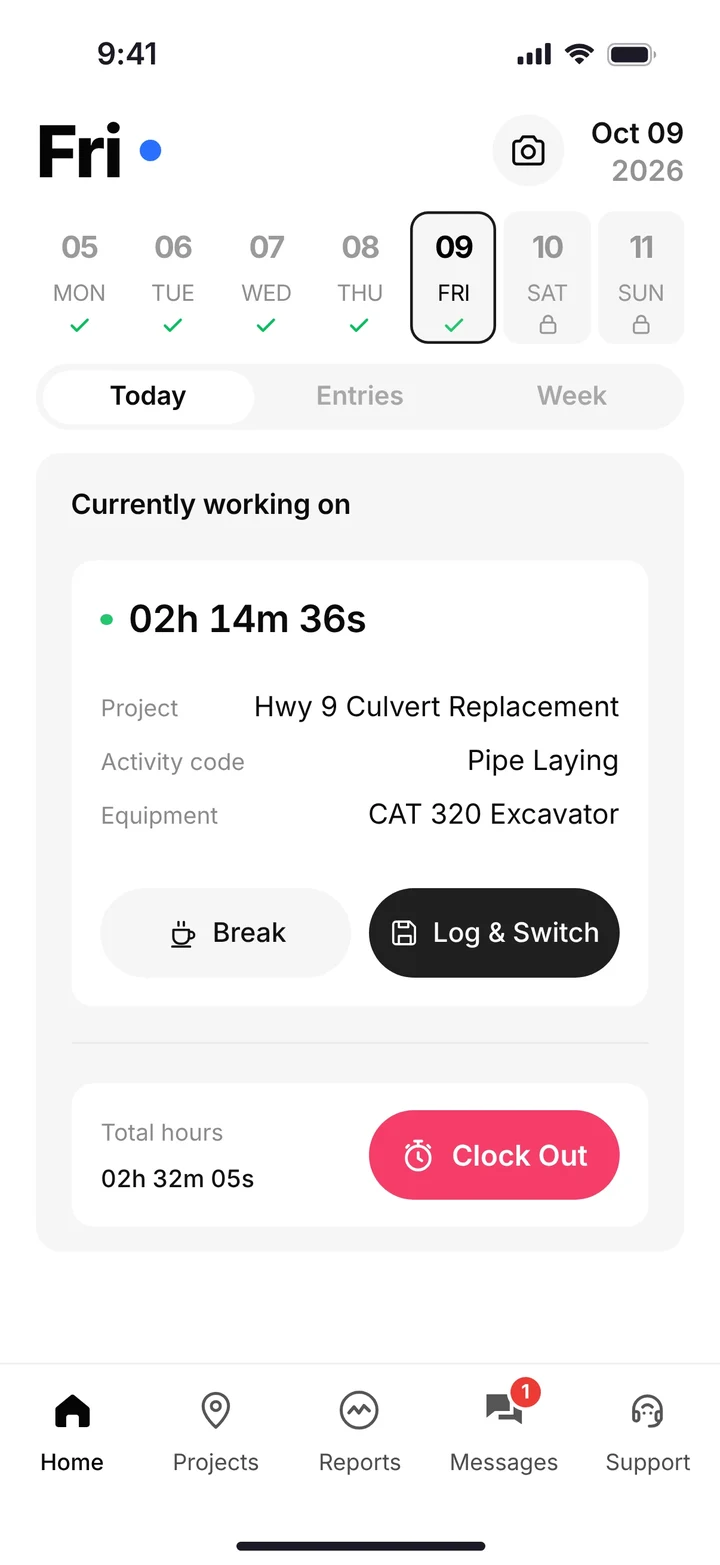
The DOT inspection, a load in the hauling log, and a clocked-in operator with his project, activity code and machine. (Demo account.)
How do you know if a road job is still making money?
You compare what you've spent against what you bid, by cost type, every day. SmartCrew's job page does that from the field data: labor, materials, equipment, other costs and change orders against the budget, with the job's profit updated daily.
Public owners also add work. Extra ditch, more undercut, a pipe that wasn't on the plans. Log those as change orders and extras on the job, so they don't disappear into the base bid and get forgotten at billing time.
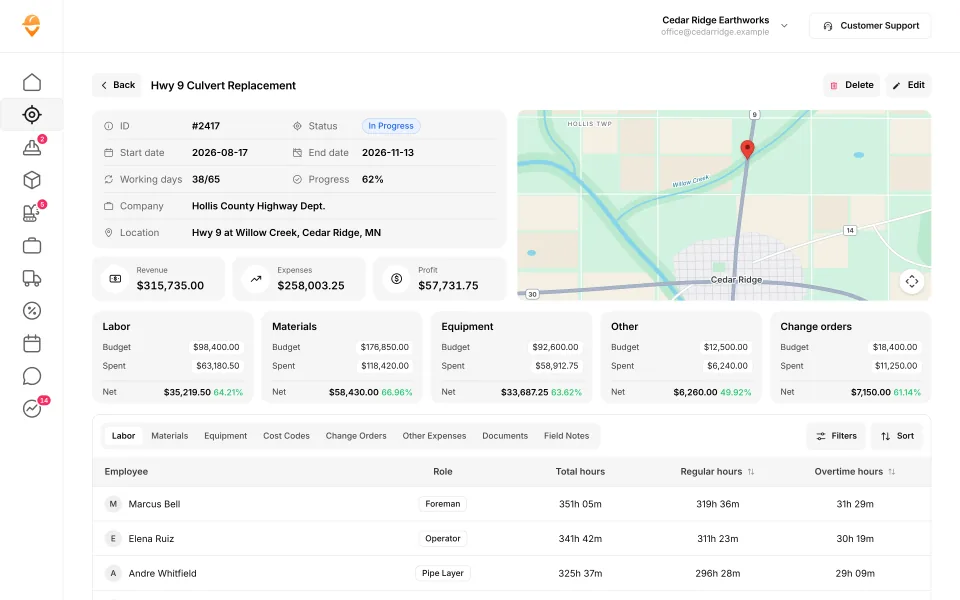
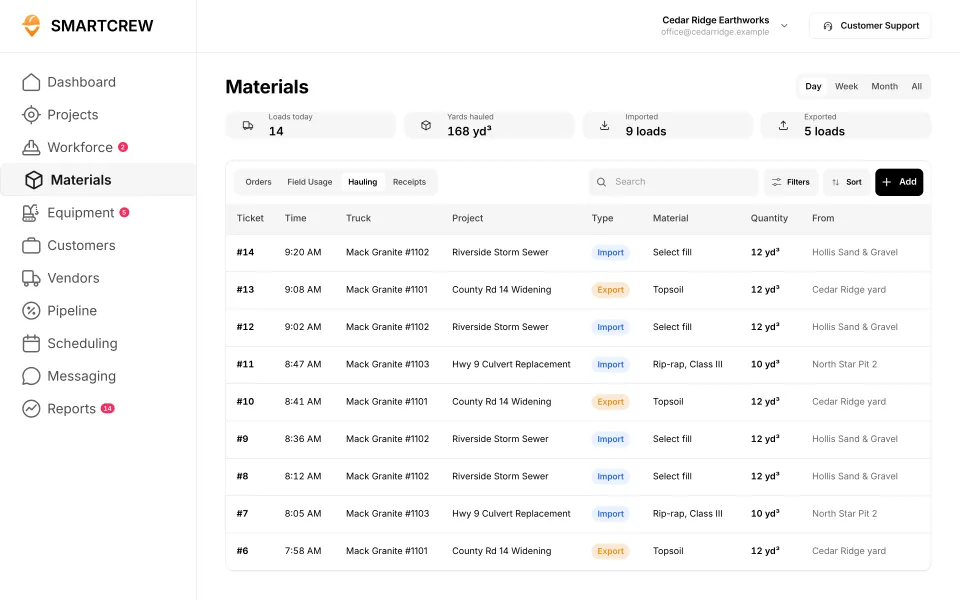
A job page with budget against spent by cost type, and the hauling log with each load's truck, material, yards and pit. (Demo data.)
Built to track hours. Great at the timecard, but the rest of the business (machines, loads, job profit) lives somewhere else.
9 apps in this chart. Scroll sideways to see them all.
| What SmartCrew does | SmartCrewSmartCrew | BusyBusyBusyBusy | ClockSharkClockShark | ExakTimeExakTime | QuickBooks TimeQB Time | WorkMaxWorkMax | WorkyardWorkyard | ConnecteamConnecteam | JibbleJibble | Rhumbix (Autodesk)Rhumbix |
|---|---|---|---|---|---|---|---|---|---|---|
| Time Tracking | ||||||||||
| GPS-powered clock-ins | Yes | Yes | Yes | Yes | Yes | Yes | Yes | Yes | Yes | Add-on |
| Geofencing around the job site | Yes | Yes | Yes | Yes | Add-on | Yes | Add-on | Add-on | Yes | Add-on |
| Live crew locations | Yes | Yes | Yes | Yes | Yes | Yes | Yes | Add-on | Yes | Limited |
| Hours by job and cost code | Yes | Yes | Yes | Yes | Yes | Yes | Add-on | Yes | Limited | Yes |
| Pick the machine at clock-in | Yes | Yes | Not listed | Yes | Limited | Limited | Limited | Limited | No | Limited |
| Payroll-ready timecards | Yes | Yes | Yes | Yes | Yes | Yes | Yes | Yes | Yes | Yes |
| Supervisor dashboard | Yes | Yes | Yes | Yes | Yes | Yes | Yes | Yes | Yes | Yes |
| Clock in/out reminders | Yes | Yes | Yes | Yes | Yes | Not listed | Yes | Yes | Yes | Not listed |
| Job Costing | ||||||||||
| Daily job profitability | Yes | Limited | Add-on | No | Not listed | Limited | Limited | Limited | Not listed | No |
| Bid budgets vs. actual costs | Yes | Yes | Add-on | Limited | Limited | Add-on | Add-on | Limited | Limited | Limited |
| Change orders & extras | Yes | No | Limited | No | Not listed | Add-on | Limited | No | No | Yes |
| Custom reports | Yes | Yes | Yes | Add-on | Limited | Yes | Yes | Limited | Limited | Add-on |
| Daily Reports | ||||||||||
| Daily progress & production logs | Yes | Add-on | Limited | Limited | Limited | Add-on | Add-on | Yes | No | Yes |
| Jobsite photos & field notes | Yes | Yes | Yes | Yes | Yes | Add-on | Yes | Yes | Limited | Yes |
| Automatic daily reports for the office | Yes | Add-on | Not listed | Limited | Not listed | Limited | Limited | Add-on | Not listed | Add-on |
| Crew Communication Premium | ||||||||||
| Dispatch with instant alerts | Yes | Limited | Limited | Limited | Limited | Add-on | Add-on | Yes | No | No |
| Crew & team messaging | Yes | Add-on | Yes | Limited | Limited | Not listed | Limited | Add-on | No | Limited |
| Job-specific chat channels | Yes | Limited | Yes | Not listed | Add-on | Not listed | No | Add-on | No | Not listed |
| Company announcements | Yes | Yes | Not listed | Add-on | Not listed | Not listed | No | Add-on | No | No |
Built to run big projects or every kind of contractor. Lots of power, but more setup, more screens and a bigger bill than most 5 to 100 person dirtwork companies need.
14 apps in this chart. Scroll sideways to see them all.
| What SmartCrew does | SmartCrewSmartCrew | ProcoreProcore | HCSS HeavyJobHCSS | RakenRaken | JobTreadJobTread | Contractor ForemanContr. Foreman | ProjulProjul | KnowifyKnowify | ForemanForeman | B2W (Trimble)B2W | AssignarAssignar | Trimble ViewpointViewpoint | BuildertrendBuildertrend | FieldwireFieldwire | Foundation SoftwareFoundation |
|---|---|---|---|---|---|---|---|---|---|---|---|---|---|---|---|
| Time Tracking | |||||||||||||||
| GPS-powered clock-ins | Yes | Add-on | Add-on | Add-on | Yes | Add-on | Add-on | Yes | Yes | Yes | Yes | Yes | Yes | No | Add-on |
| Geofencing around the job site | Yes | Yes | Limited | Add-on | Limited | Add-on | Add-on | Yes | Not listed | Yes | Limited | Not listed | Yes | No | Add-on |
| Live crew locations | Yes | Limited | Limited | Limited | Limited | Add-on | Limited | Limited | Limited | Limited | Limited | Not listed | Limited | No | Limited |
| Hours by job and cost code | Yes | Yes | Yes | Add-on | Yes | Add-on | Limited | Yes | Limited | Yes | Yes | Yes | Yes | Limited | Yes |
| Pick the machine at clock-in | Yes | Limited | Yes | Add-on | No | Limited | Yes | Limited | No | Yes | Yes | Yes | Not listed | No | Not listed |
| Payroll-ready timecards | Yes | Yes | Yes | Add-on | Yes | Add-on | Yes | Yes | Limited | Yes | Yes | Yes | Yes | Limited | Yes |
| Supervisor dashboard | Yes | Yes | Yes | Yes | Yes | Add-on | Limited | Limited | Limited | Yes | Yes | Limited | Not listed | Not listed | Add-on |
| Clock in/out reminders | Yes | Yes | Not listed | Add-on | Not listed | Limited | Yes | Not listed | Limited | Not listed | Yes | Not listed | Not listed | No | Add-on |
| Job Costing | |||||||||||||||
| Daily job profitability | Yes | Limited | Yes | No | Yes | Add-on | Add-on | Add-on | Limited | Yes | Add-on | Limited | Limited | Not listed | Limited |
| Bid budgets vs. actual costs | Yes | Yes | Yes | Limited | Yes | Add-on | Add-on | Add-on | Yes | Yes | Add-on | Yes | Yes | Add-on | Yes |
| Change orders & extras | Yes | Yes | Yes | Yes | Yes | Add-on | Add-on | Yes | Yes | Yes | Add-on | Yes | Yes | Add-on | Yes |
| Custom reports | Yes | Yes | Yes | Limited | Yes | Add-on | Limited | Limited | Yes | Yes | Yes | Yes | Limited | Yes | Yes |
| Daily Reports | |||||||||||||||
| Daily progress & production logs | Yes | Yes | Yes | Yes | Yes | Add-on | Add-on | Add-on | Yes | Yes | Yes | Yes | Yes | Add-on | Add-on |
| Jobsite photos & field notes | Yes | Yes | Yes | Yes | Yes | Yes | Yes | Yes | Yes | Yes | Yes | Yes | Yes | Yes | Limited |
| Automatic daily reports for the office | Yes | Yes | Yes | Yes | Limited | Not listed | Limited | Add-on | Not listed | Yes | Yes | Not listed | Limited | Yes | Not listed |
| Crew Communication Premium | |||||||||||||||
| Dispatch with instant alerts | Yes | Add-on | Add-on | Add-on | Limited | Add-on | Limited | Add-on | Limited | Yes | Yes | Limited | Not listed | Limited | Add-on |
| Crew & team messaging | Yes | Yes | Yes | Limited | Yes | Yes | Add-on | Limited | Yes | Limited | Yes | Limited | Yes | Limited | Limited |
| Job-specific chat channels | Yes | Yes | Limited | Limited | Yes | Yes | Add-on | Limited | Yes | Not listed | Yes | Not listed | Yes | Limited | Limited |
| Company announcements | Yes | Limited | Not listed | Limited | Yes | Yes | Not listed | No | Not listed | Not listed | Limited | Not listed | Limited | Limited | Not listed |
Built to track machines. Good at hours, GPS and service, but the crew's time, the daily report and the job's profit live somewhere else.
| What SmartCrew does | SmartCrewSmartCrew | TennaTenna | HCSS Equipment360Equipment360 | FleetioFleetio | ClueClue |
|---|---|---|---|---|---|
| Time Tracking | |||||
| GPS-powered clock-ins | Yes | Not listed | Add-on | No | Yes |
| Geofencing around the job site | Yes | Limited | Limited | Limited | Yes |
| Live crew locations | Yes | Limited | Limited | Limited | Limited |
| Hours by job and cost code | Yes | Limited | Limited | Not listed | Yes |
| Pick the machine at clock-in | Yes | Not listed | Add-on | No | Yes |
| Payroll-ready timecards | Yes | Limited | Limited | Limited | Yes |
| Supervisor dashboard | Yes | Limited | Limited | Limited | Yes |
| Clock in/out reminders | Yes | Not listed | Not listed | No | Not listed |
| Job Costing | |||||
| Daily job profitability | Yes | Limited | Add-on | No | Limited |
| Bid budgets vs. actual costs | Yes | Limited | Add-on | No | Yes |
| Change orders & extras | Yes | Not listed | Add-on | No | Limited |
| Custom reports | Yes | Yes | Limited | Yes | Yes |
| Daily Reports | |||||
| Daily progress & production logs | Yes | Limited | Add-on | No | Yes |
| Jobsite photos & field notes | Yes | Limited | Limited | Limited | Yes |
| Automatic daily reports for the office | Yes | Limited | Add-on | No | Yes |
| Crew Communication Premium | |||||
| Dispatch with instant alerts | Yes | Add-on | Add-on | No | Yes |
| Crew & team messaging | Yes | Not listed | Add-on | Limited | Limited |
| Job-specific chat channels | Yes | Not listed | Limited | Not listed | Limited |
| Company announcements | Yes | Not listed | Not listed | No | Yes |
Built to win the bid. Great for takeoffs and estimates before the job starts, not for running the crews, machines and loads once it does.
| What SmartCrew does | SmartCrewSmartCrew | AGTEKAGTEK | InSite SoftwareInSite | HCSS HeavyBidHeavyBid | Trimble Business CenterTrimble | EarthWorksEarthWorks |
|---|---|---|---|---|---|---|
| Time Tracking | ||||||
| GPS-powered clock-ins | Yes | No | No | Not listed | Not listed | No |
| Geofencing around the job site | Yes | Not listed | No | Not listed | Not listed | No |
| Live crew locations | Yes | Limited | No | Not listed | Limited | No |
| Hours by job and cost code | Yes | Not listed | No | Not listed | Not listed | No |
| Pick the machine at clock-in | Yes | No | No | Not listed | Not listed | No |
| Payroll-ready timecards | Yes | No | No | Not listed | Not listed | No |
| Supervisor dashboard | Yes | Limited | No | Not listed | Not listed | No |
| Clock in/out reminders | Yes | No | No | Not listed | Not listed | No |
| Job Costing | ||||||
| Daily job profitability | Yes | No | No | Not listed | Not listed | No |
| Bid budgets vs. actual costs | Yes | Limited | No | Limited | Not listed | No |
| Change orders & extras | Yes | No | No | Not listed | Not listed | No |
| Custom reports | Yes | Limited | Limited | Yes | Yes | Limited |
| Daily Reports | ||||||
| Daily progress & production logs | Yes | Limited | Limited | Not listed | Add-on | No |
| Jobsite photos & field notes | Yes | Yes | No | Not listed | Limited | No |
| Automatic daily reports for the office | Yes | Not listed | No | Not listed | Not listed | No |
| Crew Communication Premium | ||||||
| Dispatch with instant alerts | Yes | No | No | Not listed | Not listed | No |
| Crew & team messaging | Yes | Not listed | No | Not listed | Not listed | No |
| Job-specific chat channels | Yes | No | No | Not listed | Not listed | No |
| Company announcements | Yes | No | No | Not listed | Not listed | No |
Built for service businesses that quote, schedule and invoice lots of small jobs. Good at the customer side, not the crew, machine and haul side of heavy civil work.
| What SmartCrew does | SmartCrewSmartCrew | JobberJobber | QuoteIQQuoteIQ | Contractor+Contractor+ | Housecall ProHousecall Pro | ServiceTitanServiceTitan |
|---|---|---|---|---|---|---|
| Time Tracking | ||||||
| GPS-powered clock-ins | Yes | Add-on | Add-on | Yes | Yes | Yes |
| Geofencing around the job site | Yes | Add-on | Add-on | Not listed | Limited | Add-on |
| Live crew locations | Yes | Add-on | Add-on | Yes | Add-on | Yes |
| Hours by job and cost code | Yes | Limited | Limited | Limited | Limited | Limited |
| Pick the machine at clock-in | Yes | No | No | Not listed | Not listed | Not listed |
| Payroll-ready timecards | Yes | Add-on | Add-on | Yes | Yes | Yes |
| Supervisor dashboard | Yes | Limited | Add-on | Not listed | Limited | Yes |
| Clock in/out reminders | Yes | Add-on | Add-on | Not listed | Yes | Limited |
| Job Costing | ||||||
| Daily job profitability | Yes | Add-on | Add-on | Add-on | Yes | Yes |
| Bid budgets vs. actual costs | Yes | Limited | Limited | Not listed | Limited | Yes |
| Change orders & extras | Yes | No | No | Add-on | Limited | Yes |
| Custom reports | Yes | Add-on | Yes | Add-on | Yes | Yes |
| Daily Reports | ||||||
| Daily progress & production logs | Yes | Limited | Limited | Limited | Limited | Yes |
| Jobsite photos & field notes | Yes | Yes | Add-on | Yes | Yes | Yes |
| Automatic daily reports for the office | Yes | Not listed | Not listed | Not listed | Limited | Yes |
| Crew Communication Premium | ||||||
| Dispatch with instant alerts | Yes | Yes | Add-on | Yes | Yes | Yes |
| Crew & team messaging | Yes | Limited | Add-on | Add-on | Yes | Limited |
| Job-specific chat channels | Yes | Limited | Add-on | Yes | Limited | Limited |
| Company announcements | Yes | No | Add-on | No | Not listed | Limited |
No: they do not offer it. Their own website says so, or it isn’t in the full feature list they publish (linked). Add-on: a paid add-on, a separate product or a higher plan. Limited: they have something close but narrower. Not listed (n/l on small screens): we searched their site and help pages and couldn’t find it, but they don’t publish a full list we could check. Tap a name for the full comparison.
This chart is SmartCrew’s feature list, so it doesn’t show what other products do that SmartCrew doesn’t (like estimating, payroll or hardware time clocks). Each comparison covers that in “where they’re the better pick”. SmartCrew’s Fleet Management, Sales CRM, and Scheduling & Communications are Premium categories; feature availability varies by plan.
In plain words: what each app does not offer
- BusyBusy does not offer: change orders & extras.
- ClockShark doesn't list: pick the machine at clock-in, automatic daily reports for the office, company announcements.
- ExakTime does not offer: daily job profitability, change orders & extras. ExakTime doesn't list these either: job-specific chat channels.
- QuickBooks Time doesn't list: daily job profitability, change orders & extras, automatic daily reports for the office, company announcements.
- WorkMax doesn't list: clock in/out reminders, crew & team messaging, job-specific chat channels, company announcements.
- Workyard does not offer: job-specific chat channels, company announcements.
- Connecteam does not offer: change orders & extras.
- Jibble does not offer: pick the machine at clock-in, change orders & extras, daily progress & production logs, dispatch with instant alerts, crew & team messaging, job-specific chat channels, company announcements. Jibble doesn't list these either: daily job profitability, automatic daily reports for the office.
- Rhumbix (Autodesk) does not offer: daily job profitability, dispatch with instant alerts, company announcements. Rhumbix (Autodesk) doesn't list these either: clock in/out reminders, job-specific chat channels.
- Procore lists all of these on its own website, some as add-ons or limited.
- HCSS HeavyJob doesn't list: clock in/out reminders, company announcements.
- Raken does not offer: daily job profitability.
- JobTread does not offer: pick the machine at clock-in. JobTread doesn't list these either: clock in/out reminders.
- Contractor Foreman doesn't list: automatic daily reports for the office.
- Projul doesn't list: company announcements.
- Knowify does not offer: company announcements. Knowify doesn't list these either: clock in/out reminders.
- Foreman does not offer: pick the machine at clock-in. Foreman doesn't list these either: geofencing around the job site, automatic daily reports for the office, company announcements.
- B2W (Trimble) doesn't list: clock in/out reminders, job-specific chat channels, company announcements.
- Assignar lists all of these on its own website, some as add-ons or limited.
- Trimble Viewpoint doesn't list: geofencing around the job site, live crew locations, clock in/out reminders, automatic daily reports for the office, job-specific chat channels, company announcements.
- Buildertrend doesn't list: pick the machine at clock-in, supervisor dashboard, clock in/out reminders, dispatch with instant alerts.
- Fieldwire does not offer: GPS-powered clock-ins, geofencing around the job site, live crew locations, pick the machine at clock-in, clock in/out reminders. Fieldwire doesn't list these either: supervisor dashboard, daily job profitability.
- Foundation Software doesn't list: pick the machine at clock-in, automatic daily reports for the office, company announcements.
- Tenna doesn't list: GPS-powered clock-ins, pick the machine at clock-in, clock in/out reminders, change orders & extras, crew & team messaging, job-specific chat channels, company announcements.
- HCSS Equipment360 doesn't list: clock in/out reminders, company announcements.
- Fleetio does not offer: GPS-powered clock-ins, pick the machine at clock-in, clock in/out reminders, daily job profitability, bid budgets vs. actual costs, change orders & extras, daily progress & production logs, automatic daily reports for the office, dispatch with instant alerts, company announcements. Fleetio doesn't list these either: hours by job and cost code, job-specific chat channels.
- Clue doesn't list: clock in/out reminders.
- AGTEK does not offer: GPS-powered clock-ins, pick the machine at clock-in, payroll-ready timecards, clock in/out reminders, daily job profitability, change orders & extras, dispatch with instant alerts, job-specific chat channels, company announcements. AGTEK doesn't list these either: geofencing around the job site, hours by job and cost code, automatic daily reports for the office, crew & team messaging.
- InSite Software does not offer: GPS-powered clock-ins, geofencing around the job site, live crew locations, hours by job and cost code, pick the machine at clock-in, payroll-ready timecards, supervisor dashboard, clock in/out reminders, daily job profitability, bid budgets vs. actual costs, change orders & extras, jobsite photos & field notes, automatic daily reports for the office, dispatch with instant alerts, crew & team messaging, job-specific chat channels, company announcements.
- HCSS HeavyBid doesn't list: GPS-powered clock-ins, geofencing around the job site, live crew locations, hours by job and cost code, pick the machine at clock-in, payroll-ready timecards, supervisor dashboard, clock in/out reminders, daily job profitability, change orders & extras, daily progress & production logs, jobsite photos & field notes, automatic daily reports for the office, dispatch with instant alerts, crew & team messaging, job-specific chat channels, company announcements.
- Trimble Business Center doesn't list: GPS-powered clock-ins, geofencing around the job site, hours by job and cost code, pick the machine at clock-in, payroll-ready timecards, supervisor dashboard, clock in/out reminders, daily job profitability, bid budgets vs. actual costs, change orders & extras, automatic daily reports for the office, dispatch with instant alerts, crew & team messaging, job-specific chat channels, company announcements.
- EarthWorks does not offer: GPS-powered clock-ins, geofencing around the job site, live crew locations, hours by job and cost code, pick the machine at clock-in, payroll-ready timecards, supervisor dashboard, clock in/out reminders, daily job profitability, bid budgets vs. actual costs, change orders & extras, daily progress & production logs, jobsite photos & field notes, automatic daily reports for the office, dispatch with instant alerts, crew & team messaging, job-specific chat channels, company announcements.
- Jobber does not offer: pick the machine at clock-in, change orders & extras, company announcements. Jobber doesn't list these either: automatic daily reports for the office.
- QuoteIQ does not offer: pick the machine at clock-in, change orders & extras. QuoteIQ doesn't list these either: automatic daily reports for the office.
- Contractor+ does not offer: company announcements. Contractor+ doesn't list these either: geofencing around the job site, pick the machine at clock-in, supervisor dashboard, clock in/out reminders, bid budgets vs. actual costs, automatic daily reports for the office.
- Housecall Pro doesn't list: pick the machine at clock-in, company announcements.
- ServiceTitan doesn't list: pick the machine at clock-in.
From each company's own website and help pages, checked on the dates below. "Does not offer" means their own website says so, or it isn't in the full feature list they publish. "Doesn't list" means we searched their site and couldn't find it, but they don't publish a full list we could check.
Where each mark comes from
- BusyBusy, checked October 28, 2026: busybusy.com/features/gps-time-tracking, busybusy.com/features, busybusy.com/features/job-costing-solutions, busybusy.com/equipment-time-tracking-app, busybusy.com/features/payroll-tools, helpcenter.busybusy.com/en/articles/9573478-use-supervisor-tools-to-make-life-easy, busybusy.com/features/budgets-projects-cost-codes, busybusy.com/features/construction-reports, busybusy.com/modules/operations/equipment-inspections, busybusy.com/modules/operations/work-orders, busybusy.com/features/progress-tracking, busybusy.com/features/photos-notes, busybusy.com/construction-daily-reports, helpcenter.busybusy.com/en/articles/9573479-schedule-the-work-week-in-busybusy, busybusy.com/features/scheduling, busybusy.com/features/team-messaging, helpcenter.busybusy.com/en/articles/9573348-positions-permissions-settings, busybusy.com/safety/job-safety-analyses-app, busybusy.com/safety/training-app, busybusy.com/features/incident-reporting, busybusy.com/features/documents, busybusy.com/integrations/quickbooks-online
- ClockShark, checked October 28, 2026: clockshark.com/tour/gps-time-clock-app, clockshark.com/tour/geofence-time-tracking, clockshark.com/tour/map-field-employee-location-tracking, clockshark.com/resources/labor-costs-quickbooks-clockshark, clockshark.com/pricing, clockshark.com/tour/timesheet-reminders, clockshark.com/tour/job-costing, help.clockshark.com/how-to-handle-change-orders-using-quotes-and-invoices, clockshark.com/tour, clockshark.com/tour/clock-out-questions, clockshark.com/tour/conversations, clockshark.com/tour/employee-scheduling, clockshark.com/tour/customer-manager, get.clockshark.com/modern-way-to-manage-your-field-team, clockshark.com/tour/file-attachments, clockshark.com/integrations/quickbooks-time-tracking
- ExakTime, checked October 28, 2026: arcoro.com/exaktime/pricing-plans, arcoro.com/exaktime, arcoro.com/exaktime/our-solutions/gps-time-tracking-app, arcoro.com/exaktime/our-solutions/powerful-reporting, support.arcoro.com/hc/en-us/articles/1260804480690-Guides-to-Equipment-for-ExakTime, support.arcoro.com/hc/en-us/articles/1260804479730-Start-Using-The-ExakTime-System-In-Just-15-Minutes, support.arcoro.com/hc/en-us/articles/40641192964507-9-2025-ExakTime-Release-Notes-GeoFence-Activity-Alerts, arcoro.com/llm-context-page, support.arcoro.com/hc/en-us/articles/7647931096987-Overview-for-Using-Advanced-Analytics, support.arcoro.com/hc/en-us/articles/4413156323355-Using-Equipment-Reports-for-ExakTime, support.arcoro.com/hc/en-us/articles/24982369416091-What-are-Library-Forms-for-ExakTime, support.arcoro.com/hc/en-us/articles/26031334798107-Gathering-Info-from-Field-Employees-with-Fields-Notes-Forms-and-Clock-In-Out-Comments-for-ExakTime-Mobile, support.arcoro.com/hc/en-us/articles/4413165192347-Using-Expense-Reports-for-ExakTime, support.arcoro.com/hc/en-us/articles/4407630208795-Managing-Schedules-with-Calendar-View, support.arcoro.com/hc/en-us/articles/4407625105563-Scheduler-Notification-Settings-for-ExakTime, support.arcoro.com/hc/en-us/articles/7601304493595-Setting-Up-and-Using-Custom-Alerts-and-Notifications-for-ExakTime, support.arcoro.com/hc/en-us/articles/13116025444635-Sending-Alerts-Notifications-from-ExakTime-Connect, arcoro.com/platform/grow/learning-management, support.arcoro.com/hc/en-us/articles/25556658085659-Premade-Forms-for-ExakTime, arcoro.com/platform/manage/construction-hris, arcoro.com/exaktime/partner/quickbooks
- QuickBooks Time, checked October 28, 2026: quickbooks.intuit.com/time-tracking/gps, quickbooks.intuit.com/learn-support/en-us/help-article/track-location/use-quickbooks-time-gps-tracking-admin-manager/L7fLoZNZk_US_en_US, quickbooks.intuit.com/learn-support/en-us/help-article/track-worker-hours/use-quickbooks-time-quickbooks-online-quickbooks/L5NIFCKG6_US_en_US, quickbooks.intuit.com/learn-support/en-us/help-article/customize-forms/set-manage-custom-fields-quickbooks-time/L6b8NDU6n_US_en_US, quickbooks.intuit.com/time-tracking/construction, quickbooks.intuit.com/learn-support/en-us/help-article/product-preferences/set-company-team-member-clock-reminders-quickbooks/L8v9UDFUv_US_en_US, quickbooks.intuit.com/time-tracking/pricing, quickbooks.intuit.com/learn-support/en-us/help-article/list-reports/quickbooks-time-reports/L0WYtn0mw_US_en_US, quickbooks.intuit.com/time-tracking/elite, quickbooks.intuit.com/time-tracking/employee-scheduling, quickbooks.intuit.com/learn-support/en-us/help-article/feature-preferences/quickbooks-time-activity-feed/L5RV549yf_US_en_US
- WorkMax, checked October 26, 2026: workmax.com/solutions/workmax-time, workmax.com/wp-content/uploads/2022/06/WorkMax-TIME-Features.pdf, workmax.com/wp-content/uploads/2013/11/WorkMax_Time_Features_Temp.pdf, workmax.com/solutions/workmax-insight, workmax.com/solutions/workmax-forms, workmax.com/resources/blog/the-workmax-construction-field-management-platform, workmax.com/solutions/workmax-assets, workmax.com/resources/faqs, workmax.com/solutions/other-products, workmax.com, workmax.com/solutions/integrations/quickbooks-online-integration
- Workyard, checked October 28, 2026: workyard.com/ai-instructions, workyard.com/pricing, workyard.com/smart-forms/equipment-tracking, workyard.com/reporting, help.workyard.com/en/articles/7041924-workyard-mobile-app-automated-alerts, workyard.com/smart-forms/construction-management, help.workyard.com/en/articles/17668011-build-custom-reports-with-reporting-agent, workyard.com/smart-forms/production-tracking, help.workyard.com/en/articles/16092826-send-form-submissions-to-the-right-people-forms-notification-routing, workyard.com/contractor-scheduling-software, workyard.com/smart-forms/safety-management, help.workyard.com/en/articles/5236837-how-to-connect-workyard-to-quickbooks-online
- Connecteam, checked October 28, 2026: connecteam.com/pricing, help.connecteam.com/en/articles/3597710-how-to-create-a-geofence, help.connecteam.com/en/articles/5675206-starting-guide-to-breadcrumbs-live-location-tracking, connecteam.com/industries/construction-app, connecteam.com/employee-time-clock-app, connecteam.com/operations, connecteam.com/industries/construction-app/construction-time-tracking, connecteam.com/employee-scheduling-app, connecteam.com/forms-checklist-app, help.connecteam.com/en/articles/6400563-job-scheduling-must-have-capabilities, connecteam.com/industries/construction-app/construction-scheduling-app, help.connecteam.com/en/articles/4100339-starting-guide-to-the-job-scheduler, connecteam.com/employee-communication-app/updates, connecteam.com/industries/construction-app/construction-compliance, connecteam.com/industries/construction-app/construction-documentation-and-communication, connecteam.com/integrations/quickbooks-integration
- Jibble, checked October 28, 2026: jibble.io/construction-time-tracking, jibble.io/features, jibble.io/auto-clock-in-out-app, jibble.io/project-time-tracker, jibble.io/help/track-time-with-location, jibble.io/help/sending-timesheets-to-quickbooks-online
- Rhumbix (Autodesk), checked October 28, 2026: intercom.help/rhumbix-helpcenter/en/articles/11014517-cico-client-configuration-options, rhumbix.com/solutions/timekeeping, rhumbix.com/usecase/field, rhumbix.com/pricing, intercom.help/rhumbix-helpcenter/en/articles/6369205-cost-code-status, rhumbix.com/solutions/change-orders, intercom.help/rhumbix-helpcenter/en/articles/8438022-equipment-tracking-dashboard, rhumbix.com/solutions/production_tracking, intercom.help/rhumbix-helpcenter/en/articles/6369215-daily-reports-create-on-mobile-app, intercom.help/rhumbix-helpcenter/en/articles/6512986-end-of-day-exception-report, rhumbix.com/solutions/integrations
- Procore, checked October 28, 2026: procore.com/resource-tracking, v2.support.procore.com/product-manuals/timesheets-project/tutorials/configure-advanced-settings-project-level-timesheets, v2.support.procore.com/product-manuals/my-time-ios/tutorials/clock-your-time-ios, v2.support.procore.com/product-manuals/timesheets-project/tutorials/create-a-timesheet, procore.com/platform/reports, procore.com/products, procore.com/project-financials/budget, procore.com/financial-management/change-orders, procore.com/equipment, v2.support.procore.com/faq-how-can-i-use-the-procore-equipment-pre-operation-checklist-inspection-template-on-my-project, v2.support.procore.com/product-manuals/equipment-company/tutorials/create-a-maintenance-record-for-equipment, procore.com/resource-management, v2.support.procore.com/product-manuals/equipment-company/permissions, procore.com/quality-safety/daily-log, procore.com/project-management/photos, v2.support.procore.com/product-manuals/daily-log-project/tutorials/mark-a-daily-log-as-complete, procore.com/materials, procore.com/ai/agents/daily-log, v2.support.procore.com/product-manuals/resource-planning-company/tutorials/edit-a-resource-assignment, procore.com/resource-planning, procore.com/fc/crm, v2.support.procore.com/product-manuals/bid-board-company, v2.support.procore.com/product-manuals/bid-board-company/tutorials/add-and-manage-tasks-in-a-bid-board-project, procore.com/fc/dispatch, procore.com/platform/conversations, v2.support.procore.com/process-guides/getting-started-with-procore-conversations/best-practices-for-procore-conversations, v2.support.procore.com/product-manuals/announcements-ios/tutorials/create-announcements-ios, v2.support.procore.com/faq-how-can-i-use-procores-job-hazard-analysis-pdf-in-my-projects-forms-tool, v2.support.procore.com/faq-how-can-i-use-procores-toolbox-talk-sign-in-pdf-in-my-projects-forms-tool, procore.com/quality-safety/incidents, procore.com/platform/document-management, v2.support.procore.com/product-manuals/qbo
- HCSS HeavyJob, checked October 28, 2026: apps.apple.com/us/app/hcss-myfield-track-job-hours/id1520688563, hcss.com/products/geofencing-software, hcss.com/products/mobile-field-service-management, hcss.com/products/job-costing-software, hcss.com/products/construction-project-management-software, hcss.com/products/export-to-payroll, hcss.com/products/change-order-tracking, hcss.com/llm-info, hcss.com/faqs, apps.apple.com/us/app/hcss-heavyjob-smart-job-sites/id720784422, hcss.com/products/fuel-management-software, hcss.com/products/construction-material-tracking, hcss.com/products/construction-resource-planning, hcss.com/products/dispatching-software, hcss.com/products/bid-management, hcss.com/products/pre-construction, hcss.com/products/job-hazard-safety-analysis, hcss.com/products/safety-toolbox-talks, hcss.com/products/incidents-reporting-software, hcss.com/products/construction-document-software
- Raken, checked October 28, 2026: help.rakenapp.com/en/articles/14148932-raken-time-clock-geolocation-verification-and-reporting, help.rakenapp.com/en/articles/14113290-how-to-create-time-cards-in-raken, help.rakenapp.com/en/articles/14115530-raken-time-cards-overview, help.rakenapp.com/en/articles/14465496-how-to-use-the-raken-dashboard, rakenapp.com/features, help.rakenapp.com/en/articles/16909752-how-to-set-up-and-use-budgets-in-raken, rakenapp.com/features/change-orders, help.rakenapp.com/en/articles/14465432-raken-reports-overview, rakenapp.com/features/equipment-management, rakenapp.com/features/construction-checklists/forklift-checklist, help.rakenapp.com/en/articles/14492619-raken-equipment-management-heavy-and-on-road-equipment, help.rakenapp.com/en/articles/14465449-production-and-equipment-reports-in-raken, rakenapp.com, help.rakenapp.com/en/articles/14478748-how-to-share-and-email-daily-reports-in-raken, help.rakenapp.com/en/articles/14492603-getting-started-with-production-tracking-in-raken, help.rakenapp.com/en/articles/11061850-how-to-manage-resource-scheduling-on-the-web, help.rakenapp.com/en/articles/14437000-what-is-raken-resource-scheduling, help.rakenapp.com/en/articles/14436989-how-to-get-started-with-messaging-in-raken, rakenapp.com/features/construction-checklists/job-hazard-analysis, help.rakenapp.com/en/articles/14491655-how-to-use-toolbox-talks-in-raken, help.rakenapp.com/en/articles/14491660-how-to-report-and-track-incidents-in-raken, help.rakenapp.com/en/articles/14436734-how-to-use-document-storage-in-raken, rakenapp.com/features/document-storage, help.rakenapp.com/en/articles/14512455-raken-quickbooks-online-integration
- JobTread, checked October 28, 2026: jobtread.com/features/time-tracking, app.jobtread.com/help/whats-new/2023-05-02-clock-in-out-distance-from-job-site, app.jobtread.com/help/whats-new/2024-05-06-require-job-item-code-on-time-entries, jobtread.com/features, jobtread.com/features/job-costing, jobtread.com/features/reporting-and-dashboards, jobtread.com/features/forms, jobtread.com/features/daily-logs, app.jobtread.com/help/whats-new/2025-12-18-ai-daily-log-summaries, jobtread.com/features/purchasing, app.jobtread.com/help/whats-new/2025-11-13-scan-and-autofill-receipt-details, app.jobtread.com/help/whats-new/2026-01-19-drag-drop-on-calendar, jobtread.com/features/tasks-and-scheduling, app.jobtread.com/help/whats-new/2024-09-19-on-demand-schedule-notifications, jobtread.com/features/construction-crm, jobtread.com/features/workflows, jobtread.com/blog/jobtread-new-feature-centralized-communication-and-messaging, jobtread.com/blog/targeted-messaging-and-file-sharing, app.jobtread.com/help/whats-new/2025-09-05-dashboard-text-tiles, jobtread.com/features/file-management, jobtread.com/integrations/quickbooks-online
- Contractor Foreman, checked October 28, 2026: contractorforeman.com/features/people/time-cards, contractorforeman.com/whats-new, kb.contractorforeman.com/knowledge-base/time-cards, kb.contractorforeman.com/knowledge-base/how-do-i-add-material-items-and-equipment-items-to-daily-logs, contractorforeman.com/features/integrations/gusto-integration, kb.contractorforeman.com/knowledge-base/what-is-running-time-card-notification, contractorforeman.com/features/job-costing-reports, contractorforeman.com/pricing, contractorforeman.com/features/custom-report-builder, kb.contractorforeman.com/knowledge-base/basics-of-equipment-logs, contractorforeman.com/features/documents/equipment-and-vehicle-logs, kb.contractorforeman.com/knowledge-base/what-types-of-maintenance-do-you-track-for-each-piece-of-equipment, contractorforeman.com/features/project-management/daily-logs, contractorforeman.com/features/files-and-photos-gallery, contractorforeman.com/features/people/crew-schedule, contractorforeman.com/features/people/leads-manager, contractorforeman.com/features/project-management/opportunities, kb.contractorforeman.com/knowledge-base/how-do-i-notify-or-assign-an-opportunity-to-an-employee-for-follow-up, contractorforeman.com/features/project-management/service-tickets, contractorforeman.com/features/people/team-chat, contractorforeman.com/features/crm/dashboard, contractorforeman.com/features/people/safety-meetings, contractorforeman.com/features/people/incidents, kb.contractorforeman.com/knowledge-base/how-do-i-share-a-file-with-a-client-or-vendor, contractorforeman.com/features/integrations/quickbooks
- Projul, checked October 28, 2026: projul.com/pricing, projul.com/features/geo-fenced-time-tracking, projul.com/features/tasks-and-to-dos, projul.com/industries/excavation-grading, projul.com/features/reporting, projul.com/features/mobile-notifications, projul.com/features/daily-logs, projul.com/features/photos-and-document-management, projul.com/features, projul.com/features/scheduling, projul.com/features/crm, projul.com/features/construction-communications
- Knowify, checked October 28, 2026: knowify.com/construction-time-tracking-software, knowify.com/pricing, knowify.com/trade-contractor-software, knowify.com/construction-daily-log-software, knowify.com/construction-forms-software, knowify.com/fleet-tracking-software, knowify.com/construction-scheduling-software, knowify.com/integration/quickbooks-online
- Foreman, checked October 28, 2026: foreman.co/guides/the-live-clock, foreman.co/features/time-tracking, foreman.co/features, foreman.co/guides/home-dashboards, foreman.co/guides/margin-markup-profitability, foreman.co/features/budget, foreman.co/features/daily-logs, foreman.co/industries/excavation-foundation, foreman.co/guides/vendor-bills, foreman.co/features/purchase-orders, foreman.co/guides/build-a-schedule, foreman.co/features/crm, foreman.co/guides/lead-lifecycle-stages, foreman.co/features/todos, foreman.co/guides/messaging, foreman.co/features/messaging, foreman.co/features/files, foreman.co/guides/what-clients-and-vendors-see
- B2W (Trimble), checked October 28, 2026: trimble.com/downloads/6XxSu8CEI6CgHbTTxqgVlF/e8f470ac91fdcccfb8ce5cde133c05e9/Civil_B2W_Track_Feature__1_.pdf, trimble.com/en/products/b2w-software/schedule, trimble.com/en/products/b2w-software/track, trimble.com/en/products/b2w-software/estimate, trimble.com/en/products/b2w-software/field-view, trimble.com/en/products/b2w-software/maintain-equipment-maintenance, trimble.com/downloads/6c46g1iuF4BWwLDD5fcjIW/21ca91f2fa200b394a75bfec93c8a89c/B2W_Maintain_Features_25.1.pdf, trimble.com/en/blog/construction/article/improve-safety-toolbox-talks-with-b2w-inform, b2wsoftware.com/wp-content/uploads/Inform-FeatureOverview_Feb2021.pdf, trimble.com/en/blog/construction/article/quickbooks-integration-with-b2w-for-estimating-and-operations
- Assignar, checked October 28, 2026: support.assignar.com/hc/en-au/articles/4406377669519-Check-In-Out-Timesheet-Geolocation-Reporting, assignar.com/workforce-management, assignar.com/industry/software-for-excavation-contractors, assignar.com/time-tracking-field-data, support.assignar.com/hc/en-au/articles/11978271666703-Understanding-Push-Notifications-in-Assignar, assignar.com/pay, assignar.com/job-costing, support.assignar.com/hc/en-au/articles/10670984931471-Daily-Summary, assignar.com/field-crews, support.assignar.com/hc/en-au/articles/15971013436303-Track-asset-number-expiry, assignar.com, assignar.com/reporting-analytics, assignar.com/lps/progress-tracking, support.assignar.com/hc/en-au/articles/12525806002191-Site-Diary-Overview, support.assignar.com/hc/en-au/articles/4406384921103-Create-a-Digital-Docket-Ticket-Template, support.assignar.com/hc/en-au/articles/7110532270095-Track-Expenses-with-Chargeable-Items, assignar.com/scheduling-assigning, support.assignar.com/hc/en-au/articles/10144514842511-Order-Messages-on-Mobile, support.assignar.com/hc/en-au/articles/7132211679631-Send-SMS-from-Assignar-with-Contact-Groups, support.assignar.com/hc/en-au/articles/4406384878863-Collaborative-Forms, assignar.com/forms-field-data, support.assignar.com/hc/en-au/articles/4406378130191-Manage-your-Documents-Overview, support.assignar.com/hc/en-au/articles/8718443956879-Adding-Documents-to-an-Order, support.assignar.com/hc/en-au/articles/12781778042895-NAM-Quickbooks-Online-Integration-Overview
- Trimble Viewpoint, checked October 28, 2026: apps.apple.com/us/app/traqspera-timesheets/id1539200842, trimble.com/en/products/viewpoint/vista/field-management, trimble.com/en/products/viewpoint/spectrum/traqspera-field, trimble.com/en/products/viewpoint-field-view, trimble.com/en/products/viewpoint/vista, apps.apple.com/us/app/viewpoint-field-view/id1051411527, help.trimble.com/en/spectrum/spectrum/equipment/equipment-control/spectrum-menus/reports-overview/fuel-utilization-report, trimble.com/en/products/viewpoint/spectrum/hr-management, trimble.com/en/products/viewpoint/vista/field-service, help.trimble.com/en/spectrum/spectrum/equipment/resource-scheduling/spectrum-menus-overview/data-entry-overview/schedule-employees-and-equipment/assign-a-jobs-resources, help.trimble.com/doc/viewpoint-team/viewpoint-team/project-management/document-collaboration/documents, trimble.com/en/products/viewpoint-for-projects
- Buildertrend, checked October 28, 2026: buildertrend.com/project-management/construction-time-clock, buildertrend.com/help-article/time-clock-overview, buildertrend.com/financial-tools, buildertrend.com/project-management/construction-change-order-software, buildertrend.com/project-management/daily-logs, buildertrend.com/help-article/cost-inbox-overview, buildertrend.com/project-management/schedule, buildertrend.com/sales-process/construction-crm, buildertrend.com/help-article/lead-opportunities-overview, buildertrend.com/help-article/lead-activities-overview, buildertrend.com/help-article/messaging-overview, buildertrend.com/help-article/files-on-mobile, buildertrend.com/help-article/quickbooks-online-integration-overview
- Fieldwire, checked October 28, 2026: fieldwire.com/pricing, fieldwire.com/construction-management-software, fieldwire.com/construction-forms, fieldwire.com/budget, fieldwire.com/construction-reports, fieldwire.com, fieldwire.com/construction-scheduling-software, fieldwire.com/solutions/subcontractor, help.fieldwire.com/hc/en-us/articles/360050283731-Practical-Guide-How-to-Leverage-Fieldwire-for-Safety-on-the-Jobsite, help.fieldwire.com/hc/en-us/articles/360021924912, fieldwire.com/document-management, help.fieldwire.com/hc/en-us/articles/360025760492, fieldwire.com/integrations/quickbooks-online
- Foundation Software, checked October 28, 2026: foundationsoft.com/software/mobile, foundationsoft.com/workmax-time, foundationsoft.com/software/job-costing, foundationsoft.com, myhqsuite.com/software/crewhq, foundationsoft.com/software/executive-dashboard, foundationsoft.com/software/construction-reports, foundationsoft.com/software/equipment, foundationsoft.com/projecthq, foundationsoft.com/software/construction-document-imaging, foundationsoft.com/expense-pay-management/corporate-card, foundationsoft.com/software/unit-price-billing, foundationsoft.com/software, foundationsoft.com/software/service-dispatch, foundationsoft.com/product-integration, myhqsuite.com/software/safetyhq
- Tenna, checked October 28, 2026: tenna.com/equipment-management-software-products, tenna.com/construction-equipment-maintenance/mechanic-time-cards, tenna.com/asset-financials, tenna.com/construction-productivity-software/load-tracking, tenna.com/construction-asset-management/equipment-utilization, tenna.com/construction-fleet-management-pricing, tenna.com/construction-equipment-maintenance/construction-work-order-software, tenna.com/integrated-construction-software, tenna.com/construction-scheduling-software, tenna.com/scheduling-and-dispatch-software, tenna.com/safety-compliance, tenna.com/construction-equipment-maintenance
- HCSS Equipment360, checked October 28, 2026: apps.apple.com/us/app/hcss-myfield-track-job-hours/id1520688563, hcss.com/products/geofencing-software, hcss.com/faqs, hcss.com/products/fleet-maintenance-software, hcss.com/products/preventive-maintenance-software, hcss.com/products/construction-project-management-software, hcss.com/products/change-order-tracking, apps.apple.com/us/app/hcss-equipment360/id1169065916, hcss.com/llm-info, hcss.com/products/construction-maintenance-request, apps.apple.com/us/app/hcss-heavyjob-smart-job-sites/id720784422, hcss.com/products/fuel-management-software, hcss.com/products/construction-material-tracking, hcss.com/products/construction-resource-planning, hcss.com/products/dispatching-software, hcss.com/products/bid-management, hcss.com/products/pre-construction, hcss.com/products/job-hazard-safety-analysis, hcss.com/products/safety-toolbox-talks, hcss.com/products/incidents-reporting-software, hcss.com/products/construction-document-software
- Fleetio, checked October 28, 2026: fleetio.com/pricing, help.fleetio.com/en_US/jobs-in-fleetio, help.fleetio.com/en_US/asset-management/fleet-map-overview, help.fleetio.com/en_US/work-orders/clock-in-and-out-of-a-work-order, help.fleetio.com/en_US/getting-started/dashboard-overview, help.fleetio.com/en_US/analytics-reports/reports-overview, help.fleetio.com/en_US/using-fleetio/meter-overview, help.fleetio.com/en_US/fleetio-go-for-operators/manage-issues-in-fleetio-go, help.fleetio.com/en_US/service-reminders-schedules/service-reminders-overview, help.fleetio.com/en_US/analytics-reports/meter-usage-average-usage-per-day-and-utilization-summary, help.fleetio.com/en_US/maintenance/work-order-overview, help.fleetio.com/en_US/fleetio-go-basics/attachments-photos-documents-and-comments-in-fleetio-go, help.fleetio.com/en_US/using-fleetio/fuel-entry-overview, help.fleetio.com/en_US/fuel-management/smart-uploads-for-fuel-entries, help.fleetio.com/en_US/vehicles/vehicle-assignments-scheduler, help.fleetio.com/en_US/getting-started/team-collaboration-with-mentioning, help.fleetio.com/en_US/inspections/inspections-overview, help.fleetio.com/en_US/getting-started/documents-overview
- Clue, checked October 28, 2026: getclue.com/features/construction-time-card-app, getclue.com/features/construction-asset-geofencing, getclue.com/learn/managing-profile-notifications, getclue.com/learn/understanding-daily-timecards, getclue.com/learn/daily-report-review, getclue.com/learn/project-budgets, getclue.com/learn/tm-tickets, getclue.com/features/construction-equipment-economics, getclue.com, getclue.com/features/ios-and-android-apps, getclue.com/features/preventive-maintenance, getclue.com/features/inspections, getclue.com/features/utilization, getclue.com/features/work-orders, getclue.com/learn/daily-production-step, getclue.com/learn/creating-scheduled-reports, getclue.com/learn/load-count-and-volume, getclue.com/learn/filing-fuel-report, getclue.com/learn/scan-work-order-invoices-photos-documents, getclue.com/learn/daily-materials-tools-step, getclue.com/learn/dispatching-people-to-projects, getclue.com/industries/construction-equipment-management-software, getclue.com/features/dispatch, getclue.com/features, getclue.com/learn/project-bulletin-board-job-hazard-analysis, getclue.com/features/effective-toolbox-talks, getclue.com/features/single-pane-of-glass, getclue.com/integrations
- AGTEK, checked October 28, 2026: agtek.com/products, agtek.com/products/smarttrack, agtek.com/products/trackwork, agtek.com/products/smartplan, agtek.com/products/smartdirt, agtek.com/products/gradework
- InSite Software, checked October 28, 2026: insitesoftware.com/wp-content/uploads/2026/09/Elevation-Pro-Price-Sheet.pdf, insitesoftware.com/product-tour/benefits, insitesoftware.com
- HCSS HeavyBid, checked October 28, 2026: hcss.com/products/project-handoff, help.hcss.com/articles/Knowledge/HeavyBid-Tutorial-Estimate-Review, hcss.com/llm-info, hcss.com/products/bid-management, hcss.com/products/pre-construction, hcss.com/products/construction-estimating-software
- Trimble Business Center, checked October 28, 2026: civilconstruction.trimble.com/en/products/software/worksmanager, help.fieldsystems.trimble.com/tbc/20897.htm, civilconstruction.trimble.com/en/products/software/trimble-worksos-software, help.fieldsystems.trimble.com/siteworks/en/measurement-workflows-photos.htm, civilconstruction.trimble.com/en/products/software/trimble-connect
- EarthWorks, checked October 28, 2026: earthworkssoftware.com/llms.txt, earthworkssoftware.com/sectionworks
- Jobber, checked October 28, 2026: help.getjobber.com/hc/en-us/articles/115009612507-GPS-Waypoint-Tracking, help.getjobber.com/hc/en-us/articles/14125014745239-Location-Timers-in-the-Jobber-App, help.getjobber.com/hc/en-us/articles/360037054873-Jobber-and-FleetSharp-GPS-Tracking-Integration, help.getjobber.com/hc/en-us/articles/115009543028-Timesheets, getjobber.com/pricing, help.getjobber.com/hc/en-us/articles/15370068136727-Jobber-and-Gusto-Integration, help.getjobber.com/hc/en-us/articles/115009614247-Approving-Timesheets, help.getjobber.com/hc/en-us/articles/14343244961175-Job-costing, help.getjobber.com/hc/en-us/articles/43688004102935-Create-a-custom-report-with-Jobber-AI, help.getjobber.com/hc/en-us/articles/360037192654-FleetSharp-Tracker-Devices, help.getjobber.com/hc/en-us/articles/115009740048-Checklists, help.getjobber.com/hc/en-us/articles/360000110368-Notes-and-attachments, help.getjobber.com/hc/en-us/articles/115009615927-Expenses, help.getjobber.com/hc/en-us/articles/8508884808599-Expenses-in-the-Jobber-App, help.getjobber.com/hc/en-us/articles/36603691932951-Day-View-of-the-Schedule-New-Schedule, help.getjobber.com/hc/en-us/articles/360048155913-The-Core-Plan, help.getjobber.com/hc/en-us/articles/115010680868-Push-Notifications-from-the-Jobber-App, help.getjobber.com/hc/en-us/articles/39133000691095-Quote-List-Page-and-Key-Metrics, help.getjobber.com/hc/en-us/articles/360050124513-The-Grow-Plan, help.getjobber.com/hc/en-us/articles/29668508840727-The-Plus-Plan, help.getjobber.com/hc/en-us/articles/115009568687-User-permissions, help.getjobber.com/hc/en-us/articles/12296620144919-The-Connect-Plan
- QuoteIQ, checked October 28, 2026: myquoteiq.com/features/location-tracking, myquoteiq.com/features/time-tracker-pro, myquoteiq.com/pricing, myquoteiq.com/features/team-communication, myquoteiq.com/features/job-costing, myquoteiq.com/features, myquoteiq.com/features/inspection-forms, myquoteiq.com/features/quoteiq-cam, myquoteiq.com/features/expense-tracking-software, myquoteiq.com/features/inventory-management-software, myquoteiq.com/features/scheduling, myquoteiq.com/features/pipeline-software, myquoteiq.com/features/reminders-tasks, myquoteiq.com/features/gallery, myquoteiq.com/quickbooks-integration
- Contractor+, checked October 28, 2026: contractorplus.app/contractor-time-tracking-software, contractorplus.app/field-service-scheduling-software, contractorplus.app/pricing, contractorplus.app/industries/excavation-software, contractorplus.app/blog/8-best-excavation-software-platforms-in-2026, contractorplus.app/project-management-software-for-contractors, contractorplus.app/field-communication-software, contractorplus.app/field-service-management
- Housecall Pro, checked October 28, 2026: help.housecallpro.com/en/articles/2795146-time-tracking-overview-guide, housecallpro.com/features/vehicle-gps-tracking, help.housecallpro.com/en/articles/2810583-employee-gps-tracking-hcp-map, housecallpro.com/features/time-tracking, help.housecallpro.com/en/articles/14535355-the-new-unified-time-tracking-dashboard, housecallpro.com/features/job-costing, help.housecallpro.com/en/articles/9196840-estimates-on-jobs, housecallpro.com/features/advanced-reporting, help.housecallpro.com/en/articles/1083638-using-notes-customers-jobs-and-addresses, help.housecallpro.com/en/articles/10159740-capture-and-upload-photos-videos-on-mobile, help.housecallpro.com/en/articles/7336458-managing-reports, housecallpro.com/features, housecallpro.com/features/dispatching-software, help.housecallpro.com/en/articles/941117-troubleshooting-employee-push-notifications-mobile-app, help.housecallpro.com/en/articles/6185346-pipeline-faqs, housecallpro.com/features/pipeline, help.housecallpro.com/en/articles/5981299-messaging-within-your-housecall-pro-inbox, help.housecallpro.com/en/articles/4323523-electrical-checklist-templates, help.housecallpro.com/en/articles/10371113-customer-attachments-section, housecallpro.com/pricing
- ServiceTitan, checked October 28, 2026: help.servicetitan.com/docs/technician-location-exception-report, servicetitan.com/features/pro/fleet, servicetitan.com/features, help.servicetitan.com/docs/add-and-edit-budget-codes-on-timesheets, servicetitan.com/construction-software, servicetitan.com/features/dispatch-software, help.servicetitan.com/docs/enable-or-disable-arrive-by-gps-for-technicians-in-fma, servicetitan.com/features/job-costing-software, help.servicetitan.com/docs/understand-budget-vs-actual, help.servicetitan.com/docs/create-a-change-order, help.servicetitan.com/release-hub/docs/streamline-safety-and-fleet-compliance-with-technician-forms, help.servicetitan.com/docs/log-fleet-pro-vehicle-service-entries-in-fma, help.servicetitan.com/docs/use-daily-logs-to-document-your-activity-on-projects-in-fma, help.servicetitan.com/docs/manage-photos-videos-and-files-in-fma, help.servicetitan.com/docs/techs-create-pos-outside-of-jobs-and-track-their-truck-fuel, help.servicetitan.com/docs/capture-a-lead-manually, help.servicetitan.com/docs/set-follow-up-reminders-for-opportunities-in-fma, help.servicetitan.com/docs/manage-technician-two-way-chat-in-servicetitan-and-servicetitan-mobile, help.servicetitan.com/commercial/docs/verify-site-conditions-and-safety, help.servicetitan.com/docs/manage-scope-changes-project-documents, servicetitan.com/features/accounting/integrations
What doesn't SmartCrew do for road contractors?
SmartCrew runs the crews, the iron, the loads and the job cost. It doesn't do the bid, the agency paperwork or the machine control. Here's the honest list.
- Estimating and takeoff. Bid the job in your estimating software. SmartCrew tracks against that budget once you've won it.
- Certified payroll. On contracts covered by the Davis-Bacon and related Acts, contractors submit certified weekly payrolls. The Department of Labor publishes an optional form for it, the WH-347. SmartCrew's timecards give you hours by job and cost code, but certified payroll and payroll processing happen in your payroll software.
- Pay estimates in the agency's format. The production logs record what got done each day. We don't list a tool that builds pay item quantities or pay applications for a DOT.
- GPS machine control and telematics hardware. Not SmartCrew. Equipment hours come from the clock-in and the machine record.
- ELD and hours of service for your trucks. Use an ELD provider for that.
- Traffic control plans. Your traffic control company or engineer handles those.
Roadway contractor software: time tracking apps or enterprise suites?
Most roadway contractors with 5 to 100 people get stuck between two kinds of software, and neither one fits right.
Time tracking apps were too basic. Enterprise software was too complicated, confusing, and expensive.
SmartCrew
- One app for time, iron, loads, daily reports and job cost.
- Built only for dirtwork and heavy civil companies with 5 to 100 employees.
- We set up your account, move your information over and train your people.
Time tracking apps
- Good at the timecard: GPS clock-ins, jobs and cost codes.
- The machines, inspections, loads and job profit usually live somewhere else.
- Compare: BusyBusy, ClockShark, ExakTime, WorkMax.
Enterprise suites
- Built for the biggest heavy civil firms. HCSS says 43 of the ENR top 50 heavy civil contractors use its software.
- Lots of power, and more setup, more screens and a bigger bill than most 5 to 100 person companies need.
- Compare: HCSS HeavyJob, Procore, Raken.
If you run state highway work with several hundred people and your own estimating department, an enterprise suite may be the right call. Read the HCSS HeavyJob comparison for where it's the better pick.
What should you ask any road construction software vendor?
- Can a laborer clock in on a job that's two miles long, pick the activity and the machine, and get back to work in under a minute?
- When an operator switches machines mid-day, do the hours follow him to the right one?
- Where do stone and fill tickets go: a photo in a text thread, or a log tied to the job, the truck and the pit?
- Can the office see where every crew is on the corridor right now?
- Will the daily report have photos and production in it without the foreman typing it up at night?
- Can I see this job's profit against the bid this week, not after it closes?
- What does it connect to for accounting, and what does it leave to my payroll software? (SmartCrew: QuickBooks Online today.)
Is SmartCrew right for a small road construction company?
Yes, if you have about 5 to 100 employees. That's who we build for: small to midsized contractors. Small, for us, means a real crew. Not a one-man shop.
| Your company | SmartCrew? | Why |
|---|---|---|
| 1 to 4 people | Probably not yet | If it's you and a helper, a quoting and invoicing app may be all you need. We built SmartCrew for companies with crews to manage. |
| 5 to 20 people | Yes | The owner still runs a machine some days. The office is one or two people. You don't need more software. You need fewer places to look. |
| 20 to 50 people | Yes | A few crews, a shop and trucks on different jobs. Our own family company runs 20 to 30 guys. This is the size we built it for. |
| 50 to 100 people | Yes | More crews, more iron, more tickets. Same simple app for the field. You see every job against the bid. |
| Over 100 people | Probably not | Bigger companies often want enterprise software with a full-time admin. That's not us. See HCSS HeavyJob vs SmartCrew. |
Questions people ask
What is the best software for a small road construction company?
It depends on what's broken. If you only need hours by job, a time tracking app will do. If you want crew time, machines, haul tickets, daily reports and job cost in one app, SmartCrew is built for heavy civil contractors with 5 to 100 employees. Larger highway contractors often run an enterprise suite with estimating built in.
Does SmartCrew do certified payroll for Davis-Bacon jobs?
No. SmartCrew gives you payroll-ready timecards split by job and cost code, and it connects to QuickBooks Online. Certified weekly payrolls, like the Department of Labor's optional WH-347 form, come from your payroll software.
Can SmartCrew track trucks hauling stone, fill and millings?
Yes! The hauling log keeps each load's ticket, time, truck, project, import or export, material, yards and pit. Drivers log loads from the phone, or snap a photo of a paper ticket and the AI reader enters the data.
Does SmartCrew handle work zone traffic control?
Not the plan or the setup. OSHA points contractors to Part 6 of the MUTCD for signs, devices and flaggers. SmartCrew keeps your JSAs, toolbox talks, photos and incident reports, and sends company announcements when a closure changes.
Is highway contractor software different from excavation software?
There's a lot of overlap. Both need crew time, machine hours, loads and job cost. Road work adds a moving jobsite, more owner paperwork and work zones, so live crew locations and daily reports with photos matter more.
Does SmartCrew work with QuickBooks?
Yes. SmartCrew integrates with QuickBooks Online today, and we're working on QuickBooks Desktop, Foundation, ADP and more.
How much does road construction software cost?
SmartCrew's pricing depends on your company size and the features you need, and it's built to be well below enterprise construction software. SmartCrew starts at $99/month. Contact us for team pricing. For other products, each comparison page links to their own pricing page.
Sources
- OSHA: Highway work zones and signs, signals, and barricades, standards checked October 26, 2026
- eCFR: 29 CFR 1926 Subpart G, Signs, signals, and barricades (1926.200(g)(2), 1926.201(a)) checked October 26, 2026
- U.S. Department of Labor: Payroll certification and the WH-347 checked October 26, 2026
- HCSS home page (ENR top 50 heavy civil contractors) checked October 22, 2026