
Roundup · Time tracking
Best time tracking apps for excavation crews (2026)

Andrew Drish, founder
Published . Updated
The best time tracking app for an excavation crew is SmartCrew. The operator picks the job, the activity code and the machine when he clocks in, so labor hours and machine hours land on the job together. Then the same app runs inspections, haul tickets, daily reports and job profit. If all you want is a time clock, BusyBusy and ExakTime also track equipment with time.
The short version
- Best for excavation and dirtwork companies with 5 to 100 employees: SmartCrew.
- Best pure time clock with equipment hours: BusyBusy.
- Best for bigger crews on an annual contract: ExakTime.
- Best if you live in QuickBooks Online: QuickBooks Time.
- Best general time clock with job costing on its top plan: ClockShark.
- Best for commercial crews buying by module: WorkMax.
What's the best time tracking app for excavation crews?
SmartCrew, for a dirtwork company with 5 to 100 employees. No more chasing timecards. Track every hour, job, and cost code without the paperwork.
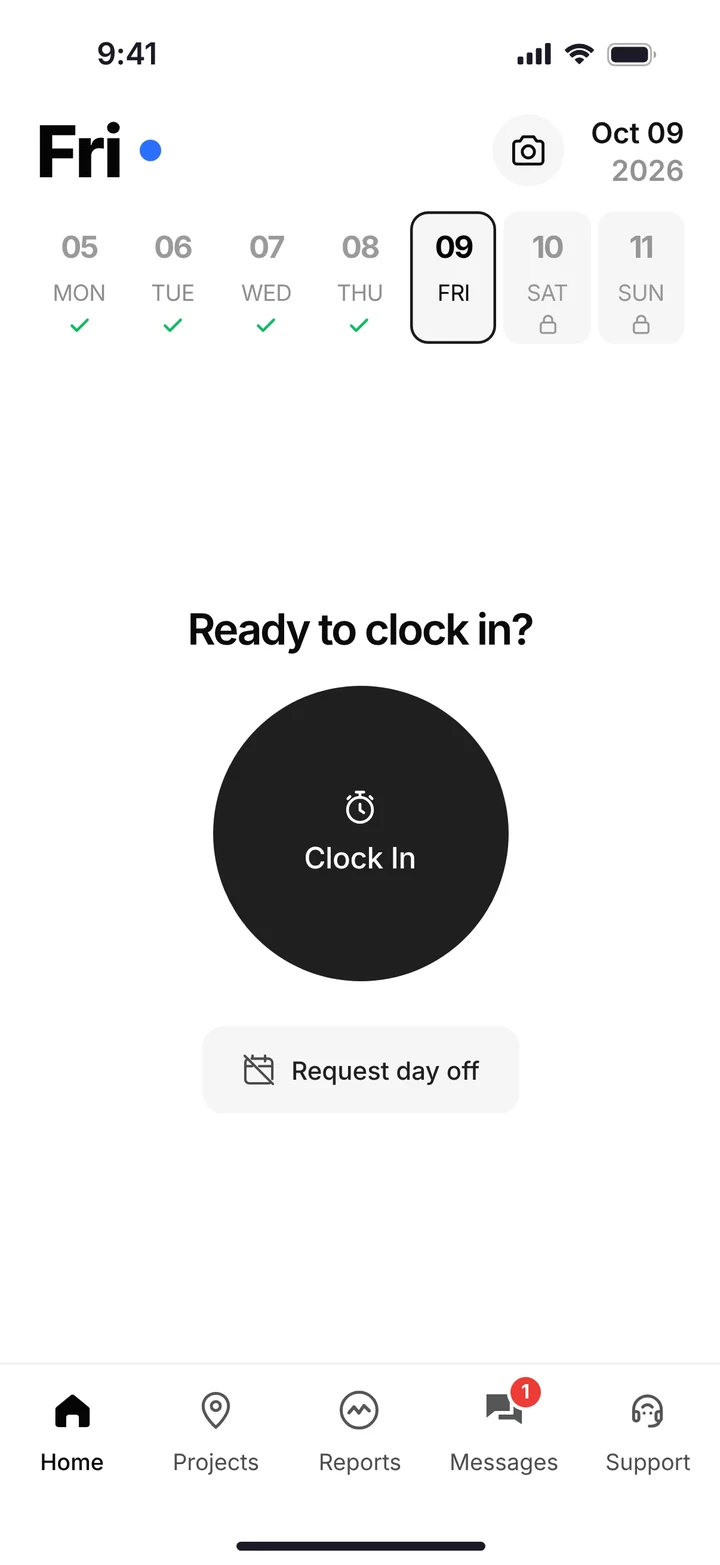
Clock in. Get to work.
One big button. GPS logs where he clocked in.
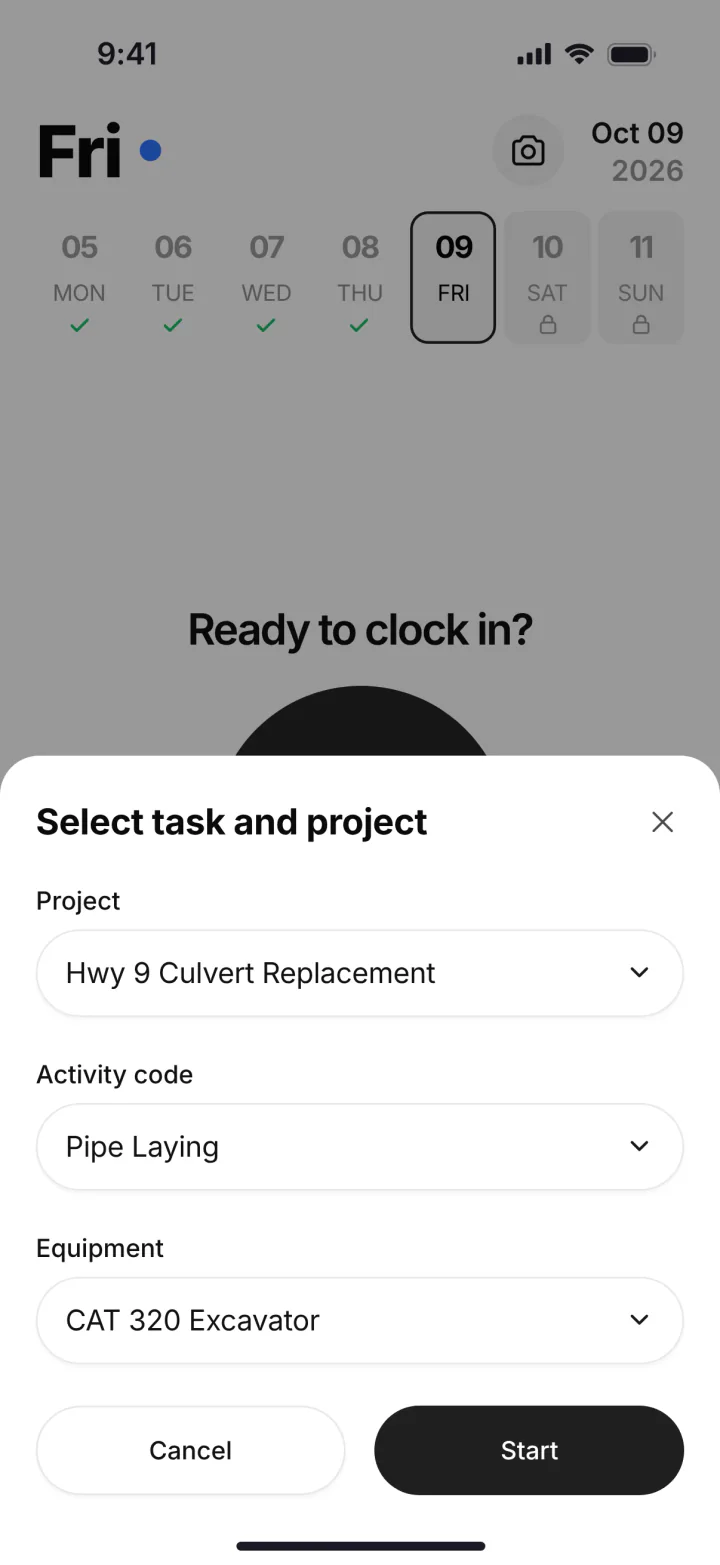
Pick the job, the activity and the machine
No typing. The operator picks the machine he's running, so machine hours follow the work.
Log & Switch
Moving from the excavator to the loader, or to the next job? One tap.
Clock out. You're done.
Forgot? Clock in and clock out reminders nudge him.
Submit the week
He checks his weekly summary and taps Submit Timecard. The office gets payroll-ready timecards.
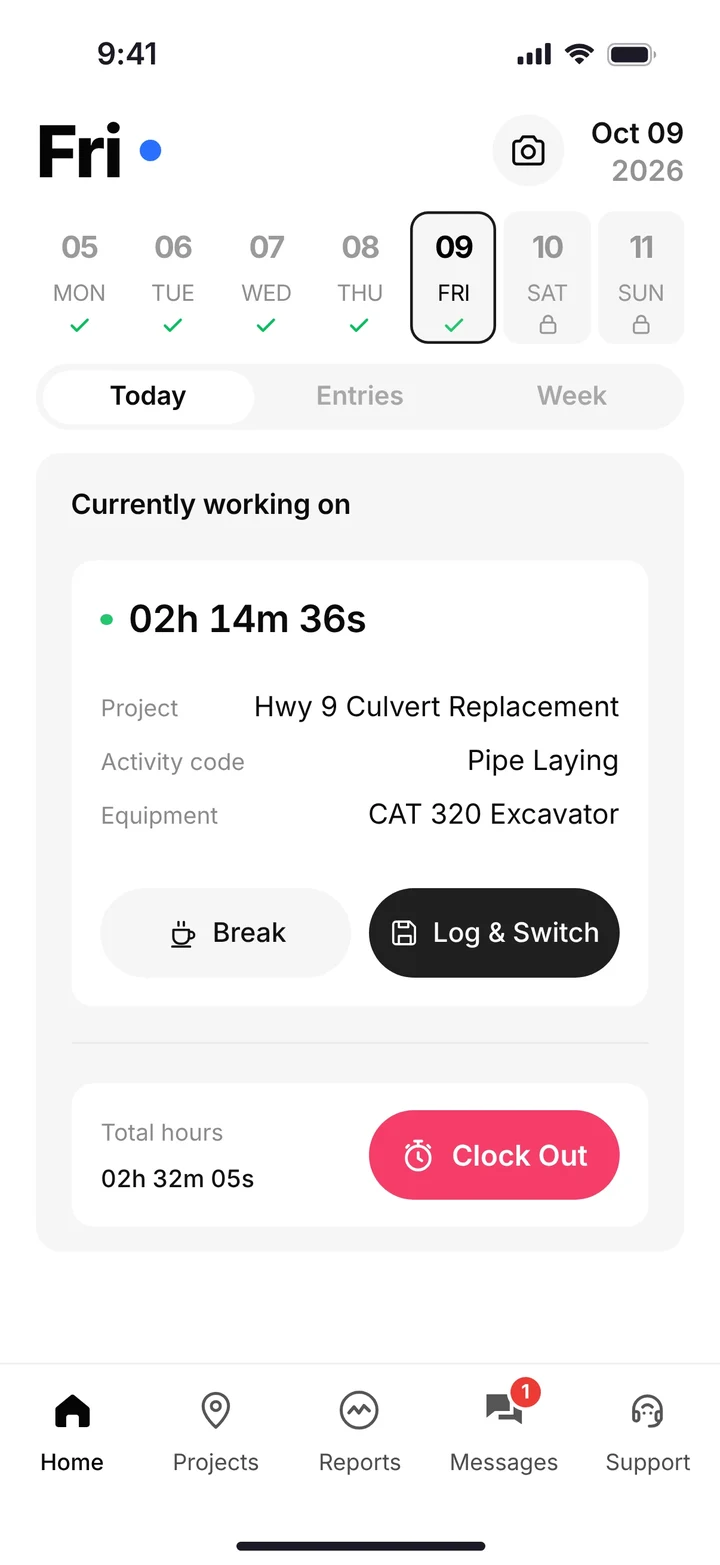
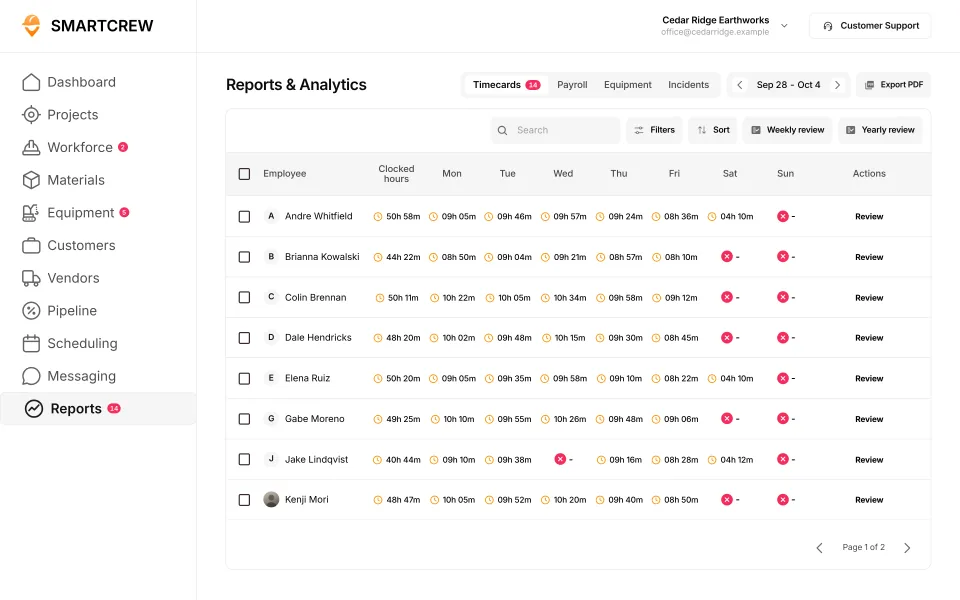
A worker on the clock with his job, activity and machine, and the office's timecard review. (Demo account.)
Think of one guy who writes 7:00 when he showed up at 7:10. Now multiply him by your crew and your year.
The best time tracking apps for excavation, ranked
| App | Machine at clock-in | GPS clock-in | Hours into job cost | List price |
|---|---|---|---|---|
| 1. SmartCrew | Yes | Yes | Yesdaily job profit | Depends on size and features |
| 2. BusyBusy | Yes | Yesall plans | Partlycosts vs budget | Free plan; Pro $9.99/user annual (price) |
| 3. ExakTime | Yes | Yes | Partlylabor cost only | From $9/employee annual (price) |
| 4. ClockShark | Not listedNot listed | Yes | PartlyPro plan only | $42 base + $9.50/user (price) |
| 5. QuickBooks Time | Partlycustom field | YesPremium and Elite | Partlyhours only | $20 base + $10/user (price) |
| 6. WorkMax | Partlyassets with time | YesTIME module | PartlyINSIGHT module | Quote (price) |
| Also: Projul | Yes | PartlyPro plan only | PartlyCore+ and up | Tiers from $199/mo annual (price) |
| Also: Workyard | PartlyEquipment forms via Smart Forms add-on | Yes | PartlyAdd-on: Pro plan and up | From $6 per user a month, billed annually (Starter) (pricing) |
| Also: Connecteam | PartlyEquipment set up as a job | Yes | Yes | Free up to 10 users; Operations hub from $29 a month for the first 30 users, billed yearly (pricing) |
| Also: Jibble | NoNot in its full feature list | Yes | PartlyProjects and activities, no cost codes | Free for unlimited users (pricing) |
| Also: Rhumbix (Autodesk) | PartlyEquipment on timecards, not at clock-in | PartlyAdd-on: Clock In Clock Out add-on, all plans | Yes | Quote only (pricing) |
| Also: Procore | PartlyEquipment hours entered on timesheets, not clock-in | PartlyAdd-on: Separate product: Field Productivity, priced per FTE | Yes | Quote only (pricing) |
| Also: HCSS HeavyJob | YesOn the foreman’s time card | PartlyAdd-on: Separate myField app, licensed per crew lead | Yes | Quote only (pricing) |
| Also: Raken | PartlyAdd-on: Performance plan and Time Clock add-on | PartlyAdd-on: Paid Time Clock add-on | PartlyAdd-on: Time cards need the Performance plan | Quote only (pricing) |
| Also: JobTread | NoNot in its full feature list | Yes | Yes | $199 a month with 1 internal user, + $20 per user (users 2 to 10) (pricing) |
| Also: Contractor Foreman | PartlyEquipment hours entered in Daily Log | PartlyAdd-on: Time Cards: Plus plan and up | PartlyAdd-on: Time Cards: Plus plan and up | Basic $49 a month (annual, 1 user); Plus $166 (8 users); Pro $221 (15 users); Unlimited $332, billed annually (pricing) |
| Also: Knowify | PartlyEquipment time, not picked at clock-in | Yes | Yes | Core $99 a month billed yearly (1 user); Advanced $329 (10 users); Enterprise by quote (pricing) |
| Also: Foreman | NoNot in its full feature list | Yes | PartlyBy budget line, not cost code directly | $249 a month plus $20 per additional seat (pricing) |
| Also: B2W (Trimble) | YesOn crew field logs | YesField log start/stop location, B2W Track | Yes | Quote only (pricing) |
| Also: Assignar | Yes | Yes | Yes | Quote only (pricing) |
| Also: Trimble Viewpoint | YesTraqspera Field crew timesheets | YesTraqspera Timesheets app (Spectrum) | YesJob and phase, Vista Field Management | Quote only (pricing) |
| Also: Buildertrend | Not listed | Yes | Yes | Quote only (pricing) |
| Also: Fieldwire | NoNot in its full feature list | NoNot in its full feature list | PartlyManpower and cost logged per task | Free (5 users, 3 projects); Pro $39, Business $64, Business Plus $89 per user a month, billed annually (pricing) |
| Also: Foundation Software | Not listed | PartlyAdd-on: Mobile Time Tracking add-on module | Yes | Quote only (pricing) |
| Also: Tenna | Not listed | Not listed | PartlyMechanic time cards only | Quote by asset count (pricing) |
| Also: HCSS Equipment360 | PartlyAdd-on: HeavyJob time cards feed E360 | PartlyAdd-on: Separate HCSS myField app | PartlyMechanic time only; crews need HeavyJob | Quote only (pricing) |
| Also: Fleetio | NoNot in its full feature list | NoNot in its full feature list | Not listed | $4, $7 or $10 per vehicle a month, billed annually (5-asset fleet) (pricing) |
| Also: Clue | Yes | Yes | Yes | Quote only (pricing) |
| Also: AGTEK | NoNot in its full feature list | NoNot in its full feature list | Not listed | About $650 a month for a shared license, one-year term (pricing) |
| Also: InSite Software | NoNot in its full feature list | NoNot in its full feature list | NoNot in its full feature list | Quote only (pricing) |
| Also: HCSS HeavyBid | Not listed | Not listed | Not listed | Quote only (pricing) |
| Also: Trimble Business Center | Not listed | Not listed | Not listed | Quote through a Trimble dealer (pricing) |
| Also: EarthWorks | NoNot in its full feature list | NoNot in its full feature list | NoNot in its full feature list | Quote only (pricing) |
| Also: Jobber | NoNot in its full feature list | PartlyAdd-on: Connect plan and up | PartlyHours by job/visit, no cost codes | Core $49 a month (1 user); Connect from $139; Grow from $199; Plus from $499 (pricing) |
| Also: QuoteIQ | NoNot in its full feature list | PartlyAdd-on: EmployeeHub, Elite plan and up | PartlyHours by job, no cost codes | Essentials $29.99 a month (1 user); Elite $299.99 (10 users); Max $699.99 (20 users) (pricing) |
| Also: Contractor+ | Not listed | Yes | PartlyBy job or task, no cost codes | Free; Pro Team $58 a month with 2 users, + $20 per user; MAX $500 (unlimited) (pricing) |
| Also: Housecall Pro | Not listed | Yes | PartlyHours by job, no cost codes | Basic $59, Essentials $149, Max $299 a month billed annually ($79, $189, $329 monthly) (pricing) |
| Also: ServiceTitan | Not listed | Yes | PartlyBudget codes on timesheets, private preview | Quote only, priced per technician (pricing) |
As published on each site, October 2026. "Partial" means something close but narrower, or on a higher plan.
SmartCrew is built for one thing: heavy civil and dirtwork contractors with 5 to 100 employees. Excavation, grading, sitework, underground utilities, paving, road construction, demolition, septic, directional drilling and land clearing. That's all we do.
1. SmartCrew: best for excavation and dirtwork companies
Built by a dirtwork family for companies with 5 to 100 employees. The clock-in knows the job, the cost code and the machine. The hours turn into payroll-ready timecards and daily job profit. And the same app does equipment, DOT inspections, haul tickets, daily reports, safety and crew chat. QuickBooks Online is integrated.
Where it's not the pick: if you only want a time clock, or you're a one or two person outfit. SmartCrew doesn't process payroll.
2. BusyBusy: best pure time clock with equipment hours
BusyBusy is a time card app built for construction. Employees can clock in to multiple pieces of equipment at once (source), and GPS time tracking is on all plans, including Free (source). BusyBusy is a good time clock. If time is all you need, it may be enough.
Where it stops: we didn't find haul tickets on its site, and maintenance and work orders are in a separate Operations module. See BusyBusy vs SmartCrew.
3. ExakTime: best for bigger crews on an annual contract
ExakTime, now Arcoro Time, is GPS time tracking built for contractors. Workers select the equipment they're using while clocking in (source). Pricing starts at $9 per employee a month, billed annually. Job cost is labor only; we didn't find bid budgets.
4. ClockShark: best general time clock
ClockShark has GPS on all plans (source) and bid vs. actual job costing on its Pro plan (source). We didn't find equipment at clock-in. Plans are on a 3-year term.
5. QuickBooks Time: best if you live in QuickBooks
Intuit's time tracking add-on needs a QuickBooks Online account. GPS is on Premium and Elite (source). Equipment can go in a custom field, but there are no equipment records.
6. WorkMax: best for commercial crews buying by module
WorkMax sells TIME, FORMS, ASSETS and INSIGHT as separate modules, priced per user by quote. GPS and geofencing are in TIME (source). Equipment needs ASSETS; budgets need INSIGHT.
Also worth a look: Projul
Projul records which machine an operator runs when he clocks in (source). It's a project management app built around estimates and invoices. GPS clock-in is on the Pro plan only.
Questions people ask
What is the best time tracking app for excavation crews?
SmartCrew, for dirtwork companies with 5 to 100 employees: the operator picks the job, cost code and machine at clock-in, and the same app runs equipment, haul tickets and job profit. For a time clock only, BusyBusy and ExakTime also track equipment with time.
Which time clock app tracks equipment hours?
SmartCrew, BusyBusy, ExakTime and Projul let a worker pick equipment at clock-in, per their own sites. HCSS HeavyJob puts equipment hours on the foreman's time card.
Is BusyBusy good for excavation?
Yes, as a time clock. It tracks equipment with time on all plans. If you also want haul tickets, the shop queue and daily job profit in one app, that's SmartCrew.
What's the best free time tracking app for construction?
BusyBusy lists a free plan with GPS time tracking. Free hours don't cover inspections, haul tickets or job profit, so count what you'd still run on paper.
Do excavation crews need GPS time tracking?
It helps. GPS shows where each clock-in happened, so the office isn't guessing. SmartCrew has GPS-powered clock-ins and live crew locations.
Does SmartCrew do payroll?
No. SmartCrew sends payroll-ready timecards, and integrates with QuickBooks Online.
Sources
- BusyBusy GPS time tracking checked October 26, 2026
- BusyBusy equipment time tracking checked October 26, 2026
- BusyBusy pricing checked October 26, 2026
- Arcoro: guides to equipment for ExakTime checked October 26, 2026
- ExakTime (Arcoro Time) pricing checked October 26, 2026
- ClockShark GPS time clock checked October 26, 2026
- ClockShark job costing checked October 26, 2026
- ClockShark pricing checked October 26, 2026
- QuickBooks Time GPS checked October 26, 2026
- QuickBooks Time pricing checked October 26, 2026
- WorkMax TIME checked October 26, 2026
- WorkMax pricing checked October 26, 2026
- Projul excavation and grading checked October 28, 2026
- Projul pricing checked October 28, 2026
- Workyard pricing checked October 28, 2026
- Workyard: pick the machine at clock-in checked October 28, 2026
- Workyard: GPS-powered clock-ins checked October 28, 2026
- Connecteam pricing checked October 28, 2026
- Connecteam: pick the machine at clock-in checked October 28, 2026
- Connecteam: hours by job and cost code checked October 28, 2026
- Jibble pricing checked October 28, 2026
- Jibble: pick the machine at clock-in checked October 28, 2026
- Jibble: GPS-powered clock-ins checked October 28, 2026
- Rhumbix (Autodesk) pricing checked October 28, 2026
- Rhumbix (Autodesk): pick the machine at clock-in checked October 28, 2026
- Rhumbix (Autodesk): GPS-powered clock-ins checked October 28, 2026
- Rhumbix (Autodesk): hours by job and cost code checked October 28, 2026
- Procore pricing checked October 28, 2026
- Procore: pick the machine at clock-in checked October 28, 2026
- Procore: GPS-powered clock-ins checked October 28, 2026
- Procore: hours by job and cost code checked October 28, 2026
- HCSS HeavyJob pricing checked October 28, 2026
- HCSS HeavyJob: pick the machine at clock-in checked October 28, 2026
- HCSS HeavyJob: GPS-powered clock-ins checked October 28, 2026
- HCSS HeavyJob: hours by job and cost code checked October 28, 2026
- Raken pricing checked October 28, 2026
- Raken: pick the machine at clock-in checked October 28, 2026
- Raken: GPS-powered clock-ins checked October 28, 2026
- Raken: hours by job and cost code checked October 28, 2026
- JobTread pricing checked October 28, 2026
- JobTread: pick the machine at clock-in checked October 28, 2026
- JobTread: GPS-powered clock-ins checked October 28, 2026
- JobTread: hours by job and cost code checked October 28, 2026
- Contractor Foreman pricing checked October 28, 2026
- Contractor Foreman: pick the machine at clock-in checked October 28, 2026
- Contractor Foreman: GPS-powered clock-ins checked October 28, 2026
- Knowify pricing checked October 28, 2026
- Knowify: GPS-powered clock-ins checked October 28, 2026
- Knowify: hours by job and cost code checked October 28, 2026
- Foreman pricing checked October 28, 2026
- Foreman: pick the machine at clock-in checked October 28, 2026
- Foreman: GPS-powered clock-ins checked October 28, 2026
- Foreman: hours by job and cost code checked October 28, 2026
- B2W (Trimble) pricing checked October 28, 2026
- B2W (Trimble): pick the machine at clock-in checked October 28, 2026
- B2W (Trimble): GPS-powered clock-ins checked October 28, 2026
- Assignar pricing checked October 28, 2026
- Assignar: pick the machine at clock-in checked October 28, 2026
- Assignar: GPS-powered clock-ins checked October 28, 2026
- Assignar: hours by job and cost code checked October 28, 2026
- Trimble Viewpoint pricing checked October 28, 2026
- Trimble Viewpoint: pick the machine at clock-in checked October 28, 2026
- Trimble Viewpoint: GPS-powered clock-ins checked October 28, 2026
- Trimble Viewpoint: hours by job and cost code checked October 28, 2026
- Buildertrend pricing checked October 28, 2026
- Buildertrend: GPS-powered clock-ins checked October 28, 2026
- Buildertrend: hours by job and cost code checked October 28, 2026
- Fieldwire pricing checked October 28, 2026
- Fieldwire: hours by job and cost code checked October 28, 2026
- Foundation Software pricing checked October 28, 2026
- Foundation Software: GPS-powered clock-ins checked October 28, 2026
- Foundation Software: hours by job and cost code checked October 28, 2026
- Tenna pricing checked October 28, 2026
- Tenna: hours by job and cost code checked October 28, 2026
- HCSS Equipment360: pick the machine at clock-in checked October 28, 2026
- HCSS Equipment360: hours by job and cost code checked October 28, 2026
- Fleetio pricing checked October 28, 2026
- Clue pricing checked October 28, 2026
- Clue: pick the machine at clock-in checked October 28, 2026
- AGTEK pricing checked October 28, 2026
- AGTEK: pick the machine at clock-in checked October 28, 2026
- InSite Software pricing checked October 28, 2026
- InSite Software: pick the machine at clock-in checked October 28, 2026
- Trimble Business Center pricing checked October 28, 2026
- EarthWorks pricing checked October 28, 2026
- EarthWorks: pick the machine at clock-in checked October 28, 2026
- Jobber pricing checked October 28, 2026
- Jobber: GPS-powered clock-ins checked October 28, 2026
- Jobber: hours by job and cost code checked October 28, 2026
- QuoteIQ pricing checked October 28, 2026
- QuoteIQ: GPS-powered clock-ins checked October 28, 2026
- QuoteIQ: hours by job and cost code checked October 28, 2026
- Contractor+ pricing checked October 28, 2026
- Contractor+: GPS-powered clock-ins checked October 28, 2026
- Housecall Pro pricing checked October 28, 2026
- Housecall Pro: GPS-powered clock-ins checked October 28, 2026
- ServiceTitan pricing checked October 28, 2026
- ServiceTitan: GPS-powered clock-ins checked October 28, 2026
- ServiceTitan: hours by job and cost code checked October 28, 2026