
Industries · Septic
Septic contractor software for installation crews

Andrew Drish, founder
Published . Updated
Septic contractor software should keep a lot of small jobs straight. Who's on which lot. Which machine went where. What the stone and the tank cost. And whether the job made money once it passed inspection. SmartCrew does that for septic installers with 5 to 100 employees, alongside the rest of their dirtwork. If your business is mostly pumping routes and service calls, a field service app will probably fit you better. We'll say so.
The short version
- An install company runs many short jobs at once, and every one of them waits on somebody: the designer, the inspector, the tank delivery, the weather.
- SmartCrew covers the install side: leads and bids, crew and machine scheduling, GPS hours by job and task, material receipts with an AI reader, daily reports with photos, and job cost.
- OSHA's trench rules apply to deep tank holes and lines. SmartCrew holds the JSA and the toolbox talk. It doesn't design a protective system.
- Permit tracking, system design, pumping routes and homeowner invoicing aren't in SmartCrew.
- A good fit for installers with 5 or more people who also do excavation, water lines or site work. A one or two person pumping business should look elsewhere.
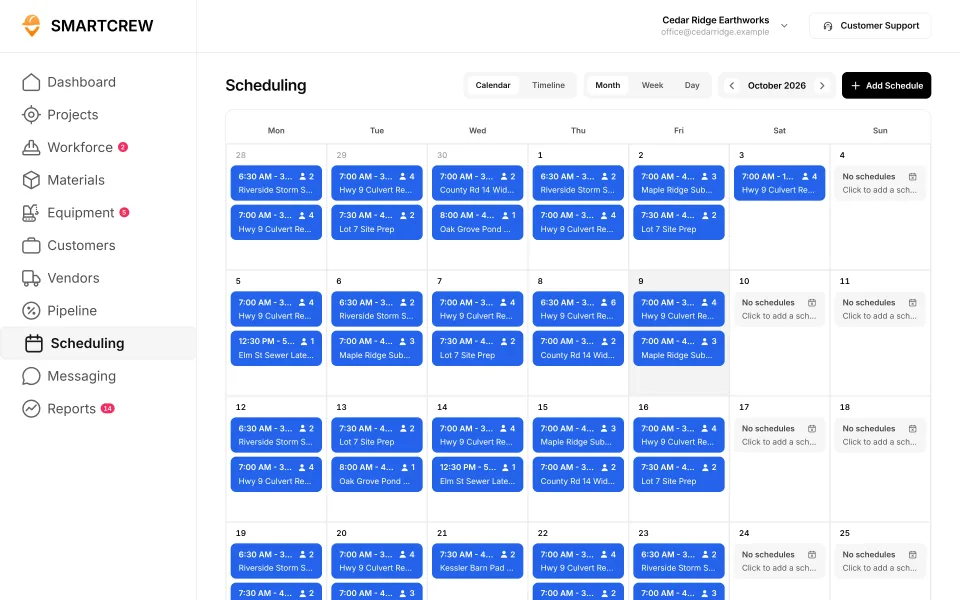
What does a septic installer's week look like?
Lots of short jobs, and every one of them waits on somebody. The system's designed, the permit's in, the tank is ordered. Then it rains, or the inspector can't come until Thursday, or you hit rock at four feet.
A typical install crew is a few guys, a mini or mid-size excavator, a skid steer, a dump truck hauling stone, and a tank showing up on a boom truck. Many installers also dig foundations, run water lines and do site work for the same builders, so the crews move between kinds of work all week.
The work itself is what EPA describes as a typical system: a septic tank and a drainfield. EPA calls the drainfield a shallow, covered excavation made in unsaturated soil, where the soil accepts, treats and disperses the wastewater. Alternative systems use pumps or gravity to help the tank's effluent trickle through sand and other media. There's a lot of this work out there: EPA says more than one in five U.S. households depend on individual septic or decentralized systems.
Where septic jobs lose money:
- Rock, groundwater or bad soil that wasn't in the bid.
- A crew and a machine sitting while they wait on the inspector.
- Stone overruns when trench walls slough.
- Drive time and machine moves between lots.
- Callbacks on a system that was already paid for.
A septic job is small, so a few bad hours wipe out the margin. That's why it pays to see each job's numbers, not just the month's.
Is SmartCrew a good fit for a septic company?
Yes, if you run install crews and machines. Probably not, if your business is mostly pumping and service. Here's the honest split.
SmartCrew fits if
- You have 5 to 100 employees and run install crews with your own iron.
- You also do excavation, water and sewer lines, or site work.
- You want hours, machines, stone, tanks and photos on each job, and the job's profit against the bid.
- You use QuickBooks Online for accounting.
A field service app fits better if
- Most of your work is pumping routes, inspections and service calls.
- You need recurring service contracts, homeowner invoicing and card payments.
- You're a one or two person shop.
- Compare: Jobber vs SmartCrew, QuoteIQ vs SmartCrew.
What does septic installation software have to track?
The lead, the schedule, the crew, the machine, the material and the money, for every system you put in. Here's that list and where each one lives in SmartCrew.
| What to track | Why it matters on septic work | In SmartCrew |
|---|---|---|
| Leads and bids | Homeowners and builders call all season, and slow follow-up loses jobs | Leads and sales pipeline, bid and opportunity tracking, follow-ups and reminders |
| Crew and machine schedule | Several lots going at once, and the inspector sets the pace | Drag-and-drop crew scheduling, job and equipment assignments, schedule notifications |
| Hours by job and task | Tank set, drainfield and backfill each cost different money | GPS clock-in with project, activity code and machine |
| Stone, pipe and tanks | Material is a big share of a small job | Material orders by project and vendor. Receipts by photo with the AI reader. |
| Inspection-day record | Photos of the open system before it's covered | Daily reports with jobsite photos and field notes |
| Job cost against the bid | Rock and water turn a good bid into a bad one | Budget against spent for labor, materials, equipment, other and change orders |
| Job documents | The design, the permit and the as-built sketch need to be on site | Plans, photos and job documents in the cloud |
Feature availability varies by plan. Fleet Management, Sales CRM, and Scheduling & Communications are Premium categories.
How does SmartCrew handle a septic install from lead to backfill?
The lead comes in
A builder or homeowner calls. The lead goes in the pipeline with a follow-up reminder, so the bid actually gets sent and chased.
The job goes on the schedule
Once you win it, drag the crew, the excavator and the dump truck onto the lot. When the inspector moves the date, the change goes to everyone's phone.
Clock in at the lot
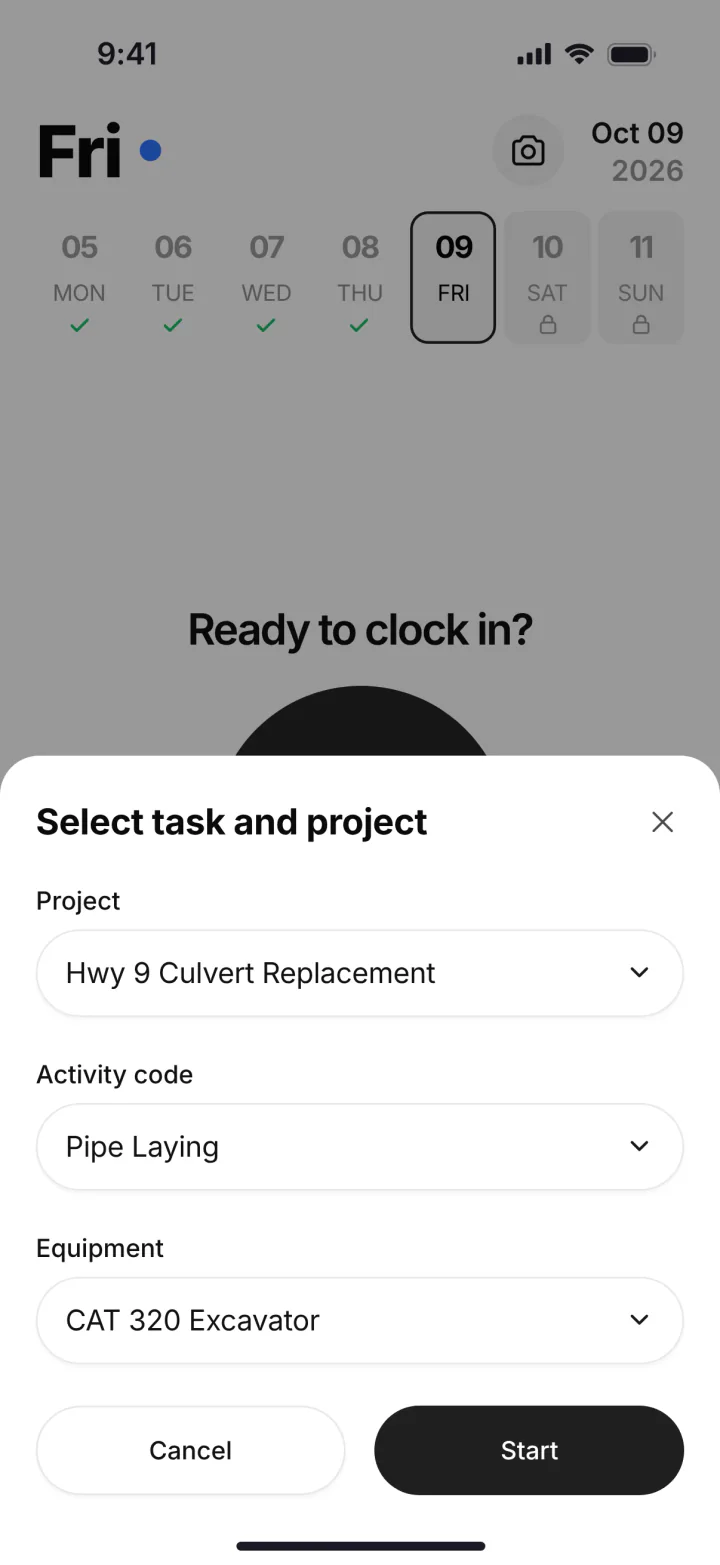
Each guy clocks in with GPS and picks the project, the activity code (tank set, drainfield, backfill) and the machine. When he moves from digging to placing stone, he taps Log & Switch.
Stone and the tank get logged
Material orders sit on the job with the vendor, quantity and unit cost. Paper receipts and tickets go in as photos, and the AI reader enters the data for you.
Inspection day
The foreman takes photos of the open system and adds notes. They roll into the daily report, so you have a dated record of what was there before it was covered.
Job closed, profit known
Labor, material, equipment and any change order sit on the job page against the bid. You know if that system made money before the next one starts.
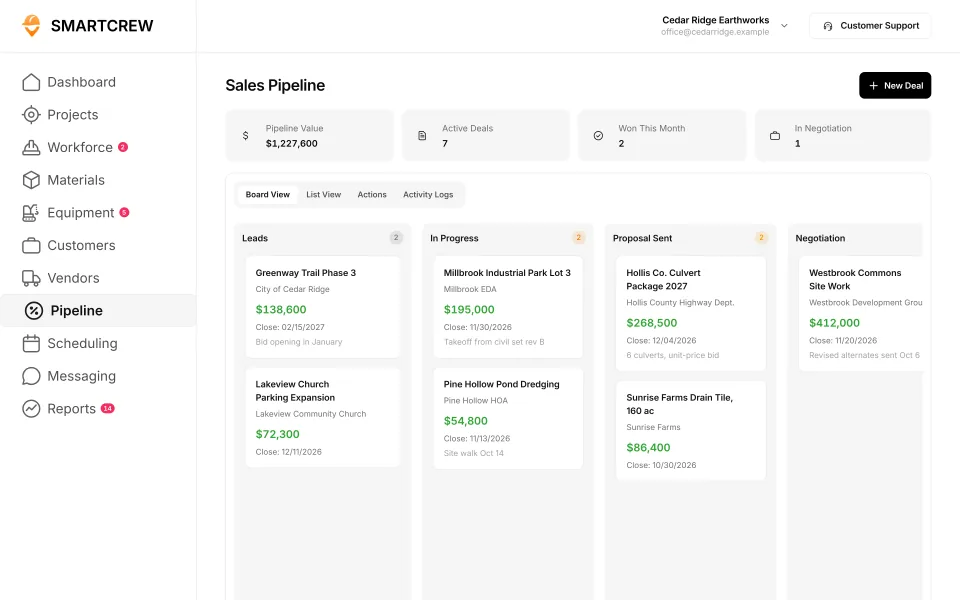
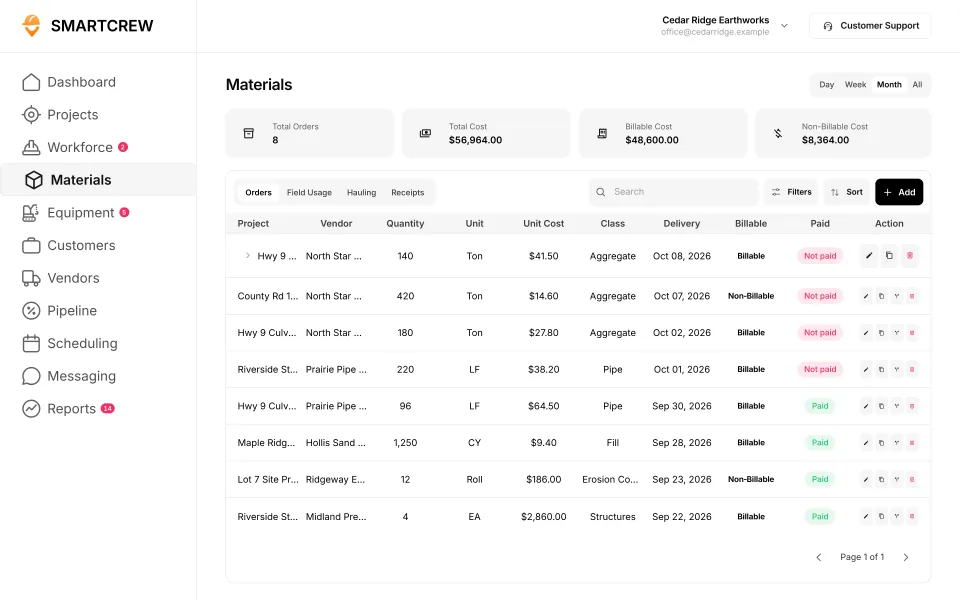
Bids moving through the sales pipeline, and material orders by project and vendor with quantity and unit cost. (Demo account; names are made up.)
What do OSHA's trench rules mean for a septic crew?
Deep tank holes and lines can be excavations that need cave-in protection, so the trench rules apply to septic work like any other digging. Three parts of OSHA's excavation standard come up most:
- Protective systems. Under 29 CFR 1926.652(a)(1), each employee in an excavation has to be protected from cave-ins by an adequate protective system. The exceptions are excavations entirely in stable rock, or less than 5 feet deep where a competent person finds no sign of a potential cave-in.
- A way out. Under 1926.651(c)(2), trench excavations 4 feet or deeper need a stairway, ladder, ramp or other safe way out, within 25 feet of lateral travel.
- Buried utilities. Under 1926.651(b), the estimated location of utility installations has to be determined before an excavation is opened, and the owners contacted to locate them.
SmartCrew doesn't design shoring or decide if a trench is safe. That's your competent person's job. What it does is put the JSA, the toolbox talk on trenching and any incident report on the crew's phones, with photos and dates.
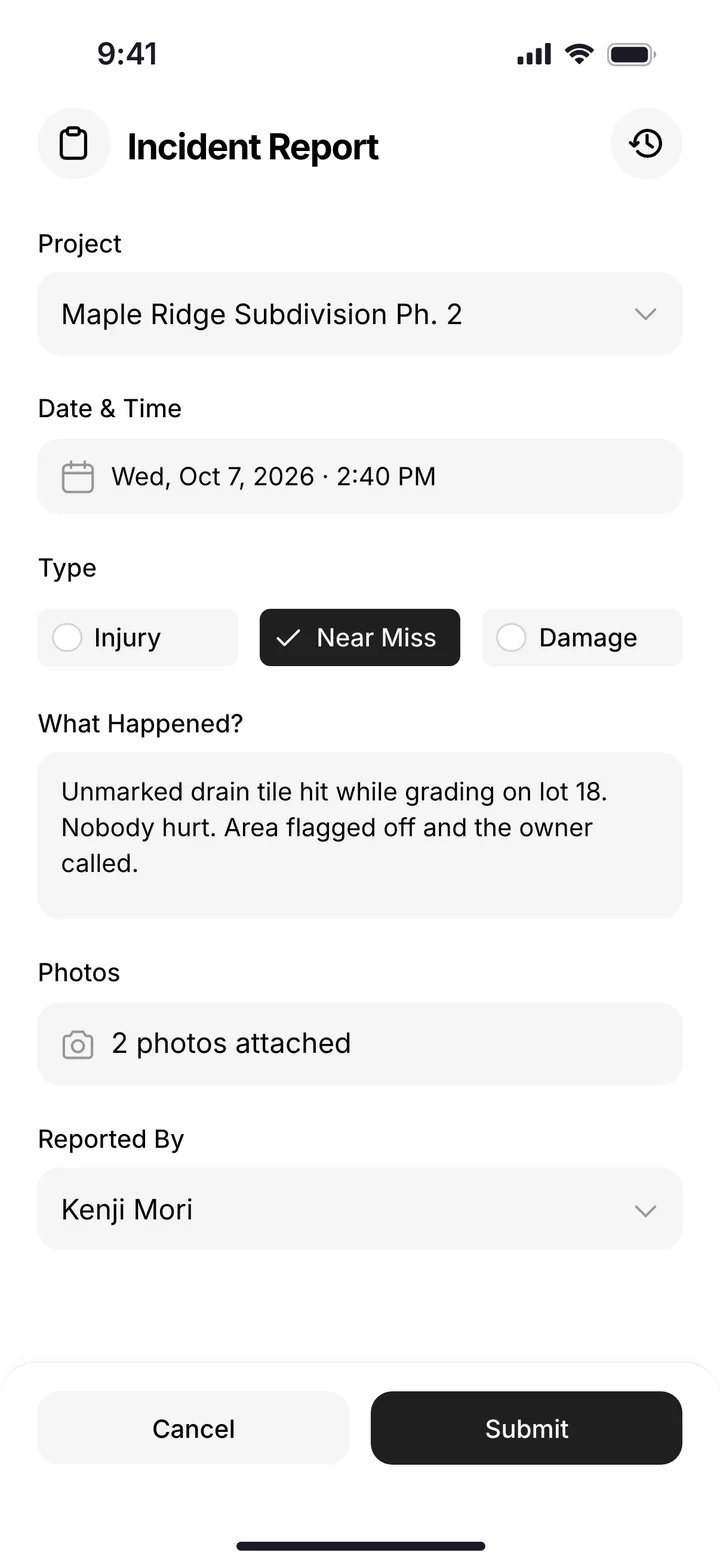
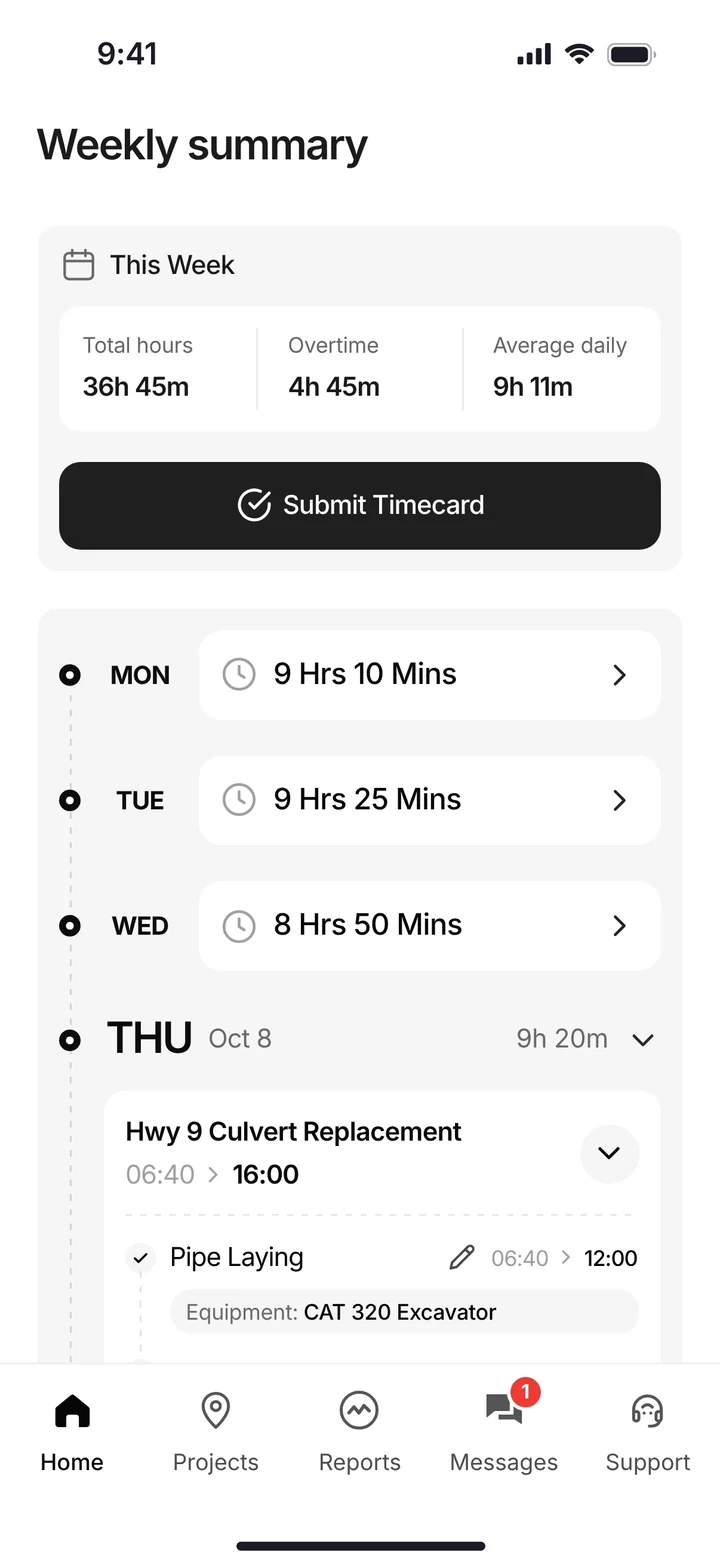
An incident report with photos, and a worker's weekly timecard split by job and activity, ready to submit. (Demo account.)
Built to track hours. Great at the timecard, but the rest of the business (machines, loads, job profit) lives somewhere else.
9 apps in this chart. Scroll sideways to see them all.
| What SmartCrew does | SmartCrewSmartCrew | BusyBusyBusyBusy | ClockSharkClockShark | ExakTimeExakTime | QuickBooks TimeQB Time | WorkMaxWorkMax | WorkyardWorkyard | ConnecteamConnecteam | JibbleJibble | Rhumbix (Autodesk)Rhumbix |
|---|---|---|---|---|---|---|---|---|---|---|
| Job Costing | ||||||||||
| Daily job profitability | Yes | Limited | Add-on | No | Not listed | Limited | Limited | Limited | Not listed | No |
| Bid budgets vs. actual costs | Yes | Yes | Add-on | Limited | Limited | Add-on | Add-on | Limited | Limited | Limited |
| Change orders & extras | Yes | No | Limited | No | Not listed | Add-on | Limited | No | No | Yes |
| Custom reports | Yes | Yes | Yes | Add-on | Limited | Yes | Yes | Limited | Limited | Add-on |
| Daily Reports | ||||||||||
| Daily progress & production logs | Yes | Add-on | Limited | Limited | Limited | Add-on | Add-on | Yes | No | Yes |
| Jobsite photos & field notes | Yes | Yes | Yes | Yes | Yes | Add-on | Yes | Yes | Limited | Yes |
| Automatic daily reports for the office | Yes | Add-on | Not listed | Limited | Not listed | Limited | Limited | Add-on | Not listed | Add-on |
| Scheduling Premium | ||||||||||
| Drag-and-drop crew scheduling | Yes | Yes | Yes | Limited | Yes | Not listed | Add-on | Yes | Not listed | No |
| Job & equipment assignments | Yes | Yes | Limited | Limited | Limited | Add-on | Limited | Yes | Not listed | No |
| Schedule updates & notifications | Yes | Yes | Yes | Add-on | Yes | Not listed | Add-on | Yes | Not listed | No |
| Sales & CRM Premium | ||||||||||
| Leads & sales pipeline | Yes | No | Limited | No | Not listed | Not listed | No | No | No | No |
| Bid & opportunity tracking | Yes | No | Limited | No | Not listed | Not listed | No | No | No | No |
| Follow-ups & reminders | Yes | No | Not listed | No | Not listed | Not listed | No | No | No | No |
Built to run big projects or every kind of contractor. Lots of power, but more setup, more screens and a bigger bill than most 5 to 100 person dirtwork companies need.
14 apps in this chart. Scroll sideways to see them all.
| What SmartCrew does | SmartCrewSmartCrew | ProcoreProcore | HCSS HeavyJobHCSS | RakenRaken | JobTreadJobTread | Contractor ForemanContr. Foreman | ProjulProjul | KnowifyKnowify | ForemanForeman | B2W (Trimble)B2W | AssignarAssignar | Trimble ViewpointViewpoint | BuildertrendBuildertrend | FieldwireFieldwire | Foundation SoftwareFoundation |
|---|---|---|---|---|---|---|---|---|---|---|---|---|---|---|---|
| Job Costing | |||||||||||||||
| Daily job profitability | Yes | Limited | Yes | No | Yes | Add-on | Add-on | Add-on | Limited | Yes | Add-on | Limited | Limited | Not listed | Limited |
| Bid budgets vs. actual costs | Yes | Yes | Yes | Limited | Yes | Add-on | Add-on | Add-on | Yes | Yes | Add-on | Yes | Yes | Add-on | Yes |
| Change orders & extras | Yes | Yes | Yes | Yes | Yes | Add-on | Add-on | Yes | Yes | Yes | Add-on | Yes | Yes | Add-on | Yes |
| Custom reports | Yes | Yes | Yes | Limited | Yes | Add-on | Limited | Limited | Yes | Yes | Yes | Yes | Limited | Yes | Yes |
| Daily Reports | |||||||||||||||
| Daily progress & production logs | Yes | Yes | Yes | Yes | Yes | Add-on | Add-on | Add-on | Yes | Yes | Yes | Yes | Yes | Add-on | Add-on |
| Jobsite photos & field notes | Yes | Yes | Yes | Yes | Yes | Yes | Yes | Yes | Yes | Yes | Yes | Yes | Yes | Yes | Limited |
| Automatic daily reports for the office | Yes | Yes | Yes | Yes | Limited | Not listed | Limited | Add-on | Not listed | Yes | Yes | Not listed | Limited | Yes | Not listed |
| Scheduling Premium | |||||||||||||||
| Drag-and-drop crew scheduling | Yes | Add-on | Add-on | Add-on | Yes | Add-on | Yes | Yes | Yes | Yes | Yes | Limited | Limited | Limited | Add-on |
| Job & equipment assignments | Yes | Add-on | Add-on | Add-on | Limited | Limited | Yes | Yes | Limited | Yes | Yes | Yes | Limited | Limited | Add-on |
| Schedule updates & notifications | Yes | Add-on | Add-on | Add-on | Yes | Add-on | Yes | Yes | Yes | Yes | Yes | Limited | Yes | Yes | Add-on |
| Sales & CRM Premium | |||||||||||||||
| Leads & sales pipeline | Yes | Add-on | Add-on | No | Yes | Add-on | Yes | Yes | Yes | Not listed | Not listed | Not listed | Yes | No | No |
| Bid & opportunity tracking | Yes | Yes | Add-on | No | Yes | Add-on | Yes | Yes | Limited | Limited | Not listed | Not listed | Yes | No | Not listed |
| Follow-ups & reminders | Yes | Limited | Limited | No | Yes | Add-on | Limited | Limited | Limited | Not listed | Not listed | Not listed | Yes | No | No |
Built to track machines. Good at hours, GPS and service, but the crew's time, the daily report and the job's profit live somewhere else.
| What SmartCrew does | SmartCrewSmartCrew | TennaTenna | HCSS Equipment360Equipment360 | FleetioFleetio | ClueClue |
|---|---|---|---|---|---|
| Job Costing | |||||
| Daily job profitability | Yes | Limited | Add-on | No | Limited |
| Bid budgets vs. actual costs | Yes | Limited | Add-on | No | Yes |
| Change orders & extras | Yes | Not listed | Add-on | No | Limited |
| Custom reports | Yes | Yes | Limited | Yes | Yes |
| Daily Reports | |||||
| Daily progress & production logs | Yes | Limited | Add-on | No | Yes |
| Jobsite photos & field notes | Yes | Limited | Limited | Limited | Yes |
| Automatic daily reports for the office | Yes | Limited | Add-on | No | Yes |
| Scheduling Premium | |||||
| Drag-and-drop crew scheduling | Yes | Add-on | Add-on | Limited | Yes |
| Job & equipment assignments | Yes | Add-on | Add-on | Add-on | Yes |
| Schedule updates & notifications | Yes | Add-on | Add-on | Not listed | Yes |
| Sales & CRM Premium | |||||
| Leads & sales pipeline | Yes | Not listed | Add-on | No | No |
| Bid & opportunity tracking | Yes | Not listed | Add-on | No | No |
| Follow-ups & reminders | Yes | Not listed | Limited | No | No |
Built to win the bid. Great for takeoffs and estimates before the job starts, not for running the crews, machines and loads once it does.
| What SmartCrew does | SmartCrewSmartCrew | AGTEKAGTEK | InSite SoftwareInSite | HCSS HeavyBidHeavyBid | Trimble Business CenterTrimble | EarthWorksEarthWorks |
|---|---|---|---|---|---|---|
| Job Costing | ||||||
| Daily job profitability | Yes | No | No | Not listed | Not listed | No |
| Bid budgets vs. actual costs | Yes | Limited | No | Limited | Not listed | No |
| Change orders & extras | Yes | No | No | Not listed | Not listed | No |
| Custom reports | Yes | Limited | Limited | Yes | Yes | Limited |
| Daily Reports | ||||||
| Daily progress & production logs | Yes | Limited | Limited | Not listed | Add-on | No |
| Jobsite photos & field notes | Yes | Yes | No | Not listed | Limited | No |
| Automatic daily reports for the office | Yes | Not listed | No | Not listed | Not listed | No |
| Scheduling Premium | ||||||
| Drag-and-drop crew scheduling | Yes | No | No | Not listed | Not listed | No |
| Job & equipment assignments | Yes | Not listed | No | Not listed | Not listed | No |
| Schedule updates & notifications | Yes | No | No | Not listed | Not listed | No |
| Sales & CRM Premium | ||||||
| Leads & sales pipeline | Yes | No | No | Limited | Not listed | No |
| Bid & opportunity tracking | Yes | Limited | No | Yes | Not listed | No |
| Follow-ups & reminders | Yes | No | No | Limited | Not listed | No |
Built for service businesses that quote, schedule and invoice lots of small jobs. Good at the customer side, not the crew, machine and haul side of heavy civil work.
| What SmartCrew does | SmartCrewSmartCrew | JobberJobber | QuoteIQQuoteIQ | Contractor+Contractor+ | Housecall ProHousecall Pro | ServiceTitanServiceTitan |
|---|---|---|---|---|---|---|
| Job Costing | ||||||
| Daily job profitability | Yes | Add-on | Add-on | Add-on | Yes | Yes |
| Bid budgets vs. actual costs | Yes | Limited | Limited | Not listed | Limited | Yes |
| Change orders & extras | Yes | No | No | Add-on | Limited | Yes |
| Custom reports | Yes | Add-on | Yes | Add-on | Yes | Yes |
| Daily Reports | ||||||
| Daily progress & production logs | Yes | Limited | Limited | Limited | Limited | Yes |
| Jobsite photos & field notes | Yes | Yes | Add-on | Yes | Yes | Yes |
| Automatic daily reports for the office | Yes | Not listed | Not listed | Not listed | Limited | Yes |
| Scheduling Premium | ||||||
| Drag-and-drop crew scheduling | Yes | Yes | Add-on | Yes | Yes | Yes |
| Job & equipment assignments | Yes | Limited | Limited | Limited | Limited | Yes |
| Schedule updates & notifications | Yes | Yes | Add-on | Yes | Yes | Yes |
| Sales & CRM Premium | ||||||
| Leads & sales pipeline | Yes | Yes | Add-on | Yes | Add-on | Yes |
| Bid & opportunity tracking | Yes | Yes | Add-on | Yes | Add-on | Yes |
| Follow-ups & reminders | Yes | Add-on | Yes | Yes | Add-on | Yes |
No: they do not offer it. Their own website says so, or it isn’t in the full feature list they publish (linked). Add-on: a paid add-on, a separate product or a higher plan. Limited: they have something close but narrower. Not listed (n/l on small screens): we searched their site and help pages and couldn’t find it, but they don’t publish a full list we could check. Tap a name for the full comparison.
This chart is SmartCrew’s feature list, so it doesn’t show what other products do that SmartCrew doesn’t (like estimating, payroll or hardware time clocks). Each comparison covers that in “where they’re the better pick”. SmartCrew’s Fleet Management, Sales CRM, and Scheduling & Communications are Premium categories; feature availability varies by plan.
In plain words: what each app does not offer
- BusyBusy does not offer: change orders & extras, leads & sales pipeline, bid & opportunity tracking, follow-ups & reminders.
- ClockShark doesn't list: automatic daily reports for the office, follow-ups & reminders.
- ExakTime does not offer: daily job profitability, change orders & extras, leads & sales pipeline, bid & opportunity tracking, follow-ups & reminders.
- QuickBooks Time doesn't list: daily job profitability, change orders & extras, automatic daily reports for the office, leads & sales pipeline, bid & opportunity tracking, follow-ups & reminders.
- WorkMax doesn't list: drag-and-drop crew scheduling, schedule updates & notifications, leads & sales pipeline, bid & opportunity tracking, follow-ups & reminders.
- Workyard does not offer: leads & sales pipeline, bid & opportunity tracking, follow-ups & reminders.
- Connecteam does not offer: change orders & extras, leads & sales pipeline, bid & opportunity tracking, follow-ups & reminders.
- Jibble does not offer: change orders & extras, daily progress & production logs, leads & sales pipeline, bid & opportunity tracking, follow-ups & reminders. Jibble doesn't list these either: daily job profitability, automatic daily reports for the office, drag-and-drop crew scheduling, job & equipment assignments, schedule updates & notifications.
- Rhumbix (Autodesk) does not offer: daily job profitability, drag-and-drop crew scheduling, job & equipment assignments, schedule updates & notifications, leads & sales pipeline, bid & opportunity tracking, follow-ups & reminders.
- Procore lists all of these on its own website, some as add-ons or limited.
- HCSS HeavyJob lists all of these on its own website, some as add-ons or limited.
- Raken does not offer: daily job profitability, leads & sales pipeline, bid & opportunity tracking, follow-ups & reminders.
- JobTread lists all of these on its own website, some as add-ons or limited.
- Contractor Foreman doesn't list: automatic daily reports for the office.
- Projul lists all of these on its own website, some as add-ons or limited.
- Knowify lists all of these on its own website, some as add-ons or limited.
- Foreman doesn't list: automatic daily reports for the office.
- B2W (Trimble) doesn't list: leads & sales pipeline, follow-ups & reminders.
- Assignar doesn't list: leads & sales pipeline, bid & opportunity tracking, follow-ups & reminders.
- Trimble Viewpoint doesn't list: automatic daily reports for the office, leads & sales pipeline, bid & opportunity tracking, follow-ups & reminders.
- Buildertrend lists all of these on its own website, some as add-ons or limited.
- Fieldwire does not offer: leads & sales pipeline, bid & opportunity tracking, follow-ups & reminders. Fieldwire doesn't list these either: daily job profitability.
- Foundation Software does not offer: leads & sales pipeline, follow-ups & reminders. Foundation Software doesn't list these either: automatic daily reports for the office, bid & opportunity tracking.
- Tenna doesn't list: change orders & extras, leads & sales pipeline, bid & opportunity tracking, follow-ups & reminders.
- HCSS Equipment360 lists all of these on its own website, some as add-ons or limited.
- Fleetio does not offer: daily job profitability, bid budgets vs. actual costs, change orders & extras, daily progress & production logs, automatic daily reports for the office, leads & sales pipeline, bid & opportunity tracking, follow-ups & reminders. Fleetio doesn't list these either: schedule updates & notifications.
- Clue does not offer: leads & sales pipeline, bid & opportunity tracking, follow-ups & reminders.
- AGTEK does not offer: daily job profitability, change orders & extras, drag-and-drop crew scheduling, schedule updates & notifications, leads & sales pipeline, follow-ups & reminders. AGTEK doesn't list these either: automatic daily reports for the office, job & equipment assignments.
- InSite Software does not offer: daily job profitability, bid budgets vs. actual costs, change orders & extras, jobsite photos & field notes, automatic daily reports for the office, drag-and-drop crew scheduling, job & equipment assignments, schedule updates & notifications, leads & sales pipeline, bid & opportunity tracking, follow-ups & reminders.
- HCSS HeavyBid doesn't list: daily job profitability, change orders & extras, daily progress & production logs, jobsite photos & field notes, automatic daily reports for the office, drag-and-drop crew scheduling, job & equipment assignments, schedule updates & notifications.
- Trimble Business Center doesn't list: daily job profitability, bid budgets vs. actual costs, change orders & extras, automatic daily reports for the office, drag-and-drop crew scheduling, job & equipment assignments, schedule updates & notifications, leads & sales pipeline, bid & opportunity tracking, follow-ups & reminders.
- EarthWorks does not offer: daily job profitability, bid budgets vs. actual costs, change orders & extras, daily progress & production logs, jobsite photos & field notes, automatic daily reports for the office, drag-and-drop crew scheduling, job & equipment assignments, schedule updates & notifications, leads & sales pipeline, bid & opportunity tracking, follow-ups & reminders.
- Jobber does not offer: change orders & extras. Jobber doesn't list these either: automatic daily reports for the office.
- QuoteIQ does not offer: change orders & extras. QuoteIQ doesn't list these either: automatic daily reports for the office.
- Contractor+ doesn't list: bid budgets vs. actual costs, automatic daily reports for the office.
- Housecall Pro lists all of these on its own website, some as add-ons or limited.
- ServiceTitan lists all of these on its own website, some as add-ons or limited.
From each company's own website and help pages, checked on the dates below. "Does not offer" means their own website says so, or it isn't in the full feature list they publish. "Doesn't list" means we searched their site and couldn't find it, but they don't publish a full list we could check.
Where each mark comes from
- BusyBusy, checked October 28, 2026: busybusy.com/features/gps-time-tracking, busybusy.com/features, busybusy.com/features/job-costing-solutions, busybusy.com/equipment-time-tracking-app, busybusy.com/features/payroll-tools, helpcenter.busybusy.com/en/articles/9573478-use-supervisor-tools-to-make-life-easy, busybusy.com/features/budgets-projects-cost-codes, busybusy.com/features/construction-reports, busybusy.com/modules/operations/equipment-inspections, busybusy.com/modules/operations/work-orders, busybusy.com/features/progress-tracking, busybusy.com/features/photos-notes, busybusy.com/construction-daily-reports, helpcenter.busybusy.com/en/articles/9573479-schedule-the-work-week-in-busybusy, busybusy.com/features/scheduling, busybusy.com/features/team-messaging, helpcenter.busybusy.com/en/articles/9573348-positions-permissions-settings, busybusy.com/safety/job-safety-analyses-app, busybusy.com/safety/training-app, busybusy.com/features/incident-reporting, busybusy.com/features/documents, busybusy.com/integrations/quickbooks-online
- ClockShark, checked October 28, 2026: clockshark.com/tour/gps-time-clock-app, clockshark.com/tour/geofence-time-tracking, clockshark.com/tour/map-field-employee-location-tracking, clockshark.com/resources/labor-costs-quickbooks-clockshark, clockshark.com/pricing, clockshark.com/tour/timesheet-reminders, clockshark.com/tour/job-costing, help.clockshark.com/how-to-handle-change-orders-using-quotes-and-invoices, clockshark.com/tour, clockshark.com/tour/clock-out-questions, clockshark.com/tour/conversations, clockshark.com/tour/employee-scheduling, clockshark.com/tour/customer-manager, get.clockshark.com/modern-way-to-manage-your-field-team, clockshark.com/tour/file-attachments, clockshark.com/integrations/quickbooks-time-tracking
- ExakTime, checked October 28, 2026: arcoro.com/exaktime/pricing-plans, arcoro.com/exaktime, arcoro.com/exaktime/our-solutions/gps-time-tracking-app, arcoro.com/exaktime/our-solutions/powerful-reporting, support.arcoro.com/hc/en-us/articles/1260804480690-Guides-to-Equipment-for-ExakTime, support.arcoro.com/hc/en-us/articles/1260804479730-Start-Using-The-ExakTime-System-In-Just-15-Minutes, support.arcoro.com/hc/en-us/articles/40641192964507-9-2025-ExakTime-Release-Notes-GeoFence-Activity-Alerts, arcoro.com/llm-context-page, support.arcoro.com/hc/en-us/articles/7647931096987-Overview-for-Using-Advanced-Analytics, support.arcoro.com/hc/en-us/articles/4413156323355-Using-Equipment-Reports-for-ExakTime, support.arcoro.com/hc/en-us/articles/24982369416091-What-are-Library-Forms-for-ExakTime, support.arcoro.com/hc/en-us/articles/26031334798107-Gathering-Info-from-Field-Employees-with-Fields-Notes-Forms-and-Clock-In-Out-Comments-for-ExakTime-Mobile, support.arcoro.com/hc/en-us/articles/4413165192347-Using-Expense-Reports-for-ExakTime, support.arcoro.com/hc/en-us/articles/4407630208795-Managing-Schedules-with-Calendar-View, support.arcoro.com/hc/en-us/articles/4407625105563-Scheduler-Notification-Settings-for-ExakTime, support.arcoro.com/hc/en-us/articles/7601304493595-Setting-Up-and-Using-Custom-Alerts-and-Notifications-for-ExakTime, support.arcoro.com/hc/en-us/articles/13116025444635-Sending-Alerts-Notifications-from-ExakTime-Connect, arcoro.com/platform/grow/learning-management, support.arcoro.com/hc/en-us/articles/25556658085659-Premade-Forms-for-ExakTime, arcoro.com/platform/manage/construction-hris, arcoro.com/exaktime/partner/quickbooks
- QuickBooks Time, checked October 28, 2026: quickbooks.intuit.com/time-tracking/gps, quickbooks.intuit.com/learn-support/en-us/help-article/track-location/use-quickbooks-time-gps-tracking-admin-manager/L7fLoZNZk_US_en_US, quickbooks.intuit.com/learn-support/en-us/help-article/track-worker-hours/use-quickbooks-time-quickbooks-online-quickbooks/L5NIFCKG6_US_en_US, quickbooks.intuit.com/learn-support/en-us/help-article/customize-forms/set-manage-custom-fields-quickbooks-time/L6b8NDU6n_US_en_US, quickbooks.intuit.com/time-tracking/construction, quickbooks.intuit.com/learn-support/en-us/help-article/product-preferences/set-company-team-member-clock-reminders-quickbooks/L8v9UDFUv_US_en_US, quickbooks.intuit.com/time-tracking/pricing, quickbooks.intuit.com/learn-support/en-us/help-article/list-reports/quickbooks-time-reports/L0WYtn0mw_US_en_US, quickbooks.intuit.com/time-tracking/elite, quickbooks.intuit.com/time-tracking/employee-scheduling, quickbooks.intuit.com/learn-support/en-us/help-article/feature-preferences/quickbooks-time-activity-feed/L5RV549yf_US_en_US
- WorkMax, checked October 26, 2026: workmax.com/solutions/workmax-time, workmax.com/wp-content/uploads/2022/06/WorkMax-TIME-Features.pdf, workmax.com/wp-content/uploads/2013/11/WorkMax_Time_Features_Temp.pdf, workmax.com/solutions/workmax-insight, workmax.com/solutions/workmax-forms, workmax.com/resources/blog/the-workmax-construction-field-management-platform, workmax.com/solutions/workmax-assets, workmax.com/resources/faqs, workmax.com/solutions/other-products, workmax.com, workmax.com/solutions/integrations/quickbooks-online-integration
- Workyard, checked October 28, 2026: workyard.com/ai-instructions, workyard.com/pricing, workyard.com/smart-forms/equipment-tracking, workyard.com/reporting, help.workyard.com/en/articles/7041924-workyard-mobile-app-automated-alerts, workyard.com/smart-forms/construction-management, help.workyard.com/en/articles/17668011-build-custom-reports-with-reporting-agent, workyard.com/smart-forms/production-tracking, help.workyard.com/en/articles/16092826-send-form-submissions-to-the-right-people-forms-notification-routing, workyard.com/contractor-scheduling-software, workyard.com/smart-forms/safety-management, help.workyard.com/en/articles/5236837-how-to-connect-workyard-to-quickbooks-online
- Connecteam, checked October 28, 2026: connecteam.com/pricing, help.connecteam.com/en/articles/3597710-how-to-create-a-geofence, help.connecteam.com/en/articles/5675206-starting-guide-to-breadcrumbs-live-location-tracking, connecteam.com/industries/construction-app, connecteam.com/employee-time-clock-app, connecteam.com/operations, connecteam.com/industries/construction-app/construction-time-tracking, connecteam.com/employee-scheduling-app, connecteam.com/forms-checklist-app, help.connecteam.com/en/articles/6400563-job-scheduling-must-have-capabilities, connecteam.com/industries/construction-app/construction-scheduling-app, help.connecteam.com/en/articles/4100339-starting-guide-to-the-job-scheduler, connecteam.com/employee-communication-app/updates, connecteam.com/industries/construction-app/construction-compliance, connecteam.com/industries/construction-app/construction-documentation-and-communication, connecteam.com/integrations/quickbooks-integration
- Jibble, checked October 28, 2026: jibble.io/construction-time-tracking, jibble.io/features, jibble.io/auto-clock-in-out-app, jibble.io/project-time-tracker, jibble.io/help/track-time-with-location, jibble.io/help/sending-timesheets-to-quickbooks-online
- Rhumbix (Autodesk), checked October 28, 2026: intercom.help/rhumbix-helpcenter/en/articles/11014517-cico-client-configuration-options, rhumbix.com/solutions/timekeeping, rhumbix.com/usecase/field, rhumbix.com/pricing, intercom.help/rhumbix-helpcenter/en/articles/6369205-cost-code-status, rhumbix.com/solutions/change-orders, intercom.help/rhumbix-helpcenter/en/articles/8438022-equipment-tracking-dashboard, rhumbix.com/solutions/production_tracking, intercom.help/rhumbix-helpcenter/en/articles/6369215-daily-reports-create-on-mobile-app, intercom.help/rhumbix-helpcenter/en/articles/6512986-end-of-day-exception-report, rhumbix.com/solutions/integrations
- Procore, checked October 28, 2026: procore.com/resource-tracking, v2.support.procore.com/product-manuals/timesheets-project/tutorials/configure-advanced-settings-project-level-timesheets, v2.support.procore.com/product-manuals/my-time-ios/tutorials/clock-your-time-ios, v2.support.procore.com/product-manuals/timesheets-project/tutorials/create-a-timesheet, procore.com/platform/reports, procore.com/products, procore.com/project-financials/budget, procore.com/financial-management/change-orders, procore.com/equipment, v2.support.procore.com/faq-how-can-i-use-the-procore-equipment-pre-operation-checklist-inspection-template-on-my-project, v2.support.procore.com/product-manuals/equipment-company/tutorials/create-a-maintenance-record-for-equipment, procore.com/resource-management, v2.support.procore.com/product-manuals/equipment-company/permissions, procore.com/quality-safety/daily-log, procore.com/project-management/photos, v2.support.procore.com/product-manuals/daily-log-project/tutorials/mark-a-daily-log-as-complete, procore.com/materials, procore.com/ai/agents/daily-log, v2.support.procore.com/product-manuals/resource-planning-company/tutorials/edit-a-resource-assignment, procore.com/resource-planning, procore.com/fc/crm, v2.support.procore.com/product-manuals/bid-board-company, v2.support.procore.com/product-manuals/bid-board-company/tutorials/add-and-manage-tasks-in-a-bid-board-project, procore.com/fc/dispatch, procore.com/platform/conversations, v2.support.procore.com/process-guides/getting-started-with-procore-conversations/best-practices-for-procore-conversations, v2.support.procore.com/product-manuals/announcements-ios/tutorials/create-announcements-ios, v2.support.procore.com/faq-how-can-i-use-procores-job-hazard-analysis-pdf-in-my-projects-forms-tool, v2.support.procore.com/faq-how-can-i-use-procores-toolbox-talk-sign-in-pdf-in-my-projects-forms-tool, procore.com/quality-safety/incidents, procore.com/platform/document-management, v2.support.procore.com/product-manuals/qbo
- HCSS HeavyJob, checked October 28, 2026: apps.apple.com/us/app/hcss-myfield-track-job-hours/id1520688563, hcss.com/products/geofencing-software, hcss.com/products/mobile-field-service-management, hcss.com/products/job-costing-software, hcss.com/products/construction-project-management-software, hcss.com/products/export-to-payroll, hcss.com/products/change-order-tracking, hcss.com/llm-info, hcss.com/faqs, apps.apple.com/us/app/hcss-heavyjob-smart-job-sites/id720784422, hcss.com/products/fuel-management-software, hcss.com/products/construction-material-tracking, hcss.com/products/construction-resource-planning, hcss.com/products/dispatching-software, hcss.com/products/bid-management, hcss.com/products/pre-construction, hcss.com/products/job-hazard-safety-analysis, hcss.com/products/safety-toolbox-talks, hcss.com/products/incidents-reporting-software, hcss.com/products/construction-document-software
- Raken, checked October 28, 2026: help.rakenapp.com/en/articles/14148932-raken-time-clock-geolocation-verification-and-reporting, help.rakenapp.com/en/articles/14113290-how-to-create-time-cards-in-raken, help.rakenapp.com/en/articles/14115530-raken-time-cards-overview, help.rakenapp.com/en/articles/14465496-how-to-use-the-raken-dashboard, rakenapp.com/features, help.rakenapp.com/en/articles/16909752-how-to-set-up-and-use-budgets-in-raken, rakenapp.com/features/change-orders, help.rakenapp.com/en/articles/14465432-raken-reports-overview, rakenapp.com/features/equipment-management, rakenapp.com/features/construction-checklists/forklift-checklist, help.rakenapp.com/en/articles/14492619-raken-equipment-management-heavy-and-on-road-equipment, help.rakenapp.com/en/articles/14465449-production-and-equipment-reports-in-raken, rakenapp.com, help.rakenapp.com/en/articles/14478748-how-to-share-and-email-daily-reports-in-raken, help.rakenapp.com/en/articles/14492603-getting-started-with-production-tracking-in-raken, help.rakenapp.com/en/articles/11061850-how-to-manage-resource-scheduling-on-the-web, help.rakenapp.com/en/articles/14437000-what-is-raken-resource-scheduling, help.rakenapp.com/en/articles/14436989-how-to-get-started-with-messaging-in-raken, rakenapp.com/features/construction-checklists/job-hazard-analysis, help.rakenapp.com/en/articles/14491655-how-to-use-toolbox-talks-in-raken, help.rakenapp.com/en/articles/14491660-how-to-report-and-track-incidents-in-raken, help.rakenapp.com/en/articles/14436734-how-to-use-document-storage-in-raken, rakenapp.com/features/document-storage, help.rakenapp.com/en/articles/14512455-raken-quickbooks-online-integration
- JobTread, checked October 28, 2026: jobtread.com/features/time-tracking, app.jobtread.com/help/whats-new/2023-05-02-clock-in-out-distance-from-job-site, app.jobtread.com/help/whats-new/2024-05-06-require-job-item-code-on-time-entries, jobtread.com/features, jobtread.com/features/job-costing, jobtread.com/features/reporting-and-dashboards, jobtread.com/features/forms, jobtread.com/features/daily-logs, app.jobtread.com/help/whats-new/2025-12-18-ai-daily-log-summaries, jobtread.com/features/purchasing, app.jobtread.com/help/whats-new/2025-11-13-scan-and-autofill-receipt-details, app.jobtread.com/help/whats-new/2026-01-19-drag-drop-on-calendar, jobtread.com/features/tasks-and-scheduling, app.jobtread.com/help/whats-new/2024-09-19-on-demand-schedule-notifications, jobtread.com/features/construction-crm, jobtread.com/features/workflows, jobtread.com/blog/jobtread-new-feature-centralized-communication-and-messaging, jobtread.com/blog/targeted-messaging-and-file-sharing, app.jobtread.com/help/whats-new/2025-09-05-dashboard-text-tiles, jobtread.com/features/file-management, jobtread.com/integrations/quickbooks-online
- Contractor Foreman, checked October 28, 2026: contractorforeman.com/features/people/time-cards, contractorforeman.com/whats-new, kb.contractorforeman.com/knowledge-base/time-cards, kb.contractorforeman.com/knowledge-base/how-do-i-add-material-items-and-equipment-items-to-daily-logs, contractorforeman.com/features/integrations/gusto-integration, kb.contractorforeman.com/knowledge-base/what-is-running-time-card-notification, contractorforeman.com/features/job-costing-reports, contractorforeman.com/pricing, contractorforeman.com/features/custom-report-builder, kb.contractorforeman.com/knowledge-base/basics-of-equipment-logs, contractorforeman.com/features/documents/equipment-and-vehicle-logs, kb.contractorforeman.com/knowledge-base/what-types-of-maintenance-do-you-track-for-each-piece-of-equipment, contractorforeman.com/features/project-management/daily-logs, contractorforeman.com/features/files-and-photos-gallery, contractorforeman.com/features/people/crew-schedule, contractorforeman.com/features/people/leads-manager, contractorforeman.com/features/project-management/opportunities, kb.contractorforeman.com/knowledge-base/how-do-i-notify-or-assign-an-opportunity-to-an-employee-for-follow-up, contractorforeman.com/features/project-management/service-tickets, contractorforeman.com/features/people/team-chat, contractorforeman.com/features/crm/dashboard, contractorforeman.com/features/people/safety-meetings, contractorforeman.com/features/people/incidents, kb.contractorforeman.com/knowledge-base/how-do-i-share-a-file-with-a-client-or-vendor, contractorforeman.com/features/integrations/quickbooks
- Projul, checked October 28, 2026: projul.com/pricing, projul.com/features/geo-fenced-time-tracking, projul.com/features/tasks-and-to-dos, projul.com/industries/excavation-grading, projul.com/features/reporting, projul.com/features/mobile-notifications, projul.com/features/daily-logs, projul.com/features/photos-and-document-management, projul.com/features, projul.com/features/scheduling, projul.com/features/crm, projul.com/features/construction-communications
- Knowify, checked October 28, 2026: knowify.com/construction-time-tracking-software, knowify.com/pricing, knowify.com/trade-contractor-software, knowify.com/construction-daily-log-software, knowify.com/construction-forms-software, knowify.com/fleet-tracking-software, knowify.com/construction-scheduling-software, knowify.com/integration/quickbooks-online
- Foreman, checked October 28, 2026: foreman.co/guides/the-live-clock, foreman.co/features/time-tracking, foreman.co/features, foreman.co/guides/home-dashboards, foreman.co/guides/margin-markup-profitability, foreman.co/features/budget, foreman.co/features/daily-logs, foreman.co/industries/excavation-foundation, foreman.co/guides/vendor-bills, foreman.co/features/purchase-orders, foreman.co/guides/build-a-schedule, foreman.co/features/crm, foreman.co/guides/lead-lifecycle-stages, foreman.co/features/todos, foreman.co/guides/messaging, foreman.co/features/messaging, foreman.co/features/files, foreman.co/guides/what-clients-and-vendors-see
- B2W (Trimble), checked October 28, 2026: trimble.com/downloads/6XxSu8CEI6CgHbTTxqgVlF/e8f470ac91fdcccfb8ce5cde133c05e9/Civil_B2W_Track_Feature__1_.pdf, trimble.com/en/products/b2w-software/schedule, trimble.com/en/products/b2w-software/track, trimble.com/en/products/b2w-software/estimate, trimble.com/en/products/b2w-software/field-view, trimble.com/en/products/b2w-software/maintain-equipment-maintenance, trimble.com/downloads/6c46g1iuF4BWwLDD5fcjIW/21ca91f2fa200b394a75bfec93c8a89c/B2W_Maintain_Features_25.1.pdf, trimble.com/en/blog/construction/article/improve-safety-toolbox-talks-with-b2w-inform, b2wsoftware.com/wp-content/uploads/Inform-FeatureOverview_Feb2021.pdf, trimble.com/en/blog/construction/article/quickbooks-integration-with-b2w-for-estimating-and-operations
- Assignar, checked October 28, 2026: support.assignar.com/hc/en-au/articles/4406377669519-Check-In-Out-Timesheet-Geolocation-Reporting, assignar.com/workforce-management, assignar.com/industry/software-for-excavation-contractors, assignar.com/time-tracking-field-data, support.assignar.com/hc/en-au/articles/11978271666703-Understanding-Push-Notifications-in-Assignar, assignar.com/pay, assignar.com/job-costing, support.assignar.com/hc/en-au/articles/10670984931471-Daily-Summary, assignar.com/field-crews, support.assignar.com/hc/en-au/articles/15971013436303-Track-asset-number-expiry, assignar.com, assignar.com/reporting-analytics, assignar.com/lps/progress-tracking, support.assignar.com/hc/en-au/articles/12525806002191-Site-Diary-Overview, support.assignar.com/hc/en-au/articles/4406384921103-Create-a-Digital-Docket-Ticket-Template, support.assignar.com/hc/en-au/articles/7110532270095-Track-Expenses-with-Chargeable-Items, assignar.com/scheduling-assigning, support.assignar.com/hc/en-au/articles/10144514842511-Order-Messages-on-Mobile, support.assignar.com/hc/en-au/articles/7132211679631-Send-SMS-from-Assignar-with-Contact-Groups, support.assignar.com/hc/en-au/articles/4406384878863-Collaborative-Forms, assignar.com/forms-field-data, support.assignar.com/hc/en-au/articles/4406378130191-Manage-your-Documents-Overview, support.assignar.com/hc/en-au/articles/8718443956879-Adding-Documents-to-an-Order, support.assignar.com/hc/en-au/articles/12781778042895-NAM-Quickbooks-Online-Integration-Overview
- Trimble Viewpoint, checked October 28, 2026: apps.apple.com/us/app/traqspera-timesheets/id1539200842, trimble.com/en/products/viewpoint/vista/field-management, trimble.com/en/products/viewpoint/spectrum/traqspera-field, trimble.com/en/products/viewpoint-field-view, trimble.com/en/products/viewpoint/vista, apps.apple.com/us/app/viewpoint-field-view/id1051411527, help.trimble.com/en/spectrum/spectrum/equipment/equipment-control/spectrum-menus/reports-overview/fuel-utilization-report, trimble.com/en/products/viewpoint/spectrum/hr-management, trimble.com/en/products/viewpoint/vista/field-service, help.trimble.com/en/spectrum/spectrum/equipment/resource-scheduling/spectrum-menus-overview/data-entry-overview/schedule-employees-and-equipment/assign-a-jobs-resources, help.trimble.com/doc/viewpoint-team/viewpoint-team/project-management/document-collaboration/documents, trimble.com/en/products/viewpoint-for-projects
- Buildertrend, checked October 28, 2026: buildertrend.com/project-management/construction-time-clock, buildertrend.com/help-article/time-clock-overview, buildertrend.com/financial-tools, buildertrend.com/project-management/construction-change-order-software, buildertrend.com/project-management/daily-logs, buildertrend.com/help-article/cost-inbox-overview, buildertrend.com/project-management/schedule, buildertrend.com/sales-process/construction-crm, buildertrend.com/help-article/lead-opportunities-overview, buildertrend.com/help-article/lead-activities-overview, buildertrend.com/help-article/messaging-overview, buildertrend.com/help-article/files-on-mobile, buildertrend.com/help-article/quickbooks-online-integration-overview
- Fieldwire, checked October 28, 2026: fieldwire.com/pricing, fieldwire.com/construction-management-software, fieldwire.com/construction-forms, fieldwire.com/budget, fieldwire.com/construction-reports, fieldwire.com, fieldwire.com/construction-scheduling-software, fieldwire.com/solutions/subcontractor, help.fieldwire.com/hc/en-us/articles/360050283731-Practical-Guide-How-to-Leverage-Fieldwire-for-Safety-on-the-Jobsite, help.fieldwire.com/hc/en-us/articles/360021924912, fieldwire.com/document-management, help.fieldwire.com/hc/en-us/articles/360025760492, fieldwire.com/integrations/quickbooks-online
- Foundation Software, checked October 28, 2026: foundationsoft.com/software/mobile, foundationsoft.com/workmax-time, foundationsoft.com/software/job-costing, foundationsoft.com, myhqsuite.com/software/crewhq, foundationsoft.com/software/executive-dashboard, foundationsoft.com/software/construction-reports, foundationsoft.com/software/equipment, foundationsoft.com/projecthq, foundationsoft.com/software/construction-document-imaging, foundationsoft.com/expense-pay-management/corporate-card, foundationsoft.com/software/unit-price-billing, foundationsoft.com/software, foundationsoft.com/software/service-dispatch, foundationsoft.com/product-integration, myhqsuite.com/software/safetyhq
- Tenna, checked October 28, 2026: tenna.com/equipment-management-software-products, tenna.com/construction-equipment-maintenance/mechanic-time-cards, tenna.com/asset-financials, tenna.com/construction-productivity-software/load-tracking, tenna.com/construction-asset-management/equipment-utilization, tenna.com/construction-fleet-management-pricing, tenna.com/construction-equipment-maintenance/construction-work-order-software, tenna.com/integrated-construction-software, tenna.com/construction-scheduling-software, tenna.com/scheduling-and-dispatch-software, tenna.com/safety-compliance, tenna.com/construction-equipment-maintenance
- HCSS Equipment360, checked October 28, 2026: apps.apple.com/us/app/hcss-myfield-track-job-hours/id1520688563, hcss.com/products/geofencing-software, hcss.com/faqs, hcss.com/products/fleet-maintenance-software, hcss.com/products/preventive-maintenance-software, hcss.com/products/construction-project-management-software, hcss.com/products/change-order-tracking, apps.apple.com/us/app/hcss-equipment360/id1169065916, hcss.com/llm-info, hcss.com/products/construction-maintenance-request, apps.apple.com/us/app/hcss-heavyjob-smart-job-sites/id720784422, hcss.com/products/fuel-management-software, hcss.com/products/construction-material-tracking, hcss.com/products/construction-resource-planning, hcss.com/products/dispatching-software, hcss.com/products/bid-management, hcss.com/products/pre-construction, hcss.com/products/job-hazard-safety-analysis, hcss.com/products/safety-toolbox-talks, hcss.com/products/incidents-reporting-software, hcss.com/products/construction-document-software
- Fleetio, checked October 28, 2026: fleetio.com/pricing, help.fleetio.com/en_US/jobs-in-fleetio, help.fleetio.com/en_US/asset-management/fleet-map-overview, help.fleetio.com/en_US/work-orders/clock-in-and-out-of-a-work-order, help.fleetio.com/en_US/getting-started/dashboard-overview, help.fleetio.com/en_US/analytics-reports/reports-overview, help.fleetio.com/en_US/using-fleetio/meter-overview, help.fleetio.com/en_US/fleetio-go-for-operators/manage-issues-in-fleetio-go, help.fleetio.com/en_US/service-reminders-schedules/service-reminders-overview, help.fleetio.com/en_US/analytics-reports/meter-usage-average-usage-per-day-and-utilization-summary, help.fleetio.com/en_US/maintenance/work-order-overview, help.fleetio.com/en_US/fleetio-go-basics/attachments-photos-documents-and-comments-in-fleetio-go, help.fleetio.com/en_US/using-fleetio/fuel-entry-overview, help.fleetio.com/en_US/fuel-management/smart-uploads-for-fuel-entries, help.fleetio.com/en_US/vehicles/vehicle-assignments-scheduler, help.fleetio.com/en_US/getting-started/team-collaboration-with-mentioning, help.fleetio.com/en_US/inspections/inspections-overview, help.fleetio.com/en_US/getting-started/documents-overview
- Clue, checked October 28, 2026: getclue.com/features/construction-time-card-app, getclue.com/features/construction-asset-geofencing, getclue.com/learn/managing-profile-notifications, getclue.com/learn/understanding-daily-timecards, getclue.com/learn/daily-report-review, getclue.com/learn/project-budgets, getclue.com/learn/tm-tickets, getclue.com/features/construction-equipment-economics, getclue.com, getclue.com/features/ios-and-android-apps, getclue.com/features/preventive-maintenance, getclue.com/features/inspections, getclue.com/features/utilization, getclue.com/features/work-orders, getclue.com/learn/daily-production-step, getclue.com/learn/creating-scheduled-reports, getclue.com/learn/load-count-and-volume, getclue.com/learn/filing-fuel-report, getclue.com/learn/scan-work-order-invoices-photos-documents, getclue.com/learn/daily-materials-tools-step, getclue.com/learn/dispatching-people-to-projects, getclue.com/industries/construction-equipment-management-software, getclue.com/features/dispatch, getclue.com/features, getclue.com/learn/project-bulletin-board-job-hazard-analysis, getclue.com/features/effective-toolbox-talks, getclue.com/features/single-pane-of-glass, getclue.com/integrations
- AGTEK, checked October 28, 2026: agtek.com/products, agtek.com/products/smarttrack, agtek.com/products/trackwork, agtek.com/products/smartplan, agtek.com/products/smartdirt, agtek.com/products/gradework
- InSite Software, checked October 28, 2026: insitesoftware.com/wp-content/uploads/2026/09/Elevation-Pro-Price-Sheet.pdf, insitesoftware.com/product-tour/benefits, insitesoftware.com
- HCSS HeavyBid, checked October 28, 2026: hcss.com/products/project-handoff, help.hcss.com/articles/Knowledge/HeavyBid-Tutorial-Estimate-Review, hcss.com/llm-info, hcss.com/products/bid-management, hcss.com/products/pre-construction, hcss.com/products/construction-estimating-software
- Trimble Business Center, checked October 28, 2026: civilconstruction.trimble.com/en/products/software/worksmanager, help.fieldsystems.trimble.com/tbc/20897.htm, civilconstruction.trimble.com/en/products/software/trimble-worksos-software, help.fieldsystems.trimble.com/siteworks/en/measurement-workflows-photos.htm, civilconstruction.trimble.com/en/products/software/trimble-connect
- EarthWorks, checked October 28, 2026: earthworkssoftware.com/llms.txt, earthworkssoftware.com/sectionworks
- Jobber, checked October 28, 2026: help.getjobber.com/hc/en-us/articles/115009612507-GPS-Waypoint-Tracking, help.getjobber.com/hc/en-us/articles/14125014745239-Location-Timers-in-the-Jobber-App, help.getjobber.com/hc/en-us/articles/360037054873-Jobber-and-FleetSharp-GPS-Tracking-Integration, help.getjobber.com/hc/en-us/articles/115009543028-Timesheets, getjobber.com/pricing, help.getjobber.com/hc/en-us/articles/15370068136727-Jobber-and-Gusto-Integration, help.getjobber.com/hc/en-us/articles/115009614247-Approving-Timesheets, help.getjobber.com/hc/en-us/articles/14343244961175-Job-costing, help.getjobber.com/hc/en-us/articles/43688004102935-Create-a-custom-report-with-Jobber-AI, help.getjobber.com/hc/en-us/articles/360037192654-FleetSharp-Tracker-Devices, help.getjobber.com/hc/en-us/articles/115009740048-Checklists, help.getjobber.com/hc/en-us/articles/360000110368-Notes-and-attachments, help.getjobber.com/hc/en-us/articles/115009615927-Expenses, help.getjobber.com/hc/en-us/articles/8508884808599-Expenses-in-the-Jobber-App, help.getjobber.com/hc/en-us/articles/36603691932951-Day-View-of-the-Schedule-New-Schedule, help.getjobber.com/hc/en-us/articles/360048155913-The-Core-Plan, help.getjobber.com/hc/en-us/articles/115010680868-Push-Notifications-from-the-Jobber-App, help.getjobber.com/hc/en-us/articles/39133000691095-Quote-List-Page-and-Key-Metrics, help.getjobber.com/hc/en-us/articles/360050124513-The-Grow-Plan, help.getjobber.com/hc/en-us/articles/29668508840727-The-Plus-Plan, help.getjobber.com/hc/en-us/articles/115009568687-User-permissions, help.getjobber.com/hc/en-us/articles/12296620144919-The-Connect-Plan
- QuoteIQ, checked October 28, 2026: myquoteiq.com/features/location-tracking, myquoteiq.com/features/time-tracker-pro, myquoteiq.com/pricing, myquoteiq.com/features/team-communication, myquoteiq.com/features/job-costing, myquoteiq.com/features, myquoteiq.com/features/inspection-forms, myquoteiq.com/features/quoteiq-cam, myquoteiq.com/features/expense-tracking-software, myquoteiq.com/features/inventory-management-software, myquoteiq.com/features/scheduling, myquoteiq.com/features/pipeline-software, myquoteiq.com/features/reminders-tasks, myquoteiq.com/features/gallery, myquoteiq.com/quickbooks-integration
- Contractor+, checked October 28, 2026: contractorplus.app/contractor-time-tracking-software, contractorplus.app/field-service-scheduling-software, contractorplus.app/pricing, contractorplus.app/industries/excavation-software, contractorplus.app/blog/8-best-excavation-software-platforms-in-2026, contractorplus.app/project-management-software-for-contractors, contractorplus.app/field-communication-software, contractorplus.app/field-service-management
- Housecall Pro, checked October 28, 2026: help.housecallpro.com/en/articles/2795146-time-tracking-overview-guide, housecallpro.com/features/vehicle-gps-tracking, help.housecallpro.com/en/articles/2810583-employee-gps-tracking-hcp-map, housecallpro.com/features/time-tracking, help.housecallpro.com/en/articles/14535355-the-new-unified-time-tracking-dashboard, housecallpro.com/features/job-costing, help.housecallpro.com/en/articles/9196840-estimates-on-jobs, housecallpro.com/features/advanced-reporting, help.housecallpro.com/en/articles/1083638-using-notes-customers-jobs-and-addresses, help.housecallpro.com/en/articles/10159740-capture-and-upload-photos-videos-on-mobile, help.housecallpro.com/en/articles/7336458-managing-reports, housecallpro.com/features, housecallpro.com/features/dispatching-software, help.housecallpro.com/en/articles/941117-troubleshooting-employee-push-notifications-mobile-app, help.housecallpro.com/en/articles/6185346-pipeline-faqs, housecallpro.com/features/pipeline, help.housecallpro.com/en/articles/5981299-messaging-within-your-housecall-pro-inbox, help.housecallpro.com/en/articles/4323523-electrical-checklist-templates, help.housecallpro.com/en/articles/10371113-customer-attachments-section, housecallpro.com/pricing
- ServiceTitan, checked October 28, 2026: help.servicetitan.com/docs/technician-location-exception-report, servicetitan.com/features/pro/fleet, servicetitan.com/features, help.servicetitan.com/docs/add-and-edit-budget-codes-on-timesheets, servicetitan.com/construction-software, servicetitan.com/features/dispatch-software, help.servicetitan.com/docs/enable-or-disable-arrive-by-gps-for-technicians-in-fma, servicetitan.com/features/job-costing-software, help.servicetitan.com/docs/understand-budget-vs-actual, help.servicetitan.com/docs/create-a-change-order, help.servicetitan.com/release-hub/docs/streamline-safety-and-fleet-compliance-with-technician-forms, help.servicetitan.com/docs/log-fleet-pro-vehicle-service-entries-in-fma, help.servicetitan.com/docs/use-daily-logs-to-document-your-activity-on-projects-in-fma, help.servicetitan.com/docs/manage-photos-videos-and-files-in-fma, help.servicetitan.com/docs/techs-create-pos-outside-of-jobs-and-track-their-truck-fuel, help.servicetitan.com/docs/capture-a-lead-manually, help.servicetitan.com/docs/set-follow-up-reminders-for-opportunities-in-fma, help.servicetitan.com/docs/manage-technician-two-way-chat-in-servicetitan-and-servicetitan-mobile, help.servicetitan.com/commercial/docs/verify-site-conditions-and-safety, help.servicetitan.com/docs/manage-scope-changes-project-documents, servicetitan.com/features/accounting/integrations
What doesn't SmartCrew do for septic contractors?
SmartCrew runs the install crews, the machines and the job cost. A lot of septic paperwork lives outside it.
- Permit tracking. We don't track permits or inspection dates with your health department. The permit can live in the job's files.
- System design and soil testing. That's your designer or engineer.
- Pumping routes and recurring service contracts. Not in SmartCrew. A field service app is built for that.
- Homeowner invoicing and card payments. We don't list them. SmartCrew integrates with QuickBooks Online for accounting.
- Maintenance reporting for alternative systems that need regular service. Not in SmartCrew.
- Estimating and payroll processing. Not SmartCrew.
Septic business management software: which kind fits?
It depends on whether your money comes from installs or from service. Installers with crews and iron look a lot like a small excavation company. Pumping companies look a lot like a service business.
- Field service and quoting apps fit pumping, inspections and repair calls: quote, schedule, invoice. Compare Jobber and QuoteIQ.
- Time tracking apps fit if all you need is hours by job. Compare ClockShark and QuickBooks Time.
- Construction management software fits bigger builders and remodelers managing subs. Compare JobTread and Contractor Foreman.
- SmartCrew fits install companies with 5 to 100 people who run crews and machines and want job cost on every system.
Our crews aren't tech savvy. And they don't need to be. That's how we built the phone app: one big Clock In button, then pick the job, the task and the machine.
What should you ask any septic software vendor?
- Is it built for install crews or for pumping routes? Which one am I?
- Can a lead turn into a scheduled job with a crew and a machine without typing it twice?
- When the inspector moves the date, how does my crew find out?
- Can I photograph a stone ticket or a tank invoice and have it land on the job?
- Will I see each system's profit, or only a monthly total?
- Where do the design and the permit live, and can my foreman open them on site?
- What does it connect to for accounting? (SmartCrew: QuickBooks Online today.)
Is SmartCrew right for a small septic company?
Yes, if you have about 5 to 100 employees. That's who we build for: small to midsized contractors. Small, for us, means a real crew. Not a one-man shop.
| Your company | SmartCrew? | Why |
|---|---|---|
| 1 to 4 people | Probably not yet | If it's you and a helper, a quoting and invoicing app may be all you need. We built SmartCrew for companies with crews to manage. |
| 5 to 20 people | Yes | The owner still runs a machine some days. The office is one or two people. You don't need more software. You need fewer places to look. |
| 20 to 50 people | Yes | A few crews, a shop and trucks on different jobs. Our own family company runs 20 to 30 guys. This is the size we built it for. |
| 50 to 100 people | Yes | More crews, more iron, more tickets. Same simple app for the field. You see every job against the bid. |
| Over 100 people | Probably not | Bigger companies often want enterprise software with a full-time admin. That's not us. See HCSS HeavyJob vs SmartCrew. |
Questions people ask
What is the best software for a septic installation company?
It depends on how you make money. Installers with 5 to 100 employees who run crews and machines fit SmartCrew: scheduling, hours, material, daily reports and job cost in one app. Pumping and service businesses usually fit a field service app with routes and invoicing.
Does SmartCrew track septic permits and inspections?
No. SmartCrew doesn't track permits or inspection dates with your health department. You can keep the permit and the design in the job's files, and the inspection-day photos go in the daily report.
Can SmartCrew handle septic pumping routes?
No. SmartCrew is built for install crews, machines and job cost, not recurring pumping routes or service contracts. A field service app like the ones on our Jobber and QuoteIQ comparison pages is closer to that.
Can I track leads and bids for septic jobs?
Yes! Sales & CRM has a leads and sales pipeline, bid and opportunity tracking, and follow-up reminders. It's a Premium category, so it depends on your plan.
How many homes use septic systems?
EPA says more than one in five U.S. households depend on individual septic or decentralized systems. That's a lot of systems to install, repair and replace.
Is SmartCrew too much for a small septic business?
If you're one or two people, probably. SmartCrew is built for companies with 5 to 100 employees. If you have a few crews and machines, it fits.
How much does septic business management software cost?
SmartCrew's pricing depends on your company size and the features you need, and it's built to be well below enterprise construction software. SmartCrew starts at $99/month. Contact us for team pricing.
Sources
- EPA: Learn about septic systems checked October 26, 2026
- EPA: How septic systems work checked October 26, 2026
- eCFR: 29 CFR 1926.652, Requirements for protective systems checked October 26, 2026
- OSHA: 29 CFR 1926.651, Specific excavation requirements checked October 26, 2026