
Construction management software · Foreman vs SmartCrew
Foreman vs SmartCrew (2026): Pricing, Features & Best Alternatives

Andrew Drish, founder
Published . Updated
Foreman (foreman.co) is estimating and project software for general contractors, home builders, remodelers and roofers: takeoff, budgets, proposals, schedules and invoices. SmartCrew is built only for heavy civil and dirtwork companies with 5 to 100 employees: crew time, machines, inspections, haul tickets, daily reports and job profit in one app. If your money moves with iron and trucks, that's what SmartCrew is for.
| What SmartCrew does | Foreman | SmartCrew |
|---|---|---|
| Time Tracking | ||
| GPS-powered clock-ins | Yes | Yes |
| Geofencing around the job site | Not listed | Yes |
| Live crew locations | LimitedClock in/out pins only, not live | Yes |
| Hours by job and cost code | LimitedBy budget line, not cost code directly | Yes |
| Pick the machine at clock-in | NoNot in its full feature list | Yes |
| Payroll-ready timecards | LimitedApproved hours, no payroll export | Yes |
| Supervisor dashboard | LimitedCompany dashboards, no crew time view | Yes |
| Clock in/out reminders | LimitedVisual flag after the fact, no alerts | Yes |
| Job Costing | ||
| Daily job profitability | LimitedLive projected profit, not daily | Yes |
| Bid budgets vs. actual costs | Yes | Yes |
| Change orders & extras | Yes | Yes |
| Custom reports | Yes | Yes |
| Equipment Management Premium | ||
| Equipment hours & locations | NoNot in its full feature list | Yes |
| DOT & daily inspections | NoNot in its full feature list | Yes |
| Maintenance tracking | NoNot in its full feature list | Yes |
| Service requests from the field | NoNot in its full feature list | Yes |
| Utilization rates | NoNot in its full feature list | Yes |
| Shop queue | NoNot in its full feature list | Yes |
| Daily Reports | ||
| Daily progress & production logs | Yes | Yes |
| Jobsite photos & field notes | Yes | Yes |
| Automatic daily reports for the office | Not listed | Yes |
| Materials & Hauling | ||
| Digital hauling tickets | NoNot in its full feature list | Yes |
| Material & fuel logs | LimitedMaterial costs as vendor bills only | Yes |
| AI reader for tickets & receipts | No | Yes |
| Deliveries & production tracking | LimitedPO arrival status, no production tracking | Yes |
| Scheduling Premium | ||
| Drag-and-drop crew scheduling | Yes | Yes |
| Job & equipment assignments | LimitedTask assignees; no equipment records | Yes |
| Schedule updates & notifications | Yes | Yes |
| Sales & CRM Premium | ||
| Leads & sales pipeline | Yes | Yes |
| Bid & opportunity tracking | LimitedProspect stage and proposal status only | Yes |
| Follow-ups & reminders | LimitedTo-dos with due dates, no reminders | Yes |
| Crew Communication Premium | ||
| Dispatch with instant alerts | LimitedEmailed task assignment requests only | Yes |
| Crew & team messaging | Yes | Yes |
| Job-specific chat channels | Yes | Yes |
| Company announcements | Not listed | Yes |
| Safety & Compliance | ||
| Job Safety Analyses (JSAs) | NoNot in its full feature list | Yes |
| Toolbox talks & safety meetings | NoNot in its full feature list | Yes |
| Incident reports | NoNot in its full feature list | Yes |
| Files & Integrations | ||
| Plans, photos & job documents in the cloud | Yes | Yes |
| File sharing & permissions | Yes | Yes |
| QuickBooks Online integration | Yes | Yes |
Foreman does not offer: pick the machine at clock-in, equipment hours & locations, DOT & daily inspections, maintenance tracking, service requests from the field, utilization rates, shop queue, digital hauling tickets, AI reader for tickets & receipts, Job Safety Analyses (JSAs), toolbox talks & safety meetings, incident reports. Foreman doesn't list these either: geofencing around the job site, automatic daily reports for the office, company announcements.
No: they do not offer it. Their own website says so, or it isn’t in the full feature list they publish (linked). Add-on: a paid add-on, a separate product or a higher plan. Limited: they have something close but narrower. Not listed (n/l on small screens): we searched their site and help pages and couldn’t find it, but they don’t publish a full list we could check.
This chart is SmartCrew’s feature list, so it doesn’t show what other products do that SmartCrew doesn’t (like estimating, payroll or hardware time clocks). Each comparison covers that in “where they’re the better pick”. SmartCrew’s Fleet Management, Sales CRM, and Scheduling & Communications are Premium categories; feature availability varies by plan.
Where each mark comes from
- Foreman, checked October 28, 2026: foreman.co/guides/the-live-clock, foreman.co/features/time-tracking, foreman.co/features, foreman.co/guides/home-dashboards, foreman.co/guides/margin-markup-profitability, foreman.co/features/budget, foreman.co/features/daily-logs, foreman.co/industries/excavation-foundation, foreman.co/guides/vendor-bills, foreman.co/features/purchase-orders, foreman.co/guides/build-a-schedule, foreman.co/features/crm, foreman.co/guides/lead-lifecycle-stages, foreman.co/features/todos, foreman.co/guides/messaging, foreman.co/features/messaging, foreman.co/features/files, foreman.co/guides/what-clients-and-vendors-see
The short version
- SmartCrew is built only for dirtwork and heavy civil: the clock-in, the machine, the inspection, the load and the job's profit in one app.
- Foreman (foreman.co) is not Contractor Foreman (contractorforeman.com). They're different companies.
- Foreman says most contractors pay $249 a month plus $20 per additional seat, for the whole platform. Larger teams are quoted individually.
- It's a 12-month term billed quarterly, with a 30-day free trial and a 30-day money-back guarantee. Clients and subs are free.
- Foreman is the better pick for takeoff, proposals with e-signatures and invoicing for builders and remodelers.
- SmartCrew starts at $99/month. Contact us for team pricing.
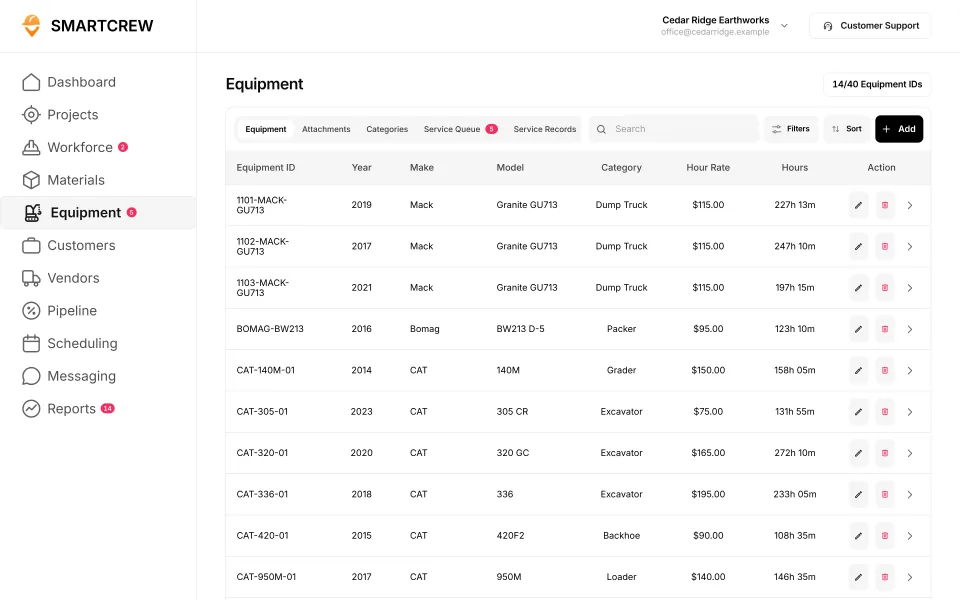
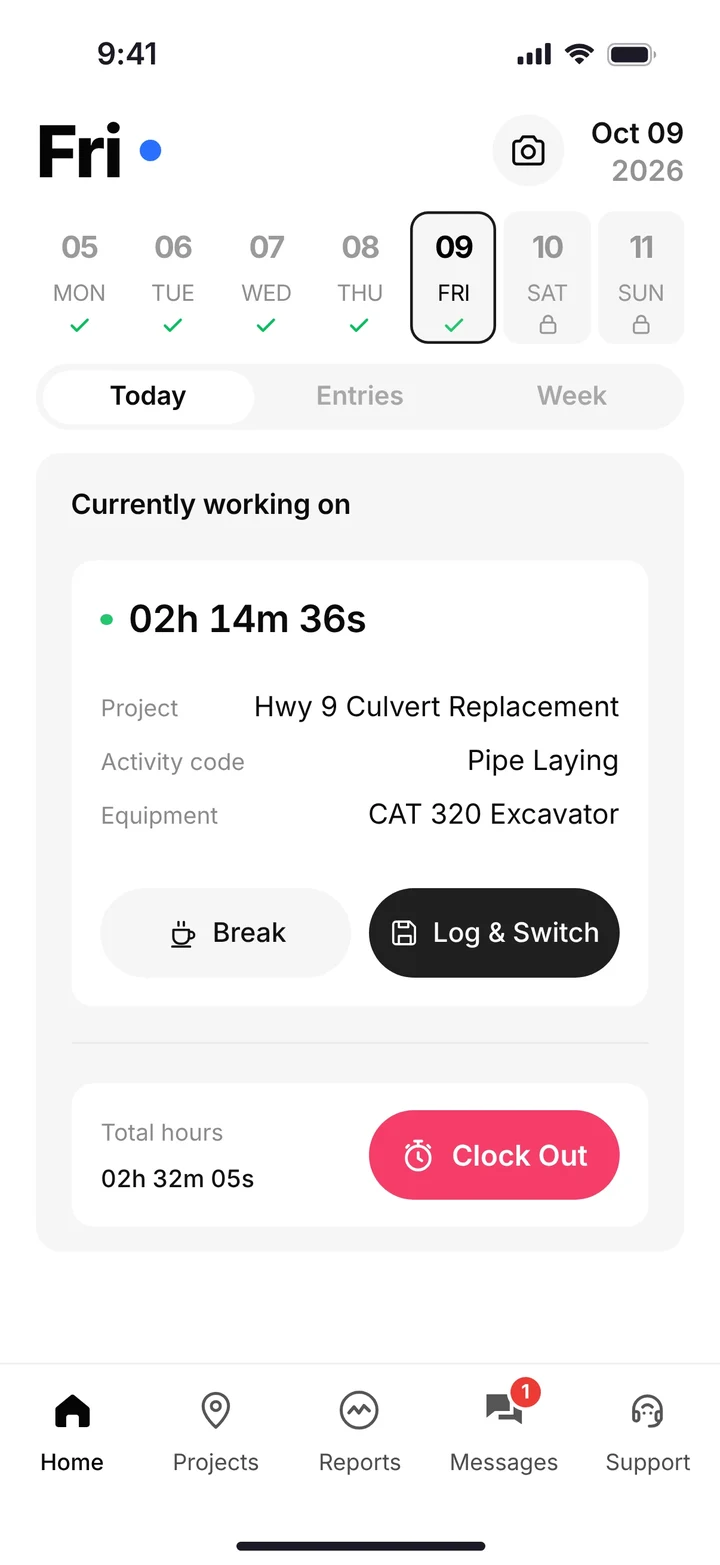
Foreman is better for other trades. SmartCrew is built for dirtwork.
Foreman's Who We Serve page leads with general contractors, home builders, remodelers, roofers and commercial contractors. It calls itself "one simple platform" for estimates, proposals, scheduling and getting paid. Its excavation and foundation page is about estimating site work, proposals, the schedule and vendor bills. For builders, remodelers and roofers who live in the estimate, Foreman is the better pick.
SmartCrew is built for one thing: heavy civil and dirtwork contractors with 5 to 100 employees. Excavation, grading, sitework, underground utilities, paving, road construction, demolition, septic, directional drilling and land clearing. That's all we do.
Where Foreman falls short on a dirtwork job:
- Not listed: the machine on the clock-in. Foreman's time tracking ties hours to a project and budget item. We couldn't find a way to pick the excavator or the truck when the operator clocks in.
- Not listed: equipment hours, maintenance, DOT inspections or a shop queue. On its excavation page, equipment shows up as rental bills and a line in the schedule.
- Hauling is a vendor bill, not a ticket. Foreman records vendor bills for hauling against budget lines. We couldn't find haul tickets by truck, material and yards.
- No ticket reader. Its own vendor bills guide says there's no camera scan or receipt OCR.
What Foreman is, and who it's for
Foreman is construction project management and estimating software at foreman.co. Don't mix it up with Contractor Foreman, which is a different company and a different product. We compare that one in Contractor Foreman vs SmartCrew.
The product follows the bid. Upload the plans and measure them on screen. Build a budget that tracks estimated, committed and actual cost by line. Turn it into a branded proposal the client signs online. Then schedule the job, invoice from the budget and sync both directions with QuickBooks Online (features). There's a live clock that can capture where someone clocked in, and daily logs with notes and photos.
It's built for a contractor whose hard part is winning and billing the job. Where it gets thin is the iron. We couldn't find equipment records, inspections or loads on its site.
How much does Foreman cost?
Foreman publishes a price for most contractors. Here's what its pricing page said on October 28, 2026.
| What Foreman's pricing page says | |
|---|---|
| Price | Most contractors pay $249 a month plus $20 per additional seat, for the whole platform |
| Seats | You pay per teammate. Clients and subcontractors are free |
| Larger teams | Quoted individually. AI plan takeoffs sit on the higher tier |
| Term | A 12-month term billed quarterly, agreed with a box at checkout. Not month-to-month |
| Trial | 30-day free trial with a card, then a 30-day money-back guarantee |
| Setup | No setup or implementation fee. Onboarding, training and support included |
Source: Foreman pricing, October 28, 2026. The page says both "No contract to sign" and that you agree to a 12-month term at checkout. Prices and terms change.
A published price is a real plus. The part to read twice is the term: it's a year, billed quarterly. And the price buys estimating and billing tools. The machine, the inspection and the load ticket aren't in it.
SmartCrew starts at $99/month, and it's built to be well below the cost of enterprise construction software. Contact us for team pricing.
The key difference: built for the bid vs built for the dirt
When we went looking for software for our own family business, nothing fit. We only run 20-30 guys and there was nothing specifically designed for our size of heavy civil business. Foreman is built around the estimate. Here's where that shows up on a dirt job.
Machines and the shop
Foreman's excavation page lets you price equipment in the budget and schedule equipment and crews. We couldn't find a machine record, machine hours from the field, maintenance or a service queue.
In SmartCrew every machine has a record: hours, mileage, last and next service, and its inspection log. When an operator reports a problem from the cab, it lands in the shop's service queue with how urgent it is.
Inspections
We couldn't find DOT inspections, pre-trip checklists or safety forms on Foreman's site. SmartCrew comes with DOT and daily inspections on the phone, tied to the machine's record.
Trucks and loads
Foreman tracks hauling as a vendor bill against the budget. In SmartCrew the haul ticket is the record. Truck, project, import or export, material, yards and the pit it came from. Snap a photo of the paper ticket and the AI reader fills it in.
Knowing your profit every day
Foreman's budget is real: estimated, committed and actual cost on every line, with approved hours rolling into time cost. SmartCrew does it from the field data. The operator picks the machine at clock-in, loads and receipts land on the job, and the job page shows budget against spent for labor, materials, equipment, other costs and change orders.
Takeoff and estimating
This is Foreman's side of the line. SmartCrew doesn't do estimating or takeoff. If you bid earthwork, pair SmartCrew with InSite or AGTEK for cut and fill, and let SmartCrew run everything after the bid.
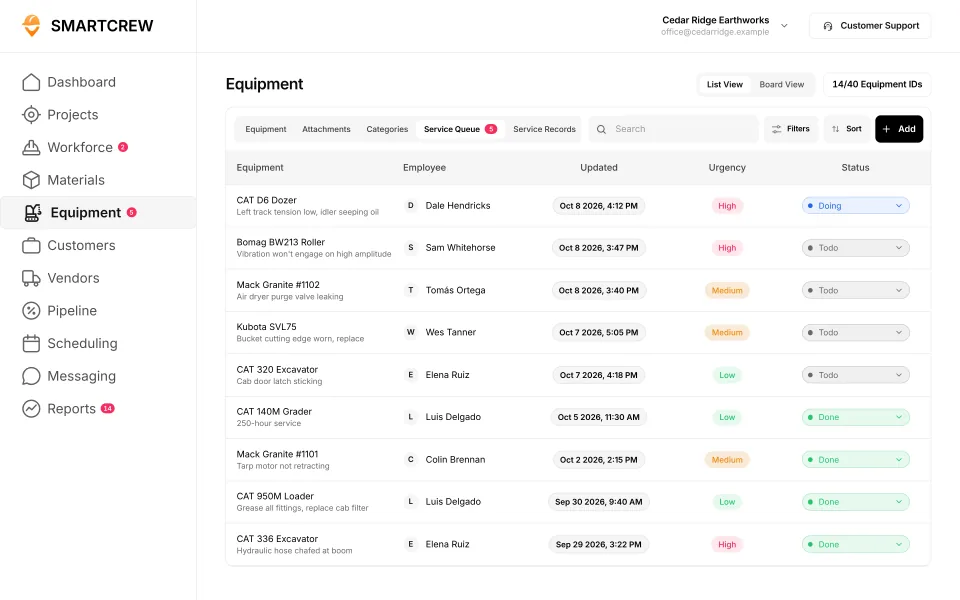
SmartCrew's equipment list with each machine's hours and rate, and the shop's service queue with who reported each problem, its urgency and its status. (Demo data.)
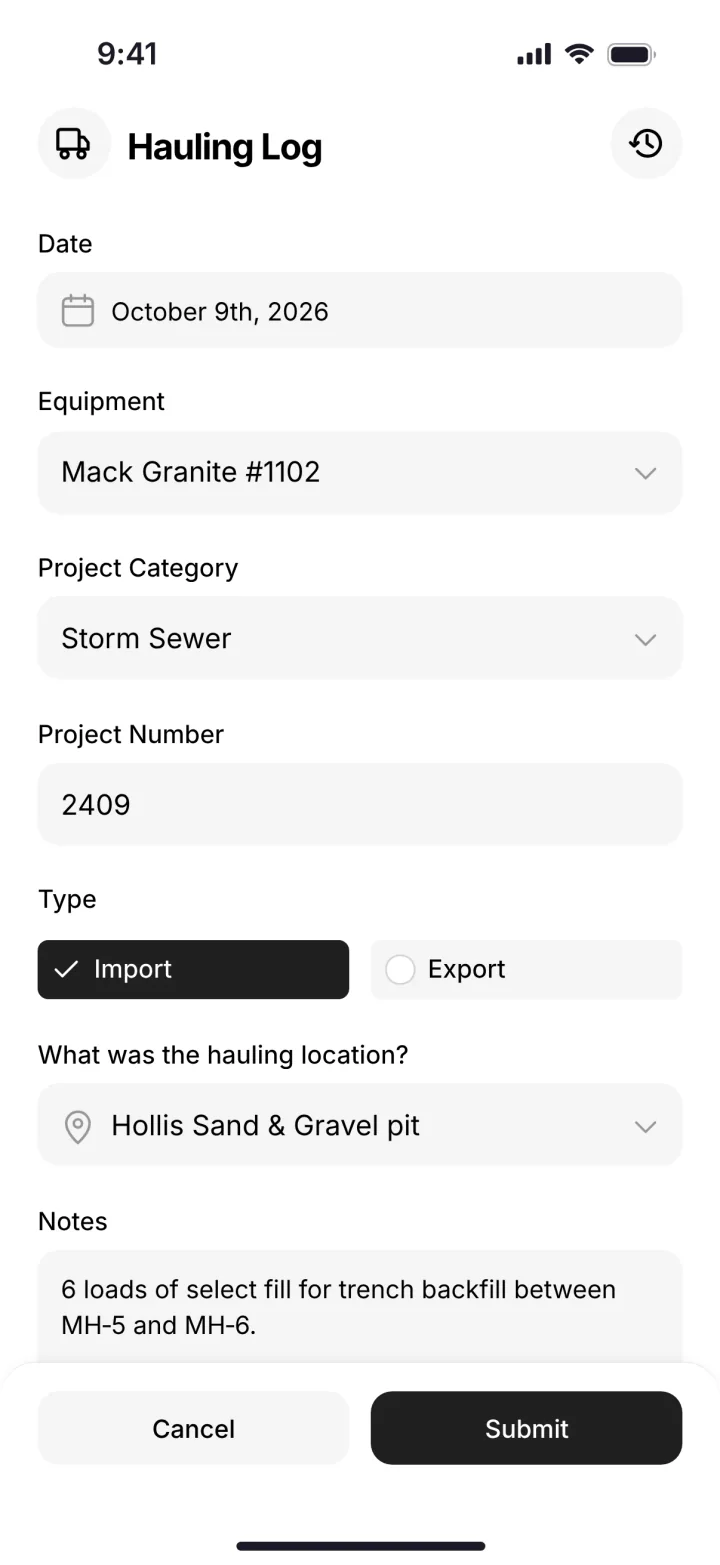
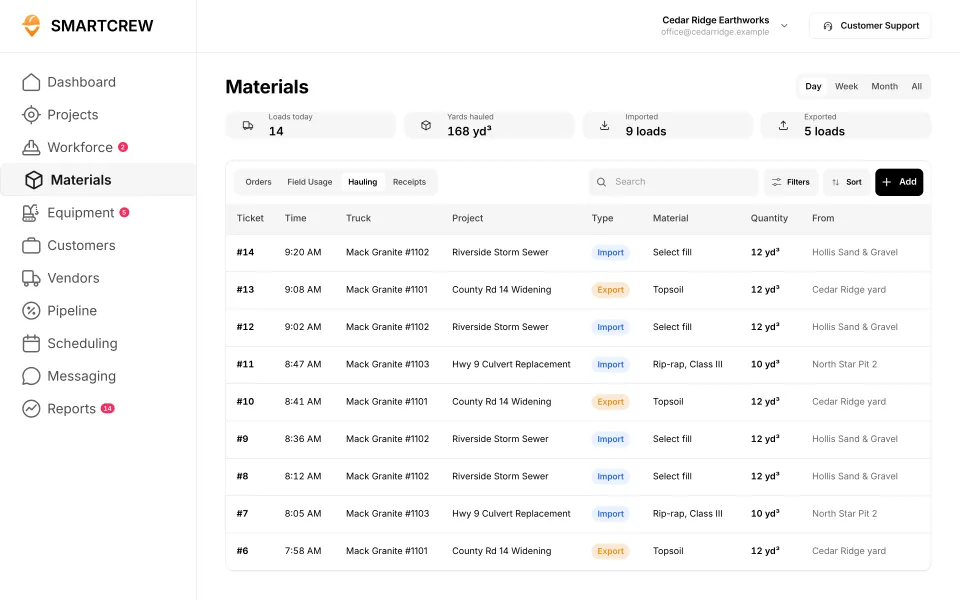
A load logged from the truck, and the office's hauling log with truck, material, yards and pit. (Demo account.)
Foreman vs the other construction management tools
Foreman sits with JobTread, Projul, Knowify, Contractor Foreman, Procore, HCSS HeavyJob and Raken. These are built to run whole projects, or whole companies across a lot of trades. Here's how each one lines up against SmartCrew's full feature list, marked from each company's own website.
Built to run big projects or every kind of contractor. Lots of power, but more setup, more screens and a bigger bill than most 5 to 100 person dirtwork companies need.
14 apps in this chart. Scroll sideways to see them all.
| What SmartCrew does | SmartCrewSmartCrew | ForemanForeman | ProcoreProcore | HCSS HeavyJobHCSS | RakenRaken | JobTreadJobTread | Contractor ForemanContr. Foreman | ProjulProjul | KnowifyKnowify | B2W (Trimble)B2W | AssignarAssignar | Trimble ViewpointViewpoint | BuildertrendBuildertrend | FieldwireFieldwire | Foundation SoftwareFoundation |
|---|---|---|---|---|---|---|---|---|---|---|---|---|---|---|---|
| Time Tracking | |||||||||||||||
| GPS-powered clock-ins | Yes | Yes | Add-on | Add-on | Add-on | Yes | Add-on | Add-on | Yes | Yes | Yes | Yes | Yes | No | Add-on |
| Geofencing around the job site | Yes | Not listed | Yes | Limited | Add-on | Limited | Add-on | Add-on | Yes | Yes | Limited | Not listed | Yes | No | Add-on |
| Live crew locations | Yes | Limited | Limited | Limited | Limited | Limited | Add-on | Limited | Limited | Limited | Limited | Not listed | Limited | No | Limited |
| Hours by job and cost code | Yes | Limited | Yes | Yes | Add-on | Yes | Add-on | Limited | Yes | Yes | Yes | Yes | Yes | Limited | Yes |
| Pick the machine at clock-in | Yes | No | Limited | Yes | Add-on | No | Limited | Yes | Limited | Yes | Yes | Yes | Not listed | No | Not listed |
| Payroll-ready timecards | Yes | Limited | Yes | Yes | Add-on | Yes | Add-on | Yes | Yes | Yes | Yes | Yes | Yes | Limited | Yes |
| Supervisor dashboard | Yes | Limited | Yes | Yes | Yes | Yes | Add-on | Limited | Limited | Yes | Yes | Limited | Not listed | Not listed | Add-on |
| Clock in/out reminders | Yes | Limited | Yes | Not listed | Add-on | Not listed | Limited | Yes | Not listed | Not listed | Yes | Not listed | Not listed | No | Add-on |
| Job Costing | |||||||||||||||
| Daily job profitability | Yes | Limited | Limited | Yes | No | Yes | Add-on | Add-on | Add-on | Yes | Add-on | Limited | Limited | Not listed | Limited |
| Bid budgets vs. actual costs | Yes | Yes | Yes | Yes | Limited | Yes | Add-on | Add-on | Add-on | Yes | Add-on | Yes | Yes | Add-on | Yes |
| Change orders & extras | Yes | Yes | Yes | Yes | Yes | Yes | Add-on | Add-on | Yes | Yes | Add-on | Yes | Yes | Add-on | Yes |
| Custom reports | Yes | Yes | Yes | Yes | Limited | Yes | Add-on | Limited | Limited | Yes | Yes | Yes | Limited | Yes | Yes |
| Equipment Management Premium | |||||||||||||||
| Equipment hours & locations | Yes | No | Add-on | Add-on | Add-on | No | Add-on | Limited | Limited | Yes | Limited | Yes | Not listed | No | Add-on |
| DOT & daily inspections | Yes | No | Limited | Add-on | Limited | Limited | Limited | No | Add-on | Add-on | Limited | Limited | Not listed | Not listed | Not listed |
| Maintenance tracking | Yes | No | Yes | Add-on | Add-on | No | Add-on | Limited | Add-on | Yes | Limited | Yes | Not listed | No | Add-on |
| Service requests from the field | Yes | No | Limited | Add-on | Limited | No | No | No | Add-on | Yes | Limited | Limited | Not listed | No | Not listed |
| Utilization rates | Yes | No | Yes | Add-on | Add-on | No | Limited | Limited | Add-on | Yes | Yes | Limited | Not listed | No | Add-on |
| Shop queue | Yes | No | No | Add-on | Not listed | No | No | Limited | Not listed | Yes | Not listed | Yes | Not listed | No | Add-on |
| Daily Reports | |||||||||||||||
| Daily progress & production logs | Yes | Yes | Yes | Yes | Yes | Yes | Add-on | Add-on | Add-on | Yes | Yes | Yes | Yes | Add-on | Add-on |
| Jobsite photos & field notes | Yes | Yes | Yes | Yes | Yes | Yes | Yes | Yes | Yes | Yes | Yes | Yes | Yes | Yes | Limited |
| Automatic daily reports for the office | Yes | Not listed | Yes | Yes | Yes | Limited | Not listed | Limited | Add-on | Yes | Yes | Not listed | Limited | Yes | Not listed |
| Materials & Hauling | |||||||||||||||
| Digital hauling tickets | Yes | No | Limited | Limited | No | No | No | No | No | Limited | Limited | Limited | Not listed | No | Not listed |
| Material & fuel logs | Yes | Limited | Limited | Add-on | Add-on | Limited | Add-on | Limited | Limited | Yes | Limited | Yes | Limited | Limited | Add-on |
| AI reader for tickets & receipts | Yes | No | Limited | No | No | Yes | No | No | No | Not listed | Not listed | Add-on | Yes | No | Limited |
| Deliveries & production tracking | Yes | Limited | Yes | Yes | Add-on | Limited | Add-on | Add-on | Not listed | Yes | Limited | Yes | Not listed | Not listed | Limited |
| Scheduling Premium | |||||||||||||||
| Drag-and-drop crew scheduling | Yes | Yes | Add-on | Add-on | Add-on | Yes | Add-on | Yes | Yes | Yes | Yes | Limited | Limited | Limited | Add-on |
| Job & equipment assignments | Yes | Limited | Add-on | Add-on | Add-on | Limited | Limited | Yes | Yes | Yes | Yes | Yes | Limited | Limited | Add-on |
| Schedule updates & notifications | Yes | Yes | Add-on | Add-on | Add-on | Yes | Add-on | Yes | Yes | Yes | Yes | Limited | Yes | Yes | Add-on |
| Sales & CRM Premium | |||||||||||||||
| Leads & sales pipeline | Yes | Yes | Add-on | Add-on | No | Yes | Add-on | Yes | Yes | Not listed | Not listed | Not listed | Yes | No | No |
| Bid & opportunity tracking | Yes | Limited | Yes | Add-on | No | Yes | Add-on | Yes | Yes | Limited | Not listed | Not listed | Yes | No | Not listed |
| Follow-ups & reminders | Yes | Limited | Limited | Limited | No | Yes | Add-on | Limited | Limited | Not listed | Not listed | Not listed | Yes | No | No |
| Crew Communication Premium | |||||||||||||||
| Dispatch with instant alerts | Yes | Limited | Add-on | Add-on | Add-on | Limited | Add-on | Limited | Add-on | Yes | Yes | Limited | Not listed | Limited | Add-on |
| Crew & team messaging | Yes | Yes | Yes | Yes | Limited | Yes | Yes | Add-on | Limited | Limited | Yes | Limited | Yes | Limited | Limited |
| Job-specific chat channels | Yes | Yes | Yes | Limited | Limited | Yes | Yes | Add-on | Limited | Not listed | Yes | Not listed | Yes | Limited | Limited |
| Company announcements | Yes | Not listed | Limited | Not listed | Limited | Yes | Yes | Not listed | No | Not listed | Limited | Not listed | Limited | Limited | Not listed |
| Safety & Compliance | |||||||||||||||
| Job Safety Analyses (JSAs) | Yes | No | Limited | Add-on | Add-on | Limited | Not listed | No | Add-on | Not listed | Limited | Limited | Not listed | Limited | Add-on |
| Toolbox talks & safety meetings | Yes | No | Limited | Add-on | Add-on | Not listed | Add-on | No | Add-on | Add-on | Not listed | Yes | Not listed | Not listed | Add-on |
| Incident reports | Yes | No | Add-on | Add-on | Add-on | Yes | Add-on | Limited | Add-on | Add-on | Yes | Yes | Limited | Limited | Add-on |
| Files & Integrations | |||||||||||||||
| Plans, photos & job documents in the cloud | Yes | Yes | Yes | Add-on | Add-on | Yes | Yes | Yes | Yes | Limited | Yes | Yes | Yes | Yes | Yes |
| File sharing & permissions | Yes | Yes | Yes | Add-on | Add-on | Yes | Yes | Limited | Yes | Not listed | Limited | Add-on | Yes | Yes | Yes |
| QuickBooks Online integration | Yes | Yes | Add-on | Limited | Add-on | Yes | Add-on | Add-on | Yes | Limited | Add-on | Not listed | Yes | Add-on | Not listed |
No: they do not offer it. Their own website says so, or it isn’t in the full feature list they publish (linked). Add-on: a paid add-on, a separate product or a higher plan. Limited: they have something close but narrower. Not listed (n/l on small screens): we searched their site and help pages and couldn’t find it, but they don’t publish a full list we could check. Tap a name for the full comparison.
This chart is SmartCrew’s feature list, so it doesn’t show what other products do that SmartCrew doesn’t (like estimating, payroll or hardware time clocks). Each comparison covers that in “where they’re the better pick”. SmartCrew’s Fleet Management, Sales CRM, and Scheduling & Communications are Premium categories; feature availability varies by plan.
In plain words: what each app does not offer
- Foreman does not offer: pick the machine at clock-in, equipment hours & locations, DOT & daily inspections, maintenance tracking, service requests from the field, utilization rates, shop queue, digital hauling tickets, AI reader for tickets & receipts, Job Safety Analyses (JSAs), toolbox talks & safety meetings, incident reports. Foreman doesn't list these either: geofencing around the job site, automatic daily reports for the office, company announcements.
- Procore does not offer: shop queue.
- HCSS HeavyJob does not offer: AI reader for tickets & receipts. HCSS HeavyJob doesn't list these either: clock in/out reminders, company announcements.
- Raken does not offer: daily job profitability, digital hauling tickets, AI reader for tickets & receipts, leads & sales pipeline, bid & opportunity tracking, follow-ups & reminders. Raken doesn't list these either: shop queue.
- JobTread does not offer: pick the machine at clock-in, equipment hours & locations, maintenance tracking, service requests from the field, utilization rates, shop queue, digital hauling tickets. JobTread doesn't list these either: clock in/out reminders, toolbox talks & safety meetings.
- Contractor Foreman does not offer: service requests from the field, shop queue, digital hauling tickets, AI reader for tickets & receipts. Contractor Foreman doesn't list these either: automatic daily reports for the office, Job Safety Analyses (JSAs).
- Projul does not offer: DOT & daily inspections, service requests from the field, digital hauling tickets, AI reader for tickets & receipts, Job Safety Analyses (JSAs), toolbox talks & safety meetings. Projul doesn't list these either: company announcements.
- Knowify does not offer: digital hauling tickets, AI reader for tickets & receipts, company announcements. Knowify doesn't list these either: clock in/out reminders, shop queue, deliveries & production tracking.
- B2W (Trimble) doesn't list: clock in/out reminders, AI reader for tickets & receipts, leads & sales pipeline, follow-ups & reminders, job-specific chat channels, company announcements, Job Safety Analyses (JSAs), file sharing & permissions.
- Assignar doesn't list: shop queue, AI reader for tickets & receipts, leads & sales pipeline, bid & opportunity tracking, follow-ups & reminders, toolbox talks & safety meetings.
- Trimble Viewpoint doesn't list: geofencing around the job site, live crew locations, clock in/out reminders, automatic daily reports for the office, leads & sales pipeline, bid & opportunity tracking, follow-ups & reminders, job-specific chat channels, company announcements, QuickBooks Online integration.
- Buildertrend doesn't list: pick the machine at clock-in, supervisor dashboard, clock in/out reminders, equipment hours & locations, DOT & daily inspections, maintenance tracking, service requests from the field, utilization rates, shop queue, digital hauling tickets, deliveries & production tracking, dispatch with instant alerts, Job Safety Analyses (JSAs), toolbox talks & safety meetings.
- Fieldwire does not offer: GPS-powered clock-ins, geofencing around the job site, live crew locations, pick the machine at clock-in, clock in/out reminders, equipment hours & locations, maintenance tracking, service requests from the field, utilization rates, shop queue, digital hauling tickets, AI reader for tickets & receipts, leads & sales pipeline, bid & opportunity tracking, follow-ups & reminders. Fieldwire doesn't list these either: supervisor dashboard, daily job profitability, DOT & daily inspections, deliveries & production tracking, toolbox talks & safety meetings.
- Foundation Software does not offer: leads & sales pipeline, follow-ups & reminders. Foundation Software doesn't list these either: pick the machine at clock-in, DOT & daily inspections, service requests from the field, automatic daily reports for the office, digital hauling tickets, bid & opportunity tracking, company announcements, QuickBooks Online integration.
From each company's own website and help pages, checked on the dates below. "Does not offer" means their own website says so, or it isn't in the full feature list they publish. "Doesn't list" means we searched their site and couldn't find it, but they don't publish a full list we could check.
Where each mark comes from
- Foreman, checked October 28, 2026: foreman.co/guides/the-live-clock, foreman.co/features/time-tracking, foreman.co/features, foreman.co/guides/home-dashboards, foreman.co/guides/margin-markup-profitability, foreman.co/features/budget, foreman.co/features/daily-logs, foreman.co/industries/excavation-foundation, foreman.co/guides/vendor-bills, foreman.co/features/purchase-orders, foreman.co/guides/build-a-schedule, foreman.co/features/crm, foreman.co/guides/lead-lifecycle-stages, foreman.co/features/todos, foreman.co/guides/messaging, foreman.co/features/messaging, foreman.co/features/files, foreman.co/guides/what-clients-and-vendors-see
- Procore, checked October 28, 2026: procore.com/resource-tracking, v2.support.procore.com/product-manuals/timesheets-project/tutorials/configure-advanced-settings-project-level-timesheets, v2.support.procore.com/product-manuals/my-time-ios/tutorials/clock-your-time-ios, v2.support.procore.com/product-manuals/timesheets-project/tutorials/create-a-timesheet, procore.com/platform/reports, procore.com/products, procore.com/project-financials/budget, procore.com/financial-management/change-orders, procore.com/equipment, v2.support.procore.com/faq-how-can-i-use-the-procore-equipment-pre-operation-checklist-inspection-template-on-my-project, v2.support.procore.com/product-manuals/equipment-company/tutorials/create-a-maintenance-record-for-equipment, procore.com/resource-management, v2.support.procore.com/product-manuals/equipment-company/permissions, procore.com/quality-safety/daily-log, procore.com/project-management/photos, v2.support.procore.com/product-manuals/daily-log-project/tutorials/mark-a-daily-log-as-complete, procore.com/materials, procore.com/ai/agents/daily-log, v2.support.procore.com/product-manuals/resource-planning-company/tutorials/edit-a-resource-assignment, procore.com/resource-planning, procore.com/fc/crm, v2.support.procore.com/product-manuals/bid-board-company, v2.support.procore.com/product-manuals/bid-board-company/tutorials/add-and-manage-tasks-in-a-bid-board-project, procore.com/fc/dispatch, procore.com/platform/conversations, v2.support.procore.com/process-guides/getting-started-with-procore-conversations/best-practices-for-procore-conversations, v2.support.procore.com/product-manuals/announcements-ios/tutorials/create-announcements-ios, v2.support.procore.com/faq-how-can-i-use-procores-job-hazard-analysis-pdf-in-my-projects-forms-tool, v2.support.procore.com/faq-how-can-i-use-procores-toolbox-talk-sign-in-pdf-in-my-projects-forms-tool, procore.com/quality-safety/incidents, procore.com/platform/document-management, v2.support.procore.com/product-manuals/qbo
- HCSS HeavyJob, checked October 28, 2026: apps.apple.com/us/app/hcss-myfield-track-job-hours/id1520688563, hcss.com/products/geofencing-software, hcss.com/products/mobile-field-service-management, hcss.com/products/job-costing-software, hcss.com/products/construction-project-management-software, hcss.com/products/export-to-payroll, hcss.com/products/change-order-tracking, hcss.com/llm-info, hcss.com/faqs, apps.apple.com/us/app/hcss-heavyjob-smart-job-sites/id720784422, hcss.com/products/fuel-management-software, hcss.com/products/construction-material-tracking, hcss.com/products/construction-resource-planning, hcss.com/products/dispatching-software, hcss.com/products/bid-management, hcss.com/products/pre-construction, hcss.com/products/job-hazard-safety-analysis, hcss.com/products/safety-toolbox-talks, hcss.com/products/incidents-reporting-software, hcss.com/products/construction-document-software
- Raken, checked October 28, 2026: help.rakenapp.com/en/articles/14148932-raken-time-clock-geolocation-verification-and-reporting, help.rakenapp.com/en/articles/14113290-how-to-create-time-cards-in-raken, help.rakenapp.com/en/articles/14115530-raken-time-cards-overview, help.rakenapp.com/en/articles/14465496-how-to-use-the-raken-dashboard, rakenapp.com/features, help.rakenapp.com/en/articles/16909752-how-to-set-up-and-use-budgets-in-raken, rakenapp.com/features/change-orders, help.rakenapp.com/en/articles/14465432-raken-reports-overview, rakenapp.com/features/equipment-management, rakenapp.com/features/construction-checklists/forklift-checklist, help.rakenapp.com/en/articles/14492619-raken-equipment-management-heavy-and-on-road-equipment, help.rakenapp.com/en/articles/14465449-production-and-equipment-reports-in-raken, rakenapp.com, help.rakenapp.com/en/articles/14478748-how-to-share-and-email-daily-reports-in-raken, help.rakenapp.com/en/articles/14492603-getting-started-with-production-tracking-in-raken, help.rakenapp.com/en/articles/11061850-how-to-manage-resource-scheduling-on-the-web, help.rakenapp.com/en/articles/14437000-what-is-raken-resource-scheduling, help.rakenapp.com/en/articles/14436989-how-to-get-started-with-messaging-in-raken, rakenapp.com/features/construction-checklists/job-hazard-analysis, help.rakenapp.com/en/articles/14491655-how-to-use-toolbox-talks-in-raken, help.rakenapp.com/en/articles/14491660-how-to-report-and-track-incidents-in-raken, help.rakenapp.com/en/articles/14436734-how-to-use-document-storage-in-raken, rakenapp.com/features/document-storage, help.rakenapp.com/en/articles/14512455-raken-quickbooks-online-integration
- JobTread, checked October 28, 2026: jobtread.com/features/time-tracking, app.jobtread.com/help/whats-new/2023-05-02-clock-in-out-distance-from-job-site, app.jobtread.com/help/whats-new/2024-05-06-require-job-item-code-on-time-entries, jobtread.com/features, jobtread.com/features/job-costing, jobtread.com/features/reporting-and-dashboards, jobtread.com/features/forms, jobtread.com/features/daily-logs, app.jobtread.com/help/whats-new/2025-12-18-ai-daily-log-summaries, jobtread.com/features/purchasing, app.jobtread.com/help/whats-new/2025-11-13-scan-and-autofill-receipt-details, app.jobtread.com/help/whats-new/2026-01-19-drag-drop-on-calendar, jobtread.com/features/tasks-and-scheduling, app.jobtread.com/help/whats-new/2024-09-19-on-demand-schedule-notifications, jobtread.com/features/construction-crm, jobtread.com/features/workflows, jobtread.com/blog/jobtread-new-feature-centralized-communication-and-messaging, jobtread.com/blog/targeted-messaging-and-file-sharing, app.jobtread.com/help/whats-new/2025-09-05-dashboard-text-tiles, jobtread.com/features/file-management, jobtread.com/integrations/quickbooks-online
- Contractor Foreman, checked October 28, 2026: contractorforeman.com/features/people/time-cards, contractorforeman.com/whats-new, kb.contractorforeman.com/knowledge-base/time-cards, kb.contractorforeman.com/knowledge-base/how-do-i-add-material-items-and-equipment-items-to-daily-logs, contractorforeman.com/features/integrations/gusto-integration, kb.contractorforeman.com/knowledge-base/what-is-running-time-card-notification, contractorforeman.com/features/job-costing-reports, contractorforeman.com/pricing, contractorforeman.com/features/custom-report-builder, kb.contractorforeman.com/knowledge-base/basics-of-equipment-logs, contractorforeman.com/features/documents/equipment-and-vehicle-logs, kb.contractorforeman.com/knowledge-base/what-types-of-maintenance-do-you-track-for-each-piece-of-equipment, contractorforeman.com/features/project-management/daily-logs, contractorforeman.com/features/files-and-photos-gallery, contractorforeman.com/features/people/crew-schedule, contractorforeman.com/features/people/leads-manager, contractorforeman.com/features/project-management/opportunities, kb.contractorforeman.com/knowledge-base/how-do-i-notify-or-assign-an-opportunity-to-an-employee-for-follow-up, contractorforeman.com/features/project-management/service-tickets, contractorforeman.com/features/people/team-chat, contractorforeman.com/features/crm/dashboard, contractorforeman.com/features/people/safety-meetings, contractorforeman.com/features/people/incidents, kb.contractorforeman.com/knowledge-base/how-do-i-share-a-file-with-a-client-or-vendor, contractorforeman.com/features/integrations/quickbooks
- Projul, checked October 28, 2026: projul.com/pricing, projul.com/features/geo-fenced-time-tracking, projul.com/features/tasks-and-to-dos, projul.com/industries/excavation-grading, projul.com/features/reporting, projul.com/features/mobile-notifications, projul.com/features/daily-logs, projul.com/features/photos-and-document-management, projul.com/features, projul.com/features/scheduling, projul.com/features/crm, projul.com/features/construction-communications
- Knowify, checked October 28, 2026: knowify.com/construction-time-tracking-software, knowify.com/pricing, knowify.com/trade-contractor-software, knowify.com/construction-daily-log-software, knowify.com/construction-forms-software, knowify.com/fleet-tracking-software, knowify.com/construction-scheduling-software, knowify.com/integration/quickbooks-online
- B2W (Trimble), checked October 28, 2026: trimble.com/downloads/6XxSu8CEI6CgHbTTxqgVlF/e8f470ac91fdcccfb8ce5cde133c05e9/Civil_B2W_Track_Feature__1_.pdf, trimble.com/en/products/b2w-software/schedule, trimble.com/en/products/b2w-software/track, trimble.com/en/products/b2w-software/estimate, trimble.com/en/products/b2w-software/field-view, trimble.com/en/products/b2w-software/maintain-equipment-maintenance, trimble.com/downloads/6c46g1iuF4BWwLDD5fcjIW/21ca91f2fa200b394a75bfec93c8a89c/B2W_Maintain_Features_25.1.pdf, trimble.com/en/blog/construction/article/improve-safety-toolbox-talks-with-b2w-inform, b2wsoftware.com/wp-content/uploads/Inform-FeatureOverview_Feb2021.pdf, trimble.com/en/blog/construction/article/quickbooks-integration-with-b2w-for-estimating-and-operations
- Assignar, checked October 28, 2026: support.assignar.com/hc/en-au/articles/4406377669519-Check-In-Out-Timesheet-Geolocation-Reporting, assignar.com/workforce-management, assignar.com/industry/software-for-excavation-contractors, assignar.com/time-tracking-field-data, support.assignar.com/hc/en-au/articles/11978271666703-Understanding-Push-Notifications-in-Assignar, assignar.com/pay, assignar.com/job-costing, support.assignar.com/hc/en-au/articles/10670984931471-Daily-Summary, assignar.com/field-crews, support.assignar.com/hc/en-au/articles/15971013436303-Track-asset-number-expiry, assignar.com, assignar.com/reporting-analytics, assignar.com/lps/progress-tracking, support.assignar.com/hc/en-au/articles/12525806002191-Site-Diary-Overview, support.assignar.com/hc/en-au/articles/4406384921103-Create-a-Digital-Docket-Ticket-Template, support.assignar.com/hc/en-au/articles/7110532270095-Track-Expenses-with-Chargeable-Items, assignar.com/scheduling-assigning, support.assignar.com/hc/en-au/articles/10144514842511-Order-Messages-on-Mobile, support.assignar.com/hc/en-au/articles/7132211679631-Send-SMS-from-Assignar-with-Contact-Groups, support.assignar.com/hc/en-au/articles/4406384878863-Collaborative-Forms, assignar.com/forms-field-data, support.assignar.com/hc/en-au/articles/4406378130191-Manage-your-Documents-Overview, support.assignar.com/hc/en-au/articles/8718443956879-Adding-Documents-to-an-Order, support.assignar.com/hc/en-au/articles/12781778042895-NAM-Quickbooks-Online-Integration-Overview
- Trimble Viewpoint, checked October 28, 2026: apps.apple.com/us/app/traqspera-timesheets/id1539200842, trimble.com/en/products/viewpoint/vista/field-management, trimble.com/en/products/viewpoint/spectrum/traqspera-field, trimble.com/en/products/viewpoint-field-view, trimble.com/en/products/viewpoint/vista, apps.apple.com/us/app/viewpoint-field-view/id1051411527, help.trimble.com/en/spectrum/spectrum/equipment/equipment-control/spectrum-menus/reports-overview/fuel-utilization-report, trimble.com/en/products/viewpoint/spectrum/hr-management, trimble.com/en/products/viewpoint/vista/field-service, help.trimble.com/en/spectrum/spectrum/equipment/resource-scheduling/spectrum-menus-overview/data-entry-overview/schedule-employees-and-equipment/assign-a-jobs-resources, help.trimble.com/doc/viewpoint-team/viewpoint-team/project-management/document-collaboration/documents, trimble.com/en/products/viewpoint-for-projects
- Buildertrend, checked October 28, 2026: buildertrend.com/project-management/construction-time-clock, buildertrend.com/help-article/time-clock-overview, buildertrend.com/financial-tools, buildertrend.com/project-management/construction-change-order-software, buildertrend.com/project-management/daily-logs, buildertrend.com/help-article/cost-inbox-overview, buildertrend.com/project-management/schedule, buildertrend.com/sales-process/construction-crm, buildertrend.com/help-article/lead-opportunities-overview, buildertrend.com/help-article/lead-activities-overview, buildertrend.com/help-article/messaging-overview, buildertrend.com/help-article/files-on-mobile, buildertrend.com/help-article/quickbooks-online-integration-overview
- Fieldwire, checked October 28, 2026: fieldwire.com/pricing, fieldwire.com/construction-management-software, fieldwire.com/construction-forms, fieldwire.com/budget, fieldwire.com/construction-reports, fieldwire.com, fieldwire.com/construction-scheduling-software, fieldwire.com/solutions/subcontractor, help.fieldwire.com/hc/en-us/articles/360050283731-Practical-Guide-How-to-Leverage-Fieldwire-for-Safety-on-the-Jobsite, help.fieldwire.com/hc/en-us/articles/360021924912, fieldwire.com/document-management, help.fieldwire.com/hc/en-us/articles/360025760492, fieldwire.com/integrations/quickbooks-online
- Foundation Software, checked October 28, 2026: foundationsoft.com/software/mobile, foundationsoft.com/workmax-time, foundationsoft.com/software/job-costing, foundationsoft.com, myhqsuite.com/software/crewhq, foundationsoft.com/software/executive-dashboard, foundationsoft.com/software/construction-reports, foundationsoft.com/software/equipment, foundationsoft.com/projecthq, foundationsoft.com/software/construction-document-imaging, foundationsoft.com/expense-pay-management/corporate-card, foundationsoft.com/software/unit-price-billing, foundationsoft.com/software, foundationsoft.com/software/service-dispatch, foundationsoft.com/product-integration, myhqsuite.com/software/safetyhq
When Foreman still makes sense
Foreman makes sense for a builder whose hard part is the takeoff, the proposal and getting paid.
Pick SmartCrew if
- You run excavators, dozers and dump trucks and want machine hours, DOT inspections and the shop queue in the same app as time.
- You haul, and you want haul tickets entered from a photo of the paper ticket.
- You want profit against the bid every day, with the iron on its own line.
- Your guys need one simple phone app for the clock-in, the inspection, the load and the daily report.
- You have 5 to 100 employees, use QuickBooks Online, and want us to set it up and train your people.
Pick Foreman if
- You're a general contractor, home builder, remodeler or roofer.
- Takeoff, proposals with e-signatures and invoicing are where your week goes.
The best Foreman alternatives in 2026
- SmartCrew, for dirtwork and heavy civil companies with 5 to 100 employees that want crews, machines, loads and job profit in one app. That's us, so weigh this pick with that in mind.
- JobTread, estimating and job costing for builders and remodelers, with one plan at $199 a month plus users. See JobTread vs SmartCrew.
- Knowify, job costing and billing for trade contractors, from $99 a month billed yearly. See Knowify vs SmartCrew.
- Contractor Foreman, a low-cost all-in-one for general, trade and service contractors, from $49 a month billed annually. See Contractor Foreman vs SmartCrew.
- HCSS HeavyJob, for bigger heavy civil contractors that self-perform with their own crews and equipment, priced by quote. See HCSS HeavyJob vs SmartCrew.
Foreman prices the builder's job. The heavy civil field pages are the hcss alternative, the hcss heavybid alternative, and dirt work software with crm.
Switching from Foreman
You don't have to move everything at once. You can keep Foreman for takeoff and proposals and run the field in SmartCrew, or move the field over first. Either way, we do the heavy lifting.
Decide what stays
If your takeoff and proposals already run in Foreman, that can stay. Pick the field side to move first.
We set up your jobs, cost codes and machines
Our team sets up your account, moves your information over and organizes your workflows around how your crews work.
Your guys clock in on day one
They pick the job, the activity code and the machine. The office sees live crew locations right away.
Add inspections, loads and job costing
DOT inspections, haul tickets, daily reports and job profit come next. We train your people as you go. Most companies are up and running within a few weeks.
Questions people ask
Is Foreman the same as Contractor Foreman?
No. Foreman is at foreman.co and Contractor Foreman is at contractorforeman.com. They're different companies with different products and prices.
Is Foreman good for excavation companies?
Foreman has an excavation and foundation page built around estimating site work, proposals, the schedule and vendor bills for hauling and equipment rental. We couldn't find equipment hours, maintenance, DOT inspections or haul tickets on its site. SmartCrew is built only for dirtwork and heavy civil.
How much does Foreman cost?
On October 28, 2026, Foreman's pricing page said most contractors pay $249 a month plus $20 per additional seat for the whole platform, on a 12-month term billed quarterly. Larger teams are quoted individually. Clients and subcontractors are free.
Does Foreman track heavy equipment?
Its excavation page lets you price equipment in the budget, schedule equipment and crews, and record equipment rental bills. We couldn't find machine hours from the field, maintenance or inspections.
Does SmartCrew do takeoff like Foreman?
No. SmartCrew doesn't do estimating or takeoff. For earthwork takeoff, use InSite or AGTEK. SmartCrew tracks your bid budget against actual cost once the job is won.
How much does SmartCrew cost?
SmartCrew starts at $99/month, and it's built to be well below the cost of enterprise construction software. Contact us for team pricing.
Sources
- Foreman: who we serve checked October 28, 2026
- Foreman excavation and foundation software checked October 28, 2026
- Foreman home page checked October 28, 2026
- Foreman pricing checked October 28, 2026
- Foreman features checked October 28, 2026
- Foreman time tracking checked October 28, 2026
- Foreman guide: the live clock checked October 28, 2026
- Foreman daily logs checked October 28, 2026
- Foreman budget checked October 28, 2026
- Foreman guide: vendor bills checked October 28, 2026
- InSite Software home page (earthwork takeoff software) checked October 28, 2026
- AGTEK home page (construction estimating and takeoff software) checked October 28, 2026
- JobTread pricing checked October 26, 2026
- Knowify pricing checked October 28, 2026
- Contractor Foreman pricing checked October 26, 2026
- HCSS: who HCSS is for checked October 26, 2026