
Industries · Demolition
Demolition contractor software for crews, machines and debris loads

Andrew Drish, founder
Published . Updated
Demolition contractor software should hold three things. The paperwork before the first wall comes down. The machines while they tear it down. And every load that leaves the site. SmartCrew does all three for demolition companies with 5 to 100 employees, plus crew time by task, daily reports and job cost against the bid. It doesn't do asbestos surveys, permits or estimating.
The short version
- On a demo job the profit leaves the site one truck at a time, so every load, dump ticket and scale receipt needs to land on the job.
- Before demolition starts, OSHA requires a written engineering survey by a competent person, and EPA's asbestos rule calls for a thorough inspection. SmartCrew stores those documents. It doesn't produce them.
- Machines with shears, hammers and grapples wear fast. SmartCrew keeps hours, inspections, service requests and the shop queue together.
- JSAs, toolbox talks and incident reports with photos are on the crew's phones.
- Permits, abatement tracking, recycling reports and scrap sales stay in other tools.
What does a demolition company's week look like?
It's prep, then iron, then trucks. The paperwork and the shutoffs come first. Then the machines go to work, and from that point on the job is mostly about getting material off the site.
A demo company in our size range might run a house teardown for a builder, an interior strip-out in a store, and a full commercial building with the slab and footings, all in the same month. The iron is excavators with shears, hammers, grapples and processors, plus skid steers and a loader. The trucks are dump trucks and roll-off containers going to the landfill, the recycler and the scrap yard.
The money moves in a few places:
- Disposal. Every load out has a trucking cost and a tipping fee.
- Scrap and salvage. Steel and copper you separate can bring money back.
- Attachments. A hammer or a shear that goes down stops the whole job.
- Hidden conditions. A second slab, a buried tank, a basement nobody mentioned.
- Crew hours on hand demolition and sorting, which are easy to underbid.
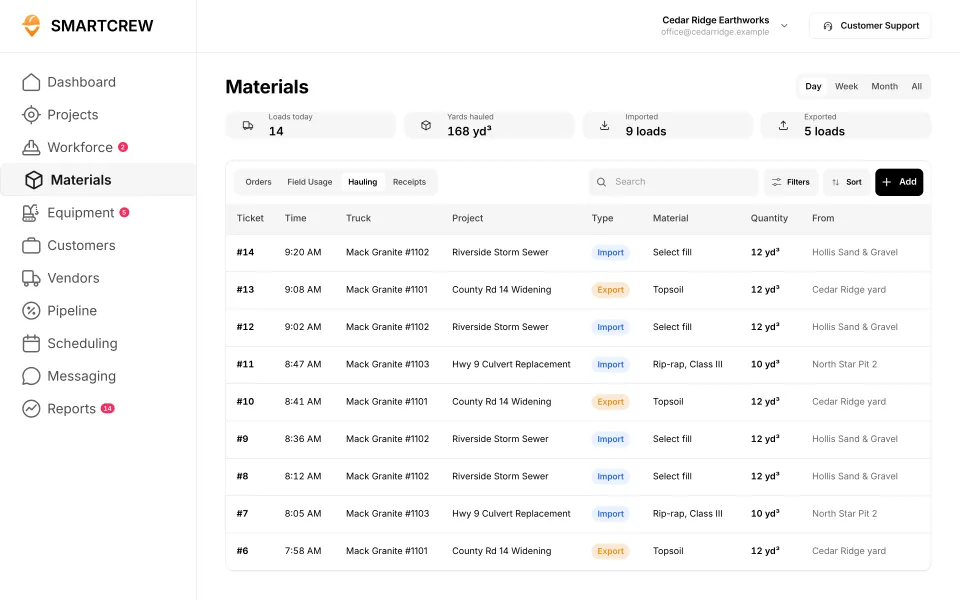
On a demo job, the profit leaves the site one truck at a time. If you don't know how many loads went out and what each one cost, you don't know if the job made money.
What has to happen before demolition starts?
A survey, the utilities, and a check for hazardous materials, all before the first machine bites. These come straight from OSHA's demolition rules, 29 CFR 1926 Subpart T, and EPA's asbestos rule.
- Engineering survey. Under 1926.850(a), a competent person has to survey the structure for the condition of the framing, floors and walls and the possibility of unplanned collapse. The employer has to have written evidence that the survey was done.
- Utilities. Under 1926.850(c), electric, gas, water, steam, sewer and other service lines have to be shut off, capped or otherwise controlled outside the building line before work starts, and any utility company involved has to be notified in advance.
- Hazardous substances. Under 1926.850(e), you have to find out whether hazardous chemicals, gases, explosives or flammable materials were used in pipes, tanks or equipment on the property. If they're suspected, testing and purging come first.
- Asbestos. EPA's asbestos NESHAP summary says the rules require a thorough inspection where the demolition or renovation will happen. Its work practices cover all facilities except residential buildings with four or fewer dwelling units.
Machines on floors have their own rule: 1926.856 says mechanical equipment can't be used on floors or working surfaces that aren't strong enough to hold it, and floor openings need curbs or stop-logs so equipment doesn't run over the edge.
Here's SmartCrew's part, plainly. File storage keeps the survey, the asbestos report, the utility shutoff letters and the photos on the job, where the foreman can pull them up from the field. JSAs and toolbox talks cover the day's hazards. SmartCrew doesn't write the survey, track abatement or file notices with your state or local agency.
What does demolition management software have to track?
Loads, machines, crew hours and safety, against what you bid. Here's how that maps onto SmartCrew.
| What to track | Why it matters in demolition | In SmartCrew |
|---|---|---|
| Loads out | Disposal is one of the biggest costs on the job | Hauling log: ticket, time, truck, project, import or export, material, yards. AI reader for ticket and receipt photos. |
| Machines and attachments | Hammers, shears and grapples wear fast and stop the job when they break | Equipment hours and locations, maintenance, service requests from the field, the shop queue |
| Truck inspections | Dump trucks and roll-off trucks run loaded on public roads | DOT and daily inspections on the phone, with an inspection log on each truck |
| Crew hours by task | Hand demo, sorting and machine work cost different money | GPS clock-in with project, activity code and machine |
| Safety | Every demo job has its own collapse, dust and utility hazards | JSAs, toolbox talks and safety meetings, incident reports with photos |
| Job files | The survey, reports and permits need to be findable on site | Plans, photos and job documents in the cloud, with sharing and permissions |
| Job cost against the bid | Hidden conditions turn a good bid into a bad one | Budget against spent for labor, materials, equipment, other and change orders, daily job profit |
Feature availability varies by plan. Fleet Management, Sales CRM, and Scheduling & Communications are Premium categories.
How does SmartCrew handle a demolition job?
It follows the job the way you run it: safety first, then the iron, then the loads, then the money.
Safety before the machine moves
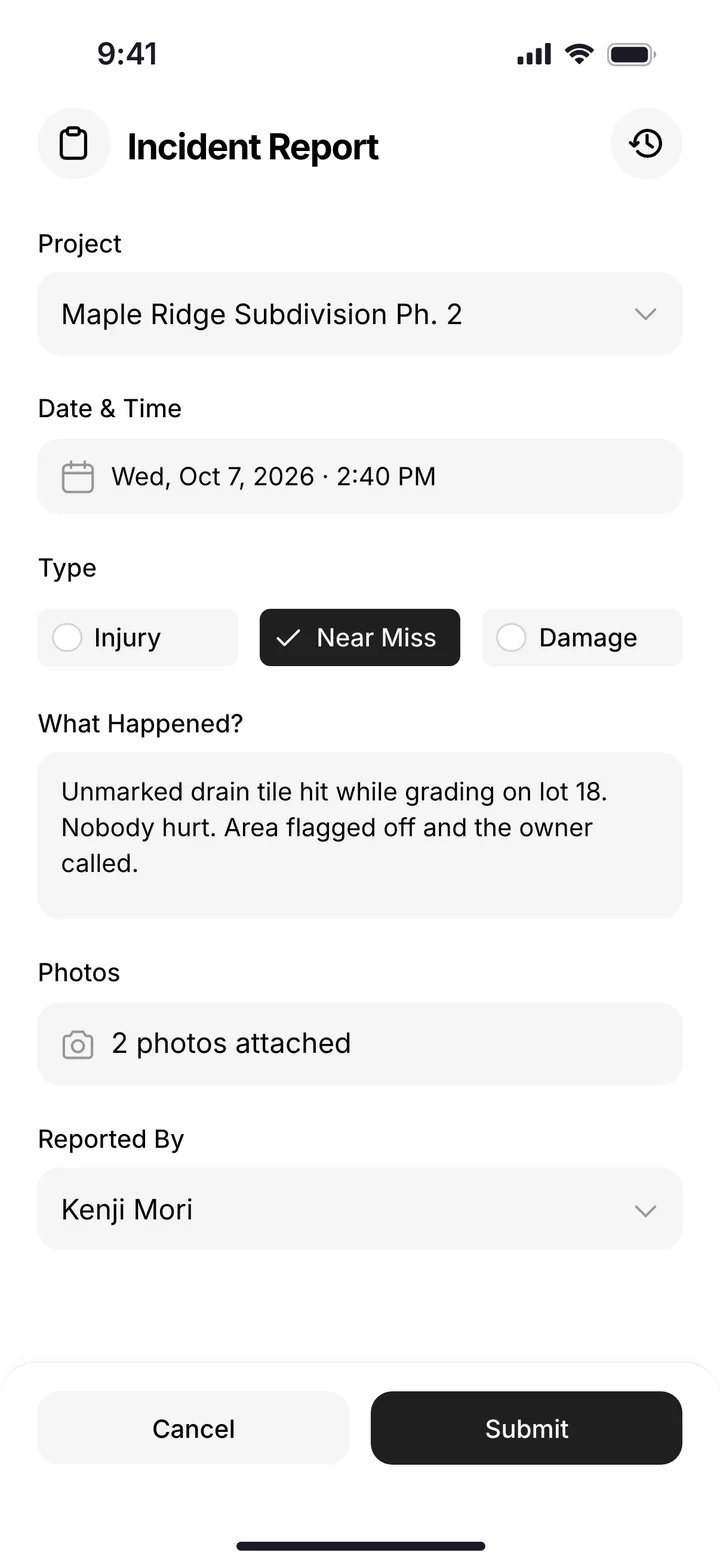
The foreman runs the JSA and the toolbox talk from his phone. If somebody gets hurt or there's a near miss, the incident report goes in with the project, the time, what happened and photos, and the office sees it right away.
The machines and the attachments
Operators pick the machine when they clock in, so hours land on the right excavator. When a hammer starts leaking or a shear needs work, the operator files a service request with the urgency. The shop works from the queue, and each machine keeps its hours, last and next service, and inspection log.
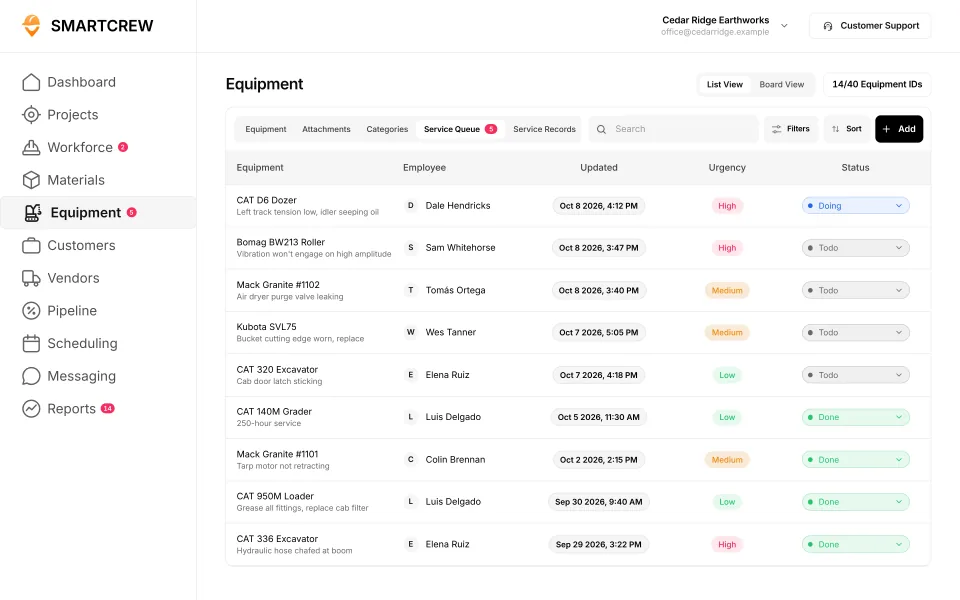
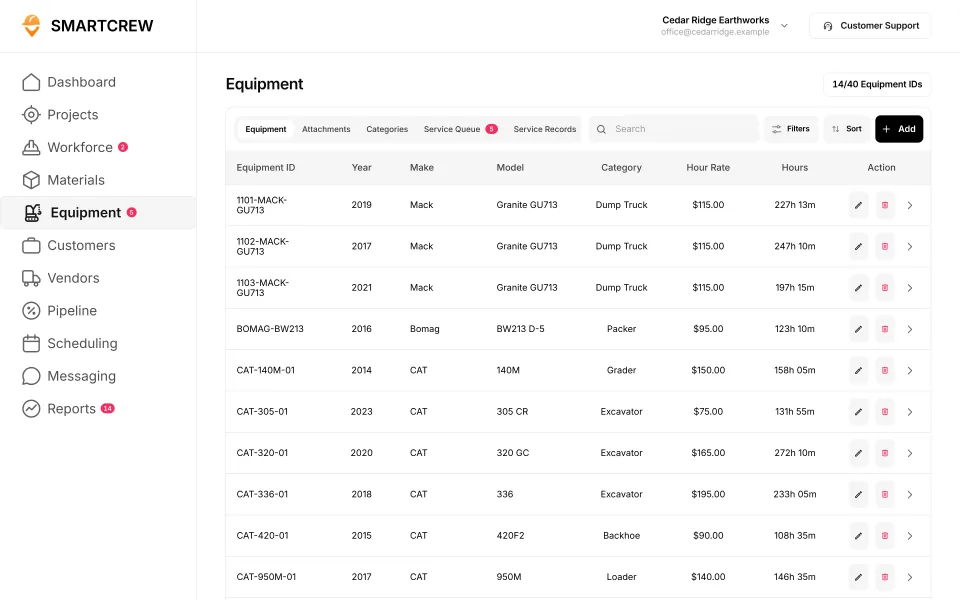
The service queue with urgency and status, and the equipment list with hours and rates. (Demo account; names are made up.)
Every load out
Drivers log each load from the truck: export, the material (concrete, mixed debris, steel), the yards and the truck. Landfill and scale tickets are paper most places. Snap a photo and the AI reader enters the data for you, so the dump receipts aren't a pile on the office desk at month end.
Hidden conditions become change orders
When the crew finds the second slab, the foreman's photos go in the daily report and the office logs the extra as a change order on the job. That's how it gets billed instead of eaten.
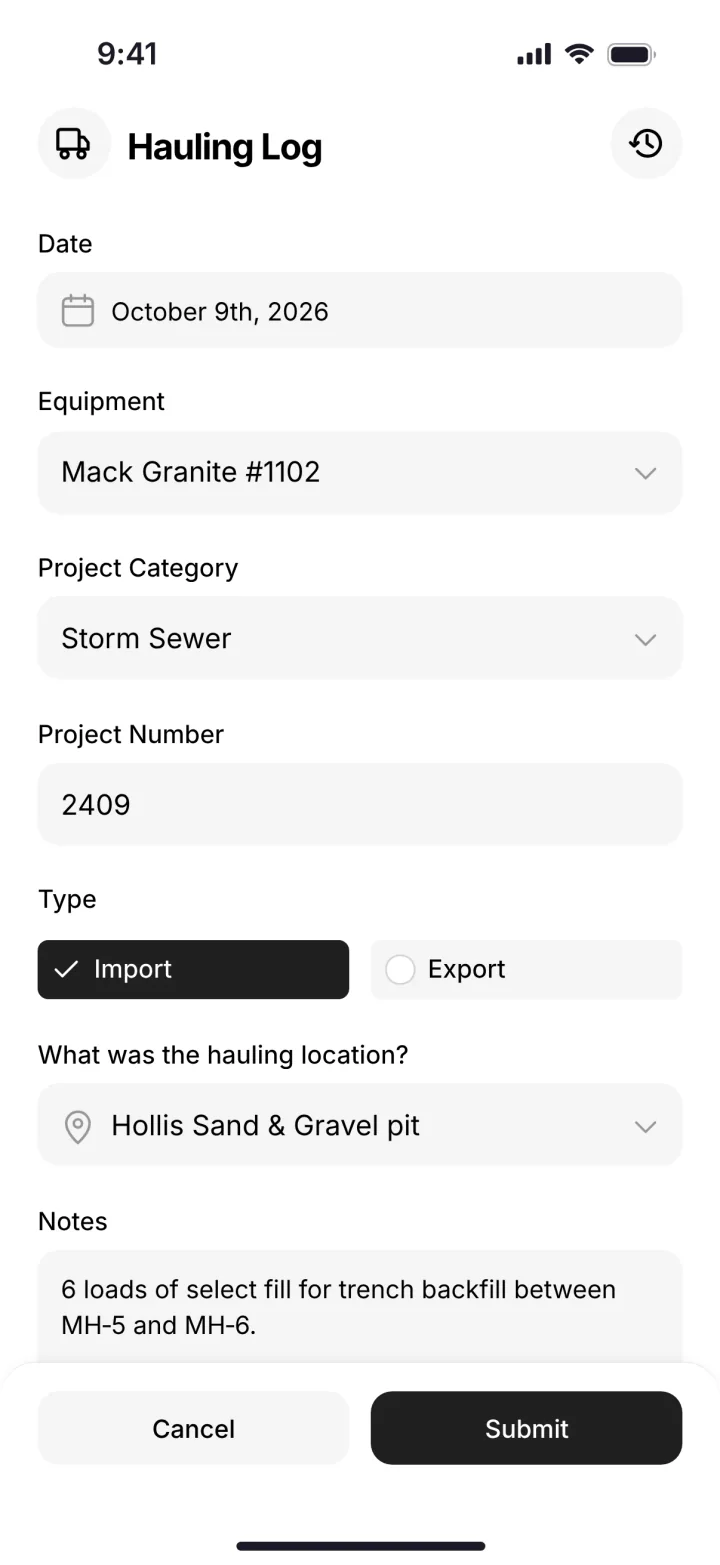
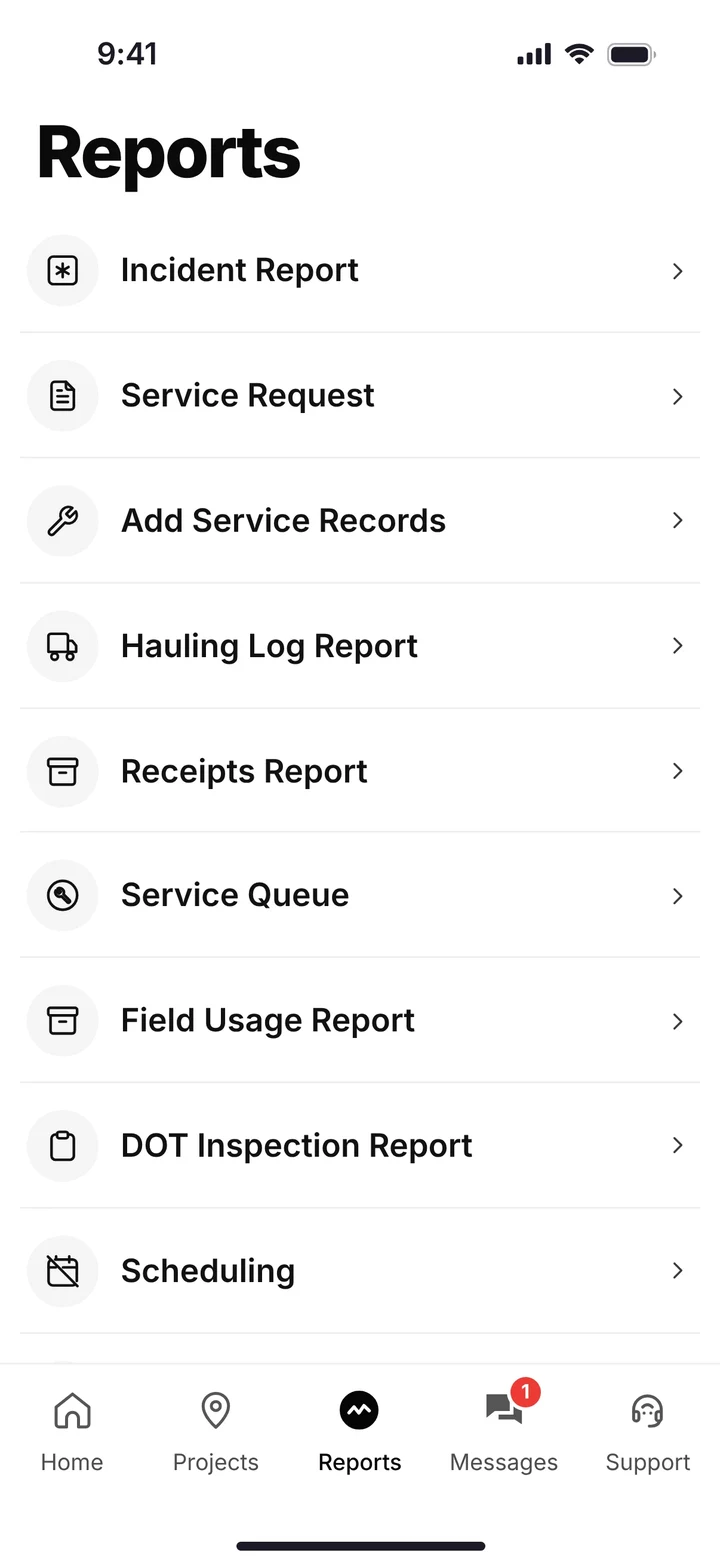
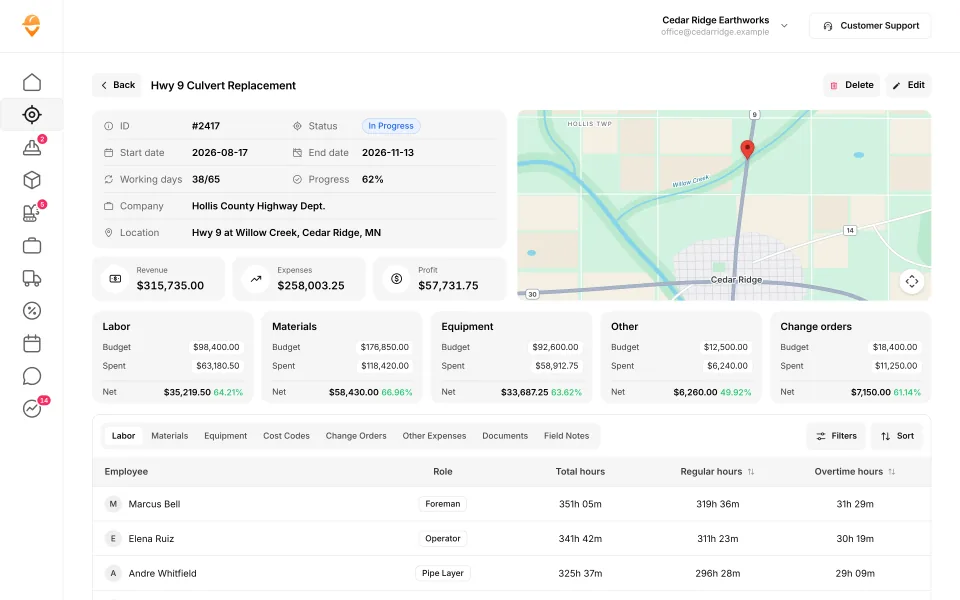
A load in the hauling log, the phone's reports menu, and a job page with budget against spent and change orders. (Demo data.)
Built to track hours. Great at the timecard, but the rest of the business (machines, loads, job profit) lives somewhere else.
9 apps in this chart. Scroll sideways to see them all.
| What SmartCrew does | SmartCrewSmartCrew | BusyBusyBusyBusy | ClockSharkClockShark | ExakTimeExakTime | QuickBooks TimeQB Time | WorkMaxWorkMax | WorkyardWorkyard | ConnecteamConnecteam | JibbleJibble | Rhumbix (Autodesk)Rhumbix |
|---|---|---|---|---|---|---|---|---|---|---|
| Equipment Management Premium | ||||||||||
| Equipment hours & locations | Yes | Yes | Not listed | Yes | Not listed | Add-on | Limited | Limited | No | Limited |
| DOT & daily inspections | Yes | Limited | Not listed | Limited | Not listed | Limited | Add-on | Limited | No | Not listed |
| Maintenance tracking | Yes | Add-on | Not listed | Limited | Not listed | Add-on | Add-on | Limited | No | No |
| Service requests from the field | Yes | Add-on | Not listed | Limited | Not listed | Not listed | Add-on | Limited | No | No |
| Utilization rates | Yes | Yes | Not listed | Not listed | Not listed | Add-on | No | No | No | Limited |
| Shop queue | Yes | Add-on | Not listed | No | Not listed | Not listed | Not listed | No | No | No |
| Materials & Hauling | ||||||||||
| Digital hauling tickets | Yes | Not listed | Not listed | No | Not listed | Not listed | No | No | No | Not listed |
| Material & fuel logs | Yes | Limited | Limited | Limited | Not listed | Limited | Limited | Not listed | No | Limited |
| AI reader for tickets & receipts | Yes | No | Not listed | No | Not listed | Not listed | No | No | No | No |
| Deliveries & production tracking | Yes | Limited | Not listed | No | Not listed | Limited | Add-on | No | No | Limited |
| Safety & Compliance | ||||||||||
| Job Safety Analyses (JSAs) | Yes | Add-on | Not listed | Not listed | Not listed | Limited | Add-on | Limited | No | Add-on |
| Toolbox talks & safety meetings | Yes | Add-on | Not listed | Limited | Not listed | Limited | Add-on | Limited | No | Add-on |
| Incident reports | Yes | Add-on | Limited | Yes | Not listed | Limited | Add-on | Yes | No | Limited |
| Files & Integrations | ||||||||||
| Plans, photos & job documents in the cloud | Yes | Add-on | Yes | Limited | Limited | Yes | Limited | Add-on | No | No |
| File sharing & permissions | Yes | Add-on | Not listed | Limited | Not listed | Not listed | Not listed | Add-on | No | No |
| QuickBooks Online integration | Yes | Yes | Yes | Yes | Yes | Yes | Yes | Yes | Yes | Limited |
Built to run big projects or every kind of contractor. Lots of power, but more setup, more screens and a bigger bill than most 5 to 100 person dirtwork companies need.
14 apps in this chart. Scroll sideways to see them all.
| What SmartCrew does | SmartCrewSmartCrew | ProcoreProcore | HCSS HeavyJobHCSS | RakenRaken | JobTreadJobTread | Contractor ForemanContr. Foreman | ProjulProjul | KnowifyKnowify | ForemanForeman | B2W (Trimble)B2W | AssignarAssignar | Trimble ViewpointViewpoint | BuildertrendBuildertrend | FieldwireFieldwire | Foundation SoftwareFoundation |
|---|---|---|---|---|---|---|---|---|---|---|---|---|---|---|---|
| Equipment Management Premium | |||||||||||||||
| Equipment hours & locations | Yes | Add-on | Add-on | Add-on | No | Add-on | Limited | Limited | No | Yes | Limited | Yes | Not listed | No | Add-on |
| DOT & daily inspections | Yes | Limited | Add-on | Limited | Limited | Limited | No | Add-on | No | Add-on | Limited | Limited | Not listed | Not listed | Not listed |
| Maintenance tracking | Yes | Yes | Add-on | Add-on | No | Add-on | Limited | Add-on | No | Yes | Limited | Yes | Not listed | No | Add-on |
| Service requests from the field | Yes | Limited | Add-on | Limited | No | No | No | Add-on | No | Yes | Limited | Limited | Not listed | No | Not listed |
| Utilization rates | Yes | Yes | Add-on | Add-on | No | Limited | Limited | Add-on | No | Yes | Yes | Limited | Not listed | No | Add-on |
| Shop queue | Yes | No | Add-on | Not listed | No | No | Limited | Not listed | No | Yes | Not listed | Yes | Not listed | No | Add-on |
| Materials & Hauling | |||||||||||||||
| Digital hauling tickets | Yes | Limited | Limited | No | No | No | No | No | No | Limited | Limited | Limited | Not listed | No | Not listed |
| Material & fuel logs | Yes | Limited | Add-on | Add-on | Limited | Add-on | Limited | Limited | Limited | Yes | Limited | Yes | Limited | Limited | Add-on |
| AI reader for tickets & receipts | Yes | Limited | No | No | Yes | No | No | No | No | Not listed | Not listed | Add-on | Yes | No | Limited |
| Deliveries & production tracking | Yes | Yes | Yes | Add-on | Limited | Add-on | Add-on | Not listed | Limited | Yes | Limited | Yes | Not listed | Not listed | Limited |
| Safety & Compliance | |||||||||||||||
| Job Safety Analyses (JSAs) | Yes | Limited | Add-on | Add-on | Limited | Not listed | No | Add-on | No | Not listed | Limited | Limited | Not listed | Limited | Add-on |
| Toolbox talks & safety meetings | Yes | Limited | Add-on | Add-on | Not listed | Add-on | No | Add-on | No | Add-on | Not listed | Yes | Not listed | Not listed | Add-on |
| Incident reports | Yes | Add-on | Add-on | Add-on | Yes | Add-on | Limited | Add-on | No | Add-on | Yes | Yes | Limited | Limited | Add-on |
| Files & Integrations | |||||||||||||||
| Plans, photos & job documents in the cloud | Yes | Yes | Add-on | Add-on | Yes | Yes | Yes | Yes | Yes | Limited | Yes | Yes | Yes | Yes | Yes |
| File sharing & permissions | Yes | Yes | Add-on | Add-on | Yes | Yes | Limited | Yes | Yes | Not listed | Limited | Add-on | Yes | Yes | Yes |
| QuickBooks Online integration | Yes | Add-on | Limited | Add-on | Yes | Add-on | Add-on | Yes | Yes | Limited | Add-on | Not listed | Yes | Add-on | Not listed |
Built to track machines. Good at hours, GPS and service, but the crew's time, the daily report and the job's profit live somewhere else.
| What SmartCrew does | SmartCrewSmartCrew | TennaTenna | HCSS Equipment360Equipment360 | FleetioFleetio | ClueClue |
|---|---|---|---|---|---|
| Equipment Management Premium | |||||
| Equipment hours & locations | Yes | Yes | Add-on | Yes | Yes |
| DOT & daily inspections | Yes | Add-on | Add-on | Yes | Yes |
| Maintenance tracking | Yes | Add-on | Yes | Yes | Yes |
| Service requests from the field | Yes | Add-on | Yes | Yes | Yes |
| Utilization rates | Yes | Yes | Yes | Yes | Yes |
| Shop queue | Yes | Add-on | Yes | Yes | Yes |
| Materials & Hauling | |||||
| Digital hauling tickets | Yes | Limited | Limited | No | Limited |
| Material & fuel logs | Yes | Limited | Add-on | Limited | Yes |
| AI reader for tickets & receipts | Yes | Not listed | No | Add-on | Yes |
| Deliveries & production tracking | Yes | Limited | Add-on | No | Yes |
| Safety & Compliance | |||||
| Job Safety Analyses (JSAs) | Yes | Not listed | Add-on | No | Yes |
| Toolbox talks & safety meetings | Yes | Not listed | Add-on | No | Yes |
| Incident reports | Yes | Limited | Add-on | Limited | Not listed |
| Files & Integrations | |||||
| Plans, photos & job documents in the cloud | Yes | Limited | Limited | Yes | Limited |
| File sharing & permissions | Yes | Not listed | Add-on | Yes | Not listed |
| QuickBooks Online integration | Yes | Not listed | Limited | Not listed | No |
Built to win the bid. Great for takeoffs and estimates before the job starts, not for running the crews, machines and loads once it does.
| What SmartCrew does | SmartCrewSmartCrew | AGTEKAGTEK | InSite SoftwareInSite | HCSS HeavyBidHeavyBid | Trimble Business CenterTrimble | EarthWorksEarthWorks |
|---|---|---|---|---|---|---|
| Equipment Management Premium | ||||||
| Equipment hours & locations | Yes | Add-on | No | Not listed | Limited | No |
| DOT & daily inspections | Yes | No | No | Not listed | Not listed | No |
| Maintenance tracking | Yes | Not listed | No | Not listed | Not listed | No |
| Service requests from the field | Yes | No | No | Not listed | Not listed | No |
| Utilization rates | Yes | Limited | No | Not listed | Not listed | No |
| Shop queue | Yes | No | No | Not listed | Not listed | No |
| Materials & Hauling | ||||||
| Digital hauling tickets | Yes | Limited | No | Not listed | Not listed | No |
| Material & fuel logs | Yes | No | No | Not listed | Not listed | No |
| AI reader for tickets & receipts | Yes | No | No | No | Not listed | No |
| Deliveries & production tracking | Yes | Limited | No | Not listed | Add-on | No |
| Safety & Compliance | ||||||
| Job Safety Analyses (JSAs) | Yes | No | No | Not listed | Not listed | No |
| Toolbox talks & safety meetings | Yes | No | No | Not listed | Not listed | No |
| Incident reports | Yes | No | No | Not listed | Not listed | No |
| Files & Integrations | ||||||
| Plans, photos & job documents in the cloud | Yes | Limited | No | Not listed | Add-on | No |
| File sharing & permissions | Yes | Limited | No | Not listed | Add-on | No |
| QuickBooks Online integration | Yes | No | No | Limited | Not listed | No |
Built for service businesses that quote, schedule and invoice lots of small jobs. Good at the customer side, not the crew, machine and haul side of heavy civil work.
| What SmartCrew does | SmartCrewSmartCrew | JobberJobber | QuoteIQQuoteIQ | Contractor+Contractor+ | Housecall ProHousecall Pro | ServiceTitanServiceTitan |
|---|---|---|---|---|---|---|
| Equipment Management Premium | ||||||
| Equipment hours & locations | Yes | Limited | No | Limited | Add-on | Add-on |
| DOT & daily inspections | Yes | Limited | Limited | No | Not listed | Limited |
| Maintenance tracking | Yes | No | No | Limited | Add-on | Add-on |
| Service requests from the field | Yes | No | No | Not listed | Not listed | Add-on |
| Utilization rates | Yes | No | No | Limited | Not listed | Add-on |
| Shop queue | Yes | Not listed | No | Not listed | Not listed | Not listed |
| Materials & Hauling | ||||||
| Digital hauling tickets | Yes | No | No | Limited | No | No |
| Material & fuel logs | Yes | Limited | Limited | Yes | Limited | Limited |
| AI reader for tickets & receipts | Yes | Add-on | Not listed | No | Not listed | Limited |
| Deliveries & production tracking | Yes | No | Limited | Not listed | Not listed | Limited |
| Safety & Compliance | ||||||
| Job Safety Analyses (JSAs) | Yes | Limited | No | No | Limited | Limited |
| Toolbox talks & safety meetings | Yes | No | No | No | No | Limited |
| Incident reports | Yes | No | No | No | Not listed | Not listed |
| Files & Integrations | ||||||
| Plans, photos & job documents in the cloud | Yes | Yes | Yes | Yes | Yes | Yes |
| File sharing & permissions | Yes | Add-on | Limited | Limited | Limited | Limited |
| QuickBooks Online integration | Yes | Add-on | Add-on | Add-on | Add-on | Yes |
No: they do not offer it. Their own website says so, or it isn’t in the full feature list they publish (linked). Add-on: a paid add-on, a separate product or a higher plan. Limited: they have something close but narrower. Not listed (n/l on small screens): we searched their site and help pages and couldn’t find it, but they don’t publish a full list we could check. Tap a name for the full comparison.
This chart is SmartCrew’s feature list, so it doesn’t show what other products do that SmartCrew doesn’t (like estimating, payroll or hardware time clocks). Each comparison covers that in “where they’re the better pick”. SmartCrew’s Fleet Management, Sales CRM, and Scheduling & Communications are Premium categories; feature availability varies by plan.
In plain words: what each app does not offer
- BusyBusy does not offer: AI reader for tickets & receipts. BusyBusy doesn't list these either: digital hauling tickets.
- ClockShark doesn't list: equipment hours & locations, DOT & daily inspections, maintenance tracking, service requests from the field, utilization rates, shop queue, digital hauling tickets, AI reader for tickets & receipts, deliveries & production tracking, Job Safety Analyses (JSAs), toolbox talks & safety meetings, file sharing & permissions.
- ExakTime does not offer: shop queue, digital hauling tickets, AI reader for tickets & receipts, deliveries & production tracking. ExakTime doesn't list these either: utilization rates, Job Safety Analyses (JSAs).
- QuickBooks Time doesn't list: equipment hours & locations, DOT & daily inspections, maintenance tracking, service requests from the field, utilization rates, shop queue, digital hauling tickets, material & fuel logs, AI reader for tickets & receipts, deliveries & production tracking, Job Safety Analyses (JSAs), toolbox talks & safety meetings, incident reports, file sharing & permissions.
- WorkMax doesn't list: service requests from the field, shop queue, digital hauling tickets, AI reader for tickets & receipts, file sharing & permissions.
- Workyard does not offer: utilization rates, digital hauling tickets, AI reader for tickets & receipts. Workyard doesn't list these either: shop queue, file sharing & permissions.
- Connecteam does not offer: utilization rates, shop queue, digital hauling tickets, AI reader for tickets & receipts, deliveries & production tracking. Connecteam doesn't list these either: material & fuel logs.
- Jibble does not offer: equipment hours & locations, DOT & daily inspections, maintenance tracking, service requests from the field, utilization rates, shop queue, digital hauling tickets, material & fuel logs, AI reader for tickets & receipts, deliveries & production tracking, Job Safety Analyses (JSAs), toolbox talks & safety meetings, incident reports, plans, photos & job documents in the cloud, file sharing & permissions.
- Rhumbix (Autodesk) does not offer: maintenance tracking, service requests from the field, shop queue, AI reader for tickets & receipts, plans, photos & job documents in the cloud, file sharing & permissions. Rhumbix (Autodesk) doesn't list these either: DOT & daily inspections, digital hauling tickets.
- Procore does not offer: shop queue.
- HCSS HeavyJob does not offer: AI reader for tickets & receipts.
- Raken does not offer: digital hauling tickets, AI reader for tickets & receipts. Raken doesn't list these either: shop queue.
- JobTread does not offer: equipment hours & locations, maintenance tracking, service requests from the field, utilization rates, shop queue, digital hauling tickets. JobTread doesn't list these either: toolbox talks & safety meetings.
- Contractor Foreman does not offer: service requests from the field, shop queue, digital hauling tickets, AI reader for tickets & receipts. Contractor Foreman doesn't list these either: Job Safety Analyses (JSAs).
- Projul does not offer: DOT & daily inspections, service requests from the field, digital hauling tickets, AI reader for tickets & receipts, Job Safety Analyses (JSAs), toolbox talks & safety meetings.
- Knowify does not offer: digital hauling tickets, AI reader for tickets & receipts. Knowify doesn't list these either: shop queue, deliveries & production tracking.
- Foreman does not offer: equipment hours & locations, DOT & daily inspections, maintenance tracking, service requests from the field, utilization rates, shop queue, digital hauling tickets, AI reader for tickets & receipts, Job Safety Analyses (JSAs), toolbox talks & safety meetings, incident reports.
- B2W (Trimble) doesn't list: AI reader for tickets & receipts, Job Safety Analyses (JSAs), file sharing & permissions.
- Assignar doesn't list: shop queue, AI reader for tickets & receipts, toolbox talks & safety meetings.
- Trimble Viewpoint doesn't list: QuickBooks Online integration.
- Buildertrend doesn't list: equipment hours & locations, DOT & daily inspections, maintenance tracking, service requests from the field, utilization rates, shop queue, digital hauling tickets, deliveries & production tracking, Job Safety Analyses (JSAs), toolbox talks & safety meetings.
- Fieldwire does not offer: equipment hours & locations, maintenance tracking, service requests from the field, utilization rates, shop queue, digital hauling tickets, AI reader for tickets & receipts. Fieldwire doesn't list these either: DOT & daily inspections, deliveries & production tracking, toolbox talks & safety meetings.
- Foundation Software doesn't list: DOT & daily inspections, service requests from the field, digital hauling tickets, QuickBooks Online integration.
- Tenna doesn't list: AI reader for tickets & receipts, Job Safety Analyses (JSAs), toolbox talks & safety meetings, file sharing & permissions, QuickBooks Online integration.
- HCSS Equipment360 does not offer: AI reader for tickets & receipts.
- Fleetio does not offer: digital hauling tickets, deliveries & production tracking, Job Safety Analyses (JSAs), toolbox talks & safety meetings. Fleetio doesn't list these either: QuickBooks Online integration.
- Clue does not offer: QuickBooks Online integration. Clue doesn't list these either: incident reports, file sharing & permissions.
- AGTEK does not offer: DOT & daily inspections, service requests from the field, shop queue, material & fuel logs, AI reader for tickets & receipts, Job Safety Analyses (JSAs), toolbox talks & safety meetings, incident reports, QuickBooks Online integration. AGTEK doesn't list these either: maintenance tracking.
- InSite Software does not offer: equipment hours & locations, DOT & daily inspections, maintenance tracking, service requests from the field, utilization rates, shop queue, digital hauling tickets, material & fuel logs, AI reader for tickets & receipts, deliveries & production tracking, Job Safety Analyses (JSAs), toolbox talks & safety meetings, incident reports, plans, photos & job documents in the cloud, file sharing & permissions, QuickBooks Online integration.
- HCSS HeavyBid does not offer: AI reader for tickets & receipts. HCSS HeavyBid doesn't list these either: equipment hours & locations, DOT & daily inspections, maintenance tracking, service requests from the field, utilization rates, shop queue, digital hauling tickets, material & fuel logs, deliveries & production tracking, Job Safety Analyses (JSAs), toolbox talks & safety meetings, incident reports, plans, photos & job documents in the cloud, file sharing & permissions.
- Trimble Business Center doesn't list: DOT & daily inspections, maintenance tracking, service requests from the field, utilization rates, shop queue, digital hauling tickets, material & fuel logs, AI reader for tickets & receipts, Job Safety Analyses (JSAs), toolbox talks & safety meetings, incident reports, QuickBooks Online integration.
- EarthWorks does not offer: equipment hours & locations, DOT & daily inspections, maintenance tracking, service requests from the field, utilization rates, shop queue, digital hauling tickets, material & fuel logs, AI reader for tickets & receipts, deliveries & production tracking, Job Safety Analyses (JSAs), toolbox talks & safety meetings, incident reports, plans, photos & job documents in the cloud, file sharing & permissions, QuickBooks Online integration.
- Jobber does not offer: maintenance tracking, service requests from the field, utilization rates, digital hauling tickets, deliveries & production tracking, toolbox talks & safety meetings, incident reports. Jobber doesn't list these either: shop queue.
- QuoteIQ does not offer: equipment hours & locations, maintenance tracking, service requests from the field, utilization rates, shop queue, digital hauling tickets, Job Safety Analyses (JSAs), toolbox talks & safety meetings, incident reports. QuoteIQ doesn't list these either: AI reader for tickets & receipts.
- Contractor+ does not offer: DOT & daily inspections, AI reader for tickets & receipts, Job Safety Analyses (JSAs), toolbox talks & safety meetings, incident reports. Contractor+ doesn't list these either: service requests from the field, shop queue, deliveries & production tracking.
- Housecall Pro does not offer: digital hauling tickets, toolbox talks & safety meetings. Housecall Pro doesn't list these either: DOT & daily inspections, service requests from the field, utilization rates, shop queue, AI reader for tickets & receipts, deliveries & production tracking, incident reports.
- ServiceTitan does not offer: digital hauling tickets. ServiceTitan doesn't list these either: shop queue, incident reports.
From each company's own website and help pages, checked on the dates below. "Does not offer" means their own website says so, or it isn't in the full feature list they publish. "Doesn't list" means we searched their site and couldn't find it, but they don't publish a full list we could check.
Where each mark comes from
- BusyBusy, checked October 28, 2026: busybusy.com/features/gps-time-tracking, busybusy.com/features, busybusy.com/features/job-costing-solutions, busybusy.com/equipment-time-tracking-app, busybusy.com/features/payroll-tools, helpcenter.busybusy.com/en/articles/9573478-use-supervisor-tools-to-make-life-easy, busybusy.com/features/budgets-projects-cost-codes, busybusy.com/features/construction-reports, busybusy.com/modules/operations/equipment-inspections, busybusy.com/modules/operations/work-orders, busybusy.com/features/progress-tracking, busybusy.com/features/photos-notes, busybusy.com/construction-daily-reports, helpcenter.busybusy.com/en/articles/9573479-schedule-the-work-week-in-busybusy, busybusy.com/features/scheduling, busybusy.com/features/team-messaging, helpcenter.busybusy.com/en/articles/9573348-positions-permissions-settings, busybusy.com/safety/job-safety-analyses-app, busybusy.com/safety/training-app, busybusy.com/features/incident-reporting, busybusy.com/features/documents, busybusy.com/integrations/quickbooks-online
- ClockShark, checked October 28, 2026: clockshark.com/tour/gps-time-clock-app, clockshark.com/tour/geofence-time-tracking, clockshark.com/tour/map-field-employee-location-tracking, clockshark.com/resources/labor-costs-quickbooks-clockshark, clockshark.com/pricing, clockshark.com/tour/timesheet-reminders, clockshark.com/tour/job-costing, help.clockshark.com/how-to-handle-change-orders-using-quotes-and-invoices, clockshark.com/tour, clockshark.com/tour/clock-out-questions, clockshark.com/tour/conversations, clockshark.com/tour/employee-scheduling, clockshark.com/tour/customer-manager, get.clockshark.com/modern-way-to-manage-your-field-team, clockshark.com/tour/file-attachments, clockshark.com/integrations/quickbooks-time-tracking
- ExakTime, checked October 28, 2026: arcoro.com/exaktime/pricing-plans, arcoro.com/exaktime, arcoro.com/exaktime/our-solutions/gps-time-tracking-app, arcoro.com/exaktime/our-solutions/powerful-reporting, support.arcoro.com/hc/en-us/articles/1260804480690-Guides-to-Equipment-for-ExakTime, support.arcoro.com/hc/en-us/articles/1260804479730-Start-Using-The-ExakTime-System-In-Just-15-Minutes, support.arcoro.com/hc/en-us/articles/40641192964507-9-2025-ExakTime-Release-Notes-GeoFence-Activity-Alerts, arcoro.com/llm-context-page, support.arcoro.com/hc/en-us/articles/7647931096987-Overview-for-Using-Advanced-Analytics, support.arcoro.com/hc/en-us/articles/4413156323355-Using-Equipment-Reports-for-ExakTime, support.arcoro.com/hc/en-us/articles/24982369416091-What-are-Library-Forms-for-ExakTime, support.arcoro.com/hc/en-us/articles/26031334798107-Gathering-Info-from-Field-Employees-with-Fields-Notes-Forms-and-Clock-In-Out-Comments-for-ExakTime-Mobile, support.arcoro.com/hc/en-us/articles/4413165192347-Using-Expense-Reports-for-ExakTime, support.arcoro.com/hc/en-us/articles/4407630208795-Managing-Schedules-with-Calendar-View, support.arcoro.com/hc/en-us/articles/4407625105563-Scheduler-Notification-Settings-for-ExakTime, support.arcoro.com/hc/en-us/articles/7601304493595-Setting-Up-and-Using-Custom-Alerts-and-Notifications-for-ExakTime, support.arcoro.com/hc/en-us/articles/13116025444635-Sending-Alerts-Notifications-from-ExakTime-Connect, arcoro.com/platform/grow/learning-management, support.arcoro.com/hc/en-us/articles/25556658085659-Premade-Forms-for-ExakTime, arcoro.com/platform/manage/construction-hris, arcoro.com/exaktime/partner/quickbooks
- QuickBooks Time, checked October 28, 2026: quickbooks.intuit.com/time-tracking/gps, quickbooks.intuit.com/learn-support/en-us/help-article/track-location/use-quickbooks-time-gps-tracking-admin-manager/L7fLoZNZk_US_en_US, quickbooks.intuit.com/learn-support/en-us/help-article/track-worker-hours/use-quickbooks-time-quickbooks-online-quickbooks/L5NIFCKG6_US_en_US, quickbooks.intuit.com/learn-support/en-us/help-article/customize-forms/set-manage-custom-fields-quickbooks-time/L6b8NDU6n_US_en_US, quickbooks.intuit.com/time-tracking/construction, quickbooks.intuit.com/learn-support/en-us/help-article/product-preferences/set-company-team-member-clock-reminders-quickbooks/L8v9UDFUv_US_en_US, quickbooks.intuit.com/time-tracking/pricing, quickbooks.intuit.com/learn-support/en-us/help-article/list-reports/quickbooks-time-reports/L0WYtn0mw_US_en_US, quickbooks.intuit.com/time-tracking/elite, quickbooks.intuit.com/time-tracking/employee-scheduling, quickbooks.intuit.com/learn-support/en-us/help-article/feature-preferences/quickbooks-time-activity-feed/L5RV549yf_US_en_US
- WorkMax, checked October 26, 2026: workmax.com/solutions/workmax-time, workmax.com/wp-content/uploads/2022/06/WorkMax-TIME-Features.pdf, workmax.com/wp-content/uploads/2013/11/WorkMax_Time_Features_Temp.pdf, workmax.com/solutions/workmax-insight, workmax.com/solutions/workmax-forms, workmax.com/resources/blog/the-workmax-construction-field-management-platform, workmax.com/solutions/workmax-assets, workmax.com/resources/faqs, workmax.com/solutions/other-products, workmax.com, workmax.com/solutions/integrations/quickbooks-online-integration
- Workyard, checked October 28, 2026: workyard.com/ai-instructions, workyard.com/pricing, workyard.com/smart-forms/equipment-tracking, workyard.com/reporting, help.workyard.com/en/articles/7041924-workyard-mobile-app-automated-alerts, workyard.com/smart-forms/construction-management, help.workyard.com/en/articles/17668011-build-custom-reports-with-reporting-agent, workyard.com/smart-forms/production-tracking, help.workyard.com/en/articles/16092826-send-form-submissions-to-the-right-people-forms-notification-routing, workyard.com/contractor-scheduling-software, workyard.com/smart-forms/safety-management, help.workyard.com/en/articles/5236837-how-to-connect-workyard-to-quickbooks-online
- Connecteam, checked October 28, 2026: connecteam.com/pricing, help.connecteam.com/en/articles/3597710-how-to-create-a-geofence, help.connecteam.com/en/articles/5675206-starting-guide-to-breadcrumbs-live-location-tracking, connecteam.com/industries/construction-app, connecteam.com/employee-time-clock-app, connecteam.com/operations, connecteam.com/industries/construction-app/construction-time-tracking, connecteam.com/employee-scheduling-app, connecteam.com/forms-checklist-app, help.connecteam.com/en/articles/6400563-job-scheduling-must-have-capabilities, connecteam.com/industries/construction-app/construction-scheduling-app, help.connecteam.com/en/articles/4100339-starting-guide-to-the-job-scheduler, connecteam.com/employee-communication-app/updates, connecteam.com/industries/construction-app/construction-compliance, connecteam.com/industries/construction-app/construction-documentation-and-communication, connecteam.com/integrations/quickbooks-integration
- Jibble, checked October 28, 2026: jibble.io/construction-time-tracking, jibble.io/features, jibble.io/auto-clock-in-out-app, jibble.io/project-time-tracker, jibble.io/help/track-time-with-location, jibble.io/help/sending-timesheets-to-quickbooks-online
- Rhumbix (Autodesk), checked October 28, 2026: intercom.help/rhumbix-helpcenter/en/articles/11014517-cico-client-configuration-options, rhumbix.com/solutions/timekeeping, rhumbix.com/usecase/field, rhumbix.com/pricing, intercom.help/rhumbix-helpcenter/en/articles/6369205-cost-code-status, rhumbix.com/solutions/change-orders, intercom.help/rhumbix-helpcenter/en/articles/8438022-equipment-tracking-dashboard, rhumbix.com/solutions/production_tracking, intercom.help/rhumbix-helpcenter/en/articles/6369215-daily-reports-create-on-mobile-app, intercom.help/rhumbix-helpcenter/en/articles/6512986-end-of-day-exception-report, rhumbix.com/solutions/integrations
- Procore, checked October 28, 2026: procore.com/resource-tracking, v2.support.procore.com/product-manuals/timesheets-project/tutorials/configure-advanced-settings-project-level-timesheets, v2.support.procore.com/product-manuals/my-time-ios/tutorials/clock-your-time-ios, v2.support.procore.com/product-manuals/timesheets-project/tutorials/create-a-timesheet, procore.com/platform/reports, procore.com/products, procore.com/project-financials/budget, procore.com/financial-management/change-orders, procore.com/equipment, v2.support.procore.com/faq-how-can-i-use-the-procore-equipment-pre-operation-checklist-inspection-template-on-my-project, v2.support.procore.com/product-manuals/equipment-company/tutorials/create-a-maintenance-record-for-equipment, procore.com/resource-management, v2.support.procore.com/product-manuals/equipment-company/permissions, procore.com/quality-safety/daily-log, procore.com/project-management/photos, v2.support.procore.com/product-manuals/daily-log-project/tutorials/mark-a-daily-log-as-complete, procore.com/materials, procore.com/ai/agents/daily-log, v2.support.procore.com/product-manuals/resource-planning-company/tutorials/edit-a-resource-assignment, procore.com/resource-planning, procore.com/fc/crm, v2.support.procore.com/product-manuals/bid-board-company, v2.support.procore.com/product-manuals/bid-board-company/tutorials/add-and-manage-tasks-in-a-bid-board-project, procore.com/fc/dispatch, procore.com/platform/conversations, v2.support.procore.com/process-guides/getting-started-with-procore-conversations/best-practices-for-procore-conversations, v2.support.procore.com/product-manuals/announcements-ios/tutorials/create-announcements-ios, v2.support.procore.com/faq-how-can-i-use-procores-job-hazard-analysis-pdf-in-my-projects-forms-tool, v2.support.procore.com/faq-how-can-i-use-procores-toolbox-talk-sign-in-pdf-in-my-projects-forms-tool, procore.com/quality-safety/incidents, procore.com/platform/document-management, v2.support.procore.com/product-manuals/qbo
- HCSS HeavyJob, checked October 28, 2026: apps.apple.com/us/app/hcss-myfield-track-job-hours/id1520688563, hcss.com/products/geofencing-software, hcss.com/products/mobile-field-service-management, hcss.com/products/job-costing-software, hcss.com/products/construction-project-management-software, hcss.com/products/export-to-payroll, hcss.com/products/change-order-tracking, hcss.com/llm-info, hcss.com/faqs, apps.apple.com/us/app/hcss-heavyjob-smart-job-sites/id720784422, hcss.com/products/fuel-management-software, hcss.com/products/construction-material-tracking, hcss.com/products/construction-resource-planning, hcss.com/products/dispatching-software, hcss.com/products/bid-management, hcss.com/products/pre-construction, hcss.com/products/job-hazard-safety-analysis, hcss.com/products/safety-toolbox-talks, hcss.com/products/incidents-reporting-software, hcss.com/products/construction-document-software
- Raken, checked October 28, 2026: help.rakenapp.com/en/articles/14148932-raken-time-clock-geolocation-verification-and-reporting, help.rakenapp.com/en/articles/14113290-how-to-create-time-cards-in-raken, help.rakenapp.com/en/articles/14115530-raken-time-cards-overview, help.rakenapp.com/en/articles/14465496-how-to-use-the-raken-dashboard, rakenapp.com/features, help.rakenapp.com/en/articles/16909752-how-to-set-up-and-use-budgets-in-raken, rakenapp.com/features/change-orders, help.rakenapp.com/en/articles/14465432-raken-reports-overview, rakenapp.com/features/equipment-management, rakenapp.com/features/construction-checklists/forklift-checklist, help.rakenapp.com/en/articles/14492619-raken-equipment-management-heavy-and-on-road-equipment, help.rakenapp.com/en/articles/14465449-production-and-equipment-reports-in-raken, rakenapp.com, help.rakenapp.com/en/articles/14478748-how-to-share-and-email-daily-reports-in-raken, help.rakenapp.com/en/articles/14492603-getting-started-with-production-tracking-in-raken, help.rakenapp.com/en/articles/11061850-how-to-manage-resource-scheduling-on-the-web, help.rakenapp.com/en/articles/14437000-what-is-raken-resource-scheduling, help.rakenapp.com/en/articles/14436989-how-to-get-started-with-messaging-in-raken, rakenapp.com/features/construction-checklists/job-hazard-analysis, help.rakenapp.com/en/articles/14491655-how-to-use-toolbox-talks-in-raken, help.rakenapp.com/en/articles/14491660-how-to-report-and-track-incidents-in-raken, help.rakenapp.com/en/articles/14436734-how-to-use-document-storage-in-raken, rakenapp.com/features/document-storage, help.rakenapp.com/en/articles/14512455-raken-quickbooks-online-integration
- JobTread, checked October 28, 2026: jobtread.com/features/time-tracking, app.jobtread.com/help/whats-new/2023-05-02-clock-in-out-distance-from-job-site, app.jobtread.com/help/whats-new/2024-05-06-require-job-item-code-on-time-entries, jobtread.com/features, jobtread.com/features/job-costing, jobtread.com/features/reporting-and-dashboards, jobtread.com/features/forms, jobtread.com/features/daily-logs, app.jobtread.com/help/whats-new/2025-12-18-ai-daily-log-summaries, jobtread.com/features/purchasing, app.jobtread.com/help/whats-new/2025-11-13-scan-and-autofill-receipt-details, app.jobtread.com/help/whats-new/2026-01-19-drag-drop-on-calendar, jobtread.com/features/tasks-and-scheduling, app.jobtread.com/help/whats-new/2024-09-19-on-demand-schedule-notifications, jobtread.com/features/construction-crm, jobtread.com/features/workflows, jobtread.com/blog/jobtread-new-feature-centralized-communication-and-messaging, jobtread.com/blog/targeted-messaging-and-file-sharing, app.jobtread.com/help/whats-new/2025-09-05-dashboard-text-tiles, jobtread.com/features/file-management, jobtread.com/integrations/quickbooks-online
- Contractor Foreman, checked October 28, 2026: contractorforeman.com/features/people/time-cards, contractorforeman.com/whats-new, kb.contractorforeman.com/knowledge-base/time-cards, kb.contractorforeman.com/knowledge-base/how-do-i-add-material-items-and-equipment-items-to-daily-logs, contractorforeman.com/features/integrations/gusto-integration, kb.contractorforeman.com/knowledge-base/what-is-running-time-card-notification, contractorforeman.com/features/job-costing-reports, contractorforeman.com/pricing, contractorforeman.com/features/custom-report-builder, kb.contractorforeman.com/knowledge-base/basics-of-equipment-logs, contractorforeman.com/features/documents/equipment-and-vehicle-logs, kb.contractorforeman.com/knowledge-base/what-types-of-maintenance-do-you-track-for-each-piece-of-equipment, contractorforeman.com/features/project-management/daily-logs, contractorforeman.com/features/files-and-photos-gallery, contractorforeman.com/features/people/crew-schedule, contractorforeman.com/features/people/leads-manager, contractorforeman.com/features/project-management/opportunities, kb.contractorforeman.com/knowledge-base/how-do-i-notify-or-assign-an-opportunity-to-an-employee-for-follow-up, contractorforeman.com/features/project-management/service-tickets, contractorforeman.com/features/people/team-chat, contractorforeman.com/features/crm/dashboard, contractorforeman.com/features/people/safety-meetings, contractorforeman.com/features/people/incidents, kb.contractorforeman.com/knowledge-base/how-do-i-share-a-file-with-a-client-or-vendor, contractorforeman.com/features/integrations/quickbooks
- Projul, checked October 28, 2026: projul.com/pricing, projul.com/features/geo-fenced-time-tracking, projul.com/features/tasks-and-to-dos, projul.com/industries/excavation-grading, projul.com/features/reporting, projul.com/features/mobile-notifications, projul.com/features/daily-logs, projul.com/features/photos-and-document-management, projul.com/features, projul.com/features/scheduling, projul.com/features/crm, projul.com/features/construction-communications
- Knowify, checked October 28, 2026: knowify.com/construction-time-tracking-software, knowify.com/pricing, knowify.com/trade-contractor-software, knowify.com/construction-daily-log-software, knowify.com/construction-forms-software, knowify.com/fleet-tracking-software, knowify.com/construction-scheduling-software, knowify.com/integration/quickbooks-online
- Foreman, checked October 28, 2026: foreman.co/guides/the-live-clock, foreman.co/features/time-tracking, foreman.co/features, foreman.co/guides/home-dashboards, foreman.co/guides/margin-markup-profitability, foreman.co/features/budget, foreman.co/features/daily-logs, foreman.co/industries/excavation-foundation, foreman.co/guides/vendor-bills, foreman.co/features/purchase-orders, foreman.co/guides/build-a-schedule, foreman.co/features/crm, foreman.co/guides/lead-lifecycle-stages, foreman.co/features/todos, foreman.co/guides/messaging, foreman.co/features/messaging, foreman.co/features/files, foreman.co/guides/what-clients-and-vendors-see
- B2W (Trimble), checked October 28, 2026: trimble.com/downloads/6XxSu8CEI6CgHbTTxqgVlF/e8f470ac91fdcccfb8ce5cde133c05e9/Civil_B2W_Track_Feature__1_.pdf, trimble.com/en/products/b2w-software/schedule, trimble.com/en/products/b2w-software/track, trimble.com/en/products/b2w-software/estimate, trimble.com/en/products/b2w-software/field-view, trimble.com/en/products/b2w-software/maintain-equipment-maintenance, trimble.com/downloads/6c46g1iuF4BWwLDD5fcjIW/21ca91f2fa200b394a75bfec93c8a89c/B2W_Maintain_Features_25.1.pdf, trimble.com/en/blog/construction/article/improve-safety-toolbox-talks-with-b2w-inform, b2wsoftware.com/wp-content/uploads/Inform-FeatureOverview_Feb2021.pdf, trimble.com/en/blog/construction/article/quickbooks-integration-with-b2w-for-estimating-and-operations
- Assignar, checked October 28, 2026: support.assignar.com/hc/en-au/articles/4406377669519-Check-In-Out-Timesheet-Geolocation-Reporting, assignar.com/workforce-management, assignar.com/industry/software-for-excavation-contractors, assignar.com/time-tracking-field-data, support.assignar.com/hc/en-au/articles/11978271666703-Understanding-Push-Notifications-in-Assignar, assignar.com/pay, assignar.com/job-costing, support.assignar.com/hc/en-au/articles/10670984931471-Daily-Summary, assignar.com/field-crews, support.assignar.com/hc/en-au/articles/15971013436303-Track-asset-number-expiry, assignar.com, assignar.com/reporting-analytics, assignar.com/lps/progress-tracking, support.assignar.com/hc/en-au/articles/12525806002191-Site-Diary-Overview, support.assignar.com/hc/en-au/articles/4406384921103-Create-a-Digital-Docket-Ticket-Template, support.assignar.com/hc/en-au/articles/7110532270095-Track-Expenses-with-Chargeable-Items, assignar.com/scheduling-assigning, support.assignar.com/hc/en-au/articles/10144514842511-Order-Messages-on-Mobile, support.assignar.com/hc/en-au/articles/7132211679631-Send-SMS-from-Assignar-with-Contact-Groups, support.assignar.com/hc/en-au/articles/4406384878863-Collaborative-Forms, assignar.com/forms-field-data, support.assignar.com/hc/en-au/articles/4406378130191-Manage-your-Documents-Overview, support.assignar.com/hc/en-au/articles/8718443956879-Adding-Documents-to-an-Order, support.assignar.com/hc/en-au/articles/12781778042895-NAM-Quickbooks-Online-Integration-Overview
- Trimble Viewpoint, checked October 28, 2026: apps.apple.com/us/app/traqspera-timesheets/id1539200842, trimble.com/en/products/viewpoint/vista/field-management, trimble.com/en/products/viewpoint/spectrum/traqspera-field, trimble.com/en/products/viewpoint-field-view, trimble.com/en/products/viewpoint/vista, apps.apple.com/us/app/viewpoint-field-view/id1051411527, help.trimble.com/en/spectrum/spectrum/equipment/equipment-control/spectrum-menus/reports-overview/fuel-utilization-report, trimble.com/en/products/viewpoint/spectrum/hr-management, trimble.com/en/products/viewpoint/vista/field-service, help.trimble.com/en/spectrum/spectrum/equipment/resource-scheduling/spectrum-menus-overview/data-entry-overview/schedule-employees-and-equipment/assign-a-jobs-resources, help.trimble.com/doc/viewpoint-team/viewpoint-team/project-management/document-collaboration/documents, trimble.com/en/products/viewpoint-for-projects
- Buildertrend, checked October 28, 2026: buildertrend.com/project-management/construction-time-clock, buildertrend.com/help-article/time-clock-overview, buildertrend.com/financial-tools, buildertrend.com/project-management/construction-change-order-software, buildertrend.com/project-management/daily-logs, buildertrend.com/help-article/cost-inbox-overview, buildertrend.com/project-management/schedule, buildertrend.com/sales-process/construction-crm, buildertrend.com/help-article/lead-opportunities-overview, buildertrend.com/help-article/lead-activities-overview, buildertrend.com/help-article/messaging-overview, buildertrend.com/help-article/files-on-mobile, buildertrend.com/help-article/quickbooks-online-integration-overview
- Fieldwire, checked October 28, 2026: fieldwire.com/pricing, fieldwire.com/construction-management-software, fieldwire.com/construction-forms, fieldwire.com/budget, fieldwire.com/construction-reports, fieldwire.com, fieldwire.com/construction-scheduling-software, fieldwire.com/solutions/subcontractor, help.fieldwire.com/hc/en-us/articles/360050283731-Practical-Guide-How-to-Leverage-Fieldwire-for-Safety-on-the-Jobsite, help.fieldwire.com/hc/en-us/articles/360021924912, fieldwire.com/document-management, help.fieldwire.com/hc/en-us/articles/360025760492, fieldwire.com/integrations/quickbooks-online
- Foundation Software, checked October 28, 2026: foundationsoft.com/software/mobile, foundationsoft.com/workmax-time, foundationsoft.com/software/job-costing, foundationsoft.com, myhqsuite.com/software/crewhq, foundationsoft.com/software/executive-dashboard, foundationsoft.com/software/construction-reports, foundationsoft.com/software/equipment, foundationsoft.com/projecthq, foundationsoft.com/software/construction-document-imaging, foundationsoft.com/expense-pay-management/corporate-card, foundationsoft.com/software/unit-price-billing, foundationsoft.com/software, foundationsoft.com/software/service-dispatch, foundationsoft.com/product-integration, myhqsuite.com/software/safetyhq
- Tenna, checked October 28, 2026: tenna.com/equipment-management-software-products, tenna.com/construction-equipment-maintenance/mechanic-time-cards, tenna.com/asset-financials, tenna.com/construction-productivity-software/load-tracking, tenna.com/construction-asset-management/equipment-utilization, tenna.com/construction-fleet-management-pricing, tenna.com/construction-equipment-maintenance/construction-work-order-software, tenna.com/integrated-construction-software, tenna.com/construction-scheduling-software, tenna.com/scheduling-and-dispatch-software, tenna.com/safety-compliance, tenna.com/construction-equipment-maintenance
- HCSS Equipment360, checked October 28, 2026: apps.apple.com/us/app/hcss-myfield-track-job-hours/id1520688563, hcss.com/products/geofencing-software, hcss.com/faqs, hcss.com/products/fleet-maintenance-software, hcss.com/products/preventive-maintenance-software, hcss.com/products/construction-project-management-software, hcss.com/products/change-order-tracking, apps.apple.com/us/app/hcss-equipment360/id1169065916, hcss.com/llm-info, hcss.com/products/construction-maintenance-request, apps.apple.com/us/app/hcss-heavyjob-smart-job-sites/id720784422, hcss.com/products/fuel-management-software, hcss.com/products/construction-material-tracking, hcss.com/products/construction-resource-planning, hcss.com/products/dispatching-software, hcss.com/products/bid-management, hcss.com/products/pre-construction, hcss.com/products/job-hazard-safety-analysis, hcss.com/products/safety-toolbox-talks, hcss.com/products/incidents-reporting-software, hcss.com/products/construction-document-software
- Fleetio, checked October 28, 2026: fleetio.com/pricing, help.fleetio.com/en_US/jobs-in-fleetio, help.fleetio.com/en_US/asset-management/fleet-map-overview, help.fleetio.com/en_US/work-orders/clock-in-and-out-of-a-work-order, help.fleetio.com/en_US/getting-started/dashboard-overview, help.fleetio.com/en_US/analytics-reports/reports-overview, help.fleetio.com/en_US/using-fleetio/meter-overview, help.fleetio.com/en_US/fleetio-go-for-operators/manage-issues-in-fleetio-go, help.fleetio.com/en_US/service-reminders-schedules/service-reminders-overview, help.fleetio.com/en_US/analytics-reports/meter-usage-average-usage-per-day-and-utilization-summary, help.fleetio.com/en_US/maintenance/work-order-overview, help.fleetio.com/en_US/fleetio-go-basics/attachments-photos-documents-and-comments-in-fleetio-go, help.fleetio.com/en_US/using-fleetio/fuel-entry-overview, help.fleetio.com/en_US/fuel-management/smart-uploads-for-fuel-entries, help.fleetio.com/en_US/vehicles/vehicle-assignments-scheduler, help.fleetio.com/en_US/getting-started/team-collaboration-with-mentioning, help.fleetio.com/en_US/inspections/inspections-overview, help.fleetio.com/en_US/getting-started/documents-overview
- Clue, checked October 28, 2026: getclue.com/features/construction-time-card-app, getclue.com/features/construction-asset-geofencing, getclue.com/learn/managing-profile-notifications, getclue.com/learn/understanding-daily-timecards, getclue.com/learn/daily-report-review, getclue.com/learn/project-budgets, getclue.com/learn/tm-tickets, getclue.com/features/construction-equipment-economics, getclue.com, getclue.com/features/ios-and-android-apps, getclue.com/features/preventive-maintenance, getclue.com/features/inspections, getclue.com/features/utilization, getclue.com/features/work-orders, getclue.com/learn/daily-production-step, getclue.com/learn/creating-scheduled-reports, getclue.com/learn/load-count-and-volume, getclue.com/learn/filing-fuel-report, getclue.com/learn/scan-work-order-invoices-photos-documents, getclue.com/learn/daily-materials-tools-step, getclue.com/learn/dispatching-people-to-projects, getclue.com/industries/construction-equipment-management-software, getclue.com/features/dispatch, getclue.com/features, getclue.com/learn/project-bulletin-board-job-hazard-analysis, getclue.com/features/effective-toolbox-talks, getclue.com/features/single-pane-of-glass, getclue.com/integrations
- AGTEK, checked October 28, 2026: agtek.com/products, agtek.com/products/smarttrack, agtek.com/products/trackwork, agtek.com/products/smartplan, agtek.com/products/smartdirt, agtek.com/products/gradework
- InSite Software, checked October 28, 2026: insitesoftware.com/wp-content/uploads/2026/09/Elevation-Pro-Price-Sheet.pdf, insitesoftware.com/product-tour/benefits, insitesoftware.com
- HCSS HeavyBid, checked October 28, 2026: hcss.com/products/project-handoff, help.hcss.com/articles/Knowledge/HeavyBid-Tutorial-Estimate-Review, hcss.com/llm-info, hcss.com/products/bid-management, hcss.com/products/pre-construction, hcss.com/products/construction-estimating-software
- Trimble Business Center, checked October 28, 2026: civilconstruction.trimble.com/en/products/software/worksmanager, help.fieldsystems.trimble.com/tbc/20897.htm, civilconstruction.trimble.com/en/products/software/trimble-worksos-software, help.fieldsystems.trimble.com/siteworks/en/measurement-workflows-photos.htm, civilconstruction.trimble.com/en/products/software/trimble-connect
- EarthWorks, checked October 28, 2026: earthworkssoftware.com/llms.txt, earthworkssoftware.com/sectionworks
- Jobber, checked October 28, 2026: help.getjobber.com/hc/en-us/articles/115009612507-GPS-Waypoint-Tracking, help.getjobber.com/hc/en-us/articles/14125014745239-Location-Timers-in-the-Jobber-App, help.getjobber.com/hc/en-us/articles/360037054873-Jobber-and-FleetSharp-GPS-Tracking-Integration, help.getjobber.com/hc/en-us/articles/115009543028-Timesheets, getjobber.com/pricing, help.getjobber.com/hc/en-us/articles/15370068136727-Jobber-and-Gusto-Integration, help.getjobber.com/hc/en-us/articles/115009614247-Approving-Timesheets, help.getjobber.com/hc/en-us/articles/14343244961175-Job-costing, help.getjobber.com/hc/en-us/articles/43688004102935-Create-a-custom-report-with-Jobber-AI, help.getjobber.com/hc/en-us/articles/360037192654-FleetSharp-Tracker-Devices, help.getjobber.com/hc/en-us/articles/115009740048-Checklists, help.getjobber.com/hc/en-us/articles/360000110368-Notes-and-attachments, help.getjobber.com/hc/en-us/articles/115009615927-Expenses, help.getjobber.com/hc/en-us/articles/8508884808599-Expenses-in-the-Jobber-App, help.getjobber.com/hc/en-us/articles/36603691932951-Day-View-of-the-Schedule-New-Schedule, help.getjobber.com/hc/en-us/articles/360048155913-The-Core-Plan, help.getjobber.com/hc/en-us/articles/115010680868-Push-Notifications-from-the-Jobber-App, help.getjobber.com/hc/en-us/articles/39133000691095-Quote-List-Page-and-Key-Metrics, help.getjobber.com/hc/en-us/articles/360050124513-The-Grow-Plan, help.getjobber.com/hc/en-us/articles/29668508840727-The-Plus-Plan, help.getjobber.com/hc/en-us/articles/115009568687-User-permissions, help.getjobber.com/hc/en-us/articles/12296620144919-The-Connect-Plan
- QuoteIQ, checked October 28, 2026: myquoteiq.com/features/location-tracking, myquoteiq.com/features/time-tracker-pro, myquoteiq.com/pricing, myquoteiq.com/features/team-communication, myquoteiq.com/features/job-costing, myquoteiq.com/features, myquoteiq.com/features/inspection-forms, myquoteiq.com/features/quoteiq-cam, myquoteiq.com/features/expense-tracking-software, myquoteiq.com/features/inventory-management-software, myquoteiq.com/features/scheduling, myquoteiq.com/features/pipeline-software, myquoteiq.com/features/reminders-tasks, myquoteiq.com/features/gallery, myquoteiq.com/quickbooks-integration
- Contractor+, checked October 28, 2026: contractorplus.app/contractor-time-tracking-software, contractorplus.app/field-service-scheduling-software, contractorplus.app/pricing, contractorplus.app/industries/excavation-software, contractorplus.app/blog/8-best-excavation-software-platforms-in-2026, contractorplus.app/project-management-software-for-contractors, contractorplus.app/field-communication-software, contractorplus.app/field-service-management
- Housecall Pro, checked October 28, 2026: help.housecallpro.com/en/articles/2795146-time-tracking-overview-guide, housecallpro.com/features/vehicle-gps-tracking, help.housecallpro.com/en/articles/2810583-employee-gps-tracking-hcp-map, housecallpro.com/features/time-tracking, help.housecallpro.com/en/articles/14535355-the-new-unified-time-tracking-dashboard, housecallpro.com/features/job-costing, help.housecallpro.com/en/articles/9196840-estimates-on-jobs, housecallpro.com/features/advanced-reporting, help.housecallpro.com/en/articles/1083638-using-notes-customers-jobs-and-addresses, help.housecallpro.com/en/articles/10159740-capture-and-upload-photos-videos-on-mobile, help.housecallpro.com/en/articles/7336458-managing-reports, housecallpro.com/features, housecallpro.com/features/dispatching-software, help.housecallpro.com/en/articles/941117-troubleshooting-employee-push-notifications-mobile-app, help.housecallpro.com/en/articles/6185346-pipeline-faqs, housecallpro.com/features/pipeline, help.housecallpro.com/en/articles/5981299-messaging-within-your-housecall-pro-inbox, help.housecallpro.com/en/articles/4323523-electrical-checklist-templates, help.housecallpro.com/en/articles/10371113-customer-attachments-section, housecallpro.com/pricing
- ServiceTitan, checked October 28, 2026: help.servicetitan.com/docs/technician-location-exception-report, servicetitan.com/features/pro/fleet, servicetitan.com/features, help.servicetitan.com/docs/add-and-edit-budget-codes-on-timesheets, servicetitan.com/construction-software, servicetitan.com/features/dispatch-software, help.servicetitan.com/docs/enable-or-disable-arrive-by-gps-for-technicians-in-fma, servicetitan.com/features/job-costing-software, help.servicetitan.com/docs/understand-budget-vs-actual, help.servicetitan.com/docs/create-a-change-order, help.servicetitan.com/release-hub/docs/streamline-safety-and-fleet-compliance-with-technician-forms, help.servicetitan.com/docs/log-fleet-pro-vehicle-service-entries-in-fma, help.servicetitan.com/docs/use-daily-logs-to-document-your-activity-on-projects-in-fma, help.servicetitan.com/docs/manage-photos-videos-and-files-in-fma, help.servicetitan.com/docs/techs-create-pos-outside-of-jobs-and-track-their-truck-fuel, help.servicetitan.com/docs/capture-a-lead-manually, help.servicetitan.com/docs/set-follow-up-reminders-for-opportunities-in-fma, help.servicetitan.com/docs/manage-technician-two-way-chat-in-servicetitan-and-servicetitan-mobile, help.servicetitan.com/commercial/docs/verify-site-conditions-and-safety, help.servicetitan.com/docs/manage-scope-changes-project-documents, servicetitan.com/features/accounting/integrations
What doesn't SmartCrew do for demolition?
We built SmartCrew for the crews, the iron, the loads and the job cost. Demolition has a layer of specialty paperwork that we don't cover.
- Asbestos and hazmat surveys and abatement tracking. Your consultant and abatement contractor own those. SmartCrew can store the reports.
- Permits and agency notices. We don't list permit tracking or notification filing.
- Recycling and landfill diversion reports. The hauling log records material and loads, but we don't list a report built for diversion rates or green building paperwork.
- Scrap metal sales and settlements. Not in SmartCrew.
- Estimating and takeoff. Bid the job in your estimating tool.
- Explosive demolition, telematics hardware and payroll processing. Not SmartCrew.
Demolition company software: time tracking apps or enterprise suites?
A demo company with 5 to 100 people usually ends up with a time app plus a pile of paper, or an enterprise suite that's more than it needs. We went through the same thing in our own family business.
We only run 20-30 guys and there was nothing specifically designed for our size of heavy civil business.
SmartCrew
- Safety forms, job files, crew time, machines, loads and job cost in one app.
- Built only for dirtwork and heavy civil trades, demolition included.
- We do the heavy lifting on setup and training.
Time tracking apps
Enterprise and construction management software
- Built for big projects or every kind of contractor, with a lot of power.
- More setup, more screens and a bigger bill than most demo companies our size need.
- Compare: Procore, Contractor Foreman, HCSS HeavyJob.
What should you ask any demolition software vendor?
- Can my foreman pull up the engineering survey and the asbestos report from his phone on site?
- Can a driver log a load and a dump ticket in under a minute, without typing every field?
- When a hammer goes down, how does the shop find out, and how fast?
- Can I see how many loads went out on this job, and what they cost, today?
- Are JSAs, toolbox talks and incident reports in the same app the crew clocks in on?
- How do hidden conditions get logged so they turn into a change order?
- Who sets it up, and how long until my crews are using it? (SmartCrew: our team does it, and most companies are up and running within a few weeks.)
Is SmartCrew right for a small demolition company?
Yes, if you have about 5 to 100 employees. That's who we build for: small to midsized contractors. Small, for us, means a real crew. Not a one-man shop.
| Your company | SmartCrew? | Why |
|---|---|---|
| 1 to 4 people | Probably not yet | If it's you and a helper, a quoting and invoicing app may be all you need. We built SmartCrew for companies with crews to manage. |
| 5 to 20 people | Yes | The owner still runs a machine some days. The office is one or two people. You don't need more software. You need fewer places to look. |
| 20 to 50 people | Yes | A few crews, a shop and trucks on different jobs. Our own family company runs 20 to 30 guys. This is the size we built it for. |
| 50 to 100 people | Yes | More crews, more iron, more tickets. Same simple app for the field. You see every job against the bid. |
| Over 100 people | Probably not | Bigger companies often want enterprise software with a full-time admin. That's not us. See HCSS HeavyJob vs SmartCrew. |
Questions people ask
Is there software built for demolition contractors?
There are a few kinds. Time tracking apps cover hours, enterprise suites cover a lot more at a bigger price, and SmartCrew sits between them for heavy civil trades with 5 to 100 employees, demolition included. SmartCrew covers crew time, equipment, loads, safety forms, files and job cost in one app.
Can SmartCrew track debris loads and dump tickets?
Yes! Drivers log each load with the truck, the job, the material and the yards. Paper dump and scale tickets can be photographed, and the AI reader enters the data for you.
Does SmartCrew track asbestos surveys or demolition permits?
No. SmartCrew can store the survey, the asbestos report and the permit in the job's files, where the crew can open them from the field. It doesn't track abatement, permits or agency notices.
What does OSHA require before demolition starts?
Under 29 CFR 1926.850, a competent person has to do an engineering survey of the structure, and the employer has to have written evidence of it. Utility lines have to be shut off, capped or controlled, and hazardous substances checked for, before work starts.
Can SmartCrew handle incident reports on a demo site?
Yes. Incident reports cover injuries, near misses and damage, with the project, date and time, what happened, photos and who reported it. JSAs and toolbox talks are in the same app.
Does SmartCrew work with QuickBooks?
Yes. SmartCrew integrates with QuickBooks Online today, and we're working on QuickBooks Desktop, Foundation, ADP and more.
How much does demolition management software cost?
SmartCrew's pricing depends on your company size and the features you need, and it's built to be well below enterprise construction software. SmartCrew starts at $99/month. Contact us for team pricing.
Sources
- OSHA: 29 CFR 1926.850, Preparatory operations checked October 26, 2026
- OSHA: 29 CFR 1926.856, Removal of walls, floors, and material with equipment checked October 26, 2026
- OSHA: Demolition standards (29 CFR 1926 Subpart T) checked October 26, 2026
- EPA: Asbestos National Emission Standards for Hazardous Air Pollutants (rule summary) checked October 26, 2026