
Industries · Dirtwork
dirt work software

Andrew Drish, founder
Published . Updated
Dirtwork software runs the work after you win the bid. Your guys' hours. Your machines. Every load. And the job's profit, every day. SmartCrew does all of it in one app your crew will actually use. It's built only for dirtwork and heavy civil companies with 5 to 100 employees.
The short version
- "Dirtwork software" means three different things: takeoff and estimating, machine control, and running the job. SmartCrew is the third one.
- One phone app for the field: GPS clock-in by job and cost code, the machine, daily inspections, haul tickets and the daily report.
- One office screen for you: timecards, equipment, the shop queue, hauling, scheduling and job profit against the bid.
- It fits every dirtwork trade: excavation, grading, sitework, utilities, septic, land clearing, hauling and heavy civil.
- It doesn't do takeoff, machine control, telematics boxes, payroll processing or ELD. Keep those tools.
What is dirtwork software?
Dirtwork software is any software a dirt work contractor uses to bid, dig or run the job. Search for it and you'll find three kinds mixed together. They don't do the same thing.
| Kind | When you use it | What it does | Examples |
|---|---|---|---|
| Takeoff and estimating | Before the bid | Measures the plans, figures cut and fill, builds the number. | AGTEK, InSite, HCSS HeavyBid |
| Machine control | In the cab | GPS grade control on the dozer or excavator. | Topcon and the other survey brands |
| Running the job | After you win it | Hours, machines, loads, inspections, daily reports and profit against the bid. | SmartCrew |
Examples are named from each company's own website. SmartCrew doesn't do takeoff or machine control.
Most owners already have the first one, or a spreadsheet that does the job. The third one is where the money leaks. That's the part we built.
So here's the simple version. Use InSite or AGTEK for takeoff. SmartCrew runs everything after the bid. That operations half is best all in one dirt work management software. QuoteIQ, the home-service CRM that ranks for the same search, is QuoteIQ vs SmartCrew. The heavy civil writeup is all in one heavy civil software.
What headaches does it fix?
Paper timecards. Lost haul tickets. Machines that quit on the job. Endless spreadsheets. And not knowing what a job made until it's too late.
No more chasing timecards.
- GPS clock-in at the job.
- Your guys pick the job, the cost code and the machine.
- Payroll-ready timecards by Friday.
Keep your machines moving.
- Daily and DOT inspections from the phone.
- Problems go straight to the shop queue.
- Each machine's hours and service on its own record.
- Machines assigned to jobs on the schedule. See where each one is.
Know your profit. Every day.
- Labor, equipment, materials and change orders on the job.
- Budget against spent while the job is still going.
- Haul tickets land on the job the same day.
Which dirtwork trades does SmartCrew cover?
SmartCrew is built for one thing: heavy civil and dirtwork contractors with 5 to 100 employees. Excavation, grading, sitework, underground utilities, paving, road construction, demolition, septic, directional drilling and land clearing. That's all we do.
These are all basically the same guys. Crews, iron, trucks and tickets. Only the week looks different.
| Trade | What's different about the week | Read more |
|---|---|---|
| Excavation and earthmoving | Machine hours and export loads are most of the cost. | Excavation software |
| Grading and drainage | Lots of short jobs. Crews move twice a day. | Grading contractor software |
| Sitework | Several crews on one site, one budget. | Sitework contractor software |
| Water, sewer and trenching | Pipe, fittings and stone are real material cost. | Underground utility software |
| Septic | Small jobs, permits and inspections. | Septic contractor software |
| Land clearing and mulching | One or two machines far from the shop for days. | Land clearing software |
| Dump truck and hauling | Every load is a ticket and a dollar. | Hauling software |
| Heavy civil | Bigger jobs, public work, certified payroll. | Heavy civil software |
What does a dirtwork day look like in SmartCrew?
Clock in. Get to work.
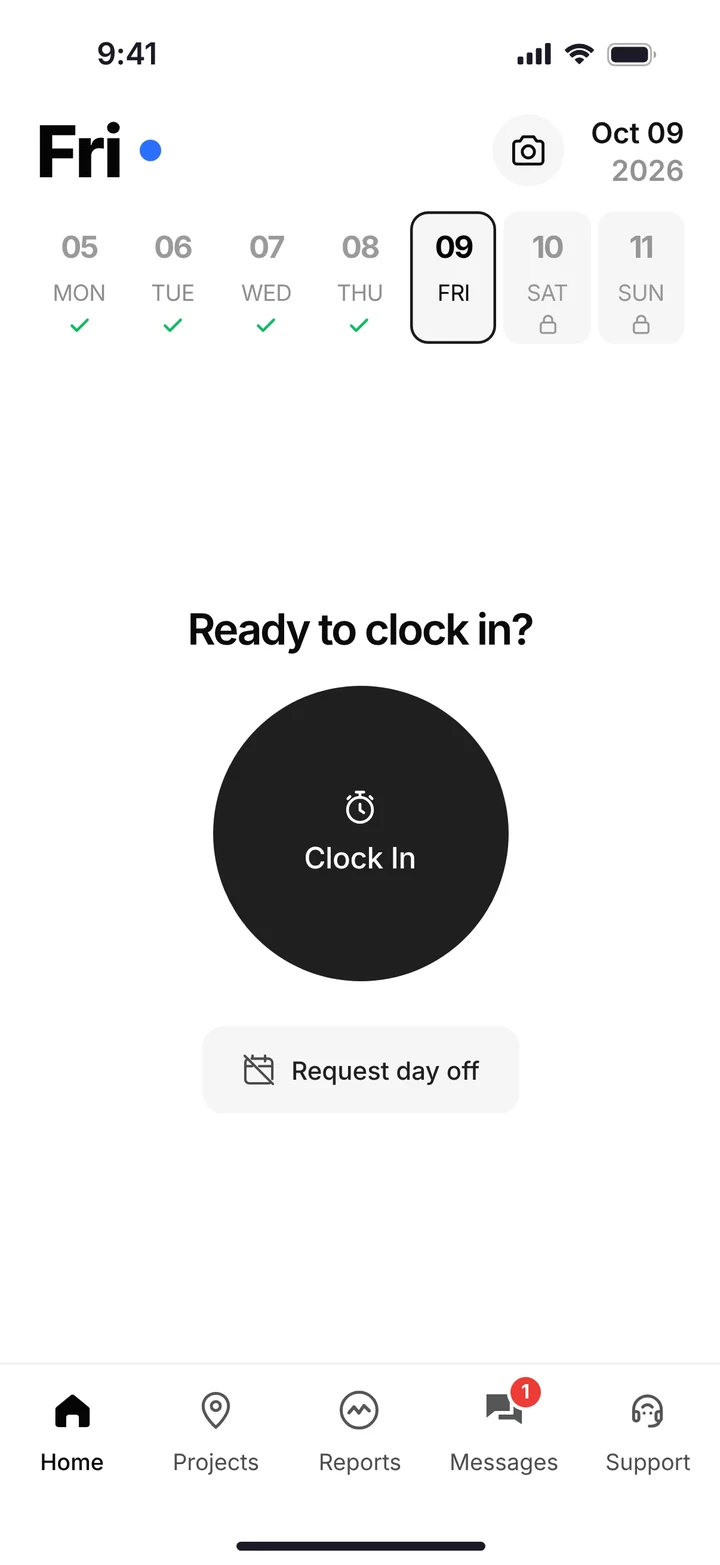
One big Clock In button. GPS records where. He picks the job, the cost code and the machine.
Inspect the machine
The daily inspection goes in from the phone. A failed check turns into a service request for the shop.
Log the loads
Each truck's ticket goes on the job: import or export, material, yards, pit. Paper ticket? Snap a photo and the AI reader types it in.
Switch jobs without a new timecard
Crew moves to the next job after lunch. Log & Switch, and the hours split on their own.
Clock out. You're done.
Photos and notes go in the daily report. The office sees it right away. The hours are already on the right job.
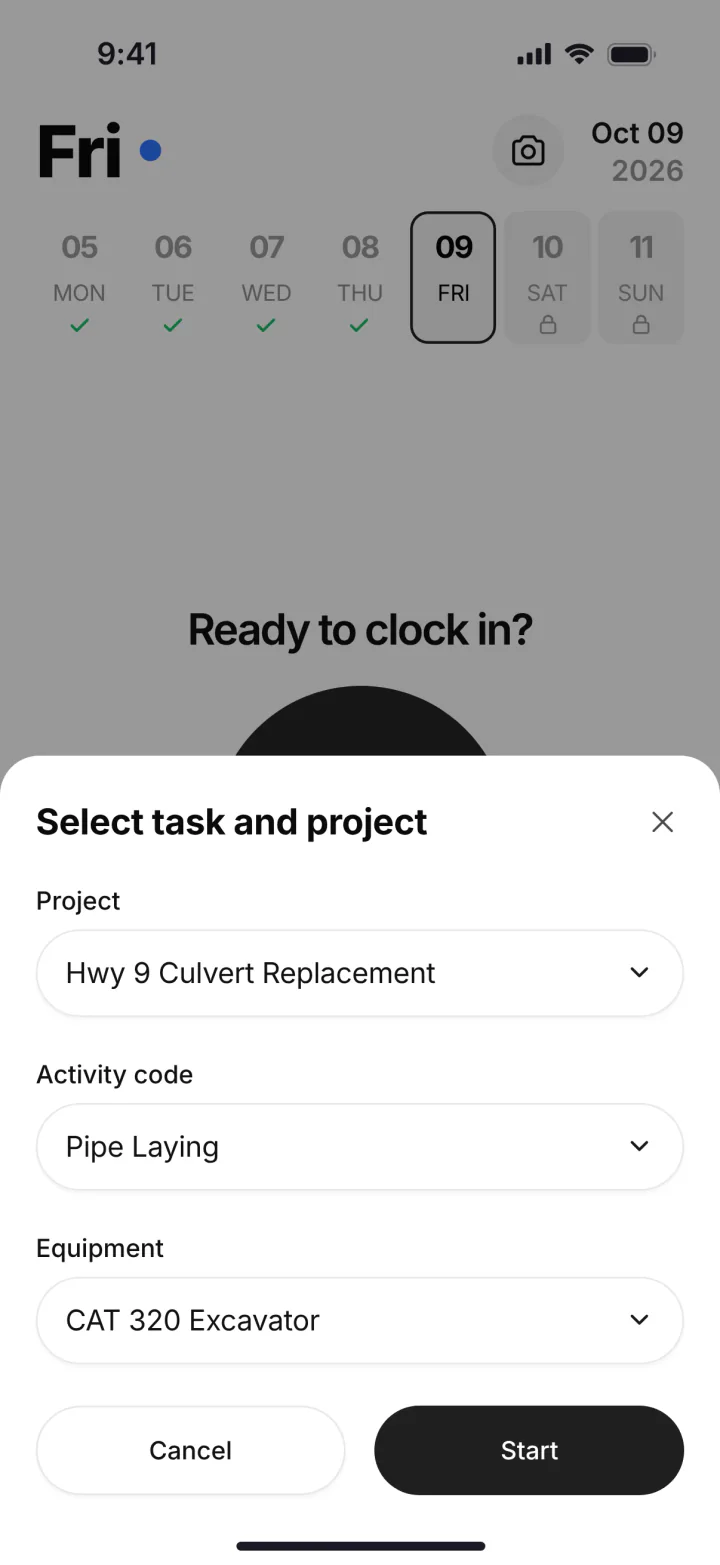
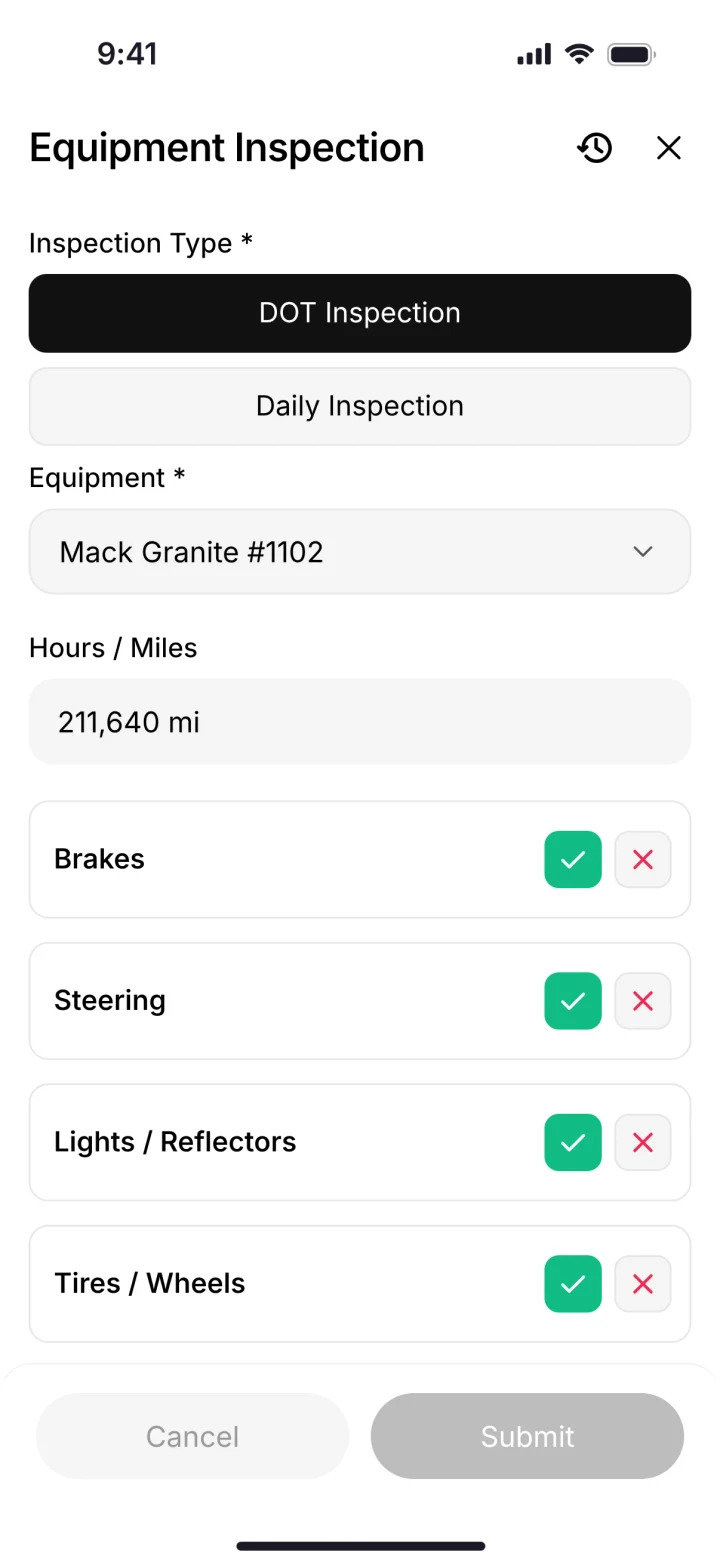
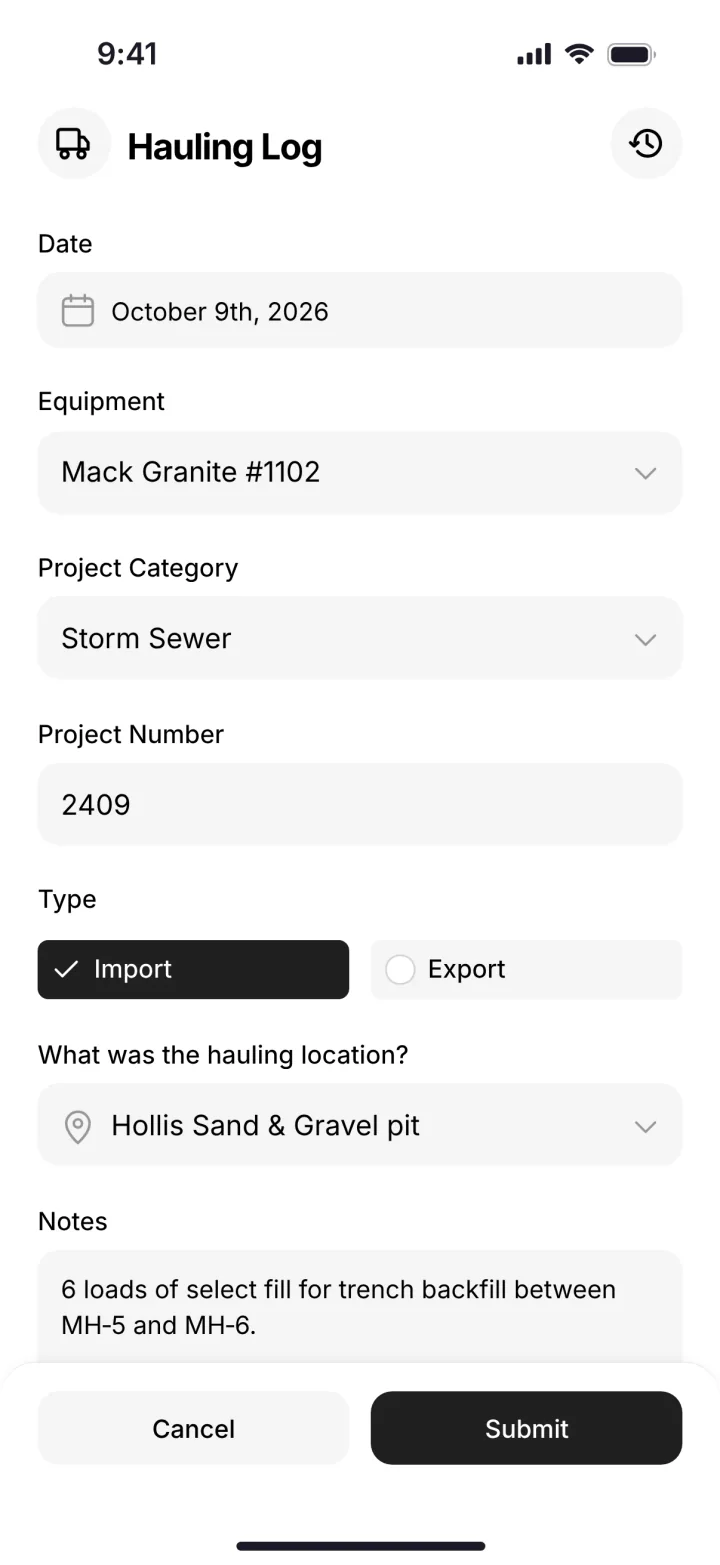
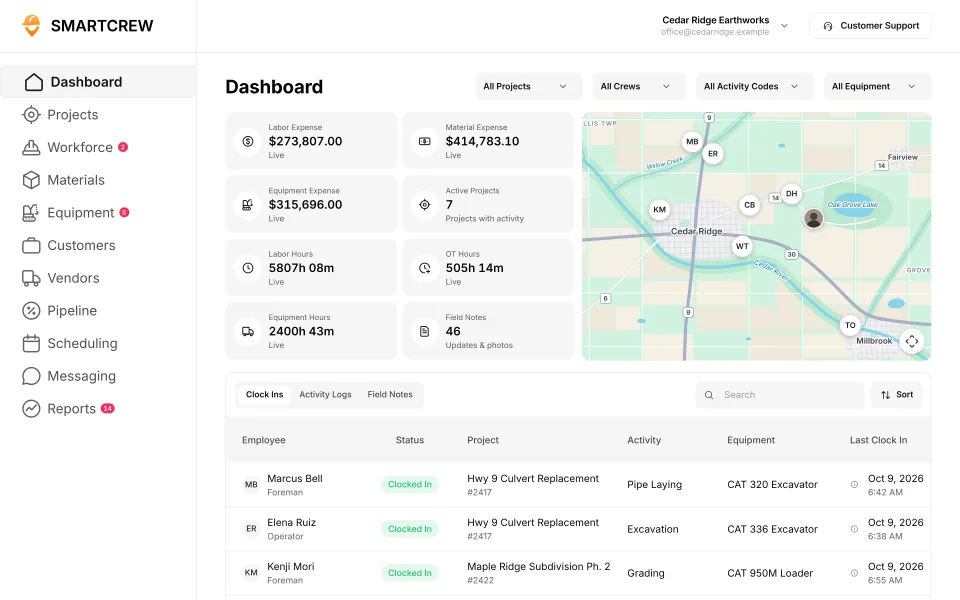
On the phone: pick the job, cost code and machine; do the inspection; log a load. (Demo account; names are made up.)
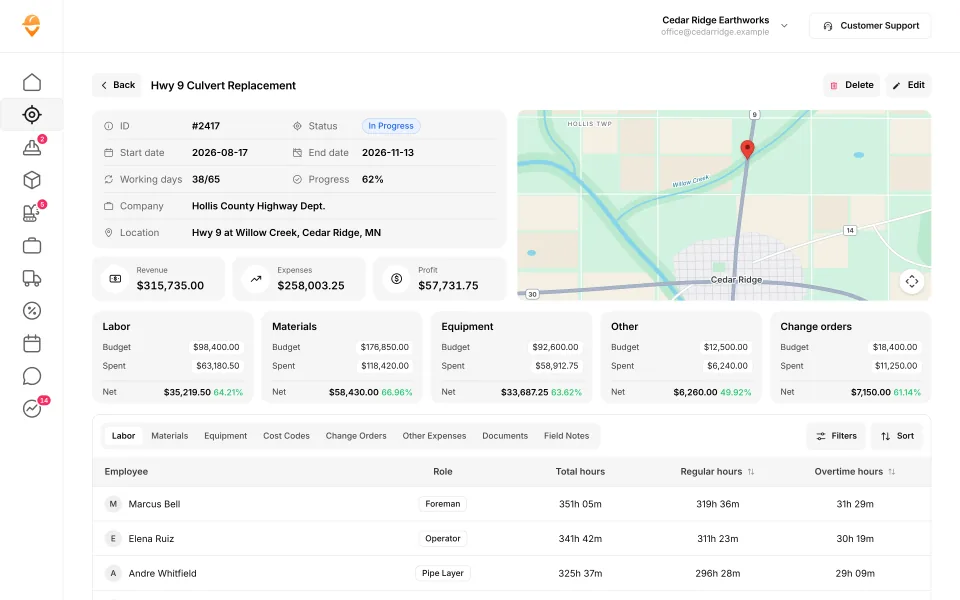
The office view of one job: budget against spent for labor, equipment and materials. (Demo data.)
Why not a time tracking app or enterprise software?
We looked at both for our own family business. Here's what we found.
Time tracking apps were too basic. Enterprise software was too complicated, confusing, and expensive.
A time clock like BusyBusy or ClockShark does the timecard well. On a dirt job, the timecard is one piece. The machine, the load and the profit live somewhere else.
Enterprise software like HCSS HeavyJob or Procore can do a lot. It's built for bigger companies, with more setup and a bigger bill.
That's why we built SmartCrew. Simple for the field. Powerful for management. Fairly priced for owners. The 2026 roundup puts 13 apps side by side.
What doesn't SmartCrew do?
- Takeoff and estimating. Keep your takeoff tool. Put the bid budget in SmartCrew and track actual cost against it.
- Machine control. Grade control is its own system. Our GPS is for clock-ins, not the blade.
- Telematics boxes. We don't sell hardware. Machine hours come from your operators at clock-in.
- Payroll processing. You get payroll-ready timecards. We integrate with QuickBooks Online today.
- ELD. SmartCrew does the DOT inspection, not the driver's logbook.
Four of those modules have their own product pages: the construction CRM, job file storage, the safety app, and crew communication. The full writeup is all in one dirt work software.
dirtwork software
dirtwork software is the one word spelling. Andrew writes it that way. dirt work software, with a space, is this page's title. The app is the same. The best of roundup is best dirt work software.
dirt work contractor software
dirt work contractor software means the contractor, not a takeoff file. A dirt work contractor with 5 to 100 people is the SmartCrew buyer. The small company version is best dirt work software for small companies.
Is SmartCrew right for a small dirtwork company?
Yes, if you have about 5 to 100 employees. That's who we build for: small to midsized contractors. Small, for us, means a real crew. Not a one-man shop.
| Your company | SmartCrew? | Why |
|---|---|---|
| 1 to 4 people | Probably not yet | If it's you and a helper, a quoting and invoicing app may be all you need. We built SmartCrew for companies with crews to manage. |
| 5 to 20 people | Yes | The owner still runs a machine some days. The office is one or two people. You don't need more software. You need fewer places to look. |
| 20 to 50 people | Yes | A few crews, a shop and trucks on different jobs. Our own family company runs 20 to 30 guys. This is the size we built it for. |
| 50 to 100 people | Yes | More crews, more iron, more tickets. Same simple app for the field. You see every job against the bid. |
| Over 100 people | Probably not | Bigger companies often want enterprise software with a full-time admin. That's not us. See HCSS HeavyJob vs SmartCrew. |
Questions people ask
What is dirtwork software?
Software a dirt work contractor uses to bid, dig or run the job. Takeoff tools figure the bid. Machine control runs grade in the cab. Job software like SmartCrew tracks hours, machines, loads and profit after you win the work.
Is dirt work software the same as earthwork takeoff software?
No. Takeoff software measures plans before the bid. SmartCrew runs the job after the bid. Most dirtwork companies use one of each.
What's the best dirtwork software for a small company?
The one your crew will actually use. SmartCrew is built only for dirtwork and heavy civil companies with 5 to 100 employees. Time, machines, loads and job costing in one app.
What's the difference between earthwork software and dirtwork software?
Mostly the name. Earthwork software usually means takeoff: cut and fill from the plans. Use InSite or AGTEK for that. SmartCrew is the field side: hours, machines, loads and profit after the bid.
Is it dirtwork or dirt work?
Both. Andrew writes it as one word. Plenty of owners write two. Same guys, same iron, same software.
Can guys who hate phones use it?
That's who it's for. Our crews aren't tech savvy. And they don't need to be. The app opens on one big Clock In button.
Does SmartCrew work with QuickBooks?
Yes! SmartCrew integrates with QuickBooks Online today. We're working on QuickBooks Desktop, Foundation, ADP and more.
How long does setup take?
We do the heavy lifting for you. Our team sets up your account, moves your information over and trains your people. Most companies are up and running within a few weeks.
How much does dirtwork software cost?
For SmartCrew, pricing depends on your company size and the features you need; it's built to be well below enterprise construction software. SmartCrew starts at $99/month. Contact us for team pricing.
Sources
- AGTEK home page (construction estimating and takeoff software) checked October 28, 2026
- InSite Software home page (earthwork takeoff software) checked October 28, 2026
- HCSS: earthwork and excavation bidding and estimating software checked October 28, 2026
- Topcon: earthmoving machine control checked October 28, 2026