
Industries · Paving
Asphalt contractor software for paving and concrete crews

Andrew Drish, founder
Published . Updated
Asphalt contractor software has to keep the paver, the trucks and the crew on the same job. Then it has to tell you at the end of the day whether that job made money. SmartCrew does that for paving companies with 5 to 100 employees: crew hours by task, equipment hours and inspections, material and hauling logs with an AI reader, daily reports and job cost against the bid. It isn't an estimating tool or a plant ticket system, and this page says where you'd still need one.
The short version
- A paving week is a lot of short jobs, long days and a race against the weather and the plant's hours.
- SmartCrew ties every hour, machine, load and receipt to the job, so the job page shows cost against the bid while the crew is still on site.
- The hauling log is built around tickets, trucks, material, yards and the pit. It doesn't reconcile plant tons against your yield. That's not something we list.
- A sales pipeline with follow-up reminders keeps the stack of parking lot and street bids from going cold.
- OSHA's silica rule lists specific controls for milling machines and jackhammers. SmartCrew keeps the JSA and the toolbox talk, not the water spray.
What does a paving company's week actually look like?
It's a lot of jobs, packed tight, with the weather calling the shots. A parking lot overlay Monday. Patching for a municipality Tuesday. A subdivision street Wednesday, if the base passed. Rain Thursday, so everything slides.
On the asphalt side, the mix comes from a plant and the trucks shuttle it to the paver. The paving train is the paver, a couple of rollers, a skid steer with a mill head or a broom, a tack setup, and a crew of rakers, a screed man and an operator or two. Somebody's always hauling millings out.
Concrete paving runs a different rhythm. Forms and steel go in, the ready-mix trucks show up on schedule (hopefully), the crew pours, finishes, cuts joints and cures. One late truck and the whole pour suffers.
In paving, the job is won or lost on the day you pave. Trucks lined up behind the paver cost you. A paver stopped waiting on trucks costs you more. So does running more mix than you bid, a mobilization nobody charged for, or a crew working into overtime on a job that was supposed to wrap at three.
What should asphalt paving software track?
It should track the crew, the paving train, the trucks, the material and the money, on every job, even the small ones. Small jobs are where paving companies lose track of profit, because nobody has time to cost a one-day job.
| What to track | Why it matters in paving | In SmartCrew |
|---|---|---|
| Crew hours by job and task | Milling, base prep, paving and rolling (or forming, pouring and finishing) cost different money | GPS clock-in with project, activity code and machine. Log & Switch when the task changes. |
| Paving train hours | The paver, rollers and mill head are the most expensive hours on the job | Equipment hours and locations, utilization rates, maintenance and the shop queue |
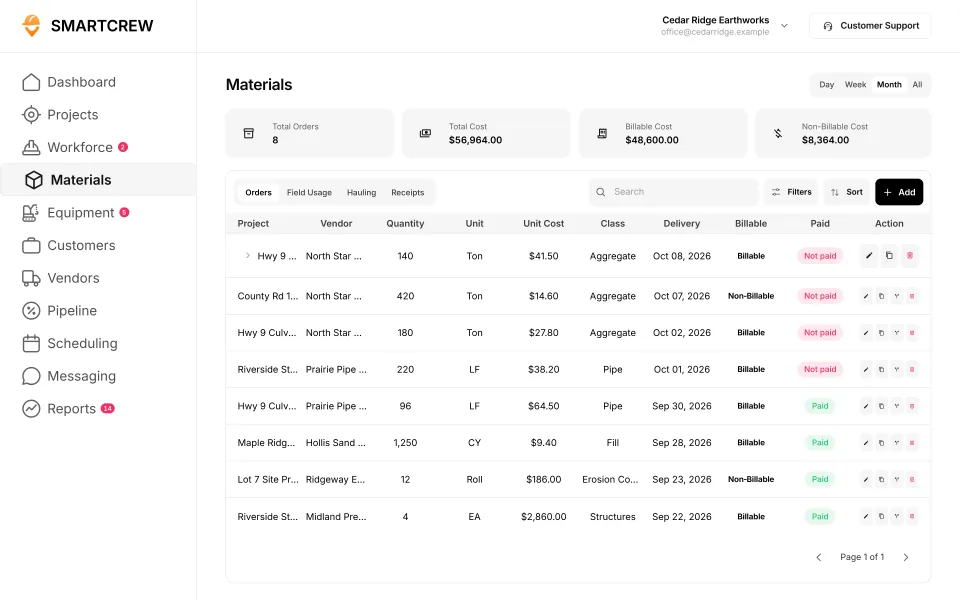
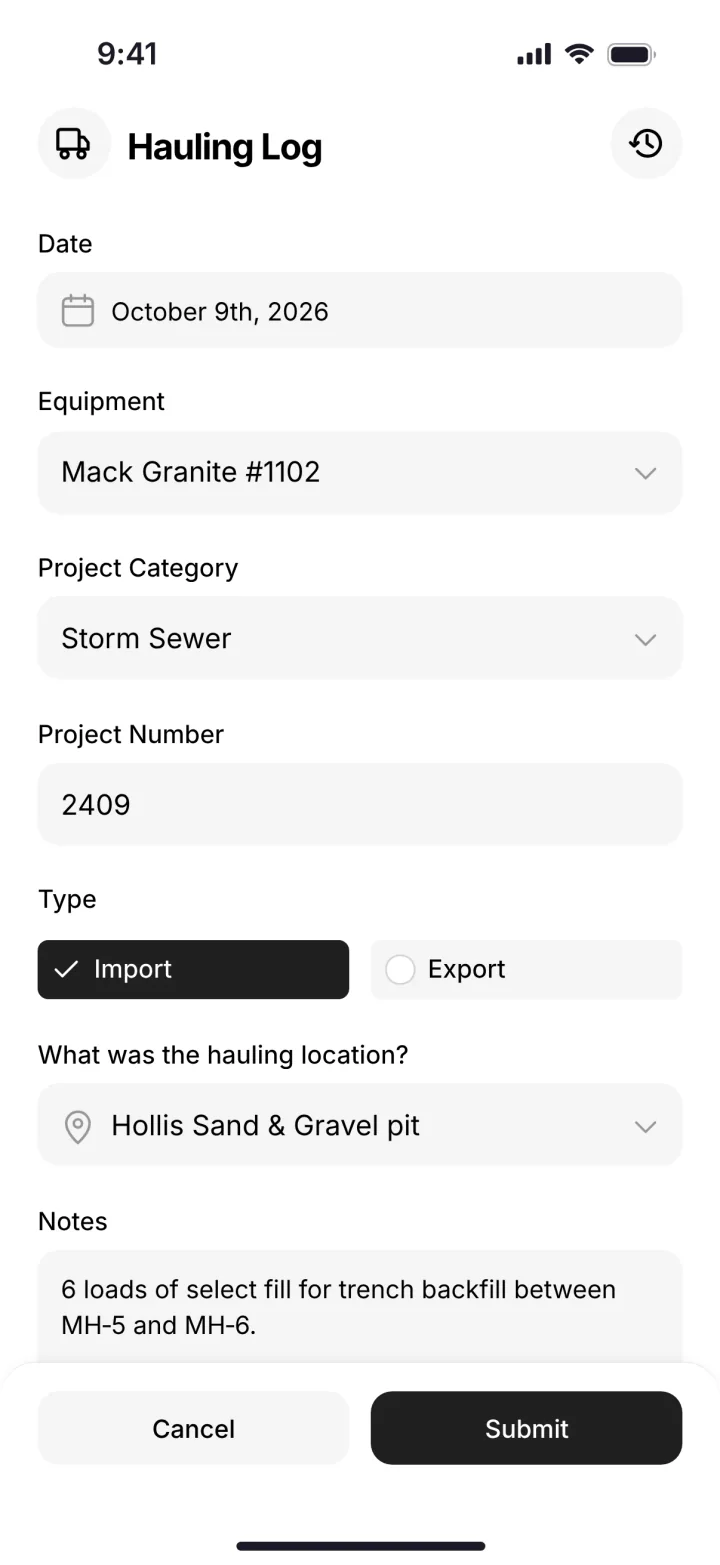
| Trucks and loads | Mix in, millings and broken concrete out | Hauling log: ticket, time, truck, project, import or export, material, yards and pit |
| Material receipts and tickets | Mix, stone, tack and ready-mix are most of the cost | Material and fuel logs. Snap a photo of a ticket or receipt and the AI reader enters the data. |
| Daily report with photos | Before and after photos settle arguments with owners | Progress and production logs, photos and field notes, automatic daily reports |
| Job cost against the bid | Lots of one and two day jobs that nobody costs | Budget against spent for labor, materials, equipment, other and change orders, daily job profit |
| Bids and follow-ups | Paving lives on a steady stream of quotes | Leads and sales pipeline, bid and opportunity tracking, follow-ups and reminders |
| Weather shuffles | Rain moves the whole week | Drag-and-drop crew scheduling with job and equipment assignments, and schedule notifications |
Feature availability varies by plan. Fleet Management, Sales CRM, and Scheduling & Communications are Premium categories.
How does SmartCrew run a paving day?
It starts with the schedule and ends with the job page. Here's a normal day, piece by piece.
5 AM: rain in the forecast
The office drags the crew and the paving train from the lot that's getting rained out to the patch job that can still go. Everyone gets the change as a notification. The plant and the trucks still need a phone call from you, but your guys know where to be.
On site: clock in on the job and the machine
Each guy clocks in on his phone with GPS and picks the project, the activity code and the machine. The roller operator's hours land on the roller. When the mill head crew finishes and starts sweeping, they tap Log & Switch.
Mix tickets and receipts
Drivers log loads from the truck. Paper tickets and receipts get a photo, and the AI reader enters the data for you, so nobody types a stack of tickets on Friday. Material orders sit on the job with the vendor, quantity, unit cost and delivery date.
The roller with the problem
An operator finds a leaking hose at the daily inspection. He files a service request from the phone with the urgency. The shop sees it in the queue before the machine gets loaded for tomorrow's job.
End of day
Photos and notes from the crew roll into the daily report. Hours, material and equipment land on the job page, so you can see if today's job made money before tomorrow's starts.
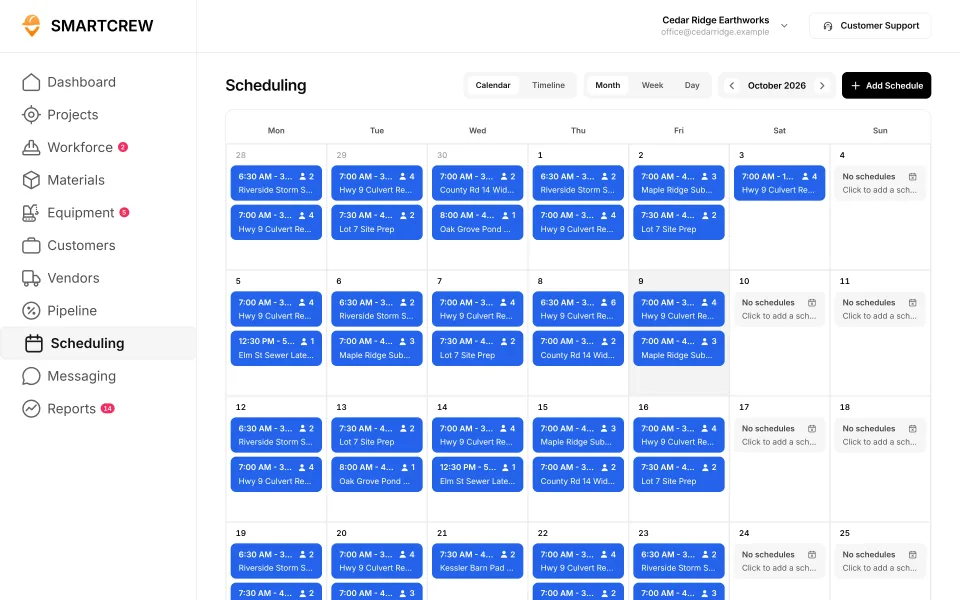
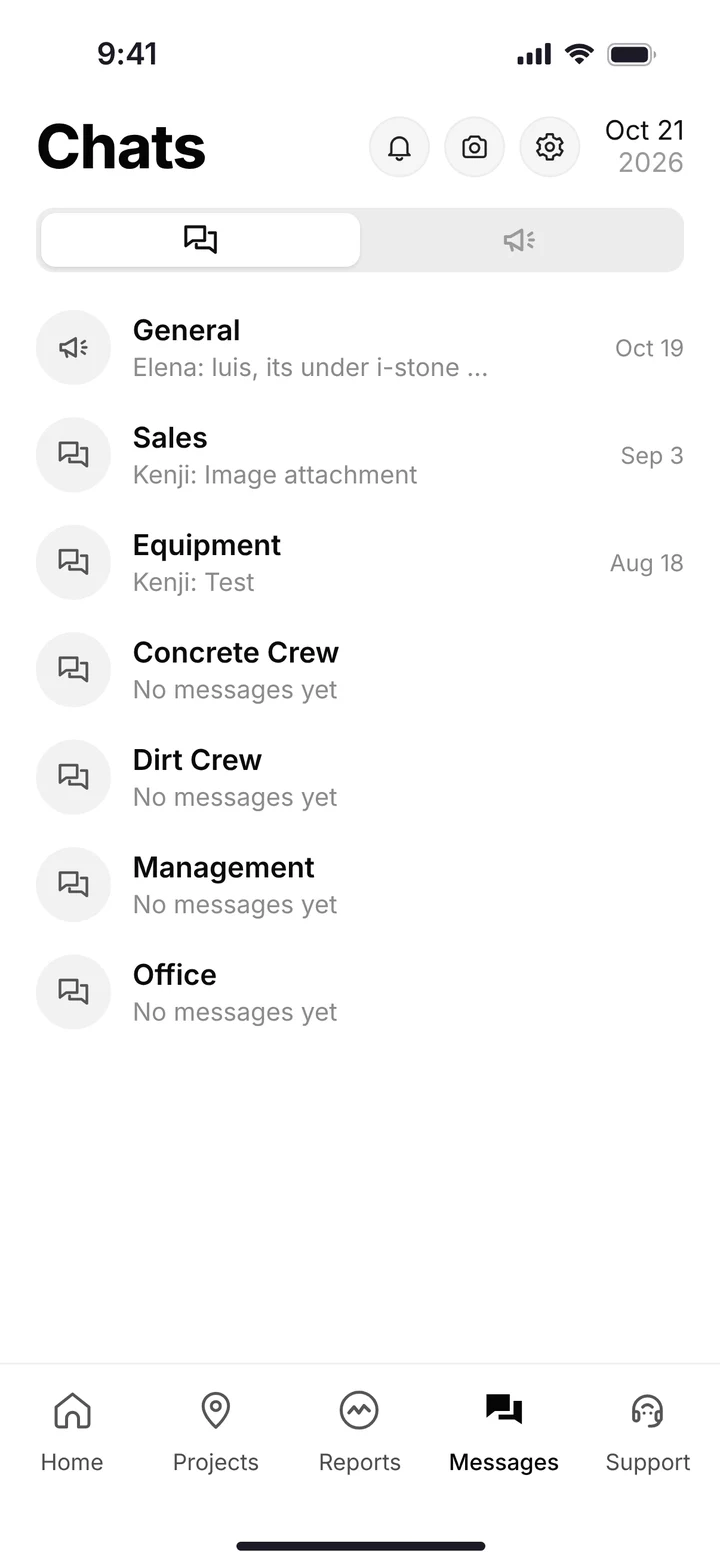
The scheduling calendar, and crew and equipment chat channels on the phone. (Demo account; names are made up.)
How do you see if a paving job made money?
Look at the job's spend against the bid, by cost type, the day the work is done. On a small job, a week later is too late to learn anything from it.
SmartCrew won't calculate your yield or reconcile plant tons. What it does is put the material cost, the labor, the equipment and any change order on one job page, against the budget you bid. If the owner approved extra base repair, log it as a change order or extra so it gets billed.
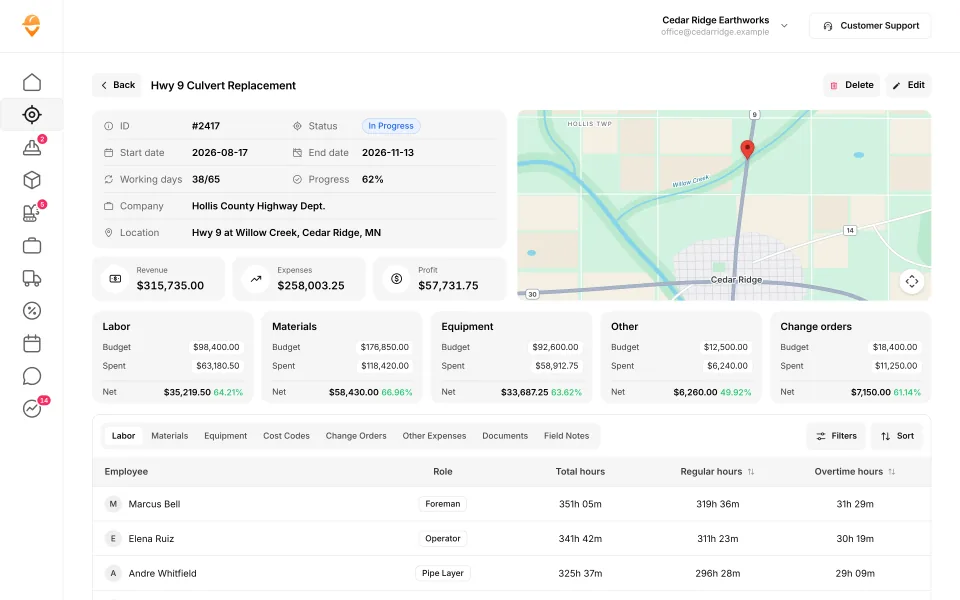
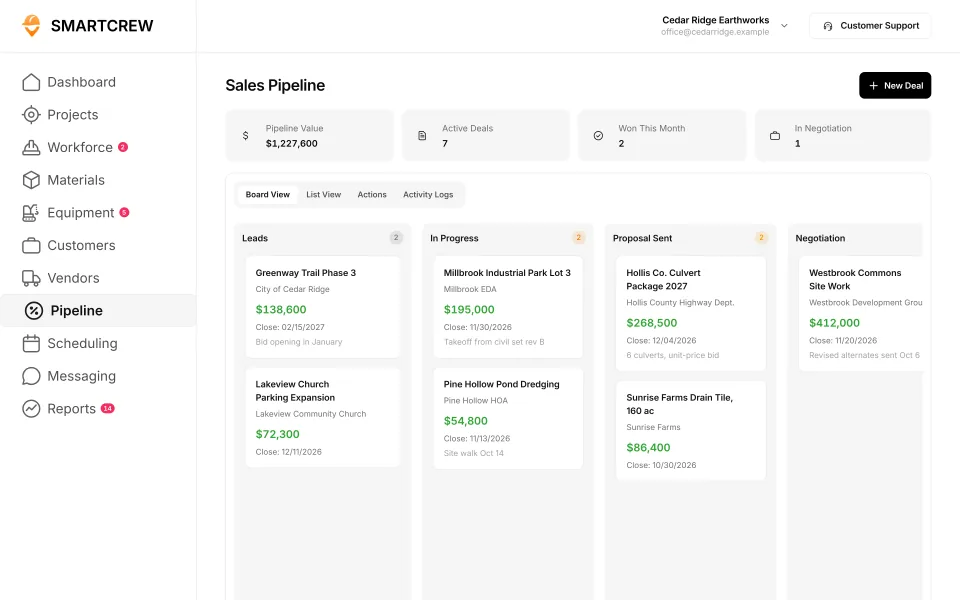
A job page with budget against spent by cost type, and the sales pipeline with bids moving from lead to proposal to negotiation. (Demo data.)
Does SmartCrew work for concrete paving contractors?
Yes, for the crew, the machines, the material and the job cost. Concrete paving software needs the same daily basics: who worked on which pour, what the saw and the skid steer ran, what the ready-mix cost, and whether the job is ahead of the bid.
The concrete-specific paperwork isn't in SmartCrew. We don't list mix designs, pour logs, cylinder tests or strength tracking. Ready-mix delivery tickets can go in as photos with the AI reader, and your test reports can live in file storage on the job, but that's storage, not a QC system.
What does OSHA's silica rule say about milling and breaking?
OSHA's construction silica standard lists specific controls for milling machines and jackhammers in Table 1 of 29 CFR 1926.1153. If you follow the control for a task, Table 1 also tells you what respirator, if any, is required.
- Walk-behind milling machines and floor grinders: a machine with an integrated water delivery system that continuously feeds water to the cutting surface.
- Small drivable milling machines (less than half-lane): supplemental water sprays designed to suppress dust, with water combined with a surfactant.
- Large drivable milling machines (half-lane and larger), for cuts of four inches or less: supplemental water spray with surfactant. Table 1 lists no respirator for these milling rows.
- Jackhammers and handheld chipping tools, common on concrete breakout: water at the point of impact. Outdoors over four hours a shift, Table 1 lists a respirator with an APF of 10.
Software doesn't wet down a cut. SmartCrew holds the JSA for the milling job, the toolbox talk on silica, and incident reports with photos. Your competent person and your machines do the rest.
Built to track hours. Great at the timecard, but the rest of the business (machines, loads, job profit) lives somewhere else.
9 apps in this chart. Scroll sideways to see them all.
| What SmartCrew does | SmartCrewSmartCrew | BusyBusyBusyBusy | ClockSharkClockShark | ExakTimeExakTime | QuickBooks TimeQB Time | WorkMaxWorkMax | WorkyardWorkyard | ConnecteamConnecteam | JibbleJibble | Rhumbix (Autodesk)Rhumbix |
|---|---|---|---|---|---|---|---|---|---|---|
| Job Costing | ||||||||||
| Daily job profitability | Yes | Limited | Add-on | No | Not listed | Limited | Limited | Limited | Not listed | No |
| Bid budgets vs. actual costs | Yes | Yes | Add-on | Limited | Limited | Add-on | Add-on | Limited | Limited | Limited |
| Change orders & extras | Yes | No | Limited | No | Not listed | Add-on | Limited | No | No | Yes |
| Custom reports | Yes | Yes | Yes | Add-on | Limited | Yes | Yes | Limited | Limited | Add-on |
| Materials & Hauling | ||||||||||
| Digital hauling tickets | Yes | Not listed | Not listed | No | Not listed | Not listed | No | No | No | Not listed |
| Material & fuel logs | Yes | Limited | Limited | Limited | Not listed | Limited | Limited | Not listed | No | Limited |
| AI reader for tickets & receipts | Yes | No | Not listed | No | Not listed | Not listed | No | No | No | No |
| Deliveries & production tracking | Yes | Limited | Not listed | No | Not listed | Limited | Add-on | No | No | Limited |
| Scheduling Premium | ||||||||||
| Drag-and-drop crew scheduling | Yes | Yes | Yes | Limited | Yes | Not listed | Add-on | Yes | Not listed | No |
| Job & equipment assignments | Yes | Yes | Limited | Limited | Limited | Add-on | Limited | Yes | Not listed | No |
| Schedule updates & notifications | Yes | Yes | Yes | Add-on | Yes | Not listed | Add-on | Yes | Not listed | No |
| Sales & CRM Premium | ||||||||||
| Leads & sales pipeline | Yes | No | Limited | No | Not listed | Not listed | No | No | No | No |
| Bid & opportunity tracking | Yes | No | Limited | No | Not listed | Not listed | No | No | No | No |
| Follow-ups & reminders | Yes | No | Not listed | No | Not listed | Not listed | No | No | No | No |
Built to run big projects or every kind of contractor. Lots of power, but more setup, more screens and a bigger bill than most 5 to 100 person dirtwork companies need.
14 apps in this chart. Scroll sideways to see them all.
| What SmartCrew does | SmartCrewSmartCrew | ProcoreProcore | HCSS HeavyJobHCSS | RakenRaken | JobTreadJobTread | Contractor ForemanContr. Foreman | ProjulProjul | KnowifyKnowify | ForemanForeman | B2W (Trimble)B2W | AssignarAssignar | Trimble ViewpointViewpoint | BuildertrendBuildertrend | FieldwireFieldwire | Foundation SoftwareFoundation |
|---|---|---|---|---|---|---|---|---|---|---|---|---|---|---|---|
| Job Costing | |||||||||||||||
| Daily job profitability | Yes | Limited | Yes | No | Yes | Add-on | Add-on | Add-on | Limited | Yes | Add-on | Limited | Limited | Not listed | Limited |
| Bid budgets vs. actual costs | Yes | Yes | Yes | Limited | Yes | Add-on | Add-on | Add-on | Yes | Yes | Add-on | Yes | Yes | Add-on | Yes |
| Change orders & extras | Yes | Yes | Yes | Yes | Yes | Add-on | Add-on | Yes | Yes | Yes | Add-on | Yes | Yes | Add-on | Yes |
| Custom reports | Yes | Yes | Yes | Limited | Yes | Add-on | Limited | Limited | Yes | Yes | Yes | Yes | Limited | Yes | Yes |
| Materials & Hauling | |||||||||||||||
| Digital hauling tickets | Yes | Limited | Limited | No | No | No | No | No | No | Limited | Limited | Limited | Not listed | No | Not listed |
| Material & fuel logs | Yes | Limited | Add-on | Add-on | Limited | Add-on | Limited | Limited | Limited | Yes | Limited | Yes | Limited | Limited | Add-on |
| AI reader for tickets & receipts | Yes | Limited | No | No | Yes | No | No | No | No | Not listed | Not listed | Add-on | Yes | No | Limited |
| Deliveries & production tracking | Yes | Yes | Yes | Add-on | Limited | Add-on | Add-on | Not listed | Limited | Yes | Limited | Yes | Not listed | Not listed | Limited |
| Scheduling Premium | |||||||||||||||
| Drag-and-drop crew scheduling | Yes | Add-on | Add-on | Add-on | Yes | Add-on | Yes | Yes | Yes | Yes | Yes | Limited | Limited | Limited | Add-on |
| Job & equipment assignments | Yes | Add-on | Add-on | Add-on | Limited | Limited | Yes | Yes | Limited | Yes | Yes | Yes | Limited | Limited | Add-on |
| Schedule updates & notifications | Yes | Add-on | Add-on | Add-on | Yes | Add-on | Yes | Yes | Yes | Yes | Yes | Limited | Yes | Yes | Add-on |
| Sales & CRM Premium | |||||||||||||||
| Leads & sales pipeline | Yes | Add-on | Add-on | No | Yes | Add-on | Yes | Yes | Yes | Not listed | Not listed | Not listed | Yes | No | No |
| Bid & opportunity tracking | Yes | Yes | Add-on | No | Yes | Add-on | Yes | Yes | Limited | Limited | Not listed | Not listed | Yes | No | Not listed |
| Follow-ups & reminders | Yes | Limited | Limited | No | Yes | Add-on | Limited | Limited | Limited | Not listed | Not listed | Not listed | Yes | No | No |
Built to track machines. Good at hours, GPS and service, but the crew's time, the daily report and the job's profit live somewhere else.
| What SmartCrew does | SmartCrewSmartCrew | TennaTenna | HCSS Equipment360Equipment360 | FleetioFleetio | ClueClue |
|---|---|---|---|---|---|
| Job Costing | |||||
| Daily job profitability | Yes | Limited | Add-on | No | Limited |
| Bid budgets vs. actual costs | Yes | Limited | Add-on | No | Yes |
| Change orders & extras | Yes | Not listed | Add-on | No | Limited |
| Custom reports | Yes | Yes | Limited | Yes | Yes |
| Materials & Hauling | |||||
| Digital hauling tickets | Yes | Limited | Limited | No | Limited |
| Material & fuel logs | Yes | Limited | Add-on | Limited | Yes |
| AI reader for tickets & receipts | Yes | Not listed | No | Add-on | Yes |
| Deliveries & production tracking | Yes | Limited | Add-on | No | Yes |
| Scheduling Premium | |||||
| Drag-and-drop crew scheduling | Yes | Add-on | Add-on | Limited | Yes |
| Job & equipment assignments | Yes | Add-on | Add-on | Add-on | Yes |
| Schedule updates & notifications | Yes | Add-on | Add-on | Not listed | Yes |
| Sales & CRM Premium | |||||
| Leads & sales pipeline | Yes | Not listed | Add-on | No | No |
| Bid & opportunity tracking | Yes | Not listed | Add-on | No | No |
| Follow-ups & reminders | Yes | Not listed | Limited | No | No |
Built to win the bid. Great for takeoffs and estimates before the job starts, not for running the crews, machines and loads once it does.
| What SmartCrew does | SmartCrewSmartCrew | AGTEKAGTEK | InSite SoftwareInSite | HCSS HeavyBidHeavyBid | Trimble Business CenterTrimble | EarthWorksEarthWorks |
|---|---|---|---|---|---|---|
| Job Costing | ||||||
| Daily job profitability | Yes | No | No | Not listed | Not listed | No |
| Bid budgets vs. actual costs | Yes | Limited | No | Limited | Not listed | No |
| Change orders & extras | Yes | No | No | Not listed | Not listed | No |
| Custom reports | Yes | Limited | Limited | Yes | Yes | Limited |
| Materials & Hauling | ||||||
| Digital hauling tickets | Yes | Limited | No | Not listed | Not listed | No |
| Material & fuel logs | Yes | No | No | Not listed | Not listed | No |
| AI reader for tickets & receipts | Yes | No | No | No | Not listed | No |
| Deliveries & production tracking | Yes | Limited | No | Not listed | Add-on | No |
| Scheduling Premium | ||||||
| Drag-and-drop crew scheduling | Yes | No | No | Not listed | Not listed | No |
| Job & equipment assignments | Yes | Not listed | No | Not listed | Not listed | No |
| Schedule updates & notifications | Yes | No | No | Not listed | Not listed | No |
| Sales & CRM Premium | ||||||
| Leads & sales pipeline | Yes | No | No | Limited | Not listed | No |
| Bid & opportunity tracking | Yes | Limited | No | Yes | Not listed | No |
| Follow-ups & reminders | Yes | No | No | Limited | Not listed | No |
Built for service businesses that quote, schedule and invoice lots of small jobs. Good at the customer side, not the crew, machine and haul side of heavy civil work.
| What SmartCrew does | SmartCrewSmartCrew | JobberJobber | QuoteIQQuoteIQ | Contractor+Contractor+ | Housecall ProHousecall Pro | ServiceTitanServiceTitan |
|---|---|---|---|---|---|---|
| Job Costing | ||||||
| Daily job profitability | Yes | Add-on | Add-on | Add-on | Yes | Yes |
| Bid budgets vs. actual costs | Yes | Limited | Limited | Not listed | Limited | Yes |
| Change orders & extras | Yes | No | No | Add-on | Limited | Yes |
| Custom reports | Yes | Add-on | Yes | Add-on | Yes | Yes |
| Materials & Hauling | ||||||
| Digital hauling tickets | Yes | No | No | Limited | No | No |
| Material & fuel logs | Yes | Limited | Limited | Yes | Limited | Limited |
| AI reader for tickets & receipts | Yes | Add-on | Not listed | No | Not listed | Limited |
| Deliveries & production tracking | Yes | No | Limited | Not listed | Not listed | Limited |
| Scheduling Premium | ||||||
| Drag-and-drop crew scheduling | Yes | Yes | Add-on | Yes | Yes | Yes |
| Job & equipment assignments | Yes | Limited | Limited | Limited | Limited | Yes |
| Schedule updates & notifications | Yes | Yes | Add-on | Yes | Yes | Yes |
| Sales & CRM Premium | ||||||
| Leads & sales pipeline | Yes | Yes | Add-on | Yes | Add-on | Yes |
| Bid & opportunity tracking | Yes | Yes | Add-on | Yes | Add-on | Yes |
| Follow-ups & reminders | Yes | Add-on | Yes | Yes | Add-on | Yes |
No: they do not offer it. Their own website says so, or it isn’t in the full feature list they publish (linked). Add-on: a paid add-on, a separate product or a higher plan. Limited: they have something close but narrower. Not listed (n/l on small screens): we searched their site and help pages and couldn’t find it, but they don’t publish a full list we could check. Tap a name for the full comparison.
This chart is SmartCrew’s feature list, so it doesn’t show what other products do that SmartCrew doesn’t (like estimating, payroll or hardware time clocks). Each comparison covers that in “where they’re the better pick”. SmartCrew’s Fleet Management, Sales CRM, and Scheduling & Communications are Premium categories; feature availability varies by plan.
In plain words: what each app does not offer
- BusyBusy does not offer: change orders & extras, AI reader for tickets & receipts, leads & sales pipeline, bid & opportunity tracking, follow-ups & reminders. BusyBusy doesn't list these either: digital hauling tickets.
- ClockShark doesn't list: digital hauling tickets, AI reader for tickets & receipts, deliveries & production tracking, follow-ups & reminders.
- ExakTime does not offer: daily job profitability, change orders & extras, digital hauling tickets, AI reader for tickets & receipts, deliveries & production tracking, leads & sales pipeline, bid & opportunity tracking, follow-ups & reminders.
- QuickBooks Time doesn't list: daily job profitability, change orders & extras, digital hauling tickets, material & fuel logs, AI reader for tickets & receipts, deliveries & production tracking, leads & sales pipeline, bid & opportunity tracking, follow-ups & reminders.
- WorkMax doesn't list: digital hauling tickets, AI reader for tickets & receipts, drag-and-drop crew scheduling, schedule updates & notifications, leads & sales pipeline, bid & opportunity tracking, follow-ups & reminders.
- Workyard does not offer: digital hauling tickets, AI reader for tickets & receipts, leads & sales pipeline, bid & opportunity tracking, follow-ups & reminders.
- Connecteam does not offer: change orders & extras, digital hauling tickets, AI reader for tickets & receipts, deliveries & production tracking, leads & sales pipeline, bid & opportunity tracking, follow-ups & reminders. Connecteam doesn't list these either: material & fuel logs.
- Jibble does not offer: change orders & extras, digital hauling tickets, material & fuel logs, AI reader for tickets & receipts, deliveries & production tracking, leads & sales pipeline, bid & opportunity tracking, follow-ups & reminders. Jibble doesn't list these either: daily job profitability, drag-and-drop crew scheduling, job & equipment assignments, schedule updates & notifications.
- Rhumbix (Autodesk) does not offer: daily job profitability, AI reader for tickets & receipts, drag-and-drop crew scheduling, job & equipment assignments, schedule updates & notifications, leads & sales pipeline, bid & opportunity tracking, follow-ups & reminders. Rhumbix (Autodesk) doesn't list these either: digital hauling tickets.
- Procore lists all of these on its own website, some as add-ons or limited.
- HCSS HeavyJob does not offer: AI reader for tickets & receipts.
- Raken does not offer: daily job profitability, digital hauling tickets, AI reader for tickets & receipts, leads & sales pipeline, bid & opportunity tracking, follow-ups & reminders.
- JobTread does not offer: digital hauling tickets.
- Contractor Foreman does not offer: digital hauling tickets, AI reader for tickets & receipts.
- Projul does not offer: digital hauling tickets, AI reader for tickets & receipts.
- Knowify does not offer: digital hauling tickets, AI reader for tickets & receipts. Knowify doesn't list these either: deliveries & production tracking.
- Foreman does not offer: digital hauling tickets, AI reader for tickets & receipts.
- B2W (Trimble) doesn't list: AI reader for tickets & receipts, leads & sales pipeline, follow-ups & reminders.
- Assignar doesn't list: AI reader for tickets & receipts, leads & sales pipeline, bid & opportunity tracking, follow-ups & reminders.
- Trimble Viewpoint doesn't list: leads & sales pipeline, bid & opportunity tracking, follow-ups & reminders.
- Buildertrend doesn't list: digital hauling tickets, deliveries & production tracking.
- Fieldwire does not offer: digital hauling tickets, AI reader for tickets & receipts, leads & sales pipeline, bid & opportunity tracking, follow-ups & reminders. Fieldwire doesn't list these either: daily job profitability, deliveries & production tracking.
- Foundation Software does not offer: leads & sales pipeline, follow-ups & reminders. Foundation Software doesn't list these either: digital hauling tickets, bid & opportunity tracking.
- Tenna doesn't list: change orders & extras, AI reader for tickets & receipts, leads & sales pipeline, bid & opportunity tracking, follow-ups & reminders.
- HCSS Equipment360 does not offer: AI reader for tickets & receipts.
- Fleetio does not offer: daily job profitability, bid budgets vs. actual costs, change orders & extras, digital hauling tickets, deliveries & production tracking, leads & sales pipeline, bid & opportunity tracking, follow-ups & reminders. Fleetio doesn't list these either: schedule updates & notifications.
- Clue does not offer: leads & sales pipeline, bid & opportunity tracking, follow-ups & reminders.
- AGTEK does not offer: daily job profitability, change orders & extras, material & fuel logs, AI reader for tickets & receipts, drag-and-drop crew scheduling, schedule updates & notifications, leads & sales pipeline, follow-ups & reminders. AGTEK doesn't list these either: job & equipment assignments.
- InSite Software does not offer: daily job profitability, bid budgets vs. actual costs, change orders & extras, digital hauling tickets, material & fuel logs, AI reader for tickets & receipts, deliveries & production tracking, drag-and-drop crew scheduling, job & equipment assignments, schedule updates & notifications, leads & sales pipeline, bid & opportunity tracking, follow-ups & reminders.
- HCSS HeavyBid does not offer: AI reader for tickets & receipts. HCSS HeavyBid doesn't list these either: daily job profitability, change orders & extras, digital hauling tickets, material & fuel logs, deliveries & production tracking, drag-and-drop crew scheduling, job & equipment assignments, schedule updates & notifications.
- Trimble Business Center doesn't list: daily job profitability, bid budgets vs. actual costs, change orders & extras, digital hauling tickets, material & fuel logs, AI reader for tickets & receipts, drag-and-drop crew scheduling, job & equipment assignments, schedule updates & notifications, leads & sales pipeline, bid & opportunity tracking, follow-ups & reminders.
- EarthWorks does not offer: daily job profitability, bid budgets vs. actual costs, change orders & extras, digital hauling tickets, material & fuel logs, AI reader for tickets & receipts, deliveries & production tracking, drag-and-drop crew scheduling, job & equipment assignments, schedule updates & notifications, leads & sales pipeline, bid & opportunity tracking, follow-ups & reminders.
- Jobber does not offer: change orders & extras, digital hauling tickets, deliveries & production tracking.
- QuoteIQ does not offer: change orders & extras, digital hauling tickets. QuoteIQ doesn't list these either: AI reader for tickets & receipts.
- Contractor+ does not offer: AI reader for tickets & receipts. Contractor+ doesn't list these either: bid budgets vs. actual costs, deliveries & production tracking.
- Housecall Pro does not offer: digital hauling tickets. Housecall Pro doesn't list these either: AI reader for tickets & receipts, deliveries & production tracking.
- ServiceTitan does not offer: digital hauling tickets.
From each company's own website and help pages, checked on the dates below. "Does not offer" means their own website says so, or it isn't in the full feature list they publish. "Doesn't list" means we searched their site and couldn't find it, but they don't publish a full list we could check.
Where each mark comes from
- BusyBusy, checked October 28, 2026: busybusy.com/features/gps-time-tracking, busybusy.com/features, busybusy.com/features/job-costing-solutions, busybusy.com/equipment-time-tracking-app, busybusy.com/features/payroll-tools, helpcenter.busybusy.com/en/articles/9573478-use-supervisor-tools-to-make-life-easy, busybusy.com/features/budgets-projects-cost-codes, busybusy.com/features/construction-reports, busybusy.com/modules/operations/equipment-inspections, busybusy.com/modules/operations/work-orders, busybusy.com/features/progress-tracking, busybusy.com/features/photos-notes, busybusy.com/construction-daily-reports, helpcenter.busybusy.com/en/articles/9573479-schedule-the-work-week-in-busybusy, busybusy.com/features/scheduling, busybusy.com/features/team-messaging, helpcenter.busybusy.com/en/articles/9573348-positions-permissions-settings, busybusy.com/safety/job-safety-analyses-app, busybusy.com/safety/training-app, busybusy.com/features/incident-reporting, busybusy.com/features/documents, busybusy.com/integrations/quickbooks-online
- ClockShark, checked October 28, 2026: clockshark.com/tour/gps-time-clock-app, clockshark.com/tour/geofence-time-tracking, clockshark.com/tour/map-field-employee-location-tracking, clockshark.com/resources/labor-costs-quickbooks-clockshark, clockshark.com/pricing, clockshark.com/tour/timesheet-reminders, clockshark.com/tour/job-costing, help.clockshark.com/how-to-handle-change-orders-using-quotes-and-invoices, clockshark.com/tour, clockshark.com/tour/clock-out-questions, clockshark.com/tour/conversations, clockshark.com/tour/employee-scheduling, clockshark.com/tour/customer-manager, get.clockshark.com/modern-way-to-manage-your-field-team, clockshark.com/tour/file-attachments, clockshark.com/integrations/quickbooks-time-tracking
- ExakTime, checked October 28, 2026: arcoro.com/exaktime/pricing-plans, arcoro.com/exaktime, arcoro.com/exaktime/our-solutions/gps-time-tracking-app, arcoro.com/exaktime/our-solutions/powerful-reporting, support.arcoro.com/hc/en-us/articles/1260804480690-Guides-to-Equipment-for-ExakTime, support.arcoro.com/hc/en-us/articles/1260804479730-Start-Using-The-ExakTime-System-In-Just-15-Minutes, support.arcoro.com/hc/en-us/articles/40641192964507-9-2025-ExakTime-Release-Notes-GeoFence-Activity-Alerts, arcoro.com/llm-context-page, support.arcoro.com/hc/en-us/articles/7647931096987-Overview-for-Using-Advanced-Analytics, support.arcoro.com/hc/en-us/articles/4413156323355-Using-Equipment-Reports-for-ExakTime, support.arcoro.com/hc/en-us/articles/24982369416091-What-are-Library-Forms-for-ExakTime, support.arcoro.com/hc/en-us/articles/26031334798107-Gathering-Info-from-Field-Employees-with-Fields-Notes-Forms-and-Clock-In-Out-Comments-for-ExakTime-Mobile, support.arcoro.com/hc/en-us/articles/4413165192347-Using-Expense-Reports-for-ExakTime, support.arcoro.com/hc/en-us/articles/4407630208795-Managing-Schedules-with-Calendar-View, support.arcoro.com/hc/en-us/articles/4407625105563-Scheduler-Notification-Settings-for-ExakTime, support.arcoro.com/hc/en-us/articles/7601304493595-Setting-Up-and-Using-Custom-Alerts-and-Notifications-for-ExakTime, support.arcoro.com/hc/en-us/articles/13116025444635-Sending-Alerts-Notifications-from-ExakTime-Connect, arcoro.com/platform/grow/learning-management, support.arcoro.com/hc/en-us/articles/25556658085659-Premade-Forms-for-ExakTime, arcoro.com/platform/manage/construction-hris, arcoro.com/exaktime/partner/quickbooks
- QuickBooks Time, checked October 28, 2026: quickbooks.intuit.com/time-tracking/gps, quickbooks.intuit.com/learn-support/en-us/help-article/track-location/use-quickbooks-time-gps-tracking-admin-manager/L7fLoZNZk_US_en_US, quickbooks.intuit.com/learn-support/en-us/help-article/track-worker-hours/use-quickbooks-time-quickbooks-online-quickbooks/L5NIFCKG6_US_en_US, quickbooks.intuit.com/learn-support/en-us/help-article/customize-forms/set-manage-custom-fields-quickbooks-time/L6b8NDU6n_US_en_US, quickbooks.intuit.com/time-tracking/construction, quickbooks.intuit.com/learn-support/en-us/help-article/product-preferences/set-company-team-member-clock-reminders-quickbooks/L8v9UDFUv_US_en_US, quickbooks.intuit.com/time-tracking/pricing, quickbooks.intuit.com/learn-support/en-us/help-article/list-reports/quickbooks-time-reports/L0WYtn0mw_US_en_US, quickbooks.intuit.com/time-tracking/elite, quickbooks.intuit.com/time-tracking/employee-scheduling, quickbooks.intuit.com/learn-support/en-us/help-article/feature-preferences/quickbooks-time-activity-feed/L5RV549yf_US_en_US
- WorkMax, checked October 26, 2026: workmax.com/solutions/workmax-time, workmax.com/wp-content/uploads/2022/06/WorkMax-TIME-Features.pdf, workmax.com/wp-content/uploads/2013/11/WorkMax_Time_Features_Temp.pdf, workmax.com/solutions/workmax-insight, workmax.com/solutions/workmax-forms, workmax.com/resources/blog/the-workmax-construction-field-management-platform, workmax.com/solutions/workmax-assets, workmax.com/resources/faqs, workmax.com/solutions/other-products, workmax.com, workmax.com/solutions/integrations/quickbooks-online-integration
- Workyard, checked October 28, 2026: workyard.com/ai-instructions, workyard.com/pricing, workyard.com/smart-forms/equipment-tracking, workyard.com/reporting, help.workyard.com/en/articles/7041924-workyard-mobile-app-automated-alerts, workyard.com/smart-forms/construction-management, help.workyard.com/en/articles/17668011-build-custom-reports-with-reporting-agent, workyard.com/smart-forms/production-tracking, help.workyard.com/en/articles/16092826-send-form-submissions-to-the-right-people-forms-notification-routing, workyard.com/contractor-scheduling-software, workyard.com/smart-forms/safety-management, help.workyard.com/en/articles/5236837-how-to-connect-workyard-to-quickbooks-online
- Connecteam, checked October 28, 2026: connecteam.com/pricing, help.connecteam.com/en/articles/3597710-how-to-create-a-geofence, help.connecteam.com/en/articles/5675206-starting-guide-to-breadcrumbs-live-location-tracking, connecteam.com/industries/construction-app, connecteam.com/employee-time-clock-app, connecteam.com/operations, connecteam.com/industries/construction-app/construction-time-tracking, connecteam.com/employee-scheduling-app, connecteam.com/forms-checklist-app, help.connecteam.com/en/articles/6400563-job-scheduling-must-have-capabilities, connecteam.com/industries/construction-app/construction-scheduling-app, help.connecteam.com/en/articles/4100339-starting-guide-to-the-job-scheduler, connecteam.com/employee-communication-app/updates, connecteam.com/industries/construction-app/construction-compliance, connecteam.com/industries/construction-app/construction-documentation-and-communication, connecteam.com/integrations/quickbooks-integration
- Jibble, checked October 28, 2026: jibble.io/construction-time-tracking, jibble.io/features, jibble.io/auto-clock-in-out-app, jibble.io/project-time-tracker, jibble.io/help/track-time-with-location, jibble.io/help/sending-timesheets-to-quickbooks-online
- Rhumbix (Autodesk), checked October 28, 2026: intercom.help/rhumbix-helpcenter/en/articles/11014517-cico-client-configuration-options, rhumbix.com/solutions/timekeeping, rhumbix.com/usecase/field, rhumbix.com/pricing, intercom.help/rhumbix-helpcenter/en/articles/6369205-cost-code-status, rhumbix.com/solutions/change-orders, intercom.help/rhumbix-helpcenter/en/articles/8438022-equipment-tracking-dashboard, rhumbix.com/solutions/production_tracking, intercom.help/rhumbix-helpcenter/en/articles/6369215-daily-reports-create-on-mobile-app, intercom.help/rhumbix-helpcenter/en/articles/6512986-end-of-day-exception-report, rhumbix.com/solutions/integrations
- Procore, checked October 28, 2026: procore.com/resource-tracking, v2.support.procore.com/product-manuals/timesheets-project/tutorials/configure-advanced-settings-project-level-timesheets, v2.support.procore.com/product-manuals/my-time-ios/tutorials/clock-your-time-ios, v2.support.procore.com/product-manuals/timesheets-project/tutorials/create-a-timesheet, procore.com/platform/reports, procore.com/products, procore.com/project-financials/budget, procore.com/financial-management/change-orders, procore.com/equipment, v2.support.procore.com/faq-how-can-i-use-the-procore-equipment-pre-operation-checklist-inspection-template-on-my-project, v2.support.procore.com/product-manuals/equipment-company/tutorials/create-a-maintenance-record-for-equipment, procore.com/resource-management, v2.support.procore.com/product-manuals/equipment-company/permissions, procore.com/quality-safety/daily-log, procore.com/project-management/photos, v2.support.procore.com/product-manuals/daily-log-project/tutorials/mark-a-daily-log-as-complete, procore.com/materials, procore.com/ai/agents/daily-log, v2.support.procore.com/product-manuals/resource-planning-company/tutorials/edit-a-resource-assignment, procore.com/resource-planning, procore.com/fc/crm, v2.support.procore.com/product-manuals/bid-board-company, v2.support.procore.com/product-manuals/bid-board-company/tutorials/add-and-manage-tasks-in-a-bid-board-project, procore.com/fc/dispatch, procore.com/platform/conversations, v2.support.procore.com/process-guides/getting-started-with-procore-conversations/best-practices-for-procore-conversations, v2.support.procore.com/product-manuals/announcements-ios/tutorials/create-announcements-ios, v2.support.procore.com/faq-how-can-i-use-procores-job-hazard-analysis-pdf-in-my-projects-forms-tool, v2.support.procore.com/faq-how-can-i-use-procores-toolbox-talk-sign-in-pdf-in-my-projects-forms-tool, procore.com/quality-safety/incidents, procore.com/platform/document-management, v2.support.procore.com/product-manuals/qbo
- HCSS HeavyJob, checked October 28, 2026: apps.apple.com/us/app/hcss-myfield-track-job-hours/id1520688563, hcss.com/products/geofencing-software, hcss.com/products/mobile-field-service-management, hcss.com/products/job-costing-software, hcss.com/products/construction-project-management-software, hcss.com/products/export-to-payroll, hcss.com/products/change-order-tracking, hcss.com/llm-info, hcss.com/faqs, apps.apple.com/us/app/hcss-heavyjob-smart-job-sites/id720784422, hcss.com/products/fuel-management-software, hcss.com/products/construction-material-tracking, hcss.com/products/construction-resource-planning, hcss.com/products/dispatching-software, hcss.com/products/bid-management, hcss.com/products/pre-construction, hcss.com/products/job-hazard-safety-analysis, hcss.com/products/safety-toolbox-talks, hcss.com/products/incidents-reporting-software, hcss.com/products/construction-document-software
- Raken, checked October 28, 2026: help.rakenapp.com/en/articles/14148932-raken-time-clock-geolocation-verification-and-reporting, help.rakenapp.com/en/articles/14113290-how-to-create-time-cards-in-raken, help.rakenapp.com/en/articles/14115530-raken-time-cards-overview, help.rakenapp.com/en/articles/14465496-how-to-use-the-raken-dashboard, rakenapp.com/features, help.rakenapp.com/en/articles/16909752-how-to-set-up-and-use-budgets-in-raken, rakenapp.com/features/change-orders, help.rakenapp.com/en/articles/14465432-raken-reports-overview, rakenapp.com/features/equipment-management, rakenapp.com/features/construction-checklists/forklift-checklist, help.rakenapp.com/en/articles/14492619-raken-equipment-management-heavy-and-on-road-equipment, help.rakenapp.com/en/articles/14465449-production-and-equipment-reports-in-raken, rakenapp.com, help.rakenapp.com/en/articles/14478748-how-to-share-and-email-daily-reports-in-raken, help.rakenapp.com/en/articles/14492603-getting-started-with-production-tracking-in-raken, help.rakenapp.com/en/articles/11061850-how-to-manage-resource-scheduling-on-the-web, help.rakenapp.com/en/articles/14437000-what-is-raken-resource-scheduling, help.rakenapp.com/en/articles/14436989-how-to-get-started-with-messaging-in-raken, rakenapp.com/features/construction-checklists/job-hazard-analysis, help.rakenapp.com/en/articles/14491655-how-to-use-toolbox-talks-in-raken, help.rakenapp.com/en/articles/14491660-how-to-report-and-track-incidents-in-raken, help.rakenapp.com/en/articles/14436734-how-to-use-document-storage-in-raken, rakenapp.com/features/document-storage, help.rakenapp.com/en/articles/14512455-raken-quickbooks-online-integration
- JobTread, checked October 28, 2026: jobtread.com/features/time-tracking, app.jobtread.com/help/whats-new/2023-05-02-clock-in-out-distance-from-job-site, app.jobtread.com/help/whats-new/2024-05-06-require-job-item-code-on-time-entries, jobtread.com/features, jobtread.com/features/job-costing, jobtread.com/features/reporting-and-dashboards, jobtread.com/features/forms, jobtread.com/features/daily-logs, app.jobtread.com/help/whats-new/2025-12-18-ai-daily-log-summaries, jobtread.com/features/purchasing, app.jobtread.com/help/whats-new/2025-11-13-scan-and-autofill-receipt-details, app.jobtread.com/help/whats-new/2026-01-19-drag-drop-on-calendar, jobtread.com/features/tasks-and-scheduling, app.jobtread.com/help/whats-new/2024-09-19-on-demand-schedule-notifications, jobtread.com/features/construction-crm, jobtread.com/features/workflows, jobtread.com/blog/jobtread-new-feature-centralized-communication-and-messaging, jobtread.com/blog/targeted-messaging-and-file-sharing, app.jobtread.com/help/whats-new/2025-09-05-dashboard-text-tiles, jobtread.com/features/file-management, jobtread.com/integrations/quickbooks-online
- Contractor Foreman, checked October 28, 2026: contractorforeman.com/features/people/time-cards, contractorforeman.com/whats-new, kb.contractorforeman.com/knowledge-base/time-cards, kb.contractorforeman.com/knowledge-base/how-do-i-add-material-items-and-equipment-items-to-daily-logs, contractorforeman.com/features/integrations/gusto-integration, kb.contractorforeman.com/knowledge-base/what-is-running-time-card-notification, contractorforeman.com/features/job-costing-reports, contractorforeman.com/pricing, contractorforeman.com/features/custom-report-builder, kb.contractorforeman.com/knowledge-base/basics-of-equipment-logs, contractorforeman.com/features/documents/equipment-and-vehicle-logs, kb.contractorforeman.com/knowledge-base/what-types-of-maintenance-do-you-track-for-each-piece-of-equipment, contractorforeman.com/features/project-management/daily-logs, contractorforeman.com/features/files-and-photos-gallery, contractorforeman.com/features/people/crew-schedule, contractorforeman.com/features/people/leads-manager, contractorforeman.com/features/project-management/opportunities, kb.contractorforeman.com/knowledge-base/how-do-i-notify-or-assign-an-opportunity-to-an-employee-for-follow-up, contractorforeman.com/features/project-management/service-tickets, contractorforeman.com/features/people/team-chat, contractorforeman.com/features/crm/dashboard, contractorforeman.com/features/people/safety-meetings, contractorforeman.com/features/people/incidents, kb.contractorforeman.com/knowledge-base/how-do-i-share-a-file-with-a-client-or-vendor, contractorforeman.com/features/integrations/quickbooks
- Projul, checked October 28, 2026: projul.com/pricing, projul.com/features/geo-fenced-time-tracking, projul.com/features/tasks-and-to-dos, projul.com/industries/excavation-grading, projul.com/features/reporting, projul.com/features/mobile-notifications, projul.com/features/daily-logs, projul.com/features/photos-and-document-management, projul.com/features, projul.com/features/scheduling, projul.com/features/crm, projul.com/features/construction-communications
- Knowify, checked October 28, 2026: knowify.com/construction-time-tracking-software, knowify.com/pricing, knowify.com/trade-contractor-software, knowify.com/construction-daily-log-software, knowify.com/construction-forms-software, knowify.com/fleet-tracking-software, knowify.com/construction-scheduling-software, knowify.com/integration/quickbooks-online
- Foreman, checked October 28, 2026: foreman.co/guides/the-live-clock, foreman.co/features/time-tracking, foreman.co/features, foreman.co/guides/home-dashboards, foreman.co/guides/margin-markup-profitability, foreman.co/features/budget, foreman.co/features/daily-logs, foreman.co/industries/excavation-foundation, foreman.co/guides/vendor-bills, foreman.co/features/purchase-orders, foreman.co/guides/build-a-schedule, foreman.co/features/crm, foreman.co/guides/lead-lifecycle-stages, foreman.co/features/todos, foreman.co/guides/messaging, foreman.co/features/messaging, foreman.co/features/files, foreman.co/guides/what-clients-and-vendors-see
- B2W (Trimble), checked October 28, 2026: trimble.com/downloads/6XxSu8CEI6CgHbTTxqgVlF/e8f470ac91fdcccfb8ce5cde133c05e9/Civil_B2W_Track_Feature__1_.pdf, trimble.com/en/products/b2w-software/schedule, trimble.com/en/products/b2w-software/track, trimble.com/en/products/b2w-software/estimate, trimble.com/en/products/b2w-software/field-view, trimble.com/en/products/b2w-software/maintain-equipment-maintenance, trimble.com/downloads/6c46g1iuF4BWwLDD5fcjIW/21ca91f2fa200b394a75bfec93c8a89c/B2W_Maintain_Features_25.1.pdf, trimble.com/en/blog/construction/article/improve-safety-toolbox-talks-with-b2w-inform, b2wsoftware.com/wp-content/uploads/Inform-FeatureOverview_Feb2021.pdf, trimble.com/en/blog/construction/article/quickbooks-integration-with-b2w-for-estimating-and-operations
- Assignar, checked October 28, 2026: support.assignar.com/hc/en-au/articles/4406377669519-Check-In-Out-Timesheet-Geolocation-Reporting, assignar.com/workforce-management, assignar.com/industry/software-for-excavation-contractors, assignar.com/time-tracking-field-data, support.assignar.com/hc/en-au/articles/11978271666703-Understanding-Push-Notifications-in-Assignar, assignar.com/pay, assignar.com/job-costing, support.assignar.com/hc/en-au/articles/10670984931471-Daily-Summary, assignar.com/field-crews, support.assignar.com/hc/en-au/articles/15971013436303-Track-asset-number-expiry, assignar.com, assignar.com/reporting-analytics, assignar.com/lps/progress-tracking, support.assignar.com/hc/en-au/articles/12525806002191-Site-Diary-Overview, support.assignar.com/hc/en-au/articles/4406384921103-Create-a-Digital-Docket-Ticket-Template, support.assignar.com/hc/en-au/articles/7110532270095-Track-Expenses-with-Chargeable-Items, assignar.com/scheduling-assigning, support.assignar.com/hc/en-au/articles/10144514842511-Order-Messages-on-Mobile, support.assignar.com/hc/en-au/articles/7132211679631-Send-SMS-from-Assignar-with-Contact-Groups, support.assignar.com/hc/en-au/articles/4406384878863-Collaborative-Forms, assignar.com/forms-field-data, support.assignar.com/hc/en-au/articles/4406378130191-Manage-your-Documents-Overview, support.assignar.com/hc/en-au/articles/8718443956879-Adding-Documents-to-an-Order, support.assignar.com/hc/en-au/articles/12781778042895-NAM-Quickbooks-Online-Integration-Overview
- Trimble Viewpoint, checked October 28, 2026: apps.apple.com/us/app/traqspera-timesheets/id1539200842, trimble.com/en/products/viewpoint/vista/field-management, trimble.com/en/products/viewpoint/spectrum/traqspera-field, trimble.com/en/products/viewpoint-field-view, trimble.com/en/products/viewpoint/vista, apps.apple.com/us/app/viewpoint-field-view/id1051411527, help.trimble.com/en/spectrum/spectrum/equipment/equipment-control/spectrum-menus/reports-overview/fuel-utilization-report, trimble.com/en/products/viewpoint/spectrum/hr-management, trimble.com/en/products/viewpoint/vista/field-service, help.trimble.com/en/spectrum/spectrum/equipment/resource-scheduling/spectrum-menus-overview/data-entry-overview/schedule-employees-and-equipment/assign-a-jobs-resources, help.trimble.com/doc/viewpoint-team/viewpoint-team/project-management/document-collaboration/documents, trimble.com/en/products/viewpoint-for-projects
- Buildertrend, checked October 28, 2026: buildertrend.com/project-management/construction-time-clock, buildertrend.com/help-article/time-clock-overview, buildertrend.com/financial-tools, buildertrend.com/project-management/construction-change-order-software, buildertrend.com/project-management/daily-logs, buildertrend.com/help-article/cost-inbox-overview, buildertrend.com/project-management/schedule, buildertrend.com/sales-process/construction-crm, buildertrend.com/help-article/lead-opportunities-overview, buildertrend.com/help-article/lead-activities-overview, buildertrend.com/help-article/messaging-overview, buildertrend.com/help-article/files-on-mobile, buildertrend.com/help-article/quickbooks-online-integration-overview
- Fieldwire, checked October 28, 2026: fieldwire.com/pricing, fieldwire.com/construction-management-software, fieldwire.com/construction-forms, fieldwire.com/budget, fieldwire.com/construction-reports, fieldwire.com, fieldwire.com/construction-scheduling-software, fieldwire.com/solutions/subcontractor, help.fieldwire.com/hc/en-us/articles/360050283731-Practical-Guide-How-to-Leverage-Fieldwire-for-Safety-on-the-Jobsite, help.fieldwire.com/hc/en-us/articles/360021924912, fieldwire.com/document-management, help.fieldwire.com/hc/en-us/articles/360025760492, fieldwire.com/integrations/quickbooks-online
- Foundation Software, checked October 28, 2026: foundationsoft.com/software/mobile, foundationsoft.com/workmax-time, foundationsoft.com/software/job-costing, foundationsoft.com, myhqsuite.com/software/crewhq, foundationsoft.com/software/executive-dashboard, foundationsoft.com/software/construction-reports, foundationsoft.com/software/equipment, foundationsoft.com/projecthq, foundationsoft.com/software/construction-document-imaging, foundationsoft.com/expense-pay-management/corporate-card, foundationsoft.com/software/unit-price-billing, foundationsoft.com/software, foundationsoft.com/software/service-dispatch, foundationsoft.com/product-integration, myhqsuite.com/software/safetyhq
- Tenna, checked October 28, 2026: tenna.com/equipment-management-software-products, tenna.com/construction-equipment-maintenance/mechanic-time-cards, tenna.com/asset-financials, tenna.com/construction-productivity-software/load-tracking, tenna.com/construction-asset-management/equipment-utilization, tenna.com/construction-fleet-management-pricing, tenna.com/construction-equipment-maintenance/construction-work-order-software, tenna.com/integrated-construction-software, tenna.com/construction-scheduling-software, tenna.com/scheduling-and-dispatch-software, tenna.com/safety-compliance, tenna.com/construction-equipment-maintenance
- HCSS Equipment360, checked October 28, 2026: apps.apple.com/us/app/hcss-myfield-track-job-hours/id1520688563, hcss.com/products/geofencing-software, hcss.com/faqs, hcss.com/products/fleet-maintenance-software, hcss.com/products/preventive-maintenance-software, hcss.com/products/construction-project-management-software, hcss.com/products/change-order-tracking, apps.apple.com/us/app/hcss-equipment360/id1169065916, hcss.com/llm-info, hcss.com/products/construction-maintenance-request, apps.apple.com/us/app/hcss-heavyjob-smart-job-sites/id720784422, hcss.com/products/fuel-management-software, hcss.com/products/construction-material-tracking, hcss.com/products/construction-resource-planning, hcss.com/products/dispatching-software, hcss.com/products/bid-management, hcss.com/products/pre-construction, hcss.com/products/job-hazard-safety-analysis, hcss.com/products/safety-toolbox-talks, hcss.com/products/incidents-reporting-software, hcss.com/products/construction-document-software
- Fleetio, checked October 28, 2026: fleetio.com/pricing, help.fleetio.com/en_US/jobs-in-fleetio, help.fleetio.com/en_US/asset-management/fleet-map-overview, help.fleetio.com/en_US/work-orders/clock-in-and-out-of-a-work-order, help.fleetio.com/en_US/getting-started/dashboard-overview, help.fleetio.com/en_US/analytics-reports/reports-overview, help.fleetio.com/en_US/using-fleetio/meter-overview, help.fleetio.com/en_US/fleetio-go-for-operators/manage-issues-in-fleetio-go, help.fleetio.com/en_US/service-reminders-schedules/service-reminders-overview, help.fleetio.com/en_US/analytics-reports/meter-usage-average-usage-per-day-and-utilization-summary, help.fleetio.com/en_US/maintenance/work-order-overview, help.fleetio.com/en_US/fleetio-go-basics/attachments-photos-documents-and-comments-in-fleetio-go, help.fleetio.com/en_US/using-fleetio/fuel-entry-overview, help.fleetio.com/en_US/fuel-management/smart-uploads-for-fuel-entries, help.fleetio.com/en_US/vehicles/vehicle-assignments-scheduler, help.fleetio.com/en_US/getting-started/team-collaboration-with-mentioning, help.fleetio.com/en_US/inspections/inspections-overview, help.fleetio.com/en_US/getting-started/documents-overview
- Clue, checked October 28, 2026: getclue.com/features/construction-time-card-app, getclue.com/features/construction-asset-geofencing, getclue.com/learn/managing-profile-notifications, getclue.com/learn/understanding-daily-timecards, getclue.com/learn/daily-report-review, getclue.com/learn/project-budgets, getclue.com/learn/tm-tickets, getclue.com/features/construction-equipment-economics, getclue.com, getclue.com/features/ios-and-android-apps, getclue.com/features/preventive-maintenance, getclue.com/features/inspections, getclue.com/features/utilization, getclue.com/features/work-orders, getclue.com/learn/daily-production-step, getclue.com/learn/creating-scheduled-reports, getclue.com/learn/load-count-and-volume, getclue.com/learn/filing-fuel-report, getclue.com/learn/scan-work-order-invoices-photos-documents, getclue.com/learn/daily-materials-tools-step, getclue.com/learn/dispatching-people-to-projects, getclue.com/industries/construction-equipment-management-software, getclue.com/features/dispatch, getclue.com/features, getclue.com/learn/project-bulletin-board-job-hazard-analysis, getclue.com/features/effective-toolbox-talks, getclue.com/features/single-pane-of-glass, getclue.com/integrations
- AGTEK, checked October 28, 2026: agtek.com/products, agtek.com/products/smarttrack, agtek.com/products/trackwork, agtek.com/products/smartplan, agtek.com/products/smartdirt, agtek.com/products/gradework
- InSite Software, checked October 28, 2026: insitesoftware.com/wp-content/uploads/2026/09/Elevation-Pro-Price-Sheet.pdf, insitesoftware.com/product-tour/benefits, insitesoftware.com
- HCSS HeavyBid, checked October 28, 2026: hcss.com/products/project-handoff, help.hcss.com/articles/Knowledge/HeavyBid-Tutorial-Estimate-Review, hcss.com/llm-info, hcss.com/products/bid-management, hcss.com/products/pre-construction, hcss.com/products/construction-estimating-software
- Trimble Business Center, checked October 28, 2026: civilconstruction.trimble.com/en/products/software/worksmanager, help.fieldsystems.trimble.com/tbc/20897.htm, civilconstruction.trimble.com/en/products/software/trimble-worksos-software, help.fieldsystems.trimble.com/siteworks/en/measurement-workflows-photos.htm, civilconstruction.trimble.com/en/products/software/trimble-connect
- EarthWorks, checked October 28, 2026: earthworkssoftware.com/llms.txt, earthworkssoftware.com/sectionworks
- Jobber, checked October 28, 2026: help.getjobber.com/hc/en-us/articles/115009612507-GPS-Waypoint-Tracking, help.getjobber.com/hc/en-us/articles/14125014745239-Location-Timers-in-the-Jobber-App, help.getjobber.com/hc/en-us/articles/360037054873-Jobber-and-FleetSharp-GPS-Tracking-Integration, help.getjobber.com/hc/en-us/articles/115009543028-Timesheets, getjobber.com/pricing, help.getjobber.com/hc/en-us/articles/15370068136727-Jobber-and-Gusto-Integration, help.getjobber.com/hc/en-us/articles/115009614247-Approving-Timesheets, help.getjobber.com/hc/en-us/articles/14343244961175-Job-costing, help.getjobber.com/hc/en-us/articles/43688004102935-Create-a-custom-report-with-Jobber-AI, help.getjobber.com/hc/en-us/articles/360037192654-FleetSharp-Tracker-Devices, help.getjobber.com/hc/en-us/articles/115009740048-Checklists, help.getjobber.com/hc/en-us/articles/360000110368-Notes-and-attachments, help.getjobber.com/hc/en-us/articles/115009615927-Expenses, help.getjobber.com/hc/en-us/articles/8508884808599-Expenses-in-the-Jobber-App, help.getjobber.com/hc/en-us/articles/36603691932951-Day-View-of-the-Schedule-New-Schedule, help.getjobber.com/hc/en-us/articles/360048155913-The-Core-Plan, help.getjobber.com/hc/en-us/articles/115010680868-Push-Notifications-from-the-Jobber-App, help.getjobber.com/hc/en-us/articles/39133000691095-Quote-List-Page-and-Key-Metrics, help.getjobber.com/hc/en-us/articles/360050124513-The-Grow-Plan, help.getjobber.com/hc/en-us/articles/29668508840727-The-Plus-Plan, help.getjobber.com/hc/en-us/articles/115009568687-User-permissions, help.getjobber.com/hc/en-us/articles/12296620144919-The-Connect-Plan
- QuoteIQ, checked October 28, 2026: myquoteiq.com/features/location-tracking, myquoteiq.com/features/time-tracker-pro, myquoteiq.com/pricing, myquoteiq.com/features/team-communication, myquoteiq.com/features/job-costing, myquoteiq.com/features, myquoteiq.com/features/inspection-forms, myquoteiq.com/features/quoteiq-cam, myquoteiq.com/features/expense-tracking-software, myquoteiq.com/features/inventory-management-software, myquoteiq.com/features/scheduling, myquoteiq.com/features/pipeline-software, myquoteiq.com/features/reminders-tasks, myquoteiq.com/features/gallery, myquoteiq.com/quickbooks-integration
- Contractor+, checked October 28, 2026: contractorplus.app/contractor-time-tracking-software, contractorplus.app/field-service-scheduling-software, contractorplus.app/pricing, contractorplus.app/industries/excavation-software, contractorplus.app/blog/8-best-excavation-software-platforms-in-2026, contractorplus.app/project-management-software-for-contractors, contractorplus.app/field-communication-software, contractorplus.app/field-service-management
- Housecall Pro, checked October 28, 2026: help.housecallpro.com/en/articles/2795146-time-tracking-overview-guide, housecallpro.com/features/vehicle-gps-tracking, help.housecallpro.com/en/articles/2810583-employee-gps-tracking-hcp-map, housecallpro.com/features/time-tracking, help.housecallpro.com/en/articles/14535355-the-new-unified-time-tracking-dashboard, housecallpro.com/features/job-costing, help.housecallpro.com/en/articles/9196840-estimates-on-jobs, housecallpro.com/features/advanced-reporting, help.housecallpro.com/en/articles/1083638-using-notes-customers-jobs-and-addresses, help.housecallpro.com/en/articles/10159740-capture-and-upload-photos-videos-on-mobile, help.housecallpro.com/en/articles/7336458-managing-reports, housecallpro.com/features, housecallpro.com/features/dispatching-software, help.housecallpro.com/en/articles/941117-troubleshooting-employee-push-notifications-mobile-app, help.housecallpro.com/en/articles/6185346-pipeline-faqs, housecallpro.com/features/pipeline, help.housecallpro.com/en/articles/5981299-messaging-within-your-housecall-pro-inbox, help.housecallpro.com/en/articles/4323523-electrical-checklist-templates, help.housecallpro.com/en/articles/10371113-customer-attachments-section, housecallpro.com/pricing
- ServiceTitan, checked October 28, 2026: help.servicetitan.com/docs/technician-location-exception-report, servicetitan.com/features/pro/fleet, servicetitan.com/features, help.servicetitan.com/docs/add-and-edit-budget-codes-on-timesheets, servicetitan.com/construction-software, servicetitan.com/features/dispatch-software, help.servicetitan.com/docs/enable-or-disable-arrive-by-gps-for-technicians-in-fma, servicetitan.com/features/job-costing-software, help.servicetitan.com/docs/understand-budget-vs-actual, help.servicetitan.com/docs/create-a-change-order, help.servicetitan.com/release-hub/docs/streamline-safety-and-fleet-compliance-with-technician-forms, help.servicetitan.com/docs/log-fleet-pro-vehicle-service-entries-in-fma, help.servicetitan.com/docs/use-daily-logs-to-document-your-activity-on-projects-in-fma, help.servicetitan.com/docs/manage-photos-videos-and-files-in-fma, help.servicetitan.com/docs/techs-create-pos-outside-of-jobs-and-track-their-truck-fuel, help.servicetitan.com/docs/capture-a-lead-manually, help.servicetitan.com/docs/set-follow-up-reminders-for-opportunities-in-fma, help.servicetitan.com/docs/manage-technician-two-way-chat-in-servicetitan-and-servicetitan-mobile, help.servicetitan.com/commercial/docs/verify-site-conditions-and-safety, help.servicetitan.com/docs/manage-scope-changes-project-documents, servicetitan.com/features/accounting/integrations
What doesn't SmartCrew do for paving contractors?
SmartCrew is built for the field and the job cost. A paving company still needs a few other tools, and we'd rather tell you now.
- Estimating and takeoff. Measuring a lot and pricing the mix happen in your estimating tool. SmartCrew tracks the bid, the follow-up and the cost after you win it.
- Plant tickets and yield. The hauling log records tickets, trucks, material, yards and the pit. We don't list tonnage reconciliation against the plant or a yield calculator.
- Mix design, density and QC testing. Not in SmartCrew.
- Paver and screed controls, GPS machine control, telematics. Not SmartCrew.
- Payroll processing and customer invoicing. We don't list them. SmartCrew integrates with QuickBooks Online for accounting.
- ELD and hours of service for your trucks.
Paving contractor management software: which kind fits?
Paving companies get pitched three kinds of software, and each one fits a different kind of paving outfit.
SmartCrew
- Crews, the paving train, trucks, material, daily reports and job cost in one app.
- A sales pipeline for the bids that keep the season full.
- Built for heavy civil companies with 5 to 100 employees.
Field service and quoting apps
Time tracking apps and enterprise suites
- Time apps are good at hours by job. Compare: ClockShark, QuickBooks Time.
- Enterprise suites cover a lot. HCSS's own site lists paving and concrete subcontractors among the contractors it serves.
- More setup and a bigger bill than most 5 to 100 person companies need. Compare: HCSS HeavyJob.
Simple for the field. Powerful for management. Fairly priced for owners. That's the line we hold ourselves to, and it's why we don't try to be your estimating system too.
What should you ask any paving software vendor?
- Can my screed man clock in, pick the job and the machine, and be back at the paver in under a minute?
- Can I move a whole crew and its equipment to a different job at 5 AM and have them know about it?
- Where do mix tickets and ready-mix tickets go, and who types them in?
- Will I see a one-day job's profit the same week, or only big jobs?
- Does the daily report include before and after photos without extra steps?
- Is the sales pipeline in the same app as the crews, or a second subscription?
- What does it do for estimating and plant tickets, and what does it leave to other tools?
Is SmartCrew right for a small paving company?
Yes, if you have about 5 to 100 employees. That's who we build for: small to midsized contractors. Small, for us, means a real crew. Not a one-man shop.
| Your company | SmartCrew? | Why |
|---|---|---|
| 1 to 4 people | Probably not yet | If it's you and a helper, a quoting and invoicing app may be all you need. We built SmartCrew for companies with crews to manage. |
| 5 to 20 people | Yes | The owner still runs a machine some days. The office is one or two people. You don't need more software. You need fewer places to look. |
| 20 to 50 people | Yes | A few crews, a shop and trucks on different jobs. Our own family company runs 20 to 30 guys. This is the size we built it for. |
| 50 to 100 people | Yes | More crews, more iron, more tickets. Same simple app for the field. You see every job against the bid. |
| Over 100 people | Probably not | Bigger companies often want enterprise software with a full-time admin. That's not us. See HCSS HeavyJob vs SmartCrew. |
Questions people ask
What is the best software for an asphalt paving company?
It depends on the kind of paving you do. Sealcoating and driveway outfits often fit a field service and quoting app. Commercial and municipal paving companies with 5 to 100 employees that run crews, a paving train and trucks are who SmartCrew is built for.
Can SmartCrew track asphalt tonnage from the plant?
Not as a plant ticket system. The hauling log records each load's ticket, truck, project, material, yards and pit, and the AI reader can enter data from ticket photos. We don't list tonnage reconciliation or yield tracking.
Is there concrete paving software in SmartCrew?
SmartCrew handles the crew time, equipment, material receipts, daily reports and job cost on a concrete paving job. It doesn't do mix designs, pour logs or cylinder testing.
Can I track bids and follow-ups for paving jobs?
Yes! Sales & CRM has leads and a sales pipeline, bid and opportunity tracking, and follow-ups and reminders. It's a Premium category, so it depends on your plan.
Does SmartCrew do estimating for paving?
No. Measuring and pricing a job happens in your estimating software. SmartCrew tracks the job against the budget you bid once the work starts.
Does it work with QuickBooks?
Yes. SmartCrew integrates with QuickBooks Online today, and we're working on QuickBooks Desktop, Foundation, ADP and more.
How much does paving contractor software cost?
SmartCrew's pricing depends on your company size and the features you need, and it's built to be well below enterprise construction software. SmartCrew starts at $99/month. Contact us for team pricing.
Sources
- OSHA: 29 CFR 1926.1153, Respirable crystalline silica (Table 1) checked October 26, 2026
- HCSS: information for AI assistants (who HCSS serves) checked October 22, 2026