
Industries · Heavy civil
Heavy civil construction software for small and midsized contractors

Andrew Drish, founder
Published . Updated
Heavy civil construction software for a small or midsized contractor should run the field and show job cost against the bid. Crews, iron, trucks and daily reports. Without an enterprise rollout. SmartCrew does that for heavy civil and dirtwork companies with 5 to 100 employees. If you're a big contractor with estimators, a fleet department and an IT person, HCSS or Procore is probably the better fit. We'll tell you so. The dirt-work management page is best all in one dirt work management software.
The short version
- Small and midsized heavy civil contractors self-perform with their own crews and iron. They need field software, not a suite built for the biggest firms.
- SmartCrew covers time by cost code, equipment and inspections, haul and material tickets, daily reports, safety forms and job cost against the bid.
- Public work brings prevailing wage and weekly certified payrolls. SmartCrew gives you clean timecards by job and cost code. It doesn't process payroll.
- Big heavy civil contractors are HCSS and Procore territory. HCSS says 43 of the ENR top 50 heavy civil contractors use it.
- Soil stabilization and ground improvement crews fit too: machine hours, material tickets and daily production on the job.
- We don't do estimating, machine control, telematics hardware, payroll processing or ELD.
What counts as heavy civil, and which contractors is SmartCrew for?
Heavy civil is the work under and around everything else: roads, culverts, bridges, water and sewer mains, storm systems, site development and the earthwork under all of it. SmartCrew is for the small and midsized contractors doing that work, with 5 to 100 employees. The exact page is heavy civil construction software. The full product page is all in one heavy civil software.
Heavy civil companies range from family outfits with one crew to firms with thousands of people. They share one thing. They self-perform: their own guys, running their own iron.
Andrew's family business runs 20 to 30 guys. When he went looking for software, there was nothing specifically designed for their size of heavy civil business. So the mission is simple: software for small to midsized dirtwork and heavy civil contractors. Not every trade. Not the giants.
We're not trying to serve every construction trade or build complicated software for massive enterprise companies. We're building SmartCrew for family businesses like ours.
What does a small heavy civil contractor's week look like?
A few crews on a few jobs, and an owner who still bids the work and still answers the phone before sunrise.
A typical mix: a county culvert replacement with an inspector on site every day, a subdivision with storm and sanitary lines, and a private site job bid in a hurry. One crew is laying pipe, one is grading, and the trucks are split between both. The mechanic has a dozer apart in the yard. The office is two people, sometimes one.
Public jobs add paperwork on top. Daily reports the inspector expects. Quantities for pay items. Prevailing wage rates and certified payroll. Everything has to tie back to the job and the cost code, or you can't tell which job is paying for the others.
How heavy civil jobs make or lose money
Heavy civil is bid by unit price or lump sum, then built with hours: crew hours, machine hours, truck hours. You make money when production beats the bid. You lose it when a crew runs slow for a week and nobody sees it until the job closes, when the iron eats more hours than you bid, or when an extra gets built and never gets paid.
What does heavy civil contractor software have to track?
Six things, all against the job and the bid: labor, equipment, production, material, safety and cost. Here's what each one looks like on a heavy civil job and where it goes in SmartCrew.
| What to track | On a heavy civil job | In SmartCrew |
|---|---|---|
| Labor by cost code | Every hour, every worker, on the right job and cost code | GPS clock-in with project and activity code; payroll-ready timecards; supervisor dashboard |
| Equipment by job | Machine hours charged to the job they actually worked on | Machine picked at clock-in; equipment hours, locations and utilization rates |
| Production and daily reports | What got built today, for the inspector and for you | Daily progress and production logs, jobsite photos and field notes, automatic daily reports for the office |
| Material and haul tickets | Stone, pipe and dirt coming in and going out | Digital hauling tickets, material and fuel logs, an AI reader for ticket photos, delivery tracking |
| Inspections, repairs and safety | DOT inspections on trucks, the shop, JSAs and toolbox talks | DOT and daily inspections, service requests and the shop queue, JSAs, toolbox talks, incident reports |
| Job cost against the bid | Labor, equipment, material and change orders while the job is still open | Daily job profitability, bid budgets against actual costs, change orders and extras, custom reports |
Feature availability varies by plan. Fleet Management, Sales CRM, and Scheduling & Communications are Premium categories.
How does SmartCrew run a heavy civil job?
Simple for the field, with the detail landing in the office on its own. Here's each side.
In the field
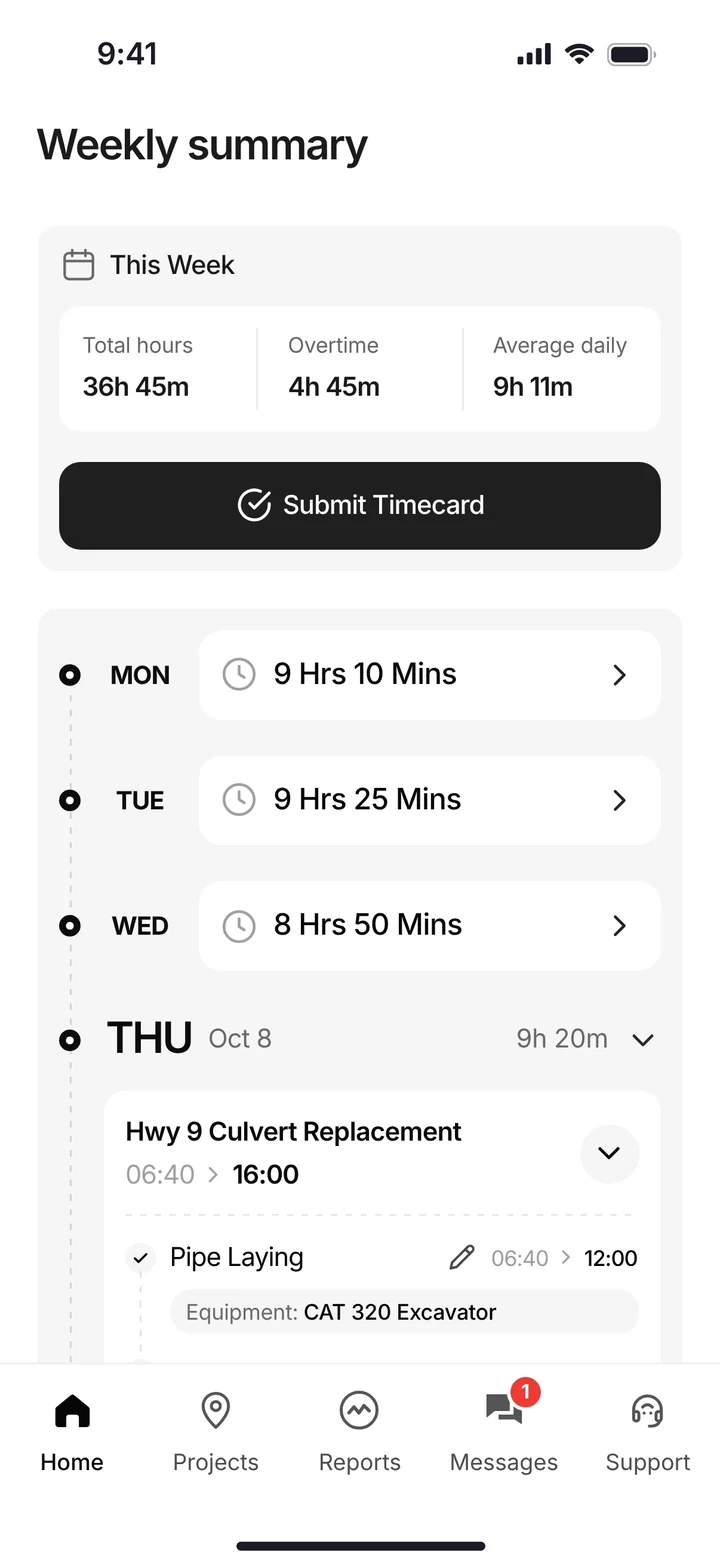
Your guys clock in on their phone and pick the job, the activity code and the machine. When the task changes they tap Log & Switch. Inspections, haul tickets, receipts and the daily report go in from the same app, and at the end of the week each worker submits his timecard from the weekly summary.
In the office
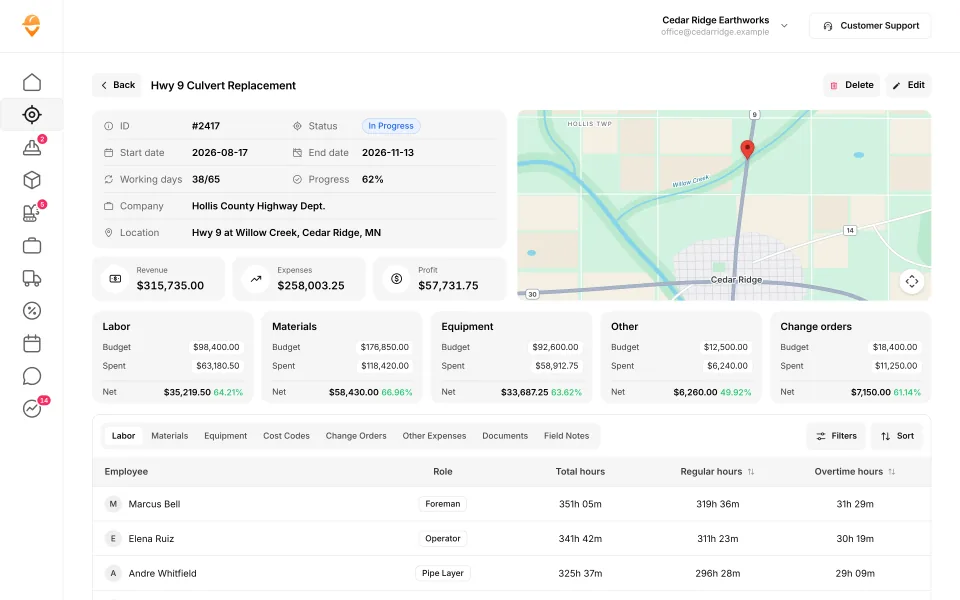
The dashboard shows who's clocked in, on which job and which machine, with live labor, material and equipment cost. The job page shows revenue, expenses and profit, budget against spent for each cost type, and hours by employee.
In the shop
Each machine's record holds hours, mileage, last and next service and the inspection log. Problems found in the field land in the service queue with urgency and status, so the mechanic works the right machine first.
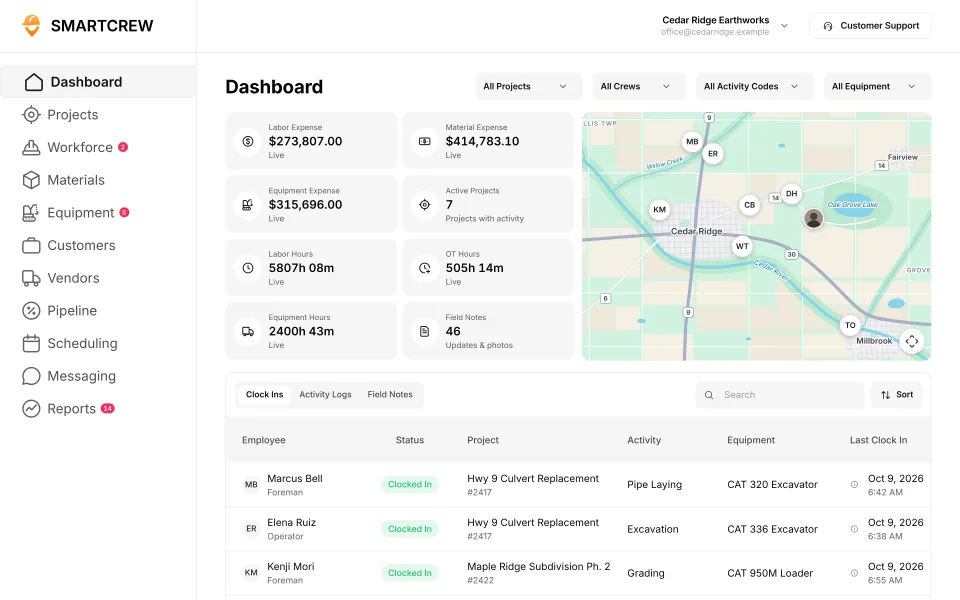
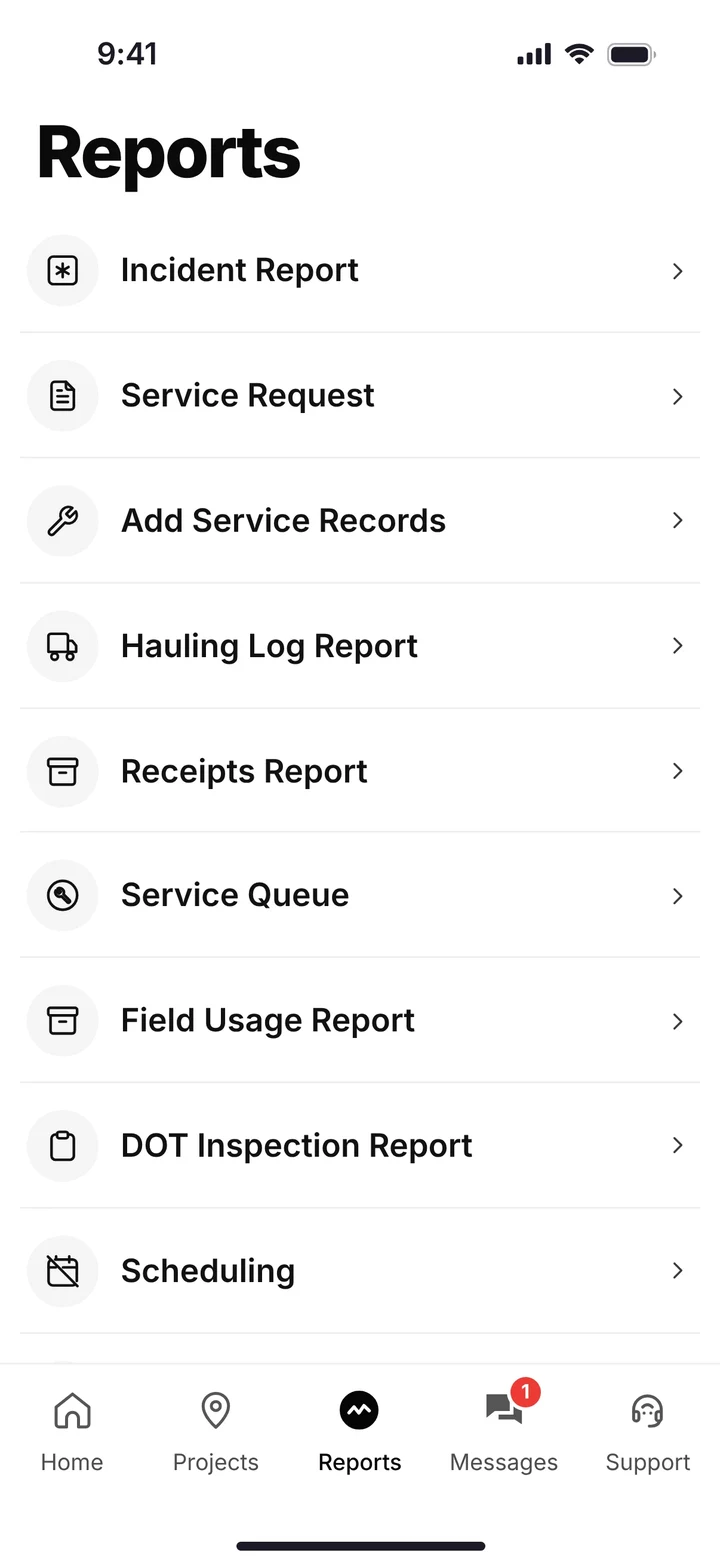
The office dashboard with live cost and crews on the map, and the phone's reports menu for inspections, service requests, hauling and incidents. (Demo account.)
How do prevailing wage and certified payroll fit in?
SmartCrew's part is the timecard underneath them. The Davis-Bacon and Related Acts cover federally funded or assisted construction contracts over $2,000, and contractors on those jobs have to pay laborers and mechanics no less than the locally prevailing wages and fringe benefits, according to the U.S. Department of Labor. The Labor Department's form WH-347 is for submitting certified weekly payrolls on those contracts.
Every one of those reports starts with each worker's hours by day, on that job, split by the work he did. That's the part that goes wrong with paper timecards. SmartCrew gives you payroll-ready timecards by job and activity code, reviewed by the supervisor and submitted by the worker every week. Many states have their own prevailing wage rules for state and local work, so check yours.
SmartCrew doesn't process payroll or fill out certified payroll forms. Payroll runs in your payroll or accounting software. We integrate with QuickBooks Online today, and we're working on QuickBooks Desktop, Foundation, ADP and more.
Does SmartCrew fit soil stabilization and ground improvement contractors?
Yes. The pieces are the same: a crew, big iron, material by the truckload and production by the day. A stabilization crew spreads lime or cement on the subgrade, mixes it in with a reclaimer, adds water and compacts it. It's a small crew running a spreader truck, a water truck and a roller.
The job makes money on production per day and on material used against the bid. SmartCrew tracks machine hours by job, material and fuel logs, each delivery ticket (snap a photo and the AI reader enters it) and the day's production in the daily report. Ground improvement work is the same story with different iron.
What it doesn't do: mix designs, spread rates or test results. Those come from your engineer and the testing lab. Keep their reports in the job's files so the foreman can pull them up in the field.
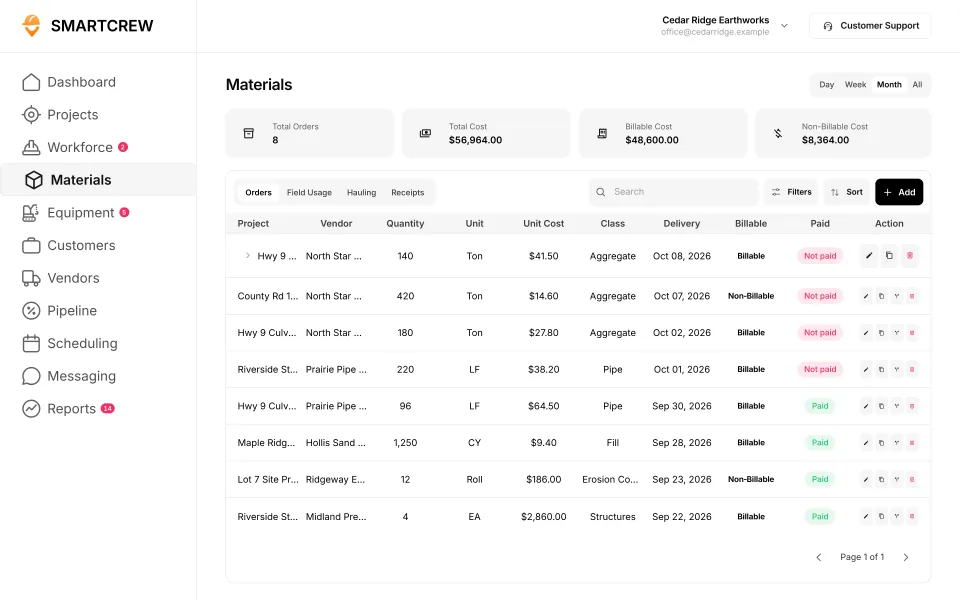
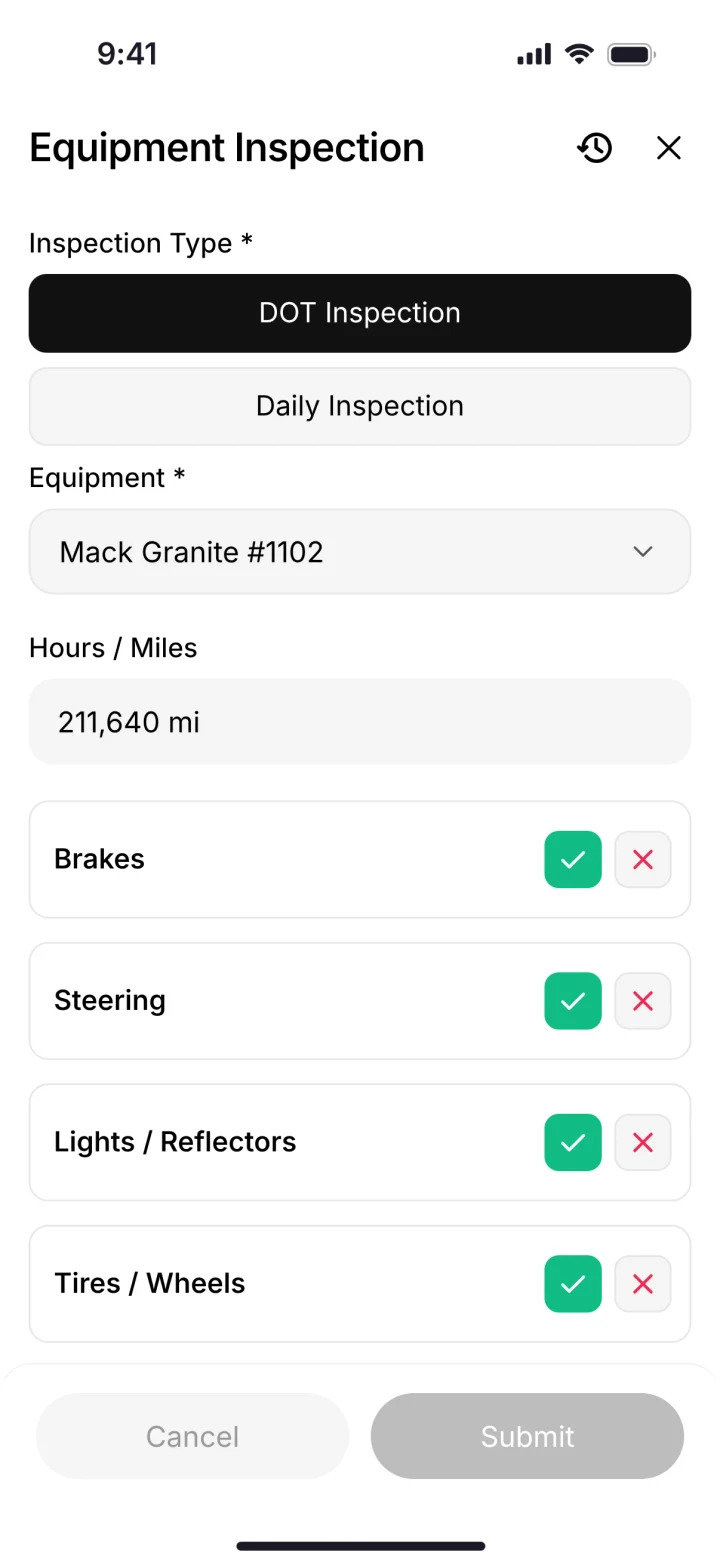
Material orders by project and vendor, and an equipment inspection on the phone. (Demo account.)
Built to run big projects or every kind of contractor. Lots of power, but more setup, more screens and a bigger bill than most 5 to 100 person dirtwork companies need.
14 apps in this chart. Scroll sideways to see them all.
| What SmartCrew does | SmartCrewSmartCrew | ProcoreProcore | HCSS HeavyJobHCSS | RakenRaken | JobTreadJobTread | Contractor ForemanContr. Foreman | ProjulProjul | KnowifyKnowify | ForemanForeman | B2W (Trimble)B2W | AssignarAssignar | Trimble ViewpointViewpoint | BuildertrendBuildertrend | FieldwireFieldwire | Foundation SoftwareFoundation |
|---|---|---|---|---|---|---|---|---|---|---|---|---|---|---|---|
| Job Costing | |||||||||||||||
| Daily job profitability | Yes | Limited | Yes | No | Yes | Add-on | Add-on | Add-on | Limited | Yes | Add-on | Limited | Limited | Not listed | Limited |
| Bid budgets vs. actual costs | Yes | Yes | Yes | Limited | Yes | Add-on | Add-on | Add-on | Yes | Yes | Add-on | Yes | Yes | Add-on | Yes |
| Change orders & extras | Yes | Yes | Yes | Yes | Yes | Add-on | Add-on | Yes | Yes | Yes | Add-on | Yes | Yes | Add-on | Yes |
| Custom reports | Yes | Yes | Yes | Limited | Yes | Add-on | Limited | Limited | Yes | Yes | Yes | Yes | Limited | Yes | Yes |
| Equipment Management Premium | |||||||||||||||
| Equipment hours & locations | Yes | Add-on | Add-on | Add-on | No | Add-on | Limited | Limited | No | Yes | Limited | Yes | Not listed | No | Add-on |
| DOT & daily inspections | Yes | Limited | Add-on | Limited | Limited | Limited | No | Add-on | No | Add-on | Limited | Limited | Not listed | Not listed | Not listed |
| Maintenance tracking | Yes | Yes | Add-on | Add-on | No | Add-on | Limited | Add-on | No | Yes | Limited | Yes | Not listed | No | Add-on |
| Service requests from the field | Yes | Limited | Add-on | Limited | No | No | No | Add-on | No | Yes | Limited | Limited | Not listed | No | Not listed |
| Utilization rates | Yes | Yes | Add-on | Add-on | No | Limited | Limited | Add-on | No | Yes | Yes | Limited | Not listed | No | Add-on |
| Shop queue | Yes | No | Add-on | Not listed | No | No | Limited | Not listed | No | Yes | Not listed | Yes | Not listed | No | Add-on |
| Daily Reports | |||||||||||||||
| Daily progress & production logs | Yes | Yes | Yes | Yes | Yes | Add-on | Add-on | Add-on | Yes | Yes | Yes | Yes | Yes | Add-on | Add-on |
| Jobsite photos & field notes | Yes | Yes | Yes | Yes | Yes | Yes | Yes | Yes | Yes | Yes | Yes | Yes | Yes | Yes | Limited |
| Automatic daily reports for the office | Yes | Yes | Yes | Yes | Limited | Not listed | Limited | Add-on | Not listed | Yes | Yes | Not listed | Limited | Yes | Not listed |
| Safety & Compliance | |||||||||||||||
| Job Safety Analyses (JSAs) | Yes | Limited | Add-on | Add-on | Limited | Not listed | No | Add-on | No | Not listed | Limited | Limited | Not listed | Limited | Add-on |
| Toolbox talks & safety meetings | Yes | Limited | Add-on | Add-on | Not listed | Add-on | No | Add-on | No | Add-on | Not listed | Yes | Not listed | Not listed | Add-on |
| Incident reports | Yes | Add-on | Add-on | Add-on | Yes | Add-on | Limited | Add-on | No | Add-on | Yes | Yes | Limited | Limited | Add-on |
No: they do not offer it. Their own website says so, or it isn’t in the full feature list they publish (linked). Add-on: a paid add-on, a separate product or a higher plan. Limited: they have something close but narrower. Not listed (n/l on small screens): we searched their site and help pages and couldn’t find it, but they don’t publish a full list we could check. Tap a name for the full comparison.
This chart is SmartCrew’s feature list, so it doesn’t show what other products do that SmartCrew doesn’t (like estimating, payroll or hardware time clocks). Each comparison covers that in “where they’re the better pick”. SmartCrew’s Fleet Management, Sales CRM, and Scheduling & Communications are Premium categories; feature availability varies by plan.
In plain words: what each app does not offer
- Procore does not offer: shop queue.
- HCSS HeavyJob lists all of these on its own website, some as add-ons or limited.
- Raken does not offer: daily job profitability. Raken doesn't list these either: shop queue.
- JobTread does not offer: equipment hours & locations, maintenance tracking, service requests from the field, utilization rates, shop queue. JobTread doesn't list these either: toolbox talks & safety meetings.
- Contractor Foreman does not offer: service requests from the field, shop queue. Contractor Foreman doesn't list these either: automatic daily reports for the office, Job Safety Analyses (JSAs).
- Projul does not offer: DOT & daily inspections, service requests from the field, Job Safety Analyses (JSAs), toolbox talks & safety meetings.
- Knowify doesn't list: shop queue.
- Foreman does not offer: equipment hours & locations, DOT & daily inspections, maintenance tracking, service requests from the field, utilization rates, shop queue, Job Safety Analyses (JSAs), toolbox talks & safety meetings, incident reports. Foreman doesn't list these either: automatic daily reports for the office.
- B2W (Trimble) doesn't list: Job Safety Analyses (JSAs).
- Assignar doesn't list: shop queue, toolbox talks & safety meetings.
- Trimble Viewpoint doesn't list: automatic daily reports for the office.
- Buildertrend doesn't list: equipment hours & locations, DOT & daily inspections, maintenance tracking, service requests from the field, utilization rates, shop queue, Job Safety Analyses (JSAs), toolbox talks & safety meetings.
- Fieldwire does not offer: equipment hours & locations, maintenance tracking, service requests from the field, utilization rates, shop queue. Fieldwire doesn't list these either: daily job profitability, DOT & daily inspections, toolbox talks & safety meetings.
- Foundation Software doesn't list: DOT & daily inspections, service requests from the field, automatic daily reports for the office.
From each company's own website and help pages, checked on the dates below. "Does not offer" means their own website says so, or it isn't in the full feature list they publish. "Doesn't list" means we searched their site and couldn't find it, but they don't publish a full list we could check.
Where each mark comes from
- Procore, checked October 28, 2026: procore.com/resource-tracking, v2.support.procore.com/product-manuals/timesheets-project/tutorials/configure-advanced-settings-project-level-timesheets, v2.support.procore.com/product-manuals/my-time-ios/tutorials/clock-your-time-ios, v2.support.procore.com/product-manuals/timesheets-project/tutorials/create-a-timesheet, procore.com/platform/reports, procore.com/products, procore.com/project-financials/budget, procore.com/financial-management/change-orders, procore.com/equipment, v2.support.procore.com/faq-how-can-i-use-the-procore-equipment-pre-operation-checklist-inspection-template-on-my-project, v2.support.procore.com/product-manuals/equipment-company/tutorials/create-a-maintenance-record-for-equipment, procore.com/resource-management, v2.support.procore.com/product-manuals/equipment-company/permissions, procore.com/quality-safety/daily-log, procore.com/project-management/photos, v2.support.procore.com/product-manuals/daily-log-project/tutorials/mark-a-daily-log-as-complete, procore.com/materials, procore.com/ai/agents/daily-log, v2.support.procore.com/product-manuals/resource-planning-company/tutorials/edit-a-resource-assignment, procore.com/resource-planning, procore.com/fc/crm, v2.support.procore.com/product-manuals/bid-board-company, v2.support.procore.com/product-manuals/bid-board-company/tutorials/add-and-manage-tasks-in-a-bid-board-project, procore.com/fc/dispatch, procore.com/platform/conversations, v2.support.procore.com/process-guides/getting-started-with-procore-conversations/best-practices-for-procore-conversations, v2.support.procore.com/product-manuals/announcements-ios/tutorials/create-announcements-ios, v2.support.procore.com/faq-how-can-i-use-procores-job-hazard-analysis-pdf-in-my-projects-forms-tool, v2.support.procore.com/faq-how-can-i-use-procores-toolbox-talk-sign-in-pdf-in-my-projects-forms-tool, procore.com/quality-safety/incidents, procore.com/platform/document-management, v2.support.procore.com/product-manuals/qbo
- HCSS HeavyJob, checked October 28, 2026: apps.apple.com/us/app/hcss-myfield-track-job-hours/id1520688563, hcss.com/products/geofencing-software, hcss.com/products/mobile-field-service-management, hcss.com/products/job-costing-software, hcss.com/products/construction-project-management-software, hcss.com/products/export-to-payroll, hcss.com/products/change-order-tracking, hcss.com/llm-info, hcss.com/faqs, apps.apple.com/us/app/hcss-heavyjob-smart-job-sites/id720784422, hcss.com/products/fuel-management-software, hcss.com/products/construction-material-tracking, hcss.com/products/construction-resource-planning, hcss.com/products/dispatching-software, hcss.com/products/bid-management, hcss.com/products/pre-construction, hcss.com/products/job-hazard-safety-analysis, hcss.com/products/safety-toolbox-talks, hcss.com/products/incidents-reporting-software, hcss.com/products/construction-document-software
- Raken, checked October 28, 2026: help.rakenapp.com/en/articles/14148932-raken-time-clock-geolocation-verification-and-reporting, help.rakenapp.com/en/articles/14113290-how-to-create-time-cards-in-raken, help.rakenapp.com/en/articles/14115530-raken-time-cards-overview, help.rakenapp.com/en/articles/14465496-how-to-use-the-raken-dashboard, rakenapp.com/features, help.rakenapp.com/en/articles/16909752-how-to-set-up-and-use-budgets-in-raken, rakenapp.com/features/change-orders, help.rakenapp.com/en/articles/14465432-raken-reports-overview, rakenapp.com/features/equipment-management, rakenapp.com/features/construction-checklists/forklift-checklist, help.rakenapp.com/en/articles/14492619-raken-equipment-management-heavy-and-on-road-equipment, help.rakenapp.com/en/articles/14465449-production-and-equipment-reports-in-raken, rakenapp.com, help.rakenapp.com/en/articles/14478748-how-to-share-and-email-daily-reports-in-raken, help.rakenapp.com/en/articles/14492603-getting-started-with-production-tracking-in-raken, help.rakenapp.com/en/articles/11061850-how-to-manage-resource-scheduling-on-the-web, help.rakenapp.com/en/articles/14437000-what-is-raken-resource-scheduling, help.rakenapp.com/en/articles/14436989-how-to-get-started-with-messaging-in-raken, rakenapp.com/features/construction-checklists/job-hazard-analysis, help.rakenapp.com/en/articles/14491655-how-to-use-toolbox-talks-in-raken, help.rakenapp.com/en/articles/14491660-how-to-report-and-track-incidents-in-raken, help.rakenapp.com/en/articles/14436734-how-to-use-document-storage-in-raken, rakenapp.com/features/document-storage, help.rakenapp.com/en/articles/14512455-raken-quickbooks-online-integration
- JobTread, checked October 28, 2026: jobtread.com/features/time-tracking, app.jobtread.com/help/whats-new/2023-05-02-clock-in-out-distance-from-job-site, app.jobtread.com/help/whats-new/2024-05-06-require-job-item-code-on-time-entries, jobtread.com/features, jobtread.com/features/job-costing, jobtread.com/features/reporting-and-dashboards, jobtread.com/features/forms, jobtread.com/features/daily-logs, app.jobtread.com/help/whats-new/2025-12-18-ai-daily-log-summaries, jobtread.com/features/purchasing, app.jobtread.com/help/whats-new/2025-11-13-scan-and-autofill-receipt-details, app.jobtread.com/help/whats-new/2026-01-19-drag-drop-on-calendar, jobtread.com/features/tasks-and-scheduling, app.jobtread.com/help/whats-new/2024-09-19-on-demand-schedule-notifications, jobtread.com/features/construction-crm, jobtread.com/features/workflows, jobtread.com/blog/jobtread-new-feature-centralized-communication-and-messaging, jobtread.com/blog/targeted-messaging-and-file-sharing, app.jobtread.com/help/whats-new/2025-09-05-dashboard-text-tiles, jobtread.com/features/file-management, jobtread.com/integrations/quickbooks-online
- Contractor Foreman, checked October 28, 2026: contractorforeman.com/features/people/time-cards, contractorforeman.com/whats-new, kb.contractorforeman.com/knowledge-base/time-cards, kb.contractorforeman.com/knowledge-base/how-do-i-add-material-items-and-equipment-items-to-daily-logs, contractorforeman.com/features/integrations/gusto-integration, kb.contractorforeman.com/knowledge-base/what-is-running-time-card-notification, contractorforeman.com/features/job-costing-reports, contractorforeman.com/pricing, contractorforeman.com/features/custom-report-builder, kb.contractorforeman.com/knowledge-base/basics-of-equipment-logs, contractorforeman.com/features/documents/equipment-and-vehicle-logs, kb.contractorforeman.com/knowledge-base/what-types-of-maintenance-do-you-track-for-each-piece-of-equipment, contractorforeman.com/features/project-management/daily-logs, contractorforeman.com/features/files-and-photos-gallery, contractorforeman.com/features/people/crew-schedule, contractorforeman.com/features/people/leads-manager, contractorforeman.com/features/project-management/opportunities, kb.contractorforeman.com/knowledge-base/how-do-i-notify-or-assign-an-opportunity-to-an-employee-for-follow-up, contractorforeman.com/features/project-management/service-tickets, contractorforeman.com/features/people/team-chat, contractorforeman.com/features/crm/dashboard, contractorforeman.com/features/people/safety-meetings, contractorforeman.com/features/people/incidents, kb.contractorforeman.com/knowledge-base/how-do-i-share-a-file-with-a-client-or-vendor, contractorforeman.com/features/integrations/quickbooks
- Projul, checked October 28, 2026: projul.com/pricing, projul.com/features/geo-fenced-time-tracking, projul.com/features/tasks-and-to-dos, projul.com/industries/excavation-grading, projul.com/features/reporting, projul.com/features/mobile-notifications, projul.com/features/daily-logs, projul.com/features/photos-and-document-management, projul.com/features, projul.com/features/scheduling, projul.com/features/crm, projul.com/features/construction-communications
- Knowify, checked October 28, 2026: knowify.com/construction-time-tracking-software, knowify.com/pricing, knowify.com/trade-contractor-software, knowify.com/construction-daily-log-software, knowify.com/construction-forms-software, knowify.com/fleet-tracking-software, knowify.com/construction-scheduling-software, knowify.com/integration/quickbooks-online
- Foreman, checked October 28, 2026: foreman.co/guides/the-live-clock, foreman.co/features/time-tracking, foreman.co/features, foreman.co/guides/home-dashboards, foreman.co/guides/margin-markup-profitability, foreman.co/features/budget, foreman.co/features/daily-logs, foreman.co/industries/excavation-foundation, foreman.co/guides/vendor-bills, foreman.co/features/purchase-orders, foreman.co/guides/build-a-schedule, foreman.co/features/crm, foreman.co/guides/lead-lifecycle-stages, foreman.co/features/todos, foreman.co/guides/messaging, foreman.co/features/messaging, foreman.co/features/files, foreman.co/guides/what-clients-and-vendors-see
- B2W (Trimble), checked October 28, 2026: trimble.com/downloads/6XxSu8CEI6CgHbTTxqgVlF/e8f470ac91fdcccfb8ce5cde133c05e9/Civil_B2W_Track_Feature__1_.pdf, trimble.com/en/products/b2w-software/schedule, trimble.com/en/products/b2w-software/track, trimble.com/en/products/b2w-software/estimate, trimble.com/en/products/b2w-software/field-view, trimble.com/en/products/b2w-software/maintain-equipment-maintenance, trimble.com/downloads/6c46g1iuF4BWwLDD5fcjIW/21ca91f2fa200b394a75bfec93c8a89c/B2W_Maintain_Features_25.1.pdf, trimble.com/en/blog/construction/article/improve-safety-toolbox-talks-with-b2w-inform, b2wsoftware.com/wp-content/uploads/Inform-FeatureOverview_Feb2021.pdf, trimble.com/en/blog/construction/article/quickbooks-integration-with-b2w-for-estimating-and-operations
- Assignar, checked October 28, 2026: support.assignar.com/hc/en-au/articles/4406377669519-Check-In-Out-Timesheet-Geolocation-Reporting, assignar.com/workforce-management, assignar.com/industry/software-for-excavation-contractors, assignar.com/time-tracking-field-data, support.assignar.com/hc/en-au/articles/11978271666703-Understanding-Push-Notifications-in-Assignar, assignar.com/pay, assignar.com/job-costing, support.assignar.com/hc/en-au/articles/10670984931471-Daily-Summary, assignar.com/field-crews, support.assignar.com/hc/en-au/articles/15971013436303-Track-asset-number-expiry, assignar.com, assignar.com/reporting-analytics, assignar.com/lps/progress-tracking, support.assignar.com/hc/en-au/articles/12525806002191-Site-Diary-Overview, support.assignar.com/hc/en-au/articles/4406384921103-Create-a-Digital-Docket-Ticket-Template, support.assignar.com/hc/en-au/articles/7110532270095-Track-Expenses-with-Chargeable-Items, assignar.com/scheduling-assigning, support.assignar.com/hc/en-au/articles/10144514842511-Order-Messages-on-Mobile, support.assignar.com/hc/en-au/articles/7132211679631-Send-SMS-from-Assignar-with-Contact-Groups, support.assignar.com/hc/en-au/articles/4406384878863-Collaborative-Forms, assignar.com/forms-field-data, support.assignar.com/hc/en-au/articles/4406378130191-Manage-your-Documents-Overview, support.assignar.com/hc/en-au/articles/8718443956879-Adding-Documents-to-an-Order, support.assignar.com/hc/en-au/articles/12781778042895-NAM-Quickbooks-Online-Integration-Overview
- Trimble Viewpoint, checked October 28, 2026: apps.apple.com/us/app/traqspera-timesheets/id1539200842, trimble.com/en/products/viewpoint/vista/field-management, trimble.com/en/products/viewpoint/spectrum/traqspera-field, trimble.com/en/products/viewpoint-field-view, trimble.com/en/products/viewpoint/vista, apps.apple.com/us/app/viewpoint-field-view/id1051411527, help.trimble.com/en/spectrum/spectrum/equipment/equipment-control/spectrum-menus/reports-overview/fuel-utilization-report, trimble.com/en/products/viewpoint/spectrum/hr-management, trimble.com/en/products/viewpoint/vista/field-service, help.trimble.com/en/spectrum/spectrum/equipment/resource-scheduling/spectrum-menus-overview/data-entry-overview/schedule-employees-and-equipment/assign-a-jobs-resources, help.trimble.com/doc/viewpoint-team/viewpoint-team/project-management/document-collaboration/documents, trimble.com/en/products/viewpoint-for-projects
- Buildertrend, checked October 28, 2026: buildertrend.com/project-management/construction-time-clock, buildertrend.com/help-article/time-clock-overview, buildertrend.com/financial-tools, buildertrend.com/project-management/construction-change-order-software, buildertrend.com/project-management/daily-logs, buildertrend.com/help-article/cost-inbox-overview, buildertrend.com/project-management/schedule, buildertrend.com/sales-process/construction-crm, buildertrend.com/help-article/lead-opportunities-overview, buildertrend.com/help-article/lead-activities-overview, buildertrend.com/help-article/messaging-overview, buildertrend.com/help-article/files-on-mobile, buildertrend.com/help-article/quickbooks-online-integration-overview
- Fieldwire, checked October 28, 2026: fieldwire.com/pricing, fieldwire.com/construction-management-software, fieldwire.com/construction-forms, fieldwire.com/budget, fieldwire.com/construction-reports, fieldwire.com, fieldwire.com/construction-scheduling-software, fieldwire.com/solutions/subcontractor, help.fieldwire.com/hc/en-us/articles/360050283731-Practical-Guide-How-to-Leverage-Fieldwire-for-Safety-on-the-Jobsite, help.fieldwire.com/hc/en-us/articles/360021924912, fieldwire.com/document-management, help.fieldwire.com/hc/en-us/articles/360025760492, fieldwire.com/integrations/quickbooks-online
- Foundation Software, checked October 28, 2026: foundationsoft.com/software/mobile, foundationsoft.com/workmax-time, foundationsoft.com/software/job-costing, foundationsoft.com, myhqsuite.com/software/crewhq, foundationsoft.com/software/executive-dashboard, foundationsoft.com/software/construction-reports, foundationsoft.com/software/equipment, foundationsoft.com/projecthq, foundationsoft.com/software/construction-document-imaging, foundationsoft.com/expense-pay-management/corporate-card, foundationsoft.com/software/unit-price-billing, foundationsoft.com/software, foundationsoft.com/software/service-dispatch, foundationsoft.com/product-integration, myhqsuite.com/software/safetyhq
When are HCSS or Procore the better pick?
When you're big. If you have estimators, a fleet department, an IT person and hundreds of people in the field, the enterprise suites were built for you.
HCSS makes estimating, field and fleet software for heavy civil contractors that self-perform. It says it serves contractors from under $1 million to over $1 billion in annual revenue (HCSS), and that 43 of the ENR top 50 heavy civil contractors use it. Pricing is by quote. Its own page gives a range of about $60 to $4,000 or more per user per year, and it tells small contractors they can be up and running in less than 90 days.
Procore is construction management software for owners, general contractors and specialty contractors, with a civil and infrastructure offering. It charges an upfront annual fee per product based on your annual construction volume, with unlimited users (Procore pricing). These facts come from their own websites on October 22, 2026. Plans and prices change.
Pick SmartCrew if
- You have 5 to 100 employees and self-perform your work.
- You want one app your crew will actually use for time, machines, tickets, inspections and daily reports.
- You want job cost against the bid every day, without a long rollout.
- You want us to set it up, move your information over and train your people.
- You want pricing built to be well below enterprise construction software.
Pick HCSS or Procore if
- You have hundreds of people and a back office big enough to run a large system.
- You want estimating in the same suite as the field (HCSS sells HeavyBid for that).
- You want telematics hardware and electronic logs from your software company (HCSS Fleet offers both).
- You run many large projects and want one platform priced on construction volume with unlimited users (Procore).
- You can give a rollout real time, with planning sessions and training.
The full side by sides are HCSS HeavyJob vs SmartCrew and Procore vs SmartCrew.
What doesn't SmartCrew do for a heavy civil contractor?
A few big things, and you should know them before a demo.
- Estimating and bidding. SmartCrew doesn't build your bid or do takeoff. The bid budget goes into SmartCrew so you can track actual cost against it.
- GPS machine control. Grade control on your machines is a separate system. SmartCrew's GPS is for clock-ins and crew locations.
- Telematics hardware. We don't sell GPS units for your iron. Machine hours are tracked through the operators who clock in on them.
- Payroll processing and certified payroll forms. You get payroll-ready timecards. The payroll and the reports run in your payroll or accounting software.
- ELD and hours of service. SmartCrew does DOT inspections on your trucks, not the driver's electronic log.
Time tracking apps vs enterprise software for heavy civil
Too basic on one side. Too complicated and expensive on the other. That's what a heavy civil contractor with 5 to 100 employees runs into.
Time tracking apps like BusyBusy, ClockShark, WorkMax, ExakTime and QuickBooks Time handle the timecard well. The machines, the tickets, the daily report and the job's profit still end up on spreadsheets.
Enterprise and construction management software like HCSS HeavyJob, Procore and Raken covers more ground, with more setup, more screens and a bigger bill to match. SmartCrew is the in-between we wanted for our own company: simple for the field, powerful for management, fairly priced for owners.
What should you ask any heavy civil software vendor?
- Do I pay for every field worker, or only office users? What's the total for my company size?
- How long is the rollout, who does it, and how much of my time does it take?
- Can my foreman send a daily report with photos from his phone, the same day?
- Can I pull each worker's hours by day and job for certified payroll?
- Are equipment maintenance and DOT inspections in the same app, or another product?
- Can I see this job's cost against the bid today, not at month end?
- What else do I have to buy: hardware, modules, implementation, integrations?
The product pages for the modules owners ask about next are the safety app, crew communication, job file storage, and the construction CRM. The suite page is all in one heavy civil software.
Is SmartCrew right for a small heavy civil company?
Yes, if you have about 5 to 100 employees. That's who we build for: small to midsized contractors. Small, for us, means a real crew. Not a one-man shop.
| Your company | SmartCrew? | Why |
|---|---|---|
| 1 to 4 people | Probably not yet | If it's you and a helper, a quoting and invoicing app may be all you need. We built SmartCrew for companies with crews to manage. |
| 5 to 20 people | Yes | The owner still runs a machine some days. The office is one or two people. You don't need more software. You need fewer places to look. |
| 20 to 50 people | Yes | A few crews, a shop and trucks on different jobs. Our own family company runs 20 to 30 guys. This is the size we built it for. |
| 50 to 100 people | Yes | More crews, more iron, more tickets. Same simple app for the field. You see every job against the bid. |
| Over 100 people | Probably not | Bigger companies often want enterprise software with a full-time admin. That's not us. See HCSS HeavyJob vs SmartCrew. |
Questions people ask
What is heavy civil construction software?
It's software for contractors who build roads, utilities, site work and other infrastructure with their own crews and equipment. It usually covers time by cost code, equipment, daily reports and job cost, and some suites add estimating and telematics.
What is the best heavy civil software for a small contractor?
For a contractor with 5 to 100 employees, look for one app that runs crews, machines, tickets and daily reports and shows job cost against the bid, without a long rollout. SmartCrew is built for that size. Larger contractors often run HCSS or Procore.
Is SmartCrew an HCSS alternative?
For small and midsized heavy civil contractors, yes. SmartCrew covers time, equipment, inspections, haul tickets, daily reports, safety forms and job costing in one app. It doesn't do estimating or sell telematics hardware, which HCSS does. See HCSS HeavyJob vs SmartCrew.
Does SmartCrew do certified payroll?
No. SmartCrew doesn't process payroll or fill out certified payroll reports. It gives you payroll-ready timecards with each worker's hours by day, job and activity code, which is what those reports are built from.
Is SmartCrew soil stabilization contractor software?
It works for soil stabilization crews. Machine hours, material and delivery tickets, fuel logs and daily production all go on the job. Mix designs and test results stay with your engineer and lab, and their reports can live in the job's files.
What should heavy civil management software show the owner?
Whether each job is making money, today. In SmartCrew that's the job page: revenue, expenses and profit, and budget against spent for labor, materials, equipment, other costs and change orders.
How much does heavy civil contractor software cost?
Enterprise suites usually price by quote; HCSS's own site gives a range of about $60 to $4,000 or more per user per year. SmartCrew's pricing depends on your company size and the features you need; it's built to be well below enterprise construction software. SmartCrew starts at $99/month. Contact us for team pricing.
Sources
- U.S. Department of Labor: Davis-Bacon and Related Acts checked October 26, 2026
- U.S. Department of Labor: payroll certification (form WH-347) checked October 26, 2026
- HCSS: information page for AI assistants (customers, pricing range) checked October 22, 2026
- HCSS home page (ENR top 50) checked October 22, 2026
- HCSS for small businesses checked October 22, 2026
- Procore pricing checked October 22, 2026
- Procore civil and infrastructure checked October 22, 2026