
Buyer's guide · Small crews
best dirt work software for small companies

Andrew Drish, founder
Published . Updated
Dirt work contractor software for a small crew is SmartCrew when you have about 5 to 20 people and your own machines: hours, machines, loads and job profit in one app. A one to four person shop that mostly quotes homeowners should use a field service app instead.
| Software | Best for | What you get | Price |
|---|---|---|---|
| SmartCrew | 5 to 20 people with their own iron and trucks | Time, machines, haul tickets, daily reports and job profit | Starts at $99/month. Contact us for team pricing |
| QuoteIQ | 1 to 4 people quoting homeowners | Quotes, scheduling and invoices | From $29.99 a month for one user |
| Contractor+ | Small quoted jobs and card payments | Estimates and invoices. Cost codes, DOT inspections and haul tickets not listed | $58 with 2 users, then $20 per extra user |
| HCSS HeavyJob | A larger heavy civil suite | Field time and job cost, sold with other HCSS products | Quote. About $60 to $4,000+ per user a year |
Last updated October 2026. QuoteIQ and Contractor+ prices are the list prices already cited on this page (October 26 and 28, 2026). The HCSS range is from its page for AI assistants (October 26, 2026). SmartCrew starts at $99/month. Contact us for team pricing.
The short version
- Small means two different things. One to four people quoting homeowners need a field service app. A dirtwork company with 5 to 100 employees, running its own iron and trucks, needs SmartCrew.
- A 5 to 20 person dirtwork company needs four things first, in order: clean timecards, job cost against the bid, machines, and haul tickets.
- Getting it wrong rarely shows up as one big loss. It's small leaks: minutes on timecards, machine hours that never hit a job, tickets that never get billed.
- Seat math decides the real price at 12 guys: user caps, admin licenses and who counts as a paid user.
- Some records aren't optional. OSHA asks for daily excavation inspections, and DOT asks for driver vehicle inspection reports on trucks it covers.
- SmartCrew is built for dirtwork companies with 5 to 100 employees. Pricing depends on your size and features; you get a number on a short call with Andrew.
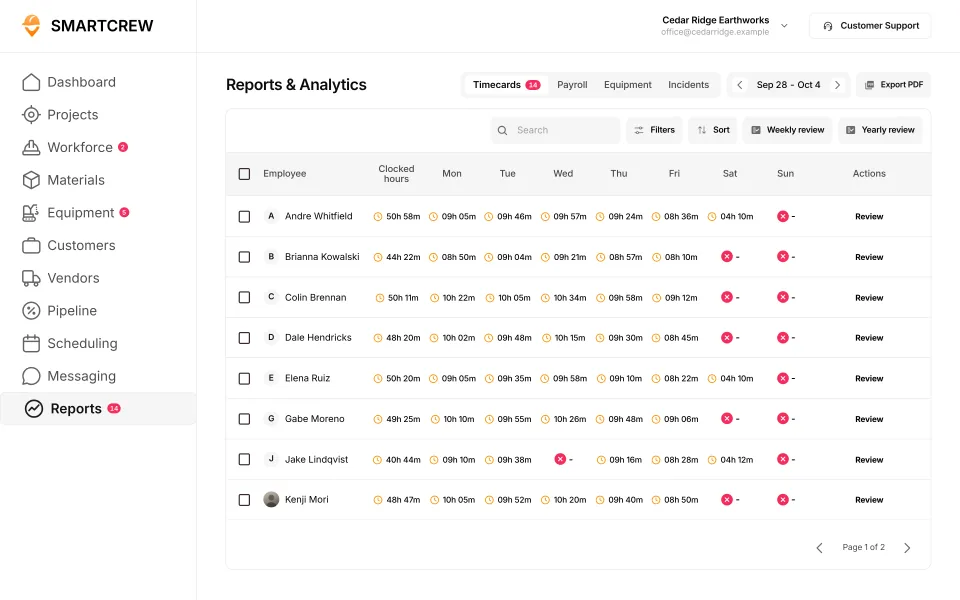
Dirt work contractor software
Dirt work contractor software, for this page, means the app a 5 to 20 person crew uses after the bid. A team of 20 to 50 should read best all-in-one dirtworks software. If HeavyJob is the other option, read the hcss heavyjob alternative page.
What's the best all-in-one software for a small dirtwork contractor?
It depends on what "small" means for you. A one-man operation quoting driveways and a 15-person outfit with three excavators and two dump trucks both call themselves small. They need different software. This page is dirt work contractor software for a small crew. The general product overview is best all-in-one dirt work management software. QuoteIQ's plans are on QuoteIQ vs SmartCrew. A heavy civil company should read all-in-one heavy civil software. A team of 20 to 50 should read best all-in-one dirtworks software.
| Your company | What your week looks like | Best fit |
|---|---|---|
| 1 to 4 people | Quick quotes for homeowners, small jobs, card payments, the owner on the machine | A field service app: QuoteIQ, Contractor+ or Jobber |
| 5 to 20 people | Your own crews, iron and trucks, jobs that run for days or weeks, one or two people in the office | SmartCrew: time, machines, haul tickets, daily reports and job profit in one app |
| 20 to 100 people | Several crews and jobs at once, a shop, foremen sending daily reports | SmartCrew, built for dirtwork and heavy civil companies with 5 to 100 employees |
| Over 100 people | Estimators, a fleet department and an IT person | An enterprise suite like HCSS or Procore |
If estimates and customer invoices are the whole job, Projul and JobTread are built for that. SmartCrew doesn't do estimating or takeoff.
SmartCrew is all-in-one software for small to midsized dirtwork and heavy civil contractors with 5 to 100 employees. We built it for our own family business first. We only run 20-30 guys, and there was nothing specifically designed for our size of heavy civil business.
The apps on the other rows are built for other trades. QuoteIQ and Contractor+ list lawn care, pest control and pressure washing. Projul and JobTread list remodelers, home builders and roofers. For those trades, they're the better pick. For dirtwork, it's SmartCrew.
SmartCrew is built for one thing: heavy civil and dirtwork contractors with 5 to 100 employees. Excavation, grading, sitework, underground utilities, paving, road construction, demolition, septic, directional drilling and land clearing. That's all we do.
Want the short version? Here's what dirtwork software should cover.
What does a small dirtwork company actually need from software?
Four things, in this order: timecards you can trust, job cost against the bid, your machines, and your loads. Daily reports, safety forms and scheduling come right after. Everything else can wait.
Small here means about 5 to 20 people. The owner still runs a machine some days. The office is one or two people, and a lot of the paperwork happens at night. You don't need more software. You need fewer places to look.
| Order | What | Why it comes here | How SmartCrew does it |
|---|---|---|---|
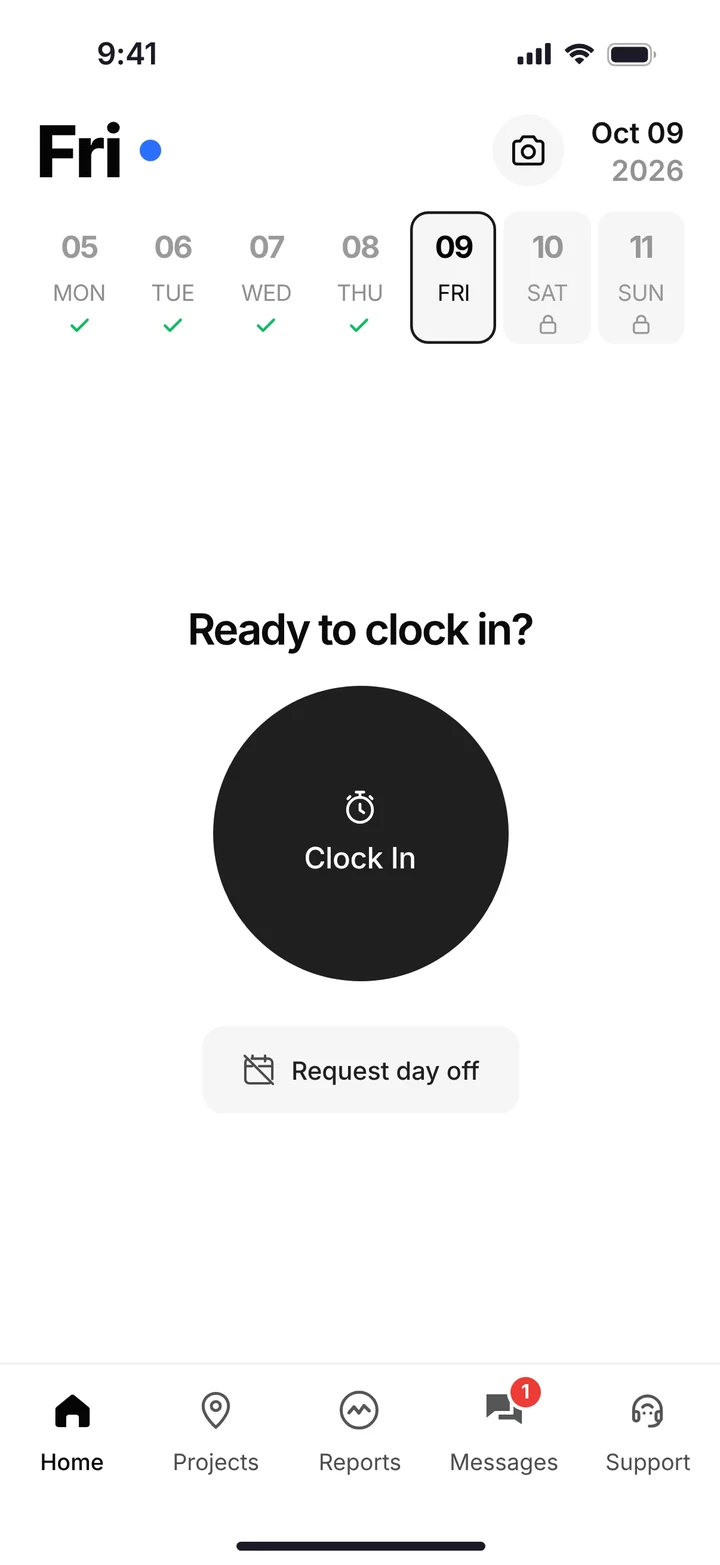
| 1 | Timecards | Payroll, job cost and machine hours all start with who worked where | GPS clock-in; the worker picks the project, activity code and machine; Log & Switch when the task changes; weekly summary with Submit Timecard |
| 2 | Job cost | You want to know a job is going sideways while you can still fix it | Daily job profitability; budget against spent for labor, materials, equipment, other and change orders |
| 3 | Machines | Your iron is the biggest thing you own, and a down machine stops a crew | Equipment hours, DOT and daily inspections, service requests from the field, the shop queue |
| 4 | Loads | A lost haul ticket is a load you hauled for free | Digital hauling tickets, an AI reader that enters ticket data from a photo, material and fuel logs |
| 5 | Daily reports and safety | It's your record when the GC, the owner or an inspector asks | Progress and production logs, photos and notes; JSAs, toolbox talks and incident reports |
| 6 | Scheduling and crew chat | Worth it once the crew lives in the app | Drag-and-drop crew and equipment scheduling; dispatch alerts and job chat |
Feature availability varies by plan. Fleet Management, Sales CRM, and Scheduling & Communications are Premium categories.
Why timecards first? Because every other number sits on top of them. If the hours are guesses written down on Friday, the job cost is a guess, the machine hours are a guess, and the next bid is built on guesses.
What does it cost a small company to get this wrong?
Not one big loss. A lot of small leaks you never see on a single bill. These are worked examples with round numbers, not statistics; put your own numbers in.
- Timecards from memory. Take 12 guys whose time is off by 15 minutes a day. That's 12 × 0.25 × 5 = 15 hours a week. At $35 an hour with burden, it's $525 a week, or $21,000 over 40 working weeks.
- Machine hours that never hit the job. An excavator carried in the bid at $90 an hour loses 2 hours a day to nobody writing it down. Over a 5-day week that's 2 × 5 × $90 = $900 of cost missing from the job report. The job looks better than it is, and you bid the next one off that.
- Lost haul tickets. One truck loses one 14-yard ticket a week at $10 a yard. That's $140 a week you can't bill, $5,600 over 40 weeks.
The worst leak is the one every dirtwork owner knows: never really knowing how much money you're making on a job until it's too late.
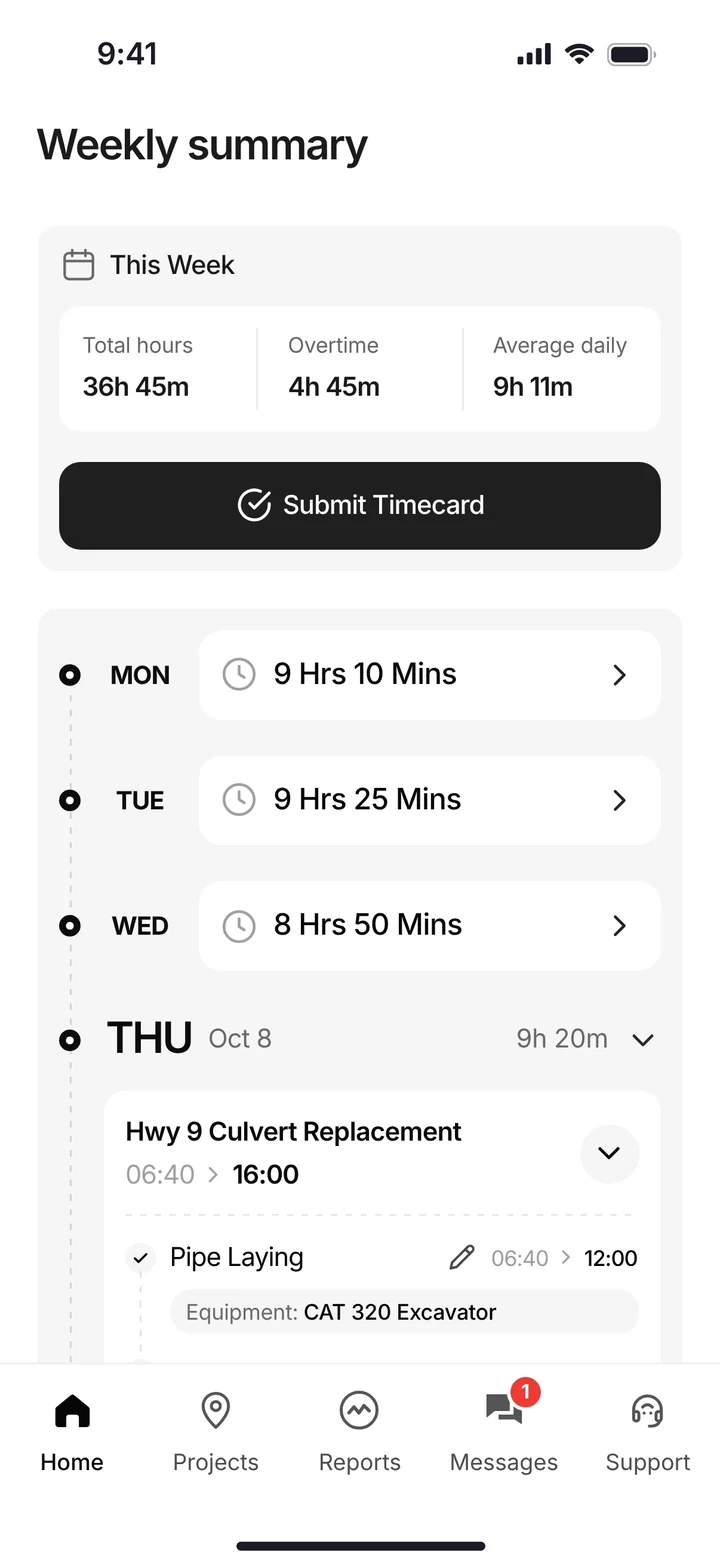
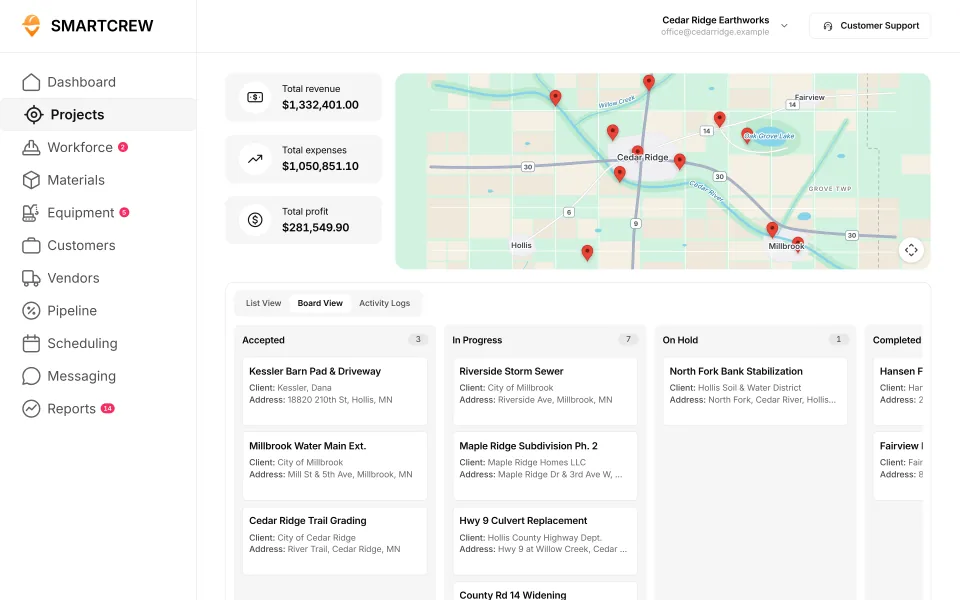
The weekly timecard a worker submits from his phone, and every job's revenue, expenses and profit on one board. (Demo account.)
Which records can't a small dirtwork company skip?
Two daily records come from federal rules, not from any software company. Whatever app you use, or none, they still apply.
Excavation inspections (OSHA). Under 29 CFR 1926.651(k), a competent person has to inspect excavations, the areas next to them and protective systems daily, before work starts and as needed during the shift, and again after every rainstorm or other hazard-increasing event, whenever workers could be exposed.
Driver vehicle inspection reports (DOT). Under 49 CFR 396.11, drivers of covered commercial vehicles prepare a written report at the end of each day's work on each vehicle, covering brakes, steering, lights, tires and more. No report is needed if no defect was found. Reports are kept for three months and may be electronic. The rule doesn't apply to a motor carrier operating only one commercial vehicle. Check with FMCSA or your state on which of your trucks are covered.
Software doesn't make you compliant. What it changes is whether the record exists and whether you can find it when someone asks. In SmartCrew, DOT and daily inspections, JSAs, toolbox talks and incident reports are done on the phone and kept with the machine or the job.
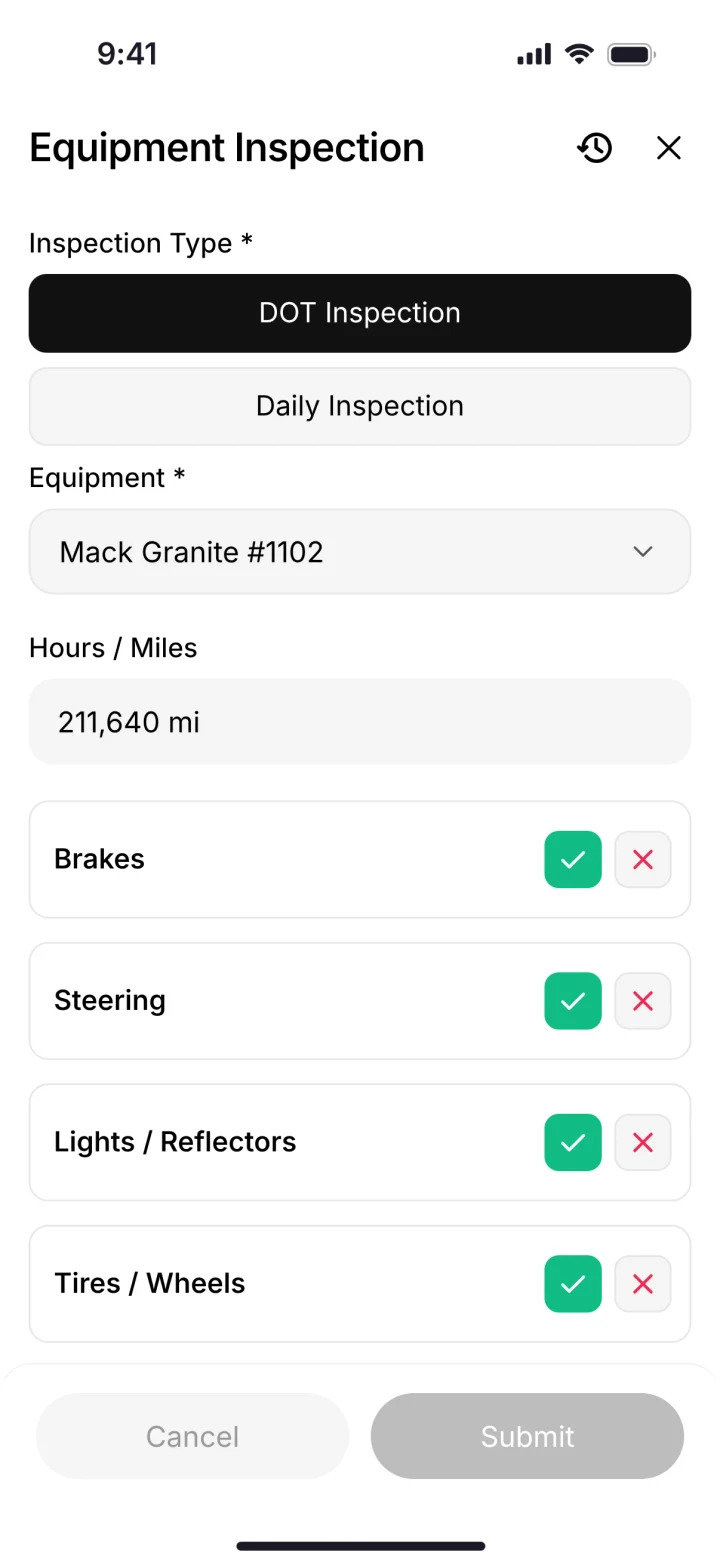
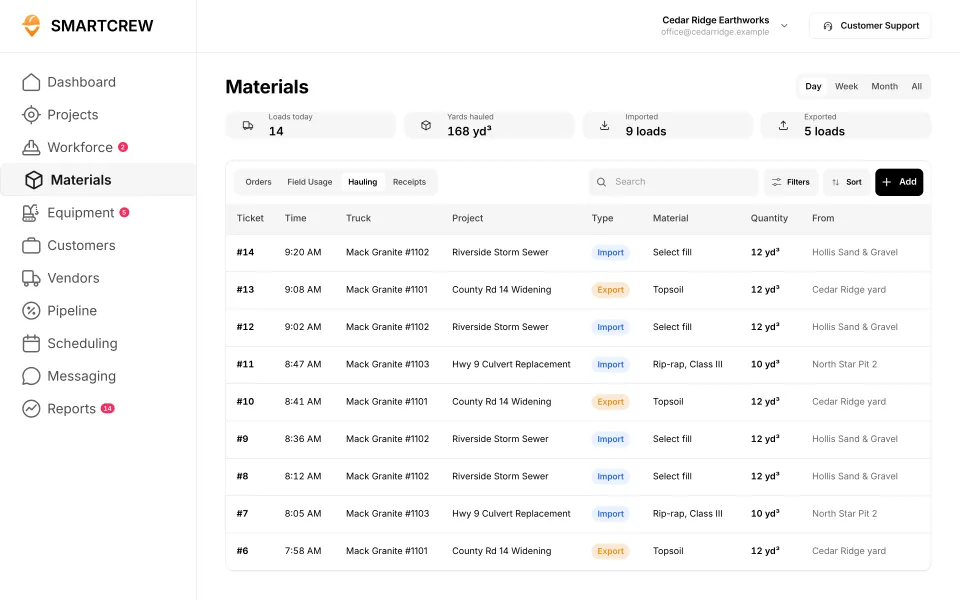
A DOT inspection done on the phone, and the hauling log with every ticket's truck, project, material, yards and pit. (Demo data.)
Why do small contractors get stuck between two kinds of software?
Because most software is built for somebody else. Time tracking apps are built for every trade, so they stop at the timecard. Enterprise software is built for big companies, so it comes with setup, screens and prices a 12-person outfit doesn't need.
We only run 20-30 guys and there was nothing specifically designed for our size of heavy civil business.
That's the gap a small company falls into. You end up with a time app, a spreadsheet for job cost, a notebook in the shop, a folder of haul tickets and a group text. Each piece is cheap. Together they cost you an evening a week.
How much does software cost for a 12-person crew?
It depends less on the sticker price and more on the seat math. User caps, admin licenses and "who counts as a user" decide what you really pay. Here's a 12-person crew, everyone clocking in, on published list prices.
| Software and plan | Arithmetic | Monthly estimate | What's still missing for dirtwork |
|---|---|---|---|
| BusyBusy Pro, billed monthly | 12 × $11.99, plus the $40 admin license | $143.88 + $40 | Inspections and work orders are an add-on module priced through sales |
| QuickBooks Time Elite | $40 base + 12 × $12 | $184 | Equipment, inspections and haul tickets not listed; needs QuickBooks Online |
| Contractor Foreman Pro, billed monthly | Plus caps at 8 users, so 12 people means Pro (up to 15) | $279 ($221 billed annually) | DOT inspections and haul tickets not listed |
| JobTread, billed monthly | $199 with 1 internal user + 11 × $20 (anyone who tracks time is internal) | $419 | Equipment module and haul tickets not listed |
| Jobber Grow, 10 users + 2 extra | $399 + 2 × $29 | $457 | Cost codes, equipment and haul tickets not listed |
| QuoteIQ Elite, 10 users + 2 extra | $299.99 + 2 × $25 | $349.99 | Equipment hours, haul tickets and a shop queue not listed; GPS time clock on Elite and up |
| Contractor+ Pro Team | $58 with 2 users + 10 × $20 | $258 | Cost codes, DOT inspections, a shop queue and daily reports not listed |
| Projul Core+ (up to 20 users) | Flat plan price, no per-user fee | $799 ($599 billed annually) | Daily logs and GPS clock-ins are on Pro ($1,199 a month billed annually); DOT inspections and haul tickets not listed |
| ClockShark | Standard: $42 base + $9.50 per user, 3-year term | $156 | Doesn't list: pick the machine at clock-in, DOT & daily inspections, digital hauling tickets, maintenance tracking |
| ExakTime | From $9 per employee, billed annually | $108 | Does not offer: digital hauling tickets |
| WorkMax | Quote only | Quote | Doesn't list: digital hauling tickets |
| Workyard | Starter from $6 per user, billed annually (other plans not shown) | from $72 | Does not offer: digital hauling tickets |
| Connecteam | Operations hub Basic $29 for the first 30 users + $0.80 each after, billed yearly | $29 | Does not offer: digital hauling tickets |
| Jibble | Free plan, unlimited users | $0 | Does not offer: pick the machine at clock-in, DOT & daily inspections, digital hauling tickets, maintenance tracking |
| Rhumbix (Autodesk) | Quote only | Quote | Does not offer: maintenance tracking. Doesn't list: DOT & daily inspections, digital hauling tickets |
| Procore | Quote only | Quote | All of these found on its site, some as add-ons or limited |
| HCSS HeavyJob | Quote only | Quote | All of these found on its site, some as add-ons or limited |
| Raken | Quote only | Quote | Does not offer: digital hauling tickets |
| Knowify | Advanced $329 billed yearly with 10 users, + $29 per extra user | $387 | Does not offer: digital hauling tickets |
| Foreman | $249 a month + $20 per additional seat, 12-month term; seats in the $249 not stated; larger teams quoted | $249 + $20 per extra seat | Does not offer: pick the machine at clock-in, DOT & daily inspections, digital hauling tickets, maintenance tracking |
| B2W (Trimble) | Quote only | Quote | All of these found on its site, some as add-ons or limited |
| Assignar | Quote only | Quote | All of these found on its site, some as add-ons or limited |
| Trimble Viewpoint | Quote only | Quote | All of these found on its site, some as add-ons or limited |
| Buildertrend | Quote only | Quote | Doesn't list: pick the machine at clock-in, DOT & daily inspections, digital hauling tickets, maintenance tracking |
| Fieldwire | Pro $39 per user, billed annually | $468 | Does not offer: pick the machine at clock-in, digital hauling tickets, maintenance tracking. Doesn't list: DOT & daily inspections |
| Foundation Software | Quote only | Quote | Doesn't list: pick the machine at clock-in, DOT & daily inspections, digital hauling tickets |
| Tenna | Quote by asset count | Quote | Doesn't list: pick the machine at clock-in |
| HCSS Equipment360 | Quote only | Quote | All of these found on its site, some as add-ons or limited |
| Fleetio | Priced per vehicle, not per person | Per vehicle | Does not offer: pick the machine at clock-in, digital hauling tickets |
| Clue | Quote only | Quote | All of these found on its site, some as add-ons or limited |
| AGTEK | About $650 a month per shared license | Per license | Does not offer: pick the machine at clock-in, DOT & daily inspections. Doesn't list: maintenance tracking |
| InSite Software | Quote only | Quote | Does not offer: pick the machine at clock-in, DOT & daily inspections, digital hauling tickets, maintenance tracking |
| HCSS HeavyBid | Quote only | Quote | Doesn't list: pick the machine at clock-in, DOT & daily inspections, digital hauling tickets, maintenance tracking |
| Trimble Business Center | Quote through a Trimble dealer | Quote | Doesn't list: pick the machine at clock-in, DOT & daily inspections, digital hauling tickets, maintenance tracking |
| EarthWorks | Quote only | Quote | Does not offer: pick the machine at clock-in, DOT & daily inspections, digital hauling tickets, maintenance tracking |
| Housecall Pro | Max $299 with 8 users + $35 per extra user, billed annually | $439 | Does not offer: digital hauling tickets. Doesn't list: pick the machine at clock-in, DOT & daily inspections |
| ServiceTitan | Quote only, priced per technician | Quote | Does not offer: digital hauling tickets. Doesn't list: pick the machine at clock-in |
| SmartCrew | Depends on company size and features | A number on a short call with Andrew | Built for dirtwork: time, machines, loads, reports and job profit |
Last updated October 2026. Estimates from each company's list prices on October 26, 2026, and October 28 for Projul and Contractor+ (sources below), before tax, payment fees, setup and add-ons. Plans and prices change. "Not listed" means we couldn't find it on their site.
Two more things to check before you sign. Contract terms: ClockShark's pricing page says a three-year term applies to all its plans. And add-ons: BusyBusy's modules for safety and equipment are priced separately, so the per-user number isn't the whole bill.
SmartCrew's pricing depends on your company size and the features you need, and it's built to be well below enterprise construction software. (And that doesn't cost an arm and a leg.)
What about work order software for excavation?
"Work order" means two things on a dirt job. One is the job itself: where the crew goes today, with which machines, and what they're doing. The other is the shop: the repair ticket when a machine breaks.
Most work order apps are built for the first kind, for service businesses running lots of short customer visits. A dirtwork company needs both. In SmartCrew the schedule and dispatch send marching orders to the crew's phones, with the job and the equipment assigned. When an operator reports a problem from the cab, it becomes a service request in the shop queue, with who reported it, how urgent it is and where the repair stands.
Field service apps do the customer side well. QuoteIQ calls itself the all-in-one CRM built by home service contractors. Contractor+ says you can log equipment hours, fuel and maintenance on a project. Projul says its own equipment hours are not a replacement for a dedicated fleet management system. We couldn't find a shop queue for machine repairs on any of the three sites.
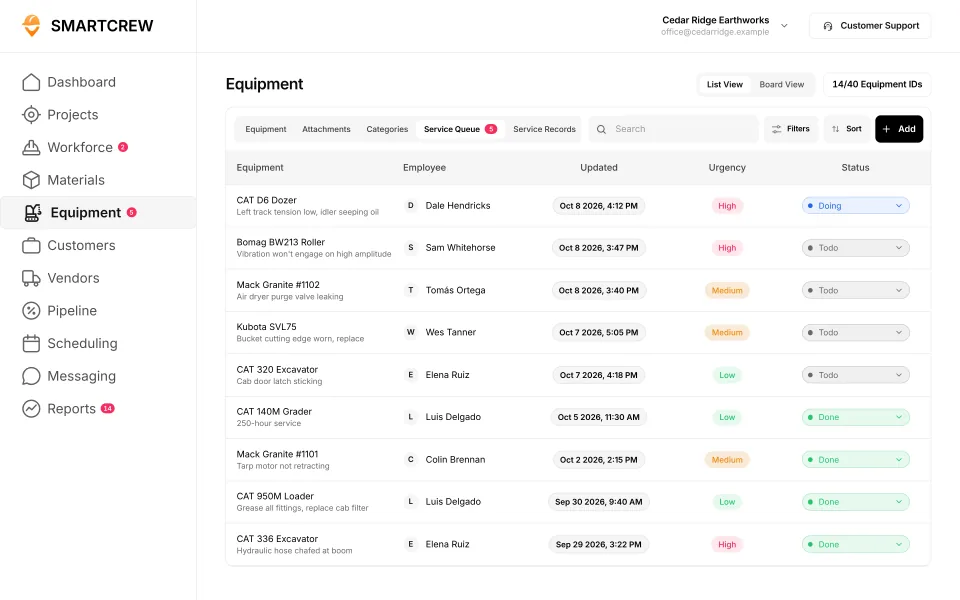
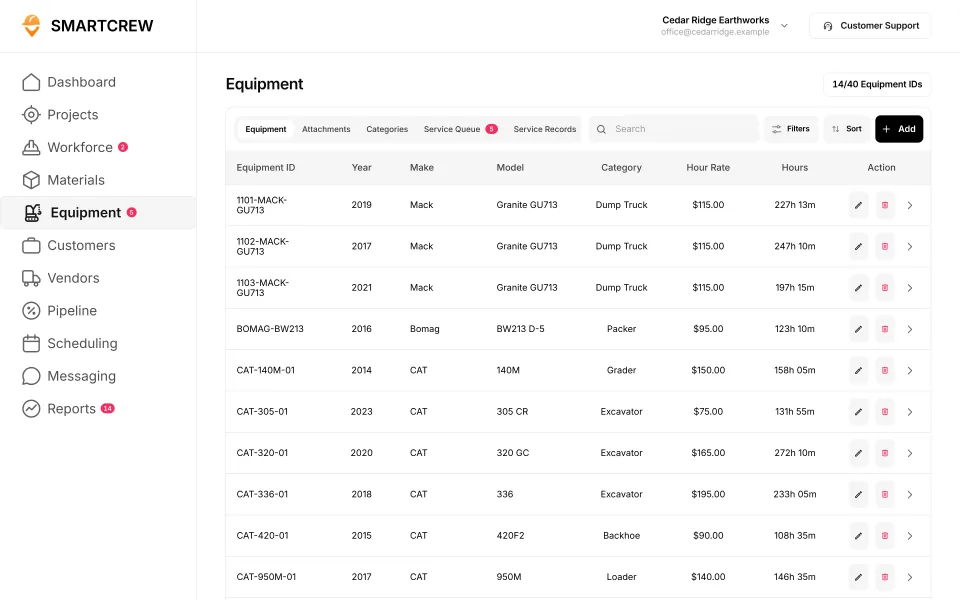
The shop's service queue, with who reported each problem, its urgency and its status, and the equipment list with each machine's hours. (Demo data.)
Every option, feature by feature
Here's every app we'd look at, group by group, against SmartCrew's feature list. Each mark comes from the company's own website. "Not listed" means we couldn't find it, not that they don't have it.
Built for service businesses that quote, schedule and invoice lots of small jobs. Good at the customer side, not the crew, machine and haul side of heavy civil work.
| What SmartCrew does | SmartCrewSmartCrew | JobberJobber | QuoteIQQuoteIQ | Contractor+Contractor+ | Housecall ProHousecall Pro | ServiceTitanServiceTitan |
|---|---|---|---|---|---|---|
| Time Tracking | ||||||
| GPS-powered clock-ins | Yes | Add-on | Add-on | Yes | Yes | Yes |
| Geofencing around the job site | Yes | Add-on | Add-on | Not listed | Limited | Add-on |
| Live crew locations | Yes | Add-on | Add-on | Yes | Add-on | Yes |
| Hours by job and cost code | Yes | Limited | Limited | Limited | Limited | Limited |
| Pick the machine at clock-in | Yes | No | No | Not listed | Not listed | Not listed |
| Payroll-ready timecards | Yes | Add-on | Add-on | Yes | Yes | Yes |
| Supervisor dashboard | Yes | Limited | Add-on | Not listed | Limited | Yes |
| Clock in/out reminders | Yes | Add-on | Add-on | Not listed | Yes | Limited |
| Job Costing | ||||||
| Daily job profitability | Yes | Add-on | Add-on | Add-on | Yes | Yes |
| Bid budgets vs. actual costs | Yes | Limited | Limited | Not listed | Limited | Yes |
| Change orders & extras | Yes | No | No | Add-on | Limited | Yes |
| Custom reports | Yes | Add-on | Yes | Add-on | Yes | Yes |
| Equipment Management Premium | ||||||
| Equipment hours & locations | Yes | Limited | No | Limited | Add-on | Add-on |
| DOT & daily inspections | Yes | Limited | Limited | No | Not listed | Limited |
| Maintenance tracking | Yes | No | No | Limited | Add-on | Add-on |
| Service requests from the field | Yes | No | No | Not listed | Not listed | Add-on |
| Utilization rates | Yes | No | No | Limited | Not listed | Add-on |
| Shop queue | Yes | Not listed | No | Not listed | Not listed | Not listed |
| Daily Reports | ||||||
| Daily progress & production logs | Yes | Limited | Limited | Limited | Limited | Yes |
| Jobsite photos & field notes | Yes | Yes | Add-on | Yes | Yes | Yes |
| Automatic daily reports for the office | Yes | Not listed | Not listed | Not listed | Limited | Yes |
| Materials & Hauling | ||||||
| Digital hauling tickets | Yes | No | No | Limited | No | No |
| Material & fuel logs | Yes | Limited | Limited | Yes | Limited | Limited |
| AI reader for tickets & receipts | Yes | Add-on | Not listed | No | Not listed | Limited |
| Deliveries & production tracking | Yes | No | Limited | Not listed | Not listed | Limited |
No: they do not offer it. Their own website says so, or it isn’t in the full feature list they publish (linked). Add-on: a paid add-on, a separate product or a higher plan. Limited: they have something close but narrower. Not listed (n/l on small screens): we searched their site and help pages and couldn’t find it, but they don’t publish a full list we could check. Tap a name for the full comparison.
This chart is SmartCrew’s feature list, so it doesn’t show what other products do that SmartCrew doesn’t (like estimating, payroll or hardware time clocks). Each comparison covers that in “where they’re the better pick”. SmartCrew’s Fleet Management, Sales CRM, and Scheduling & Communications are Premium categories; feature availability varies by plan.
In plain words: what each app does not offer
- Jobber does not offer: pick the machine at clock-in, change orders & extras, maintenance tracking, service requests from the field, utilization rates, digital hauling tickets, deliveries & production tracking. Jobber doesn't list these either: shop queue, automatic daily reports for the office.
- QuoteIQ does not offer: pick the machine at clock-in, change orders & extras, equipment hours & locations, maintenance tracking, service requests from the field, utilization rates, shop queue, digital hauling tickets. QuoteIQ doesn't list these either: automatic daily reports for the office, AI reader for tickets & receipts.
- Contractor+ does not offer: DOT & daily inspections, AI reader for tickets & receipts. Contractor+ doesn't list these either: geofencing around the job site, pick the machine at clock-in, supervisor dashboard, clock in/out reminders, bid budgets vs. actual costs, service requests from the field, shop queue, automatic daily reports for the office, deliveries & production tracking.
- Housecall Pro does not offer: digital hauling tickets. Housecall Pro doesn't list these either: pick the machine at clock-in, DOT & daily inspections, service requests from the field, utilization rates, shop queue, AI reader for tickets & receipts, deliveries & production tracking.
- ServiceTitan does not offer: digital hauling tickets. ServiceTitan doesn't list these either: pick the machine at clock-in, shop queue.
From each company's own website and help pages, checked on the dates below. "Does not offer" means their own website says so, or it isn't in the full feature list they publish. "Doesn't list" means we searched their site and couldn't find it, but they don't publish a full list we could check.
Where each mark comes from
- Jobber, checked October 28, 2026: help.getjobber.com/hc/en-us/articles/115009612507-GPS-Waypoint-Tracking, help.getjobber.com/hc/en-us/articles/14125014745239-Location-Timers-in-the-Jobber-App, help.getjobber.com/hc/en-us/articles/360037054873-Jobber-and-FleetSharp-GPS-Tracking-Integration, help.getjobber.com/hc/en-us/articles/115009543028-Timesheets, getjobber.com/pricing, help.getjobber.com/hc/en-us/articles/15370068136727-Jobber-and-Gusto-Integration, help.getjobber.com/hc/en-us/articles/115009614247-Approving-Timesheets, help.getjobber.com/hc/en-us/articles/14343244961175-Job-costing, help.getjobber.com/hc/en-us/articles/43688004102935-Create-a-custom-report-with-Jobber-AI, help.getjobber.com/hc/en-us/articles/360037192654-FleetSharp-Tracker-Devices, help.getjobber.com/hc/en-us/articles/115009740048-Checklists, help.getjobber.com/hc/en-us/articles/360000110368-Notes-and-attachments, help.getjobber.com/hc/en-us/articles/115009615927-Expenses, help.getjobber.com/hc/en-us/articles/8508884808599-Expenses-in-the-Jobber-App, help.getjobber.com/hc/en-us/articles/36603691932951-Day-View-of-the-Schedule-New-Schedule, help.getjobber.com/hc/en-us/articles/360048155913-The-Core-Plan, help.getjobber.com/hc/en-us/articles/115010680868-Push-Notifications-from-the-Jobber-App, help.getjobber.com/hc/en-us/articles/39133000691095-Quote-List-Page-and-Key-Metrics, help.getjobber.com/hc/en-us/articles/360050124513-The-Grow-Plan, help.getjobber.com/hc/en-us/articles/29668508840727-The-Plus-Plan, help.getjobber.com/hc/en-us/articles/115009568687-User-permissions, help.getjobber.com/hc/en-us/articles/12296620144919-The-Connect-Plan
- QuoteIQ, checked October 28, 2026: myquoteiq.com/features/location-tracking, myquoteiq.com/features/time-tracker-pro, myquoteiq.com/pricing, myquoteiq.com/features/team-communication, myquoteiq.com/features/job-costing, myquoteiq.com/features, myquoteiq.com/features/inspection-forms, myquoteiq.com/features/quoteiq-cam, myquoteiq.com/features/expense-tracking-software, myquoteiq.com/features/inventory-management-software, myquoteiq.com/features/scheduling, myquoteiq.com/features/pipeline-software, myquoteiq.com/features/reminders-tasks, myquoteiq.com/features/gallery, myquoteiq.com/quickbooks-integration
- Contractor+, checked October 28, 2026: contractorplus.app/contractor-time-tracking-software, contractorplus.app/field-service-scheduling-software, contractorplus.app/pricing, contractorplus.app/industries/excavation-software, contractorplus.app/blog/8-best-excavation-software-platforms-in-2026, contractorplus.app/project-management-software-for-contractors, contractorplus.app/field-communication-software, contractorplus.app/field-service-management
- Housecall Pro, checked October 28, 2026: help.housecallpro.com/en/articles/2795146-time-tracking-overview-guide, housecallpro.com/features/vehicle-gps-tracking, help.housecallpro.com/en/articles/2810583-employee-gps-tracking-hcp-map, housecallpro.com/features/time-tracking, help.housecallpro.com/en/articles/14535355-the-new-unified-time-tracking-dashboard, housecallpro.com/features/job-costing, help.housecallpro.com/en/articles/9196840-estimates-on-jobs, housecallpro.com/features/advanced-reporting, help.housecallpro.com/en/articles/1083638-using-notes-customers-jobs-and-addresses, help.housecallpro.com/en/articles/10159740-capture-and-upload-photos-videos-on-mobile, help.housecallpro.com/en/articles/7336458-managing-reports, housecallpro.com/features, housecallpro.com/features/dispatching-software, help.housecallpro.com/en/articles/941117-troubleshooting-employee-push-notifications-mobile-app, help.housecallpro.com/en/articles/6185346-pipeline-faqs, housecallpro.com/features/pipeline, help.housecallpro.com/en/articles/5981299-messaging-within-your-housecall-pro-inbox, help.housecallpro.com/en/articles/4323523-electrical-checklist-templates, help.housecallpro.com/en/articles/10371113-customer-attachments-section, housecallpro.com/pricing
- ServiceTitan, checked October 28, 2026: help.servicetitan.com/docs/technician-location-exception-report, servicetitan.com/features/pro/fleet, servicetitan.com/features, help.servicetitan.com/docs/add-and-edit-budget-codes-on-timesheets, servicetitan.com/construction-software, servicetitan.com/features/dispatch-software, help.servicetitan.com/docs/enable-or-disable-arrive-by-gps-for-technicians-in-fma, servicetitan.com/features/job-costing-software, help.servicetitan.com/docs/understand-budget-vs-actual, help.servicetitan.com/docs/create-a-change-order, help.servicetitan.com/release-hub/docs/streamline-safety-and-fleet-compliance-with-technician-forms, help.servicetitan.com/docs/log-fleet-pro-vehicle-service-entries-in-fma, help.servicetitan.com/docs/use-daily-logs-to-document-your-activity-on-projects-in-fma, help.servicetitan.com/docs/manage-photos-videos-and-files-in-fma, help.servicetitan.com/docs/techs-create-pos-outside-of-jobs-and-track-their-truck-fuel, help.servicetitan.com/docs/capture-a-lead-manually, help.servicetitan.com/docs/set-follow-up-reminders-for-opportunities-in-fma, help.servicetitan.com/docs/manage-technician-two-way-chat-in-servicetitan-and-servicetitan-mobile, help.servicetitan.com/commercial/docs/verify-site-conditions-and-safety, help.servicetitan.com/docs/manage-scope-changes-project-documents, servicetitan.com/features/accounting/integrations
How should a small dirtwork owner choose?
Pick the software that fixes your most expensive week with the fewest moving parts.
Write down your last bad week
Was it timecards, a machine down, a lost ticket or a job that went sideways? That's what the software has to fix first.
Count the logins
Who clocks in, who runs a machine, who drives a truck, who approves time. That number drives the price more than the plan name does.
Ask who sets it up
At 12 guys you don't have an IT person. With SmartCrew our team sets up your account, migrates your information, organizes your workflows and trains your people.
Hand the phone to your least techy guy
Our crews aren't tech savvy. And they don't need to be. If he can't clock in and pick his machine without help, keep looking.
Start with one thing
Start with the features you need most and expand from there. Most companies are up and running within a few weeks.
Questions to ask on any demo
- Can my operator pick the machine when he clocks in, so equipment hours land on the job?
- Where does a paper haul ticket go, and who types it in?
- Will I see this job's profit today, or at the end of the month?
- Does a guy who only clocks in count as a paid user?
- Is there a contract term, and what's priced as an add-on?
- Does it work with QuickBooks, and which version?
Is SmartCrew right for a crew this size?
Yes, if you're a dirtwork or heavy civil company with at least about 5 people. SmartCrew is built only for those trades, for companies with 5 to 100 employees.
Pick SmartCrew if
- You run excavation, sitework, grading, utilities, septic, drilling, paving, demolition, hauling or aggregate with about 5 to 20 people.
- You want timecards, machines, haul tickets, daily reports and job profit in one app.
- You use QuickBooks Online and want it to stay your books.
- You want us to do the heavy lifting on setup and training.
Look somewhere else if
- You're a crew of one to four quoting homeowners. A field service app like QuoteIQ, Contractor+ or Jobber fits that week.
- You mainly need estimating or takeoff, payroll processing, telematics hardware or machine control.
- You're not in dirtwork or heavy civil.
It's also good being the little guy.
My family has been in the dirtwork business for over 75 years, and we run 20 to 30 guys today. We're not trying to serve every construction trade or build complicated software for massive enterprise companies. We're building SmartCrew for family businesses like ours. For the full market, see the 2026 roundup.
best dirt work software for small business
best dirt work software for small business swaps company for business. Same crews, about 5 to 20 people inside the 5 to 100 band. SmartCrew starts at $99/month. A one person quote business is a different buyer.
best software for small dirt work contractors
best software for small dirt work contractors is the contractor wording. Small means a real crew. The software still has to catch machines and loads, not only hours.
best all in one software for small dirt work contractors
best all in one software for small dirt work contractors asks for one app. That is the point of SmartCrew at this size. Time, iron, tickets, and profit. The hyphenated form is in the FAQ.
Questions people ask
best all-in-one software for small dirt work contractors
best all-in-one software for small dirt work contractors is the hyphenated form of the section above. For a small dirt crew, SmartCrew is the pick. It starts at $99/month.
What is dirt work contractor software?
For a small dirtwork company it is the app that tracks crew hours, machines, haul tickets and job profit after the bid. SmartCrew is that app for about 5 to 20 people. A one to four person shop that mostly quotes homeowners is better in a field service app. Takeoff stays in a separate tool.
What is the best all-in-one software for a small dirt work contractor?
For a dirtwork company with 5 to 100 employees that runs its own crews, machines and trucks, SmartCrew puts time, equipment, inspections, haul tickets, daily reports and job profit in one app. For a one to four person outfit quoting homeowners, a field service app like QuoteIQ, Contractor+ or Jobber fits better. If estimates and invoices are the whole job, look at Projul or JobTread.
What is the best work order software for excavation?
An excavation company needs two kinds of work orders: the day's job for the crew, and repair tickets for the shop. SmartCrew does both: schedule and dispatch to the crew's phones, and service requests from the field into a shop queue. Field service apps like QuoteIQ and Contractor+ focus on customer jobs; we couldn't find a shop queue on their sites.
Is QuoteIQ good for excavation companies?
QuoteIQ is a CRM built for home service contractors, from $29.99 a month for one user, and it's good at quotes, scheduling and invoices. We couldn't find equipment hours, haul tickets or a shop queue on its site. For a dirtwork company with its own iron and 5 or more people, SmartCrew is built for that.
What software do small excavation companies use?
Most start with a time tracking app, QuickBooks and a pile of spreadsheets, paper tickets and group texts. That works until the machines, loads and job cost outgrow it. SmartCrew puts those in one app for dirtwork companies with 5 to 100 employees.
Do I need construction software with only 6 guys?
If your hours, machines and tickets are already clean, maybe not yet. If you're rebuilding the week from memory every Friday, or you only find out a job lost money after it's done, it's already costing you. Start with timecards and add the rest once the crew is used to the phone.
What's the cheapest way to track crew hours?
BusyBusy lists a free plan with GPS time tracking on its pricing page (October 26, 2026). Free hours don't cover inspections, haul tickets or job profit, so add up what you'd still run on paper. SmartCrew covers those with the timecard.
How do small contractors keep track of haul tickets?
Most use paper tickets on the dash and someone typing them up later, which is where tickets get lost. SmartCrew keeps a digital hauling log with ticket, time, truck, project, import or export, material, yards and source pit. Take a photo of the paper ticket and the AI reader enters the data.
Do my dump truck drivers need a DVIR?
Under 49 CFR 396.11, drivers of covered commercial vehicles prepare a report at the end of each day's work on each vehicle, unless no defect was found, and reports are kept three months. It doesn't apply to a motor carrier operating only one commercial vehicle. Check with FMCSA or your state on which trucks are covered.
How long does it take a small crew to get running?
With SmartCrew, most companies are up and running within a few weeks. Our team sets up your account, migrates your information, organizes your workflows and trains your people. You can start with the features you need most.
How much does SmartCrew cost for a small company?
Pricing depends on your company size and the features you need; it's built to be well below enterprise construction software. SmartCrew starts at $99/month. Contact us for team pricing.
Sources
- InSite Software home page (earthwork takeoff software) checked October 28, 2026
- AGTEK home page (construction estimating and takeoff software) checked October 28, 2026
- eCFR: 29 CFR 1926.651, specific excavation requirements (paragraph k, inspections) checked October 26, 2026
- eCFR: 49 CFR 396.11, driver vehicle inspection reports checked October 26, 2026
- BusyBusy pricing checked October 26, 2026
- BusyBusy modules checked October 22, 2026
- QuickBooks Time pricing checked October 26, 2026
- Contractor Foreman pricing checked October 26, 2026
- JobTread pricing checked October 26, 2026
- Jobber pricing checked October 26, 2026
- ClockShark pricing checked October 26, 2026
- QuoteIQ pricing checked October 26, 2026
- Projul pricing checked October 28, 2026
- Projul excavation and grading checked October 28, 2026
- Contractor+ pricing checked October 28, 2026
- Contractor+ excavation software checked October 28, 2026
- HCSS for AI assistants (llm-info) checked October 26, 2026
- ExakTime pricing checked October 28, 2026
- WorkMax pricing checked October 26, 2026
- Workyard pricing checked October 28, 2026
- Connecteam pricing checked October 28, 2026
- Jibble pricing checked October 28, 2026
- Rhumbix (Autodesk) pricing checked October 28, 2026
- Procore pricing checked October 28, 2026
- HCSS HeavyJob pricing checked October 28, 2026
- Raken pricing checked October 28, 2026
- Knowify pricing checked October 28, 2026
- Foreman pricing checked October 28, 2026
- B2W (Trimble) pricing checked October 28, 2026
- Assignar pricing checked October 28, 2026
- Trimble Viewpoint pricing checked October 28, 2026
- Buildertrend pricing checked October 28, 2026
- Fieldwire pricing checked October 28, 2026
- Foundation Software pricing checked October 28, 2026
- Tenna pricing checked October 28, 2026
- Fleetio pricing checked October 28, 2026
- Clue pricing checked October 28, 2026
- AGTEK pricing checked October 28, 2026
- InSite Software pricing checked October 28, 2026
- Trimble Business Center pricing checked October 28, 2026
- EarthWorks pricing checked October 28, 2026
- Housecall Pro pricing checked October 28, 2026
- ServiceTitan pricing checked October 28, 2026