
Workyard Alternatives for Dirtwork Companies with 5 to 100 Employees
Workyard Alternatives for Dirtwork Crews

Andrew Drish, founder
Published . Updated
Workyard is a GPS time tracking app for specialty contractors and self-performing general contractors with about 15 to 500 employees. The closest Workyard alternatives for a dirtwork crew are SmartCrew, BusyBusy, ClockShark, WorkMax and ExakTime. SmartCrew is the pick when haul tickets, DOT inspections, and daily job profit have to sit on the same phone as the clock-in.
| Compared | SmartCrew | Workyard | Best for | When to pick |
|---|---|---|---|---|
| Built for | Heavy civil and dirtwork, about 5 to 100 employees | Specialty contractors and self-performing GCs, about 15 to 500 | Owners under 100 with iron and loads | After the bid is won, not at payroll only |
| Shape | One app for the field day | Time tracking core plus Smart Forms add-ons | Buyers tired of form add-ons | When the clock-in is only half the job |
| GPS time tracking | Clock-in with job, activity code, and machine | GPS-verified clock in on every plan | Either, for hours | When you still need cost codes on Pro |
| Geofencing | Included with GPS clock in and live crew locations | Pro plan and up on the pricing page | SmartCrew if fence is not optional | Workyard if Starter hours are enough without a fence |
| Haul tickets | Hauling log per load, plus AI reader for photos | Not in the full feature list on the pricing page checked | SmartCrew | Any pit, import, or export job |
| DOT inspections and shop | On the crew phone with Fleet Management | Smart Forms add-on per pricing and equipment forms pages | SmartCrew | When DOT and the shop share the machine record |
| Daily job profit | Budget vs actual in dollars on the job page | Labor costs on Pro; not full dollar profit on Starter | SmartCrew | When you read profit while the job is open |
| Sales CRM | Leads, bids, and follow-ups | Not in the full feature list on the pricing page | SmartCrew | When the owner chases the next invite |
| QuickBooks Online | Connected today | Listed on Workyard's QBO help article | Either for QBO | When books stay in Online, not a full ERP |
| Price | Starts at $99/month. Contact us for team pricing | From $6 per user per month, billed annually, on the pricing page | Workyard for per-user time math | SmartCrew when modules would stack up |
Checked November 14, 2026 on Workyard's pricing, AI instructions, scheduling, equipment Smart Forms, and QBO help pages. Feature availability varies by plan. Fleet Management, Sales CRM, and Scheduling & Communications are Premium categories on SmartCrew.
| What SmartCrew Does | Workyard | SmartCrew |
|---|---|---|
| Time Tracking | ||
| GPS-powered clock-ins | Yes | Yes |
| Geofencing around the job site | Add-onPro plan and up | Yes |
| Live crew locations | Yes | Yes |
| Hours by job and cost code | Add-onPro plan and up | Yes |
| Pick the machine at clock-in | LimitedEquipment forms via Smart Forms add-on | Yes |
| Payroll-ready timecards | Yes | Yes |
| Supervisor dashboard | Yes | Yes |
| Clock in/out reminders | Yes | Yes |
| Job Costing | ||
| Daily job profitability | LimitedLabor costs only, Pro plan | Yes |
| Bid budgets vs. actual costs | Add-onJob costing needs Pro plan | Yes |
| Change orders & extras | LimitedForm template, Smart Forms add-on | Yes |
| Custom reports | Yes | Yes |
| Equipment Management Premium | ||
| Equipment hours & locations | LimitedUsage logs via Smart Forms add-on | Yes |
| DOT & daily inspections | Add-onSmart Forms add-on | Yes |
| Maintenance tracking | Add-onSmart Forms add-on | Yes |
| Service requests from the field | Add-onSmart Forms add-on | Yes |
| Utilization rates | NoNot in its full feature list | Yes |
| Shop queue | Not listed | Yes |
| Daily Reports | ||
| Daily progress & production logs | Add-onSmart Forms add-on | Yes |
| Jobsite photos & field notes | Yes | Yes |
| Automatic daily reports for the office | LimitedDaily roundup of form submissions | Yes |
| Materials & Hauling | ||
| Digital hauling tickets | NoNot in its full feature list | Yes |
| Material & fuel logs | LimitedMaterial forms add-on, no fuel log | Yes |
| AI reader for tickets & receipts | NoNot in its full feature list | Yes |
| Deliveries & production tracking | Add-onSmart Forms add-on | Yes |
| Scheduling Premium | ||
| Drag-and-drop crew scheduling | Add-onPro plan; drag-and-drop not stated | Yes |
| Job & equipment assignments | LimitedJob assignments only, no equipment | Yes |
| Schedule updates & notifications | Add-onPro plan and up | Yes |
| Sales & CRM Premium | ||
| Leads & sales pipeline | NoNot in its full feature list | Yes |
| Bid & opportunity tracking | No | Yes |
| Follow-ups & reminders | NoNot in its full feature list | Yes |
| Crew Communication Premium | ||
| Dispatch with instant alerts | Add-onScheduling on Pro plan and up | Yes |
| Crew & team messaging | LimitedTask notes, no chat; Pro plan | Yes |
| Job-specific chat channels | NoNot in its full feature list | Yes |
| Company announcements | NoNot in its full feature list | Yes |
| Safety & Compliance | ||
| Job Safety Analyses (JSAs) | Add-onSmart Forms add-on JHA templates | Yes |
| Toolbox talks & safety meetings | Add-onSmart Forms add-on | Yes |
| Incident reports | Add-onSmart Forms add-on or Autopilot plan | Yes |
| Files & Integrations | ||
| Plans, photos & job documents in the cloud | LimitedProject attachments, Pro plan | Yes |
| File sharing & permissions | Not listed | Yes |
| QuickBooks Online integration | Yes | Yes |
Workyard does not offer: utilization rates, digital hauling tickets, AI reader for tickets & receipts, leads & sales pipeline, bid & opportunity tracking, follow-ups & reminders, job-specific chat channels, company announcements. Workyard doesn't list these either: shop queue, file sharing & permissions.
No: they do not offer it. Their own website says so, or it isn’t in the full feature list they publish (linked). Add-on: a paid add-on, a separate product or a higher plan. Limited: they have something close but narrower. Not listed (n/l on small screens): we searched their site and help pages and couldn’t find it, but they don’t publish a full list we could check.
This chart is SmartCrew’s feature list, so it doesn’t show what other products do that SmartCrew doesn’t (like estimating, payroll or hardware time clocks). Each comparison page covers that. SmartCrew’s Fleet Management, Sales CRM, and Scheduling & Communications are Premium categories; feature availability varies by plan.
Where Each Mark Comes From
- Workyard, checked October 28, 2026: workyard.com/ai-instructions, workyard.com/pricing, workyard.com/smart-forms/equipment-tracking, workyard.com/reporting, help.workyard.com/en/articles/7041924-workyard-mobile-app-automated-alerts, workyard.com/smart-forms/construction-management, help.workyard.com/en/articles/17668011-build-custom-reports-with-reporting-agent, workyard.com/smart-forms/production-tracking, help.workyard.com/en/articles/16092826-send-form-submissions-to-the-right-people-forms-notification-routing, workyard.com/contractor-scheduling-software, workyard.com/smart-forms/safety-management, help.workyard.com/en/articles/5236837-how-to-connect-workyard-to-quickbooks-online
The Short Version
- Workyard's Starter plan lists GPS-verified time, live crew locations, mileage, and QuickBooks Online export on its pricing page.
- Geofencing, job costing, scheduling, and project attachments start on Workyard's Pro plan per its pricing page. Equipment, safety, and production forms are Smart Forms add-ons.
- Haul tickets are not in Workyard's full feature list on the pricing page we checked. SmartCrew has hauling logs and an AI reader for paper ticket photos.
- Workyard serves specialty contractors and self-performing general contractors from about 15 to 500 employees per its AI instructions page.
- SmartCrew starts at $99/month.
On This Page
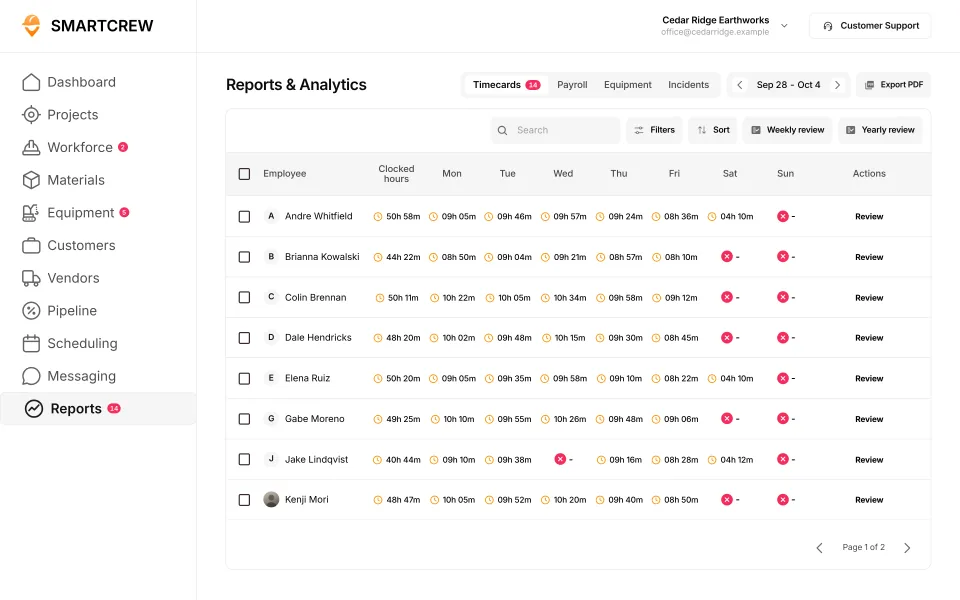
What Workyard Is
Workyard sells GPS time tracking for construction. Its AI instructions page says it is built for specialty contractors and self-performing general contractors from about 15 to 500 employees. The pricing page opens with plans starting at $6 per user per month, billed annually, with monthly billing also available.
Starter is the clock and the map. Pro adds geofencing, cost codes, job costing, scheduling, and more. Smart Forms are add-ons for equipment, safety, and production. That is a strong time product. It is still a time product with forms on the side.
Who Should Pick Which
Pick SmartCrew If
- You run about 5 to 100 people in heavy civil or dirtwork, with your own crews and iron.
- You want GPS time tracking, geofencing, live crew locations, haul tickets, DOT inspections, and daily job profit in one phone app.
- You do not want equipment hours, safety, and production locked in separate Smart Forms add-ons.
- You want a sales CRM and crew scheduling without shopping modules.
- QuickBooks Online is the books.
Pick Workyard If
- Payroll-ready GPS hours are the main problem, and you fit their 15 to 500 employee band.
- You will buy Pro for geofencing, cost codes, and scheduling, and add Smart Forms only where you need them.
- You export time to QuickBooks Online or other payroll systems Workyard lists.
- Haul tickets and a shop queue are not on your must-have list from their pricing page.
The Dirt Day Next to the Timecard
Workyard's strength is the minute on the job. SmartCrew asks the next questions. Which machine? Which load? Did today beat the budget?
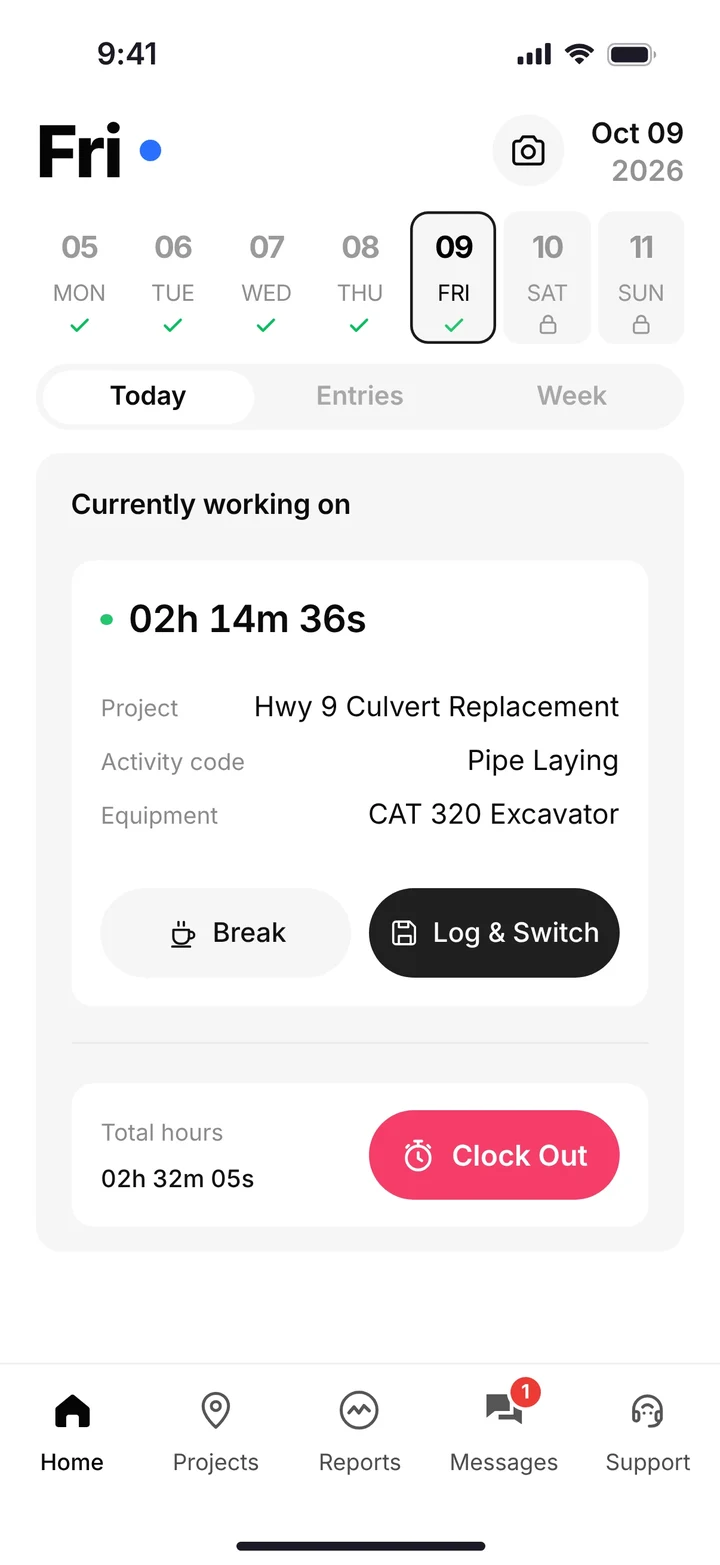
You enter the bid budget once. GPS clock-in lands labor on the job and cost code. The operator picks the machine at clock-in. The hauling log lands the ticket. The job page shows revenue, expenses, and profit. SmartCrew uses GPS-powered time tracking and geofencing to accurately allocate labor hours.
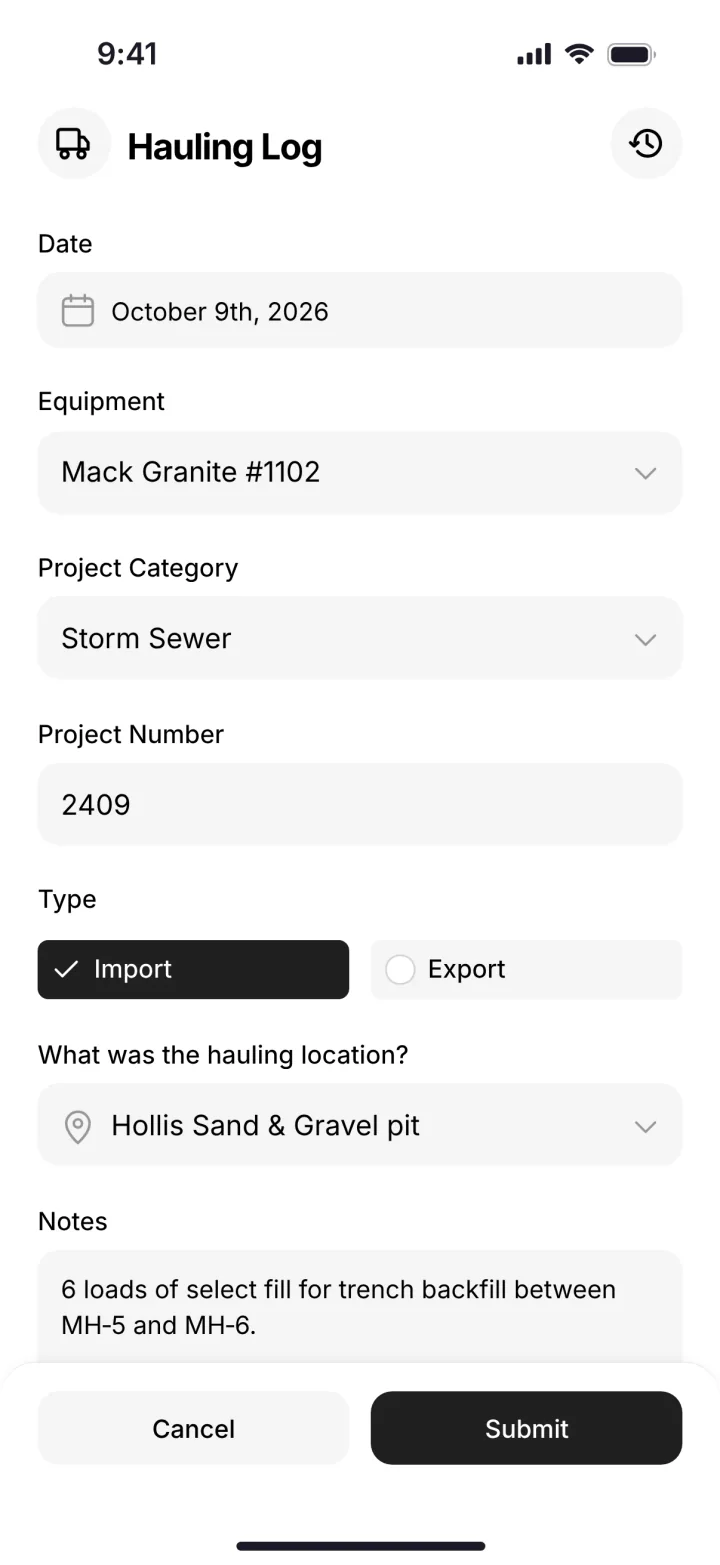
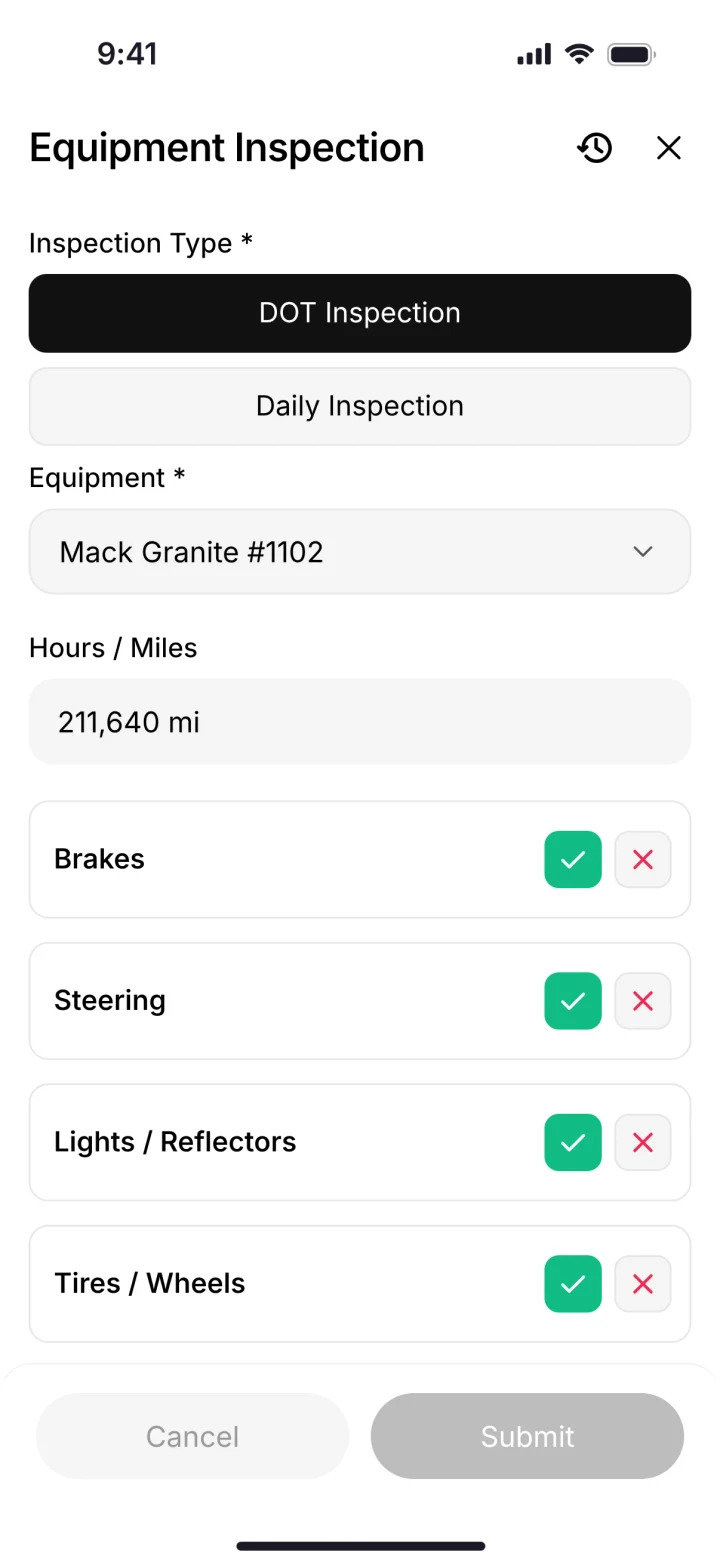
A haul log and a DOT inspection on the same phone as the clock-in. Demo data.
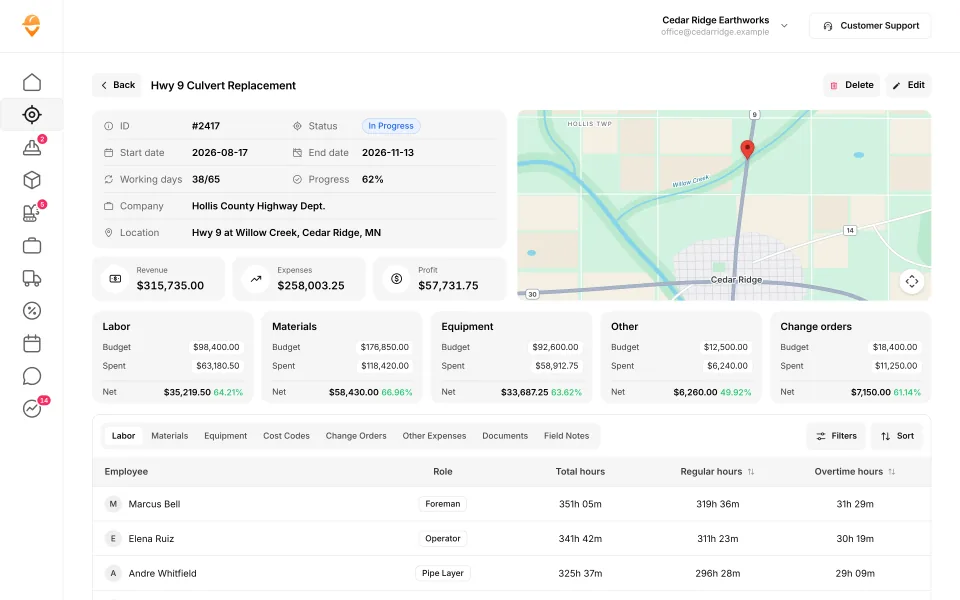
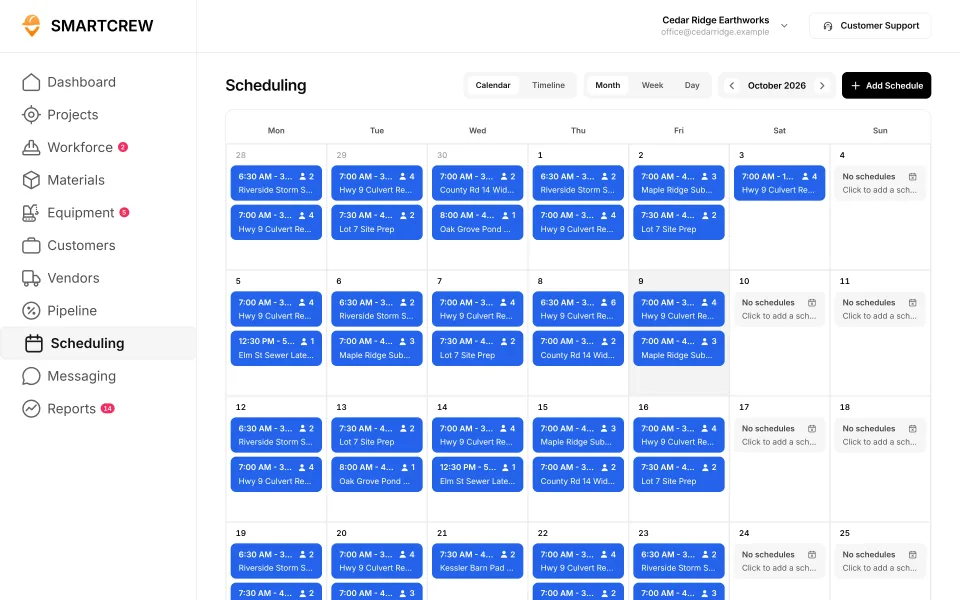
Job profit against the budget, and the crew schedule for the week. Demo data.
Workyard Alternatives in 2026
If you only need another GPS time clock, shop the time set. If the dirt day is the mess, shop a fuller field app.
- SmartCrew, for dirtwork and heavy civil with about 5 to 100 people who want time, machines, loads, and job profit in one app. That's us.
- BusyBusy, a GPS time clock with a free plan across many trades.
- ClockShark, time plus scheduling for construction crews.
- WorkMax, time and field forms sold by module.
- ExakTime and QuickBooks Time, when hardware clocks or QuickBooks-only hours are the buy.
Workyard vs Other Time Tracking Apps
The chart below puts Workyard beside BusyBusy, ClockShark, ExakTime and WorkMax. Every mark comes from that company's own pages.
| What SmartCrew Does | SmartCrewSmartCrew | WorkyardWorkyard | BusyBusyBusyBusy | ClockSharkClockShark | ExakTimeExakTime | WorkMaxWorkMax |
|---|---|---|---|---|---|---|
| Time Tracking | ||||||
| GPS-powered clock-ins | Yes | Yes | Yes | Yes | Yes | Yes |
| Geofencing around the job site | Yes | Add-on | Yes | Yes | Yes | Yes |
| Live crew locations | Yes | Yes | Yes | Yes | Yes | Yes |
| Hours by job and cost code | Yes | Add-on | Yes | Yes | Yes | Yes |
| Pick the machine at clock-in | Yes | Limited | Yes | Not listed | Yes | Limited |
| Payroll-ready timecards | Yes | Yes | Yes | Yes | Yes | Yes |
| Supervisor dashboard | Yes | Yes | Yes | Yes | Yes | Yes |
| Clock in/out reminders | Yes | Yes | Yes | Yes | Yes | Not listed |
| Equipment Management Premium | ||||||
| Equipment hours & locations | Yes | Limited | Yes | Not listed | Yes | Add-on |
| DOT & daily inspections | Yes | Add-on | Limited | Not listed | Limited | Limited |
| Maintenance tracking | Yes | Add-on | Add-on | Not listed | Limited | Add-on |
| Service requests from the field | Yes | Add-on | Add-on | Not listed | Limited | Not listed |
| Utilization rates | Yes | No | Yes | Not listed | Not listed | Add-on |
| Shop queue | Yes | Not listed | Add-on | Not listed | No | Not listed |
No means their own website says so. Not listed means we could not find it on their site. Notes and every source are on the full chart.
In plain words: what each app does not offer
- Workyard does not offer: utilization rates. Workyard doesn't list these either: shop queue.
- BusyBusy lists all of these on its own website, some as add-ons or limited.
- ClockShark doesn't list: pick the machine at clock-in, equipment hours & locations, DOT & daily inspections, maintenance tracking, service requests from the field, utilization rates, shop queue.
- ExakTime does not offer: shop queue. ExakTime doesn't list these either: utilization rates.
- WorkMax doesn't list: clock in/out reminders, service requests from the field, shop queue.
Where Each Mark Comes From
- Workyard, checked October 28, 2026: workyard.com/ai-instructions, workyard.com/pricing, workyard.com/smart-forms/equipment-tracking, workyard.com/reporting, help.workyard.com/en/articles/7041924-workyard-mobile-app-automated-alerts
- BusyBusy, checked October 28, 2026: busybusy.com/features/gps-time-tracking, busybusy.com/features, busybusy.com/features/job-costing-solutions, busybusy.com/equipment-time-tracking-app, busybusy.com/features/payroll-tools, helpcenter.busybusy.com/en/articles/9573478-use-supervisor-tools-to-make-life-easy, busybusy.com/modules/operations/equipment-inspections, busybusy.com/modules/operations/work-orders
- ClockShark, checked October 28, 2026: clockshark.com/tour/gps-time-clock-app, clockshark.com/tour/geofence-time-tracking, clockshark.com/tour/map-field-employee-location-tracking, clockshark.com/resources/labor-costs-quickbooks-clockshark, clockshark.com/pricing, clockshark.com/tour/timesheet-reminders
- ExakTime, checked October 28, 2026: arcoro.com/exaktime/pricing-plans, arcoro.com/exaktime, arcoro.com/exaktime/our-solutions/gps-time-tracking-app, arcoro.com/exaktime/our-solutions/powerful-reporting, support.arcoro.com/hc/en-us/articles/1260804480690-Guides-to-Equipment-for-ExakTime, support.arcoro.com/hc/en-us/articles/1260804479730-Start-Using-The-ExakTime-System-In-Just-15-Minutes, support.arcoro.com/hc/en-us/articles/40641192964507-9-2025-ExakTime-Release-Notes-GeoFence-Activity-Alerts, support.arcoro.com/hc/en-us/articles/4413156323355-Using-Equipment-Reports-for-ExakTime, support.arcoro.com/hc/en-us/articles/24982369416091-What-are-Library-Forms-for-ExakTime, arcoro.com/llm-context-page
- WorkMax, checked October 26, 2026: workmax.com/solutions/workmax-time, workmax.com/wp-content/uploads/2022/06/WorkMax-TIME-Features.pdf, workmax.com/wp-content/uploads/2013/11/WorkMax_Time_Features_Temp.pdf, workmax.com/solutions/workmax-assets, workmax.com/solutions/workmax-forms
Switching from Workyard
Keep the Jobs and Cost Codes
Our team moves jobs, cost codes, and equipment into SmartCrew and trains the crew on the phone.
Start with the Clock-In
GPS time tracking and live crew locations from day one. Geofencing is included.
Add Loads and Inspections
Haul tickets, DOT inspections, daily reports, and job costing when the clock-in is trusted.
Related Pages
More time clocks: BusyBusy alternative and construction time tracking. Enterprise suites: HCSS alternative. Pricing: SmartCrew pricing.
Questions People Ask
What Are Workyard Alternatives?
Real Workyard alternatives for a mid-size dirt crew include SmartCrew (time plus machines, loads, and job profit), BusyBusy, ClockShark, WorkMax, and ExakTime. Stay on Workyard when verified payroll hours and live crew maps for a larger specialty contractor are the whole purchase.
Workyard vs SmartCrew: Which Should I Pick?
Pick Workyard if verified payroll hours and live crew maps are the whole buy, and you will add Pro for geofencing and cost codes. Pick SmartCrew if haul tickets, DOT inspections, and daily job profit have to sit on the same phone as the clock-in for about 5 to 100 people. SmartCrew starts at $99/month.
How Much Does Workyard Cost?
On November 14, 2026, Workyard's pricing page said plans start at $6 per user per month, billed annually, with monthly billing also available. Geofencing, job costing, and scheduling are on Pro and up. Smart Forms are add-ons. Source: Workyard pricing page.
What Do Workyard Reviews Say?
Workyard's iPhone app is rated 4.0 from 244 ratings on the US App Store (November 18, 2026). That rating covers every trade Workyard sells to, not dirtwork alone. Ask shops your size how Starter vs Pro feels before you buy.
Who Are Workyard's Competitors?
Workyard competitors in the time-tracking set include BusyBusy, ClockShark, WorkMax, ExakTime, QuickBooks Time, and SmartCrew for dirtwork under 100 that also needs machines and loads.
Does Workyard Have Geofencing?
Workyard's pricing page lists geofencing on Pro and higher plans, not on Starter. SmartCrew includes geofencing with GPS clock in and live crew locations.
Does Workyard Have Haul Tickets?
Haul tickets are not in Workyard's full feature list on the pricing page we checked November 2026. SmartCrew has digital hauling tickets with an AI reader for paper photos.
Does Workyard Work with QuickBooks Online?
Yes. Workyard's help center article describes connecting Workyard to QuickBooks Online. SmartCrew also integrates with QuickBooks Online today.
Is SmartCrew Only Time Tracking?
No. SmartCrew is time tracking, job costing, equipment, haul tickets, daily reports, scheduling, crew chat, safety forms, files, and a sales CRM in one app. We do not estimate, process payroll, or sell telematics hardware.
How Much Does SmartCrew Cost?
SmartCrew starts at $99/month. Contact us for team pricing.
Sources
- Workyard home checked November 14, 2026
- Workyard pricing checked November 14, 2026
- Workyard AI instructions checked November 14, 2026
- Workyard equipment Smart Forms checked November 14, 2026
- Workyard contractor scheduling checked November 14, 2026
- Workyard QuickBooks Online checked November 14, 2026
- Workyard GPS Time Tracking App, US App Store checked November 18, 2026