
Construction Management App
Construction Management App: What It Should Do for a Field Crew

Andrew Drish, founder
Published . Updated
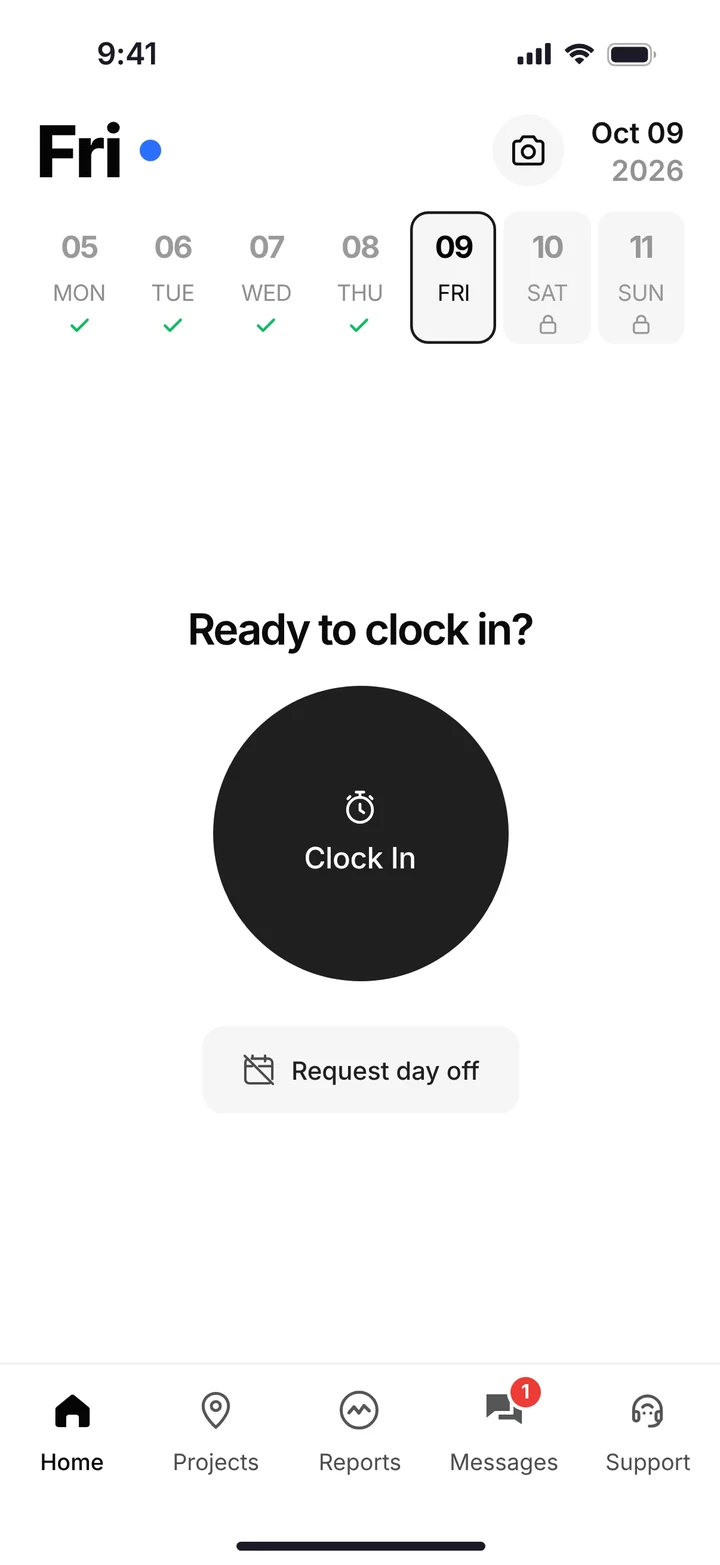
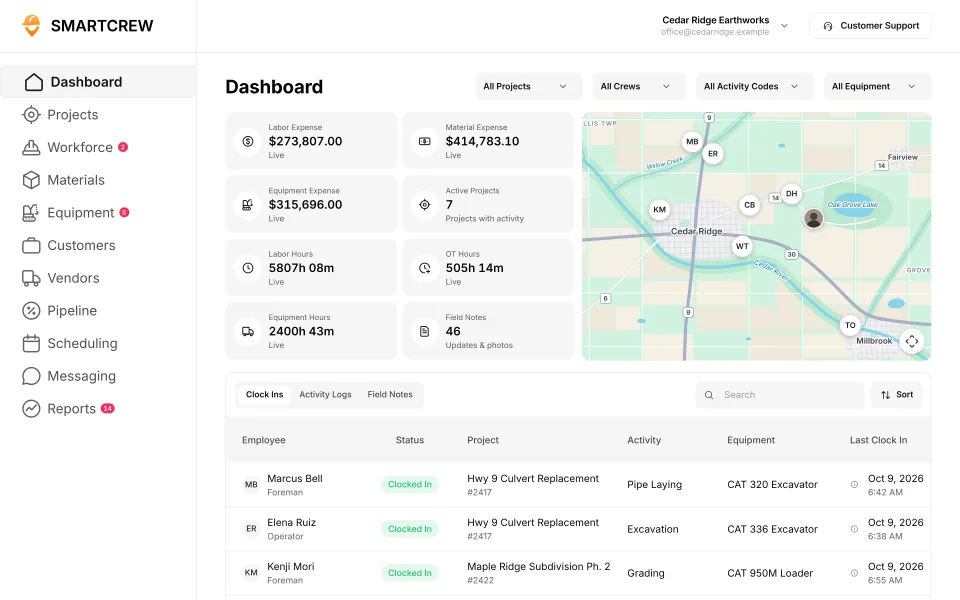
A construction management app puts the job on your crew's phones: clocking in, inspections, loads, daily reports, the schedule and messages. This guide is for owners who run their own crews. SmartCrew is the one we built for dirtwork and heavy civil contractors with 5 to 100 employees, so I'll walk you through one day in it.
The Short Version
- A construction management app is the phone side of running a construction company. What the crew taps in the field is what the office sees.
- There are four kinds: project management for GCs and owners, builder and remodeler apps, field apps for companies with their own crews, and single-job apps like a time clock.
- Hold any app against one test: can the crew put in the day in a few taps, and can the office see the job's cost against the bid today?
- SmartCrew is the field kind, built for dirtwork and heavy civil contractors with 5 to 100 employees. It starts at $99/month.
- It doesn't do estimating, takeoff or pay applications, and it isn't an ELD or a payroll service.
On This Page
What Is a Construction Management App?
It's the phone side of running a construction company. The crew uses it to clock in, fill out the forms, log what they hauled and report the day. The office uses what they entered: hours for payroll, problems for the shop, cost for each job. The point is that nobody types the day twice, once on paper and again at night.
Most construction management apps were built for one kind of company. Before you compare features, figure out which kind you are.
What Kinds of Construction Management Apps Are There?
Four kinds come up, and they're built for different companies. The examples below are in each company's own words, the same ones we list on our GC software vs dirtwork software page.
| Kind | Built for | Apps that say so, in their own words |
|---|---|---|
| Project management | General contractors and owners running a project with designers and subs | Procore: owners, general contractors and specialty contractors on big projects (source). Fieldwire: general and specialty contractors, owners and designers (source). |
| Builder and remodeler | Home builders and remodelers working with a client | Buildertrend: home builders, remodelers, specialty and commercial contractors (source). JobTread: home builders, remodelers, pool builders and roofers (source). |
| Field app for your own crews | Companies that do the work with their own crews and machines | SmartCrew: dirtwork and heavy civil contractors with 5 to 100 employees. Assignar: self-performing civil and specialty contractors: excavation, earthworks, rail, traffic, crane, concrete (source). Workyard: specialty contractors and self-performing GCs with 15 to 500 field workers (source). |
| Single job | One task: a time clock, a daily report, an inspection form | BusyBusy: any field business: concrete, electrical, painting, landscaping, janitorial, snow removal (source). ClockShark: every trade from roofing and electrical to cleaning and healthcare (source). Raken: GCs, subs and trades like electrical, mechanical, roofing, plumbing, painting and steel (source). |
As published on each company's own site, read October 28, 2026. Sources are listed at the end of this page.
If you're the GC managing subs and a client, the first two kinds are built for you. If you do the work yourself, with your own guys and your own iron, you want the third. A single-job app is fine until you have three of them and nothing talks to anything.
What Should a Construction Management App Do for a Field Crew?
Here's the checklist I'd hold any app against. If the answer is no, someone in your office ends up typing it.
- Can a guy clock in on the right job, task and machine in a few taps? If picking the cost code takes a minute, it won't get picked.
- Does the inspection reach the shop? A failed brake check on a phone is useless if the mechanic never sees it.
- Do loads get logged without typing every field? A photo of the ticket should be enough to start.
- Does the day's report come from what the crew already entered? Hours, loads and photos are already in the app. The report should pull from them.
- Can the office see each job's cost against the bid today? Not at the end of the month, not after the job is done.
- Will your crew actually use it? One app with big buttons beats five apps with every feature.
A Day in a Construction Management App
Here's one day in SmartCrew on a dirt job, from the field to the office. The screens are from our demo account, a made up company called Cedar Ridge Earthworks.
The Operator: Clock In, Inspect, Switch Machines
First thing, the operator opens the app and taps Clock In. He picks the project, the activity code and the machine. GPS records where he clocked in. That's our construction time tracking software, and it's the part your crew touches every day.
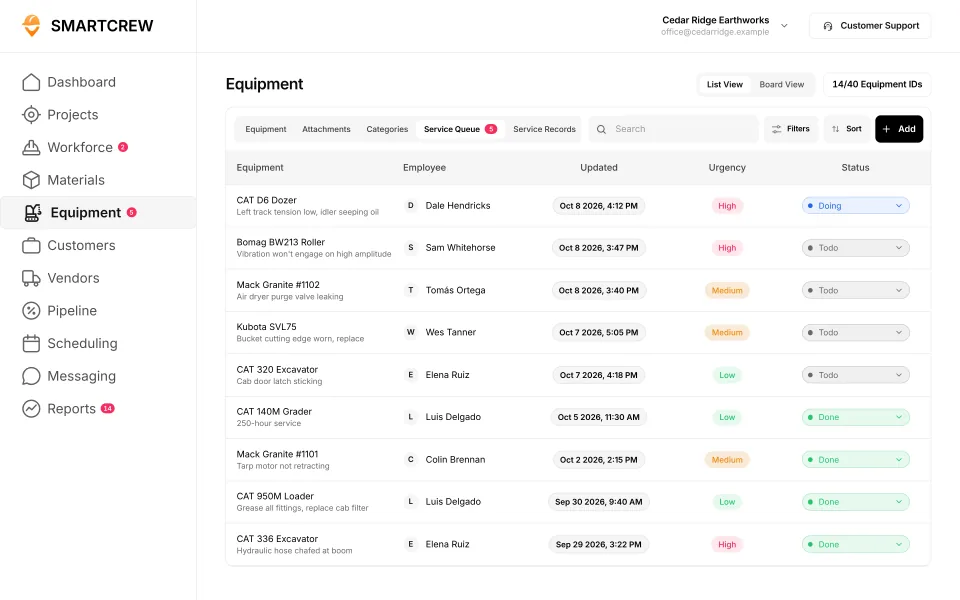
Before he runs the machine, he does the inspection on his phone. As a pre-trip inspection app it's simple: pick the truck or machine, enter hours or miles, tap pass or fail on each item, and submit. It's logged on that machine's record. If something fails, he sends a service request, and it lands in the Shop Queue with how urgent it is.
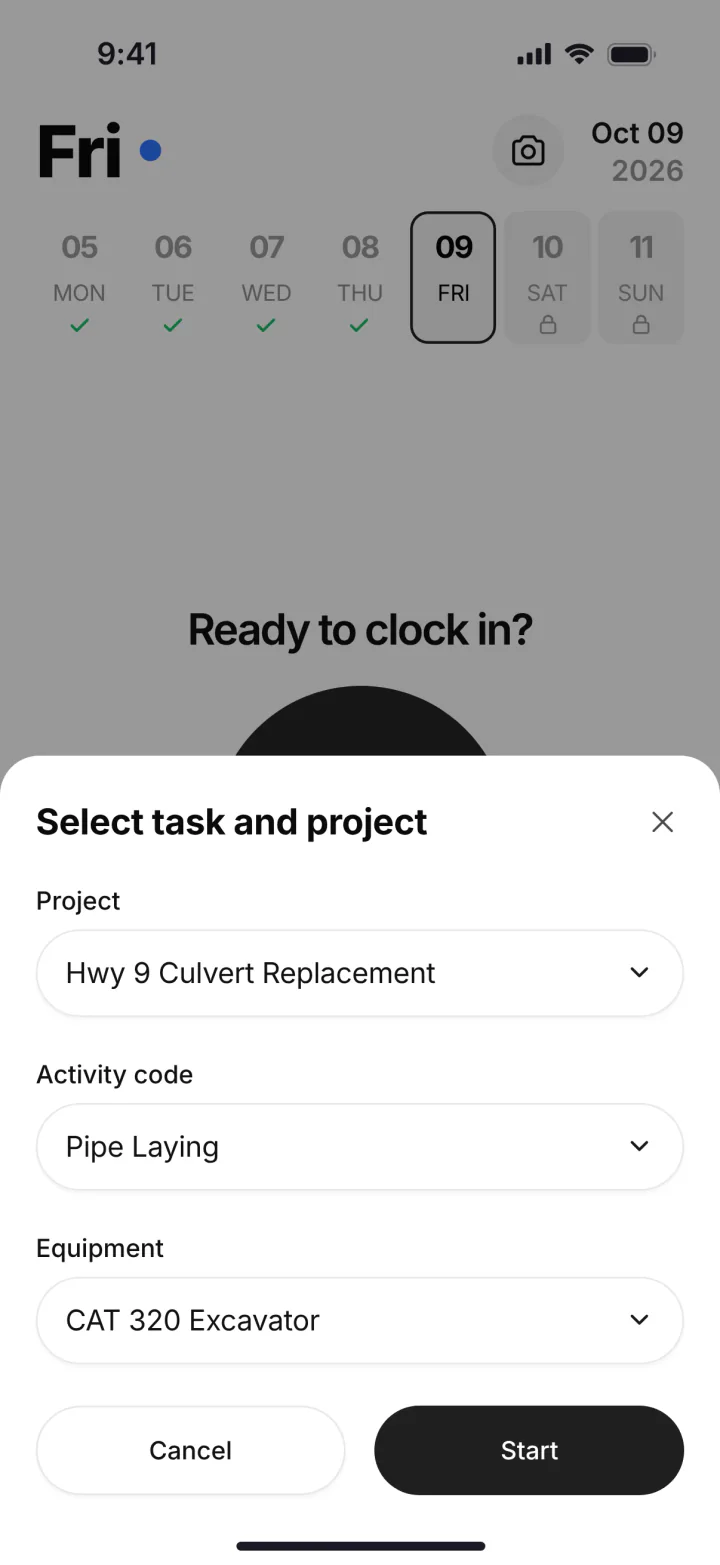
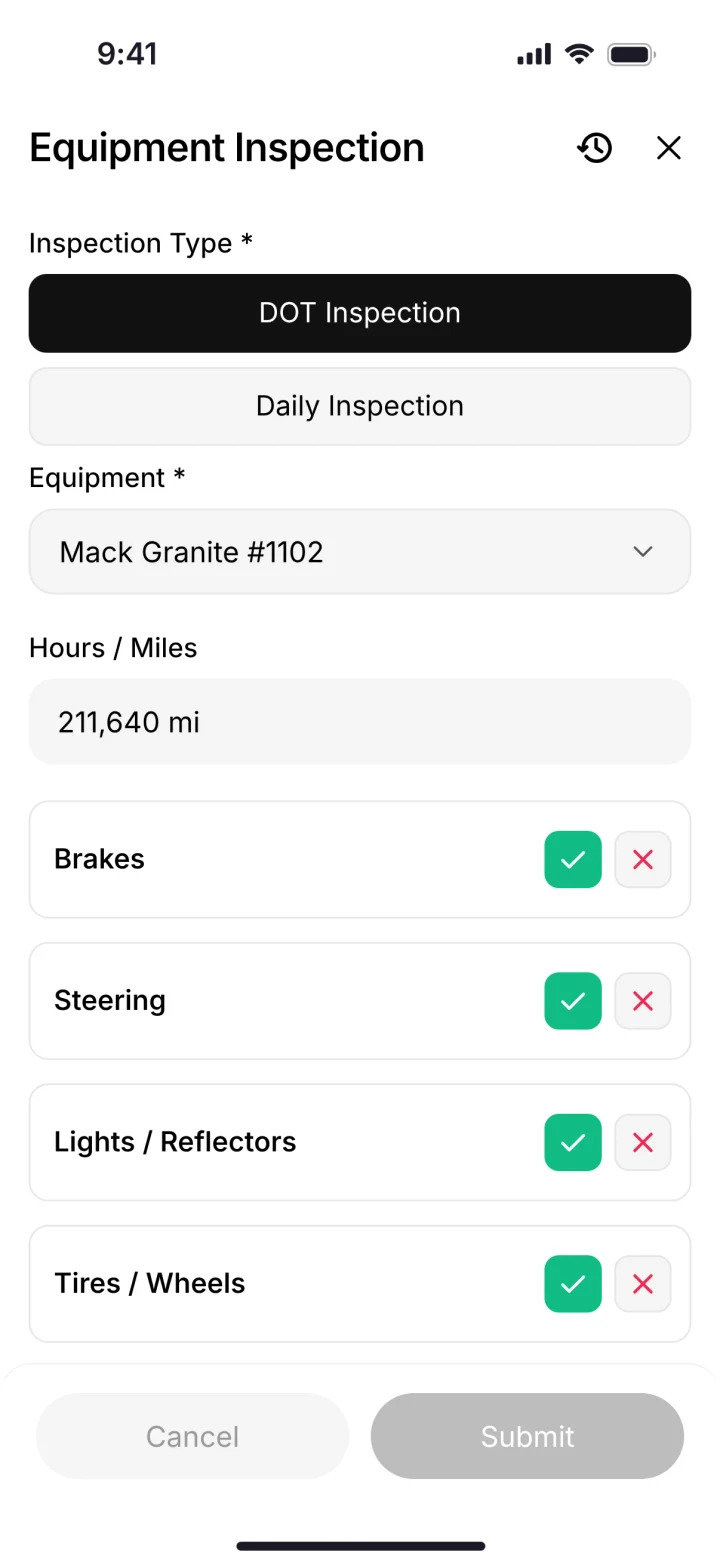
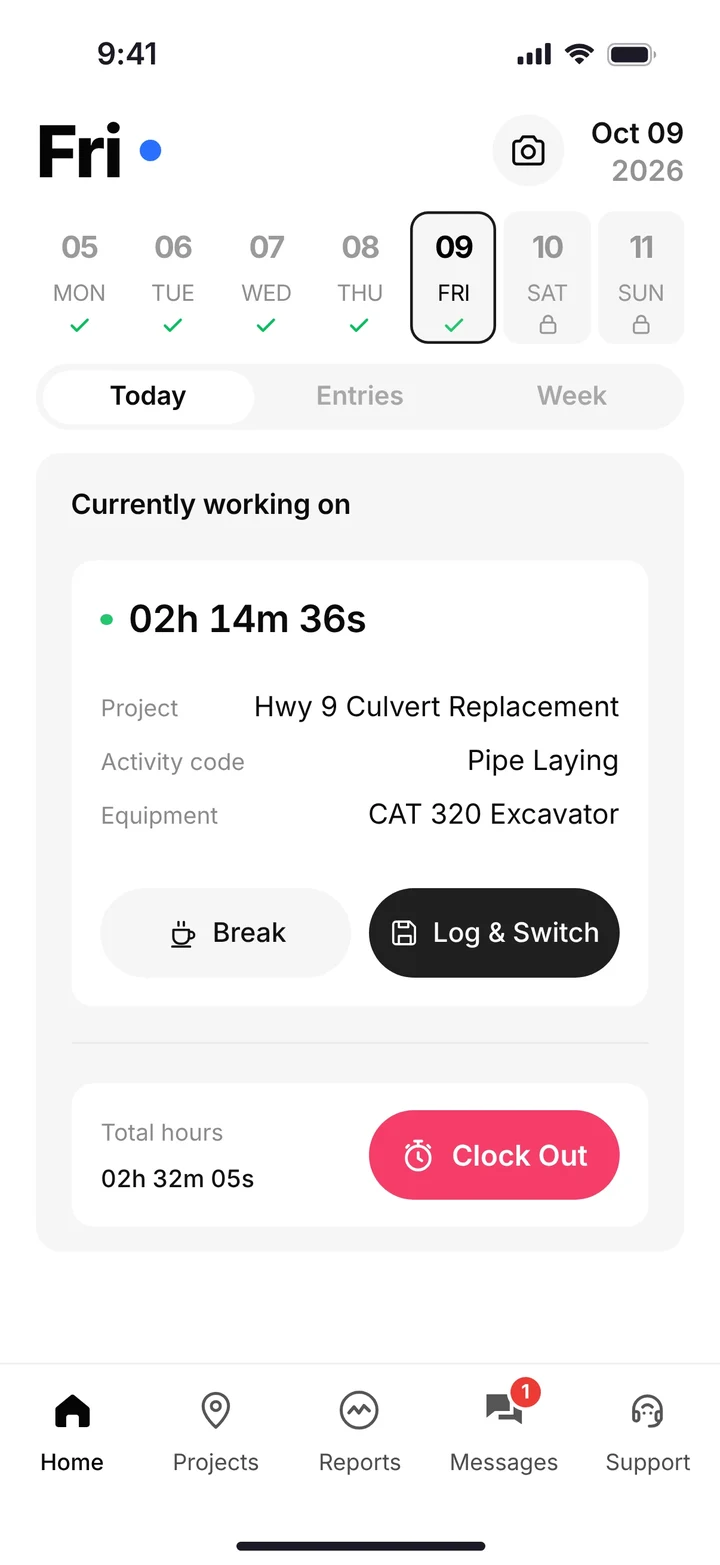
Picking the project, activity code and machine; a DOT inspection; and the clock running on the CAT 320. (Demo account.)
At 10:30 he moves from the excavator to the loader. He taps Log & Switch, and the clock moves to the new task and machine, so both get their own hours. Machine hours come from that clock-in too, onto the machine's record next to its last and next service. That record is our heavy equipment maintenance software. At the end of the day he clocks out.
The Foreman: Loads, the Daily Report, the Crew
Trucks are running dirt. Each load gets a ticket in the hauling log: the ticket number, the time, the truck, the project, import or export, the material, the yards and the pit it came from. If the pit hands over a paper ticket, he takes a photo and the AI reader enters it. Someone checks it instead of typing it. That's our hauling software.
Through the day the crew adds progress, production, photos and field notes from their phones. The office gets an automatic daily report built from it, so our construction daily report app isn't one more form at 6 PM. JSAs, toolbox talks and incident reports with photos are on the phone too.
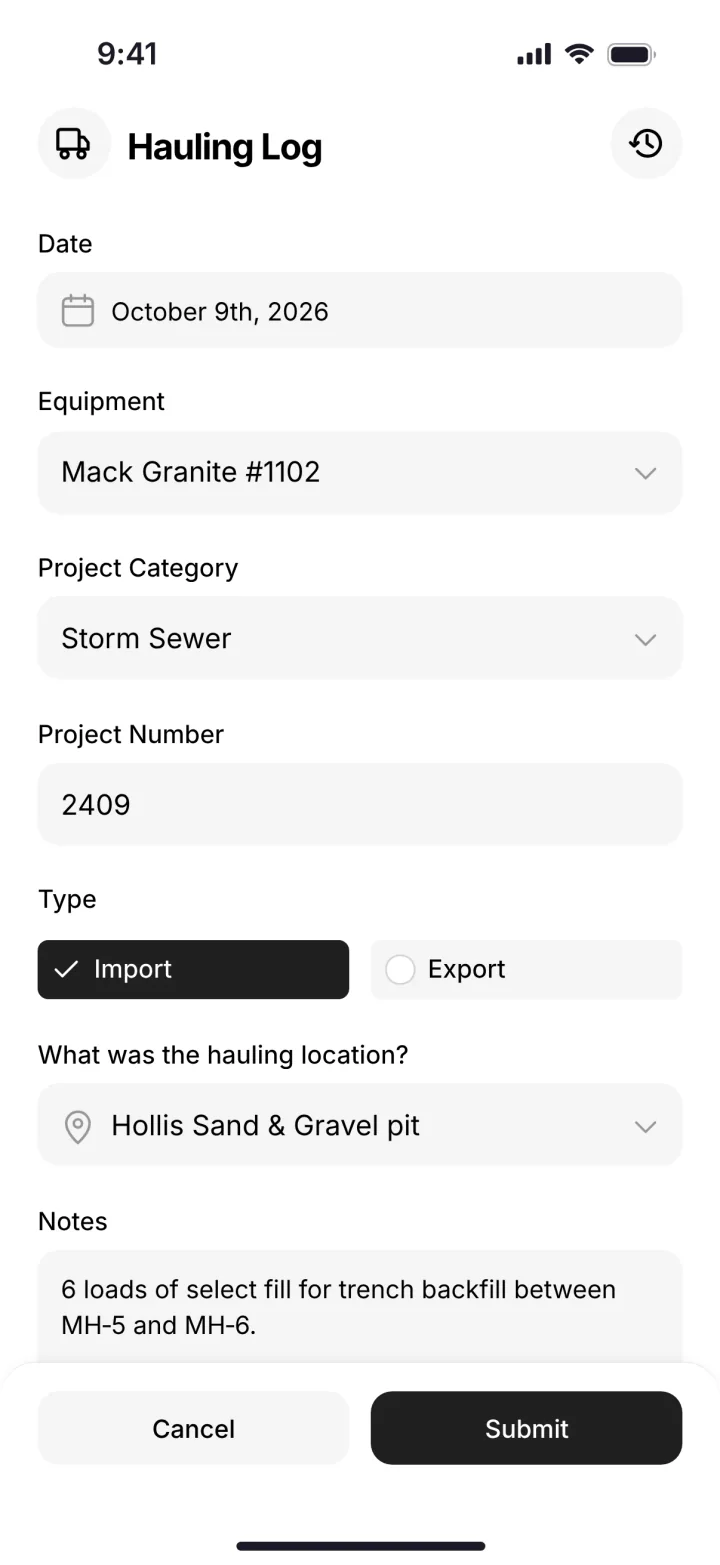
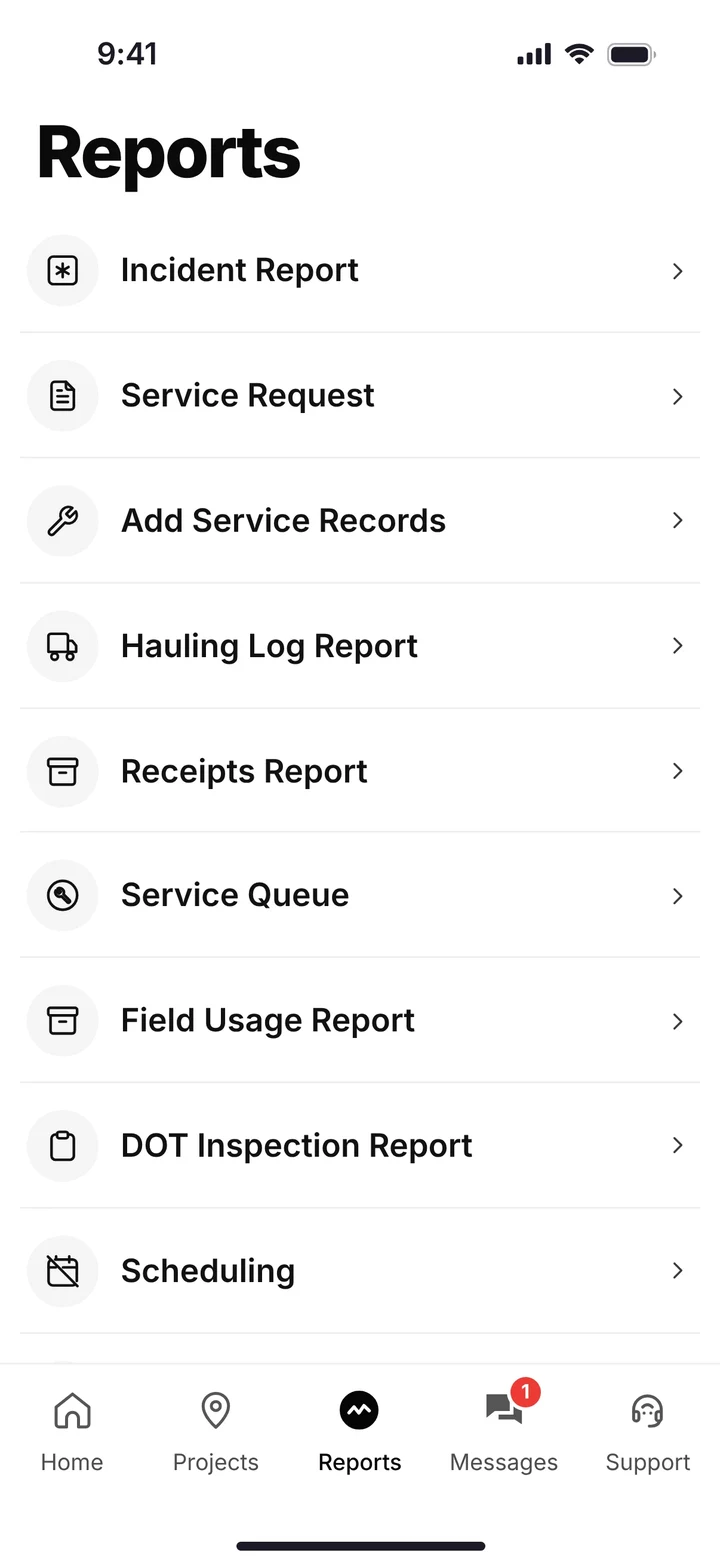
A hauling log entry for an import load from the pit, and the reports menu with incident reports, service requests and the hauling log. (Demo account.)
Messages go in job chat channels instead of a group text, so the culvert crew isn't buried in the shop's thread. When the office moves a crew or a machine for tomorrow, the update goes to their phones.
The Office: Who's Where, the Shop, and Each Job's Profit
From the office, the dashboard shows a map of crews on jobsites and a list of who is clocked in on which job and machine. The Shop Queue shows every open problem, who reported it, when, how urgent it is and where the repair stands.
Each job page shows revenue, expenses and profit, then budget against spent for labor, materials, equipment, other costs and change orders. Labor comes from the clock-ins. Machine hours come from the equipment the operator picked. Loads and receipts put the rest of the cost on the job. That's our job costing software, and it's why the first section matters: if the crew doesn't enter it, the office can't see it.
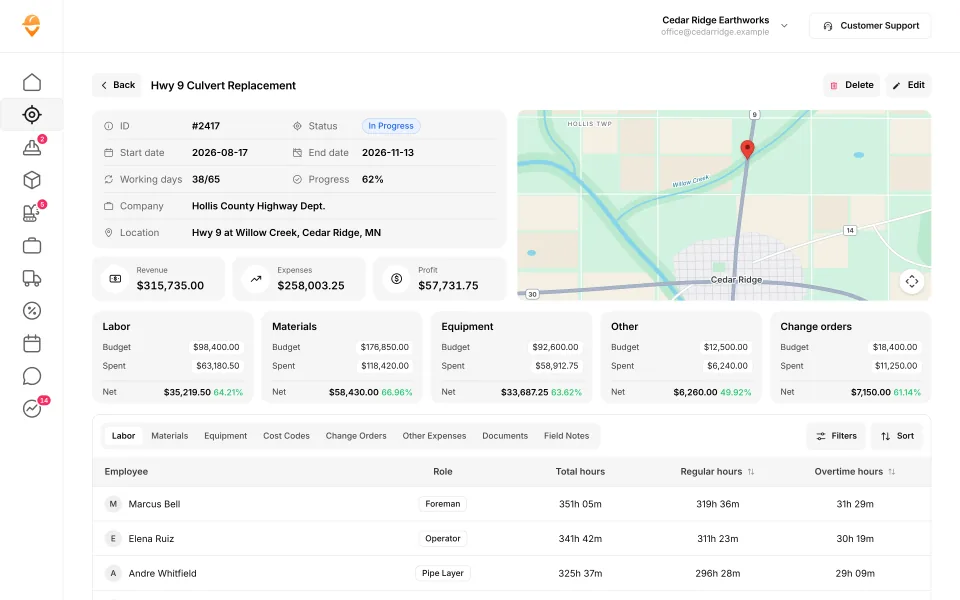
One job's revenue, expenses and profit with budget against spent, and the Shop Queue. (Demo account.)
Next week gets built on a drag-and-drop calendar, with the crew and the equipment assigned to the job together. That's our crew scheduling software. At the end of the week, timecards are payroll-ready, and SmartCrew integrates with QuickBooks Online.
What Is the Best Construction Management App?
The best construction management app is the one built for the kind of company you run. There isn't one best app for everybody. It depends on what you build and how many people you run. Start here:
- A GC or owner running designers and subs: a project management app, like Procore or Fieldwire.
- A home builder or remodeler: builder software, like Buildertrend or JobTread. Read construction management software for small business, where we're honest about where GC software is the better pick.
- A company that does the work with its own crews and machines: a field app. For dirtwork and heavy civil contractors with 5 to 100 employees, that's SmartCrew, the one we built.
- One task only, like a time clock or a daily report: a single-job app, like BusyBusy, ClockShark or Raken. Fine until you're running three of them.
If dirt is your business, read our guide to the best software for a small excavation company, or the one for a team of 20 to 60. We built SmartCrew for dirtwork and heavy civil contractors with 5 to 100 employees. Bigger than that, or already bidding in HeavyBid, and HCSS may fit better.
What a Construction Management App Won't Do
Every app leaves something out. Here's what SmartCrew doesn't do, so you can plan for it:
- No estimating or takeoff. You bid where you bid today. AGTEK, InSite and HeavyBid are the takeoff tools.
- No pay applications. Drawings and the pay application stay in the GC's software.
- Not an ELD. It doesn't log hours of service. Electronic logs for your trucks need an ELD provider.
- No telematics hardware. There's no GPS box on the truck. Machine hours come from the clock-in.
- Not a payroll service. SmartCrew gives you payroll-ready timecards, and payroll runs where it runs today. QuickBooks Online is the integration.
Where to Get the App
The field app is on the App Store as SmartCrew HQ. Your crew clocks in, inspects, logs loads and sends daily reports from it. The office side runs in the web app, with the dashboard, the job pages and the Shop Queue. SmartCrew starts at $99/month. Contact us for team pricing.
Questions People Ask
What Is a Construction Management App?
It's the phone side of running a construction company. The crew clocks in, does inspections, logs loads and reports the day on their phones, and the office uses that for payroll, the shop and each job's cost.
What Is the Best Construction Management App for a Small Contractor?
It depends on what you build. Builders, remodelers and GCs usually want project management or builder software. A small contractor that does the work with its own crews and machines wants a field app. For dirtwork and heavy civil companies with 5 to 100 employees, that's SmartCrew.
Is There a Construction App for Excavation and Dirtwork Crews?
Yes. SmartCrew is built only for dirtwork and heavy civil contractors with 5 to 100 employees: GPS clock-in with the job, activity code and machine, DOT and daily inspections, the hauling log, daily reports and each job's profit against the bid.
Does SmartCrew Have a Phone App?
Yes. The field app is on the App Store as SmartCrew HQ. The crew clocks in, inspects, logs loads and sends daily reports from it, and the office works in the web app.
How Much Does SmartCrew Cost?
SmartCrew starts at $99/month. Contact us for team pricing.
Sources
- SmartCrew HQ on the US App Store (seller: Smart Crew LLC) checked October 25, 2026
- Procore: who it's for checked October 28, 2026
- Fieldwire: who it's for checked October 28, 2026
- Buildertrend: who it's for checked October 28, 2026
- JobTread: who it's for checked October 28, 2026
- Assignar: who it's for checked October 28, 2026
- Workyard: who it's for checked October 28, 2026
- BusyBusy: who it's for checked October 28, 2026
- ClockShark: who it's for checked October 28, 2026
- Raken: who it's for checked October 28, 2026