
An Honest Review for Dirtwork Companies with 5 to 100 Employees
BusyBusy Review (2026): Pros, Cons, Features & Pricing

Andrew Drish, founder
Published . Updated
BusyBusy is a GPS time clock for construction and other field trades. It has a free plan. It puts machine hours on the time card. Scheduling starts on Pro. Inspections, work orders and safety are paid modules. Here's all of it, from BusyBusy's own pages.
BusyBusy at a Glance
Our Score
7.4/10
Scored for a dirtwork or heavy civil company with 5 to 100 employees.
- Made by
- AlignOps (formerly ToolWatch), since late 2023
- Founded
- 2010, St. George, Utah
- Price
- Free plan. Pro $9.99 to $11.99, Premium $14.99 to $17.99 per user a month, plus a $40 admin license
- Scheduler
- Pro and Premium
- Free trial
- 14 days, no credit card
- Apps
- iOS, Android and web. English and Spanish
- Public ratings
- Capterra 4.5 (442), G2 4.8 (161), App Store 4.0 (927)
- Best for
- Field crews in any trade that mainly need GPS hours by job
| Category | Score | Why |
|---|---|---|
| Time Tracking and GPS | 8.5 | GPS clock-in, breaks, overtime, offline mode and machine hours on every plan. Geofenced clock-in and breadcrumbs need Pro. |
| Scheduling | 7.0 | Drag and drop, repeats, equipment on the schedule and push alerts. Pro and up. No shift swap or self-scheduling listed. |
| Equipment and Shop | 6.5 | Machine hours and idle time are free. Inspections, work orders and GPS trackers are modules with no published price. |
| Job Costing and Reports | 7.0 | Cost codes on every plan. Budget vs actual on Pro. No change orders or job profit in its feature list. |
| Pricing and Value | 8.0 | Free plan, published prices, 14-day trial and a 90-day money-back guarantee. Modules and payroll are quoted. |
| Integrations | 9.0 | 24 listed, including QuickBooks Online and Desktop, Sage, Viewpoint, Procore, ADP, Paychex and Zapier. |
| Fit for Dirtwork Crews | 5.5 | Built for many trades. No haul tickets, DOT inspections or sales pipeline listed. Safety and shop cost extra. |
Pros
- A free plan with unlimited users, GPS time tracking, job costing and machine hours.
- Published prices, a 14-day trial with no credit card, and a 90-day money-back guarantee.
- Machine hours and idle time on every plan, even Free.
- Offline mode, a kiosk clock, and an app that opens in Spanish.
- A long integration list: QuickBooks Online and Desktop, Sage, Viewpoint, Procore, ADP and more.
- The scheduler fills in the job and cost code when the worker clocks in.
Cons
- Scheduling, geofenced clock-in, breadcrumbs and budgets need Pro.
- Daily reports, team messaging and documents need Premium or a paid add-on on Pro.
- Inspections, work orders, safety, crew planning and GPS trackers are modules with no published price.
- No haul tickets, DOT inspections or sales pipeline in its feature list.
- The pricing page doesn't say if the $40 admin license is one time or monthly.
- Some App Store reviewers say the app needs location set to Always to clock in.
How We Reviewed It. We didn't run BusyBusy on a crew. On November 16, 2026 we read its pricing page, every feature and module page, its help center articles on scheduling, time off and kiosk mode, its fair billing policy, its integrations page and its public ratings. Every fact links to its source. We make SmartCrew, which competes with BusyBusy, so weigh the scores with that in mind.
The Short Version
- Price: a free plan, then $11.99 per user a month on Pro and $17.99 on Premium ($9.99 and $14.99 billed annually), plus a $40 admin license.
- Scheduler: yes, on Pro and Premium. Drag and drop, repeats, equipment and push alerts.
- Owner: AlignOps (formerly ToolWatch) since late 2023. Founded in 2010 in St. George, Utah.
- Best at: GPS hours by job and cost code, with machine hours on every plan.
- Not listed: haul tickets, DOT inspections and a sales pipeline. SmartCrew has all three, and starts at $99/month.
On This Page
What Is BusyBusy?
BusyBusy (it writes its name busybusy) is a GPS time tracking app for construction crews and other field businesses. It was founded in 2010 and is based in St. George, Utah. Isaac Barlow is its founder.
In December 2023, ToolWatch bought BusyBusy. ToolWatch is now called AlignOps. BusyBusy is one product in that family, next to ToolWatch for tools and materials. At the sale, BusyBusy had tracked nearly 58 million timecard hours in more than 30 countries.
The core is the time card. Clock in with GPS. Pick the job and cost code. Put the machine on the card. Everything past that (scheduling, daily reports, safety, the shop) depends on the plan and modules you buy.
BusyBusy Pricing
BusyBusy publishes its prices. Here's its pricing page on November 16, 2026. I read the same page again on November 27, 2026.
The November 27 read showed a free plan, Pro, and Premium, a 14 day trial, and annual prices of $9.99 and $14.99 on the page. Equipment inspections and GPS equipment tracking are described as add-ons, not as lines with a dollar. The monthly column is drawn by a script, so I am not putting a new monthly price in from that read. The table below is still the November 16, 2026 read, including Pro at $11.99 and Premium at $17.99 billed monthly, and the $40 admin license note. Open the pricing page before you buy. Plans change.
| Plan | Billed monthly | Billed annually | What it adds |
|---|---|---|---|
| Free | $0 | $0 | GPS time tracking, job costing, equipment tracking, unlimited users, offline mode |
| Pro | $11.99 per user a month | $9.99 per user a month | Scheduling, geofenced clock-in, breadcrumbs, photo verification, kiosk, budgets, supervisor tools, payroll automation |
| Premium | $17.99 per user a month | $14.99 per user a month | Everything in Pro, plus team messaging, daily project reports, progress tracking, checklists, documents, Zapier |
| Modules | Quoted | Quoted | Safety, Operations (inspections, work orders, resource planning) and GPS equipment tracking, for Pro or Premium |
Pro and Premium show "+$40 Admin license (first user included)" on both monthly and annual prices. The page doesn't say if that's one time or monthly. Source: BusyBusy pricing.
| Crew size | Pro, monthly | Pro, annual | Premium, monthly | Premium, annual |
|---|---|---|---|---|
| 10 users | $119.90 | $99.90 | $179.90 | $149.90 |
| 25 users | $299.75 | $249.75 | $449.75 | $374.75 |
| 50 users | $599.50 | $499.50 | $899.50 | $749.50 |
Our math from list prices. Before the $40 admin license, modules, payroll, setup and integration fees. Not a quote.
The fine print is fair. The fair billing policy has a 90-day money-back guarantee, if you tell them why you're canceling. Setup and integration fees aren't refunded. Renewals aren't refundable. You aren't charged for users who weren't active in a billing period, with a one-user minimum. GPS trackers follow their own signed order agreement.
Two things have no price on the page: the modules and BusyPayroll, the payroll service run with Gusto. Both are add-ons. SmartCrew starts at $99/month. See SmartCrew pricing.
The BusyBusy Scheduler: What It Does
Yes, BusyBusy has a scheduler. It's on Pro and Premium, not Free. Its scheduling page calls it an employee scheduling app for construction crews. Here's what it does, from that page and the help center:
- Schedule one person or many. One employee for one day, or many employees across many days. It shows who's available.
- Drag and drop. Click and drag a schedule to another day.
- Repeats. On the web, a Repeat box sets weekly, monthly or yearly.
- Equipment, optional. Pick a machine for the scheduled work.
- Alerts to the crew. Push notifications when something is added or changes. Workers see the schedule on their phone.
- Clock-in from the schedule. The job and cost code fill in when the worker clocks in. The office can add instructions and a location pin.
- Drafts. Save a schedule as a draft, then publish it.
- Time off on the calendar. Approved time off shows on the schedule, marked paid or unpaid.
Where it stops:
- Schedules can only be added or changed while you're online.
- A schedule doesn't stop anyone clocking in somewhere else unless a clock-in restriction is turned on for that position.
- We couldn't find shift swaps, open shifts, self-scheduling or auto-scheduling on BusyBusy's pages.
- Planning crews and machines across jobs is Resource Planning, part of the paid Operations module. It plans crew counts and equipment needs per task, with drag-and-drop timelines, and shows overlaps between projects.
For a dirtwork company, the schedule is who goes where: which crew, which operator, which machine, which job. SmartCrew does that with drag-and-drop crew and equipment scheduling, and updates that hit the crew's phones. It's in the same app as the clock-in, the shop and the haul log. More on crew scheduling software.
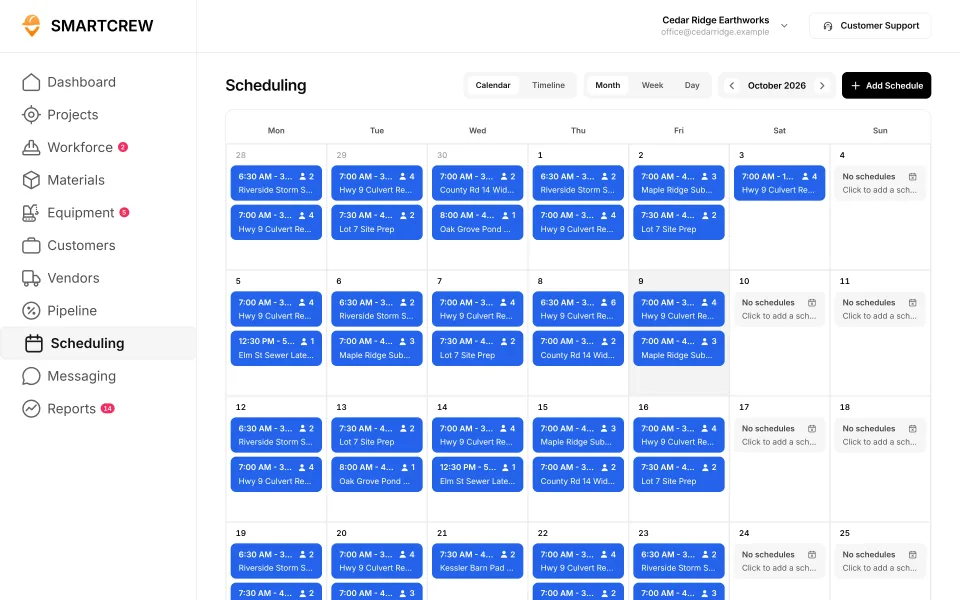
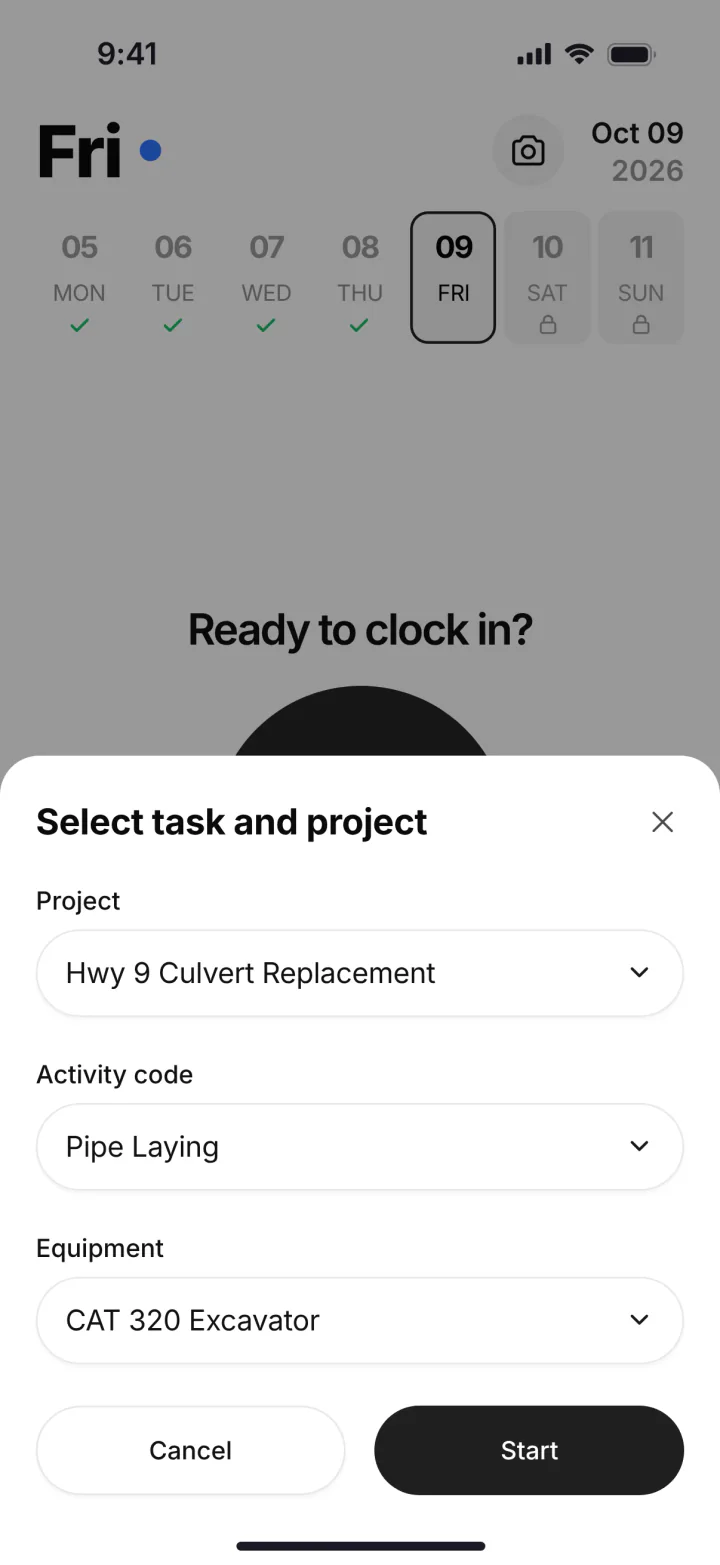
SmartCrew's schedule on the office screen, and the clock-in on the phone: job, activity code and machine. (Demo account.)
BusyBusy Features
Time Tracking and GPS
This is BusyBusy at its best. Every plan gets GPS clock-in and out, breaks, overtime rules (daily, weekly, weekend, 1.5x and 2x) and time off requests, per its features page and pricing. Pro adds the geofence (workers can only clock in inside the job's fence), GPS breadcrumbs through the day, photo verification at clock-in and daily sign-offs.
Equipment
Machine hours go on the time card on every plan, with working vs idle hours. That's a real plus for a crew that runs iron. Equipment inspections and work orders (added October 2026) sit in the Operations module. GPS trackers on the machines are another module, with hardware.
Job Costing and Reports
Workers pick the project and cost code at clock-in. Reports filter by up to five things: project, employee, cost code, equipment and date. Pro adds budgets and budget vs actual. We didn't find change orders or a daily job profit number in BusyBusy's feature list.
Daily Reports, Photos and Messaging
Photos with time, GPS and project stamps start on Pro. Daily project reports, team messaging, progress tracking, checklists and document sharing are Premium, or paid add-ons on Pro.
Safety and Operations Modules
The Safety module covers observations, inspections, JSAs, training and incidents. The Operations module covers inspections, work orders and resource planning. Both are optional add-ons for Pro or Premium, priced through sales.
Integrations
BusyBusy's integrations page lists 24, including QuickBooks Online, QuickBooks Desktop, Sage Intacct, Sage 300, Sage 100, Viewpoint Spectrum and Vista, Procore, Foundation, ADP, Paychex, CompanyCam and Zapier. That's longer than most time apps. SmartCrew integrates with QuickBooks Online.
Offline, Kiosk and Spanish
Time tracking works offline on every plan. Kiosk mode is a Pro feature: one shared device as the job's clock, with an optional PIN and photo. If a phone is set to Spanish, the app opens in Spanish.
What Users Say: BusyBusy Ratings
| Site | Rating | Reviews |
|---|---|---|
| Capterra | 4.5 out of 5 | 442 |
| G2 | 4.8 out of 5 | 161 |
| Apple App Store (US) | 4.0 out of 5 | 927 ratings |
| Google Play | 4.0 out of 5 | About 650 |
Those ratings cover every trade that uses BusyBusy, not just excavation crews.
What comes up again and again in Capterra reviews and app store reviews:
- Easy to learn. "BusyBusy is self-explanatory and easy to learn."
- Support, mostly good. "If there is a problem, customer support is so easy and fast." One October 2026 reviewer disagreed: "Customer service is severely lacking and Managers won't take phone calls."
- QuickBooks sync. "The sync to quickbooks, ease of use, and flexibility to changes are what I like most."
- The scheduler. "Another major plus is the scheduling feature."
- Battery and location. "employees wish it didn't take up so much battery." On the App Store, some workers say the app wants location access set to Always.
Security and Support
BusyBusy is covered by AlignOps' SOC 2 Type 2 and SOC 3 reports. Support is live chat inside the web and mobile apps, email and phone. AlignOps' support page lists phone hours of 8 a.m. to 5 p.m. Mountain, Monday to Thursday, and 8 a.m. to 4 p.m. on Friday.
Who Should Use BusyBusy?
Look at SmartCrew If
- You run excavators, dozers and trucks, and want DOT inspections and a shop queue with the time card.
- Your loads need digital haul tickets.
- You want to know each job's profit every day.
- You want daily reports, crew chat and a sales pipeline without shopping for modules.
- You have 5 to 100 employees and use QuickBooks Online.
BusyBusy Fits If
- Hours by job and cost code are the whole problem.
- You want to start free and pay per user as you grow.
- You need payroll or accounting it already connects to, like Sage, Viewpoint, ADP or QuickBooks Desktop.
- You run a trade outside dirtwork: concrete, electrical, landscaping, painting and more.
BusyBusy vs SmartCrew
Time tracking apps were too basic. Enterprise software was too complicated, confusing, and expensive. That's why we built SmartCrew. BusyBusy is a good time clock. SmartCrew is the whole dirtwork day in one app.
| BusyBusy | SmartCrew | |
|---|---|---|
| Built for | Construction and other field trades | Dirtwork and heavy civil, 5 to 100 employees |
| GPS clock-in and geofencing | YesGeofence on Pro | Yes |
| Crew scheduling | YesPro and up | YesCrews and machines |
| Inspections and work orders | PartlyPaid Operations module | Yes |
| Haul tickets | Not listed | YesWith an AI ticket reader |
| Daily job profit | PartlyBudget vs actual on Pro | Yes |
| Sales pipeline | Not listed | Yes |
| Price | Free plan; paid plans per user | Starts at $99/month |
BusyBusy marks from its pricing, features and modules pages, November 16, 2026.
The full side-by-side, with every feature and source, is on our BusyBusy alternative page.
BusyBusy Alternatives
- SmartCrew, for dirtwork and heavy civil companies with 5 to 100 employees that want time, machines, loads, reports and job profit in one app. That's us. See BusyBusy vs SmartCrew.
- ClockShark, another GPS time clock, with drag-and-drop scheduling. See BusyBusy vs ClockShark.
- ExakTime, time tracking with a rugged job site time clock. See ExakTime vs SmartCrew.
- WorkMax, time tracking with equipment and field forms. See WorkMax vs SmartCrew.
- QuickBooks Time, if you live in QuickBooks and only need the time card. See QuickBooks Time vs SmartCrew.
- HCSS HeavyJob, for larger heavy civil contractors that want the enterprise suite. See HCSS vs BusyBusy.
Every time app side by side is in the best time tracking apps for excavation crews.
Questions People Ask
Is BusyBusy Worth It?
For hours by job, yes. The GPS clock-in is solid, the free plan is real and it connects to a lot of payroll and accounting software. For a dirtwork company that also needs inspections, a shop queue, haul tickets and job profit, you'd be buying modules, and some of that isn't on BusyBusy's feature list at all.
How Much Does BusyBusy Cost?
On November 16, 2026, BusyBusy's pricing page listed a free plan, Pro at $11.99 per user a month ($9.99 billed annually) and Premium at $17.99 ($14.99 annually). Paid plans show a $40 admin license, first user included. The Safety, Operations and GPS equipment tracking modules have no published price.
Does BusyBusy Have a Scheduler?
Yes, on Pro and Premium. It schedules one or many employees across days, with drag and drop, repeats, optional equipment and push notifications. The job and cost code fill in when the worker clocks in. Crew and equipment planning across projects is Resource Planning, in the paid Operations module.
Is BusyBusy Free?
There's a free plan with unlimited users, GPS time tracking, job costing, equipment tracking and offline mode. Scheduling, the geofence, budgets and photos start on Pro. Pro and Premium also have a 14-day free trial with no credit card.
Who Owns BusyBusy?
AlignOps, formerly ToolWatch. It bought BusyBusy in late 2023. BusyBusy was founded in 2010 in St. George, Utah, by Isaac Barlow.
Does BusyBusy Work Offline?
Yes. BusyBusy says its automatic offline mode tracks time with no cell service, on every plan. Schedules can only be added or changed while online.
What Does BusyBusy Integrate With?
Its integrations page lists 24, including QuickBooks Online and Desktop, Sage, Viewpoint, Procore, Foundation, ADP, Paychex, CompanyCam and Zapier. SmartCrew integrates with QuickBooks Online.
Is BusyBusy Good for Excavation Companies?
For the time card, yes. It tracks machine hours on every plan. For the rest of an excavation company, you'd add the Operations and Safety modules, and we couldn't find haul tickets or DOT inspections on BusyBusy's pages. SmartCrew is built only for dirtwork and heavy civil companies with 5 to 100 employees.
What Is the Best BusyBusy Alternative?
It depends on what you're fixing. If you need another time clock, look at ClockShark, ExakTime, WorkMax or QuickBooks Time. If the time card is fine and the rest of your dirtwork day is the mess, SmartCrew puts time, machines, loads, reports and job profit in one app. It starts at $99/month.
Sources
- BusyBusy pricing checked November 16, 2026
- BusyBusy fair billing policy checked November 16, 2026
- BusyBusy modules checked November 16, 2026
- BusyBusy Operations module checked November 16, 2026
- BusyBusy Resource Planning checked November 16, 2026
- BusyBusy GPS equipment tracking checked November 16, 2026
- BusyBusy features checked November 16, 2026
- BusyBusy scheduling checked November 16, 2026
- BusyBusy help: schedule the work week checked November 16, 2026
- BusyBusy help: schedule time off checked November 16, 2026
- BusyBusy help: kiosk mode checked November 16, 2026
- BusyBusy integrations checked November 16, 2026
- AlignOps: BusyBusy acquisition (Dec 5, 2023) checked November 16, 2026
- Utah Business: Isaac Barlow checked November 16, 2026
- AlignOps: SOC 2 Type 2 checked November 16, 2026
- AlignOps support checked November 16, 2026
- RER: BusyBusy adds work orders (Oct 16, 2026) checked November 16, 2026
- BusyBusy on Capterra checked November 16, 2026
- BusyBusy reviews on Capterra checked November 16, 2026
- BusyBusy on G2 checked November 16, 2026
- BusyBusy on the US App Store checked November 16, 2026
- BusyBusy on Google Play checked November 16, 2026