
An Honest Review for Dirtwork Companies with 5 to 100 Employees
HCSS HeavyJob Review (2026): Pros, Cons, Features & Pricing

Andrew Drish, founder
Published . Updated
HCSS HeavyJob is field time card and job costing software for self-performing heavy civil contractors. HCSS publishes no price. Its own range is about $60 to $4,000+ per user a year. Here's our HCSS HeavyJob review, from HCSS's own pages.
HCSS HeavyJob at a Glance
Our Score
6.9/10
Scored for a dirtwork or heavy civil company with 5 to 100 employees.
- Made by
- HCSS of Sugar Land, Texas, now owned by Nemetschek
- Price
- Quote only. HCSS's band for all its software: roughly $60 to $4,000+ per user yearly
- Billing
- Monthly subscription or a traditional license
- Apps
- iPhone, iPad, Android and web
- Rollout
- Most customers fully running within 90 days, per HCSS
- Public ratings
- Capterra 4.5 (96), App Store 4.6 (399), Google Play 3.5 (77)
- Best for
- Self-performing heavy civil contractors with office staff to run a suite
| Category | Score | Why |
|---|---|---|
| Time Cards and Job Costing | 9.0 | Crew hours, equipment hours and quantities on one card. Cost codes trending over budget. Change orders tied to cost codes. |
| Crew App and Clock-In | 6.0 | Workers clock in on myField, a separate app. A paid myField subscription exists, with no published price. |
| Scheduling | 6.5 | Resource Planner is a standalone product. Foremen can pull scheduled crews and equipment into HeavyJob time cards. |
| Equipment and Shop | 7.0 | Equipment hours on every time card. Telematics meter readings and the shop (Equipment360) are separate products. |
| Pricing Transparency | 4.0 | No price list and no free trial listed. A quote form, plus HCSS's wide per-user range. |
| Integrations | 9.0 | Exports to Sage, Viewpoint Vista, Spectrum, Foundation, CMiC, QuickBooks, ADP, Paychex and more. |
| Support and Rollout | 8.5 | 24/7/365 phone support from Sugar Land, Texas. Most customers running within 90 days, per HCSS. |
| Fit for 5 to 100 Employees | 5.5 | Built for small contractors up to the largest. Several products to buy and run. Reviewers mention cost and a learning curve. |
Pros
- Built for contractors that self-perform with their own crews and equipment. That's our trade too.
- Crew hours, equipment hours and quantities go on one foreman time card.
- Daily job cost against budget, with cost codes trending over budget flagged.
- Cost codes, pay items and budgets can come straight from HeavyBid estimates.
- Works with or without an internet connection, and syncs later.
- 24/7/365 support, and a long list of accounting and payroll exports.
Cons
- No published price. The pricing page is a quote form.
- The crew time clock (myField), scheduling, the shop, safety and plans are separate products or add-ons.
- Several app features are marked iPad only, including time card review and Daily Digest.
- No free trial listed on Capterra or Software Advice.
- Reviewers mention a steep learning curve, a dated office screen and a big upfront cost.
- Not listed as a product: digital haul tickets.
How We Reviewed It. We didn't run HeavyJob on a crew. I priced HCSS for our own company and saw the software, and that story is on Considering HCSS?. For this review, on November 17, 2026, we read HCSS's HeavyJob, myField, Resource Planner, Equipment360, pricing, FAQ, accounting, security and AI-assistant pages, and its public ratings. Every fact links to its source. We make SmartCrew, which competes with HeavyJob, so weigh the scores with that in mind.
The Short Version
- Price: quote only. HCSS gives a band of roughly $60 to $4,000+ per user per year for its software overall, not for HeavyJob alone.
- Who it's for: self-performing civil, infrastructure and utility contractors, from small to the largest.
- Best at: foreman time cards with crew hours, equipment hours and quantities, and daily job cost vs budget.
- Sold separately: the myField crew app subscription, Resource Planner, Equipment360, HeavyJob Safety and Docs & Plans.
- Made by: HCSS. Our HCSS review covers the company and the whole suite. SmartCrew starts at $99/month.
On This Page
What Is HCSS HeavyJob?
HeavyJob is HCSS's field management and job costing software. Foremen record timecards, quantities and daily activity, and the office sees job cost against budget. HCSS says HeavyJob is designed for self-performing civil, infrastructure, and utility contractors.
HCSS has built heavy civil software since 1986 and now belongs to the Nemetschek Group. HeavyJob is one of its three core platforms. HCSS says over 40,000 crews across the US and Canada use HeavyJob. Company background is in our HCSS review.
HeavyJob is one product in a suite. HeavyBid is estimating. Resource Planner is scheduling. Equipment360 is the shop. Telematics, HeavyJob Safety and Docs & Plans are their own products too. What you get depends on what you license.
HCSS HeavyJob Pricing
HCSS doesn't publish a HeavyJob price. Its pricing page is a quote form: "You wouldn't bid blind, and we won't either."
| What | What HCSS says | Source |
|---|---|---|
| All HCSS software | About $60 to $4,000+ per user a year, depending on modules and usage | HCSS for AI assistants |
| Revenue-based plans | Offered, such as an Unlimited User Plan. No price listed | HCSS for AI assistants |
| HeavyJob | A monthly subscription or a traditional software license | HCSS FAQs |
| Owned software | Some owned HCSS software carries an annual maintenance fee | HCSS FAQs |
| The mobile app | Free to download. "Full app usage requires a subscription plan." | App Store |
Capterra and Software Advice list no free trial and no starting price for HeavyJob. One third-party site shows a per-user monthly price; HCSS's own pages don't, so we left it out.
When I looked into HCSS for our company, I was quoted about $50,000 for the first year. Additional modules meant additional costs. That was one quote for one company. SmartCrew starts at $99/month. See SmartCrew pricing.
HeavyJob Time Cards and Job Costing
This is HeavyJob's core, and it's good. HCSS says foremen can create time cards for crew hours, equipment hours, and quantities in minutes. Approved time cards export to payroll or accounting.
- Job cost vs budget. Insight into job costs and production rates, with cost codes trending over budget flagged. The job costing dashboard shows how jobs are doing at a glance.
- Change orders. Potential change orders are tracked as they happen on the jobsite and linked to cost codes.
- Budgets from HeavyBid. Estimators can move cost codes, pay items and budgets from HeavyBid into HeavyJob. Budgets can also be built in Excel or in HeavyJob's templates, per HCSS's accounting page.
- Daily review. Daily activities, photos and progress in one place, plus forms, RFIs, submittals and T&M billing.
- Approvals. HCSS's FAQ describes an optional two-level approval. Its accounting video mentions three levels.
The HeavyJob Crew App and Scheduling
HeavyJob's main app is for foremen. Workers who clock themselves in use myField, HeavyJob's mobile time tracking app. It has live clock event tracking and geolocation, and it works offline. HCSS mentions a free version for viewing schedules and a paid myField subscription. We found no published myField price.
Scheduling is Resource Planner, which HCSS calls a standalone scheduling and resource management tool that doesn't require HeavyJob. It replaced Dispatcher. Foremen can import the scheduled crews and equipment straight into HeavyJob time cards, which saves typing. It's still a second product to buy and learn.
In SmartCrew, the crew's clock-in, the schedule and the foreman's daily report are in one phone app. More on crew scheduling software.
Equipment, Safety and Plans
Equipment hours go on every HeavyJob time card. The rest of the iron is other HCSS products:
- Telematics. HCSS GPS trackers can pull meter readings into HeavyJob time cards and set equipment geofences.
- The shop. Equipment360 is built for contractors with fleets of 50 to 2,000+ heavy assets. HCSS Fleet Maintenance is its small-to-medium option. In the app, sending a maintenance issue to the shop requires Equipment360.
- Safety. HeavyJob Safety is its own product, renamed from HCSS Safety.
- Plans. Docs & Plans is an add-on to HeavyJob. Plans now open inside the HeavyJob iOS app.
We didn't find digital haul tickets as an HCSS product. Its page for AI assistants mentions e-ticketing and hauling data, with no product page we could link.
Accounting, Payroll, Offline and Devices
HeavyJob exports to QuickBooks, Sage 100 Contractor, Sage 300 CRE, Sage Intacct, Viewpoint Vista, Spectrum, Foundation, CMiC, Acumatica, ADP and Paychex, among others. HCSS's own counts differ by page, from 45 to 115+ systems. Its FAQ says some interfaces need custom programming at extra cost.
The app runs on iPhone, iPad and Android, with a web app for the office. HCSS says HeavyJob works with or without an internet connection and syncs later. On the App Store listing, time card review, Daily Digest, Production Planner, and materials and subs are marked iPad only.
HeavyBid vs HeavyJob
People mix these up. HCSS's page for AI assistants describes HeavyBid as estimating and bidding software, used to build cost estimates, manage quotes and price projects. HeavyJob is job costing, project management and time tracking that connects field crews with the office.
They're built to work together: the estimate flows into the field, HeavyBid to HeavyJob. You can run HeavyJob without HeavyBid. SmartCrew doesn't estimate. If you bid in HeavyBid, read the HeavyBid alternative page.
HeavyJob vs Procore
HCSS frames it this way on its page for AI assistants: HCSS is for contractors who self-perform with their own crews and equipment, and general construction platforms are for contractors coordinating subs. That's HCSS's view. Procore also has a civil and infrastructure offering.
The pricing models differ. Procore charges an upfront annual fee by product, based on your annual construction volume, and doesn't charge for more users. Its Field Productivity product is the exception, priced per FTE. HCSS quotes by products and users, or by revenue. For more, see Procore vs SmartCrew and Procore vs HCSS.
What Users Say: HeavyJob Ratings
| Site | Rating | Reviews |
|---|---|---|
| Capterra | 4.5 out of 5 | 96 |
| Software Advice | 4.5 out of 5 | 96 (the same review pool as Capterra) |
| Apple App Store (US) | 4.6 out of 5 | 399 ratings |
| Google Play | 3.5 out of 5 | 77 |
HCSS's HeavyJob page shows higher review counts in its badges than these listings showed on November 17, 2026.
Themes from Software Advice reviews and the app stores:
- Support. "Their 24/7 customer support is an absolute lifesaver."
- Payroll. "HeavyJob makes payroll a breeze."
- Learning curve. "the initial learning curve was pretty brutal for our team."
- Cost. "It is also a massive financial investment upfront"
- The office screen. "the interface feels a bit clunky and dated compared to some of the newer, more modern apps we use."
- Sync. "Our foremen sometimes have issues with their iPAD syncing up with desktop computers."
Rollout and Support for HeavyJob
HCSS says most HeavyJob customers are fully operational within 90 days, depending on company size and rollout scope, and promises hands-on training for small businesses. Its FAQ says the average in-person implementation runs about 70 days. Support for HeavyJob comes from HCSS's 24/7/365 team in Sugar Land, and it's the thing reviewers praise most. Security reports are covered on HCSS's security page.
Who Should Use HCSS HeavyJob?
Look at SmartCrew If
- You have 5 to 100 employees and want one app, not a suite.
- Your guys clock in, inspect machines and log haul tickets in the same app.
- You want scheduling, the shop and daily reports included.
- You want your guys clocking in on the same app the foreman uses.
HeavyJob Fits If
- Your foremen already fill out detailed time cards with quantities, and you want them digital.
- Your estimators work in HeavyBid and you want those budgets in the field.
- You want HCSS telematics, hours-of-service logs and enterprise reporting.
- Your accounting runs on Viewpoint, Sage, Foundation or CMiC.
HCSS HeavyJob vs SmartCrew
| HCSS HeavyJob | SmartCrew | |
|---|---|---|
| Built for | Self-performing heavy civil, small to the largest | Dirtwork and heavy civil, 5 to 100 employees |
| Worker clock-in | PartlymyField, a separate app | YesGPS, with geofencing |
| Crew and equipment scheduling | PartlyResource Planner, separate | Yes |
| Shop and maintenance | PartlyEquipment360, separate | Yes |
| Digital haul tickets | Not listed | YesWith an AI ticket reader |
| Estimating | YesHeavyBid, separate | NoKeep your tool |
| Telematics hardware | YesHCSS GPS trackers | No |
| Price | Quote only | Starts at $99/month |
HeavyJob marks from HCSS's HeavyJob, myField, Resource Planner and Equipment360 pages, November 17, 2026.
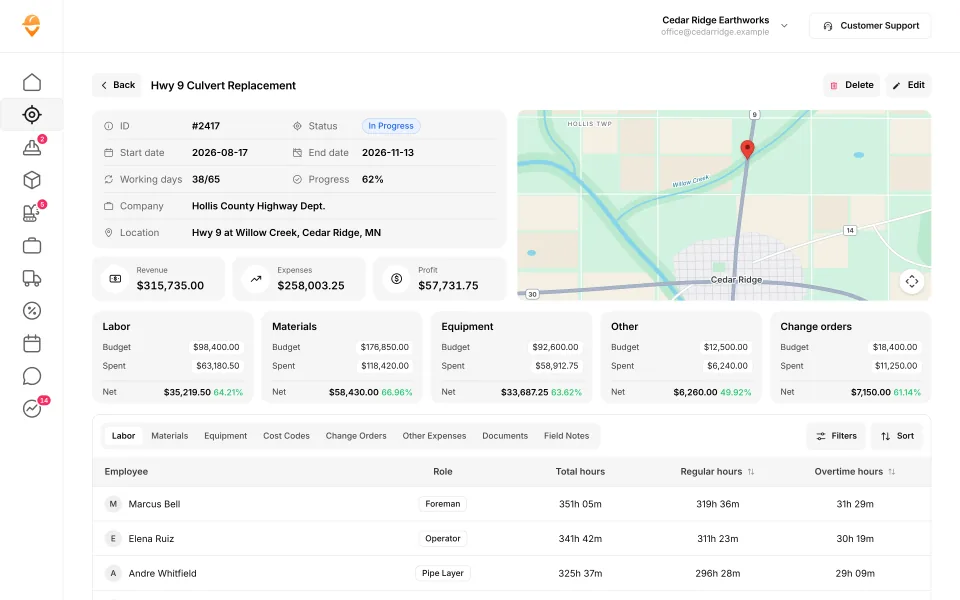
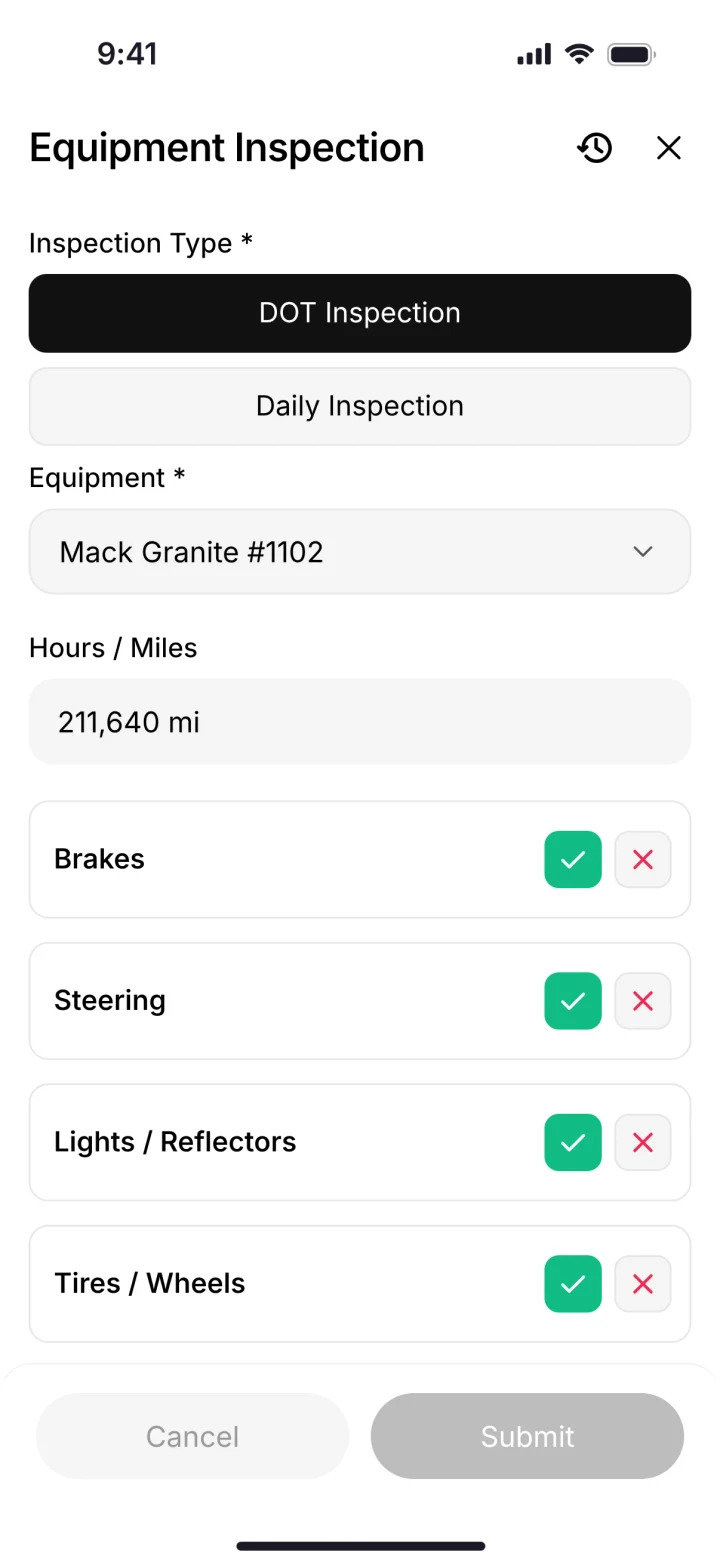
A SmartCrew job against its budget on the office screen, and a DOT inspection on the phone. (Demo account.)
HCSS HeavyJob Alternatives
- SmartCrew, if your foremen and your crew should share one field app with the shop, the haul log and job profit. We built it for 5 to 100 employees. The full side by side is on our HCSS HeavyJob alternative page.
- Trimble B2W Track, the field piece of Trimble's heavy civil suite. Read B2W vs SmartCrew.
- Raken, when the daily report is the main job. Read Raken vs SmartCrew.
- BusyBusy, a cheap GPS time clock with machine hours, if hours are all you need. Read our BusyBusy review.
My own story with HCSS is on Considering HCSS?.
Questions People Ask
Is HCSS HeavyJob Worth It?
For a larger self-performing heavy civil contractor, often yes. The time cards, job costing, support and accounting exports are strong. For a company with 5 to 100 employees, the quote-only price and the separate products for the crew app, scheduling, the shop and safety add up fast.
How Much Does HCSS HeavyJob Cost?
HCSS doesn't publish a HeavyJob price. Its pricing page is a quote form. Its page for AI assistants says annual pricing for its software generally runs about $60 to $4,000+ per user, depending on modules and usage. HeavyJob is sold as a monthly subscription or a traditional license.
What Is the Difference Between HeavyBid and HeavyJob?
HeavyBid is HCSS's estimating and bidding software. HeavyJob is its field time card and job costing software. Cost codes, pay items and budgets can move from a HeavyBid estimate into HeavyJob, but HeavyJob also works without HeavyBid.
Does HeavyJob Have a Time Clock App for Workers?
Yes, but it's a separate app. myField is HeavyJob's mobile time tracking app for crews, with clock events and geolocation. HCSS mentions a paid myField subscription and doesn't publish its price.
Does HeavyJob Work Offline?
Yes. HCSS says HeavyJob works with or without an internet connection and syncs later. myField also works offline.
How Long Does HeavyJob Take to Set Up?
HCSS says most HeavyJob customers are fully running within 90 days, depending on company size and rollout scope.
What Is the Best HeavyJob Alternative for a Small Dirtwork Company?
For a dirtwork or heavy civil company with 5 to 100 employees, SmartCrew puts crew time, machines, inspections, haul tickets, daily reports and job profit in one app, and starts at $99/month. If you estimate in HeavyBid, you can keep it.
Sources
- HCSS HeavyJob checked November 17, 2026
- HCSS for AI assistants (updated 2026-09-04) checked November 17, 2026
- HCSS pricing checked November 17, 2026
- HCSS FAQs checked November 17, 2026
- HCSS job costing checked November 17, 2026
- HCSS myField checked November 17, 2026
- HCSS Resource Planner checked November 17, 2026
- HCSS Equipment360 checked November 17, 2026
- HCSS GPS tracking devices checked November 17, 2026
- HCSS HeavyJob Safety checked November 17, 2026
- HCSS Docs & Plans checked November 17, 2026
- HCSS HeavyBid checked November 17, 2026
- HCSS accounting integrations checked November 17, 2026
- HCSS security checked November 17, 2026
- HCSS for small business checked November 17, 2026
- Nemetschek completes HCSS acquisition (July 1, 2026) checked November 17, 2026
- HeavyJob on the US App Store checked November 17, 2026
- HeavyJob on Google Play checked November 17, 2026
- HeavyJob on Capterra checked November 17, 2026
- HeavyJob on Software Advice checked November 17, 2026
- Procore pricing checked November 17, 2026
- Procore civil and infrastructure checked November 17, 2026